1
Additional Feature
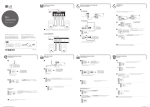
Deleting file
Característica Adicional
Eliminando archivo
,
This function is supported only in stop status. (USB only) /
Esta función sólo está disponible en estado de alto. (Solo para USB)
a
MINI
COMPONENTE
Select the file you want to delete. /
Seleccione el archivo que desea eliminar.
180
150
120 ... 10
OFF
Select the folder you want to delete. /
Seleccione la carpeta que desea eliminar.
Modelo : CM4350
Press and hold. /
Presione y retenga.
a
FILE-XXX_001
Select the DEL FILE, DEL DIR or FORMAT. /
Seleccione DEL FILE, DEL DIR o FORMAT.
b
FORMAT
b
DEL FILE
XX:00
a
Press and hold. /
Presione y retenga.
ESPAÑOL | MANUAL SIMPLE (2 de 2)
ENGLISH | SIMPLE MANUAL (2 of 2)
To view the instructions of advanced features, visit http://
www.lg.com and then download Owner’s Manual. Some of
the content in this manual may differ from your unit.
Para ver las instrucciones de las características avanzadas,
visite http://www.lg.com y descargue el Manual del
Propietario. Ciertos contenidos de este manual pueden ser
diferentes a los de su unidad.
DEL DIR
c
b
AM 12:00
00:XX
0:00
Antes de operar su producto lea atentamente este manual
de instrucciones.
d
DELETE
TUNER
CD
XX:00
USB2
USB1
Press to delete file, folder or format. /
Presione para borrar archivo, carpeta o
formatear.
c
c
e
VOL XX
d
,
00:XX
,
Alarm function works only after clock is set. /
La función de alarma funciona solo tras ajustar el reloj.
USB copying
USB Recording
Copia de USB
Grabación USB
Connect a USB storage and select the
source (CD, AUX, PORTABLE, TUNER) to
record. /
Conecte un dispositivo de almacenamiento
USB y seleccione la función (CD, AUX,
PORTABLE, TUNER) para grabar.
a
To select bitrate and recording speed /
Para seleccionar el bitrate y la velocidad de grabación
,
AUDIO CD
Select the bitrate and confirm. /
Seleccione el bitrate y confirme.
b
USB REC
c
USB REC
USB REC
Press to start recording. During recording,
“REC” displayed. /
Presione para iniciar la grabación.
Durante la grabación aparece “REC”
,
,
Status /
Estado
Recording (Only CD function) /
Grabación (Sólo función CD)
Playback /
Reproducción
One track/file /
Una pista/archivo
Programmed playback /
Reproducción programada
Programmed the track(s)/file(s) /
Pista(s)/archivo(s) programado(s)
Full stop /
Alto total
All track(s)/file(s) /
Toda(s) la(s) pista(s)/archivo(s)
It’ll be stored as follows. * The other source : AUX and the like. /
Será almacenado como sigue. * La otra fuente : AUX y similares.
a
Connect USB devices to USB ports and
select USB 1. /
Conecte dispositivos USB a los puertos USB
y seleccione USB 1.
b
Press USB REC to start recording. Audio files
in USB 1 are copied to USB 2. /
Presione USB REC para iniciar la grabación.
Los archivos de audio de USB 1 se copian
a USB 2.
Press and hold for 3 seconds. /
Presione y retenga durante 3 segundos.
a
USB REC
b
Select the recording speed and confirm.
(Only CD function) /
Seleccione la velocidad de grabación y
confirme. (Sólo función CD)
Press to stop the recording /
Presione para detener la grabación.
,
,
MP3/WMA
The other source*
TUNER
A file is recorded by about 512 Mbyte when you record for a long term. /
Se grabará un archivo de aprox. 512 Mbytes cuando grabe durante un tiempo prolongado.
When you stop recording during playback, the file that has recorded at that time will be stored.
(Except MP3/WMA file) /
Cuando detenga la grabación durante la reproducción, el archivo que se está grabando en ese
momento quedará almacenado. (Excepto archivos MP3/WMA)
USB REC
,
Press to stop recording /
Presione para detener la grabación.
Press to pause the recording. (Only TUNER,
AUX, PORTABLE) /
Presione para pausar la grabación. (Solo
TUNER, AUX, PORTABLE)
Press to pause the recording. (Only TUNER,
AUX, PORTABLE) /
Presione para pausar la grabación. (Solo
TUNER, AUX, PORTABLE)
,
CM4350-AB_DPERLLK_SIM_0715_0716.indd 3
Press to exit the current mode. /
Presione para salir del modo actual.
Status /
Estado
Recording /
Grabación
Playback /
Reproducción
One track/file /
Una pista/archivo
Programmed playback /
Reproducción programada
Programmed the track(s)/file(s) /
Pista(s)/archivo(s) programado(s)
Full stop /
Alto total
All track(s)/file(s) /
Toda(s) la(s) pista(s)/archivo(s)
2015-01-09 �� 4:45:18