1
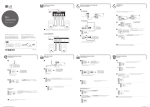
Speaker connection
Conexión de las bocinas
Using External Device ( or, )
Disc & Data Playback
a
a
Connect the USB or insert the CD you want
to play. /
Conecte el USB o inserte el CD que desea
reproducir.
b
Select the CD or USB. /
Seleccione el CD o USB.
Uso de un dispositivo externo (
o,
Reproducción de discos y datos
)
AUX Connection / Conexión AUX
MINI
COMPONENTE
AUX IN
L
AUX IN
R
Transparent /
Transparente
PORT. IN Connection / Conexión PORT. IN
Modelo : CM4350
<
CD
ESPAÑOL | MANUAL SIMPLE (1 de 2)
ENGLISH | SIMPLE MANUAL (1 of 2)
To view the instructions of advanced features, visit http://
www.lg.com and then download Owner’s Manual. Some of
the content in this manual may differ from your unit.
Black stripe /
Banda negra
Para ver las instrucciones de las características avanzadas,
visite http://www.lg.com y descargue el Manual del
Propietario. Ciertos contenidos de este manual pueden ser
diferentes a los de su unidad.
Select the AUX or PORTABLE. /
Seleccione la opción AUX o PORTABLE.
c
Play the music on the connected external
device. /
Reproducción de la música en el dispositivo
externo conectado.
c
Antes de operar su producto lea atentamente este manual
de instrucciones.
,
Antena FM
b
USB
Use the speakers far away from either TV screen or PC monitor. /
Utilice las bocinas alejadas de la pantalla de la TV o el monitor de la PC.
z
Select the desired song and the song is
played. /
Seleccione la canción deseada y comenzará
su reproducción.
Antena AM
www.lg.com
Radio Operation
Presetting Radio Station
a
a
Operación de radio
Presintonización de emisoras de radio
FM 87.5
Select the station to preset. /
Seleccione la emisora de radio que desea
presintonizar.
ANTENNA
b
01 87.5
b
FM 87.5
CM4350-AB_DPERLLK_SIM_0715_0716.indd 1
Press and hold. /
Presione y retenga.
b
Press PROGRAM/MEMORY when
“ERASEALL” blinks to confirm /
Presione PROGRAM/MEMORY cuando
“ERASEALL” parpadee para confirmar.
ERASEALL
Select the preset station to listen. /
Seleccione la emisora presintonizada que
desee escuchar.
Tune the desired frequency. /
Sintonice la frecuencia deseada.
c
,
a
Select the FM or AM /
Seleccione FM o AM.
c
,
Select the preset number and store the
station. /
Seleccione el número de presintonía y
guarde la emisora.
To delete all the saved station /
Para borrar todas las emisoras guardadas
Auto tuning : Press and hold. /
Sintonización automática : Presione y retenga.
Manual tuning : Press. /
Sintonización manual : Presione.
2015-01-09 �� 4:45:11
Using Bluetooth
LG Sound Sync
Uso de Bluetooth
LG Sound Sync
LG Sound Sync enables you to control some functions of this unit by a remote control of your LG TV.
Controllable functions are volume up/down and mute. Make sure that your TV has LG Sound Sync logo as
shown above. /
LG Sound Sync le permite controlar algunas funciones de esta unidad mediante el control remoto de su LG
TV. Las funciones que se pueden controlar son la subida/bajada de volumen y el silencio. Asegúrese de que
su TV tiene el logotipo de LG Sound Sync como se muestra arriba.
b
TV Speaker
External Speaker
LG Sound Sync (Optical)
LG Sound Sync (Wireless)
Set up the sound output of your TV : TV
setting menu [ [Sound] [ [TV Sound
output] [ [LG Sound Sync (Wireless)] /
Menú de configuración de la TV [ [Sonido]
[ [Salida de sonido de la TV] [ [LG
Sound Sync (Inalámbrico)]
a
BT READY
Select the Bluetooth function. /
Seleccione la función Bluetooth.
,
b
a
LG TV
PAIRED
Select LG TV function. /
Seleccione la función LG TV.
LG CM4350 (XX)
LG CM4350 (XX)
Set on the Bluetooth and select “LG CM4350
(XX)” on your bluetooth device. /
Encienda el Bluetooth y seleccione
“LG CM4350 (XX)” en su dispositivo
bluetooth.
,
PAIRED
LG TV
,
,
,
For specific information of operating, refer to the instruction manual of your TV. /
Para información específica de operación, consulte el manual de instrucciones de su TV.
When the connections failed, make sure of the conditions of this unit and your TV : power, function. /
Cuando las conexiones fallen, compruebe el estado de esta unidad y su TV: encendido/apagado,
función.
,
,
Auto Power On
Uso de la aplicación “Music Flow Bluetooth”
When this unit is successfully connected with your Bluetooth device, “PAIRED” appears on the display
window and change to Bluetooth device name soon. /
Cuando esta unidad se conecta con éxito a su dispositivo Bluetooth, aparece “PAIRED” en la pantalla y
cambia al nombre del dispositivo Bluetooth en unos segundos.
The multi pairing connection is only supported on Android or iOS devices. (Multi pairing connection
may not be supported depending on the connected device specifications.) /
La conexión de emparejamiento múltiple solo es compatible con dispositivos Android o iOS. (La
conexión de emparejamiento múltiple puede no ser compatible dependiendo de las especificaciones
del dispositivo conectado.)
,
Removable/detachable bluetooth device (Ex : Dongle etc.) doesn’t support multi pairing. /
Los dispositivos bluetooth desmontables/separables (Ej.: Dongle etc.) no son compatibles con el
emparejamiento múltiple.
,
Even if this unit connected up to 3 bluetooth devices in the bluetooth mode, you can play and control
music by using only one of the connected devices. /
Aún si esta unidad tuviera conectados hasta 3 dispositivos bluetooth en el modo bluetooth, usted
puede jugar y escuchar música usando solamente uno de los dispositivos conectados.
If it is unavailable to display device name on the unit, “_” will be displayed. /
Si no está disponible el nombre del dispositivo en la unidad, aparecerá, “_”.
AUTO DJ
Folder Searching
Encendido automático
To use this unit more comfortably, install “Music Flow Bluetooth” on your bluetooth devices. Select a way of
installation ( , ). /
Para un uso más cómodo de esta unidad, instale “Music Flow Bluetooth” en sus dispositivos bluetooth.
Seleccione un modo de instalación ( , ).
AUTO DJ
Búsqueda de carpetas
Press to move superior or subordinate folder
from the root folder. /
Presione para mover una carpeta superior o
subordinada desde la carpeta raíz
a
HELLO
Auto DJ blends the end of one song into the beginning of another for seamless playback. /
Auto DJ combina el final de una canción con el inicio de otra para obtener una reproducción continua de la
música.
AUTO DJ
RANDOM
Searching for “Music Flow Bluetooth” on the
Google Play Store. /
Buscando “Music Flow Bluetooth” en Google
Play Store.
,
This unit automatically turns on by an input source : LG TV or Bluetooth
If you have already paired with this unit, automatically this unit can turn on by an input source when this unit
is turned off. /
Esta unidad se enciende y se apaga automáticamente con una fuente de entrada: LG TV o Bluetooth
Si ya está emparejado con esta unidad, la unidad se puede encender automáticamente con una fuente de
entrada cuando la unidad esté apagada.
Scanning QR code. /
Escaneando el código QR.
b
The folder including no file is not searched. /
No se buscan las carpetas vacías.
AUTO DJ
SEQUENTIAL
Press repeatedly to select the mode you
want. /
Presione repetidamente para seleccionar el
modo deseado.
RANDOM (AUTO DJ RANDOM) -> RPT (AUTO
DJ SEQUENTIAL) -> (AUTO DJ OFF)
AUTO DJ OFF
Select the folder to play. The first file of the
folder is played. /
Seleccione la carpeta que desea reproducir.
Se reproduce el primer archivo de la
carpeta.
,
,
This unit can be connected up to 3 bluetooth devices when you use Bluetooth mode. However, music
playback is possible from only one of connected device. /
Esta unidad puede conectarse hasta a 3 dispositivos bluetooth cuando se utiliza el modo Bluetooth.
Sin embargo, la música puede reproducirse solamente desde uno de los dispositivos conectados.
The amount of time to turn off this unit is different depending on your TV. /
El tiempo necesario para apagar esta unidad es diferente dependiendo de su TV.
,
Using “Music Flow Bluetooth” App
Enter the PIN code (0000) as needed. /
Ingrese el código PIN (0000) según sea necesario.
Play a music on your bluetooth device. /
Reproduzca música en su dispositivo
bluetooth.
c
Only AUTO DJ SEQUENTIAL is selected when played Programmed list. /
Solo se selecciona AUTO DJ SEQUENTIAL cuando se reproduce la lista programada.
Android O/S : Ver 4.0.3 (or later) /
Android O/S : Ver 4.0.3 (O posterior)
Auto Function Change
Cambio automático de función
,
Refer to the guide from the “Music Flow Bluetooth” app on your smart device. /
Consulte la guía de la aplicación “Music Flow Bluetooth” en su dispositivo inteligente.
CM4350-AB_DPERLLK_SIM_0715_0716.indd 2
This unit recognizes input signals such as Bluetooth and LG TV and then changes suitable function
automatically. /
Esta unidad reconoce señales de entrada como Bluetooth y LG TV y cambia a la función adecuada
automáticamente.
2015-01-09 �� 4:45:15
Additional Feature
Deleting file
Característica Adicional
Eliminando archivo
,
This function is supported only in stop status. (USB only) /
Esta función sólo está disponible en estado de alto. (Solo para USB)
a
MINI
COMPONENTE
Select the file you want to delete. /
Seleccione el archivo que desea eliminar.
180
150
120 ... 10
OFF
Select the folder you want to delete. /
Seleccione la carpeta que desea eliminar.
Modelo : CM4350
Press and hold. /
Presione y retenga.
a
FILE-XXX_001
Select the DEL FILE, DEL DIR or FORMAT. /
Seleccione DEL FILE, DEL DIR o FORMAT.
b
FORMAT
b
DEL FILE
XX:00
a
Press and hold. /
Presione y retenga.
ESPAÑOL | MANUAL SIMPLE (2 de 2)
ENGLISH | SIMPLE MANUAL (2 of 2)
To view the instructions of advanced features, visit http://
www.lg.com and then download Owner’s Manual. Some of
the content in this manual may differ from your unit.
Para ver las instrucciones de las características avanzadas,
visite http://www.lg.com y descargue el Manual del
Propietario. Ciertos contenidos de este manual pueden ser
diferentes a los de su unidad.
DEL DIR
c
b
AM 12:00
00:XX
0:00
Antes de operar su producto lea atentamente este manual
de instrucciones.
d
DELETE
TUNER
CD
XX:00
USB2
USB1
Press to delete file, folder or format. /
Presione para borrar archivo, carpeta o
formatear.
c
c
e
VOL XX
d
,
00:XX
,
Alarm function works only after clock is set. /
La función de alarma funciona solo tras ajustar el reloj.
USB copying
USB Recording
Copia de USB
Grabación USB
Connect a USB storage and select the
source (CD, AUX, PORTABLE, TUNER) to
record. /
Conecte un dispositivo de almacenamiento
USB y seleccione la función (CD, AUX,
PORTABLE, TUNER) para grabar.
a
To select bitrate and recording speed /
Para seleccionar el bitrate y la velocidad de grabación
,
AUDIO CD
Select the bitrate and confirm. /
Seleccione el bitrate y confirme.
b
USB REC
c
USB REC
USB REC
Press to start recording. During recording,
“REC” displayed. /
Presione para iniciar la grabación.
Durante la grabación aparece “REC”
,
,
Status /
Estado
Recording (Only CD function) /
Grabación (Sólo función CD)
Playback /
Reproducción
One track/file /
Una pista/archivo
Programmed playback /
Reproducción programada
Programmed the track(s)/file(s) /
Pista(s)/archivo(s) programado(s)
Full stop /
Alto total
All track(s)/file(s) /
Toda(s) la(s) pista(s)/archivo(s)
It’ll be stored as follows. * The other source : AUX and the like. /
Será almacenado como sigue. * La otra fuente : AUX y similares.
a
Connect USB devices to USB ports and
select USB 1. /
Conecte dispositivos USB a los puertos USB
y seleccione USB 1.
b
Press USB REC to start recording. Audio files
in USB 1 are copied to USB 2. /
Presione USB REC para iniciar la grabación.
Los archivos de audio de USB 1 se copian
a USB 2.
Press and hold for 3 seconds. /
Presione y retenga durante 3 segundos.
a
USB REC
b
Select the recording speed and confirm.
(Only CD function) /
Seleccione la velocidad de grabación y
confirme. (Sólo función CD)
Press to stop the recording /
Presione para detener la grabación.
,
,
MP3/WMA
The other source*
TUNER
A file is recorded by about 512 Mbyte when you record for a long term. /
Se grabará un archivo de aprox. 512 Mbytes cuando grabe durante un tiempo prolongado.
When you stop recording during playback, the file that has recorded at that time will be stored.
(Except MP3/WMA file) /
Cuando detenga la grabación durante la reproducción, el archivo que se está grabando en ese
momento quedará almacenado. (Excepto archivos MP3/WMA)
USB REC
,
Press to stop recording /
Presione para detener la grabación.
Press to pause the recording. (Only TUNER,
AUX, PORTABLE) /
Presione para pausar la grabación. (Solo
TUNER, AUX, PORTABLE)
Press to pause the recording. (Only TUNER,
AUX, PORTABLE) /
Presione para pausar la grabación. (Solo
TUNER, AUX, PORTABLE)
,
CM4350-AB_DPERLLK_SIM_0715_0716.indd 3
Press to exit the current mode. /
Presione para salir del modo actual.
Status /
Estado
Recording /
Grabación
Playback /
Reproducción
One track/file /
Una pista/archivo
Programmed playback /
Reproducción programada
Programmed the track(s)/file(s) /
Pista(s)/archivo(s) programado(s)
Full stop /
Alto total
All track(s)/file(s) /
Toda(s) la(s) pista(s)/archivo(s)
2015-01-09 �� 4:45:18
Additional Information
Programmed Playback
Información adicional
Reproducción programada
You can make a playlist of your favourite tracks/files from a disc or USB device using Programmed Playback. /
Puede hacer una lista de reproducción de sus pistas/archivos favoritos desde un disco o un dispositivo USB utilizando la
reproducción programada.
To enjoy Programmed Playback /
Para disfrutar de la reproducción programada
Music File Requirement / Requisito de los archivos de música
Press again after you make the list. /
Presione de nuevo tras crear la lista.
a
function is supported only on stop status. /
, This
Esta función solamente está disponible en estado de alto total.
Press to play the list. /
Presione para reproducir la lista.
b
To make Programmed Playback list /
Para elaborar la lista de reproducción programada
Press twice to exit from Programmed
Playback mode. /
Presione dos veces para salir del modo de
reproducción programada.
Press to enter the edit mode. /
Presione para acceder al modo de edición.
a
Sampling frequency /
Frecuencia de muestreo
yy MP3 : 32 - 48 kHz
yy WMA : 32 - 48 kHz
Bit rate /
Velocidad de bits
yy MP3 : 32 - 320 kb/s
yy WMA : 40 - 192 kb/s
Maximum files /
Número máximo de archivos
Data CD : 999 / USB : 2000
CD Datos : 999 / USB : 2 000
Maximum folders /
Número máximo de carpetas
Data CD : 99 / USB : 200
CD Datos : 99 / USB : 200
File extensions /
Extensiones de archivo
yy “.mp3”
yy “.wma”
CD-ROM file format /
Formato de archivo de CD-ROM
ISO9660+JOLIET
USB Flash Drive /
Unidad Flash USB
Devices that support USB2.0 or USB1.1. /
Dispositivo que admite USB2.0 o USB1.1.
Bluetooth
Codec /
Códec
SBC
To delete Programmed Playback List /
Para borrar la lista de reproducción programada
Press again to exit from the edit mode. /
Presione de nuevo para salir del modo de
edición.
c
The USB function of this unit does not support all USB devices. /
La función USB de esta unidad no admite todos los dispositivos USB.
,
Using NTFS file system is not supported. (Only FAT(16/ 32) file system is supported.) /
El sistema de archivos NTFS no es compatible. (Sólo el sistema de archivos FAT(16/32) es compatible).
,
External HDD, Card readers, Locked devices, or hard type USB devices are not supported. /
No son compatibles discos duros externos, lectores de tarjetas, dispositivos bloqueados, o dispositivos
USB de tipo duro.
,
,
Select a track/file and confirm. /
Seleccione una pista/archivo y confirme.
b
,
a
Press in stop status. /
Presione en el estado de alto.
b
Press repeatedly to select a track/file. /
Presione repetidamente para seleccionar
una pista/archivo.
c
Press to delete selected song. /
Presione para eliminar la canción
seleccionada.
The DTS is not supported. In case of DTS audio format, audio is not output. /
DTS no es compatible. En el caso del formato de audio DTS, no hay salida de audio.
How to disconnect the wireless network connection or the wireless device
Turn off the unit by pressing the power button for more than 5 seconds. /
Cómo desconectar la conexión de red inalámbrica o el dispositivo inalámbrico
Apague la unidad presionando el botón de encendido/apagado durante más de 5 segundos.
playlist of up to 20 tracks/files can be entered for CD/USB1/USB2. /
, APuede
introducir una lista de hasta 20 pistas/archivos para CD/USB1/USB2
, Repeat steps b to store other files. /
Repita los pasos b para almacenar otros archivos.
Specification
Safety Information
Especificación
Información de seguridad
ENGLISH
Power Requirements
Power Consumption
Bus Power Supply
(USB)
Total Output
DELETE
ESPAÑOL
Refer to the main label on
the unit.
Refer to the main label on
the unit.
Networked standby : 0.4 W
(If all network ports are
activated.)
5 V 0 500 mA
260 W
Design and specifications are subject to change
without notice.
Requisitos de
Consulte la etiqueta
alimentación eléctrica principal de la unidad.
Consulte la etiqueta
principal de la unidad.
Consumo de energía Reposo conectado en red:
0,4 W (Si están activados
todos los puertos de red.)
Suministro de
alimentación del bus 5 V 0 500 mA
(USB)
Salida total
260 W
El diseño y las especificaciones están sujetos a
cambios sin previo aviso.
CAUTION
RISK OF ELECTRIC SHOCK
DO NOT OPEN
CAUTION: TO REDUCE THE RISK OF ELECTRIC SHOCK DO NOT
REMOVE COVER (OR BACK) NO USER-SERVICEABLE PARTS INSIDE
REFER SERVICING TO QUALIFIED SERVICE PERSONNEL.
This lightning flash with arrowhead
symbol within an equilateral triangle
is intended to alert the user to the
presence of uninsulated dangerous
voltage within the product’s enclosure
that may be of sufficient magnitude
to constitute a risk of electric shock to
persons.
The exclamation point within an
equilateral triangle is intended to
alert the user to the presence of
important operating and maintenance
(servicing) instructions in the literature
accompanying the product.
WARNING: TO PREVENT FIRE OR ELECTRIC SHOCK HAZARD, DO
NOT EXPOSE THIS PRODUCT TO RAIN OR MOISTURE.
CAUTION: The apparatus shall not be exposed to water (dripping
or splashing) and no objects filled with liquids, such as vases, shall
be placed on the apparatus.
WARNING: Do not install this equipment in a confined space such
as a book case or similar unit.
CAUTION: Do not use high voltage products around this product.
(ex. Electrical swatter) This product may malfunction due to
electrical shock.
CAUTION: Do not block any ventilation openings. Install in
accordance with the manufacturer’s instructions.
Slots and openings in the cabinet are provided for ventilation and
to ensure reliable operation of the product and to protect it from
over heating. The openings shall be never be blocked by placing
the product on a bed, sofa, rug or other similar surface. This product
shall not be placed in a built-in installation such as a bookcase or
rack unless proper ventilation is provided or the manufacturer’s
instruction has been adhered to.
CAUTION: This product employs a Laser System.To ensure
proper use of this product, please read this owner’s manual
carefully and retain it for future reference. Shall the unit
require maintenance, contact an authorized service center.
Use of controls, adjustments or the performance of
procedures other than those specified herein may result in
hazardous radiation exposure. To prevent direct exposure
to laser beam, do not try to open the enclosure.
CAUTION concerning the Power cord
The Power Plug is the disconnecting device. In case of an
emergency, the Power Plug must remain readily accessible.
CM4350-AB_DPERLLK_SIM_0715_0716.indd 4
This device is equipped with a portable battery or accumulator.
Safety way to remove the battery or the battery from the
equipment: Remove the old battery or battery pack, follow the
steps in reverse order than the assembly. To prevent contamination
of the environment and bring on possible threat to human
and animal health, the old battery or the battery put it in the
appropriate container at designated collection points. Do not
dispose of batteries or battery together with other waste. It is
recommended that you use local, free reimbursement systems
batteries and accumulators. The battery shall not be exposed to
excessive heat such as sunshine, fire or the like.
IMPORTANT SAFETY
INSTRUCTIONS
1. Read these instructions.
2. Keep these instructions.
3. Heed all warnings.
4. Follow all instructions.
5. Do not use this apparatus near water.
6. Clean only with dry cloth.
PRECAUCIÓN
Este dispositivo está equipado con una batería o acumulador
portátil.
RIESGO DE CHOQUE
ELÉCTRICO. NO ABRIR.
Forma segura de retirar la batería del equipo: retire la batería o
baterías antiguas siguiendo el orden inverso al de instalación. Para
evitar contaminar el medioambiente y provocar posibles daños a
la salud pública, las baterías viejas deben llevarse a los puntos de
recogida designados. no se deshaga de las baterías con la basura
normal. Es recomendable utilizar los sistemas locales de recogida
de baterías y acumuladores. La batería no debe exponerse a calor
excesivo como el del sol, el fuego o fuente similar.
PRECAUCIÓN: PARA REDUCIR EL RIESGO DE CHOQUE ELÉCTRICO,
NO RETIRE LA CUBIERTA (O LA PARTE POSTERIOR). EN EL INTERIOR
NO HAY PIEZAS REPARABLES POR EL USUARIO. SOLICITE AYUDA AL
PERSONAL DE SERVICIO CALIFICADO.
El símbolo del rayo con punta de flecha dentro
de un triángulo equilátero pretende alertar al
usuario de la presencia de voltaje peligroso no
aislado en el interior del armario del producto
que puede tener la magnitud suficiente para
constituir un riesgo de choque eléctrico para las
personas.
El signo de exclamación dentro de un triángulo
equilátero pretende alertar al usuario de
la presencia de instrucciones importantes
(de servicio) para el funcionamiento y
mantenimiento en la información que acompaña
al producto.
7. Do not block any ventilation openings. Install in accordance
with the manufacturer’s instructions.
ADVERTENCIA: PARA REDUCIR EL RIESGO DE INCENDIO O
CHOQUE ELÉCTRICO, NO EXPONGA ESTE PRODUCTO A LA LLUVIA
NI A LA HUMEDAD.
8. Do not install near any heat sources such as radiators, heat
registers, stoves, or other apparatus (including amplifiers) that
produce heat.
PRECAUCIÓN: el aparato no debe exponerse al agua (goteo o
salpicaduras) y no debe colocar sobre el aparato objetos llenos de
líquidos, como floreros.
9. Do not defeat the safety purpose of the polarized or groundingtype plug. A polarized plug has two blades with one wider than
the other. A grounding type plug has two blades and a third
grounding prong. The wide blade or the third prong are provided for your safety. If the provided plug does not fit into your
outlet, consult an electrician for replacement of the obsolete
outlet.
ADVERTENCIA: no instale el equipo en un espacio cerrado, como
en un librero o mueble similar.
10.Protect the power cord from being walked on or pinched particularly at plugs, convenience receptacles, and the point where
they exit from the apparatus.
11.Only use attachments/accessories specified by the manufacturer.
12.Use only with the cart, stand, tripod, bracket,
or table specified by the manufacturer,
or sold with the apparatus. When a cart is
used, use caution when moving the cart/
apparatus combination to avoid injury from
tip-over.
13.Unplug this apparatus during lightning storms or when unused
for long periods of time.
14.Refer all servicing to qualified service personnel. Servicing is
required when the apparatus has been damaged in any way,
such as power-supply cord or plug is damaged, liquid has been
spilled or objects have fallen into the apparatus, the apparatus
has been exposed to rain or moisture, does not operate normally, or has been dropped.
PRECAUCIÓN: No usar equipos de alto voltage cerca de este
producto. (ej. Matamoscas electrónico). Este producto puede
funcionar incorrectamente debido a las descargas eléctricas.
PRECAUCIÓN: no obstruya ninguno de los orificios de ventilación.
Instale conforme a las instrucciones del fabricante.
Las ranuras y orificios del armario cumplen un propósito de
ventilación y aseguran el funcionamiento adecuado del producto,
a fin de protegerlo de un posible sobrecalentamiento. Los orificios
no deben obstruirse. El producto no debe colocarse sobre una
cama, sofá, tapete o una superficie similar. Este producto no debe
colocarse en una instalación empotrada, como un librero o estante,
a menos que haya una buena ventilación y se respeten todas las
instrucciones del fabricante.
Instrucciones importantes
de seguridad
1. Lea estas instrucciones.
2. Guarde estas instrucciones.
3. Siga todas las advertencias.
4. Siga todas las instrucciones.
5. No use este aparato cerca del agua.
6. Limpie únicamente con un paño seco.
7. No obstruya ninguna salida de ventilación. Instale de acuerdo
con las instrucciones del fabricante.
8. No instale cerca de fuentes de calor como radiadores, registros
de calefacción, estufas u otros aparatos (incluyendo amplificadores) que produzcan calor.
9. Respete el uso de la conexión del tomacorriente polarizado o
con conexión a tierra. Un tomacorriente polarizado tiene una
cuchilla más ancha que la otra. Un tomacorriente con tierra
tiene dos cuchillas y una pata para tierra. La cuchilla más ancha
o la pata para tierra sirven como protección. Si el tomacorriente
proporcionado no se ajusta a su tomacorriente, póngase en
contacto con un electricista para que lo reemplace.
10.Proteja el cable de alimentación para que no caminen sobre él o
quede atorado, particularmente en contactos, en receptáculos y
en el punto por donde sale del aparato.
11.Solamente use los aditamentos / accesorios especificados por el
fabricante.
12.Use únicamente con el carro, estante,
trípode, soporte o mesa especificados por
el fabricante o que haya sido vendido junto
con el aparato. Cuando use un carro, tenga
cuidado cuando mueva la unidad / carro
para evitar accidentes por vuelcos.
13.Desconecte este aparato durante tormentas eléctricas o cuando
no vaya a usarlo por períodos prolongados.
PRECAUCIÓN: este producto usa un sistema láser. Para asegurar
el uso apropiado de este producto, lea detenidamente este
manual del usuario y guárdelo para futuras consultas. Si la unidad
necesitara mantenimiento, póngase en contacto con un centro
de servicio autorizado. El uso de controles o ajustes, o la ejecución
de procedimientos, a excepción de los que se especifican aquí,
puede causar una exposición peligrosa a la radiación. Para evitar la
exposición directa al rayo láser, no intente abrir la cubierta.
14.Haga que todo el mantenimiento sea realizado solamente por
personal técnico cualificado.Solicite mantenimiento cuando
el aparato haya sufrido cualquier tipo de daño, por ejemplo,
si el cable de alimentación o el tomacorriente están dañados,
cuando se haya derramado líquido sobre el aparato o hayan
caído objetos sobre él, cuando haya sido expuesto a lluvia o
humedad, cuando no funcione con normalidad o cuando haya
sufrido una caída.
PRECAUCIÓN relacionada con el cable de alimentación
El enchufe de corriente es el dispositivo de desconexión. En caso
de emergencia, el enchufe de corriente debe permanecer de fácil
acceso.
2015-01-09 �� 4:45:20