1
®
TM
BASIC ENTRY TOUCHPAD
USER MANUAL
MAINTENANCE FOR
BASIC ENTRY
LOCKING SYSTEM
REPLACING THE TOUCHPAD
3
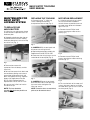
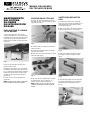
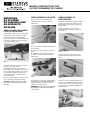
1. Remove the two /32" Allen cap
screws holding the electronic
touchpad onto the cart top (Fig. 2).
TO REPLACE FUSE
AND/OR BATTERY
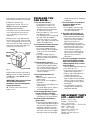
MOTOR/CAM REPLACEMENT
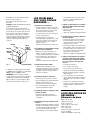
1. Using the mechanical key, unlock
the cart and remove the bottom
several drawers to provide access to
the motor cover plate on the bottom
right in the cart.
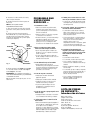
2. Remove the two Phillips head
screws securing the motor access
plate (Fig. 4).
1. Unlock the cart and remove the top
several drawers to provide access to
the battery box.
2. Supporting the battery box, loosen
and remove the two screws holding
the battery box to the frame at the top
rear of the cart (Fig. 1).
Fig. 2
2. CAREFULLY lift the touchpad and
disconnect the wiring harness.
FUSE
3. Replace the touchpad assembly with
Replacement Part No. RPC13-159D.
4. Reconnect the wiring harness to the
underside of the touchpad (Fig. 3).
BATTERY BOX
Fig. 4
3. Remove the two Phillips head
screws securing the motor mounting
bracket (Fig. 5).
Fig. 1
3. Remove the two terminal
connectors from the battery and the
inline fuse.
4. Reinstall the two terminals back onto
the new battery (being sure to attach
the red wire to the red terminal, and
black wire to black terminal). Replace
battery with Replacement Part No.
RPC13-159A. Replace fuse with
Replacement Part No. RPC13-159C.
5. Insert the new inline fuse into the
fuse terminal clip.
NOTE: The fuse should be
installed after the battery leads have
been connected.
Fig. 3
5. CAREFULLY lower the touchpad
back onto the cutout in the top, align
the screw holes and tighten the
Allen cap screws.
NOTE: Insure the wires are not kinked,
pinched, or otherwise strained.
Fig. 5
4. Twist out the back of the motor until
it clears the recess pocket, and slide
the motor back until the cam is clear of
the inner panel (Fig. 6).
MOTOR
CAM
Fig. 6