1
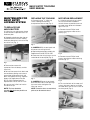
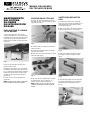
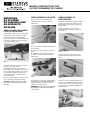
5. Disconnect the motor terminal wires
and remove the motor/cam assembly.
PROBLEMS YOU
CAN SOLVE . . .
6. Replace the motor with
Replacement Part No. RPC13-155.
1. The unit does not lock.
• Is the mechanical lock in the
locked position, vertical? The
mechanical lock must be in the
locked position for the electronic
lock to function correctly.
• Does the motor run? If not, check
for a defective motor.
• The motor does run. Do the orange
lock tabs move up and down?
Check the motor cam, it may be
loose. If not, replace the motor. See
Motor/Cam Replacement.
NOTE: The cam can be replaced
separately from the motor.
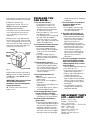
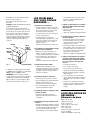
7. To remove the cam from the motor
shaft, loosen the set screw on the
cam, and slide the cam off of the
motor shaft.
8. Slide the new cam, Replacement
Part No. RPC14-055B, onto the motor
shaft. The indentation on the cam must
face away from the motor. Align the set
screw with the flat on the motor shaft.
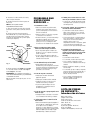
Tighten set screw (see Fig. 7).
MOTOR
INDENTATION
MOTOR
SHAFT
FLAT ON
MOTOR
SHAFT
CAM
Fig. 7
SET SCREW
9. Reconnect the black wire to the #1
red terminal on the motor. Reconnect
the red wire to the #2 black terminal
on the motor.
IMPORTANT! Reversing these wires
will cause the motor to run
backwards, and could damage the
locking mechanism!
10. To reinstall the motor, reverse
Steps 1 thru 4.
2. I cannot hear the motor turn when
I use the electronic touchpad.
• Do you hear a beep when you
press the buttons on the keypad?
If not, check the fuse or battery
condition.
• If you hear a beep when you
depress a button on the keypad,
replace the motor. See Motor/Cam
Replacement.
3. The Low battery light is on.
• The battery needs to be charged.
Plug the Power Supply/Charger
into a 110VAC power source. The
unit will function while plugged in.
The unit will take 4-8 hours to
charge completely.
4. The charging light does not
come on.
• Verify that there is power at the
power source.
• Verify that the unit is plugged in
completely.
• Check the fuse. See Replace fuse
and/or Battery.
• If all of the above are OK, replace
the Power Supply/Charger.
5. The charging light does not turn
off after 16 hours of charging.
• Replace the battery. It is defective.
See Replace Fuse and/or Battery
6. How do I know if the battery is
good or bad?
• Plug in the Power Supply/Charger.
If the charging light does not go out
after 16 hours and light or no use,
the battery is defective. If the low
battery light comes on after only a
few cycles, and was fully charged
to the point when the charge light
turned off automatically, the battery
is defective.
7. The motor seems to cycle two or
three times before the unit
unlocks or locks.
• If this happens, the limit switch
may need to be adjusted. See
Limit Switch Adjustment.
8. The green open light does not
come on at all or inconsistently.
• Does the green open light come
on when the mechanical lock is
used? If not, call your regional
Metro Customer Service
Representative for assistance.
• If the green open light does come
on when the mechanical key is
used, check the motor cam for
correct operation, tighten if
necessary. If the above are OK,
the limit switch may need to be
adjusted. See Limit Switch
Adjustment.
9. The unit is unplugged and will not
respond. (Keypad will not beep
when a key is depressed and/or
nothing happens when a correct
code is entered.)
• Does the green open light come on?
• If yes, the fuse is OK.
• If no, check the fuse. See Fuse
and/or Battery replacement.
• Plug unit into charger, does the
charging light come on?
• If yes, let it charge and check
again in about an hour for beep/
function. If after an hour there is
still no beep or function, replace
the keypad.
• If no, the battery may be fully
charged and the keypad may
need to be replaced.
REPLACEMENT PARTS
LIST — BASIC ENTRY
Battery — RPC13-159A
Charger — RPC13-159B
Fuse — RPC13-159C
Touchpad with Overlay — RPC13-159D
Motor — RPC13-155
Cam — RPC14-055B
Limit Switch — RPC13-156
Spring — RPC10-018
Charger (220 Volt 50/60 Hz) —
RPC13-159E