1
POUR LE TECHNICIEN SEULEMENT – NE PAS ENLEVER NI DÉTRUIRE
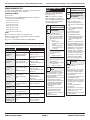
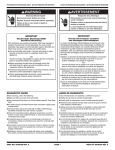
MANUAL DIAGNOSTIC TEST
FAILURE/ERROR DISPLAY
CODES
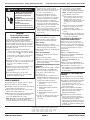
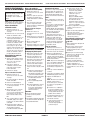
The washer must be empty and the control must be in the OFF state before
pressing the touch-pad sequence to start the test.
Failure codes will be displayed in the
Estimated Time Remaining display of
the washer console.
NOTE : The column of Cycle Status
LEDs also displays a code matching
the F-Code Number. These LEDs can be
ignored on machines with Estimated
Time Remaining displays.
Starting the Test Mode
Close the door.
Select any one key (except PAUSE/CANCEL) and follow the steps below,
using the same key (remember the key):
a. Press/hold 4 seconds.
b. Release for 4 seconds.
c. Press/hold 4 seconds.
d. Release for 4 seconds.
e. Press/hold 4 seconds.
d. Release for 4 seconds.
e. Press/hold 4 seconds, release.
NOTES:
■ Press the same key to advance to the next failure code.
■ At the end of the procedure the program will loop back to the beginning.
This is a continuous loop.
■ To cancel out of the Manual Test Mode press PAUSE/CANCEL.
■
Display
■
A communication error
between the Central Control
Unit (CCU) and the EEPROM
onboard the CCU occurred.
■ A power glitch may cause
this error.
– Unplug washer or
disconnect power for two
minutes.
– Verify CCU operation by
running a Diagnostic Test
or any cycle.
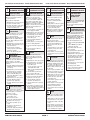
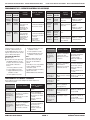
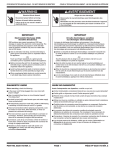
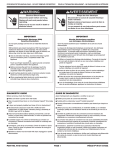
Be sure to perform the Diagnostic Tests before replacing the system components.
Exit Condition
Control Action
To be Checked
■
On key press or if
overfill level is
detected
■
Distribution system is set to
Main Wash compartment.
Filling with both valves.
■
■
■
On key press or if
overfill level is
detected
Distribution system is set to
Bleach compartment.
Filling only by the Hot valve.
■
■
■
■
On key press or if
overfill level is
detected
Distribution system is set to
Fabric Softener compartment.
Filling with both valves.
■
On key press or if
overfill level is
detected
Distribution system is set to
Bypass channel.
Filling only by the Cold
valve.
■
■
■
■
■
■
■
■
Door lock system
PUMP DRIVE ERROR
Dispenser Motor
Dispenser contact
Cold and Hot Water Inlet Valve
Overfill level
The pump driver fails to
activate.
– Replace CCU board.
Dispenser Motor
Dispenser contact
Cold and Hot Water Inlet Valve
Overfill Level
One of the main relays is not
working properly.
■ The relay might be soldered
or always open.
– Replace CCU board.
Dispenser Motor
Dispenser contact
Cold and Hot Water Inlet Valve
Overfill Level
Dispenser Motor
Dispenser contact
Cold Water Inlet Valve
Overfill Level
Heater element (if equipped)
On key press or
completion
Drum executes reversing
movement at wash speed
(10 min).
■
■
Motor
Motor Control (MCU)
On key press or
completion
Drain Pump is on (4 min).
■
Drain Pump
On completion only Drain Pump is on (reach
Level_sud plus 10 sec).
■
Drain Pump
On key press or
completion
Drum rotates counter-clockwise and ramps up to maximum speed.
■
Motor
Motor Control (MCU)
On key press only
after rpm = 0 and
door is unlocked
Stop motor to 0 rpm. Door
unlocks.
■
PART NO. W10118956A
■
■
■
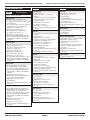
RECOMMENDED PROCEDURE
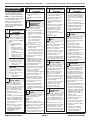
EEPROM ERROR
MANUAL OVERVIEW TEST PROGRAM
On completion only Door locks.
EXPLANATION AND
MAIN RELAYS ERROR
MOTOR CONTROL UNIT
ERROR
The Motor Control Unit has internal
failure; repeating under or over voltage,
or over current conditions. If failure
occurs during high-speed spin the door
unlocks after 3 minutes.
1. Unplug washer or disconnect power.
2. Check wire harness connections
between the drive motor and the Motor
Control Unit (MCU), and between the
MCU and the Central Control Unit
(CCU). Check the motor and do a
continuity test.
3. Plug in washer or reconnect power.
4. Check the MCU by looking for
operations of the drive motor.
5. Check the drive motor for powered
rotations.
6. Replace MCU board.
Display
FOR SERVICE TECHNICIAN ONLY – DO NOT REMOVE OR DESTROY
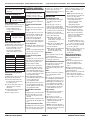
EXPLANATION AND
RECOMMENDED PROCEDURE
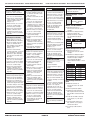
NO WATER DETECTED
ENTERING MACHINE OR
PRESSURE SWITCH TRIP
NOT DETECTED.
The pressure switch is not tripped after
6 minutes.
■ If there is no water in the unit:
– Make sure that both valves at the
water source(s) are turned on all the
way.
– Check for plugged or kinked inlet
hoses or plugged screens in the
inlet valves.
– Verify inlet valve operation.
■ If there is water in the unit:
– Verify drain pump operation.
– Verify that the pressure switch hose
is in good condition and properly
connected to tub and pressure
switch.
1. Verify there is not a siphon problem.
2. Press PAUSE/CANCEL twice to clear
the display. The machine will drain for
3 minutes before unlocking the door.
3. Unplug washer or disconnect power.
4. Verify wire harness connections to
inlet valves, pressure switch, drain
pump and Central Control Unit (CCU).
5. Check all hoses for possible leaks.
6. Plug in washer or reconnect power.
7. Verify pressure switch operation.
8. Verify CCU operation by running a
Diagnostic Test or any cycle.
LONG DRAIN
If the drain time exceeds 8 minutes the
water valves turn off.
NOTES:
■ After 4 minutes the “Sd” error will be
displayed, then 4 minutes later the
“F/21” error code will be displayed.
■ Press PAUSE/CANCEL two times to
clear the display.
1. Check the drain hose and make sure
it is not plugged or kinked.
2. Unplug washer or disconnect power.
3. Check the electrical connections at
the pump and make sure the pump
is running.
4. Check the drain pump filter for
foreign objects.
5. Plug in washer or reconnect power.
6. If the above does not correct the
problem, go to step 7.
7. Unplug washer or disconnect power.
8. Replace the pump.
Motor
Motor Control (MCU)
Door lock system
PAGE 2
PIÈCE No W10118956A