1
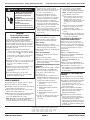
FOR SERVICE TECHNICIAN ONLY – DO NOT REMOVE OR DESTROY
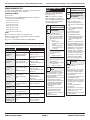
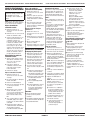
TROUBLESHOOTING GUIDE
Problem
Possible Cause/Test
NOTE: Possible Cause/Tests must be performed in the
sequence shown for each problem.
Won’t power up.
(Touch-pads do not respond when pressed.)
1. Check that the unit is plugged into a working outlet
and for blown fuses.
2. Check for power going to Central Control Unit (CCU)
by listening for a click in the CCU when unit is
plugged in. If no click, replace CCU.
3. Unplug washer or disconnect power.
4. Check continuity of line cord and line filter.
5. Check harness connections to CCU.
6. Plug in washer or reconnect power.
7. Check the touch-pad/LED assembly by selecting
different cycles and changing the modifiers and
options available to confirm the touch-pad/LED is
responding.
Won’t start cycle.
1. Open and close the door. The door has to be opened
between consecutive wash cycles.
2. Check the door switch/lock unit using the
diagnostics. See Diagnostic Test.
3. If door is locked, drain the unit.
4. Unplug washer or disconnect power.
5. Check the wire harness connections.
6. Plug in washer or reconnect power.
7. Check the touch-pad/LED assembly by selecting
different cycles and changing the modifiers and
options available to confirm the touch-pad/LED is
responding.
Won’t shut off.
1. Check for a Fault/Error Code on the display.
2. Press PAUSE/CANCEL on the touch-pad twice.
3. Check the touch-pad/LED assembly by selecting
different cycles and changing the modifiers and
options available to confirm the touch-pad/LED is
responding.
4. Unplug washer or disconnect power.
5. Check that the drain hose and drain pump filter are
clear of foreign objects and not plugged.
6. Plug in washer or reconnect power.
7. Check drain pump.
8. Verify CCU operation by running a Diagnostic Test
or any cycle.
Control won’t accept selections.
1. Press PAUSE/CANCEL on the touch-pad twice.
2. Drain the unit, then check that the drain hose and
drain pump filter are clear of foreign objects.
3. Check the touch-pad/LED assembly by selecting
different cycles and changing the modifiers and
options available to confirm the touch-pad/LED is
responding.
4. Unplug washer or disconnect power.
5. Check harness connections.
6. Plug in washer or reconnect power.
7. Verify CCU operation by running a Diagnostic Test
or any cycle.
PART NO. W10118956A
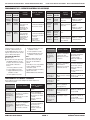
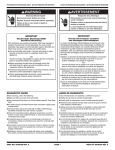
Problem
POUR LE TECHNICIEN SEULEMENT – NE PAS ENLEVER NI DÉTRUIRE
Possible Cause/Test
Problem
Possible Cause/Test
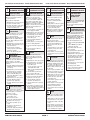
Won’t dispense.
Won’t drain.
1. Verify the unit is level.
2. Verify dispenser drawer is not clogged with
detergent.
3. Check water connections to the unit and within the
unit. Check for plugged screen in water source.
4. Check dispenser motor.
5. Unplug washer or disconnect power.
6. Check harness connections.
7. Plug in washer or reconnect power.
8. Verify CCU operation by running a Diagnostic Test
or any cycle.
1. Unplug washer or disconnect power.
2. Check wire harness connections.
3. Check drain pump.
4. Check drain pump motor.
5. Check that the drain hose and drain pump filter are
clear of foreign objects.
6. Plug in washer or reconnect power.
7. Verify CCU operation by running a Diagnostic Test
or any cycle.
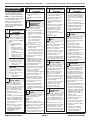
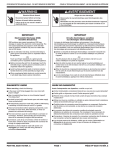
Won’t fill.
1. Check installation. Verify hot and cold water faucets
are open.
2. Check inlet valves.
3. Unplug washer or disconnect power.
4. Check water connections to the unit and within the
unit. Make sure water supply hoses are
unobstructed. Check for plugged screen.
5. Plug in washer or reconnect power.
6. Check operating pressure switch.
7. Check drain pump motor.
8. Verify CCU operation by running a Diagnostic Test
or any cycle.
9. Check under Won’t Dispense problem above.
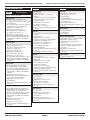
Machine vibrates.
1. Remove shipping system.
2. Check installation.
3. Check leveling feet.
Incorrect water temperature.
1. Check that the inlet hoses are connected properly.
2. Unplug washer or disconnect power.
3. Check the water heater and wire harness
connections to it.
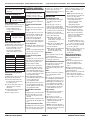
4. Check water temperature sensor for an abnormal
condition. See the Water Temperature Sensor
section, page 5.
5. Plug in washer or reconnect power.
6. Verify CCU operation by running a Diagnostic Test
or any cycle.
Over fills.
Display flashing.
1. Verify the unit is level.
2. Check pump drain system – this could indicate a
failure to drain.
3. Unplug washer or disconnect power.
4. Check operating pressure switch.
5. Check pressure switch hose.
6. Plug in washer or reconnect power.
7. Verify flow meter operation by blowing air though
the part and measuring the resistance.
8. Verify CCU operation by running a Diagnostic Test
or any cycle.
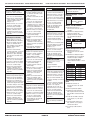
See Failure/Error Display Codes.
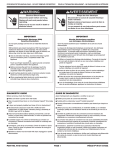
Drum won’t rotate.
1. Check drive belt.
2. Check drive motor.
3. Unplug washer or disconnect power.
4. Check wire harness connections.
5. Plug in washer or reconnect power.
6. Check the MCU by looking for operations of the
drive motor.
Motor overheats.
1. Check drive motor.
2. Unplug washer or disconnect power.
3. Check wire harness connections.
4. Check drive belt.
5. Plug in washer or reconnect power.
6. Check the MCU by looking for operations of the
drive motor.
PAGE 4
PIÈCE No W10118956A