1
Saving a Radio Station
1 Follow the instructions for tuning the FM radio.
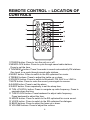
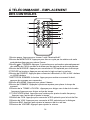
2 Press the TUN+/CLOCK+ or TUN-/CLOCK-buttons on the remote control
to adjust a desired radio frequency.
3 After tuning to the desired station, press the MEM/CLOCK button.
4 Press the MEM/CLOCK button to save the current radio station to
the selected preset. Here are 30 stations can be saved to the tower
speaker′s memory.
(5) Setting the clock
1 Press the POWER button to switch off the unit.
2 Press the MEM/CLOCK button on the remote control.
3 The time on the LCD display will begin blinking.
4 Press the TUN+/CLOCK + or TUN-/CLOCK-button on the remote control to
adjust up or down the hour.
5 Press MEM/CLOCK button again on the remote control to confirm the setting
and it will automatically go to minute setting.
6 Press the TUN+/CLOCK + or TUN-/CLOCK-button on the remote control to
adjust up or down the minute.
7 Press MEM/CLOCK button again on the remote control to confirm the setting.
(6) Setting SLEEP timer
1 Press the POWER button to switch on the unit.
2 Press the SLEEP button repeatedly to select the preset set timer.
Time presets available are 5, 10, 15, 30, 60, 90 minute.
3 After the set sleep time has expired, the tower bar will automatically power off.
(7) Setting the alarm
1 Press the POWER button to turn the tower speaker on.
2 Press the SOURCE button and select the FM mode on the remote control.
Press the TUN+/CLOCK + or TUN-/CLOCK-button to select the desired radio
frequency.
3 Press the POWER button on the remote control to switch off the power.
4 Press the ALARM button on the remote control.
5 The time on the LCD display will begin blinking.
6 Press the TUN+/CLOCK + or TUN-/CLOCK-button on the remote control to
adjust up or down the hour.
7 Press ALARM button again on the remote control to confirm the setting and
it will automatically go to minute setting.
8 Press the TUN+/CLOCK + or TUN-/CLOCK-button on the remote control to
adjust up or down the minute.
9 Press the ALARM button again on the remote control to confirm the setting.
10 After the set sleep time has expired, the ALARM will ring the preset radio
station.
9