1
INSTALLATION
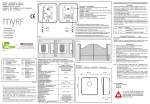
Fix the receiver vertically and as high as possible, with no obstacles around
If you have other receivers installed, you have to put them at least 4-5 meters
faraway the one from the other in order to let them working properly.
STORING NEW REMOTE CONTROL'S CODE
ALL PRE-STORED TEST CODES MUST BE DELETED BEFORE PROGRAMMING
RADIO RECEIVER (see paragraph “DELETING CODES”)
a)
If your remote control has dip-switches, then set up a new code (to made a
safe code, avoid setting the dip-switches all in ON or all in OFF position).
If your remote control doesn't have any dip-switches the code has already
been random generated (it can random generate 16.000.000 different
combinations of codes)
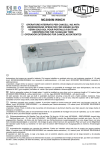
b) Give an impulse by pressing on of the remote control's buttons.
LED4 on the receiver will light up.
c) Press button P1 on the receiver within 4 second to save the code storing.
Once the code is stored, LED4 will go off.
The receiver is now ready to have another code stored by repeating the
procedure from point a).
d) Repeat the same procedure to store further codes from 2° to 60°
e)
Codes can be deleted one by one only.
Repeat the complete procedure for each code you want to delete. If no more
codes are stored, LED4 blinks three times quickly when you press button P2.
We recommend you to take a note of the position assigned to each code/customer
so you don't need to have the remote control in your hands when you want to
delete its code from the receiver and you can start the deleting procedure from
point c). (Don't forget to replace jumper J4 once you have completed the codes
deleting procedure to restore the reception mode on).
Note:
b)
c)
d)
JUMPERS FUNCTIONS
On each channel you can select the SINGLE IMPULSE function or the
BISTABLE function.
J1 = select channel 1 contact
Press a remote control's button to check if a code is already stores in the
receivers' memory: the corresponding output relay should activate itself and
LED1/2/3 should light on accordingly
a)
Once you reach the position in which the code you want to delete is stored
(i.e. if the code you want to delete is in position nr 24 then wait until LED4
blinks once in the twenty-fourth position), press button P2 and keep on
pressing until LED4 blinks three times quickly.
The code is now successfully deleted.
J2 = select channel 2 contact
Linked
= BISTABLE
Not linked = IMPULSE
J3 = select channel 3 contact
DELETING CODES
First thing you need to know the storing position of the code that you want to
delete. For this purpose push the button on the remote control that you want
to delete from the receiver's storage.
LED4 will show the storing position by blinking once if the code is stored in
position nr 1, twice if the code is stored in position nr 2 and so on until
position nr 60.
(We suggest you to now deactivate the reception mode by removing jumper
J4 (RX OFF) in order to avoid interferences while deleting codes)
Press button P2 on the receiver to go trough the stored codes till the position
of the code that you want to delete
Going through the storing positions the LED4 will blink once if in the position
there's a code stored or twice if there's no code stored in that position.
J4 = Linked
Not linked
RX ON
RX OFF
J5 = NOT USED
INSTALACION
Poner el receptor en el punto más alto en posición vertical, donde no haya
obstáculos.
Es necesario no instalar dos o más receptores a una distancia menor de 4 - 5
metros uno del otro, porque esto podría provocar problemas en el funcionamiento.
PROGRAMACION
ANTES DE HACER LA PROGRAMACION DEL RECEPTOR CANCELAR
TODOS LOS CODIGOS DE LA MEMORIA (que fueron memorizados
en la fase de prueba, ver parágrafo CANCELACION DE LOS CODIGOS).
MEMORIZACION AUTOMATICA DE LOS CODIGOS
a) Crear un código personalisado en el transmisor con los 10 Deep Switches,
evitar poner todos los deep switches en posición ON o en posición OFF
En los transmisores con código aleatorio Ud. no tiene que introducir un código
porque este transmisor ya tiene el código introducido en la fase de prueba de
manera casual (hay 16.000.000 de combinaciones)
b) Trasmitir un signal con unas de las teclas del transmisor.
El LED 4 del receptor relampaguerá.
c) Pulsar la tecla P1 del receptor dentro de 4 segundos para memoriza el código
El código 1 ha sido memorizado, el LED 4 se apaga, el receptor está listo para
recibir el segundo código, empezando desde el pundo (a).
d) Repetir el mismo procedimiento para memorizar el 2°, 3°, 4°...60° código.
Con la receptión de un código ya memorizado se activa el relay de salida
conectado a la tecla que ha sido pulsada y el LED 1/ 2/ 3 relampaguean.
e)
Si el código que quiere borrar estáen posición 24, cuando el LED 4 ha señale
la 24° posición, pulsar la tecla P2 y mantener apretado hasta que el LED 4 no
relampaguerá 3 veces.
Ahora el código está borrado. Se pueden cancelar los códigos sólo a uno a uno.
Repetir la oparación para cada código que quiere cancelar.
Si pulsando la tecla P1 el LED1 relampaguea 3 veces con 3 relampagueos veloces,
significa que no hay códigos memorizados.
Sugerimos escribir los códigos memorizados y el nombre del cliente, así que no
hay que tener el transmisor a disposición para cancelar el código y Ud. podrá
empezar directamente desde el punto c).
(completada la cancelación de los códigos, recordarse de reactivar la receptión
introduciendo el JUMPER J4)
JUMPERS
Para cada canal se puede elegir la función: IMPULSO o BISTABLE
J1 = selección contacto canal 1
J2 = selección contacto canal 2
conectado = bistabile
desconectado = impulso
J3 = selección contacto canal 3
a)
b)
c)
d)
CANCELACION DE LOS CODIGOS
Identificar el códogo que se quiere borrar.
Es necesario tener el transmisor que se quiere anular y pulsar la tecla relativa.
El LED 4 relampaguerá una vez si este código está en posición 1.
Relampaguerá dos veces si está en posición 2 y otras hierbas hasta la 60°
posición.
Para que no haya interferencias causadeas por la receptión de algunos códigos
mientras la cancelación de los códigos, aconsejamos de parar la receptión con
el JUMPER J4 (RX OFF)
Pulsar la tecla P2 para empezar a buscar el código que borrar.
El LED 4 relampaguerá una vez para cada código memorizado y dos veces
veloz para cada código disponible (está operación será repetida para cada uno
de los 10 códigos presentes en la memoria)
J4 = conectado
desconectado
J5 = no utilizado
RX activo
RX no activo