1
INSTALLATION MANUAL
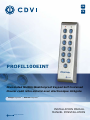
PROFIL100EINT
Illuminated Mullion Weatherproof Keypad Self Contained
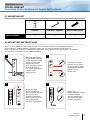
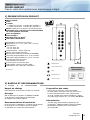
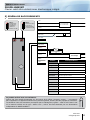
F. RESET MASTER CODE
On stand-by operating mode,
put a jumper on P2.
- The green LED lights on,
- One beep is emitted,
- Wait until the green LED switches off,
- To desable the function remove the jumper,
- The master code is restored to its default
value 1 2 3 4 5 6 in 6-digits code, 1 2 3 4 5
in 5-digits code and 1 2 3 4 in 4-digits code,
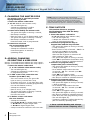
G. CHANGING THE CODE
BY A USER
To authorize a user to modify its own
User code place the jumper on P3
(to disable the function remove the jumper).
1. Enter the old user code.
- The relay is activated and a beep is emitted,
- The green LED lights on,
- One beep is emitted.
2. Enter the 2-digits sub master code
- Relay 1, for the first use : A and B,
- Relay 2, for the first use : 1 and 3,
- The red LED lights on,
- A beep is emitted to authorise
the modification.
3. Enter the new user code.
- The green LED lights on during 1 second,
- 2 beeps are emitted to confirm the new code,
- The red LED lights off.
4. Check the new user code to be sure
of the modification.
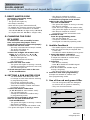
H. SETTING A SUB MASTER CODE
- The Sub Master code allows the user
to change its own code without entering
in programming mode,
- For security reasons the code
need to be changed periodically,
- This feature makes it easier and faster
to change its code.
1. Enter the master code twice
(1 2 3 4 5 default value master code).
- The red LED lights on,
- 2 beeps are emitted to confirm entry
in programming mode.
2. Press A7 to program a sub master
code for the user individual Pin
code modification.
- The green LED lights on during 1 second,
- One beep is emitted,
- Enter the new 2-digits sub master code,
- The green LED lights on during 1 second.
- One beep is emitted to confirm
programming of the sub master code.
3. Press A8 to program a sub master
code for the user individual
Pin code modification.
- The green LED lights on during 1 second,
- One beep is emitted,
- Enter the new 2-digits sub master code,
- The green LED lights on during 1 second,
- One beep is emitted to confirm
programming of the sub master code.
4. Press B to exit
from the programming mode.
- The red LED lights off,
- 2 beeps are emitted to confirm that
the keypad is in stand-by operating mode.
I. Audible Feedback
- The audible signal is enabled in programming
mode and when the relay is energised after
a valid code,
- To enable the audible feedback on a key press:
1. Enter the master code twice
(1 2 3 4 5 default value master code).
2 beeps are emitted to confirm entry
in programming mode.
2. Press AA.
- One beep is emitted,
- Press 0 to disable the audible signal
during a keypress,
- Press 1 to enable the audible signal
during a keypress,
- One beep confirms the new setting.
3. Press B to exit from programming.
2 beeps are emitted to confirm exit
from programming mode.
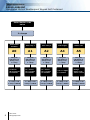
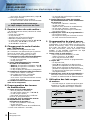
J. Use of the red and green LEDs:
- The red and green LEDs are designed
to receive 12V dc (built-in resistors),
- They are wired as follows:
Red
LED
Green
LED
2.2KΩ
2.2KΩ
Brown
12V dc
White
0V
Green
12V dc
Yellow
0V
cdvi.com
cdvigroup.com
7