1
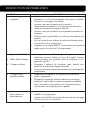
The recording doesn’t
work as scheduled.
‧
‧
‧
‧
Unable to pair the camera ‧
to the receiver
‧
‧
Bright white spots appear
at night time
‧
Make sure correct DATE AND TIME has been
correctly set.
Make sure the Record Schedule has been setup
correctly.
Make sure the memory card is inserted and formatted.
In motion detection mode, a moving object within the
camera viewing angle is necessary to trigger the motion
sensor for recording.
Make sure the camera and the receiver are powered on.
Press and release the pairing button on the camera once
quickly. Do not press and hold.
Power off the receiver and restart. If power button does
not work, use a pin to press the reset button.
The camera's infrared LEDs produce invisible light that
reflects off surfaces such as glass. Install the camera on
the other side of windows or place the lens flush against
the surface to improve the night vision. It is suggested
to install camera(s) under well lit area.
Note: Please check the environment rating (Ingress) of
the camera(s) before installing outdoors.
Memory card error
‧
‧
Make sure the memory card is correctly inserted and
formatted.
Use the provided memory card within the package to
ensure proper operation.
Note: Please backup the data before formatting. Format
function will delete all the data on the memory card.
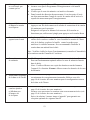
Wrong data and/or time is ‧ Wrong date and/or time will result in unexpected record
shown.
schedule. Please refer to page 46 of your monitor
notice to configure correct system date/time.
More cameras are added ‧ Make sure all cameras are properly paired (see page
but not all of them show
Of your monitor notice p42).
images on the receiver
‧ Make sure all cameras are properly activated (see page
Of your monitor notice p42).
‧ Follow the solution of ‘No image appears’ to ensure
best reception of wireless signals.
27