1
Camera Installation
Avoid positioning the camera so that it is facing directly at the sun as this will impair
the picture quality viewed.
Avoid pointing the camera lens directly through clear glass as the night vision
LEDs will cause a blurred image at night.
Avoid pointing the camera directly at any bushes, tree branches or moving objects that
might naturally move due to winds. This is also because if you need to use the motion
detection feature in the PC software to record movement the software might record
unnecessarily.
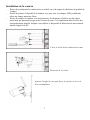
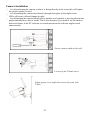
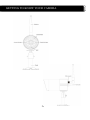
Secure camera stand on the wall
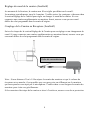
Loosen up the Thumb screw
Adjust proper view angle then secure the joint with
T-bolt.
21