1
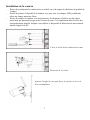
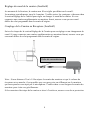
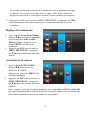
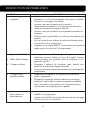
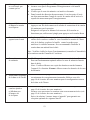
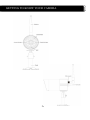
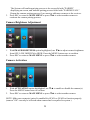
CAMERA ADDITIONNELLE DWS Pour kit Vidéo surveillance DWS Manuel d’installation et d’utilisation Modèle: DWS LIRE ATTENTIVEMENT ET CONSERVER CETTE NOTICE Ce manuel contient d'importantes informations sur le fonctionnement du produit. En cas d'installation pour le compte d'autres personnes, il convient de laisser la présente notice aux utilisateurs finaux du système. 1 Table des matières INTRODUCTION .................................................................................................................. 3 CONSIGNES DE SECURITE IMPORTANTES ................................................... 3 CONTENU DE L’EMBALLAGE ......................................................................................... 5 CONSEILS DE SECURITE ET D’INSTALLATION ....................................................... 6 Installation de la caméra .......................................................................................... 7 Réglage du canal de la caméra (facultatif) ............................................................ 8 Couplage de la caméra au récepteur (facultatif) .................................................... 8 COMPRENDRE VOTRE CAMERA ................................................................................... 9 CONFIGURATION DU RECEPTEUR VIDEO ............................................................... 10 Connexion de la caméra ....................................................................................... 10 Réglage de la luminosité ........................................................................................ 11 Mise en route de la caméra .................................................................................... 11 RESOLUTION DES PROBLEMES ................................................................................. 12 TECHNOLOGIE DIGITALE SANS FIL ........................................................................ 14 SPECIFICATIONS DU PRODUIT......................................................................................... 14 NOTICE VERSION ANGLAISE ........................................................................................ 15 DECLARATION DE GARANTIE ................................................................................. 31 2 INTRODUCTION CONSIGNES DE SECURITE IMPORTANTES Les dommages causés par une utilisation non-conforme aux consignes d’instruction entraînent l’annulation de la garantie! Nous n’assumons aucune responsabilité pour tout dommage corporel ou matériel occasionné par une utilisation non-conforme ou par un nonrespect des consignes de sécurité. Dans de tels cas, toute requête de garantie devient automatiquement nulle et non avenue. 1. Veillez à ne pas faire tomber la caméra. Ne cherchez ni à l’ouvrir, ni à la désassembler, sous peine d’annulation de la garantie. 2. Evitez tout contact avec l’eau, et essuyez vos mains avant utilisation. 3. Ne tirez jamais sur les câbles de connexion. Utilisez la fiche pour débrancher l’appareil du mur. 4. N’exposez pas la caméra à une température élevée, et ne la laissez pas en plein soleil. Ceci pourrait endommager l’appareil ou provoquer un mauvais fonctionnement temporaire. 5. Utilisez l’appareil avec précaution. Evitez de presser fortement sur le corps de la caméra. 6. Pour votre propre sécurité, il est conseillé de ne pas utiliser l’appareil ou de le débrancher en cas d’orage 7. Débranchez le bloc d’alimentation en cas de périodes prolongées entre chaque usage 8. Utilisez seulement les accessoires et les blocs d’alimentation fournis par le fabricant. 9. Afin de respecter les règles relevant de la responsabilité parentale, veuillez conserver l’appareil hors de la portée des enfants. 10. Vérifiez que les cordons d’alimentation ne soient ni écrasés ni endommagés lorsque l’appareil est en marche. FCC Déclaration de Conformité: ce produit est conforme à l’article 15 du règlement FCC. L’opération est sujette aux deux conditions suivantes : (1) l’appareil ne doit causer aucune interférence nocive, et (2) l’appareil doit accepter toute interférence reçue, y compris les interférences causées par des opérations nondésirées. Les produits possédant la mention CE sont conformes à la Directive EMC (2004/108/EC) ainsi qu’ à la Directive de Basse Tension(73/23/EEC), R&TTE (1999/5/EC) et à la Directive ROHS (2011/65/EU) issues par la Commission de la Communauté Européenne. La conformité à ces directives implique la conformité aux Normes Européennes suivantes : EMC: EN 301 489 LVD : EN 60950 Radio : EN 300 328 3 AVERTISSEMENT FCC/CE Cet appareil a été testé et répond aux exigences des appareils digitaux de Catégorie B, conformément à l’Article 15 du règlement FCC et ETSI(EN) 300328. Ces exigences sont conçues pour fournir une protection raisonnable contre des interférences nuisibles dans les installations résidentielles. Cet appareil génère, utilise et irradie une énergie radioélectrique et peut, en cas d’installation ou d’utilisation non conforme aux instructions, engendrer une interférence néfaste aux communications radio. Cependant, il n’existe aucune garantie que des interférences n’auront pas lieu dans une installation particulière. Si l’appareil interfère avec la réception d’appareils de télévision ou de radio, ce qui peut être déterminé en l’allumant ou en l’éteignant, il est recommandé de corriger l’interférence par une ou plusieurs des mesures suivantes : - Réorienter ou relocaliser l’antenne de réception. – Eloigner l’appareil du récepteur. - Brancher l’appareil sur un circuit différent de celui du récepteur. – Consulter le vendeur ou un technicien de radio/télévision pour des suggestions supplémentaires. Nous vous rappelons que toute modification de l’appareil qui n’est pas expressément approuvée par un partenaire agréé risque d’annuler votre droit de l’utiliser. DESTRUCTION Si le système de caméra ne fonctionne plus ou ne peut plus être utilisé, il doit être éliminé selon les règlements en vigueur. Les piles et accus usagés doivent impérativement être retournés. Il est strictement interdit de jeter les piles et accus usagés avec les déchets domestiques! Les piles et accus qui contiennent des substances dangereuses possèdent un symbole sur le côté. Ces symboles indiquent qu’il est interdit de jeter ces piles et accus dans les poubelles domestiques. Les abréviations pour les métaux lourds sont respectivement : Cd=cadmium, Hg=mercure, Pb=plomb. Vous pouvez retourner les piles et accus usagés qui ne peuvent plus être chargés dans les lieux de collecte prévus à cet effet dans votre ville, ou dans tout point de vente de ces objets. Si vous suivez ces instructions, vous répondez aux exigences réglementaires et vous contribuez à la protection de l’environnement ! Déclaration pour une installation de vidéosurveillance La vidéosurveillance est soumis aux articles L223-1 à L223-9; L251-1 à L 251-8; L 253-1 à L253-5 et L254-1 du code de la sécurité intérieure. Décret d’application N° 96-926 du 17 octobre 1996 modifiée. Dans les lieux privés : domicile / entreprise non ouverte au public Les systèmes sans enregistrements dans les lieux privés (domicile ou entreprises non ouvertes au public extérieur) qui n’accueillent pas de public au sens de la loi ne relèvent d'aucune procédure administrative préalable. La mise en place éventuelle de caméras doit cependant s’effectuer dans le respect de la vie privée et sans visionner la voie publique. Les dispositions générales du code civil sur le droit à l’image ou des réglementations particulières telles que celle du code du travail sont alors applicables. Dans les lieux ouverts au public Concernant les lieux ouverts au public s’il n'existe aucun enregistrement et que les images prises par la caméra sont directement renvoyées sur un seul et même écran que tout le monde peut voir en entrant, nous ne sommes pas non plus dans un système considéré comme participant à de la surveillance. En revanche si les images collectées par la caméra sont également renvoyées sur un écran central sur lequel d'autres images collectées par d'autres caméras sont également proposées aux fins de surveillance, alors nous sommes bien dans un système de vidéoprotection relevant du code de sécurité intérieure. Dans ce cas, l'installation d'un système de vidéoprotection relève d'une autorisation préalable à solliciter auprès du préfet du département qu'il y ait enregistrement ou pas des images. Adresser une demande d’autorisation à la préfecture de votre département qui instruira votre demande. Le formulaire à compléter est le cerfa 13806*03. Les informations générales et aide pour remplir la demande d'autorisation d'un système de vidéo protection sont dans la notice d’information 51336#02. Site internet : http://www.interieur.gouv.fr 4 CONTENU DE L’EMBALLAGE A Caméra Digitale Sans fil x 1 B Socle de la caméra x 1 C D 5V/1A Bloc d’Alimentation Antenne de Caméra x 1 E Paquet de vis x 1 F Manuel d’installation x 1 Matériel requis: Perceuse électrique Mèche à maçonnerie de 5mm Mèche à maçonnerie de15mm Tournevis n°2 5 CONSEILS DE SECURITE ET D’INSTALLATION Ne tentez pas d’ouvrir pas l’appareil lorsque la prise du bloc d’alimentation est branchée afin d’éviter tout risque de blessure. Lorsque vous procédez à l’installation de la caméra de vidéosurveillance, suivez scrupuleusement les conseils du fabricant pour l’utilisation des outils électriques, des escabeaux, des échelles etc…, et portez un équipement protecteur (par exemple des lunettes de protection) lorsque vous percez des trous. Avant de percer les murs, il convient de vérifier la présence de câbles électriques et tuyaux d’eau cachés. Il est conseillé d’utiliser un détecteur de câbles. Il est également recommandé de ne pas exposer les caméras à des conditions climatiques extrêmes (par exemple sous une gouttière où des risques de fuite sont présents). Lors de l’installation des caméras, il est conseillé d’utiliser des gaines de protection pour les câbles de prolongation afin de prévenir ou de réduire les possibilités d’altération. Après la perforation de trous dans des murs extérieurs, veuillez-vous assurer que le trou est scellé autour du câble avec un produit d’étanchéité pour la prévention des infiltrations. Pour vous protéger des dangers d’incendie ou de choc électrique, n’essayez en aucun cas d’ouvrir le boîtier lorsque que l’appareil est exposé à la pluie ou à l’humidité. Le produit ne contient aucune pièce interne réparable par l’utilisateur. Adressez-vous à un service spécialisé. Evitez d’exposer la caméra en plein soleil, ou de la diriger vers des buissons, branches d’arbres ou tout objet mouvant qui risque de causer des enregistrements inutiles (par exemple à cause du vent). Le système fournit aussi la fonction “Masque”. L’utilisateur peut masquer les espaces de détection de mouvement dans la partie de l’image où elle n’est pas requise. Vision nocturne La caméra possède des lumières LED infra-rouges intégrées qui vous permettent une surveillance nocturne de 24 heures/24. Les lampes LED s’allument automatiquement la nuit et fournissent une image en noir et blanc. L’étendue de la visibilité nocturne est de 7 mètres. 6 Installation de la caméra - Evitez de positionner la caméra face au soleil, car cela risque de détériorer la qualité de l’image. Evitez de pointer l’objectif de la caméra vers une vitre, les lampes LED produiront alors une image nocturne floue. Evitez de pointer la caméra vers des buissons, des branches d’arbres ou des objets mouvants qui puissent bouger sous l’action du vent. Ceci également afin d’éviter des enregistrements inutiles lorsque vous utilisez le dispositif de détection de mouvement dans le logiciel du PC. Fixez le socle de la caméra sur le mur Desserrez la vis à tête Ajustez l’angle de vue puis fixez le joint avec la vis à tête rectangulaire 7 Réglage du canal de la caméra (facultatif) Au moment de la livraison, la caméra sans fil est réglée par défaut sur le canal 1. Le moniteur peut alimenter jusqu’à 4 caméras. Veuillez suivre les consignes ci-dessous dans la section Réglage de la Caméra pour régler ou changer le canal de la caméra. Si vous connectez une caméra supplémentaire au moniteur fourni, assurez-vous que son canal diffère de celui programmé dans la caméra d’origine. Couplage de la Caméra au Récepteur (facultatif) Suivez les étapes de la section Réglage de la Caméra pour un réglage ou un changement de canal. Si vous connectez une caméra supplémentaire au moniteur fourni, assurez-vous que son canal diffère de celui programmé dans la caméra d’origine. Fiche de raccordement Note : Si une distance d’1m à 1.50m sépare la caméra du moniteur et que le volume du récepteur est en marche, il est possible que vous perceviez un sifflement sur le moniteur qui correspond au son capté par le microphone. Veuillez dans ce cas éloigner la caméra du moniteur pour éviter ces grésillements. Si la connexion électrique de la caméra se situe à l’extérieur, assurez-vous de sa protection. 7 8 COMPRENDRE VOTRE CAMERA Antenne LED Infra-rouges Indicateur de courant Indicateur de signal Indicateur de signal EDS Socle Connecteur SMA Câble électrique 9 CONFIGURATION DE LA CAMERA 1. 2. 3. Sélectionnez CAMERA SETUP, appuyez sur la touche MENU puis sur SUBMENU Utilisez ▼▲pour sélectionner la caméra (caméra 1-4) Utilisez ◄►pour sélectionner le sous-menu : Connexion de la Caméra/ Luminosité/ Touche Arrêt/marche Connexion de la caméra Le fabricant a connecté votre caméra au canal 1. Pour ajouter de nouvelles caméras au système, vous devez les connecter aux différents canaux. 1. 2. Lorsque l’option “Connexion” est allumée, appuyez une fois sur la touche Menu pour initier la connexion. La touche LED clignotera d’abord une fois puis continuellement pour indiquer que la transmission de données est en cours. Appuyez puis relâchez la touche une fois brièvement. 10 Le système confirmera le succès de la connexion avec l’apparition du signe “connecté” sur l’écran, ou l’échec avec le signe “échec de la connexion”. Répétez ce processus si vous désirez ajouter d’autres caméras au récepteur. 3. Appuyer sur ESC pour revenir au MENU PRINCIPAL ou appuyez sur ▼▲ pour sélectionner une autre caméra pour la continuation du processus de connexion. Réglage de la luminosité 1. 2. Avec l’option Correction d’Image, utilisez ▼▲pour régler la luminosité de la caméra sur Arrêt, Faible, Moyen ou Fort. Appuyez sur le bouton MENU une fois pour confirmer. Appuyez sur ESC pour revenir au MENU PRINCIPAL ou appuyez sur ▼▲ pour sélectionner une autre caméra. Activation de la caméra 1. 2. Avec l’option ACTIVATION, utilisez ▼▲ pour activer ou désactiver la caméra. Appuyez sur la touche MENU une fois pour confirmer Appuyez sur ESC pour retourner au MENU PRINCIPAL ou appuyez sur ▼▲ pour sélectionner une autre caméra. Note : Assurez-vous que la caméra connectée soit compatible au SCAN ou QUAD pour un fonctionnement normal (la touche de la caméra « ON » peut seulement être sélectionnée quand la caméra a été connectée au système). 11 RESOLUTION DE PROBLEMES CONSTAT Aucune image n’apparaît SOLUTION Signal sans fil faible Faible débit d’images L’image est floue L’image est de mauvaise qualité Le détecteur de mouvements ne fonctionne pas Vérifiez si le bloc d’alimentation est pas endommagé ou défectueux, et s’il est bien branché à une prise de courant Vérifiez si le récepteur est chargé Assurez-vous que la caméra soit en marche Repositionnez la caméra et le récepteur pour obtenir la meilleure réception des signaux sans fil Assurez-vous que la caméra est proprement accordée au récepteur Vérifiez que le canal affiché est celui qui est connecté à la caméra. Si ce n’est pas le cas, utilisez la touche de direction pour vous trouver sur le canal correct Appuyez sur la touche MENU du récepteur pour quitter le mode repos et revenir sur l’écran principal Les appareils sans fils tels que les systèmes stéréos familiaux peuvent réduire la force du signal. Laissez autant d’espace que possible entre le récepteur et ces appareils sans fil Retournez l’antenne du récepteur pour obtenir une meilleure réception des signaux sans fils Vous pouvez aussi acheter des antennes avec prolongateur d’autonomie pour augmenter la portée votre signal sans fil la Rapprochez la caméra et de le récepteur pour obtenir portée appropriée Eloignez les obstacles entre la caméra et le récepteur Nettoyez l’objectif de la caméra en utilisant un chiffon doux. Les taches et la poussière sur l’objectif peuvent aussi donner une image de pauvre qualité Vérifiez que la détection de mouvement a été correctement installée et programmée Ajustez la sensibilité du capteur de mouvement (voir page 16 de la notice de votre moniteur) 12 L’enregistrement ne se déroule pas comme prévu Impossibilité d’adapter la caméra au récepteur Des taches blanches apparaissent la nuit Assurez-vous que la Date et l’Heure ont été installées correctement Assurez-vous que le Programme d’Enregistrement a été installé correctement Vérifiez que la carte de mémoire est insérée et formatée Dans le mode de détection de mouvement, il est nécessaire d’avoir un objet mouvant dans l’angle de vue de la caméra afin d’activer le capteur de mouvement pour l’enregistrement Assurez-vous que la caméra et le récepteur sont allumés Appuyez une fois brièvement sur la touche de connexion de la caméra. Ne maintenez pas la pression Eteignez le récepteur et allumez-le à nouveau. Si la touche ne fonctionne pas, utilisez une épingle pour appuyer sur la touche Reset Les lampes LED infra-rouges produisent une lumière invisible qui se reflète sur les surfaces comme le verre. Installez la caméra de l’autre côté de la fenêtre ou placez la lentille contre la surface pour améliorer la visibilité nocturne. Il est recommandé d’installer la caméra dans un endroit bien éclairé Note : Veuillez vérifier la classe d’environnement (en matière d’étanchéité) de la caméra avant de l’installer à l’extérieur. Erreur de carte de mémoire Erreur dans l’affichage de la date et de l’heure Certaines des caméras ajoutées n’affichent pas d’images sur le récepteur Vérifiez que la carte de mémoire est correctement insérée et formatée Pour un fonctionnement optimal utilisez la carte de mémoire fournie dans la boîte. Note : Veuillez effectuer une copie des données avant de formater l’appareil. La fonction Format effacera toutes les données de la carte de mémoire. Des erreurs dans la programmation de la date et de l’heure occasionnent des enregistrements inattendus. Référez-vous à la page 19 de la notice de votre moniteur pour la configuration correcte de la date et de l’heure Assurez-vous que toutes les caméras sont correctement ajustées (voir page 15 de la notice de votre moniteur) Assurez-vous que toutes les caméras sont correctement activées (voir page 15 de la notice de votre moniteur) Suivez la solution “Aucune image n’apparaît” pour garantir une réception optimale des signaux sans fil 13 RENSEIGNEMENTS COMPLEMENTAIRES SUR LA TECHNOLOGIE DIGITALE SANS FIL Cette section vous offre des informations utiles pour la résolution de la plupart des problèmes. Nous espérons qu’elle vous aidera à optimiser votre configuration. Sur le Signal Digital Sans Fil 2.4GHz Cette solution digitale innovatrice intègre la technologie de pointe du Frequency Hopping Spread Spectrum (FHSS). Cette technologie réduit considérablement les interférences provenant d’autres appareils branchés sur la même fréquence de radio (2.4GHz), par exemple WIFI, Bluetooth, Zigbee, téléphone sans fil etc… Il vous est dorénavant possible d’obtenir une qualité de surveillance sans fil sans grésillement ni vacillement. Cependant, un signal faible (une image décalée ou immobile) peut être observé de temps en temps, suivant la localisation du système. En accord avec le règlement FCC article 15.247,ETSI(EN)300 328, les signaux auditifs et vi suels transmis sur une distance de plus de 150 mètres devraient pouvoir être captés. Toutefois, les lignes d’installation de signaux ne sont pas pratique courante. Les facteurs influant la transmission incluent les fours micro -ondes et autres ondes magnétiques à haute fréquence. La caméra et le récepteur ne doivent pas être placés près de murs en béton renforcé, de produits en métal massif ou d’ameublement en métal. L’eau forme également un obstacle. Par ailleurs, le passage d’êtres humains peut également causer une qualité de réception trouble. Comment augmenter la qualité des signaux sans fil? Dans la mesure du possible, retirez tous les obstacles susceptibles d’affecter le signal entre la caméra et le récepteur. Ceci inclut les meubles et les murs. Si vous pensez que le signal demeure toujours de mauvaise qualité, veuillez rapprocher la caméra du récepteur. Pourquoi la compression d’images? Afin de fournir un service sans fil privé et libre d’interférences, cette solution digitale fonctionne sur une bande de fréquence de 2Mb. A la différence des signaux analogues traditionnels 2.4GHz, ce signal digital sans fil est comprimé et présenté sous le format Motion JPEG (MJPEG). Les données brutes analogues étant digitalisées et comprimées, la bande passante fonctionne de façon plus efficace et plus sûre. Par conséquent, il est possible que vous observiez une ligne d’image plus dentelée sur un grand récepteur ou sur une télévision Plasma. SPECIFICATIONS DU PRODUIT Portée de la communication 150 mètres en champ libre Résolution du Récepteur 800 X 480 Résolution de la Caméra 640 X 480 Température de Fonctionnement -10°C ~ 50°C Voltage DC 5V / 1A Consommation électrique 550mA (max) Vision nocturne 5 mètres Dimensions 123 x 65 x 65 mm 14 DWS SERIES VIDEO SECURITY SYSTEM Installation and Operating Instruction Manual Model: DWS This manual should be retained for future reference CONTENTS INTRODUCTION ....................................................................................................... 17 IMPORTANT SAFETY PRECAUTIONS .................................................... 17 KIT CONTENT ........................................................................................................... 19 SAFETY AND INSTALLATION TIPS ..................................................................... 20 Camera Installation6 Setting the Camera Channel (optional) ......................................................... 22 Pairing the Camera to Receiver (optional) .................................................... 22 GETTING TO KNOW YOUR CAMERA ................................................................. 23 CONFIGURING YOUR VIDEO RECEIVER .......................................................... 24 Camera Pairing .............................................................................................. 24 Camera Brightness Adjustment ..................................................................... 25 Camera Activation ........................................................................................ 25 TROUBLE SHOOTING .............................................................................................. 26 ABOUT DIGITAL WIRELESS TECHNOLOGY .................................................... 28 PRODUCT SPECIFICATION .................................................................................... 29 WARRANTY DECLARATION ............................................................................. 32 16 INTRODUCTION IMPORTANT SAFETY PRECAUTIONS Damages caused by non-compliance with this operating manual will void the warranty! We will not assume any liability for damages to items or persons caused by improper handling or non-compliance with the safety notices! Any warranty claim will be null and void in such cases. 1. Do not drop, puncture or disassemble the camera; otherwise the warranty will be voided. 2. Avoid all contact with water, and dry hands before using. 3. Never tug on the power cords. Use the plug to unplug it from the wall outlet. 4. Do not expose the camera to high temperature or leave it in direct sunlight. Doing so may damage the camera or cause camera temporary malfunction. 5. Use the devices with care. Avoid pressing hard on the camera body. 6. For your own safety, avoid using the camera or power off the camera when there is a storm or lightning. 7. Remove the power adapter during long periods between usages. 8. Use only the accessories and power adapters supplied by the manufacturer. 9. To meet the regulations pertaining to parental responsibility, keep the devices out of the reach of infants. 10. Check power cables, do not get crushed or damaged by sharp edges whenever the devices are in operation. FCC Compliance Statement: This device complies with Part 15 of the FCC rules. Operation is subjected to the following two conditions: (1) this device may not cause harmful interference, and (2) this device must accept any interference received, including interference that may cause undesired operation. 17 Products with CE Marking comply with EMC Directive (2004/108/EC); Low Voltage Directive (73/23/EEC); R&TTE(1999/5/EC); ROHS Directive (2011/65/EU) issued by the Commission of the European Community. Compliance with these directives implies conformity to the following European Norms: EMC: EN 301 489 LVD: EN 60950 Radio: EN 300 328 FCC/CE WARNING This equipment has been tested and found to comply with limits for a Class B digital device, pursuant to Part 15 of the FCC rules and ETSI(EN) 300328. These limits are designed to provide reasonable protection against harmful interference in residential installations. This equipment generates, uses, and can radiate radio frequency energy, and if not installed and used in accordance with the instructions, may cause harmful interference to radio communications. However, there is no guarantee that interference will not occur in a particular installation. If this equipment does interference to radio or television equipment reception, which can be determined by turning the equipment off and on, the user is encouraged to try to correct the interference by one or more of the following measures: -Reorient or relocate the receiving antenna.-Move the equipment away from the receiver.-Plug the equipment into an outlet on a circuit different from that to which the receiver is connected.-Consult the dealer or an experienced radio/television technician for additional suggestions. You are cautioned that any change or modifications to the equipment not expressly approved by the party responsible for compliance could void your authority to operate such equipment. DISPOSAL If the camera system no longer functions or can no longer be repaired, it must be disposed of according to the valid statutory regulations. Disposal of spent batteries/accumulators: You are required by law (Battery Ordinance) to return all spent batteries and accumulators. Disposing of spent batteries/accumulators with common household waste is prohibited! Batteries/accumulators that contain hazardous substances are marked with the symbols on the side. These symbols indicate that it is prohibited to dispose of these batteries/accumulators in the household waste. The abbreviations for the respective heavy metals are: Cd=cadmium, Hg=mercury, Pb=lead. You can return spent batteries and accumulators that can no longer be charged to the designated collection points in your community, outlets or wherever batteries or accumulators are sold. Following these instructions will allow you to fulfill the legal requirements and contribute to the protection of our environment! 18 KIT CONTENT A Digital Wireless Camera x 1 B Camera Stand x 1 C Camera Antenna x 1 E Screw Pack x 1 D 5V/1A Power Adapter F Manual x 1 Tools Required: Electric drill 5mm masonry drill bit 15mm masonry drill bit No. 2 Philips screwdriver 19 SAFETY AND INSTALLATION TIPS Do not attempt to open the units with the power adaptor plug connected to avoid any risk of personal injury. When installing CCTV camera(s), always follow manufacturer's advice when using power tools, steps, ladders, etc. and wear suitable protective equipment (e.g. safety goggles) when drilling holes. Before drilling holes through walls, check for hidden electricity cables and water pipes. The use of cable/pipe detector is advisable. It is also advisable to avoid exposing any cameras to extreme weather conditions (e.g, under a gutter which is prone to any water leaks). When installing any cameras with this unit, it is advisable to use cable conduit to protect any video/power extension cables from being exposed externally and to prevent/reduce the chances of the cables being tampered with. After drilling any hole though an external wall for a cable, ensure the hole is sealed up around the cable using a sealant to prevent drafts. To prevent a fire or electrical shock hazard, do not attempt to open the housing while the unit is exposed to rain, water or wet conditions. There are no user serviceable parts inside. Refer servicing to qualified service personnel. Avoid pointing the camera(s) directly at the sun or any bushes, tree branches or moving objects that might unnecessarily cause the receiver to record due to winds for example. System also provides the "Masking" function. User may screen out motion detection area in parts of the picture which motion detection is not required. Night Vision The camera has built-in infra-red LEDs to allow you to view at night for 24hrs surveillance. The LEDs will automatically activate at night and the picture viewed will turn to black and white. The night viewing range is up to 7 meters. 20 Camera Installation Avoid positioning the camera so that it is facing directly at the sun as this will impair the picture quality viewed. Avoid pointing the camera lens directly through clear glass as the night vision LEDs will cause a blurred image at night. Avoid pointing the camera directly at any bushes, tree branches or moving objects that might naturally move due to winds. This is also because if you need to use the motion detection feature in the PC software to record movement the software might record unnecessarily. Secure camera stand on the wall Loosen up the Thumb screw Adjust proper view angle then secure the joint with T-bolt. 21 Setting the Camera Channel (optional) The wireless camera is supplied preset to channel 1. The monitor supports up to 4 cameras. Follow the steps below in Camera Setup section to setup or change the monitor channel of the camera. If you are adding another camera to link with the supplied monitor in this kit, then ensure its channel is set to a different channel to the existing camera(s). Pairing the Camera to Receiver (optional) Follow the steps in Camera Setup section to setup or change the channel of the camera. If you are adding another camera to link with the supplied monitor in this kit, then ensure its channel is set to a different channel to the existing camera(s). Note: If the camera is located within 1m to 1.5m from the monitor and the camera's volume on the receiver is turned on, then you may hear a whistling noise on the monitor which is the feedback picked up by the microphone. In this case please locate the camera further away from the monitor to prevent this noise. If the power connection to the camera is kept outdoors, ensure the connection is suitably protected. 22 GETTING TO KNOW YOUR CAMERA 23 CONFIGURING YOUR VIDEO RECEIVER CAMERA SETUP 1. 2. 3. Select CAMERA SETUP, press the MENU button to enter sub-menu. Use ▼▲ to select the camera to set up (camera 1-4). Use ◄► to select the sub-menu [CAMERA PAIRING] [BRIGHTNESS] [CAMERA ON/OFF] Camera Pairing Your camera is paired to the monitor at the factory to channel 1. To add new camera(s) to your system, you have to pair it to the different channel(s). 1. With the PAIRING option highlighted, press the MENU button once to begin camera pairing. 2. The pair LED on camera will blink once and following with LED blinking continuously to indicate data transmission in progress. Press and release the pairing button on the camera once quickly. 24 3. The System will confirm pairing process to be successful with "PAIRED" displaying on screen, and indicate pairing process failed with "PAIRING FAIL." Repeat the camera pairing process if you want to add more cameras to the receiver. Press ESC to return to MAIN MENU or press ▼▲ to select another camera to continue the camera pairing process. Camera Brightness Adjustment 1. 2. With IMAGE RIGHTNESS option highlighted, use ▼▲ to adjust camera brightness from OFF, LOW, MEDIUM to HIGH. Press the MENU button once to confirm. Press ESC to return to MAIN MENU or press ▼▲ to select another camera. Camera Activation 1. 2. With ACTIVATION option highlighted, use ▼▲ to enable or disable the camera(s). Press the MENU button once to confirm. Press ESC to return to MAIN MENU or press ▼▲ to select another camera. NOTE: Make sure camera(s) paired is enabled for SCAN or QUAD to function properly (camera "ON" can only be selected when camera has been paired to system.). 25 TROUBLE SHOOTING IF… No image appears SOLUTION ‧ ‧ ‧ ‧ ‧ ‧ ‧ Low wireless signal ‧ Low frame rate Image is choppy ‧ ‧ Poor picture quality ‧ ‧ ‧ Motion detection is not working ‧ ‧ Make sure the power adaptor is not damaged or defective and plugged into an electrical outlet with power. Make sure the receiver has enough charge Make sure the camera is powered on. Relocate the camera/ receiver to obtain the best reception of wireless signals. Make sure the camera is properly paired to the receiver. Check the displaying channel is the one paired with the camera. If not, use the direction button to switch to the correct channel. Press the Menu button on the receiver to exit the system idle mode and go back to the main screen. Wireless devices such as wireless home stereo system may reduce the signal strength. Leave as much space as possible between the camera(s)/receiver and these wireless devices. Flip the antenna of the receiver to obtain the best reception of wireless signals. You can also purchase accessory range extender antennas to increase the range of your wireless signal. Move closer the camera(s) and receiver to ensure the appropriate wireless range. Remove the obstacles between the camera(s) and receiver. Clean the camera lens using lens cleaning cloth. Spots or dust on the lens can also cause image quality problems. Confirm the motion detection has been correctly set up or scheduled. Adjust the sensitivity of the motion sensor (see page of your monitor notice p43). 26 The recording doesn’t work as scheduled. ‧ ‧ ‧ ‧ Unable to pair the camera ‧ to the receiver ‧ ‧ Bright white spots appear at night time ‧ Make sure correct DATE AND TIME has been correctly set. Make sure the Record Schedule has been setup correctly. Make sure the memory card is inserted and formatted. In motion detection mode, a moving object within the camera viewing angle is necessary to trigger the motion sensor for recording. Make sure the camera and the receiver are powered on. Press and release the pairing button on the camera once quickly. Do not press and hold. Power off the receiver and restart. If power button does not work, use a pin to press the reset button. The camera's infrared LEDs produce invisible light that reflects off surfaces such as glass. Install the camera on the other side of windows or place the lens flush against the surface to improve the night vision. It is suggested to install camera(s) under well lit area. Note: Please check the environment rating (Ingress) of the camera(s) before installing outdoors. Memory card error ‧ ‧ Make sure the memory card is correctly inserted and formatted. Use the provided memory card within the package to ensure proper operation. Note: Please backup the data before formatting. Format function will delete all the data on the memory card. Wrong data and/or time is ‧ Wrong date and/or time will result in unexpected record shown. schedule. Please refer to page 46 of your monitor notice to configure correct system date/time. More cameras are added ‧ Make sure all cameras are properly paired (see page but not all of them show Of your monitor notice p42). images on the receiver ‧ Make sure all cameras are properly activated (see page Of your monitor notice p42). ‧ Follow the solution of ‘No image appears’ to ensure best reception of wireless signals. 27 ABOUT DIGITAL WIRELESS TECHNOLOGY This section offers some helpful information to solve most of the problems you may encounter. We hope this section can help you to enjoy a pleasant setup. About 2.4GHz Digital Wireless Signal This innovative digital wireless solution integrates advance Frequency Hopping Spread spectrum (FHSS) technology. This technology greatly reduce the interference that comes from other devices using the same radio frequency (2.4GHz), e.g. WIFI, Bluetooth, Zigbee, cordless phone...etc. You now can enjoy a more pleasant wireless surveillance quality without flicking and noisy image. However, weaker signal (lag or still image) can be observed yet from time to time, depending on the environment where the system is installed. Complied with FCC part 15.247,ETSI(EN)300 328, audio / video signals transmitted out about or over 500 foot / 150meter in line of sight should be supported. Line of sign installation, though, is usually not a common practice. Factors affecting transmission include microwave ovens or other high frequency electromagnetic waves. Reinforced concrete walls, large scale metal products and metal furniture should not be located near the camera or the receiver. Water creates an obstacle and should not be placed near. Human bodies such as a person passing through may cause unstable signal quality How to improve the wireless signal quality? If possible, remove obstacles in between camera and receiver that might reflect the signal. These could include furniture, cabinets, and walls. If you feel the wireless signal is not improvement, please relocate the camera closer to the receiver. Why Image Compression? In order to provide a private and interference free wireless service, this digital wireless solution works on a 2Mb narrow hopping band. Different from traditional 2.4GHz analog signal, this digital wireless signal is compressed and presented as Motion JPEG (MJPEG) format. By digitalizing and compressing the raw analog data, the bandwidth is used more efficiently and securely. Consequentially, you might observe an indent image line on a larger display receiver or plasma TV. 28 PRODUCT SPECIFICATION Communication Range 150 meters in open space Receiver Resolution 800 X 480 Camera Resolution 640 X 480 Operating Temperature -10°C ~ 50°C Operating Voltage DC 5V / 1A Current Consumption 550mA(max) Night Vision 5 meters Dimension 123 x 65 x 65 mm 29 DÉCLARATION DE GARANTIE Désignation : DWS Caméra additionnelle Durée de garantie Ref 2 ANS DWS CAM Lieu d’achat Ville : .............................................................................. CP : ........................................................ N° lot (indiqué dans la zone du code barre du packaging) : ................................................... Vous Nom : ........................................................... Tél. : .................................................. Prénom : .................................................................. Email : .................................................................................. Ville : .............................................................................. CP : ........................................................ Installateur particulier professionnel Nom : .................................................................................................................. Siret : .................................................................................................................. N’oubliez pas d’enregistrer votre garantie dans le mois suivant votre achat en envoyant cette déclaration à SCS Sentinel - Service SAV - Rte de St Symphorien - BP 69 85130 LES LANDES GÉNUSSON (France) ou en vous rendant sur notre site www.scs-laboutique.com Hotline assistance technique au 0 892 350 490 (0.34 € TTC la minute) Horaire hotline : voir sur le site internet www.scs-laboutique.com S E ! WARRANTY DECLARATION Product name : DWS additional camera Lead Time Ref 2 YEARS DWS CAM Purchase location City : .............................................................................. ZIP CODE : ............................................. Batch number (close to gencod location) : .............................................................................. You Name : ........................................................... Phone : .................................................. Surname : ............................................................ Email : ............................................................................ City : .............................................................................. ZIP CODE : ............................................ Installation by Person Company Name : ............................................................................................................... ID code : ........................................................................................................... TO BE SEND AT LEAST 1 MONTH AFTER PURCHASING SCS Sentinel - Service SAV - Rte de St Symphorien - BP 69 85130 LES LANDES GÉNUSSON (France) or directy on our website www.scs-laboutique.com S E