1
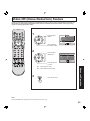
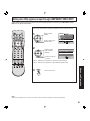
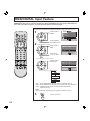
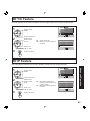
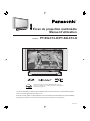
Multimedia Projection Display
Operating Instructions
Models No.
PT-50LC13-K/PT-60LC13-K
As an ENERGY STAR® Participant, Panasonic has
determined that this product or product model meets the
ENERGY STAR® guidelines for energy efficiency.
This operating instruction book is designed for use with models PT-50LC13-K and PT-60LC13-K. Illustrations
in this manual show the PT-50LC13-K.
Before connecting, operating or adjusting this product, please read the instructions completely.
Please keep this manual for future reference.
LSQT0748 A
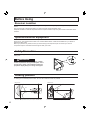
IMPORTANT SAFETY INSTRUCTIONS
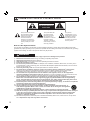
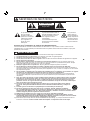
CAUTION
RISK OF ELECTRIC SHOCK
DO NOT OPEN
WARNING: To reduce the risk of electric shock, do not remove cover or back. No
user-serviceable parts inside. Refer servicing to qualified service personnel.
This symbol warns the user
that uninsulated voltage
within the unit may have
sufficient magnitude to
cause electric shock.
Therefore, it is dangerous
to make any kind of contact
with any inside part of this
unit.
This symbol alerts the
user that important
literature concerning
the operation and
maintenance of this unit
has been included.
Therefore, it should be
read carefully in order to
avoid any problems.
The pictorial
representation of a hot
surface within a triangle
is intended to tell the
user that parts inside
the product are a risk of
burns to persons.
Note to CATV System Installer:
This reminder is provided to call the CATV system installer’s attention to Article 820-40 of the NEC that provides
guidelines for proper grounding and, in particular, specifies that the cable ground shall be connected to the grounding
system of the building, as close to the point of cable entry as practical.
WARNING
- To reduce the risk of electric shock, fire, injury to persons or damage to this product:
1)
2)
3)
4)
5)
6)
7)
8)
9)
10)
11)
12)
13)
14)
15)
2
Read these instructions before using, connecting or adjusting this product.
Keep these instructions for future reference.
Heed all warnings on the product and in this Operating Instructions manual.
Follow all instructions carefully.
Do not use this product near water. For example, near a bathtub, washbowl, kitchen sink, or laundry tub, in
a wet basement or near a swimming pool, and the like. Do not place objects filled with water, such as a vase or
the like, on top of this unit.
Clean only with a dry cloth. Do not use liquid cleaners or aerosol cleaners.
Do not block any ventilation openings. Install in accordance with the manufacturer’s instructions.
Openings in the cabinet are provided for ventilation to ensure reliable operation and to protect it from
overheating. Never block openings by placing the product on a bed, sofa or similar surfaces.
Do not install near any heat source such as radiators, heat registers, stoves, or other apparatus
(including amplifiers) that produces heat. Do not install in a built-in installation such as a bookcase or rack,
unless proper ventilation is provided or the manufacturer’s instructions have bee adhered to.
Do not defeat the safety purpose of the polarized or grounding-type plug. A polarized plug has two
blades with one wider than the other. A grounding type plug has two blades and a third grounding
prong. The wide blade or the third prong are provided for your safety. If the provided plug does not fit
into your outlet, consult an electrician for replacement of the obsolete outlet.
Protect the power cord from being walked on or pinched particularly at plugs, convenience receptacles,
and the point where they exit from the apparatus.
Use only attachments/accessories specified by the manufacturer.
Use only with the cart, stand, tripod, bracket, or table specified by the manufacturer, or
sold with the apparatus. When a cart is used, use caution when moving the cart/apparatus
combination to avoid injury from tip-over.
Unplug this apparatus during lightning storms or when unused for long periods of time.
Refer all servicing to qualified personnel. Servicing is required when the apparatus has been damaged
in any way, such as power-supply cord or plug is damaged, liquid has been spilled or objects have
fallen into the apparatus, the apparatus has been exposed to rain or moisture, does not operate
normally, or has been dropped.
Because the temperature of the lamp unit is elevated immediately after its use, a direct touch to it may cause
burns. Replace the lamp unit only after it has cooled.
IMPORTANT SAFETY INSTRUCTIONS (CONTINUED)
WARNING
AS WITH ANY SMALL OBJECT, SD CARDS CAN BE SWALLOWED BY YOUNG CHILDREN. DO NOT ALLOW
CHILDREN TO HANDLE THE SD CARD.
(2) This projection display should not be exposed to direct sunlight, extreme temperatures or moisture, as this can
result in serious irreparable damage.
The lamp has a maximum life of about 10 000 hours.
If use exceeds this figure, the possibility of lamp damage becomes greater.
The lamp should be changed as soon as possible once the lamp warning message appears.
If the lamp is damaged, please contact your nearest dealer.
Getting Started
CAUTION
(1) This projection display is intended to be used with the following TV stand: model TY-50LC13C for the
PT-50LC13-K/PT-60LC13-K. Use with other stands may result in the projection display becoming unstable,
possibly causing injury.
Due to the characteristics and use conditions of individual lamps, the lamp may cease to light before the
stated lamp life.
Influences of frequent lighting, continuous light use for over 24 hours, the number of times lit, the length of
time between lightings, etc. may shorten lamp life.
(Because of this, we recommend having a replacement lamp on hand.)
Trademarks
• VGA and XGA are trademarks of International Business Machines Corporation.
• Macintosh is a registered trademark of Apple Computer, USA.
• VESA and SVGA are trademarks of the Video Electronics Standard Association.
Even if no special notation has been made of company or product trademarks, these trademarks have been fully respected.
-TV Noise Reduction for true MTS reproduction.
-TV Noise Reduction is required for good stereo
• Equipped with
separation and audio fidelity.
is a registered trademark, and is licensed by
Technology Licensing.
Manufactured under license from BBE Sound, Inc.
Licensed by BBE Sound, Inc. under USP4638258 and 4482866.
BBE and BBE symbol are registered trademarks of BBE Sound, Inc.
3
Dear Panasonic Customer
Welcome to the Panasonic family of customers. We hope that you will have many years of enjoyment from your new
projection display.
To obtain maximum benefit from your set, please read these Instructions before making any adjustments, and retain
them for future reference.
Retain your purchase receipt also, and record the serial number of your set in the space provided on the rear cover
of these instructions.
4
Table of Contents
Information
Other
Information !
Replacing the lamp unit ................................................................................................. 72
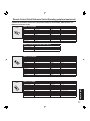
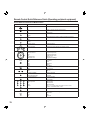
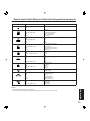
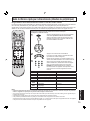
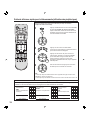
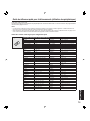
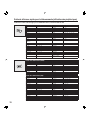
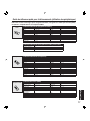
Remote Control Quick Reference Guide (Operating peripheral equipment) ............ 73
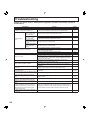
Troubleshooting ............................................................................................................. 80
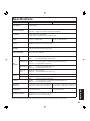
Specifications ................................................................................................................. 81
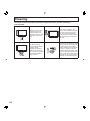
Cleaning .......................................................................................................................... 82
Limited Warranty / Servicentre List .............................................................................. 83
Index ................................................................................................................. Back cover
Advanced Operation
Enjoy
More !
Adjusting screen position and size .............................................................................. 42
Audio Adjustments......................................................................................................... 44
Picture Adjustments....................................................................................................... 46
Closed Captions ............................................................................................................. 48
Lock Feature ................................................................................................................... 50
Channel Caption Feature ............................................................................................... 57
Weak Signal Display Feature......................................................................................... 58
Video NR (Noise Reduction) Feature............................................................................ 59
Automatically changing screen size ............................................................................ 60
Setting when 480p signals are input through COMPONENT VIDEO INPUT ............. 61
RGB/DIGITAL Input Feature........................................................................................... 62
3D Y/C Feature ................................................................................................................ 63
3D IP Feature................................................................................................................... 63
Sleep Timer Feature ....................................................................................................... 64
Switching languages for display................................................................................... 65
Information...................................................................................................................... 65
Demo Mode Feature ....................................................................................................... 66
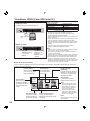
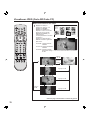
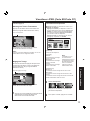
JPEG Viewer (SD Card/PC Card)................................................................................... 67
Basic Operation
Use
Now !
Power ON and OFF......................................................................................................... 22
Initial Setup ............................................................................................................ 22
Turning the Power ON and OFF ............................................................................ 23
Flow Chart of Main menu............................................................................................... 24
Tuning channels ............................................................................................................. 26
Automatic channel setting ...................................................................................... 26
Manual channel setting .......................................................................................... 28
Projection display operation ......................................................................................... 30
ASPECT Controls ........................................................................................................... 32
Searching for the desired channel (Channel search) ................................................. 34
Playing peripheral equipment ....................................................................................... 35
Mute / Freeze / SAP ........................................................................................................ 36
Split screen ..................................................................................................................... 38
Picture in Picture (PIP) Screen...................................................................................... 40
Getting Started
To
Start !
Important Safety Instructions.......................................................................................... 2
Before Using ..................................................................................................................... 6
Receiver Location .................................................................................................... 6
Optional External Equipment ................................................................................... 6
Safety Precaution..................................................................................................... 6
Viewing position ....................................................................................................... 6
Accessories.............................................................................................................. 7
Remote Control Battery Installation ......................................................................... 7
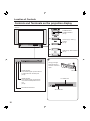
Location of Controls ........................................................................................................ 8
Illuminated Remote Control...................................................................................... 8
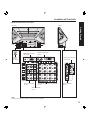
Controls and Terminals on the projection display .................................................. 10
Installation....................................................................................................................... 12
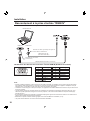
Connecting the Antenna / Cable to the RF in Terminal (No VCR) ......................... 12
Connecting the Antenna / Cable to the RF in Terminal (VCR)............................... 14
How to connect the “1, 2, 3” Input Terminals ......................................................... 15
How to connect the COMPONENT VIDEO Input Terminals.................................. 16
How to connect the AV Out Terminals ....................................................................17
How to connect the RGB IN Terminals .................................................................. 18
How to connect the DIGITAL IN Terminal .............................................................. 20
RGB/DIGITAL IN signals that can be input............................................................ 21
5
Before Using
Receiver Location
Locate for comfortable viewing. Avoid placing where sunlight or other bright light (including reflections) will fall on the
screen.
Use of some types of fluorescent lighting can reduce remote control transmitter range.
Adequate ventilation is essential to prevent internal component failure. Keep away from areas of excessive heat or
moisture.
Optional External Equipment
The Video / Audio connection between components can be made with shielded video and audio cables. For best
performance, video cables should utilize 75 Ω coaxial shielded cables. Cables are available from your dealer or
electronic supply house.
Before you purchase any cables, be sure you know what type of output and input connectors your various
components require. Also determine the length of cable you’ll need.
Safety Precaution
Please take safety precautions to prevent the unit from
falling over.
WARNING
The unit may tip or fall if not situated on a stable
surface, if pushed or during an earthquake. Use a
strong rope or chain (not included) to fasten the
projection display firmly to a strong wall support.
Viewing position
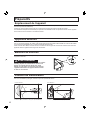
To optimize your viewing comfort, please follow the viewing guidelines shown in the diagrams below.
If viewing for an extended period of time, sit as far back from the screen as possible.
<Top view>
<Side view>
70º
30º
30º
70º
At least 1.8 m (PT-50LC13-K)/2.2 m (PT-60LC13-K).
6
At least 1.8 m (PT-50LC13-K)/2.2 m (PT-60LC13-K).
Before Using
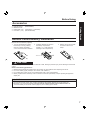
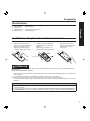
Accessories
Remote Control
Batteries 2 “AA”
RGB Cable (2 m)
DVI Cable (2 m)
(EUR7603ZB0)
Getting Started
1.
2.
3.
4.
(LSJA0239-1 or LSJA0443)
(K1HA24DA0003)
Remote Control Battery Installation
Requires two AA batteries (supplied).
1. Turn the Transmitter face down.
Remove top cover by pressing
down on marking and sliding
cover off in the direction indicated.
2. Install the batteries as shown in
the battery compartment.
(Polarity + or - must match the
markings in the compartment).
3. Replace the cover and slide
in reverse until the lock
snaps.
Two AA size
CAUTION
Incorrect battery installation can cause the batteries to leak, leading to personal injury and/or damage to the remote
control.
Observe the following precautions:
1.
2.
3.
4.
Batteries should always be replaced as a pair. Always use new batteries when replacing the old set.
Do not mix battery types (example: “Zinc Carbon” with “Alkaline”).
Do not attempt to charge, short-circuit, disassemble, heat or burn used batteries.
Battery replacement is necessary when the remote control acts sporadically or stops operating the projection
display set.
Helpful Hints:
(1) For frequent remote control users, replace old batteries with Alkaline batteries for longer battery life.
(2) Whenever you remove the batteries, you may need to reset the remote control infrared codes. We
recommend that you record the code on page 74, prior to setting up the remote.
7
Location of Controls
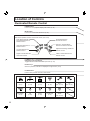
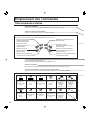
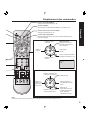
Illuminated Remote Control
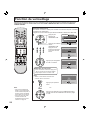
POWER button
Press to turn the projection display ON or OFF. (P. 22)
MUTE button
Press this button to mute the sound. (P. 36)
Mode Selection buttons
Selects the operation mode for the remote control. (PP. 73-79)
DVD (Digital Versatile
Disc) Mode Selection for
Remote Control
AUX Mode Selection
for Remote Control
Receiver / Amplifier Mode
Selection for Remote Control
VCR Mode Selection for
Remote Control
TV Mode Selection for
Remote Control
Digital Broadcasting Satellite for
Remote Control
Digital TV Mode Selection
for Remote Control
Cable TV Mode Selection for
Remote Control
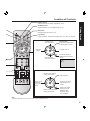
PC/MENU button
RGB input mode is displayed.
Toggles between RGB1 and RGB2 input mode. (P. 35)
Number keys
When 6 is pressed, channel 6 is displayed in single screen. (P. 31)
R-TUNE button
Press to view previous channel or video mode.
Function buttons
PIP MIN
8
PIP MIN
(P. 41)
SD
(P. 35)
PIP MAX
(P. 41)
FREEZE
(P. 36)
PIP/SPLIT CH
Down
(PP. 39, 41)
CH Search
(P. 34)
PIP
(P. 40)
SPLIT
(P. 38)
PIP MOVE
(P. 41)
PIP/SPLIT
SWAP
(PP. 39, 41)
PIP/SPLIT CH
Up
(PP. 39, 41)
Location of Controls
ASPECT button
Changes the way the image is displayed. (P. 32)
SAP button
Changes the audio mode. (P. 37)
Light button
Lights all buttons. The selected mode button (TV, VCR, etc.) flashes.
Changes to the
next channel up.
Reduces
volume.
Getting Started
TV/VIDEO button
Toggles between TV and VIDEO inputs. (P. 35)
Display menu
Press the ACTION button
to display Menu screen.
Increase volume.
Changes to the
next channel down.
The screen below is
displayed for 5 seconds.
(P. 31)
NORMA L
S T E R EO
SAP
MONO
CH 1 2
ABC
When the Menu screen is displayed, (PP. 24-25)
Moves cursor upward
during menu mode.
Moves cursor
to the left
during menu
mode.
Sets the items.
Moves cursor to the
right during menu
mode.
Moves cursor downward
during menu mode.
Returns to normal
viewing from the
MENU screen.
Previous before
item in MENU.
Note:
This section describes TV mode only. For other modes, see pages 73-79.
9
Location of Controls
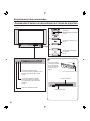
Controls and Terminals on the projection display
Model PT-50LC13-K unit shown
< FRONT >
POWER button/
POWER indicator
(P. 23)
Volume up(+) / down(–)
buttons
(P. 30)
Channel up / down buttons
(P. 31)
A
A
Using your finger,
slide Slot Cover in
direction of arrow to
open.
Open
LAMP indicator
This indicator lights up when there is
a malfunction with the lamp unit.
(P. 80)
TEMP indicator
This indicator lights up when there
is an abnormal temperature in the
unit.
(P. 80)
Slot Cover
PC CARD slot
Remote Control Sensor
SD CARD slot
10
Location of Controls
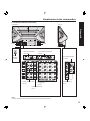
Model PT-50LC13-K unit shown
< REAR >
< SIDE >
Getting Started
Vent
Vent
RGB Input 1 terminal
(PP. 18-19)
Digital Input terminal
(P. 20)
VHF/UHF
terminal
(PP. 12-14)
RGB Input 2 terminal
(PP. 18-19)
Input 1, 2 terminals
(P. 15)
Component signal input 1-4 terminals
(P. 16)
Input 3 terminals
(P. 15)
AV out terminals
(P. 17)
Note:
Make sure the vents are not blocked. (This could cause damage.)
11
Installation
Notes on connections
• Turn off the power supply for all components before making any connections.
• If the cables necessary for connecting a component to the system are not included with the component or available as an
option, you may need to fashion a cable to suit the component concerned.
• Read the instruction manual for each system component carefully before connecting it.
• If there is a lot of jitter in the video signal input from the video source, the picture on the screen may flicker. In this case, it will
be necessary to connect a TBC (time base corrector).
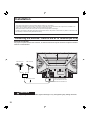
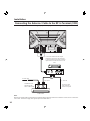
Connecting the Antenna / Cable to the RF in Terminal (No VCR)
Antenna Connection
For proper reception of VHF / UHF channels, an external antenna is required. For best reception an outdoor
antenna is recommended.
VHF Antenna
UHF Antenna
Mixer
RF Coaxial Cable
VHF/UHF TERMINAL
ON THE BACK OF THE
PROJECTION DISPLAY
CAUTION
When using “Nut type” RF coaxial cables, tighten with fingers only. Overtightening may damage terminals.
12
Installation
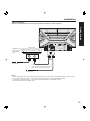
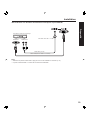
Cable Connection
Use this configuration when connecting the projection display to a cable TV system.
Getting Started
CABLE BOX
TERMINAL ON
THE BACK OF
THE CABLE
BOX
Or
In from cable
Connect the cable from the antenna or
cable system to the VHF/UHF terminal
on the back of the projection display.
In from cable
Notes:
• Certain cable systems offset some channels to reduce interference or have Premium (scrambled) channels. A cable converter
box is required for proper reception. Check with your local Cable company for its compatibility requirements.
• For reception of cable channels (01 - 125) connect the cable supplied by your local cable company.
Antenna Mode must be set to CABLE. (P. 26)
13
Installation
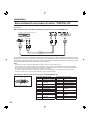
Connecting the Antenna / Cable to the RF in Terminal (VCR)
Use this configuration when connecting the projection display to a cable TV system using VCR.
Connect the cable from the Output
terminal on the back of the Cable Box
or antenna/cable system to the Antenna
input terminal on the back of the VCR.
VCR
Or
In from cable
↑ TO VCR
TERMINAL ON
THE BACK OF
THE CABLE BOX
↑ TO VCR
Incoming Cable
from Antenna or
Cable TV System
CABLE BOX
Note:
When the RF coaxial cable is connected to the projection display VHF/UHF terminal via a cable box or VCR, set the TV channel to
CH3 or CH4. This does not apply when signal is input from VIDEO INPUT.
14
Installation
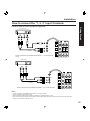
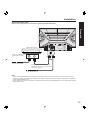
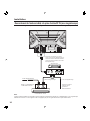
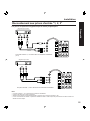
How to connect the “1, 2, 3” Input Terminals
Connects VCRs and other peripheral equipment
Getting Started
(S-VHS VCR)
S-VIDEO
AUDIO
Similar connections are available at the INPUT 1, 2, 3 input terminals.
(P. 11)
(VHS VCR)
VIDEO
AUDIO
Similar connections are available at the INPUT 1, 2, 3 input terminals.
Notes:
•
•
•
•
Similar connections are available at the INPUT 1, 2, 3 input terminals.
Input 3 is located on the side of the unit.
Select the desired VIDEO input position by pressing the TV/VIDEO button. (P. 35)
When connecting video cables, priority is given to the S-Video cable when the S-Video input terminal and the video input
terminal are connected at the same time.
15
Installation
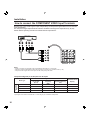
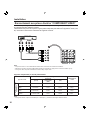
How to connect the COMPONENT VIDEO Input Terminals
Because each Y, PB, and PR signal is input independently, the Component signal allows for more accurate
color reproduction.
The Component signal output terminal indication will differ according to the output device ( Y, PB, PR ).
Please read the operating instructions included with the output device.
DVD Player
COMPONENT VIDEO
AUDIO
Notes:
• Similar connections are available at the COMPONENT VIDEO INPUT 1-4 Terminals.
• Select the desired COMPONENT VIDEO INPUT position by pressing the TV/VIDEO button. (P. 35)
• Component video signals that can be input are 480i, 480p, 720p, and 1080i.
Component Signals (Y, PB, PR) that can be Input
DTV Format
Signals
Signal data
Mode type
No. of dots
(H X V)
480i
664 X 485
Horizontal
frequency
(kHz)
15.73
480p
720 X 483
720p
*1080i
Vertical frequency
(Hz)
29.97
480 i
31.47
59.94
480 p
1 280 X 720
45.00
60.00
720 p
1 920 X 1 080
33.75
30.00
Note:
Input signals, other than those listed with a * mark, will give you a beautiful, stable picture.
16
Information menu
display
1080 i
Installation
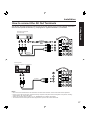
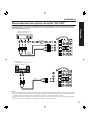
How to connect the AV Out Terminals
Recording Equipment
(S-VHS VCR)
S-VIDEO
Getting Started
The “AV Out” Terminals output the same signals as the main picture on the projection display screen and
sound from the speaker at that time, e.g. TV programs or signals from INPUT 1, 2, 3 terminals.
Or
VIDEO
AUDIO
Stereo System
(A Stereo Amplifier and Speakers)
AUDIO
Notes:
• Never connect the VIDEO IN and OUT terminals to the same video recorder, as this could cause incorrect operation.
• Even if TV is in Split or PIP mode, OUT terminals only output the main picture and sound signals. A sub-picture, including
channel search, etc., will not be output.
• VIDEO OUT terminals will not output Y, PB, PR, RGB/DIGITAL IN or SD/PC card signals.
• The S-Video OUT terminal outputs the same signal that is input from the S-Video IN terminal.
17
Installation
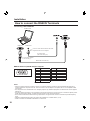
How to connect the RGB IN Terminals
Connecting a PC to RGB IN
COMPUTER
RGB OUT
AUDIO OUT
Connect a cable which matches the audio
output terminal on the computer.
PC audio cable
(M3 stereo mini pin)
Conversion adapter
(If necessary)
RGB cable (D-SUB 15P)
RGB IN Terminal (D-SUB 15P) Pin Layouts
11 12 13 14 15
6
7
1
8
2
9 10
3
4
Connection port view
5
Pin No.
1
2
3
4
5
6
7
8
Signal name
R
G
B
NC
NC
Ground for R
Ground for G
Ground for B
Pin No.
9
10
11
12
13
14
15
Signal name
NC
Ground
NC
NC
HD/CSYNC
VD
NC
NC: Not connected
Notes:
• Some PC models cannot be connected to the set. A conversion adapter is required to use the RGB cable (D-SUB 15P) to
connect a Macintosh computer to the set. There is no need to use an adapter for computers with PC / AT compatible D-SUB
15P terminal.
• The computer shown in the illustration is for example purposes only. Additional equipment and cables shown are not supplied
with this set.
• The picture will become dark if an PC signal with a vertical scanning frequency of 62 Hz is input. To obtain the optimum picture
quality with the projection display, a vertical scanning frequency of 60 Hz is recommended.
• Do not set the horizontal and vertical scanning frequencies for PC signals which are above or below the specified frequency
range.
• Select the desired RGB input position by pressing the PC/MENU or TV/VIDEO button. (P. 35)
• Similar connections are available at the RGB IN 1, 2 Terminals.
18
Installation
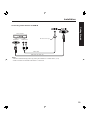
Connecting a DTV Decoder to RGB IN
RGB OUT
M3 stereo mini pin
AUDIO OUT
Getting Started
DTV Decoder
Audio cable
RGB cable (D-SUB 15P)
Notes:
• Select the desired RGB input position by pressing the PC/MENU or TV/VIDEO button. (P. 35)
• Similar connections are available at the RGB IN 1, 2 Terminals.
19
Installation
How to connect the DIGITAL IN Terminal
The video signal is digitally input to the projection display for superior picture quality enjoyment.
Connecting a DTV Decoder to DIGITAL IN
DTV Decoder
AUDIO OUT
AUDIO
DVI cable
By inputting a High-bandwidth Digital Content Protection high-definition picture source to the DIGITAL IN terminal of
this projection display, high-definition pictures can be displayed on the screen in their digital form. (This terminal is
for use in the future when High-bandwidth Digital Content Protection DTV decoders, DVD players and D-VHS are
put on the market.)
Notes:
• Select the DIGITAL input position by pressing the TV/VIDEO button. (P. 35)
• The DIGITAL IN terminal can only be used with 1080i, 720p and 480p picture signals. Set the DTV Decoder DIGITAL OUT
terminal to 1080i, 720p, or 480p signal output. Please refer to the DTV Decoder instruction manual.
• If no picture is displayed because the DTV Decoder output cannot be set, use the component Video Input, S-Video Input, or
Video Input. This will display the picture as an analog signal.
DIGITAL IN Terminal Pin Layouts
24
16 8
17 9
1
Connection port view
20
Pin No. Signal name
1
T.M.D.S Data 22
T.M.D.S Data 2+
3
T.M.D.S Data 2 Shield
4
NC
5
NC
6
DDC Clock
7
DDC Data
8
NC
9
T.M.D.S Data 110
T.M.D.S Data 1+
11
T.M.D.S Data 1 Shield
12
NC
NC: Not connected
Pin No.
13
14
15
16
17
18
19
20
21
22
23
24
Signal name
NC
+5 V
GND
Hot Plug Detect
T.M.D.S Data 0T.M.D.S Data 0+
T.M.D.S Data 0 Shield
NC
NC
T.M.D.S Clock Shield
T.M.D.S Clock +
T.M.D.S Clock -
Installation
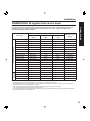
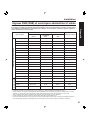
RGB/DIGITAL IN signals that can be input
DTV Format
Signals
Personal Computer Signals
Signal data
Information menu
display
Mode type
No. of dots
(H X V)
VGA400 (70 Hz) ♦
640 X 400
31.47
70.08
VGA400 70Hz
VGA480 (60 Hz) ♦
640 X 480
31.47
59.94
VGA 60Hz
Macintosh 13″
640 X 480
35.00
66.67
MAC 13
VESA400 (85 Hz)
640 X 400
37.86
85.08
VESA 85Hz
VESA480 (72 Hz)
640 X 480
37.86
72.81
VGA 72Hz
VESA480 (75 Hz)
640 X 480
37.50
75.00
VGA 75Hz
VESA480 (85 Hz)
640 X 480
43.27
85.01
VGA 85Hz
SVGA (56 Hz)
800 X 600
35.16
56.25
SVGA 56Hz
SVGA (60 Hz) ♦
800 X 600
37.88
60.32
SVGA 60Hz
SVGA (72 Hz)
800 X 600
48.08
72.19
SVGA 72Hz
SVGA (75 Hz)
800 X 600
46.88
75.00
SVGA 75Hz
SVGA (85 Hz)
800 X 600
53.67
85.06
SVGA 85Hz
Macintosh 16″
832 X 624
49.73
74.55
MAC 16
* XGA (60 Hz) ♦
1 024 X 768
48.36
60.00
XGA 60Hz
* XGA (70 Hz)
1 024 X 768
56.48
70.07
XGA 70Hz
* XGA (75 Hz)
1 024 X 768
60.02
75.03
XGA 75Hz
* Macintosh 19″
1 024 X 768
60.24
74.93
MAC 19
480i
664 X 485
15.73
29.97
480 i
480p ♦
720 X 483
31.47
59.94
480 p
720p ♦
1 280 X 720
45.00
60.00
720 p
*1080i ♦
1 920 X 1 080
33.75
30.00
Horizontal frequency Vertical frequency
(kHz)
(Hz)
Getting Started
The table below lists the different types of RGB/DIGITAL IN signals that can be input.
If a signal which differs greatly from any of the types listed below is input, the picture image may not be
displayed correctly, or a black background may be displayed. At this time, “signal” will flash in the
on-screen display for about 5 seconds.
1080 i
Notes:
• Input signals, other than those listed with a * mark, will give you a beautiful, stable picture.
• The D-SUB15P connector can accept RGB (H-V sync separate) and RGB (sync on green). However, it is not guaranteed to
display stable color when using RGB (sync on green).
• When used with an external video processor/scaler, it must have RGB (H-V sync separate) output.
• A “♦” mark indicates signals that can be input with DIGITAL IN.
• If your PC (with DIGITAL IN terminal) does not support Plug-and-Play (DDC1/2B) for displays, reconfiguration is required after
the projection display is connected to the PC.
21
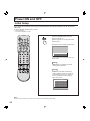
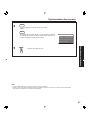
Power ON and OFF
Initial Setup
First, check the connection of the Plug to the Wall Outlet and the Antenna/Cable to the RF in Terminal.
(PP. 12-14.)
If using Cable Box, DSS Receiver, or VCR,
• Turn on Cable Box.
• Turn off DSS Receiver, or VCR.
Press the POWER button to turn the
projection display on.
(Refer to page 23 for “Turning the Power
ON and OFF”.)
Automatic Channel Setting is performed.
CH AUTO SET PROCEEDING
Note:
To cancel AUTO SET in progress, press the
SWAP button.
Case 1
When setup is complete, the lowest
channel picture appears.
Case 2
If setup is incomplete, the following
screen appears. Check connection of
Antenna/Cable to the RF in Terminal,
then try Automatic Channel Setting
again. (PP. 26-27)
NO CH FOUND
PLEASE CHECK ANTENNA
CABLE CONNECTION THEN
PRESS ACTION KEY AGAIN
Note:
When the unit is turned on for the first time, Automatic Channel Setting is performed.
22
Power ON / OFF
Turning the Power ON and OFF
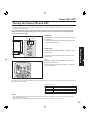
Always be sure to follow the procedure given below to turn the projection display power ON and OFF.
• The lamp cooling fan will continue to operate for approximately 1 minute after the power is turned off. At the same time, the
POWER indicator will blink Red.
Do not disconnect the power cord from the outlet and do not open the circuit breaker (unless necessary)
while the cooling fan is still operating. Do not disconnect the power cord from the power outlet while the
power indicator blinks Red.
POWER button/
POWER indicator
Power ON
Press POWER on projection display or remote control to
turn power on.
The Power Indicator blinks Green for about 10 seconds
and then turns solid Green.
Press POWER on projection display or remote control to
turn power off.
Power shuts off after a Black Screen is displayed for a
few seconds.
Note:
If POWER is pressed during the Black Screen display,
Power is turned back on.
Basic Operation
Power OFF
The Power Indicator blinks Red for about 1 minute and
then turns solid Red.
Note:
When the AC Cord is unplugged, the internal cooling fan stops operating. In this case, the lamp will be insufficiently cooled and will
take a while to turn ON again.
The Power Indicator
LED
Red
Red blink
Green
Green blink
ACTION
Power – OFF (Standby mode)
Power – OFF (Now cooling)
Power – ON
Power – ON (Preparing to light lamp)
Notes:
• If the POWER button is accidentally turned off during use, after power is turned back on, it may take a short period before the
lamp automatically comes on.
• After the unit is turned on, maximum picture brightness will be achieved in 5-10 minutes. This is normal.
23
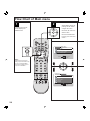
Flow Chart of Main menu
1
2
Select MENU desired by
pushing Left “◄” button
or Right “►” button.
Pressing the ACTION
button displays the
MENU screen.
Use the ▲, ▼ buttons to
select an item.
Use the ACTION button
to set or go to next menu
screen.
ADJUST
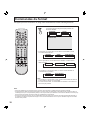
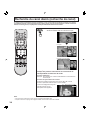
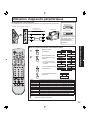
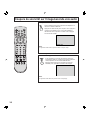
SET UP
PICTURE
AUDIO
POSITION/SIZE
INFORMATION
PAGE
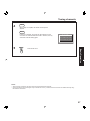
SELECT
END
Note:
Depending on the signal
being input, some items may
or may not be adjustable
and some functions may or
may not be available.
ADJUST
SET UP
LANGUAGE :ENGLISH
CHANNEL
LOCK
CAPTION
VIDEO
OTHER
PAGE
24
SELECT
END
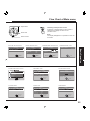
Flow Chart of Main menu
Adjust items
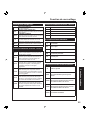
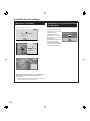
Returning to the previous screen
If RECALL is pressed while a menu screen is
displayed, the display will return to the
previous screen.
Set an item
Note:
The display disappears if no operation is done for
5 minutes.
Select an item
PICTURE ADJUST menu
PICTURE
AUDIO
SELECT
EXIT
PP. 46-47
LANGUAGE selection screen
SET UP
:NORMAL
:ON
:OFF
:OFF
SELECT
EXIT
ADJUST
PP. 44-45
ANTENNA : CABLE
AUTO SET
MANUAL SET
CHANNEL CAPTION
WEAK SIGNAL DISPLAY:OFF
SELECT
EXIT
PP. 48-49
EXIT
P. 65
LOCK
ENTER 4-DIGIT CODE
ENTER :0-9
EXIT
PP. 50-56
OTHER menu
VIDEO
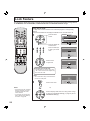
CAPTION MODE : OFF
CC ON MUTE
: CAP C1
SELECT
EXIT
SELECT
EXIT
VIDEO menu
CAPTION
NTSC
LOCK selection screen
CHANNEL menu
PP. 26-29, 57-58
CAPTION menu
INPUT SIGNAL
PP. 42-43
SELECT
END
P. 65
INFORMATION screen
H POSITION
V POSITION
H WIDTH
:SHRINK
NORMAL
SET UP CHANNEL
LANGUAGE :ENGLISH
CHANNEL
LOCK
CAPTION
VIDEO
OTHER
PAGE
AUDIO MENU
AUDIO ADJUST
SPEAKER
SURROUND
BBE
POSITION
Basic Operation
PICTURE MENU
:DYNAMIC
PICTURE ADJUST
COLOR TEMP
:NORMAL
ADJUST
POSITION/SIZE ADJUST menu
AUDIO ADJUST menu
OTHER
VIDEO NR :OFF
ID-1
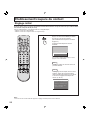
:OFF
480P COLOR MATRIX:SDTV
RGB
:VGA
3D Y/C
:ON
3D IP
:ON
SELECT
EXIT
P. 59-63
SLEEP TIMER:OFF
DEMO MODE :OFF
SELECT
EXIT
PP. 64, 66
25
Tuning channels
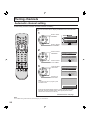
Automatic channel setting
Automatically searches and adds receivable channels to memory.
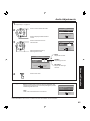
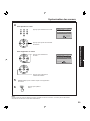
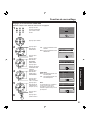
Press the ACTION button to display the MENU screen and select SET
UP.
1
Press to select
CHANNEL.
ADJUST
LANGUAGE :ENGLISH
CHANNEL
LOCK
CAPTION
VIDEO
OTHER
PAGE
Press to display
the CHANNEL.
2
Press to select
ANTENNA.
Press to select
TV or CABLE.
3
Press to select
AUTO SET.
Press to run
AUTO SET.
SET UP
SELECT
END
SET UP CHANNEL
ANTENNA : CABLE
AUTO SET
MANUAL SET
CHANNEL CAPTION
WEAK SIGNAL DISPLAY:OFF
SELECT
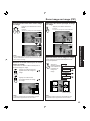
EXIT
SET UP CHANNEL
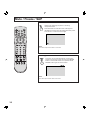
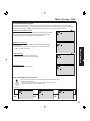
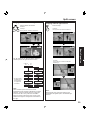
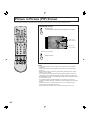
ANTENNA : CABLE
AUTO SET
MANUAL SET
CHANNEL CAPTION
WEAK SIGNAL DISPLAY:OFF
SELECT
EXIT
Note:
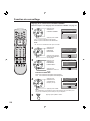
To cancel AUTO SET in progress, press
the SWAP button.
CH AUTO SET PROCEEDING
Channels will automatically advance until all channels have been
scanned. Channel numbers with a video signal present will be
stored in the channel scan memory.
Continued on the next page.
Note:
TV or Cable Tuning mode must be set according to your connections.
26
Tuning channels
4
Case 1
When setup is complete, the lowest channel picture
appears.
Case 2
If setup is incomplete, the screen at right appears. Check
connection of Antenna/Cable to the RF in Terminal, then try
Automatic Channel Setting again.
NO CH FOUND
PLEASE CHECK ANTENNA
CABLE CONNECTION THEN
PRESS ACTION KEY AGAIN
Press to exit menu.
Basic Operation
5
Notes:
• After AUTO SET is finished, the lowest channel number added will be received.
• Some channels with very weak signals may be locked into memory. If desired, these channels can be deleted manually using
the MANUAL SET feature.
27
Tuning channels
Manual channel setting
Use this setting when changing setting of receiving channels or changing the channel display.
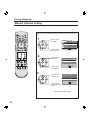
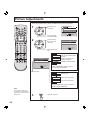
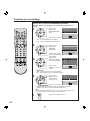
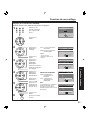
Press the ACTION button to display the MENU screen and select SET
UP.
1
Press to select
CHANNEL.
Press to display
the CHANNEL.
2
Press to select
ANTENNA.
Press to select
TV or CABLE.
3
Press to select
MANUAL SET.
ADJUST
SET UP
LANGUAGE :ENGLISH
CHANNEL
LOCK
CAPTION
VIDEO
OTHER
PAGE
SELECT
END
SET UP CHANNEL
ANTENNA : CABLE
AUTO SET
MANUAL SET
CHANNEL CAPTION
WEAK SIGNAL DISPLAY:OFF
SELECT
EXIT
SET UP CHANNEL
ANTENNA : CABLE
AUTO SET
MANUAL SET
CHANNEL CAPTION
WEAK SIGNAL DISPLAY:OFF
Press to display
the MANUAL SET
screen.
Continued on the next page.
28
SELECT
EXIT
Tuning channels
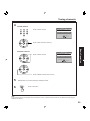
4
To add channel
MANUAL SET
Press to select channel.
ENTER CHANNEL :
01
CHOOSE A CHANNEL
USING CHANNEL UP/DOWN
ADD
EXIT
Press to add channels to memory.
MANUAL SET
Press to select channel.
ENTER CHANNEL :
01
CHOOSE A CHANNEL
USING CHANNEL UP/DOWN
DELETE
EXIT
Basic Operation
To delete channel
Press to delete channels from memory.
5
Repeat steps 4 to continue adding or deleting channels.
6
Press to exit menu.
Note:
Some channels with very weak signals may be locked into memory. If desired, these channels can be deleted manually using the
MANUAL SET feature.
29
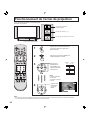
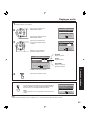
Projection display operation
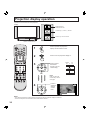
Operation can be done from the projection
display.
POWER button/
POWER indicator
Volume up(+) / down(–) buttons
Channel up / down buttons
Remote Control Sensor
1
Press to operate the projection
display with the remote control.
2
Press to turn the projection display on.
3
CABLE
TV
125 or 69
CH 01
Press to select
the desired
channel. (Or use
number keys )
CH 02
Or
CH 125
Note:
Refer to “Using the
number keys” on the
next page.
4
Press to
select the
desired
volume
level.
+0!
$
Notes:
• The channel number and volume level are stored even after the projection display is turned off.
• Power consumption can be reduced if the volume level is lowered.
30
Projection display operation
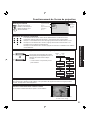
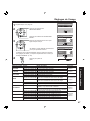
TV status display
Press the RECALL button,
except when the MENU
screen is displayed, to display
current TV status information.
Aspect types
(P. 32)
Receivable
broadcast types
(P. 37)
CH 1 2
ABC
NORMA L
S T E R EO
SAP
MONO
Channel
Channel
caption
(P. 57)
Using the number keys
When selecting CABLE channels 100 to 125 with the number keys, first press the 1 key,
and then enter the remaining two digits.
Example 1: To select channel 125, first press the 1 key, then 2, then 5.
Example 2: To select channel 12, press the 1 key, then 2. Channel 12 appears momentarily.
Example 3: To select channel 8, press the 8 key. Channel 8 appears momentarily.
CABLE
TV
125 or 69
CH 01
Projection display Channel up/down
buttons can also be used to select an
outside input as shown right.
DIGITAL IN
* No input mode is displayed for terminals with
no equipment connected.
CH 125
RGB 2
VIDEO 1 *
RGB 1
VIDEO 2 *
COMPONENT 4 *
VIDEO 3 *
COMPONENT 3 *
COMPONENT 1 *
COMPONENT 2 *
Basic Operation
Using projection display Channel up/down buttons to select input mode
Auto shut off
To extend lamp life, if there is no signal to the set’s tuner for 5 minutes, the lamp will shut off automatically.
Invalid operation notification
If an invalid operation is attempted, the mark shown right is
displayed.
FREEZE
Example: Invalid operation was tried
during FREEZE mode.
31
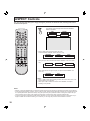
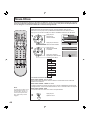
ASPECT Controls
The color monitor will allow you to enjoy viewing the picture at its maximum size, including wide screen
cinema format picture.
The aspect mode changes each time the ASPECT
button is pressed.
JUST
ZOOM
NORMAL
FULL
FULL
• When a 480p signal is being received, the mode
switches between NORMAL, ZOOM, and FULL only.
NORMAL
ZOOM
FULL
• During PC input, the mode switches between NORMAL, FULL and TRUE
only.
NORMAL
FULL
TRUE
• When XGA and Mac 19 signal is input, the aspect will be NORMAL and
FULL only.
NORMAL
FULL
Notes:
• When a 1080i or 720p signal is being received, the mode is set to FULL, and
aspect switching is not possible.
• When input mode is CARD, the mode is set to NORMAL, and aspect
switching is not possible.
Notes:
• However, if the mode selected does not match the aspect ratio of the input signal, the original picture quality may be affected.
• If using this projection display in places, such as cafes or hotels, with the aim of displaying programs for a commercial purpose
or for public presentation, please note that by using the aspect ratio (16:9) selection function to change the aspect ratio, you
may be infringing on the rights of the original copyright owner of that program under copyright protection laws.
• If a normal (4:3) picture is projected in wide screen, distortion may occur around the edges so that part of the picture may no
longer be visible. We recommend viewing in 4:3 mode so you can enjoy the picture as it was intended to be seen.
32
ASPECT Controls
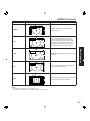
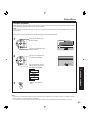
Mode
Picture
Explanation
NORMAL
4
NORMAL
3
JUST
16
JUST
9
16
ZOOM
FULL
TRUE
9
ZOOM mode magnifies the central section of
the picture.
9
FULL will display the picture at its maximum
size but with sight elongation.
16
FULL
647-
JUST mode will display a 4:3 picture at
maximum size but with aspect correction
applied to the center of the screen so that
elongation is only apparent at the left and
right edges of the screen. The size of the
picture will depend on the original signal.
Basic Operation
ZOOM
NORMAL will display a 4:3 picture at its
standard 4:3 size.
"
!
You can reduce the image and adjust it to the
original image quality. (Except XGA)
Notes:
• The screen size changes if ID-1 is detected. (P. 60)
• When ASPECT is in ZOOM mode, PIP feature cannot be used. (P. 40)
33
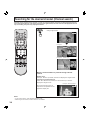
Searching for the desired channel (Channel search)
Channel search displays each channel, in order, as a paused image. Channels are displayed from the left
top to the right bottom in order. When it reaches the right bottom, the next channel is displayed at the left
top, overwriting the previously displayed channel.
When the SEARCH/OPEN/CLOSE button is pressed
during single screen.
+0!
Example 1
CH03
02
05
06
07
08
10
Example 2 (RGB input)
RGB1
02
05
06
07
08
10
When a channel button is pressed during channel
search.
Number keys:
Example: When 6 is pressed, channel 6 is displayed in single screen.
Channel up and down buttons:
When ▲ or ▼ button is pressed, the next channel up or down is
displayed in single screen.
Example: Select channel 6
Sound from the left screen is
output from the speakers on the
projection display set.
Notes:
• To end channel search, press SEARCH/OPEN/CLOSE.
• While using the PIP feature, Channel search is not available.
34
+0$
Playing peripheral equipment
Confirming connections
A video camera uses the Input 3 terminal on the front of the projection display.
VCR
Example: Connect Input 3
To S-video output
or video output
Video camera
DVD player
This equipment can
also be connected to
the rear terminals. See
Connections for details.
To audio output
Turning the power on and switching input modes
Turn the projection
display on.
2
The input mode changes
each time this button is
pressed.
* No input mode is displayed
for terminals with no
equipment connected.
Card input mode is
selected.
RGB input mode is
selected.
TV
CARD
VIDEO 1 *
DIGITAL IN
VIDEO 2 *
RGB 2
VIDEO 3 *
RGB 1
COMPONENT 1 *
COMPONENT 4 *
COMPONENT 2 *
COMPONENT 3 *
Basic Operation
1
RGB 2
RGB 1
VIDEO 1
VIDEO 2
VIDEO 3
COMPONENT 1
COMPONENT 2
COMPONENT 3
COMPONENT 4
RGB 1
RGB 2
DIGITAL IN
CARD
3
Signal of source connected to INPUT 1 is displayed.
Signal of source connected to INPUT 2 is displayed.
Signal of source connected to INPUT 3 is displayed.
Signal of source connected to COMPONENT VIDEO INPUT 1 is displayed.
Signal of source connected to COMPONENT VIDEO INPUT 2 is displayed.
Signal of source connected to COMPONENT VIDEO INPUT 3 is displayed.
Signal of source connected to COMPONENT VIDEO INPUT 4 is displayed.
Signal of source connected to RGB IN 1 is displayed.
Signal of source connected to RGB IN 2 is displayed.
Signal of source connected to DIGITAL IN is displayed.
Signal of source connected to CARD SLOT is displayed.
Operate the connected equipment.
35
Mute / Freeze / SAP
Sound mute
Useful when answering the phone or receiving
unexpected visitors
Press this button to mute the sound. Press again to
reactivate sound. Sound is also reactivated when power
is turned off or volume level is changed.
MU T E
Note:
The audio output from AV OUT is not muted.
Freezing pictures
Projection can be switched between a frozen (still)
picture and a moving picture each time the FREEZE
button on the remote control unit is pressed. Press
FREEZE button again to resume motion.
F RE E Z E
Note:
The video output from AV OUT is not frozen.
36
Mute / Freeze / SAP
Receivable Broadcast Types
The following are possible broadcast types with their accompanying on-screen displays. The signal being
received is indicated with a “ ” mark while the selected audio mode is indicated with an arrow. To change the
audio mode for these broadcasts, follow the “Select Audio Mode for TV Viewing” section (below.)
MTS Stereo and SAP broadcast
Multi-channel Television Sound Stereo (main language) and Secondary
Audio Program (sub language) broadcasts are both being received
simultaneously. Select the STEREO or SAP audio mode.
CH 1 2
S T E R EO
SAP
MONO
CH 1 2
MTS Stereo broadcast
Multi-channel Television Sound Stereo broadcast. Select STEREO
audio mode.
S T E R EO
SAP
MONO
CH 1 2
SAP broadcast
Secondary Audio Program (sub language.)
Select SAP audio mode for the sub language.
S T E R EO
SAP
MONO
Basic Operation
• If stereo broadcast is weak and the display flickers, select MONO audio
mode for possibly better results.
CH 1 2
MONO broadcast
Normal monaural sound broadcast.
S T E R EO
SAP
MONO
Select Audio Mode for TV Viewing
Press SAP button to select the desired audio mode as described below.
(Arrow shows selection.)
• Each press of SAP button will change the audio mode as shown below.
• “SAP” is selected with first press of SAP button.
Example:
CH 1 2
CH 1 2
S T E R EO
SAP
MONO
Press
SAP
CH 1 2
S T E R EO
SAP
MONO
Press
SAP
S T E R EO
SAP
MONO
Press
SAP
37
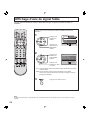
Split screen
Splitting the screen
Press to split.
(The previously selected screen appears on the left.)
+0!
+0#
Left screen
(Main picture)
Right screen
(Sub picture)
• Returning to one screen.
Press to return.
Selecting the screen aspect for split screen.
Press to
select
modes.
+0!
+0#
SPLIT SCREEN FULL
Notes:
• Sound from the Left screen is output from the
speakers on the projection display set.
• When the screen is split, signals of the Left
screen are output from the rear monitor
output terminal.
• The left and right screens are processed by
individual circuits and, therefore, may vary in
image quality.
• Split screen returns to single screen when the
projection display is turned off.
• With the Left screen, as with a single screen,
you can change the input, change channels,
and adjust the volume.
• The right and left screens cannot display the
same picture at the same time.
• A split screen which includes an
RGB/DIGITAL IN signal is fixed as SPLIT
SCREEN NORMAL. (Example: RGB input is
shown right.)
• CARD input screen cannot be displayed using
the Split Screen function.
38
+0!
+0#
SPLIT SCREEN NORMAL
RGB1
CH05
SPLIT SCREEN NOR MAL
(Example: RGB input)
Split screen
Changing the channel of the right screen
Swapping left and right screens
Press to select the desired
channel.
Press to swap.
Example:
During SPLIT SCREEN NORMAL
Example:
During SPLIT SCREEN NORMAL
+0!
+0#
+0!
+0#
+0!
+0$
+0#
+0!
CABLE
TV
125 or 69
CH 01
Example:
During SPLIT SCREEN NOR MAL
(RGB input)
Basic Operation
PIP ▲, ▼ buttons can also be used to select an
outside input for the right side of the screen.
RGB1
CH05
DIGITAL IN
* No input mode
is displayed for
terminals with
no equipment
connected.
CH 125
RGB 2
VIDEO 1 *
RGB 1
VIDEO 2 *
COMPONENT 4 *
RGB1
VIDEO 3 *
COMPONENT 3 *
COMPONENT 1 *
COMPONENT 2 *
Note:
When outside input is finished, the lowest
registered channel number is displayed. For faster
selection, press the SWAP button to change the
screen to the left. Then, press the TV/VIDEO
button to directly change the input. Finally, press
SWAP button again to change the screen back to
the right.
CH05
Note:
Picture quality may change according to the
combination of signals input to the left and right
screens.
39
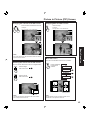
Picture in Picture (PIP) Screen
You can view two pictures simultaneously using two tuners and picture in picture (PIP) display function.
Display PIP screen
Press to split
(The previously selected screen appears on the Main.)
Main screen
(Main picture)
PIP screen
(Sub picture)
• Returning to one screen.
Press to return.
Notes:
• Sound from the Main screen is output from the speakers on the projection
display set.
• In PIP mode, the Main screen signal is output from the rear monitor output
terminal.
• Because Main and PIP screens are processed by individual circuits, image
quality may vary slightly.
• PIP mode returns to single screen when the projection display is turned off.
• The Main and PIP screens cannot display the same picture at the same time.
• An RGB/DIGITAL IN signal and CARD input screen cannot be displayed using
the PIP screen function.
• A component signal cannot be displayed on a PIP screen. Thus, when a
component signal is displayed on the Main screen, the SWAP button becomes
invalid.
• With the Main screen, as with a single screen, you can change the input,
change channels, and adjust the volume.
• When ASPECT is in ZOOM mode, PIP feature cannot be used. (P. 32)
40
Picture in Picture (PIP) Screen
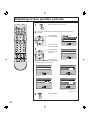
Changing the channel of the PIP screen
Swapping Main and PIP screens
Press to swap.
Example:
During Main screen NORMAL
Press to select the desired channel.
Example:
During Main screen NORMAL
Note:
PIP ▲, ▼ buttons can also be used to select an outside
input for the PIP screen.
Move PIP screen
You can move the PIP screen to four positions.
Selecting the screen size for PIP screen
Press repeatedly
to select PIP
position.
You can choose PIP screen size of 3 magnifications.
Press to large
PIP screen size.
Basic Operation
Initial Position
1st Press
2nd Press
Press to small
PIP screen size.
3rd Press
+0!
+0!
!
Initial position
Note:
Initial size
The last size chosen is saved and will not be erased
even if the power is turned off.
Note:
The last position chosen is saved and will not be
erased even if the power is turned off.
41
Adjusting screen position and size
1
2
Press to select the screen mode.
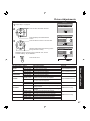
Press the ACTION button to display the MENU screen and select
ADJUST.
Press to select
POSITION/SIZE.
ADJUST
SET UP
PICTURE
AUDIO
POSITION/SIZE
INFORMATION
PAGE
SELECT
END
Press to display
POSITION/SIZE.
3
Press to select
the menu to set
each item.
POSITION
H POSITION
V POSITION
H WIDTH
:SHRINK
NORMAL
ADJUST
Press to adjust
POSITION/SIZE.
SELECT
EXIT
JUST mode
NORMAL is displayed at default.
POSITION
POSITION
H POSITION
V POSITION
V SIZE
NORMAL
H POSITION
V POSITION
H WIDTH
:WIDEN
NORMAL
ADJUST
SELECT
EXIT
POSITION
POSITION
H POSITION
V POSITION
H SIZE
PHASE
NORMAL
H POSITION
V POSITION
NORMAL
SELECT
EXIT
FULL mode
4
42
SELECT
EXIT
ZOOM mode
NORMAL mode
ADJUST
ADJUST
Press to exit menu.
ADJUST
SELECT
EXIT
RGB input
(DIGITAL IN: H POSITION/
V POSITION only)
Adjusting screen position and size
Adjustment Button
Adjustment Details
item
H Position Press ► button. The image moves to the right.
Note
Press ◄ button. The image moves to the left.
V Position
Press ► button. The image moves up.
Press ◄ button. The image moves down.
H WIDTH
Press ACTION If noise appears on the ends of the
button.
image in SHRINK, switch to
ENLARGE.
Only JUST mode
(SHRINK)
(ENLARGE)
If noise appears on the ends of the
image in WIDEN, switch to NARROW.
(WIDEN)
V SIZE
Press ► button. Press to enlarge image vertically
(NARROW)
Only NORMAL
mode
(Except PC
input)
Only ZOOM
mode
H SIZE
Press ► button. Press to enlarge image horizontally
RGB input
Press ◄ button. Press to shrink image horizontally
PHASE
Press ► button. Adjust in order to remove any picture interference or contour blurring RGB input
Press ◄ button. which may occur in computer images.
Advanced Operation
Press ◄ button. Press to shrink image ver tically
Notes:
• This projection display is equipped with various screen modes. If a screen mode with a different aspect from the broadcast
program is selected, image will appear differently. Select the proper screen mode with this in mind.
• Be careful when using this projection display for commercial purposes or for public use, such as in cafes and hotels.
• Shrinking and enlarging images by using screen mode switching function (zoom, etc.) may violate copyright laws.
• Images displayed on a wide screen TV will be cut off or distorted at the edges, when viewing normal aspect images of 4:3 in
ZOOM, JUST or FULL mode. Display in NORMAL mode to view the original image intended by the producer.
• For 1080i and 720p input images, screen size cannot be adjusted.
• The adjusted setting will be kept even when the projection display is turned off.
• The signals output from the monitor output terminal on the back of the projection display is not affected when the screen size
and position is adjusted.
43
Audio Adjustments
Press the ACTION button to display the MENU screen and select ADJUST.
1
ADJUST
Press to select
AUDIO.
PICTURE
AUDIO
POSITION/SIZE
INFORMATION
Press to display
AUDIO screen.
2
SET UP
Press to select the
menu to set each
item.
PAGE
AUDIO
AUDIO MENU
AUDIO ADJUST
SPEAKER
SURROUND
BBE
AUDIO MENU
AUDIO ADJUST
SPEAKER
SURROUND
BBE
:NORMAL
:ON
:OFF
:OFF
NORMAL
AUTO
SELECT
EXIT
CINEMA
See next page
You can hear deeper, 3D
audio using just the units
two front speakers.
Surround sound effect is not
available for normal (mono)
broadcasts.
MUSIC
SPEECH
You can turn off the internal
speakers when it is
connected to external audio
equipment.
See next page
3
:ON
:OFF
:OFF
Emits the original
sound.
The sound level is
automatically
adjusted to suit the
program source.
Sound suited to
movies.
Sound suited to music.
Sound suited to
dialogue.
Press to exit menu.
Notes:
• Sound signals are output from the rear AUDIO OUT terminal.
• When volume is adjusted or the mute button is pressed from the remote control, a message will be displayed.
44
:NORMAL
SELECT
EXIT
Press to set each
item.
AUDIO
SELECT
END
Audio Adjustments
1 Repeat step 1 on page 44.
AUDIO
Press to select AUDIO ADJUST.
2
AUDIO MENU
AUDIO ADJUST
SPEAKER
SURROUND
BBE
AUDIO ADJUST
Press to select the menu to
set each item.
BASS
TREBLE
BALANCE
NORMAL
ADJUST
SELECT
EXIT
Adjust the desired level by
listening to the sound.
AUDIO ADJUST
BASS
TREBLE
BALANCE
NORMAL
ADJUST
:ON
:OFF
:OFF
SELECT
EXIT
Press to display AUDIO ADJUST
screen.
3
:NORMAL
BASS
Adjusts low sounds
TREBLE
Adjusts high sounds
SELECT
EXIT
Advanced Operation
BALANCE
Adjusts left and right
volumes
NORMAL is displayed at default.
4
Using BBE
Press to exit menu.
BBE sound technology enhances speech intelligibility and
restores the dynamic range of musical passages to provide
outstanding natural sound.
Note:
If BBE is ON, SURROUND cannot be selected.
AUDIO
AUDIO MENU
AUDIO ADJUST
SPEAKER
SURROUND
BBE
:NORMAL
:ON
:OFF
:ON
SELECT
EXIT
Note:
If the AUDIO MENU is set to AUTO, or if BBE is ON, BASS and TREBLE cannot be adjusted.
45
Picture Adjustments
Press the ACTION button to display the MENU screen and select ADJUST.
1
Press to select
PICTURE.
Press to display
PICTURE screen.
2
Press to select
the menu to set
each item.
ADJUST
SET UP
PICTURE
AUDIO
POSITION/SIZE
INFORMATION
PAGE
PICTURE
PICTURE MENU
:DYNAMIC
PICTURE ADJUST
COLOR TEMP
:NORMAL
SELECT
EXIT
Press to set each
item.
DYNAMIC
PICTURE
CINEMA
PICTURE MENU
:DYNAMIC
PICTURE ADJUST
COLOR TEMP
:NORMAL
SELECT
EXIT
NORMAL
SELECT
END
Displays a clear screen
with a high contrast of light
to dark.
Ideal for movies in low
lighting conditions.
Displays unaltered image.
During RGB/DIGITAL IN input, picture
menu changes to NORMAL.
See next page
NORMAL
Normal color
WARM
Warm color (more red)
COOL
Cool color (more blue)
During RGB/DIGITAL IN input, COLOR
TEMP changes to NORMAL.
Note:
There is little change when
PICTURE is increased with a
bright picture or reduced with a
dark picture.
46
3
Press to exit menu.
Picture Adjustments
1 Repeat step 1 on page 46.
Press to select PICTURE ADJUST.
2
PICTURE
PICTURE MENU
:NORMAL
PICTURE ADJUST
COLOR TEMP
:NORMAL
SELECT
EXIT
PICTURE ADJUST
Press to display PICTURE ADJUST
screen.
3
Press to select the menu to set each item.
COLOR
TINT
BRIGHTNESS
PICTURE
SHARPNESS
NORMAL
ADJUST
SELECT
EXIT
RGB/DIGITAL IN input
PICTURE ADJUST
Adjust to desired level while viewing picture
through the menu overlay.
NORMAL returns all items to factory defaults. Also, returns
COLOR TEMP (p. 46) to NORMAL.
4
BRIGHTNESS
CONTRAST
R LEVEL
G LEVEL
B LEVEL
NORMAL
ADJUST
SELECT
EXIT
Press to exit menu.
COLOR
Press ► button.
PICTURE
Press ◄ button.
SHARPNESS
Press ► button.
Press ◄ button.
Press ► button.
CONTRAST
Press ◄ button.
R LEVEL
G LEVEL
B LEVEL
Press ► button.
Press ◄ button.
Press ► button.
Press ◄ button.
Press ► button.
Press ◄ button.
Adjustment Details
The color becomes deeper.
The color becomes paler.
Flesh tones become greenish.
Flesh tones become reddish.
The screen becomes brighter.
The screen becomes darker.
Picture intensity becomes stronger as both
contrast and color levels are adjusted.
Picture intensity becomes weaker as both contrast
and color levels are adjusted.
The picture quality becomes sharper.
The picture quality becomes softer.
Only the Highlights of the image become brighter,
adding Contrast.
The Highlights become less bright, diminishing
Contrast.
The red component becomes stronger.
The red component becomes weaker.
The green component becomes stronger.
The green component becomes weaker.
The blue component becomes stronger.
The blue component becomes weaker.
Remarks
Except RGB/DIGITAL IN
Except RGB/DIGITAL IN
Except RGB/DIGITAL IN
Except RGB/DIGITAL IN
Advanced Operation
Adjustment item Button
Press ► button.
COLOR
Press ◄ button.
Press ► button.
TINT
Press ◄ button.
Press ► button.
BRIGHTNESS
Press ◄ button.
RGB/DIGITAL IN only
RGB/DIGITAL IN only
47
Closed Captions
This receiver has a built in decoder that provides a visual depiction of the audio portion of a television
program in the form of written words across the screen (white or colored letters on a black background). It
allows the viewer to read the dialogue of a television program or other information.
CAPTION MODE
Activates the On-Screen Closed Caption feature. When activated this feature will
remain on until OFF is selected in this menu.
Press the ACTION button to display the MENU screen and select SET UP.
1
Press to select
CAPTION.
Press to display the
CAPTION screen.
2
Press to select
CAPTION MODE.
Press repeatedly to
select CAPTION
MODE.
ADJUST
SET UP
LANGUAGE :ENGLISH
CHANNEL
LOCK
CAPTION
VIDEO
OTHER
PAGE
SELECT
END
CAPTION
CAPTION MODE : OFF
CC ON MUTE
: CAP C1
SELECT
EXIT
NO (OFF)
CAP C1
TEXT C1
CAP C2
TEXT C2
Note:
The closed caption or text signal
may be broadcast over C1, C2,
or both. Also, text contents can
vary so you may wish to try
different settings.
48
Closed Caption Modes from which to Choose
Caption Mode: CAP C1 or C2
A narration of selected TV programs is displayed.
Check TV program listings for C. C. (Closed Caption) broadcasts.
Caption Mode: TEXT C1 or C2
The lower half of the screen will be blocked out. When the TV station broadcasts
information, such as program listings, it will appear in this space.
Caption Mode: OFF
Closed Caption /Text narration will not be displayed.
3
Press to exit menu.
Closed Captions
CC ON MUTE
Activates the On-Screen Closed Caption feature, when the MUTE button on the Remote Control is pressed. To
deactivate, press the MUTE button again.
Note:
This feature functions when the Closed Caption Mode is in the “OFF” position. The program being viewed must be broadcast
with Closed Caption.
Press the ACTION button to display the MENU screen and select SET UP.
1
Press to select
CAPTION.
ADJUST
SET UP
LANGUAGE :ENGLISH
CHANNEL
LOCK
CAPTION
VIDEO
OTHER
Press to display the
CAPTION screen.
2
Press to select
CC ON MUTE.
PAGE
SELECT
END
CAPTION
CAPTION MODE : OFF
CC ON MUTE
: CAP C1
SELECT
EXIT
Press repeatedly to select
CC ON MUTE.
CAP C1
CAP C2
3
Press to exit menu.
Advanced Operation
NO (OFF)
Notes:
• The setting for CC ON MUTE is valid only when the CC MODE is OFF, CC MODE set to ON will override CC ON MUTE.
• Closed Caption is not displayed if the input signal is COMPONENT VIDEO INPUT of 480P or more, or from RGB/DIGITAL IN.
49
Lock Feature
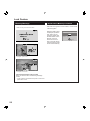
This projection display has a built-in V-Chip Control which allows you to block unwanted TV usage based
on US MOVIES, US TV PROGRAMS, CANADIAN ENGLISH and CANADIAN FRENCH ratings.
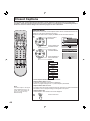
Enter Secret Code
A 4-digit code must be entered to view a blocked program or change rating
settings.
Press the ACTION button to display the MENU screen and select SET UP.
1
Press to select
LOCK.
ADJUST
SET UP
LANGUAGE :ENGLISH
CHANNEL
LOCK
CAPTION
VIDEO
OTHER
PAGE
Press to display the
LOCK screen.
2
Press number keys
to enter your secret
code.
SELECT
END
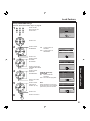
LOCK
ENTER 4-DIGIT CODE
ENTER :0-9
+
EXIT
LOCK
Press to save
4-digit code.
CONFIRM 4-DIGIT CODE
ENTER :0-9
BACKSPACE
EXIT
Changing your secret code
• You will need your current code. Press
“◄” to clear current code. Repeat step
2 to enter new code.
LOCK
Note:
• Use a code that is easy to remember and
record it in a safe place.
RECOGNIZED
ENTER :0-9
3
Notes:
• Once ratings are set, restricted
tapes or programs cannot be
accessed unless the secret
code is entered.
• If you forget your secret code,
refer to “Reset User’s Memory
Functions” on page 56.
50
CONFIRM 4-DIGIT CODE
Press to exit menu.
Or
CHANGE
CODE
EXIT
Or,
Press to display LOCK menu for rating screen and go
to page 51 (US MOVIES Ratings), or page 52 (US TV
PROGRAMS Ratings).
Lock Feature
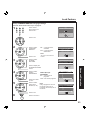
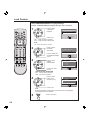
Setup US MOVIES Ratings
Perform “Enter Secret Code” step 1 on page 50.
1
LOCK
Press number
keys to enter your
secret code.
ENTER 4-DIGIT CODE
ENTER :0-9
+
EXIT
Press to set.
2
Press to select
US MOVIES.
ON:
V-Chip Control is
activated.
OFF: V-Chip Control is
deactivated.
LOCK
US MOVIES
:OFF
CHANGE SETTINGS
US TV PROGRAMS
:OFF
CHANGE SETTINGS
SELECT
EXIT
Press to set
3
Press to select
CHANGE
SETTINGS.
LOCK
Press to select
ratings to be
blocked. (P. 55.)
VIEW NR PROGRAMS? : YES
G
UNLOCKED
PG
PG-13
R
NC-17
X
CONTAINS NO RATING
SELECT
EXIT
Press to set “YES”
or “NO”.
Press to set.
6
VIEW NR (Not Rated)
PROGRAMS
NO: Cannot view NR
programs.
YES: Can view NR programs.
SELECT
EXIT
Note:
Ratings highlighted in Red will be
blocked while those not highlighted
(black letters) will not be blocked.
VIEW NR PROGRAMS? : YES
G
UNLOCKED
PG
PG-13
R
NC-17
X
PARENTS CAUTIONED
Advanced Operation
5
Press to select
VIEW NR
PROGRAMS?.
1/2
US MOVIES
:OFF
CHANGE SETTINGS
US TV PROGRAMS
:OFF
CHANGE SETTINGS
Press to display the
CHANGE SETTINGS
screen.
4
1/2
SELECT
EXIT
Press to exit menu.
51
Lock Feature
Setup US TV PROGRAMS Ratings
Perform “US MOVIES Ratings” step 1 on page 51.
1
Press to select
US TV
PROGRAMS.
LOCK
1/2
US MOVIES
:OFF
CHANGE SETTINGS
US TV PROGRAMS
:OFF
CHANGE SETTINGS
SELECT
EXIT
Press to set.
ON: V-Chip Control is activated.
OFF: V-Chip Control is deactivated.
2
3
Press to select
CHANGE
SETTINGS.
Press to display the
CHANGE SETTINGS
screen.
Press to select
VIEW NR
PROGRAMS?.
Press to set “YES”
or “NO”.
LOCK
1/2
US MOVIES
:OFF
CHANGE SETTINGS
US TV PROGRAMS
:OFF
CHANGE SETTINGS
SELECT
EXIT
VIEW NR PROGRAMS? : YES
TV-Y
UNLOCKED
TV-Y7
FV
TV-G
TV-PG
V S L D
TV-14
V S L D
TV-MA
V S L
CONTAINS NO RATING
SELECT
EXIT
VIEW NR (Not Rated) PROGRAMS
NO: Cannot view NR programs.
YES: Can view NR programs.
4
Press to select
ratings to be
blocked. (P. 55.)
VIEW NR PROGRAMS? : YES
TV-Y
UNLOCKED
TV-Y7
FV
TV-G
TV-PG
V S L D
TV-14
V S L D
TV-MA
V S L
PARENTAL GUIDANCE
SELECT
EXIT
Press to set.
You may select from standard TV ratings (chart 1), or customize to a
specific content rating (chart 2.)
Note:
Ratings highlighted in Red will be blocked while those not highlighted (black
letters) will not be blocked.
5
52
Press to exit menu.
Lock Feature
Setup CANADIAN ENGLISH Language Ratings
Perform “Enter Secret Code” step 1 on page 50.
1
LOCK
Press number
keys to enter your
secret code.
ENTER 4-DIGIT CODE
ENTER :0-9
+
2
EXIT
Press to set.
Press to select
CANADIAN
ENGLISH.
ON : V-Chip Control is
activated.
OFF : V-Chip Control is
deactivated.
LOCK
CANADIAN ENGLISH :OFF
CHANGE SETTINGS
CANADIAN FRENCH :OFF
CHANGE SETTINGS
Note:
Press to set
3
LOCK
Press to set “YES”
or “NO”.
5
Press to select
ratings to be
blocked. (P. 55.)
Press to set.
6
VIEW E (Exempt)
PROGRAMS
NO: Cannot view E
programs.
YES: Can view E programs.
SELECT
EXIT
VIEW E PROGRAMS? : YES
C
UNLOCKED
C8+
G
PG
14+
18+
EXEMPT
SELECT
EXIT
Note:
Ratings highlighted in Red will
be blocked while those not
highlighted (black letters) will not
be blocked.
VIEW E PROGRAMS? : YES
C
UNLOCKED
C8+
G
PG
14+
18+
FOR AGE 8 AND OLDER
Advanced Operation
Press to select
VIEW E
PROGRAMS?.
2/2
CANADIAN ENGLISH :OFF
CHANGE SETTINGS
CANADIAN FRENCH :OFF
CHANGE SETTINGS
Press to display the
CHANGE SETTINGS
screen.
4
SELECT
EXIT
“2/2” is the LOCK Menu for
Canada.
Press to select
CHANGE
SETTINGS.
2/2
SELECT
EXIT
Press to exit menu.
53
Lock Feature
Setup CANADIAN FRENCH Language Ratings
Perform “CANADIAN ENGLISH Language Ratings” step 1 on page 53.
1
Press to select
CANADIAN
FRENCH.
LOCK
2/2
CANADIAN ENGLISH :OFF
CHANGE SETTINGS
CANADIAN FRENCH :OFF
CHANGE SETTINGS
SELECT
EXIT
Press to set.
ON : V-Chip Control is activated.
OFF : V-Chip Control is deactivated.
Note:
“2/2” is the LOCK Menu for Canada.
2
Press to select
CHANGE
SETTINGS.
LOCK
CANADIAN ENGLISH :OFF
CHANGE SETTINGS
CANADIAN FRENCH :OFF
CHANGE SETTINGS
Press to display the
CHANGE SETTINGS
screen.
3
Press to select
VIEW E
PROGRAMS?.
2/2
SELECT
EXIT
VIEW E
G
8
13
16
18
PROGRAMS? : YES
UNLOCKED
ANS+
ANS+
ANS+
ANS+
EXEMPT
SELECT
EXIT
Press to set “YES”
or “NO”.
VIEW E (Exempt) PROGRAMS
NO: Cannot view E programs.
YES: Can view E programs.
4
Press to select
ratings to be
blocked. (P. 55.)
VIEW E
G
8
13
16
18
PROGRAMS? : YES
UNLOCKED
ANS+
ANS+
ANS+
ANS+
FOR AGE 13 AND OLDER
SELECT
EXIT
Press to set.
Note:
Ratings highlighted in Red will be blocked while those not highlighted
(black letters) will not be blocked.
5
54
Press to exit menu.
Lock Feature
US MOVIES RATINGS:
GENERAL AUDIENCE:
All ages admitted.
PARENTAL GUIDANCE SUGGESTED:
PG
Some materials may not be suitable for
children.
PARENTS CAUTIONED:
PG-13 Some materials may be inappropriate for
children under 13.
RESTRICTED
R
Children under 17 must be accompanied by
a parent or adult.
OVER AGE 17 ONLY:
NC-17
No one 17 and under admitted
X
ADULTS ONLY:
G
US TV PROGRAMS RATINGS: Chart 1
TV-Y
TV-Y7
TV-G
TV-PG
TV-MA
US TV PROGRAMS RATINGS: Chart 2
FV
C
C8+
Children
Children 8 years and older
G
General Audience
PG
Parental Guidance
14+
Viewers 14 years and older
18+
Adult Programming
CANADIAN FRENCH RATINGS:
G
General
8 ANS Not recommended for young children
13 ANS+
Programming may not be suitable for
children under the age of 13
16 ANS+
Programming may not be suitable for
children under the age of 13
18 ANS+ Programming restricted to adults
Advanced Operation
TV-14
FOR ALL CHILDREN:
Content specifically geared to young viewers
ages 2-6.
FOR AGE 7 AND OLDER:
May contain mild physical or comedic
violence which may frighten children under 7.
GENERAL AUDIENCE:
Contains little or no violence, strong
language, or sexual dialogue or situations.
PARENTAL GUIDANCE:
May contain infrequent coarse language,
limited violence, some suggestive sexual
dialogue and situations.
PARENTS CAUTIONED:
May contain sophisticated themes, sexual
situations, strong language, and more
intense violence.
MATURE AUDIENCE:
May contain mature themes, profane
language, graphic violence, and sexual
situations.
CANADIAN ENGLISH RATINGS:
Fantasy Violence
V
Violence
S
Sexual Situations
L
Adult Language
D
Sexually Suggestive Dialogue
55
Lock Feature
Reset User’s Memory Functions
Blocking Message
Use when moving unit to a new location, or if the secret
code is forgotten.
<When V-Chip Control is activated>
CH08
PROGRAM RA T I NG E XCE EDED
RA T I NG : T V - Y
CODE - - - EN T ER : 0 - 9
<Example: single screen>
CH03
CH08
PROGRAM RA T I NG
E XCE EDED
RA T I NG : T V - Y
CODE - - - EN T ER : 0 - 9
<Example: split screen>
<Example: PIP screen>
Temporarily deactivate V-Chip control
Enter your secret code in the blocking message
screen.
• V-Chip control is reactivated when power is turned off or
power failure occurs.
56
While the OSD at right
is displayed, press the
VOL- button on the
projection display and
ACTION button on the
Remote control at
same time for more
than 5 seconds. When
reset is finished, power
shuts off automatically.
LOCK
ENTER 4-DIGIT CODE
ENTER :0-9
EXIT
Channel Caption Feature
Choose from a list of 24 station names, e.g. ABC, TNN, etc. so that they will appear on screen when a
channel is selected.
Press the ACTION button to display the MENU screen and select SET UP.
1
2
3
Press to select
CHANNEL.
ADJUST
SET UP
LANGUAGE :ENGLISH
CHANNEL
LOCK
CAPTION
VIDEO
OTHER
Press to display the
SET UP CHANNEL
screen.
PAGE
Press to select
CHANNEL CAPTION.
SET UP CHANNEL
ANTENNA : CABLE
AUTO SET
MANUAL SET
CHANNEL CAPTION
WEAK SIGNAL DISPLAY:OFF
SELECT
EXIT
Press to display the
CHANNEL CAPTION
screen.
Press to select a
station.
CHANNEL CAPTION
ABC
CBS
FOX
NBC
PBS
CNN
1/4
SELECT
EXIT
To remove a registered channel number, select the station,
then press the ◄ button (CLEAR).
Press to select
channel number.
CHANNEL CAPTION
ABC
CBS
FOX
NBC
PBS
CNN
CANCEL
Press to set.
02
SELECT
EXIT
1/4
Advanced Operation
Press to move cursor
to the right.
4
SELECT
END
To make a correction, press the ◄ button.
• Repeat step 3 and 4 until the Caption List is complete.
5
Press to exit menu.
57
Weak Signal Display Feature
When “ON” is selected, the picture is displayed even when a broadcast signal is weak or non-existent.
Press the ACTION button to display the MENU screen and select SET UP.
1
ADJUST
Press to select
CHANNEL.
LANGUAGE :ENGLISH
CHANNEL
LOCK
CAPTION
VIDEO
OTHER
PAGE
Press to display
the SET UP
CHANNEL
screen.
2
Press to select
WEAK SIGNAL
DISPLAY.
SET UP
SELECT
END
SET UP CHANNEL
ANTENNA : CABLE
AUTO SET
MANUAL SET
CHANNEL CAPTION
WEAK SIGNAL DISPLAY:OFF
SELECT
EXIT
Press to set
“ON” or “OFF”.
ON:
Picture is displayed regardless of signal condition, and may not
always be clearly visible.
OFF: Screen turns solid blue when signal is absent or weak.
(Screen turns solid black during PIP or SPLIT functions.)
3
Press to exit menu.
Note:
If unit is connected to equipment which has blue back feature, selecting “ON” will have no effect on the other equipment.
58
Video NR (Noise Reduction) Feature
In the event of weak signal conditions, the Video NR circuitry reduces noise in the luminance channel. It is
important to note that Video NR should remain OFF for maximum picture detail when receiving a strong
signal or viewing high-quality video.
Press the ACTION button to display the MENU screen and select SET UP.
1
Press to select
VIDEO.
ADJUST
SET UP
LANGUAGE :ENGLISH
CHANNEL
LOCK
CAPTION
VIDEO
OTHER
PAGE
SELECT
END
Press to display
the VIDEO screen.
2
Press to select
VIDEO NR.
VIDEO
VIDEO NR :OFF
ID-1
:OFF
480P COLOR MATRIX:SDTV
RGB
:VGA
3D Y/C
:ON
3D IP
:ON
SELECT
EXIT
Press to set “ON”
or “OFF”.
3
Press to exit menu.
Advanced Operation
ON: When signal is noisy
OFF: When signal is high-quality
Note:
When an RGB/DIGITAL IN signal is input, VIDEO NR is set to OFF only.
59
Automatically changing screen size
If the received signal contains screen size specifications in RF, VIDEO INPUT (1–3) or COMPONENT VIDEO
INPUT (1–4), the screen size is automatically changed.
Press the ACTION button to display the MENU screen and select SET UP.
1
Press to select
VIDEO.
Press to display the
VIDEO screen.
2
Press to select
ID-1.
Press to set
“ON” or “OFF”.
ON:
ADJUST
SET UP
LANGUAGE :ENGLISH
CHANNEL
LOCK
CAPTION
VIDEO
OTHER
PAGE
SELECT
END
VIDEO
VIDEO NR :OFF
ID-1
:OFF
480P COLOR MATRIX:SDTV
RGB
:VGA
3D Y/C
:ON
3D IP
:ON
SELECT
EXIT
When screen size specification signals are detected, screen size
is automatically changed.
OFF: The screen size is not automatically changed. (Turn OFF if this
function does not operate properly.)
3
Press to exit menu.
Notes:
• When ID-1 is detected and screen size is changed, Aspect mode will be displayed.
• When displaying split screen, ID-1 is not detected.
60
Setting when 480p signals are input through COMPONENT VIDEO INPUT
Adjust 480p signals to achieve a natural color from digital equipment connected to COMPONENT VIDEO
INPUT (Y, PB, PR input terminals).
Press the ACTION button to display the MENU screen and select SET UP.
1
Press to select
VIDEO.
Press to display the
VIDEO screen.
2
Press to select
480P COLOR
MATRIX.
ADJUST
SET UP
LANGUAGE :ENGLISH
CHANNEL
LOCK
CAPTION
VIDEO
OTHER
PAGE
SELECT
END
VIDEO
VIDEO NR :OFF
ID-1
:OFF
480P COLOR MATRIX:SDTV
RGB
:VGA
3D Y/C
:ON
3D IP
:ON
Press to set “SDTV”
or “HDTV”.
SELECT
EXIT
SDTV : When the input signal is a normal TV system (NTSC).
HDTV : When the input signal is a High-Definition system (HD).
Press to exit menu.
Advanced Operation
3
Note:
480p COLOR MATRIX does not need to be set when using Hi-Definition equipment or 480i output equipment.
61
RGB/DIGITAL Input Feature
Set the signal to be input to the projection display’s RGB IN or DIGITAL IN terminal. Most of analog
RGB/DIGITAL IN signals are selected automatically. When RGB/DIGITAL IN input signal is VGA 60Hz from
PC or 480P from other equipment, you must manually switch to the desired input.
Press the ACTION button to display the MENU screen and select SET UP.
1
Press to select
VIDEO.
ADJUST
SET UP
LANGUAGE :ENGLISH
CHANNEL
LOCK
CAPTION
VIDEO
OTHER
PAGE
SELECT
END
Press to display
the VIDEO screen.
2 When RGB signal is input.Press to select
RGB.
Or
VIDEO
VIDEO NR :OFF
ID-1
:OFF
480P COLOR MATRIX:SDTV
RGB
:VGA
3D Y/C
:ON
3D IP
:ON
SELECT
EXIT
Press to set
“VGA” or “480P”.
When DIGITAL IN signal is input.
Press to select
DIGITAL IN.
Press to set
VIDEO
VIDEO NR :OFF
ID-1
:OFF
480P COLOR MATRIX:SDTV
DIGITAL IN:VGA
3D Y/C
:ON
3D IP
:ON
SELECT
EXIT
VGA
480P
AUTO
VGA : When RGB/DIGITAL IN input signal is VGA 60Hz from PC.
480P : When RGB/DIGITAL IN input signal is 480P from other equipment.
AUTO: VGA/480P input signals are distinguished automatically.
(DIGITAL IN only)
Note:
Select VGA/480P manually if picture appears unnatural in AUTO.
3
62
Press to exit menu.
3D Y/C Feature
Accurate separation of the picture’s brightness and color signals allows you to enjoy a beautiful picture.
Press the ACTION button to display the MENU screen and select SET UP.
1
ADJUST
SET UP
LANGUAGE :ENGLISH
CHANNEL
LOCK
CAPTION
VIDEO
OTHER
Press to select
VIDEO.
PAGE
2
Press to select
3D Y/C.
ON: Usually set to ON.
OFF: Set to OFF if picture appears
unnatural.
Press to set
“ON” or “OFF”.
3
SELECT
END
Press to display the
VIDEO screen.
VIDEO
VIDEO NR :OFF
ID-1
:OFF
480P COLOR MATRIX:SDTV
RGB
:VGA
3D Y/C
:ON
3D IP
:ON
SELECT
EXIT
Press to exit menu.
3D IP Feature
Film media (taken at 24 frames per second) is faithfully reproduced on the projection display.
1
ADJUST
SET UP
LANGUAGE :ENGLISH
CHANNEL
LOCK
CAPTION
VIDEO
OTHER
Press to select
VIDEO.
PAGE
2
Press to display the
VIDEO screen.
Press to select
3D IP.
Press to set
“ON” or “OFF”.
3
ON:
Recordings created at 24
frames per second are shown
in higher quality.
OFF: Set to OFF if picture appears
unnatural.
SELECT
END
VIDEO
VIDEO NR :OFF
ID-1
:OFF
480P COLOR MATRIX:SDTV
RGB
:VGA
3D Y/C
:ON
3D IP
:ON
Advanced Operation
Press the ACTION button to display the MENU screen and select SET UP.
SELECT
EXIT
Press to exit menu.
63
Sleep Timer Feature
The projection display can be set to shut itself off at a preselected time.
Press the ACTION button to display the MENU screen and select SET UP.
1
Press to select
OTHER.
ADJUST
SET UP
LANGUAGE :ENGLISH
CHANNEL
LOCK
CAPTION
VIDEO
OTHER
PAGE
SELECT
END
Press to display
the OTHER
screen.
2
Press to select
SLEEP
TIMER.
Press repeatedly
to select the
desired time.
OFF
30min
60min
90min
3
Note:
• Pressing RECALL with sleep timer set displays remaining time.
• Minutes remaining is displayed for the last 3 minutes before shutoff.
64
Press to exit menu.
OTHER
SLEEP TIMER:OFF
DEMO MODE :OFF
SELECT
EXIT
Switching languages for display
The language of the projection display is set to English as the factory setting. To select one of 3 different
languages for on-screen displays, follow the instructions below.
Press the ACTION button to display the MENU screen and select SET UP.
1
Press to select LANGUAGE.
ADJUST
SET UP
LANGUAGE :ENGLISH
CHANNEL
LOCK
CAPTION
VIDEO
OTHER
Press repeatedly to select the
desired LANGUAGE.
PAGE
SELECT
END
ENGLISH
ESPAÑOL
FRANÇAIS
2
Press to exit menu.
Information
Press the ACTION button to display the MENU screen and select ADJUST.
1
Press to select
INFORMATION.
Press to display
INFORMATION screen.
2
Press to exit menu.
ADJUST
SET UP
PICTURE
AUDIO
POSITION/SIZE
INFORMATION
PAGE
INPUT SIGNAL
SELECT
END
Advanced Operation
You can display the input signal type. Display items differ depending on the input signal.
NTSC
EXIT
65
Demo Mode Feature
Function demonstrations of this unit are displayed in Demo mode.
Press the ACTION button to display the MENU screen and select SET UP.
1
Press to select
OTHER.
ADJUST
SET UP
LANGUAGE :ENGLISH
CHANNEL
LOCK
CAPTION
VIDEO
OTHER
PAGE
SELECT
END
Press to display
the OTHER
screen.
2
Press to select
DEMO MODE.
Press to set “ON”
or “OFF”.
OTHER
SLEEP TIMER:OFF
DEMO MODE :OFF
SELECT
EXIT
ON: Demo mode is started.
OFF: Demo mode is canceled.
3
Press to exit menu.
Note:
Demo mode setting remains even when power is turned off. To turn off Demo mode, select DEMO MODE : OFF in
the menu screen.
66
JPEG Viewer (SD Card/PC Card)
Still image data (JPEG) made with a digital camera, digital video camera, or PC can be played back using an
SD Card/PC Card.
WARNING
As with any small object, SD cards can be swallowed by young children. Do not allow children to handle the
SD card.
Displayable Image Formats:
Baseline JPEG
(80 x 60 ~ 5 120 x 3 840 pixels)
Notes:
• Some parts of an image may not be displayed or the image may be displayed on a smaller scale depending on the size of the
image.
• Only JPEG images can be displayed on this projection display.
Card Data Protection
• Do not remove the card while it is being accessed.
• Do not touch the terminals on the back of the SD Card/PC Card.
• Electrical interference, electrostatic discharges and malfunctions of the unit or card may all result in damage to the card or
data loss. It is recommended that any important data also be backed up on a PC.
• Stored data should be periodically backed up as a protection against data corruption, data loss or device malfunction. Please
note that our company shall not accept any liability for damage or loss of stored data.
Caution
• Always insert card in the correct direction. Failure to do so may result in damage to the card and this unit.
• The SD Card and PC Card are precision devices. Do not subject them to excessive pressure or strong impacts.
Folders and Files
Digital cameras that are compliant with DCF specifications use folders with a specific structure. The following
diagram shows an example of the folder structure.
ROOT
DCIM
100_PANA
P1000001.jpg
P1000002.jpg
P1000003.jpg
P1000004.jpg
101_PANA
P1010001.jpg
P1010002.jpg
P1010003.jpg
P1010004.jpg
100_PANA Folder
Folder names consist of a 3-digit folder number which is
followed by five arbitrary characters. Digital camera
images are stored within these folders.
JPEG files in the 100_PANA folder are displayed when a
Card, which is structured as shown left, is inserted. To
display another folder, see page 69 INDEX AREA
OPERATION.
Advanced Operation
Example:
If the Card file hierarchy is displayed on the PC
as shown in diagram at below.
DCIM Folder
The digital camera creates this folder automatically.
Note:
The folder name may vary according to the digital
camera being used.
P1000001.JPG: DCF File
File names consist of four arbitrary characters followed
by a 4-digit file number. DCF files are image files
(normally JPEG files) that have been taken by a digital
camera.
67
JPEG Viewer (SD Card/PC Card)
Compatible Card
Insert the Card.
SD Card slot
SD Card
Multi Media Card
Front Card Slot (P. 10)
PC Card slot
Compact Flash*
Smart Media*
Memory Stick*
xD Picture Card*
• The media* listed in the right column above can be read via
the PC Card in the PC Card adaptor.
• Hard disk PC Cards, Flash ATA Cards, and other recorded
media cannot be used.
• Place the selected media onto the PC Card and then insert
into the PC Card Slot.
• When both an SD Card and PC Card are inserted, the SD
Card contents has priority and will be displayed.
• If the Card is unusable, “CARD ERROR” is displayed
on-screen. Remove the Card only when ACCESS is not
displayed.
• If an incompatible JPEG file is displayed (full size file
preview), “DATA ERROR” is displayed.
SD Card
PC Card
Remove the Card.
Notes:
Press in lightly
on SD Card,
then release.
Press PC Card
EJECT TAB twice.
Card Menu Screen
• Insert/remove Card while “Card Menu Screen” or “No Card”
is displayed.
• Be sure ACCESS is not displayed before Card
insertion/removal.
• Fully insert the Card (ACCESS is displayed). Wait until
ACCESS goes out before removing.
• Before reinserting a Card after removing it, wait until “NO
CARD” is displayed. If there are Cards in both Card Slots,
wait until the Card Menu Screen of the other Slot is displayed
and ACCESS is no longer displayed before reinserting a
Card.
The screen below is displayed automatically when a card is inserted. If “NO CARD” appears, confirm that
a card is correctly inserted.
Parent Folder
Returns currently
displayed folder to the
parent (previous)
folder.
Menu Area
Select display method
(SINGLE PLAY or
SLIDE SHOW).
Confirm the displayed
card type (SD Card or
PC Card).
-MENUSINGLE
SLIDE
PAGE:
Display Page No.
When the displayed
files/folders fill more than
one page, the total number
of pages is displayed.
1/6
SD/PC
ACCESS
Index Area
Folders and files are
displayed here.
Notes:
JPEG
ACCESS Indication
ACCESS is displayed
while data is read.
68
Subfolder
The subfolder of
the currently
displayed folder is
opened.
200_PANA
Folder Name Area
The name of the selected
subfolder (framed in yellow) is
displayed.
• Up to 1 000 JPEG files can
be displayed. (This number
may be lower if subfolders,
or files other than JPEG are
included in the folder.)
• Depending on JPEG
file type, “JPEG” will
be displayed instead of
thumbnail image.
Note:
Only JPEG files can be
displayed.
JPEG Viewer (SD Card/PC Card)
MENU Area Operation
1
Press to
select
MENU.
-MENUSINGLE
SLIDE
PAGE:
1/6
SD/PC
Press to
move to
index area.
SINGLE
A single image selected from the index area fills the screen.
You can also rotate the image and view image information. (PP. 70-71)
SLIDE
Images are displayed one after another as a slide show. Also, the SPEED and
Transition features (p. 71) can be used.
SD/PC
When both an SD Card and PC Card are inserted, the ◄► buttons can be used
to select a card in the index area.
Index Area Operation
Press to
select icon.
2
-MENUSINGLE
SLIDE
PAGE:
1/6
SD/PC
Press to set
To select a page directly, enter the page number with the Number Keys,
then press ACTION.
Select an Image file.
Display full size file preview.
Select a Parent folder ( ).
Make changes to the parent (previous) directory display.
Note:
File and folder names will not be displayed correctly if...
• More than 8 characters are used.
• Spaces and special symbols are used. Use care when changing file and/or
folder names.
RETURN Operation
Press RECALL to display
RETURN MENU.
Press ▲▼ to select an item,
and press ACTION.
-MENUSINGLE
SLIDE
PAGE:
Advanced Operation
Select a Subfolder ( ).
Display files/folders contained in the folder.
1/6
SD/PC
RETURN
RETURN TO MENU
RETURN:
Returns to the parent (previous) folder.
RETURN TO MENU:
Returns to Menu Area screen.
69
JPEG Viewer (SD Card/PC Card)
Single Play Mode
▲▼ to select “SINGLE,”
1 Press
and press ACTION.
Press ▲▼◄► to move cursor
to desired file in INDEX
AREA.
(Press ▲▼◄► to display
next/previous page of 9
thumbnail files),
Press ACTION to display file
in full screen size.
-MENUSINGLE
SLIDE
PAGE:
1/6
SD/PC
SINGLE VIEW SCREEN
Press ► : The next image is displayed.
Press ◄ : The previous image is displayed.
Press ▼ : Each press rotates image 90°.
Press
►
Press
◄
Press ▼
Press
►
Press ▼
Press
►
Press ▼
Press ▼
Press
►
Continued in left column of next page.
70
JPEG Viewer (SD Card/PC Card)
Continued from page 70.
Information Screen Display
Slide Show Mode
1
Press ACTION: INFORMATION SCREEN is
displayed. (Rotation angle is maintained.)
Information Screen
FILE
DATE
P2000006
07/31/2003
Pressing RECALL returns to SINGLE VIEW
SCREEN.
Note:
• If a file name exceeds 8 characters, a file name
different from the original is displayed.
Picture Adjustment
Picture Adjust menu
PICTURE ADJUST
COLOR
TINT
BRIGHTNESS
PICTURE
SHARPNESS
NORMAL
ADJUST
-MENUPAGE:
START
SINGLE
SPEED
:FAST
SLIDE
TRANSITION:NORMAL
SD/PC
1/6
[START]
Starts slide show.
[SPEED]
FAST:
Image transition every
2 seconds.
MEDIUM:
Image transition every
5 seconds.
SLOW:
Image transition every
10 seconds.
Note:
The display intervals of
2, 5, and 10 seconds
do not include file data
reading time. The display
interval becomes longer
depending on the JPEG
size.
[Transition]
NORMAL:
Image transition one by one.
WIPE:
Image transition from top to bottom.
BLIND:
Image transition in a series of band-like shapes
that resemble window blinds.
SELECT
EXIT
Pressing RECALL returns to SINGLE VIEW
SCREEN.
2
START SLIDE SHOW.
...
Advanced Operation
When ACTION is pressed while the Information
Screen is displayed, the Picture Adjust menu
(p. 46) is displayed. (Rotation angle is
maintained.)
Press ▲▼ to select “SLIDE,” and press ACTION.
Press ▲▼◄► to move cursor to desired file in Index
Area.
(Press ▲▼◄► to display next/previous page of 9
thumbnail files).
Press ACTION to display SLIDE MENU.
Press ▲▼ to select an item, and press ACTION
repeatedly to set.
Press ACTION to stop or resume slide show.
2
Press RECALL with SINGLE VIEW screen
displayed to return to the Index Area menu.
3
Press RECALL to exit this mode.
71
Replacing the lamp unit
The lamp unit is sold separately. To purchase a replacement, call the Panasonic accessory department, toll
free at: 1-800-332-5368.
Lamp unit Part No. : TY-LA1000-K
Lamp unit replacement period
The lamp has a maximum life of about 10 000 hours.
• When the stipulated time is reached, “THE LAMP NEEDS TO BE REPLACED, •••” will be
displayed for about 5 minutes.
• The LAMP indicator lights red.
THE LAMP NEEDS TO BE
REPLACED, AND THE LAMP
HOUR METER NEEDS TO BE
RESET.
EXIT
Due to the characteristics and use conditions of individual lamps, the lamp may cease to light before the stated
lamp life.
Influences of frequent lighting, continuous light use for over 24 hours, the number of times lit, the length of time
between lightings, etc. may shorten lamp life.
(Because of this, we recommend having a replacement lamp on hand.)
WARNING
Failure to follow these warnings when replacing the lamp unit could result in personal injury:
1) The high-pressure lamp could explode if not properly handled and lamp fragments could cause injury.
2) Because the temperature of the lamp unit is elevated immediately after its use, touching it may cause burns.
Please allow the lamp to cool before handling or replacing the lamp unit.
3) Handle the old lamp unit carefully. It can explode if not handled with care.
4) Wear gloves and safety eyeglasses when replacing the lamp unit.
5) If replacement of the lamp unit becomes necessary during the operation of the TV, follow the procedure below
to turn off the power and wait until the lamp unit cools completely.
a. Press the POWER button on the remote control unit to turn off the power.
b. Wait for about 1 minute until the cooling fan stops.
• The lamp cooling fan will continue to operate for about 1 minute after turning off the power. Do not unplug
the power cord from the outlet until the fan has stopped. Avoid interrupting the power line by using circuit
breakers or switchable power strips.
c. After the cooling fan has stopped, Unplug the power cord from the outlet.
• Please wait more than one hour for lamp replacement.
[ If you need to replace the lamp more urgently ]
• The projection display has a forced cooling feature. After the POWER button is turned OFF, and sometime during about the
first minute of the normal cooling fan operation, press the VOL+ button on the projection display and the ▲ button on the
Remote control at same time for more than 5 seconds. The cooling fan operates for about 10 minutes.
Refer to the instructions enclosed with the lamp unit (Part No.: TY-LA1000-K) when replacing the lamp.
72
Remote Control Quick Reference Guide (Operating peripheral equipment)
Programming The Illuminated Remote Control Using Access Codes
The remote control can be preset for other manufacturers, by utilizing the REMOTE MODE SELECTION BUTTONS
for CABLE, DTV, VCR, RCVR (a Receiver or Amplifier), DVD (DVD or CD), DBS and AUX (for Cassette Player or
a PVR.) Details on remote control buttons to operate peripheral equipment. (PP. 78-79)
Setting up the remote using the numerical keys.
(When code is known):
1
+
Press and hold the POWER and ACTION
buttons simultaneously for at least 5 seconds.
After 5 seconds, all the illuminated mode
buttons will begin to flash. Then let go of the
POWER and ACTION buttons.
2
Press the desired mode button.
The mode button will illuminate steadily, all
others will go out.
3
Enter the three digit set up code, by using the
Remote Control Keyboard.
If the correct code is entered, the mode button will
blink twice and then go out.
Now your remote is set for this code.
Then, press the Remote Control POWER button to
test the component. If the procedure was
successful, the component will turn on.
Device
TV
VCR
CBL
DBS
RCVR
AUX
DVD
DTV
Operate
TV (Only Panasonic)
VCR (Preset)
Cable Boxes (Preset)
DBS Boxes (Preset)
RCVR (Preset)
Cassette Players, PVR (Preset)
DVD & LD & CD Player (Preset)
STB (Only Panasonic)
Default
Panasonic Code
Panasonic Code
Panasonic Code
Panasonic Code
Panasonic Code
Panasonic Cassette Players Code
Panasonic DVD Code
Panasonic Code
Notes:
Information
• Due to changes in infra-red commands used by manufacturers, some brands have several codes. If your unit does not
respond to the first code, please try the next one.
• If an incorrect number is entered (or there is an incomplete entry after 30 seconds), the button illumination goes out (no blink)
and settings are unchanged.
• Repeat setup after remote battery replacement.
• Remote will not control every component made by the manufacturer listed. If you get no response, your particular component
cannot be controlled. There are NO additional codes for the products listed. If your product is not listed, then the remote is not
compatible with that product.
73
Remote Control Quick Reference Guide (Operating peripheral equipment)
Setting to the remote using the step and set method
(When code is not known):
1
+
2
Press and hold the POWER and ACTION
buttons simultaneously for at least 5 seconds.
After 5 seconds, all the illuminated mode buttons
will begin to flash. Then let go of the POWER
and ACTION button.
Press the mode button.
The mode button will illuminate steadily, all
others will go out.
3
Press “►” button to step to the next code. Press
POWER button to send a test signal in that
format. Continue doing this until the proper
device code is found, and the target device
responds.
4
Once the code has been found, press the
ACTION button to lock it in.
Notes:
• The step and set mode will start from the current device (not the beginning of the
library, except for the first time).
• The step and set mode works in the reverse direction using the “◄” button.
Infrared Remote Codes for Specific Components
Helpful Hint: Write down the code numbers for your components in the space provided below. This will serve as a
handy reference whenever you need to reprogram your remote control.
CABLE
Cable Box
DBS
Digital Broadcast System
74
VCR
Video Cassette Recorder
RCVR
Receiver or Amplifier
CD
Compact Disc Player
DVD
Digital Versatile Player
Other Component
Other Component
Other Component
Other Component
Other Component
Other Component
Remote Control Quick Reference Guide (Operating peripheral equipment)
Infrared Codes Index
The remote control is capable of operating many brands of peripheral equipment. Refer to page 73 and 74 for
programming procedures.
Notes:
• The remote control memory is limited and therefore some models may not operate. The remote control is not designed to control
all features available in all models.
• After entering the proper infrared code, press the desired Mode Selection button on the remote control. Refer to page 8 and 78
to 79 for details on operating peripheral equipment using the remote control.
VCR Infrared Codes Index
VCR
Maker List (VCR)
Maker
Set Up No.
Maker
Set Up No.
ADMIRAL
AIWA
AKAI
AUDIO DYNAMIC
BELL & HOWELL
BROKSONIC
CANON
CITIZEN
CRAIG
335
332
314, 315, 316, 329
311, 339
305, 313
320, 326
323, 325
306
305, 306, 329
OPTIMUS
ORION
PANASONIC
J.C. PENNEY
PENTAX
PHILCO
PHILIPS
PIONEER
PROSCAN
CURTIS MATHES
DAEWOO
DBX
324, 345
301, 324, 343
310, 311, 339
QUASAR
RADIO SHACK
RCA
DIMENSIA
EMERSON
FISHER
FUNAI
GE
345
303, 319, 320, 325, 326, 343
305, 307, 308, 309, 313
320, 326, 334
324, 333, 345
REALISTIC
SAMSUNG
SANSUI
SANYO
SCOTT
GOLDSTAR
GRADIENTE
HITACHI
306
334
300, 323, 345
SEARS
SHARP
SHINTOM
306, 321, 328, 335
320, 326
321, 322, 323, 324
300, 305, 310, 311, 324, 339, 345
300, 311, 345
320, 323, 324, 326, 331, 343
323, 324, 331
323
300, 301, 302, 323, 324, 331, 333,
345, 346
321, 322, 323, 324
305, 309, 324, 333, 336, 340
300, 301, 302, 323, 324, 331, 333,
345, 346
305, 309, 324, 336, 340
302, 304, 333
320, 326, 339, 352
305, 309, 313
301, 302, 304, 309, 320, 326, 338,
340, 347, 348
300, 305, 306, 307, 308
335, 336
317
INSTANT REPLAY
323, 324
SIGNATURE 2000
335
JENSEN
339
SINGER
317
JVC
310, 311, 334, 339
SONY
328, 329, 330
KENWOOD
306, 310, 311, 339
SYLVAVIA
323, 324, 331
LXI
300, 305, 306, 307, 308, 309
TASHIRO
306
MAGNAVOX
323, 324, 331
TATUNG
310, 311, 339
MARANTZ
310, 311, 339
TEAC
310, 311, 339
MARTA
306
TECHNICS
321, 322, 323, 324
MEMOREX
309, 324
TEKNIKA
324
MGA
338, 340, 341, 347, 348
TOSHIBA
301, 346
MINOLTA
300, 345
VECTOR RESEARCH
311
MITSUBISHI
338, 340, 341, 347, 348
WARDS
306, 309, 335, 336, 344
MULTITECH
304, 347
YAMAHA
305, 310, 311, 339
NEC
310,311, 334, 339
ZENITH
306, 344
OLYMPIC
323, 324
Information
75
Remote Control Quick Reference Guide (Operating peripheral equipment)
CABLE CONVERTER BOX AND DVD, CD PLAYERS Infrared Codes Index
CBL
DVD
Maker List (CBL)
Maker
Set Up No.
Maker
Set Up No.
ABC
ARCHER
CABLEVIEW
CITIZEN
CURTIS
DIAMOND
EAGLE
EASTERN
GCBRAND
GEMINI
GENERAL
INSTRUMENT /
JERROLD
HAMLIN
HITACHI
MACOM
MAGNAVOX
MEMOREX
MOVIETIME
OAK
PANASONIC
PHILIPS
124
125, 132
105, 132
105, 122
112, 113
124, 125, 132
129
134
105, 132
122
111, 119, 120, 121, 122, 123, 124,
125, 126, 127
PULSAR
PUSER
RCA
REALISTIC
REGAL
REGENCY
REMBRANT
SAMSUNG
SCIENTIFIC ATLANTA
SLMARK
SPRUCER
105, 132
132
115
132
112, 118, 140, 141, 142, 145
134
105, 132, 137
105
111, 112, 113
101, 105
105, 110
112, 118, 140, 141, 142, 145
103, 124
103, 104, 105
133
130
105, 132
102, 137, 139
109, 110, 114
106, 107, 128, 129, 130
STARGATE
TELEVIEW
TEXSCAN
TOCOM
TOSHIBA
UNIKA
UNIVERSAL
VIDEOWAY
VIEWSTAR
105, 132
101, 105
144
135
104
125, 132
122, 132
106
129, 130
PIONEER
101, 116
ZENITH
100, 117
ZENITH / DRAKE
SATELLITE
100
Maker List (DVD)
Maker
Set Up No.
Maker
Set Up No.
DENON
FERGUSON
JVC
MITSUBISHI
NORDMENDE
PANASONIC
PHILIPS
PIONEER
RCA
100
101
109
105
101
100
103
102
101
SABA
SAMSUNG
SHARP
SONY
TECHNICS
THOMSON
TOSHIBA
YAMAHA
ZENITH
101
110
108
104
100
101
103
100
107
Maker List (CD)
76
Maker
Set Up No.
Maker
Set Up No.
ADMIRAL
AIWA
CARVER
DENON
EMERSON
FISHER
HARMAN/KARDON
HITACHI
JENSEN
JVC
KARDON
KENWOOD
LXI/SEARS
MAGNAVOX
MARANTZ
MCINTOSH
NAKAMICHI
ONKYO
226
233, 235
229
242
239
205
219, 220, 221, 223
207
234
240, 241, 245
223
200, 201, 211, 245
236
229, 232
229
221
210
214, 215
OPTIMUS
PANASONIC
PHILIPS
PIONEER
QUASAR
RCA
SANSUI
SANYO
SCOTT
SHARP
SHERWOOD
SONY
SOUNDESIGN
TEAC
TECHNICS
VICTOR
YAMAHA
208, 218, 220, 222
224, 225, 227
229, 230
208
224, 225, 227
231, 237, 238, 247
210, 246
205
210, 246
242, 243
220
228
244
212, 216, 218
224, 225, 227
240, 241, 245
202, 203, 204
Remote Control Quick Reference Guide (Operating peripheral equipment)
CASSETTE PLAYERS, PERSONAL VIDEO RECORDERS, RECEIVERS, AMPLIFIERS, and
DBS Infrared Codes Index
AUX
Maker List (TAPE)
Maker
Set Up No.
Maker
Set Up No.
AIWA
DENON
FISHER
JENSEN
JVC
KENWOOD
MARANTZ
NAKAMICHI
ONKYO
PANASONIC
223, 224, 225
231
203
214
229, 230
200, 207
202
205
208, 209, 213
216, 218
PHILIPS
PIONEER
RCA
SANSUI
SHARP
SONY
TEAC
TECHNICS
YAMAHA
222
204
226, 227, 228
205, 210
231
219, 220
210, 211, 215
216, 218
201, 202
Maker List (Personal Video Recorders)
RCVR
DBS
Maker
Set Up No.
Panasonic Replay TV
Philips Tivo
Sony Tivo 102
100
101
102
Maker List (RCVR)
Maker
Set Up No.
Maker
Set Up No.
ADMIRAL
AIWA
DENON
FISHER
GARRARD
HARMAN KARDON
JENSEN
JVC
KENWOOD
MAGNAVOX
MARANTZ
MCLNTOSH
NAKAMICHI
ONKYO
120
125, 126
134, 135, 136
104
113
115, 123
129
132, 133
100, 108
127
124
116
106
109, 114
OPTIMUS
PANASONIC
PHILIPS
PIONEER
QUASAR
RCA
SANSUI
SHARP
SONY
SOUNDESIGN
TEAC
TECHNICS
VICTOR
YAMAHA
103, 127, 130, 131
118, 119, 121
123
105, 107
118, 119, 121
103, 105, 127, 130, 131
103, 111, 139
134, 137
122
138
111, 112, 113
118, 119, 121
132, 133
101, 102
Maker List (DBS)
Set Up No.
Maker
Set Up No.
DISH NETWORK
(ECHOSTAR)
ECHO STAR
EXPRESS VU
G.E.
G.I. (GENERAL
INSTRUMENT)
GRADIENTE
HITACHI
HNS (HUGHES)
105, 115, 116
MAGNAVOX
PANASONIC
PHILIPS
PRIMESTAR
PROSCAN
RCA
SONY
STAR CHOICE
TOSHIBA
UNIDEN
101, 102
104
101, 102
108
106, 109, 110, 113
106, 109, 110, 113
107
103, 108
100
101, 102
105
105, 115
106
108
114
103, 111, 112
103
Information
Maker
77
Remote Control Quick Reference Guide (Operating peripheral equipment)
Quick Reference Functional Button Chart
BUTTON
MODE
MUTE
ASPECT
TV/VIDEO
LIGHT
DVD
AUX
DTV
CBL
RC
V
All Components
Turns selected components On and Off
TV
Press to access Second Audio program
TV
CBL
RCVR
TV
DTV
DBS
TV
RCVR
Mutes audio
Remote Control
Illuminate buttons
All Components
Component mode selection for remote control
TV CBL VCR AUX
DBS RCVR DTV
DVD
CD
TV CBL RCVR
DBS DVD DTV
TV
DTV
CBL
DBS
DVD
DVD
DTV
DBS
DBS
DVD
Channel Up/Down
Navigation Up/Down
Navigation Up/Down
Next/Previous Track
Volume (+/-)
Navigation Left/Right
TV Menu
DTV Menu
Enter
DBS Menu
Select
DVD Menu
Menu On/Off
Menu On/Off
Page Up/Down
Skip -/+
TV CBL VCR DBS
DTV
AUX (Cassette Deck)
TV VCR DBS DVD
DTV
CD
TV VCR CBL DBS
All Components
CD
DVD
RCVR
Previous Channel
Previous STB Channel
Deck A/B
Onscreen Display
Onscreen Display
Time Format
Selects Channel
Selects Code
Selects Track
Selects chapter
Keys 1, 2, 3 and 4 select A/V inputs; 5 CD; 6 Tuner;
7 Phono; 8 Cassette Deck; 9 Aux
DTV DBS
Exit Menus
DTV
DBS
DVD
CD
DTV Guide (Electronic Program Guide)
DBS Guide
Title
Next Disc
Selects the input mode
TV
S
DB
CH
ACTION
VOL
VOL
CH
ACTION
PAGE
R-TUNE
RECALL
1
2
3
4
5
6
7
8
9
0
EXIT
GUIDE
78
Select picture size (ratio) to match programming format.
R
R
VC
FUNCTION
Remote Control Quick Reference Guide (Operating peripheral equipment)
Quick Reference Functional Button Chart
BUTTON
PROG
MODE
FUNCTION
DTV
DBS
Delimiter between major and minor channel number
TV
VCR
AUX (Cassette Deck)
DVD
CD
RCVR
TV
VCR
AUX (Cassette Deck)
DVD
CD
TV
VCR
AUX (Cassette Deck)
DVD
CD
RCVR
TV
VCR
AUX (Cassette Deck) CD
DVD
TV
VCR
DVD
CD
AUX (Cassette Deck)
TV
DTV
VCR
AUX (Cassette Deck)
DBS
VCR
DBS
PIP Move
Rewind
Skip Search Fast Rewind
Search Fast Rewind
Search Fast Rewind
Surround (-)
PIP On/Off
Play
Play
Play
Play
SPLIT function / PIP Size
Fast Forward
Fast Forward
Skip Search Fast Forward
Skip Search Fast Forward
Surround (+)
Freeze
Pause
Pause
Still
PIP Swap / SPLIT swap
Stop
Stop
Stop
Stop
Channel Search
Info (EPG)
Record
Record
Record
TV/VCR switch
TV/DBS switch
TV
VCR
DVD
DBS
CD
RCVR
TV
DVD
CD
AUX (Cassette Deck)
PIP Channel Up/Down
Channel Up/Down
Slow +/Channel Up/Down
Repeat/Random
Center Channel (+/-)
BBE Sound On/Off
Open/Close
Open/Close
Open/Close
Notes:
Information
• Not all functions listed may be controllable.
• Some TV, Cable Box and DSS Receiver brands require you to turn on the power manually.
79
Troubleshooting
Before you call for service, determine the symptoms and make a few simple checks as
shown below.
Symptoms
Power does not turn ON.
No picture. (Lamp does not light up.)
The power turns
OFF.
The POWER indicator
flashes orange twice
every 5 seconds.
The TEMP indicator
flashes 2 or 4 times
every 5 seconds.
The TEMP indicator
flashes 5 times every 5
seconds.
Power turns off while
another indicator is
flashing.
Checks
• Is the power plug plugged in?
• If the Lamp will not light after turning on the power 2 or 3 times, the
Lamp may be damaged. Please consult your nearest dealer.
22-23
72
• The lamp cover is ajar. Firmly replace the cover.
-
• Check whether or not the vents are clogged.
-
• Is the set being used in a location that is hot?
-
• Please consult your nearest dealer.
-
• Please consult your nearest dealer.
-
• Are the batteries dead or inserted incorrectly?
• Is the remote control sensor in direct light of fluorescent lamps or
Remote control does not function.
other strong sources of light?
• Did you correctly set the remote control code?
Image shakes.
• Is the antenna or antenna cable old, broken or shorted?
• Is the antenna cable connected properly?
• Sudden changes in ambient temperature may cause condensation
Image is not clear.
in the internal optics. Condensation should disappear after Power
has been ON for a while.
• When using a VCR and selecting channels on the TV, is the
Color patches or no color.
TV/VIDEO mode for the VCR set to TV?
• Is the antenna facing the right direction?
Image appears doubled or tripled.
• Is the antenna receiving any signals reflected off of mountains or
buildings.
Images disappear at the top and bottom of
• When using 16:9 image software, there is no picture at the top and
the screen.
bottom of the screen (cinema vision size software, etc.).
During ZOOM modes, the image is cut off at • Has the screen position been changed? If so, adjust screen
the top and bottom.
positioning.
Some parts of the screen are always lit while
others do not light up.
• This is a characteristic of the LCD panel and not a malfunction.
Some parts of the screen do not light up.
Fan is operating even though TV Power is
• This is because the cooling fan is operating. The fan will stop after
OFF.
about 1 minute.
An OSD instructing to replace the lamp is
• Replace lamp with a new one.
displayed. (The LAMP indicator is lit red.)
Relighting the lamp when it is hot makes a
• This is a characteristic of the lamp and not a malfunction.
sound.
Leaving stationary images, such as still video
images, web pages, or filler bars (used for
• This is a characteristic of the LCD panel and not a malfunction. Try
NORMAL aspect mode), on-screen for an
displaying constantly moving pictures which fill the entire screen, or
extended period of time can leave ghost
turn the power OFF for a while to return the screen to normal.
images on the screen.
An OSD advising “AIR FILTER CLEANING...”
• Please consult your nearest dealer.
is displayed.
80
Page
7
73
12-14
32-33,
42-43
23
72
-
-
-
Specifications
PT-50LC13-K
PT-60LC13-K
Power Source
AC 120 V, 60 Hz
Power Consumption
Power ON:
Power OFF:
LCD panels
0.9″ Poly silicon TFT LCD panel x 3
921 600 (1 280 x 720) stripe pixels x 3 panels (16:9)
Display
50-inch, 16 : 9 aspect ratio
Speaker
2 Speakers 30 W [15 W + 15 W ] (10 % THD)
HID Lamp
100 W HID (High Intensity Discharge) Lamp
Channel Capability
VHF-12 : UHF-56 : Cable-125
RGB INPUT
1-2
RGB analog
AUDIO
VIDEO
AV INPUT 1-3 S-VIDEO
AUDIO L-R
Input
Terminals COMPONENT Y
VIDEO INPUT PB / PR
AUDIO L-R
1-4
Card slot
Approx. 220 W (When audio is at maximum)
Approx. 0.4 W (When cooling fan is stopped)
60-inch, 16 : 9 aspect ratio
0.7 Vp-p (75 Ω) (D-SUB15P)
0.5 Vrms (M3 Stereo mini Pin Jack)
1.0 Vp-p (75 Ω) (RCA Pin Jack)
Y : 1 Vp-p (75 Ω), C : 0.286 Vp-p (75 Ω) (Mini DIN 4 pin)
0.5 Vrms (RCA Pin Jack x 2)
1.0 Vp-p (with sync) (75 Ω) (Pin Jack)
± 0.35 Vp-p (75 Ω) (Pin Jack x 2)
0.5 Vrms (RCA Pin Jack x 2)
DIGITAL IN
INPUT
DIGITAL IN
AUDIO L-R
DVI 1.0 (24 pin)
0.5 Vrms (RCA Pin Jack Type × 2)
SD Card slot
SD Card, Multi Media Card
PC Card slot
Compact Flash, Smart Media, Memory Stick, xD Picture Card
VIDEO
S-VIDEO
AUDIO L-R
1.0 Vp-p (75 Ω) (RCA Pin Jack)
Y : 1 Vp-p (75 Ω), C : 0.286 Vp-p (75 Ω) (Mini DIN 4 pin)
0.5 Vrms (RCA Pin Jack x 2)
Dimensions
(WxHxD)
1 416 mm (W) x 897 mm (H) x 389 mm (D) 1 637 mm (W) x 1 050 mm (H) x 459 mm (D)
55-6/8″ (W) x 35-5/16″ (H) x 15-5/16″ (D) 64-7/16″ (W) x 41-3/8″ (H) x 18-1/16″ (D)
Weight (Mass)
37.6 kg (82.9 lbs.) Net
Operating conditions
Temperature : 0 °C – 40 °C (34 °F - 104 °F)
Humidity : 20 % - 80 % (non-condensing)
46 kg (101.4 lbs.) Net
Note:
Design and Specifications are subject to change without notice. Weight and Dimensions shown are approximate.
Information
Output signals
(AV OUT)
81
Cleaning
To ensure continued excellent performance by this product, periodic cleaning is
recommended.
82
The unit contains many
plastic parts. For this
reason DO NOT use
benzine, thinner or other
chemicals to clean the
unit.
Dust will accumulate on the
picture screen. Please wipe with
a soft cloth from time to time. If
you use a chemically treated
cloth, please be careful to follow
the instructions that come with
the cloth.
DO NOT bring into
contact with insecticide
or other volatile
substances. DO NOT
allow the unit to come
into contact for extended
periods with rubber or
vinyl products.
Remove dirt and soiling by wiping
with a light cloth. Even if the unit
is heavily soiled, do not apply
cleaner directly to the unit. Soak
a cloth in a solution of neutral
cleanser diluted with water. Then
wring out the cloth, wipe the unit
clean, and finish by wiping with a
dry cloth. Do not use any type of
cleansers on the picture screen.
Limited Warranty / Servicentre List
Panasonic Canada Inc.
5770 Ambler Drive, Mississauga, Ontario L4W 2T3
PANASONIC PRODUCT – LIMITED WARRANTY
Panasonic Canada Inc. warrants this product to be free from defects in material and workmanship and agrees to
remedy any such defect for a period as stated below from the date of original purchase.
Multimedia Projection Display – 1 year, parts (90 days, lamp assembly) and labour
LIMITATIONS AND EXCLUSIONS
This warranty does not apply to products purchased outside Canada or to any product which has been improperly
installed, subjected to usage for which the product was not designed, misused or abused, damaged during shipping,
or which has been altered or repaired in any way that affects the reliability or detracts from the performance, nor
does it cover any product which is used commercially. Dry cell batteries are also excluded from coverage under this
warranty.
This warranty is extended to the original end user purchaser only.
A purchase receipt or other proof of date of original purchase is required before warranty service is performed.
THIS EXPRESS, LIMITED WARRANTY IS IN LIEU OF ALL OTHER WARRANTIES, EXPRESS OR IMPLIED,
EXCLUDING ANY IMPLIED WARRANTIES OF MERCHANTABILITY OR FITNESS FOR A PARTICULAR
PURPOSE.
IN NO EVENT WILL PANASONIC CANADA INC. BE LIABLE FOR ANY SPECIAL, INDIRECT OR
CONSEQUENTIAL DAMAGES.
In certain instances, some jurisdictions do not allow the exclusion or limitation of incidental or consequential
damages, or the exclusion of implied warranties, so the above limitations and exclusions may not be applicable.
WARRANTY SERVICE
For product operation and information assistance, please contact your Dealer or our Customer Care Centre at:
Telephone #: (905) 624-5505
Fax #: (905) 238-2360
Web: www.panasonic.ca
For product repairs, please contact one of the following:
• Your Dealer who will inform you of an authorized Servicentre nearest you.
• Our Customer Care Centre at (905) 624-5505 or www.panasonic.ca
• A Panasonic Factory Servicentre listed below:
Richmond, British Columbia
Panasonic Canada Inc.
12111 Riverside Way
Richmond, BC V6W 1K8
Tel: (604) 278-4211
Fax: (604) 278-5627
Calgary, Alberta
Panasonic Canada Inc.
6835-8th St. N. E.
Calgary, AB T2E 7H7
Tel: (403) 295-3955
Fax: (403) 274-5493
Mississauga, Ontario
Panasonic Canada Inc.
5770 Ambler Dr.
Mississauga, ON L4W 2T3
Tel: (905) 624-8447
Fax: (905) 238-2418
Lachine, Québec
Panasonic Canada Inc.
3075, rue Louis A. Amos
Lachine, QC H8T 1C4
Tel: (514) 633-8684
Fax: (514) 633-8020
Information
IF YOU SHIP THE PRODUCT TO A SERVICENTRE
Carefully pack and send prepaid, adequately insured and preferably in the original carton. Include details of the
defect claimed, and proof of date of original purchase.
83
Index
1 080 i.....................................................................16, 21
480 i........................................................................16, 21
480 p ......................................................................16, 21
720 p ......................................................................16, 21
A
ACTION button.........................................................9, 24
ASPECT button ........................................................9, 32
Auto shut off .................................................................31
AV out terminals ...........................................................11
B
BBE ............................................................................. 45
Blocking Message ....................................................... 56
C
Card MENU SCREEN ................................................. 68
Channel up / down buttons (projection display) .....10, 30
CH buttons (remote control) .....................................9, 24
Component signal input terminals ................................11
D
Digital Input terminal.....................................................11
DIGITAL IN position .................................................... 35
DVI cable..................................................................... 20
F
Freezing pictures ......................................................... 36
Function buttons............................................................ 8
I
ID-1.............................................................................. 60
Input 1, 2, 3 terminals ...................................................11
L
LAMP indicator.............................................................10
Left screen................................................................... 38
Light button.................................................................... 9
M
Main picture........................................................... 38, 40
Main screen................................................................. 40
Mode Selection buttons................................................. 8
MUTE button ................................................................. 8
P
PC Card....................................................................... 68
PIP screen................................................................... 40
POWER button........................................................ 8, 22
POWER button/POWER indicator .................. 10, 23, 30
R
R-TUNE button .............................................................. 8
RECALL button ..................................................9, 25, 31
Receivable Broadcast Types........................................37
Remote Control Sensor..........................................10, 30
Reset User’s Memory Functions ................................. 56
RGB 1, 2 position ........................................................ 35
RGB cable ..............................................................18, 19
RGB IN 1, 2 terminals...................................................11
Right screen ................................................................ 38
S
SAP button .................................................................... 9
SD Card....................................................................... 68
Sound mute ................................................................. 36
SVGA............................................................................21
T
TEMP indicator.............................................................10
TV/VIDEO button .................................................... 9, 35
U
Using stereo system .....................................................17
Using VCR....................................................................14
V
VESA ............................................................................21
VGA ..............................................................................21
VHF/UHF terminal........................................................11
Volume +/- buttons (projection display) ..................10, 30
VOL buttons (remote control) ...................................9, 24
X
XGA ..............................................................................21
Y
Y, PB, PR .......................................................................16
N
Number keys ............................................................8, 31
Customer’ Record
The serial number of this product can be found on its back cover. You should note this serial number in the space
provided below and retain this book, plus your purchase receipt, as a permanent record of your purchase to aid in
identification in the event of theft or loss, and for Warranty Service purposes.
Serial Number
Model Number
Panasonic Canada Inc.
5770 Ambler Drive,
Mississauga, Ontario L4W 2T3
(905) 624-5010
www.panasonic.ca
Montréal: 3075 Louis A. Amos, Lachine, Québec H8T 1C4 (514) 633-8684
Toronto: 5770 Ambler Drive, Mississauga, Ontario L4W 2T3 (905) 238-2181
Calgary: 6835 8th Street N.E., Calgary, Alberta T2E 7H7 (403) 295-3922
Vancouver: 13131 Bathgate Place, Richmond, BC V6V 1Z3 (604) 278-4211
Printed in U.S.A
LSQT0748 A
S1003-0
K
Écran de projection multimédia
Manuel d’utilisation
Modèles
PT-50LC13-K/PT-60LC13-K
À titre de participant au programme ENERGY STAR®, Panasonic
assure que cet appareil, ou ce modèle, satisfait aux normes d’efficacité
énergétique du programme.
Ce manuel d’utilisation se rapporte aux modèles PT-50LC13-K et PT-60LC13-K. Les illustrations figurant
dans ce manuel s’appliquent au PT-50LC13-K.
Avant de raccorder, régler ou utiliser l’appareil, il est recommandé de lire attentivement le manuel d’utilisation.
Conservez par ailleurs ce manuel en lieu sûr pour pouvoir le retrouver en cas de besoin.
LSQT0749 A
MESURES DE SÉCURITÉ
ATTENTION
Risque de chocs électriques
Ne pas ouvrir
ATTENTION : Afin de prévenir le risque de chocs électriques, ne pas retirer
les vis. Toute réparation devrait être confiée à un personnel qualifié.
Le symbole de l’éclair
dans un triangle
équilatéral indique la
présence d’une tension
suffisamment élevée
pour engendrer un
risque de chocs
électriques.
Le point d’exclamation dans un
triangle équilatéral indique que
le manuel d’utilisation inclus
avec l’appareil contient
d’importantes
recommandations quant au
fonctionnement et à l’entretien
de ce dernier.
Le symbole de
chaleur dans un
triangle équilatéral
indique la présence
de pièces internes
très chaudes et de
risque de brûlures.
Conseils pour l’installateur du système de câblodistribution:
Il est recommandé de consulter le Code canadien de l’électricité en ce qui a trait à la mise à la terre du fil de
câblodistribution. Ce code spécifie que le fil doit être relié au système de mise à la terre de l’édifice, le plus près
possible du point d’entrée.
AVERTISSEMENT
Afin de prévenir tout risque de choc électrique, d’incendie, de dommage ou de blessures:
1)
2)
3)
4)
5)
6)
7)
8)
9)
10)
11)
12)
13)
14)
15)
2
Lire attentivement ces instructions avant d’utiliser, raccorder ou régler l’appareil.
Conserver ces instructions pour référence ultérieure.
Lire et observer toutes les mises en garde contenues dans le manuel d’utilisation et apposées sur l’appareil.
Suivre toutes les instructions.
Ne pas utiliser l’appareil dans un endroit où il pourrait être mouillé tel que, par exemple, près d’une
baignoire, d’un lavabo, d’un évier, ou encore dans un sous-sol humide ou à proximité d’une piscine. Ne pas
placer des objets remplis de liquide, tel un vase, sur l’appareil.
Nettoyer l’appareil avec un chiffon sec. Ne pas utiliser de nettoyant liquide ou en aérosol.
Ne pas bloquer les évents d’aération. Installer l’appareil selon les instructions du fabricant.
Les évents d’aération du boîtier assurent une ventilation adéquate et le fonctionnement normal de l’appareil et
permettent d’éviter toute surchauffe. Ne jamais placer l’appareil sur un lit, un divan ou un tapis ni sur une surface
qui bloquerait les évents.
Ne pas installer l’appareil près d’un appareil de chauffage tel qu’un radiateur, une cuisinière, un registre
de chaleur ou tout dispositif émettant de la chaleur (y compris un amplificateur).
Ne pas installer l’appareil dans un endroit fermé tel qu’une étagère de bibliothèque ou une unité murale si
une ventilation adéquate ne peut être assurée ou que les instructions quant à l’installation ne peuvent être
respectées.
Pour des raisons de sécurité, ne pas modifier la fiche polarisée ou celle de mise à la terre. Une fiche
polarisée est une fiche à deux lames, dont une plus large. Une fiche de mise à la terre est une fiche
à deux lames avec une broche de masse. La lame plus large ou la broche de masse procure une
protection accrue. Si ce genre de fiche ne peut être inséré dans une prise de courant, communiquer
avec un électricien pour remplacer la prise.
S’assurer que le cordon est placé dans un endroit où il ne risque pas d’être écrasé, piétiné
ou coincé. Faire particulièrement attention à ses extrémités de branchement, y compris sa
fiche.
N’utiliser que les accessoires ou périphériques recommandés par le fabricant.
Ne placer l’appareil que dans une baie ou sur un support, trépied, gabarit d’installation,
etc., recommandée par le fabricant ou vendu avec l’appareil. Le chariot sur lequel se trouve
l’appareil doit être déplacé avec soin. Des arrêts brusques, l’utilisation d’une force excessive et des
surfaces inégales peuvent entraîner la chute du chariot.
Débrancher cet appareil lors d’un orage ou en cas de non utilisation prolongée.
Confier l’appareil à un technicien qualifié pour toute réparation: cordon d’alimentation ou fiche
endommagé, liquide renversé ou objet tombé dans l’appareil, exposition à la pluie ou à une humidité
excessive, mauvais fonctionnement ou échappement de l’appareil.
Étant donné que la lampe est très chaude immédiatement après usage, il y a risque de brûlures si elle est
touchée à ce moment. Laisser refroidir avant de manipuler ou remplacer le bloc de la lampe.
MESURES DE SÉCURITÉ
AVERTISSEMENT
COMME POUR TOUT PETIT OBJET, LES CARTES SD PEUVENT ÊTRE AVALÉES PAR DE JEUNES ENFANTS.
NE JAMAIS LAISSER DES ENFANTS MANIPULER LA CARTE SD.
(2) Afin de réduire tout risque de dommage à l’appareil, ne pas l’exposer aux rayons directs du soleil, à des températures
extrêmes ni à l’humidité.
Préparatifs
ATTENTION
(1) Cet appareil est conçu pour être utilisé avec le meuble télé TY-50LC13C pour les modèles PT-50LC13-K/PT-60LC13-K.
L’utilisation d’un autre meuble peut ne pas assurer un support stable et risque d’entraîner le basculement de l’appareil et
ainsi provoquer des blessures.
La lampe a une durée de vie maximale d’environ 10 000 heures.
Ne pas excéder cette durée afin de prévenir tout dommage qui pourrait être causé par la lampe.
Remplacer sans tarder la lampe dès que le message demandant de la remplacer s’affiche.
Si la lampe est endommagée, consulter le détaillant.
De par ses caractéristiques et les conditions d’utilisation, la lampe peut cesser de s’allumer avant la fin de la
durée de vie prévue.
Parmi les autres conditions qui peuvent abréger la durée de vie, il y a l’allumage fréquent, l’allumage
constant pendant plus de 24 heures, l’allumage multiple, le temps entre les allumages, etc.
(Tenant compte de cela, il est recommandé de conserver une lampe de rechange sur place.)
Marques de commerce
• VGA et XGA sont des marques de commerce de International Business Machines Corporation.
• Macintosh est une marque déposée de Apple Computer, USA.
• VESA et SVGA sont des marques de commerce de Video Electronics Standard Association.
Même s’il n’y a aucune mention de cette compagnie ou des marques de commerce, les marques de commerce ont toutefois été
respectées.
• Cet appareil est équipé d’un réducteur de bruit télé
pour une fidèle reproduction stéréo. Le réducteur de bruit télé
est essentiel pour un rendu sonore stéréo de haute qualité et de haute fidélité.
est une marque déposée de
Technology Licensing.
Fabriqué sous licence de BBE Sound, Inc.
Sous licence de BBE Sound, Inc., sous les brevets USP4638258 et 4482866. BBE et
le symbole BBE sont des marques déposées de BBE Sound, Inc.
3
Cher client Panasonic
Bienvenue parmi les clients Panasonic. Nous espérons que ce nouvel écran de projection vous apportera de
nombreuses années de divertissement.
Pour profiter au mieux de votre acquisition, lire attentivement le manuel d’utilisation avant d’effectuer quelque
réglage que ce soit; conserver ce manuel pour référence ultérieure.
Conserver également la facture d’achat et noter le numéro de série à l’emplacement prévu à cet effet sur la dernière
page de ce manuel.
4
Table des matières
Information
Autre
information !
Remplacement de la lampe........................................................................................... 72
Guide de référence rapide pour la télécommande (utilisation des périphériques) ....73
Guide de dépannage...................................................................................................... 80
Spécifications................................................................................................................. 81
Nettoyage ........................................................................................................................ 82
Garantie/Liste des centres de service......................................................................... 83
Index ......................................................................................................................... Endos
Fonctions évoluées
À voir !
Réglage de la position et du format de l’écran ........................................................... 42
Réglages audio............................................................................................................... 44
Réglages de l’image....................................................................................................... 46
Sous-titres ...................................................................................................................... 48
Fonction de verrouillage ............................................................................................... 50
Bannière de canal .......................................................................................................... 57
Affichage d’avis de signal faible .................................................................................. 58
Réducteur de bruit vidéo............................................................................................... 59
Changement automatique du format d’écran ............................................................. 60
Réglages avec les signaux 480p reçus à l’entrée vidéo composant........................ 61
Entrées RGB et DIGITAL IN ........................................................................................... 62
Filtre 3D Y/C .................................................................................................................... 63
Fonction 3D IP ................................................................................................................ 63
Minuterie-sommeil ........................................................................................................ 64
Choix de langue à l’affichage ....................................................................................... 65
Information ..................................................................................................................... 65
Mode de démonstration ................................................................................................ 66
Visualiseur JPEG (Carte SD/Carte PC)......................................................................... 67
Fonctionnement de base
Pour
utiliser !
Établissement/coupure du contact.............................................................................. 22
Réglage initial......................................................................................................... 22
Établissement/coupure du contact......................................................................... 23
Organigramme du menu principal ............................................................................... 24
Syntonisation des canaux............................................................................................. 26
Réglage automatique des canaux.......................................................................... 26
Réglage manuel des canaux.................................................................................. 28
Fonctionnement de l’écran de projection ................................................................... 30
Commandes du format.................................................................................................. 32
Recherche du canal désiré (recherche de canal)....................................................... 34
Utilisation d’appareils périphériques .......................................................................... 35
Coupure du son/arrêt sur l’image/seconde voie audio ............................................. 36
Écran partagé ................................................................................................................. 38
Écran image sur image (PIP) ........................................................................................ 40
Préparatifs
Pour
commencer !
Mesures de sécurité ........................................................................................................ 2
Préparatifs ........................................................................................................................ 6
Emplacement de l’appareil ....................................................................................... 6
Appareils externes ................................................................................................... 6
Mesures de sécurité................................................................................................. 6
Position de visualisation........................................................................................... 6
Accessoires.............................................................................................................. 7
Installation des piles dans la télécommande............................................................ 7
Emplacement des commandes ...................................................................................... 8
Télécommande éclairée ........................................................................................... 8
Commandes et bornes de raccordement sur l’écran de projection ....................... 10
Installation ...................................................................................................................... 12
Raccordement de l’antenne/câble à la prise d’entrée RF IN (sans magnétoscope)...12
Raccordement de l’antenne/câble à la prise d’entrée RF IN (avec magnétoscope) .. 14
Raccordement aux prises d’entrée “1, 2, 3” ........................................................... 15
Raccordement aux prises d’entrée “COMPONENT VIDEO” ................................. 16
Raccordement aux prises de sortie “AV OUT”........................................................17
Raccordement aux prises d’entrée “RGB IN” ........................................................ 18
Raccordement à la prise d’entrée “DIGITAL IN” .................................................... 20
Signaux RVB (RGB) et numériques admissibles à l’entrée ................................... 21
5
Préparatifs
Emplacement de l’appareil
Choisir un emplacement offrant la meilleure visualisation. Éviter un lieu exposé aux rayons du soleil ou à une source
lumineuse (incluant les réflexions).
L’usage de certains tubes fluorescents pour l’éclairage peut réduire la portée de la télécommande.
Une ventilation adéquate est essentielle pour prévenir toute défaillance des composants internes. Placer l’appareil
loin de toute source de chaleur ou humidité excessive.
Appareils externes
Les branchements vidéo/audio entre les appareils doivent être effectués à l’aide de câbles vidéo et audio blindés.
Pour un rendement optimal, les câbles vidéo utilisés doivent être des câbles vidéo blindés de 75 Ω. De tels câbles
sont vendus chez le détaillant ou un vendeur d’appareils électroniques.
Avant d’acheter des câbles, s’assurer de bien connaître les divers types de connecteurs d’entrée et de sortie des
appareils. Mesurer également les longueurs nécessaires.
Mesures de sécurité
Prendre les mesures appropriées pour empêcher
l’appareil de basculer.
AVERTISSEMENT
L’appareil peut basculer s’il est placé sur une surface
instable, pendant des tremblements de terre ou si
quelqu’un s’appuie dessus. Utiliser une corde
robuste ou une chaîne (non fournie) pour attacher
l’appareil fermement à un support robuste comme
un mur ou une colonne.
Position de visualisation
Pour un confort de visualisation optimal, suivre les lignes directrices des schémas suivants.
Pour une visualisation prolongée, s’asseoir le plus loin possible de l’écran.
< Vue de dessus>
<Vue latérale>
70º
30º
30º
70º
Au moins 1,8 m (PT-50LC13-K)/2,2 m (PT-60LC13-K).
6
Au moins 1,8 m (PT-50LC13-K)/2,2 m (PT-60LC13-K).
Préparatifs
Accessoires
Télécommande
2 piles “AA”
Câble RVB (2 m)
Câble DVI (2 m)
(EUR7603ZB0)
(LSJA0239-1 ou LSJA0443)
(K1HA24DA0003)
Installation des piles dans la télécommande
Préparatifs
1.
2.
3.
4.
Utiliser deux piles AA (fournies).
1. Retourner la télécommande.
Retirer le couvercle supérieur en
exerçant une pression sur le
repère et en faisant glisser le
couvercle dans le sens indiqué.
2. Installer les piles de la manière
indiquée dans le compartiment
des piles.
(Respecter les polarités + et –
indiquées dans le compartiment.)
3. Remettre le couvercle en
place et le pousser en sens
inverse jusqu’à ce qu’il
s’enclenche.
Deux piles AA
ATTENTION
Une mauvaise installation peut provoquer une fuite d’électrolyte et la corrosion des piles, ce qui endommagerait la
télécommande.
Observer les précautions suivantes :
1. Toujours remplacer les deux piles en même temps. De même, n’utiliser que des piles fraîches pour remplacer les
piles usagées.
2. Ne pas mélanger des piles de types différents (exemple : carbone-zinc et alcaline).
3. Ne pas tenter de recharger, court-circuiter, démonter, chauffer ou brûler les piles usagées.
4. Il est nécessaire de remplacer les piles lorsque la télécommande ne fonctionne pas bien et cesse de commander
l’appareil.
Conseils pratiques:
(1) Si un usage intensif est fait de la télécommande, remplacer les piles par des piles alcalines qui ont une durée
de vie plus grande.
(2) Chaque fois que les piles sont remplacées, il peut être nécessaire de réinitialiser les codes infrarouges de
la télécommande. Il est recommandé de consigner les codes à la page 74, avant de régler la télécommande.
7
Emplacement des commandes
Télécommande éclairée
Interrupteur (POWER)
Appuyer sur la touche pour mettre l’appareil en ou hors marche. (P. 22)
Touche de coupure du son (MUTE)
Appuyer sur cette touche pour couper le son. (P. 36)
Touches de sélection de mode
Sélection du mode de fonctionnement de la télécommande. (P. 73-79)
Sélection du mode DVD
(Digital Versatile Disc)
pour la télécommande.
Sélection du mode AUX pour la
télécommande.
Sélection du mode
magnétoscope pour la
télécommande.
Sélection du mode
récepteur/amplificateur pour la
télécommande.
Sélection du mode
télévision pour la
télécommande.
Sélection du mode satellite de
communication numérique pour
la télécommande.
Sélection du mode télévision
numérique pour la télécommande.
Sélection du mode câblodistribution
pour la télécommande.
Touche PC/MENU
Le mode d’entrée RVB est affiché.
Alterne entre les modes d’entrée RVB1 et RVB2. (P. 35)
Touches numériques
Une pression sur la touche 6 fait afficher le canal 6 dans un écran simple. (P. 31)
Touche de syntonisation du dernier canal capté (R-TUNE)
Appuyer pour visionner le canal précédemment capté ou le mode vidéo précédent.
Touches de fonction
PIP MIN
Réduction de
l’image sur image
(P. 41)
Recherche de
canal
(P. 34)
8
Lecture de carte
SD
(P. 35)
Image sur image
(P. 40)
Agrandissement de
l’image sur image
(P. 41)
Arrêt sur image
(pause)
(P. 36)
Écran partagé
(P. 38)
Déplacement de
l’image sur image
(P. 41)
Sélection de canal Sélection de canal
(ordre croissant) (ordre décroissant)
Image sur
Image sur
image/écran
image/écran
partagé
partagé
(P. 39, 41)
(P. 39, 41)
Permutation
de l’image sur
image/écran
partagé
(P. 39, 41)
Emplacement des commandes
Touche de format (ASPECT)
Change le format de l’image. (P. 32)
Touche TV/VIDEO
Alterne entre les modes d’entrée télévision et vidéo. (P. 35)
Touche d’éclairage (LIGHT)
Éclaire toutes les touches. La touche du mode sélectionné (TV,
VCR, etc.) clignote.
Passe au canal
supérieur.
Réduit le
volume.
Préparatifs
Touche de seconde voie audio (SAP)
Change le mode audio. (P. 37)
Affiche le menu.
Appuyer sur la touche
ACTION pour afficher le
menu à l’écran.
Augmente le
volume.
Passe au canal
inférieur.
L’écran ci-dessous s’affiche
pendant 5 secondes. (P. 31)
NORMA L
S T É R ÉO
2 VO I E
MONO
CA 1 2
ABC
Lors de l’affichage d’un menu (P. 24-25)
Déplace le curseur vers
le haut en mode menu.
Déplace le
curseur vers
la gauche en
mode menu.
Valide le choix.
Déplace le curseur
vers la droite en mode
menu.
Déplace le curseur vers
le bas en mode menu.
Retourne au
visionnement normal
à partir de l’écran de
menu. Rubrique
précédente au menu.
Nota:
Cette section décrit le mode TV seulement. Voir la description des autres modes aux pages 73 à 79.
9
Emplacement des commandes
Commandes et bornes de raccordement sur l’écran de projection
Le modèle PT-50LC13-K est illustré
<AVANT>
Interrupteur
(POWER)/Voyant POWER
(P. 23)
Touches du volume (+)/(–)
(P. 30)
Touches de syntonisation
des canaux
(P. 31)
A
Voyant de la lampe (LAMP)
Ce voyant s’allume en présence d’une
anomalie dans le bloc de la lampe.
(P. 80)
Voyant de température (TEMP)
Ce voyant s’allume en présence
d’une température anormale dans
l’appareil.
(P. 80)
A
Ouvrir
Pour ouvrir, utiliser
un doigt pour glisser
le couvercle de la
fente de carte dans
la direction de la
flèche.
Couvercle de la fente de carte
Fente de carte PC
Capteur de la télécommande
Fente de carte SD
10
Emplacement des commandes
Le modèle PT-50LC13-K est illustré
<ARRIÈRE>
<CÔTÉ>
Préparatifs
Évent
Évent
Prise d’entrée RVB 1
(P. 18-19)
Prise d’entrée numérique
(P. 20)
Prise
VHF/UHF
(P. 12-14)
Prise d’entrée RVB 2
(P. 18-19)
Prises d’entrée 1 et 2
(P. 15)
Prises d’entrée 1 à 4 des signaux
composants
(P. 16)
Prises d’entrée 3
(P. 15)
Prises de sortie AV
(P. 17)
Nota:
S’assurer que l’évent n’est pas obstrué. (Cela pourrait endommager l’appareil.)
11
Installation
Nota concernant les raccordements
• Couper l’alimentation sur tous les appareils avant d’effectuer les raccordements.
• Si les câbles nécessaires au raccordement d’un appareil auxiliaire ne sont pas fournis avec l’appareil ou sont vendus
séparément, il peut être nécessaire de fabriquer ou d’acheter le câble approprié.
• Lire attentivement le manuel d’utilisation de chaque appareil auxiliaire avant de procéder aux raccordements.
• Si le signal vidéo d’entrée démontre un sautillement en provenance de la source vidéo, l’image peut scintiller à l’écran. Le
cas échéant, il peut être nécessaire d’ajouter un correcteur de base de temps.
Raccordement de l’antenne/câble à la prise d’entrée RF IN (sans magnétoscope)
Raccordement de l’antenne
Pour obtenir une bonne réception des canaux VHF/UHF, une antenne externe doit être installée. Une
antenne extérieure donne une meilleure réception.
Antenne VHF
Antenne UHF
Mélangeur
Mélangeur
Câble coaxial RF
Prise VHF/UHF à
l’arrière de l’écran de
projection
ATTENTION
Avec un câble RF muni d’un connecteur vissé, serrer avec les doigts seulement. Si elle est trop serrée, la
prise peut être endommagée.
12
Installation
Raccordement du câble
Utiliser cette configuration pour raccorder l’appareil à la câblodistribution.
Préparatifs
CÂBLOSÉLECTEUR
PRISE À L’ARRIÈRE DU
CÂBLOSÉLECTEUR
Ou
Fil de câblodistribution
Raccorder le câble de l’antenne ou de
câblodistribution à la prise VHF/UHF à
l’arrière de l’appareil.
Fil de câblodistribution
Nota:
• Certains câblodistributeurs décalent la fréquence de quelques canaux pour réduire l’interférence ou pour inclure des canaux
de prestige (brouillés). Un décodeur est nécessaire pour obtenir la réception appropriée. Vérifier les exigences de compatibilité
auprès du câblodistributeur local.
• Pour la réception des canaux du câble (01 à 125) brancher le câble fourni par le câblodistributeur local. Le mode antenne doit être
réglé à CÂBLE. (P. 26)
13
Installation
Raccordement de l’antenne/câble à la prise d’entrée RF IN (avec magnétoscope)
Utiliser cette configuration pour raccorder l’appareil à la câblodistribution avec un magnétoscope.
Raccorder le câble de la prise de
sortie à l’arrière du câblosélecteur ou
celui de l’antenne/câblodistribution à
la prise d’entrée d’antenne à l’arrière
du magnétoscope.
Magnétoscope
Ou
Fil de câblodistribution
↑ Vers le magnétoscope
↑ Vers le magnétoscope
Câble provenant de
l’antenne ou du
système de
câblodistribution
PRISE À L’ARRIÈRE DU
CÂBLOSÉLECTEUR
CÂBLOSÉLECTEUR
Nota:
Lorsque le câble coaxial RF est raccordé à la prise VHF/UHF de l’appareil en passant par un câblosélecteur ou un magnétoscope,
sélectionner le canal 3 ou 4 sur l’appareil. Cela ne s’applique pas pour un signal acheminé à la prise VIDEO INPUT.
14
Installation
Raccordement aux prises d’entrée “1, 2, 3”
Ces prises acceptent les magnétoscopes et autres périphériques.
Préparatifs
Magnétoscope S-VHS
S-VIDÉO
AUDIO
Les prises d’entrée 1, 2 et 3 offrent des raccordements semblables.
(P. 11)
Magnétoscope VHS
VIDÉO
AUDIO
Les prises d’entrée 1, 2 et 3 offrent des raccordements semblables.
Nota:
•
•
•
•
Les prises d’entrée 1, 2 et 3 offrent des raccordements semblables.
L’entrée 3 est située sur le côté de l’appareil.
Sélectionner la position d’entrée VIDÉO désirée en appuyant sur la touche TV/VIDEO. (P. 35)
Lors du raccordement des câbles, la priorité est attribuée au câble S-Vidéo lorsque les prises d’entrée S-Vidéo et vidéo sont
utilisées en même temps.
15
Installation
Raccordement aux prises d’entrée “COMPONENT VIDEO”
Étant donné que les signaux Y, PB et PR sont acheminés séparément, les signaux vidéo composant offrent
une reproduction plus fidèle des couleurs.
L’identification des prises de sortie des signaux vidéo composant peut différer d’un appareil à l’autre ( Y, PB ,
PR ). Consulter les instructions d’utilisation de l’appareil concerné.
Lecteur DVD
VIDÉO COMPOSANT
AUDIO
Nota:
• Les prises d’entrée 1 à 4 de COMPONENT VIDEO INPUT offrent des raccordements semblables.
• Sélectionner la position d’entrée COMPONENT VIDEO INPUT désirée en appuyant sur la touche TV/VIDEO. (P. 35)
• Les signaux vidéo composant admissibles sont 480i, 480p, 720p et 1080i.
Signaux composants (Y, PB, PR) admissibles
Caractéristiques du signal
Signaux de télévision
numérique
Type de mode
Points
(H x V)
Fréquence
horizontale
(kHz)
Fréquence verticale
(Hz)
480i
664 X 485
15,73
29,97
480 i
480p
720 X 483
31,47
59,94
480 p
720p
1 280 X 720
45,00
60,00
720 p
*1080i
1 920 X 1 080
33,75
30,00
Nota:
• Les signaux d’entrée, à part ceux identifiés par un astérisque (*), afficheront des images stables et claires.
16
Affichage au
menu
1080 i
Installation
Raccordement aux prises de sortie “AV OUT”
Appareil d’enregistrement
(Magnétoscope S-VHS)
Préparatifs
Les prises “AV OUT” acheminent les mêmes signaux que ceux affichés à l’écran de projection et le même
signal audio qui est perçu dans les haut-parleurs, c’est-à-dire l’émission télé en cours ou les signaux aux
prises d’entrée INPUT 1, 2 ou 3.
S-VIDÉO
Ou
VIDÉO
AUDIO
Chaîne stéréo
(Un amplificateur stéréo avec des
enceintes acoustiques)
AUDIO
Nota:
• Ne jamais raccorder les prises VIDEO IN et VIDEO OUT à un même magnétoscope pour prévenir un fonctionnement incorrect.
• Même en mode écran partagé ou image sur image (PIP), les prises OUT acheminent uniquement l’image et le son de l’image
principale. Une image secondaire, incluant la recherche de canal, etc., n’est pas acheminée à la sortie.
• Les prises VIDEO OUT n’acheminent pas les signaux de sortie Y, PB, PR, RVB ou numérique, ni les signaux des cartes SD ou
PC.
• La prise S-VIDEO OUT achemine le même signal qui est présent à la prise S-VIDEO IN.
17
Installation
Raccordement à la prise d’entrée “RGB IN”
Raccordement d’un ordinateur personnel à la prise RGB IN
ORDINATEUR
RGB OUT
AUDIO OUT
Brancher un câble qui s’adapte à la prise de
sortie audio de l’ordinateur.
Câble audio pour PC
(mini fiche stéréo M3)
Adaptateur de conversion
(si nécessaire)
Câble RVB (fiche D-SUB à 15 contacts)
Identification des broches du connecteur d’entrée RGB IN (D-SUB à 15 contacts)
11 12 13 14 15
6
7
1
8
2
9 10
3
4
5
Vue du port de connexion
N° broche Nom du signal
1
R
2
V
3
B
4
NC
5
NC
6
Terre de R
7
Terre de V
8
Terre de B
NC : non connecté
N° broche
9
10
11
12
13
14
15
Nom du signal
NC
Terre
NC
NC
HD/CSYNC
VD
NC
Nota:
• Certains modèles d’ordinateur ne peuvent pas être raccordés à l’appareil. Un adaptateur de conversion peut être nécessaire
pour utiliser le câble RVB (D-SUB à 15 contacts) pour raccorder un ordinateur Macintosh à l’appareil. L’adaptateur n’est pas
nécessaire avec un ordinateur de type PC/AT muni de la fiche D-SUB à 15 contacts.
• L’ordinateur montré à la figure ne sert que d’exemple. Les appareils et les câbles additionnels montrés ne sont pas fournis avec
l’écran de projection.
• L’image devient sombre avec le signal d’entrée d’un ordinateur dont la fréquence de balayage verticale est de 62 Hz. Pour
obtenir une qualité optimale de l’image avec l’écran de projection, il est recommandé d’utiliser une fréquence de balayage
verticale de 60 Hz.
• Ne pas régler les fréquences horizontale et verticale de balayage des signaux de l’ordinateur au-dessus ou au-dessous de la
gamme recommandée des fréquences de balayage.
• Sélectionner la position d’entrée RVB en appuyant sur la touche PC/MENU ou TV/VIDEO. (P. 35)
• Les prises d’entrée RGB IN 1 et 2 offrent des raccordements semblables.
18
Installation
Raccordement d’un décodeur de télévision numérique à la prise RGB IN
Mini fiche stéréo M3
RGB OUT
Préparatifs
Décodeur de télévision numérique
AUDIO OUT
Câble audio pour PC
Câble RVB (fiche D-SUB à 15 contacts)
Nota:
• Sélectionner la position d’entrée RVB en appuyant sur la touche PC/MENU ou TV/VIDEO. (P. 35)
• Les prises d’entrée RGB IN 1 et 2 offrent des raccordements semblables.
19
Installation
Raccordement aux prises d’entrée “DIGITAL IN”
Le signal vidéo est acheminé numériquement à l’écran de projection afin de fournir une image de qualité
supérieure.
Raccordement d’un décodeur de télévision numérique à la prise DIGITAL IN
Décodeur de télévision numérique
AUDIO OUT
AUDIO
Câble DVI
En introduisant une source d’image haute définition à contenu numérique protégé à large bande passante à la borne
DIGITAL IN de cet écran, on peut afficher des images à haute définition sur l’écran sous leur forme numérique. (Cette
borne est pour usage dans le futur lorsque les D-VHS, lecteurs DVD et décodeurs de télévision numérique à contenu
numérique protégé à large bande passante seront sur le marché.)
Nota:
• Sélectionner la position d’entrée ENTRÉE NUM. en appuyant sur la touche TV/VIDEO. (P. 35)
• La borne DIGITAL IN ne peut être utilisée qu’avec les signaux d’image 1080i, 720p et 480p. Mettez le réglage de sortie de la
borne DIGITAL OUT du décodeur de télévision numérique à la position 1080i, 720p ou 480p. Pour des informations détaillées,
se reporter au manuel d’instructions du décodeur de télévision numérique.
• Si l’image ne s’affiche pas parce que le décodeur utilisé n’a pas de sortie DIGITAL OUT, utiliser l’entrée vidéo composant,
S-Vidéo ou l’entrée vidéo. L’image sera alors affichée comme un signal analogique.
Identification des broches du connecteur d’entrée DIGITAL IN
24
16 8
17 9
1
Vue du port de connexion
20
N° broche
1
2
3
Nom du signal
N° broche
Données 2- T.M.D.S
13
Données 2+ T.M.D.S
14
Blindage pour données
15
2 T.M.D.S
16
4
NC
17
5
NC
18
6
Horloge DDC
19
7
Données DDC
8
NC
20
9
Données 1- T.M.D.S
21
10
Données 1+ T.M.D.S
22
11
Blindage pour données
1 T.M.D.S
23
12
NC
24
NC : non connecté
Nom du signal
NC
+5 V
Terre
Capteur prise active
Données 0- T.M.D.S
Données 0+ T.M.D.S
Blindage pour données
0 T.M.D.S
NC
NC
Blindage pour horloge
T.M.D.S
Horloge+ T.M.D.S
Horloge- T.M.D.S
Installation
Signaux RVB (RGB) et numériques admissibles à l’entrée
Caractéristiques du signal
Signaux de
télévision numérique
Signaux de l’ordinateur personnel
Type de mode
Points
(H x V)
Fréquence
horizontale
(kHz)
Fréquence verticale Affichage au menu
(Hz)
VGA400 (70 Hz)♦
640 X 400
31,47
70,08
VGA400 70Hz
VGA480 (60 Hz)♦
640 X 480
31,47
59,94
VGA 60Hz
Macintosh 13 po
640 X 480
35,00
66,67
MAC 13
VESA400 (85 Hz)
640 X 400
37,86
85,08
VESA 85Hz
VESA480 (72 Hz)
640 X 480
37,86
72,81
VGA 72Hz
VESA480 (75 Hz)
640 X 480
37,50
75,00
VGA 75Hz
VESA480 (85 Hz)
640 X 480
43,27
85,01
VGA 85Hz
SVGA (56 Hz)
800 X 600
35,16
56,25
SVGA 56Hz
SVGA (60 Hz)♦
800 X 600
37,88
60,32
SVGA 60Hz
SVGA (72 Hz)
800 X 600
48,08
72,19
SVGA 72Hz
SVGA (75 Hz)
800 X 600
46,88
75,00
SVGA 75Hz
SVGA (85 Hz)
800 X 600
53,67
85,06
SVGA 85Hz
Macintosh 16 po
832 X 624
49,73
74,55
MAC 16
* XGA (60 Hz)♦
1 024 X 768
48,36
60,00
XGA 60Hz
* XGA (70 Hz)
1 024 X 768
56,48
70,07
XGA 70Hz
* XGA (75 Hz)
1 024 X 768
60,02
75,03
XGA 75Hz
* Macintosh 19 po
1 024 X 768
60,24
74,93
MAC 19
480i
664 X 485
15,73
29,97
480 i
480p♦
720 X 483
31,47
59,94
480 p
720p♦
1 280 X 720
45,00
60,00
720 p
*1080i♦
1 920 X 1 080
33,75
30,00
Préparatifs
Le tableau ci-dessous énumère les divers types de signaux RVB et numériques admissibles.
Si un signal qui diffère grandement des types énumérés ci-dessous est acheminé à l’entrée, l’image peut ne
pas s’afficher correctement ou un fond noir peut s’afficher. Le cas échéant, l’indication “Signal” clignote à
l’écran pendant environ 5 secondes.
1080 i
Nota:
• Les signaux d’entrée, à part ceux identifiés par un astérisque (*), afficheront des images stables et claires.
• La prise D-SUB à 15 contacts peut accepter les signaux RVB (syncho H-V distincte) et les signaux RVB (synchro sur le vert).
Toutefois, il n’est pas assuré qu’une image de couleur stable sera obtenue avec le signal RVB (synchro sur le vert).
• Si un processeur vidéo externe est utilisé, il doit posséder une sortie RVB (synchro H-V distincte).
• L’indice ♦ indique des signaux d’entrée qui peuvent être acheminés à la prise DIGITAL IN.
• Si la fonctionnalité prêt-à-tourner (Plug and Play) pour écrans (DDC1/2B) n’est pas prise en charge par l’ordinateur personnel
avec prise DIGITAL IN utilisé, la reconfiguration sera nécessaire une fois l’écran de projection raccordé à l’ordinateur.
21
Établissement/coupure du contact
Réglage initial
D’abord, vérifier que le cordon d’alimentation est bien branché dans une prise secteur et que l’antenne/câble
est raccordé à la prise RF IN. (P. 12-14)
Avec un câblosélecteur, un récepteur DSS ou un magnétoscope,
• Établir le contact sur le câblosélecteur.
• Établir le contact sur le récepteur DSS ou le magnétoscope.
Appuyer sur la touche POWER pour établir
le contact sur l’écran de projection.
(Voir l’établissement/coupure du contact à
la page 23.)
Le réglage automatique des canaux
s’effectue.
RÉGLAGE AUTOMATIQUE
EN COURS
Nota:
Pour annuler le réglage automatique en cours,
appuyer sur la touche SWAP.
Cas 1
À la fin du réglage, le canal de numéro le
plus bas s’affiche.
Cas 2
Si le réglage est incomplet, l’écran suivant
s’affiche. Vérifier les raccordements de
l’antenne/câble à la prise RF IN, puis lancer
à nouveau le réglage automatique des
canaux. (P. 26-27)
AUCUN CANAL TROUVÉ
VÉRIFIER LE RACCORDEMENT
DU CÂBLE D’ANTENNE PUIS
APPUYER À NOUVEAU SUR
LA TOUCHE ACTION
Nota:
Lors de la mise en marche initiale de l’appareil, le réglage automatique des canaux s’effectue.
22
Établissement/coupure du contact
Établissement/coupure du contact
Toujours respecter la marche à suivre ci-dessous pour établir ou couper le contact sur l’appareil.
• Le ventilateur d’aération de la lampe continue à tourner pendant environ 1 minute après la coupure du contact.
Pendant ce temps, le voyant POWER clignote en rouge.
Ne pas débrancher le cordon d’alimentation ni ouvrir un disjoncteur d’alimentation (seulement si nécessaire)
pendant que le ventilateur fonctionne. Ne pas débrancher le cordon d’alimentation de la prise secteur
pendant que le voyant POWER clignote en rouge.
Interrupteur (POWER)/
Voyant POWER
En contact
Appuyer sur la touche POWER sur l’appareil ou sur la
télécommande pour mettre l’appareil en contact.
Le voyant POWER tourne au vert et clignote pendant
environ 10 secondes, puis demeure allumé.
Appuyer sur la touche POWER sur l’appareil ou sur la
télécommande pour mettre l’appareil hors contact.
L’appareil se met hors contact après que l’écran noir
s’affiche pendant quelques secondes.
Nota:
Si la touche POWER est appuyée pendant l’affichage de l’écran
noir, le contact est rétabli.
Le voyant POWER tourne au rouge et clignote pendant
environ 1 minute, puis demeure allumé.
Fonctionnement de base
Hors contact
Nota:
Lorsque le cordon d’alimentation est débranché, le ventilateur interne s’arrête. Le cas échéant, la lampe n’est pas suffisamment
refroidie et il faudra plus de temps lors de la mise en contact ultérieure.
Voyant POWER
DÉL
Rouge
Clignotement rouge
Vert
Clignotement vert
ACTION
Hors contact (mode attente)
Hors contact (refroidissement en cours)
En contact
En contact (en attente d’allumer la lampe)
Nota:
• Si le contact est coupé par erreur pendant l’utilisation, il faut quelques instants après le rétablissement du contact pour que la
lampe s’allume automatiquement.
• Après l’établissement du contact, le niveau maximal de luminosité n’est atteint qu’après 5 à 10 minutes. Ceci est normal.
23
Organigramme du menu principal
1
2
Sélectionner le MENU
désiré en appuyant sur
la touche de gauche “◄”
ou celle de droite “►”.
Une pression sur la
touche ACTION affiche
l’écran MENU.
Utiliser la touche “▲” ou
“▼” pour sélectionner
une rubrique.
Utiliser la touche ACTION
pour valider ou pour
avancer au menu suivant.
RÉGLAGES
INITIAUX
IMAGE
AUDIO
POSITION/FORMAT
INFORMATION
PAGE
CHOISIR
FIN
Nota:
Selon le signal à l’entrée,
certains éléments peuvent
ne pas être réglables et
certaines fonctions peuvent
ne pas être accessibles.
RÉGLAGES
INITIAUX
LANGUE
:FRANÇAIS
CANAL
VERROUILLAGE
SOUS-TITRES
VIDÉO
AUTRE
PAGE
24
CHOISIR
FIN
Organigramme du menu principal
Réglage d’une rubrique
Retour à l’écran précédent
Une pression sur la touche RECALL pendant
qu’un menu est affiché ramène l’utilisateur au
menu précédent.
Validation d’une rubrique
Nota:
L’affichage disparaît si aucune opération n’est effectuée
pendant 5 minutes.
Sélection d’une rubrique
IMAGE
MENU IMAGE
:DYNAMIQUE
RÉGLAGES IMAGE
TEMP. COUL
:NORMAL
CHOISIR
SORTIE
P. 46-47
Menu de sélection de LANGUE
RÉGLAGES
INITIAUX
LANGUE
:FRANÇAIS
CANAL
VERROUILLAGE
SOUS-TITRES
VIDÉO
AUTRE
PAGE
Menu POSITION
Menu des réglages AUDIO
POSITION
MENU AUDIO
:NORMAL
RÉGLAGES AUDIO
HAUT-PARLEURS :OUI
SON AMBIO
:NON
BBE
:NON
POSITION H
POSITION V
LARGEUR H :RÉTRÉCIR
NORMAL
CHOISIR
SORTIE
RÉGLAGE
P. 44-45
Menu des RÉGLAGES CANAL
RÉGLAGES CANAL
ANTENNE : CÂBLE
RÉGLAGE AUTO
RÉGLAGE MANUEL
IDENTIFICATION CANAL
AVIS SIGNAL FAIBLE:NON
SOUS-TITRES
MODE S/TITRES:NON
S/TITRES-SOURDINE:S/T C1
CHOISIR
SORTIE
P. 48-49
CHOISIR
SORTIE
Menu VIDÉO
NTSC
SORTIE
P. 65
Écran VERROUILLAGE
VERROUILLAGE
ENTRER UN CODE
À 4 CHIFFRES
ENTRER :0-9
CHOISIR
SORTIE
P. 26-29, 57-58
Menu SOUS-TITRES
SIGNAL D’ENTRÉE
P. 42-43
CHOISIR
FIN
P. 65
Écran d’information
AUDIO
Fonctionnement de base
Menu des réglages IMAGE
SORTIE
P. 50-56
Menu AUTRE
VIDÉO
AUTRE
RÉDUCTEUR DE BRUIT:NON
DI-1
:NON
MATRICE COULEUR 480P:DS
RVB
:VGA
3D Y/C
:OUI
3D IP
:OUI
CHOISIR
SORTIE
P. 59-63
SOMMEIL:NON
DÉMONSTRATION:NON
CHOISIR
SORTIE
P. 64, 66
25
Syntonisation des canaux
Réglage automatique des canaux
Recherche automatique des canaux et ajout des canaux accessibles dans la mémoire.
Appuyer sur la touche ACTION pour afficher le menu à l’écran et
sélectionner INITIAUX.
1
Appuyer pour
sélectionner
CANAL.
RÉGLAGES
LANGUE
:FRANÇAIS
CANAL
VERROUILLAGE
SOUS-TITRES
VIDÉO
AUTRE
PAGE
2
3
Appuyer pour
afficher l’écran
RÉGLAGES
CANAL.
Appuyer pour
sélectionner
ANTENNE.
Appuyer pour
sélectionner
TÉLÉ ou CÂBLE.
Appuyer pour
sélectionner
RÉGLAGE
AUTO.
Appuyer pour
lancer le
RÉGLAGE
AUTO.
INITIAUX
CHOISIR
FIN
RÉGLAGES CANAL
ANTENNE : CÂBLE
RÉGLAGE AUTO
RÉGLAGE MANUEL
IDENTIFICATION CANAL
AVIS SIGNAL FAIBLE:NON
CHOISIR
SORTIE
RÉGLAGES CANAL
ANTENNE : CÂBLE
RÉGLAGE AUTO
RÉGLAGE MANUEL
IDENTIFICATION CANAL
AVIS SIGNAL FAIBLE:NON
CHOISIR
SORTIE
Nota:
Pour annuler le RÉGLAGE AUTO en
cours, appuyer sur la touche SWAP.
RÉGLAGE AUTOMATIQUE
EN COURS
La sélection des canaux se fait jusqu’à ce que le balayage de tous les
canaux soit complété. Les numéros des canaux offrant un signal vidéo
sont stockés dans la mémoire de balayage des canaux.
Suite à la page suivante
Nota:
Le mode de syntonisation TÉLÉ ou CÂBLE doit être sélectionné selon le type de raccordement.
26
Syntonisation des canaux
4
Cas 1
À la fin du réglage, le canal de numéro le plus bas
s’affiche.
Cas 2
Si le réglage est incomplet, l’écran ci-contre s’affiche. Vérifier les
raccordements de l’antenne/câble à la prise RF IN, puis lancer à
nouveau le réglage automatique des canaux.
AUCUN CANAL TROUVÉ
VÉRIFIER LE RACCORDEMENT
DU CÂBLE D’ANTENNE PUIS
APPUYER À NOUVEAU SUR
LA TOUCHE ACTION
Appuyer pour quitter le menu.
Fonctionnement de base
5
Nota:
• À la fin du RÉGLAGE AUTO, le canal de numéro le plus bas s’affiche.
• Certains canaux au signal très faible peuvent être verrouillés en mémoire. Au besoin, ces canaux peuvent être effacés
manuellement à l’aide de la fonction RÉGLAGE MANUEL.
27
Syntonisation des canaux
Réglage manuel des canaux
Utiliser ce réglage pour changer les réglages de réception des canaux ou pour changer l’affichage des
canaux.
Appuyer sur la touche ACTION pour afficher le MENU et sélectionner
INITIAUX.
1
Appuyer pour
sélectionner
CANAL.
Appuyer pour
afficher l’écran
RÉGLAGES
CANAL.
2
Appuyer pour
sélectionner
ANTENNE.
Appuyer pour
sélectionner
TÉLÉ ou CÂBLE.
3
Appuyer pour
sélectionner
RÉGLAGE
MANUEL.
Appuyer pour
afficher l’écran
RÉGLAGE
MANUEL.
RÉGLAGES
INITIAUX
LANGUE
:FRANÇAIS
CANAL
VERROUILLAGE
SOUS-TITRES
VIDÉO
AUTRE
PAGE
CHOISIR
FIN
RÉGLAGES CANAL
ANTENNE : CÂBLE
RÉGLAGE AUTO
RÉGLAGE MANUEL
IDENTIFICATION CANAL
AVIS SIGNAL FAIBLE:NON
CHOISIR
SORTIE
RÉGLAGES CANAL
ANTENNE : CÂBLE
RÉGLAGE AUTO
RÉGLAGE MANUEL
IDENTIFICATION CANAL
AVIS SIGNAL FAIBLE:NON
CHOISIR
SORTIE
Suite à la page suivante
28
Syntonisation des canaux
4
Pour ajouter un canal
RÉGLAGE MANUEL
Appuyer pour sélectionner le canal.
ENTRER CANAL
:
01
SÉLECTIONNER LE CANAL
AVEC LES TOUCHES /
AJOUTER
SORTIE
Appuyer pour ajouter le canal dans
la mémoire.
Appuyer pour sélectionner
le canal.
RÉGLAGE MANUEL
ENTRER CANAL
:
01
SÉLECTIONNER LE CANAL
AVEC LES TOUCHES /
SUPPRIMER
SORTIE
Fonctionnement de base
Pour supprimer un canal
Appuyer pour supprimer le
canal de la mémoire.
5
6
Répéter l’étape 4 pour continuer l’ajout ou la suppression
de canaux.
Appuyer pour quitter le
menu.
Nota:
Certains canaux au signal très faible peuvent être verrouillés en mémoire. Au besoin, ces canaux peuvent être effacés
manuellement à l’aide de la fonction RÉGLAGE MANUEL.
29
Fonctionnement de l’écran de projection
Le fonctionnement peut être commandé à partir
de l’écran de projection.
Interrupteur (POWER)
Voyant POWER
Touches du volume (+)/(–)
Touches de syntonisation des canaux
Capteur de la télécommande
1
Appuyer pour le fonctionnement de
l’écran de projection à partir de la
télécommande.
2
Appuyer sur la touche POWER pour
mettre l’appareil en contact.
3
CÂBLE
TÉLÉ
125 ou 69
CA 01
Appuyer pour
sélectionner le
canal désiré. (Ou
utiliser les touches
numériques.)
CA 02
Ou
CA 125
Nota:
Consulter l’utilisation
des touches
numériques à la page
suivante.
4
CA03
Appuyer pour
sélectionner
le volume
désiré.
26
Nota:
• Le numéro du canal et le réglage du volume sont conservés en mémoire même après la mise hors contact de l’appareil.
• La consommation peut être réduite si le niveau de volume est baissé.
30
Fonctionnement de l’écran de projection
Affichage d’état télé
Appuyer sur la touche
RECALL, sauf lorsque le
MENU est affiché, pour
afficher l’état télé.
Types de format
(P. 32)
Types d’émissions
recevables
(P. 37)
CA 1 2
ABC
NORMA L
S T É R ÉO
2 VO I E
MONO
Canal
Bannière
de canal
(P. 57)
Utilisation des touches numériques
Pour sélectionner les canaux 100 à 125 de câblodistribution à l’aide des touches
numériques, appuyer d’abord sur la touche 1, puis entrer les deux autres chiffres.
Exemple 1 : Pour sélectionner le canal 125, appuyer dans l’ordre sur les touches 1, 2 et 5.
Utilisation des touches de syntonisation des canaux de l’appareil pour sélectionner l’entrée
Les touches de syntonisation des canaux
de l’appareil peuvent également servir à la
sélection de l’entrée comme indiqué
ci-contre.
* Le mode d’entrée n’est pas affiché pour les
prises inutilisées.
CÂBLE
TÉLÉ
125 ou 69
CA 01
ENTRÉE NUM.
CA 125
RVB 2
VIDÉO 1 *
RVB 1
VIDÉO 2 *
COMPOSANT 4 *
VIDÉO 3 *
COMPOSANT 3 *
COMPOSANT 1 *
COMPOSANT 2 *
Fonctionnement de base
Exemple 2 : Pour sélectionner le canal 12, appuyer dans l’ordre sur les touches 1 et 2.
L’indication CA 12 s’affiche momentanément.
Exemple 3 : Pour sélectionner le canal 8, appuyer sur la touche 8. L’indication CA 8 s’affiche
momentanément.
Coupure automatique du contact
Afin de prolonger la durée de vie de la lampe, si le syntonisateur de l’appareil est laissé sans signal pendant 5
minutes, la lampe s’éteint automatiquement.
Fonction d’avertissement d’action invalide
FIGÉE
Si une action invalide est tentée, le repère ci-contre s’affiche.
Exemple : Une action invalide a été tentée
en mode arrêt sur image.
31
Commandes du format
Cet appareil permet la visualisation de l’image à son format maximal, incluant le format grand écran.
Le mode de format change à chaque pression sur
la touche ASPECT.
INTÉGRAL
ZOOM
NORMAL
PLEIN ÉCRAN
PLEIN ÉCRAN
• À la réception d’un signal 480p, le mode alterne entre NORMAL, ZOOM
et PLEIN ÉCRAN seulement.
NORMAL
ZOOM
PLEIN ÉCRAN
• Avec un signal de PC, le mode alterne entre NORMAL, PLEIN ÉCRAN et
RÉEL seulement.
NORMAL
PLEIN ÉCRAN
RÉEL
• À la réception d’un signal XGA et Mac 19, seuls les formats NORMAL et
PLEIN ÉCRAN sont possibles.
NORMAL
PLEIN ÉCRAN
Nota:
• À la réception d’un signal 1080i ou 720p, le mode PLEIN ÉCRAN est validé et
la commutation du format n’est pas possible.
• En mode d’entrée CARTE, le mode NORMAL est validé et la commutation du
format n’est pas possible.
Nota:
• Si le mode sélectionné ne correspond pas au format du signal d’entrée, la qualité de l’image peut être amoindrie.
• Si cet appareil est utilisé dans des endroits publics comme les cafés ou hôtels dans le but d’afficher des programmes dans un
contexte payant ou pour une présentation publique, il ne faut pas oublier que l’utilisation de la fonction de sélection du format (16:9)
peut conduire à la violation des droits d’auteur du propriétaire de ces émissions.
• Si une image normale de format (4:3) est projetée dans le format grand écran, les bords de l’image peuvent être déformés ce
qui rendrait non visibles ces parties de l’image. Il est recommandé d’utiliser le format 4:3 pour visualiser l’image de la manière
dont elle a été produite.
32
Commandes du format
Mode
Image
Explication
4
NORMAL
NORMAL
3
16
INTÉGRAL
INTÉGRAL
9
Le mode NORMAL affiche une image de
format 4:3 selon le format standard 4:3.
Le mode INTÉGRAL affiche l’image 4:3 à son
format maximal mais avec une correction de
format au centre d’écran de manière que
l’étirement ne soit apparent que sur les bords
gauche et droit de l’image. Le format de
l’image dépend du signal d’origine.
ZOOM
ZOOM
9
Le mode ZOOM agrandit la partie centrale de
l’image.
9
Le mode PLEIN ÉCRAN affiche l’image à son
format maximal mais avec un léger étirement.
3
Il est possible de réduire l’image et de la régler
à la qualité d’origine (sauf en mode XGA).
16
PLEIN ÉCRAN
PLEIN ÉCRAN
Fonctionnement de base
16
4
RÉEL
RÉEL
Nota:
• La grandeur de l’écran change lorsque le code DI-1 est détecté. (P. 60)
• Lorsque le format est en mode ZOOM, la fonction d’image sur image n’est pas disponible. (P. 40)
33
Recherche du canal désiré (recherche de canal)
La recherche de canal affiche chaque canal dans l’ordre, sous forme d’une image en pause. Les canaux
sont affichés depuis le haut à gauche jusqu’en bas à droite. Une fois en bas à droite, le canal suivant est
affiché en haut à gauche, remplaçant le canal précédemment affiché à cet endroit.
Lorsqu’une pression est exercée sur la touche
SEARCH/OPEN/CLOSE en mode écran simple.
CA03
Exemple 1
CA03
02
05
06
07
08
10
Exemple 2 (Entrée RVB)
RVB1
02
05
06
07
08
10
Lorsqu’une pression est exercée sur une touche de
canal pendant la recherche de canal.
Touches numériques
Exemple : Une pression sur la touche 6 fait afficher le canal 6 dans un
écran simple.
Touches de syntonisation des canaux:
Lorsqu’une pression est exercée sur la touche ▲ ou ▼, le canal
suivant ou précédent s’affiche dans un écran simple.
Ex. : Sélectionner le canal 6.
Le son accompagnant l’image de
CA06
gauche est émis par les
haut-parleurs de l’appareil.
Nota:
• Pour terminer la recherche de canal, appuyer sur SEARCH/OPEN/CLOSE.
• Lorsque la fonction PIP (image sur image) est utilisée, la recherche de canal est invalidée.
34
Utilisation d’appareils périphériques
Vérification des raccordements
Un caméscope est raccordé à la prise d’entrée Input 3 à l’avant de l’écran de projection.
Magnétoscope
Exemple : Raccordement à l’entrée 3
Vers la sortie
S-Vidéo ou vidéo
Caméscope
Lecteur DVD
Ces appareils peuvent
également être raccordés
aux prises arrière. Voir
les détails dans les
raccordements sous
Installation.
Vers la sortie audio
1
Établir le contact
sur l’appareil.
2
Chaque pression sur la
touche alterne le mode
d’entrée.
* Le mode d’entrée n’est
pas affiché pour les prises
inutilisées.
Le mode d’entrée CARTE
est sélectionné.
Le mode d’entrée RVB est
sélectionné.
TÉLÉ
CARTE
VIDÉO 1 *
ENTRÉE NUM.
VIDÉO 2 *
RVB 2
VIDÉO 3 *
RVB 1
COMPOSANT 1 *
COMPOSANT 4 *
COMPOSANT 2 *
COMPOSANT 3 *
Fonctionnement de base
Mise en contact et sélection des modes d’entrée
RVB 2
RVB 1
VIDÉO 1
VIDÉO 2
VIDÉO 3
COMPOSANT 1
COMPOSANT 2
COMPOSANT 3
COMPOSANT 4
RVB 1
RVB 2
ENTRÉE NUM.
CARTE
3
L’écran affiche le signal de la source raccordée à la prise VIDEO IN 1.
L’écran affiche le signal de la source raccordée à la prise VIDEO IN 2.
L’écran affiche le signal de la source raccordée à la prise VIDEO IN 3.
L’écran affiche le signal de la source raccordée à la prise COMPONENT VIDEO INPUT1.
L’écran affiche le signal de la source raccordée à la prise COMPONENT VIDEO INPUT2.
L’écran affiche le signal de la source raccordée à la prise COMPONENT VIDEO INPUT3.
L’écran affiche le signal de la source raccordée à la prise COMPONENT VIDEO INPUT4.
L’écran affiche le signal de la source raccordée à la prise RGB IN 1.
L’écran affiche le signal de la source raccordée à la prise RGB IN 2.
L’écran affiche le signal de la source raccordée à la borne DIGITAL IN.
L’écran affiche le signal provenant de la fente de carte PC/SD.
Utiliser les appareils raccordés.
35
Coupure du son/arrêt sur l’image/seconde voie audio
Coupure du son
S’avère pratique lorsqu’il faut répondre au téléphone ou
recevoir un visiteur inattendu.
Appuyer sur cette touche pour couper le son. Appuyer à
nouveau pour rétablir le son. Le son est également
réactivé lors de la coupure du contact ou si le réglage
du volume est modifié.
COUPURE SON
Nota:
Le signal de sortie audio à la prise AV OUT n’est pas coupé.
Arrêt sur l’image
Il est possible de commuter la projection entre une
image figée (arrêt sur l’image) et une image animée à
chaque pression sur la touche FREEZE de la
télécommande. Appuyer à nouveau sur la touche
FREEZE pour reprendre l’animation des images.
F I GÉ E
Nota:
Le signal de sortie vidéo à la prise AV OUT n’est pas figé.
36
Coupure du son/arrêt sur l’image/seconde voie audio
Types d’émissions qui peuvent être reçues
Voici les types d’émissions qui peuvent être captées avec les affichages à l’écran correspondants. Le signal reçu
est accompagné du repère “ ” alors que le mode audio sélectionné est accompagné d’une flèche. Pour modifier
le mode audio avec de telles émissions, utiliser la marche à suivre de la section “Sélection du mode audio lors
de la visualisation de la télévision” (ci-dessous).
Émission stéréo et seconde voie audio
Le son stéréo de télé à canaux multiples (langue principale) et la
seconde voie audio (autre langue) sont captées simultanément.
Sélectionner le mode audio STÉRÉO ou 2 VOIE.
CA 1 2
S T É R ÉO
2 VO I E
MONO
• Si le signal de l’émission stéréo est faible et que l’écran scintille, sélectionner
le mode audio MONO pour obtenir de meilleurs résultats.
Émission à deuxième voie son
Seconde voie audio (autre langue).
Sélectionner le mode audio 2 VOIE pour obtenir l’autre langue.
CA 1 2
S T É R ÉO
2 VO I E
MONO
CA 1 2
S T É R ÉO
2 VO I E
MONO
CA 1 2
Émission MONO
Émission normale en son monophonique.
Fonctionnement de base
Émission stéréo
Émission avec son stéréo de télé à canaux multiples. Sélectionner le
mode audio STÉRÉO.
S T É R ÉO
2 VO I E
MONO
Sélection du mode audio lors de la visualisation de la télévision
Appuyer sur la touche SAP pour sélectionner le mode audio désiré en procédant
comme suit. (La flèche confirme la sélection.)
• Chaque pression sur la touche SAP change le mode audio comme suit.
• “2 VOIE” est sélectionné lors de la première pression sur la touche SAP.
Exemple:
CA 1 2
CA 1 2
S T É R ÉO
2 VO I E
MONO
Appuyer
sur SAP
CA 1 2
S T É R ÉO
2 VO I E
MONO
S T É R ÉO
2 VO I E
MONO
Appuyer
sur SAP
Appuyer
sur SAP
37
Écran partagé
Partage de l’écran
Appuyer pour partager l’écran.
(L’écran précédemment sélectionné s’affiche à la gauche.)
CA03
CA05
Écran de
gauche (image
principale)
Écran de
droite (image
secondaire)
• Retour à un écran simple.
Appuyer pour revenir à un
écran simple.
Sélection du format d’écran pour un écran partagé
Appuyer
pour
sélectionner
le mode.
CA03
CA05
PLEIN ÉCRAN PARTAGÉ
Nota:
• Le son accompagnant l’image de gauche est
émis par les haut-parleurs de l’appareil.
• Lorsque l’écran est partagé, le signal de
l’écran de gauche est acheminé à la prise de
sortie MONITOR à l’arrière de l’appareil.
• Les signaux des écrans de gauche et de
droite sont traités par des circuits distincts et
la qualité de l’image peut varier.
• L’écran partagé retourne à l’écran simple
lorsque l’écran de projection est mis hors
contact.
• Dans l’écran de gauche, comme dans l’écran
simple, il est possible de changer la source
d’entrée, le canal et de régler le volume.
• Les écrans de gauche et de droite ne peuvent
pas afficher simultanément la même image.
• Lorsqu’un écran partagé comprend un signal
RVB ou numérique, le format est réglé à
ÉCRAN PARTAGÉ NORMAL (Exemple: la
sortie RVB est montrée à droite).
• Un signal de l’entrée carte ne peut être affiché
à l’écran de gauche ni l’écran de droite.
38
CA03
CA05
ÉCRAN PARTAGÉ NORMAL
RVB1
CA05
ÉCRAN PARTAGÉ NORMAL
(Exemple: entrée RVB)
Écran partagé
Changement de canal dans l’écran de
droite
Alternance des écrans de gauche et de
droite
Appuyer pour sélectionner le
canal désiré.
Appuyer pour alterner les écrans.
Exemple:
En mode ÉCRAN PARTAGÉ NORMAL
Exemple:
En mode ÉCRAN PARTAGÉ NORMAL
CA05
CA03
CA05
CA03
CA06
CA05
CA03
Il est possible également d’utiliser les touches PIP
“▲” et “▼” pour sélectionner une entrée de source
externe pour l’image de l’écran de droite.
Exemple:
ÉCRAN PARTAGÉ NORMAL
(Entrée RVB)
CÂBLE
TÉLÉ
125 ou 69
CA 01
RVB1
Fonctionnement de base
CA03
CA05
ENTRÉE NUM.
* Le mode d’entrée
n’est pas affiché
pour les prises
inutilisées.
CA 125
RVB 2
VIDÉO 1 *
RVB 1
VIDÉO 2 *
COMPOSANT 4 *
RVB1
VIDÉO 3 *
COMPOSANT 3 *
COMPOSANT 1 *
COMPOSANT 2 *
CA05
Nota:
À la fin du signal de la source externe, l’écran affiche
l’image du canal le plus bas de la liste enregistrée. Pour
accélérer la sélection, appuyer sur la touche SWAP pour
déplacer l’écran à gauche. Ensuite, appuyer sur la touche
TV/VIDEO pour changer l’entrée directement. Enfin,
appuyer sur la touche SWAP pour déplacer à nouveau
l’écran à droite.
Nota:
La qualité de l’image peut varier selon la combinaison
des entrées de signaux des écrans de gauche et de
droite.
39
Écran image sur image (PIP)
Il est possible de visualiser simultanément deux images en utilisant deux blocs d’accord et la fonction d’affichage
image sur image (PIP).
Affichage de l’image sur image
Appuyer pour partager l’image.
(L’écran précédemment sélectionné s’affiche sur l’image
principale.)
CA03
PIP CA05
Écran principal
(image
principale)
Écran PIP
(image
secondaire)
• Retour à un écran simple.
Appuyer pour revenir à un
écran simple.
Nota:
• Le son accompagnant l’image principale est émis par les haut-parleurs de
l’appareil.
• En mode image sur image, le signal de l’écran principal est acheminé à la
prise de sortie MONITOR à l’arrière de l’appareil.
• Étant donné que les signaux des écrans principal et image sur image sont
traités par des circuits distincts, la qualité de l’image peut varier.
• L’écran image sur image retourne à l’écran simple lorsque l’écran de projection
est mis hors contact.
• Les écrans principal et image sur image ne peuvent pas afficher simultanément
la même image.
• Des signaux RVB/numérique et de l’entrée carte ne peuvent pas être affichés
en mode image sur image.
• Un signal vidéo composant ne peut pas être affiché sur un écran image sur
image. Ainsi, lorsqu’un signal vidéo composant est affiché sur l’écran principal,
la touche SWAP est invalidée.
• Dans l’écran principal, comme dans l’écran simple, il est possible de changer
la source d’entrée, le canal et de régler le volume.
• Lorsque le format est en mode ZOOM, la fonction d’image sur image n’est pas
disponible. (P. 32)
40
Écran image sur image (PIP)
Changement de canal dans l’écran image
sur image
Alternance des écrans principal et image
sur image
Appuyer pour sélectionner le canal
désiré.
Exemple:
Sur l’écran principal en mode NORMAL
Appuyer pour alterner les écrans.
Exemple:
Sur l’écran principal en mode NORMAL
CA03
CA03
PIP CA05
PIP CA05
CA05
PIP CA03
PIP CA06
Nota:
Il est possible également d'utiliser les touches PIP “▲” et
“▼” pour sélectionner une entrée de source externe pour
l’écran image sur image.
Déplacement de l’écran image sur image
L’écran image sur image peut être déplacé à l’une
des quatre positions.
Sélection du format d’écran pour un écran
image sur image
Appuyer à
plusieurs reprises
pour sélectionner
la position de
l’image sur
image.
Il est possible de choisir un des 3 formats pour le
format de l’image sur image.
Appuyer sur cette touche pour
agrandir l’écran de l’image sur
image.
Position d’origine
Fonctionnement de base
CA03
1re pression
2e pression
3e pression
Appuyer sur cette touche
pour réduire l’écran de l’image
sur image.
2
1
CA03
CA03
3
1
2
Position d’origine
Nota:
Format d’origine
Le dernier format choisi est sauvegardé et n’est pas
effacé lorsque l’appareil est mis hors contact.
Nota:
La dernière position choisie est sauvegardée et n’est
pas effacée lorsque l’appareil est mis hors contact.
41
Réglage de la position et du format de l’écran
1
Appuyer pour sélectionner le
mode écran.
2
Appuyer sur la touche ACTION pour afficher le MENU et sélectionner
RÉGLAGES.
Appuyer pour
sélectionner
POSITION/FORMAT.
RÉGLAGES
Appuyer pour afficher
l’écran
POSITION/FORMAT.
3
INITIAUX
IMAGE
AUDIO
POSITION/FORMAT
INFORMATION
PAGE
CHOISIR
FIN
POSITION
Appuyer pour
sélectionner le menu
pour régler chaque
rubrique.
POSITION H
POSITION V
LARGEUR H :RÉTRÉCIR
NORMAL
RÉGLAGE
Appuyer pour régler la
POSITION/FORMAT.
CHOISIR
SORTIE
Mode INTÉGRAL
NORMAL s’affiche par défaut.
POSITION
POSITION
POSITION H
POSITION V
LARGEUR H :ÉLARGIR
NORMAL
POSITION H
POSITION V
FORMAT V
NORMAL
RÉGLAGE
RÉGLAGE
CHOISIR
SORTIE
Mode ZOOM
Mode NORMAL
POSITION
POSITION
POSITION H
POSITION V
FORMAT H
PHASE
NORMAL
POSITION H
POSITION V
NORMAL
RÉGLAGE
42
RÉGLAGE
CHOISIR
SORTIE
Mode PLEIN ÉCRAN
4
CHOISIR
SORTIE
CHOISIR
SORTIE
Entrée RVB
(ENTRÉE NUMÉRIQUE:
POSITION H/POSITION V seulement)
Appuyer pour quitter le
menu.
Réglage de la position et du format de l’écran
Rubrique à Touche
Détail du réglage
régler
Position H Appuyer sur la touche ►. L’image se déplace vers la
droite.
Nota
Appuyer sur la touche ◄. L’image se déplace vers la
gauche.
Position V
Appuyer sur la touche ►. L’image se déplace vers le
haut.
Appuyer sur la touche ◄. L’image se déplace vers le
bas.
FORMAT H Appuyer sur la touche
ACTION.
Si des parasites
apparaissent sur les
extrémités de l’image en
mode RÉTRÉCIR,
commuter sur AGRANDIR.
Si des parasites
apparaissent sur les
extrémités de l’image en
mode ÉLARGIR, commuter
sur RESSERRER.
FORMAT V Appuyer sur la touche ►. Appuyer pour agrandir
l’image à la verticale.
Seulement en
mode
INTÉGRAL
(RÉTRÉCIR) (AGRANDIR)
Seulement en
mode NORMAL
(sauf pour
(ÉLARGIR) (RESSERRER) l’entrée PC)
Seulement en
mode ZOOM
Appuyer sur la touche ◄. Appuyer pour rétrécir l’image
à la verticale.
Entrée RVB
Appuyer sur la touche ◄. Appuyer pour rétrécir l’image
à l’horizontale.
PHASE
Appuyer sur la touche ►. Régler afin de retirer de l’image tout parasite ou flou sur
Appuyer sur la touche ◄. les contours des images d’ordinateur.
Entrée RVB
Nota:
• Cet écran de projection comporte plusieurs modes écran. Si un mode écran de format différent de l’émission est sélectionné,
l’image apparaît différemment. Sélectionner le mode écran approprié en tenant compte de ce fait.
• Prendre garde en utilisant cet appareil à des fins commerciales ou en public comme dans un café ou un hôtel.
• Le fait de rétrécir ou d’agrandir l’image à l’aide de la fonction de commutation de mode (zoom, etc.) peut enfreindre les lois sur
les droits d’auteur.
• Les images affichées sur un téléviseur à grand écran sont tronquées ou déformées sur les bords en visualisant des images de
format normal 4:3 en mode ZOOM, INTÉGRAL ou PLEIN ÉCRAN. Afficher en mode NORMAL pour visualiser l’image d’origine
comme prévue par le producteur.
• Le format d’écran des images d’entrée 1080i et 720p ne peut pas être réglé.
• Le réglage est conservé, même lorsque l’appareil est mis hors contact.
• Les signaux présents à la prise de sortie de moniteur à l’arrière de l’appareil ne sont pas touchés lorsque le format et la position
de l’image sont modifiés.
Fonctions évoluées
FORMAT H Appuyer sur la touche ►. Appuyer pour agrandir
l’image à l’horizontale.
43
Réglages audio
Appuyer sur la touche ACTION pour afficher le MENU et sélectionner RÉGLAGES.
1
Appuyer pour
sélectionner
AUDIO.
RÉGLAGES
IMAGE
AUDIO
POSITION/FORMAT
INFORMATION
Appuyer pour
afficher l’écran
AUDIO.
2
INITIAUX
PAGE
Appuyer pour
sélectionner le menu
pour régler chaque
rubrique.
CHOISIR
FIN
AUDIO
MENU AUDIO
:NORMAL
RÉGLAGES AUDIO
HAUT-PARLEURS :OUI
SON AMBIO
:NON
BBE
:NON
CHOISIR
SORTIE
Appuyer pour régler
chaque rubrique.
AUDIO
MENU AUDIO
:NORMAL
RÉGLAGES AUDIO
HAUT-PARLEURS :OUI
SON AMBIO
:NON
BBE
:NON
NORMAL
AUTO
Le niveau sonore est
réglé automatiquement
selon la source du
programme.
FILM
Le son propre aux
films.
MUSIQUE
Le son propre à la
musique.
DIALOGUE
Le son propre au
dialogue.
CHOISIR
SORTIE
Voir à la page suivante.
Un effet sonore tridimensionnel
profond est émis par les
haut-parleurs avant de l’appareil
seulement.
L’effet ambiophonique n’est pas
fonctionnel sur les émissions
normales (monophoniques).
Émet le son d’origine.
Il est possible de mettre hors circuit
les haut-parleurs de l’appareil
lorsqu’il est raccordé à un
équipement audio externe.
Voir à la page suivante.
3
Appuyer pour quitter le menu.
Nota:
• Les signaux sonores sont acheminés à la prise AUDIO OUT à l’arrière.
• Lorsque le volume est réglé ou si une pression est exercée sur la touche MUTE de la télécommande, un message s’affiche à
l’écran.
44
Réglages audio
1 Répéter l’étape 1 à la page 44.
Appuyer pour sélectionner
RÉGLAGES AUDIO.
2
AUDIO
MENU AUDIO
:NORMAL
RÉGLAGES AUDIO
HAUT-PARLEURS :OUI
SON AMBIO
:NON
BBE
:NON
CHOISIR
SORTIE
Appuyer pour afficher l'écran
RÉGLAGES AUDIO.
3
Appuyer pour sélectionner
le menu pour régler chaque
rubrique.
RÉGLAGES AUDIO
GRAVES
AIGUS
ÉQUILIBRE
NORMAL
RÉGLAGE
CHOISIR
SORTIE
Régler le niveau désiré en
écoutant le signal sonore.
RÉGLAGES AUDIO
GRAVES
AIGUS
ÉQUILIBRE
NORMAL
RÉGLAGE
GRAVES
Règle les graves.
AIGUS
Règle les aigus.
CHOISIR
SORTIE
ÉQUILIBRE
Règle le volume à
gauche et à droite.
4
Appuyer pour quitter le menu.
Utilisation de BBE
La technologie du son BBE améliore l’intelligibilité de la
parole et rétablit la dynamique des passages musicaux
pour donner un son exceptionnellement naturel.
AUDIO
MENU AUDIO
:NORMAL
RÉGLAGES AUDIO
HAUT-PARLEURS :OUI
SON AMBIO
:NON
BBE
:OUI
Fonctions évoluées
NORMAL s’affiche par défaut.
Nota:
Si BBE est réglé à OUI, il est impossible de sélectionner SON
AMBIO.
CHOISIR
SORTIE
Nota:
Si MENU AUDIO est réglé à AUTO, ou si BBE est à OUI, il est impossible de régler GRAVES et AIGUS.
45
Réglages de l’image
Appuyer sur la touche ACTION pour afficher le MENU et sélectionner RÉGLAGES.
1
Appuyer pour
sélectionner IMAGE.
RÉGLAGES
IMAGE
AUDIO
POSITION/FORMAT
INFORMATION
PAGE
Appuyer pour afficher
l’écran IMAGE.
Appuyer pour
sélectionner le menu
pour régler chaque
rubrique.
2
INITIAUX
CHOISIR
FIN
IMAGE
MENU IMAGE
:DYNAMIQUE
RÉGLAGES IMAGE
TEMP. COUL
:NORMAL
CHOISIR
SORTIE
Appuyer pour régler
chaque rubrique.
DYNAMIQUE
IMAGE
MENU IMAGE
:DYNAMIQUE
RÉGLAGES IMAGE
TEMP. COUL
:NORMAL
CHOISIR
SORTIE
Voir à la page
suivante.
Affiche un écran clair qui
accentue le contraste
entre les parties sombres
et lumineuses de l’image.
FILM
Réglage idéal pour les
films sous des conditions
de faible éclairage.
NORMAL
Affiche l’image originale.
À la réception d’un signal RVB ou numérique, le
menu de l’image passe à NORMAL.
NORMAL
Couleur normale
ROUGE
Teinte rouge
BLEU
Teinte bleue
À la réception d’un signal RVB ou numérique, la
température de la couleur passe à NORMAL.
Nota:
Il y a peu de changement
lorsque le réglage IMAGE
est accru avec une image
lumineuse ou réduite avec une
image sombre.
46
3
Appuyer pour quitter le menu.
Réglages de l’image
1 Répéter l’étape 1 à la page 46.
Appuyer pour sélectionner
2
RÉGLAGES IMAGE.
IMAGE
MENU IMAGE
:NORMAL
RÉGLAGES IMAGE
TEMP. COUL
:NORMAL
CHOISIR
SORTIE
Appuyer pour afficher l’écran RÉGLAGE
IMAGE.
3
Appuyer pour sélectionner le menu pour
régler chaque rubrique.
RÉGLAGES IMAGE
COULEUR
NUANCES
BRILLANCE
IMAGE
NETTETÉ
NORMAL
RÉGLAGE
CHOISIR
SORTIE
Mode RVB/entrée numérique
RÉGLAGES IMAGE
Se référer à l’image affichée en dessous du
menu pour ajuster les niveaux.
La sélection de la rubrique NORMAL retourne toutes les rubriques
aux réglages par défaut, y compris la température de la couleur, qui
est réglé à NORMAL. (P. 46)
4
Appuyer pour quitter le
menu.
LUMINOSITÉ
CONTRASTE
NIVEAU R
NIVEAU V
NIVEAU B
NORMAL
RÉGLAGE
CHOISIR
SORTIE
LUMINOSITÉ
Fonctions évoluées
Rubrique à régler Touche
Détail du réglage
Remarque
Appuyer sur la touche ►. La couleur est plus profonde.
Sauf RVB/entrée
COULEUR
numérique
Appuyer sur la touche ◄. La couleur est moins profonde.
Appuyer sur la touche ►. La carnation est plus verdâtre.
Sauf RVB/entrée
NUANCES
numérique
Appuyer sur la touche ◄. La carnation est plus rougeâtre.
Appuyer sur la touche ►. L’image devient plus lumineuse.
BRILLANCE
Appuyer sur la touche ◄. L’image devient plus sombre.
L’intensité de l’image devient plus forte alors que le
Appuyer sur la touche ►.
niveau des contrastes et de la couleur est réglé.
Sauf RVB/entrée
IMAGE
numérique
L’intensité de l’image devient plus faible alors que le
Appuyer sur la touche ◄.
niveau des contrastes et de la couleur est réglé.
Appuyer sur la touche ►. L’image devient plus nette.
Sauf RVB/entrée
NETTETÉ
numérique
Appuyer sur la touche ◄. L’image devient plus douce.
Les parties lumineuses de l’image deviennent moins
Appuyer sur la touche ►.
RVB/entrée
brillantes, ce qui diminue les contrastes.
numérique
CONTRASTE
Seulement les parties lumineuses de l’image
seulement
Appuyer sur la touche ◄.
deviennent plus brillantes, ce qui ajoute des contrastes.
Appuyer sur la touche ►. La composante rouge de l’image est accrue.
NIVEAU R
Appuyer sur la touche ◄. La composante rouge de l’image est atténuée.
RVB/entrée
Appuyer sur la touche ►. La composante verte de l’image est accrue.
numérique
NIVEAU V
Appuyer sur la touche ◄. La composante verte de l’image est atténuée.
seulement
Appuyer sur la touche ►. La composante bleue de l’image est accrue.
NIVEAU B
Appuyer sur la touche ◄. La composante bleue de l’image est atténuée.
47
Sous-titres
Cet écran de projection intègre un décodeur qui affiche à l’écran une représentation textuelle de la portion
audio d’une émission (lettres blanches ou en couleurs sur un fond noir). Cela permet au téléspectateur de
lire les dialogues d’une émission télévisée ou d’autres renseignements.
MODE SOUS-TITRES
Valide la fonction de sous-titres à l’écran. Une fois validée, cette fonction
demeure en circuit jusqu’à ce que MODE S/TITRES soit mis à NON au menu.
Appuyer sur la touche ACTION pour afficher le MENU et sélectionner INITIAUX.
1
Appuyer pour
sélectionner
SOUS-TITRES.
Appuyer pour afficher
l’écran SOUS-TITRES.
2
Appuyer pour
sélectionner MODE
S/TITRES.
Appuyer à plusieurs
reprises pour sélectionner
le MODE S/TITRES.
RÉGLAGES
INITIAUX
LANGUE
:FRANÇAIS
CANAL
VERROUILLAGE
SOUS-TITRES
VIDÉO
AUTRE
PAGE
CHOISIR
FIN
SOUS-TITRES
MODE S/TITRES:NON
S/TITRES-SOURDINE:S/T C1
CHOISIR
SORTIE
NON
S/T C1
TEXTE C1
S/T C2
TEXTE C2
Nota:
Le signal de sous-titres ou de
texte peut être émis sur C1,
C2 ou les deux. De plus, le
contenu textuel peut varier;
ainsi, il faut essayer divers
réglages.
48
Les modes sous-titres offerts sont :
Mode SOUS-TITRES : S/T C1 ou C2
Une narration des émissions choisies s’affiche. L’horaire télé donne la liste des
émissions sous-titrées.
Mode SOUS-TITRES : TEXTE C1 ou C2
La demie inférieure de l’écran est obscurcie. Lorsque le télédiffuseur transmet des
renseignements, comme la liste des émissions, ceux-ci s’affichent dans cet espace.
Mode SOUS-TITRES : NON
La narration des sous-titres ou du texte n’est pas affichée.
3
Appuyer pour
quitter le menu.
Sous-titres
S/TITRES-SOURDINE
Valide la fonction de sous-titres à l’écran, lorsqu’une pression est exercée sur la touche MUTE de la télécommande.
Pour désactiver, appuyer à nouveau sur la touche MUTE.
Nota:
Cette caractéristique fonctionne lorsque le mode SOUS-TITRES est à la position NON. L’émission télédiffusée doit comporter
des sous-titres.
Appuyer sur la touche ACTION pour afficher le MENU et sélectionner INITIAUX.
1
Appuyer pour sélectionner
SOUS-TITRES.
RÉGLAGES
INITIAUX
LANGUE
:FRANÇAIS
CANAL
VERROUILLAGE
SOUS-TITRES
VIDÉO
AUTRE
Appuyer pour afficher l’écran
SOUS-TITRES.
2
Appuyer pour sélectionner
S/TITRES-SOURDINE.
Appuyer plusieurs fois pour
sélectionner le réglage de
S/TITRES-SOURDINE.
PAGE
CHOISIR
FIN
SOUS-TITRES
MODE S/TITRES:NON
S/TITRES-SOURDINE:S/T C1
CHOISIR
SORTIE
S/T C1
S/T C2
3
Appuyer pour quitter le
menu.
Fonctions évoluées
NON
Nota:
• Le réglage de S/TITRES-SOURDINE est valide seulement lorsque le MODE SOUS-TITRES est à NON. Le réglage du MODE
SOUS-TITRES à OUI annule S/TITRES-SOURDINE.
• Les sous-titres ne sont pas affichés si le signal d’entrée est 480p ou plus en ENTRÉE VIDÉO COMPOSANT ou en RVB.
49
Fonction de verrouillage
Cet écran de projection intègre une puce antiviolence qui permet de bloquer la réception des émissions
inappropriées selon les normes américaines des FILMS et ÉMISSIONS TÉLÉ et les normes CANADA et
CANADA-QUÉBEC.
Saisie du code secret
Il faut entrer un code à 4 chiffres pour visualiser une émission bloquée ou modifier
le réglage de la classification.
Appuyer sur la touche ACTION pour afficher le MENU et sélectionner INITIAUX.
1
Appuyer pour
sélectionner
VERROUILLAGE.
Appuyer pour afficher
l’écran
VERROUILLAGE.
Appuyer sur les
touches numériques
pour entrer le code
secret.
2
RÉGLAGES
INITIAUX
LANGUE
:FRANÇAIS
CANAL
VERROUILLAGE
SOUS-TITRES
VIDÉO
AUTRE
PAGE
CHOISIR
FIN
VERROUILLAGE
ENTRER UN CODE
À 4 CHIFFRES
ENTRER :0-9
+
SORTIE
VERROUILLAGE
Appuyer pour enregistrer
le code à 4 chiffres.
CONFIRMER LE CODE ENTRÉ
ENTRER :0-9
MODIFIER
Modification du code secret
SORTIE
• Il faut connaître le code actuel. Appuyer sur
“◄” pour annuler le code actuel. Répéter
l’étape 2 pour entrer un nouveau code.
VERROUILLAGE
Nota:
• Utiliser un code facile à mémoriser et le
conserver dans un endroit sûr.
ACCEPTÉ
ENTER :0-9
3
Nota:
• Une fois les classifications
réglées, les enregistrements
ou les émissions bloquées ne
peuvent pas être visualisées
sans l’entrée du code secret.
• Si le code secret est oublié,
consulter la section de
réinitialisation des fonctions
mémoire à la page 56.
50
CONFIRMER LE CODE ENTRÉ
Appuyer pour quitter le
menu.
Ou
CHANGER
CODE
SORTIE
Ou
Appuyer pour afficher le menu VERROUILLAGE et
accéder à l’écran de classification et aller aux pages
51 à 52.
Fonction de verrouillage
Réglage de la classification FILMS USA
Effectuer l’étape 1 sous “Saisie du code secret” à la page 50.
1
Appuyer sur les
touches numériques
pour entrer le code
secret.
VERROUILLAGE
ENTRER UN CODE
À 4 CHIFFRES
ENTRER :0-9
+
SORTIE
Appuyer pour valider.
2
Appuyer pour
sélectionner
FILMS USA.
OUI : La puce antiviolence est
activée.
NON : La puce antiviolence est
désactivée.
Appuyer pour
valider.
3
5
6
VERROUILLAGE
Appuyer pour
afficher l’écran de
modification des
réglages.
Appuyer pour
sélectionner
SANS VISA
SANS VISA –
NON: Les émissions sans visa
REGARDER ?
sont bloquées.
OUI: Les émissions sans visa
sont débloquées.
Appuyer pour
sélectionner
“OUI” ou “NON”.
Appuyer pour
valider.
FILMS USA
:NON
MODIFIER RÉGLAGES
ÉMISSIONS TÉLÉ USA:NON
MODIFIER RÉGLAGES
CHOISIR
SORTIE
Appuyer pour
sélectionner
MODIFIER
RÉGLAGES.
Appuyer pour
sélectionner la
classification à
bloquer. (P. 55)
1/2
Nota:
Les classifications en surbrillance
(rouge) sont bloquées alors
que celles qui ne sont pas en
surbrillance (lettres noires) ne sont
pas bloquées.
1/2
FILMS USA
:NON
MODIFIER RÉGLAGES
ÉMISSIONS TÉLÉ USA:NON
MODIFIER RÉGLAGES
CHOISIR
SORTIE
SANS VISA-REGARDER?: OUI
G
DÉBLOQUÉ
PG
PG-13
R
NC-17
X
AUCUN VISA ÉMIS
CHOISIR
SORTIE
SANS VISA-REGARDER?: OUI
G
DÉBLOQUÉ
PG
PG-13
R
NC-17
X
JUGEMENT PARENTS
Fonctions évoluées
4
VERROUILLAGE
CHOISIR
SORTIE
Appuyer pour
quitter le menu.
51
Fonction de verrouillage
Réglage de la classification ÉMISSIONS TÉLÉ USA
Effectuer l’étape 1 sous “Réglage de la classification FILMS USA” à la
page 51.
VERROUILLAGE
1/2
Appuyer pour
sélectionner
FILMS USA
:NON
MODIFIER RÉGLAGES
ÉMISSIONS TÉLÉ
ÉMISSIONS TÉLÉ USA:NON
USA.
MODIFIER RÉGLAGES
1
CHOISIR
SORTIE
Appuyer pour valider.
OUI : La puce antiviolence est activée.
NON : La puce antiviolence est désactivée.
2
3
Appuyer pour
sélectionner
MODIFIER
RÉGLAGES.
Appuyer pour afficher
l’écran de modification
des réglages.
Appuyer pour
sélectionner SANS
VISA - REGARDER?
VERROUILLAGE
1/2
FILMS USA
:NON
MODIFIER RÉGLAGES
ÉMISSIONS TÉLÉ USA:NON
MODIFIER RÉGLAGES
CHOISIR
SORTIE
SANS VISA-REGARDER?: OUI
TV-Y
DÉBLOQUÉ
TV-Y7
FV
TV-G
TV-PG
V S L D
TV-14
V S L D
TV-MA
V S L
AUCUN VISA ÉMIS
Appuyer pour
sélectionner “OUI” ou
“NON”.
CHOISIR
SORTIE
SANS VISA
NON: Les émissions sans visa sont bloquées.
OUI: Les émissions sans visa sont débloquées.
4
Appuyer pour
sélectionner la
classification à
bloquer. (P. 55)
SANS VISA-REGARDER?: OUI
TV-Y
DÉBLOQUÉ
TV-Y7
FV
TV-G
TV-PG
V S L D
TV-14
V S L D
TV-MA
V S L
SURVEILLANCE PARENTALE
CHOISIR
SORTIE
Appuyer pour valider.
Il est possible de sélectionner selon les classifications standard
(tableau 1) ou selon le contenu spécifique (tableau 2).
Nota:
Les classifications en surbrillance (rouge) sont bloquées alors que celles qui ne
sont pas en surbrillance (lettres noires) ne sont pas bloquées.
5
52
Appuyer pour quitter le menu.
Fonction de verrouillage
Réglage de la classification CANADA
Effectuer l’étape 1 sous “Saisie du code secret” à la page 50.
1
VERROUILLAGE
Appuyer sur les
touches numériques
pour entrer le code
secret.
ENTRER UN CODE
À 4 CHIFFRES
ENTRER :0-9
+
2
SORTIE
Appuyer pour
valider.
Appuyer pour
sélectionner
CANADA.
OUI : La puce antiviolence
est activée.
NON : La puce antiviolence
est désactivée.
Nota:
“2/2” est le menu
VERROUILLAGE pour le
Canada.
Appuyer pour
valider.
3
6
2/2
ÉMISSIONS EXEMPTÉES
NON: Les émissions
exemptées sont
bloquées.
OUI: Les émissions
exemptées sont
débloquées.
CHOISIR
SORTIE
ÉMISSIONS EXEMPTÉES?:OUI
C
DÉBLOQUÉ
C8+
G
PG
14+
18+
EXEMPTÉES
CHOISIR
SORTIE
Nota:
Les classifications en surbrillance
(rouge) sont bloquées alors
que celles qui ne sont pas en
surbrillance (lettres noires) ne sont
pas bloquées.
Appuyer pour
valider.
ÉMISSIONS EXEMPTÉES?:OUI
C
DÉBLOQUÉ
C8+
G
PG
14+
18+
8 ANS ET PLUS
Fonctions évoluées
5
CHOISIR
SORTIE
CANADA
:NON
MODIFIER RÉGLAGES
CANADA-QUÉBEC:NON
MODIFIER RÉGLAGES
Appuyer pour
sélectionner
ÉMISSIONS
EXEMPTÉES?
Appuyer pour
sélectionner
“OUI” ou “NON”.
Appuyer pour
sélectionner la
classification à
bloquer. (P. 55)
2/2
CANADA
:NON
MODIFIER RÉGLAGES
CANADA-QUÉBEC:NON
MODIFIER RÉGLAGES
VERROUILLAGE
Appuyer pour
sélectionner
MODIFIER
RÉGLAGES.
Appuyer pour afficher
l’écran de modification
des réglages.
4
VERROUILLAGE
CHOISIR
SORTIE
Appuyer pour quitter
le menu.
53
Fonction de verrouillage
Réglage de la classification CANADA-QUÉBEC
Effectuer l’étape 1 sous “Réglage de la classification CANADA” à la page 53.
1
Appuyer pour
sélectionner
CANADA-QUÉBEC.
VERROUILLAGE
2/2
CANADA
:NON
MODIFIER RÉGLAGES
CANADA-QUÉBEC:NON
MODIFIER RÉGLAGES
CHOISIR
SORTIE
Appuyer pour valider.
OUI : La puce antiviolence est activée.
NON : La puce antiviolence est désactivée.
Nota:
“2/2” est le menu VERROUILLAGE pour le Canada.
2
Appuyer pour
sélectionner
MODIFIER
RÉGLAGES.
VERROUILLAGE
CANADA
:NON
MODIFIER RÉGLAGES
CANADA-QUÉBEC:NON
MODIFIER RÉGLAGES
Appuyer pour afficher
l’écran de modification
des réglages.
3
Appuyer pour
sélectionner
ÉMISSIONS
EXEMPTÉES?
2/2
CHOISIR
SORTIE
ÉMISSIONS EXEMPTÉES?:OUI
G
DÉBLOQUÉ
8 ANS+
13 ANS+
16 ANS+
18 ANS+
EXEMPTÉES
Appuyer pour
sélectionner “OUI” ou
“NON”.
ÉMISSIONS EXEMPTÉES
NON: Les émissions exemptées sont bloquées.
OUI: Les émissions exemptées sont débloquées.
4
Appuyer pour
sélectionner la
classification à
bloquer. (P. 55)
CHOISIR
SORTIE
ÉMISSIONS EXEMPTÉES?:OUI
G
DÉBLOQUÉ
8 ANS+
13 ANS+
16 ANS+
18 ANS+
13 ANS ET PLUS
CHOISIR
SORTIE
Nota:
Appuyer pour valider.
Les classifications en surbrillance (rouge) sont bloquées alors que celles qui ne
sont pas en surbrillance (lettres noires) ne sont pas bloquées.
5
54
Appuyer pour quitter le menu.
Fonction de verrouillage
Classification FILMS USA:
AUDITOIRE GÉNÉRAL
Pour tous les âges.
SURVEILLANCE PARENTALE
PG
Certaines images pourraient ne pas convenir
à des enfants.
JUGEMENT PARENTS
PG-13 Certaines images pourraient ne pas convenir
à des enfants de moins de 13 ans.
17 ANS +
R
Avec des enfants de moins de 17 ans la
supervision d’adultes est recommandée.
+ DE 17 ANS SEULEMENT
NC-17
Interdit aux personnes de 17 ans et moins.
X
POUR ADULTES SEULEMENT
G
Classification ÉMISSIONS TÉLÉ USA – Tableau 1
TV-Y
TV-Y7
TV-G
TV-14
TV-MA
FV
VIOLENCE – FICTION
V
VIOLENCE
S
SEXUALITÉ
L
LANGAGE VULGAIRE
D
SUJET DÉLICAT
CLASSIFICATIONS CANADA:
C
Pour enfants
C8+
8 ans et plus
G
Auditoire général
PG
Surveillance parentale
14+
14 ans et plus
18+
Pour adultes seulement
CLASSIFICATIONS CANADA-QUÉBEC:
G
8 ANS
Auditoire général
Non recommandées pour les jeunes
enfants
13 ANS+
Ces émissions peuvent ne pas convenir
aux enfants de moins de 13 ans.
16 ANS+
Ces émissions peuvent ne pas convenir
aux enfants de moins de 16 ans.
Fonctions évoluées
TV-PG
POUR ENFANTS
Émissions spécialement conçues pour des
enfants entre 2 et 6 ans.
7 ANS ET PLUS
L’émission peut comporter des scènes de
violence burlesque pouvant effrayer de
jeunes enfants en bas de 7 ans.
AUDITOIRE GÉNÉRAL
Comporte peu ou pas de scènes violentes,
ni de propos vulgaires, ni de dialogues à
connotation sexuelle ou d’images
suggestives.
SURVEILLANCE PARENTALE
Cette émission peut comporter certains
propos vulgaires, d’occasionnelles scènes
de violence et certaines scènes ou certains
propos suggestifs.
JUGEMENT PARENTS
Cette émission peut présenter des sujets
délicats ou comporter des propos vulgaires,
des scènes de sexualité ou de violence.
AUDITOIRE ADULTE
Cette émission peut présenter des sujets
délicats et comporter des propos obscènes,
des scènes explicites de violence ou de
sexualité.
Classification ÉMISSIONS TÉLÉ USA – Tableau 2
18 ANS+ Pour adultes seulement
55
Fonction de verrouillage
Message de verrouillage
<Puce antiviolence activée>
CA08
C L AS S I F I CA T I ON RE F US É E
CÔT E : C 8 +
CODE - - - EN T RER : 0 - 9
Exemple : Écran simple
CA03
CA08
C L AS S I F I CA T I ON
RE F US É E
CÔT E : C 8 +
CODE - - - EN T RER : 0 - 9
Exemple : Écran partagé
CA03
I MAGE NON D I S PON I B L E
C L AS S I F I CA T I ON RE F US É E
CÔT E : C 8 +
PIP CA08
CODE - - - EN T RER : 0 - 9
Exemple : Image sur image
Désactiver temporairement la puce antiviolence
Entrer le code secret à l’écran de message de
verrouillage.
• La puce antiviolence est réactivée lorsque le contact est
coupée ou après une panne de courant.
56
Réinitialisation des fonctions mémoire
de l’utilisateur
S’utilise lorsque l’écran de projection est déménagé ou
si le code secret est perdu.
Lorsque l’écran ci-contre
s’affiche, appuyer
simultanément sur la
touche VOL- de l’écran de
projection et sur la touche
ACTION de la
télécommande pendant
plus de 5 secondes.
Lorsque la réinitialisation
est terminée, le contact se
coupe automatiquement.
VERROUILLAGE
ENTRER UN CODE
À 4 CHIFFRES
ENTRER :0-9
SORTIE
Bannière de canal
Ce réglage permet l’affichage à l’écran des noms de jusqu’à 24 stations (ABC, TNN, etc.) lorsque le canal
correspondant est syntonisé.
Appuyer sur la touche ACTION pour afficher le MENU et sélectionner
INITIAUX.
1
2
3
Appuyer pour
sélectionner CANAL.
Appuyer pour afficher
l’écran RÉGLAGES
CANAL.
Appuyer pour
sélectionner
IDENTIFICATION
CANAL.
RÉGLAGES
LANGUE
:FRANÇAIS
CANAL
VERROUILLAGE
SOUS-TITRES
VIDÉO
AUTRE
PAGE
ANTENNE : CÂBLE
RÉGLAGE AUTO
RÉGLAGE MANUEL
IDENTIFICATION CANAL
AVIS SIGNAL FAIBLE:NON
CHOISIR
SORTIE
IDENTIFICATION CANAL
1/4
ABC
CBS
FOX
NBC
PBS
CNN
Appuyer pour
déplacer le curseur à
droite.
CHOISIR
SORTIE
Pour retirer un numéro de canal enregistré, sélectionner la
station, puis appuyer sur la touche ◄ (EFFACER).
Appuyer pour
sélectionner le
numéro du canal.
IDENTIFICATION CANAL
1/4
ABC
02
CBS
FOX
NBC
PBS
CNN
ANNULER
Appuyer pour valider.
CHOISIR
SORTIE
Pour corriger, appuyer sur la touche ◄.
Fonctions évoluées
4
CHOISIR
FIN
RÉGLAGES CANAL
Appuyer pour afficher
l’écran
IDENTIFICATION
CANAL.
Appuyer pour
sélectionner une
station.
INITIAUX
• Répéter les étapes 3 et 4 jusqu’à ce que la liste des bannières soit
complétée.
5
Appuyer pour quitter le menu.
57
Affichage d’avis de signal faible
Lorsque “OUI” est sélectionné, l’image s’affiche même lorsque le signal de la station est faible ou
inexistant.
Appuyer sur la touche ACTION pour afficher le MENU et sélectionner
INITIAUX.
1
RÉGLAGES
Appuyer pour
sélectionner
CANAL.
Appuyer pour
afficher l’écran
RÉGLAGES
CANAL.
2
Appuyer pour
sélectionner
AVIS SIGNAL
FAIBLE.
INITIAUX
LANGUE
:FRANÇAIS
CANAL
VERROUILLAGE
SOUS-TITRES
VIDÉO
AUTRE
PAGE
CHOISIR
FIN
RÉGLAGES CANAL
ANTENNE : CÂBLE
RÉGLAGE AUTO
RÉGLAGE MANUEL
IDENTIFICATION CANAL
AVIS SIGNAL FAIBLE:NON
Appuyer pour
sélectionner “OUI”
ou “NON”.
CHOISIR
SORTIE
OUI : L’image s’affiche quel que soit l’état du signal et elle peut ne pas être
toujours visible.
NON : L’écran est bleu lorsque le signal est absent ou trop faible.
L’écran est noir quand les fonctions d’image sur image ou d’écran
partagé sont utilisées.
3
Appuyer pour quitter le menu.
Nota:
Si l’appareil est raccordé à un appareil doté de la caractéristique fond bleu, la sélection de OUI n’a pas d’effet sur cet autre
appareil.
58
Réducteur de bruit vidéo
Lorsque le signal vidéo est faible, le circuit de réduction de bruit vidéo réduit les parasites sur le signal
luminance. Il est important de savoir que le réducteur de bruit vidéo doit demeurer à NON pour obtenir le
maximum des détails d’une image à la réception d’un signal puissant ou à la visualisation d’un signal vidéo
de haute qualité.
Appuyer sur la touche ACTION pour afficher le MENU et sélectionner
INITIAUX.
1
RÉGLAGES
Appuyer pour
sélectionner
VIDÉO.
INITIAUX
LANGUE
:FRANÇAIS
CANAL
VERROUILLAGE
SOUS-TITRES
VIDÉO
AUTRE
PAGE
CHOISIR
FIN
Appuyer pour
afficher l’écran
VIDÉO.
2
Appuyer pour
sélectionner
RÉDUCTEUR DE
BRUIT.
VIDÉO
RÉDUCTEUR DE BRUIT:NON
DI-1
:NON
MATRICE COULEUR 480P:DS
RVB
:VGA
3D Y/C
:OUI
3D IP
:OUI
Appuyer pour
sélectionner “OUI”
ou “NON”.
3
Appuyer pour quitter le menu.
Fonctions évoluées
OUI : Lorsque le signal est parasité.
NON : Lorsque le signal est de haute qualité.
CHOISIR
SORTIE
Nota:
Cette fonction ne peut pas être activée avec un signal d’entrée RVB ou numérique.
59
Changement automatique du format d’écran
Si le signal capté contient les spécifications du format d’écran à l’entrée RF, ENTRÉE VIDÉO (1 à 3) ou
ENTRÉE VIDÉO COMPOSANT (1-4), le format de l’écran est automatiquement changé.
Appuyer sur la touche ACTION pour afficher le MENU et sélectionner
INITIAUX.
1
Appuyer pour
sélectionner
VIDÉO.
Appuyer pour afficher
l’écran VIDÉO.
2
Appuyer pour
sélectionner DI-1.
Appuyer pour
sélectionner “OUI” ou
“NON”.
RÉGLAGES
INITIAUX
LANGUE
:FRANÇAIS
CANAL
VERROUILLAGE
SOUS-TITRES
VIDÉO
AUTRE
PAGE
CHOISIR
FIN
VIDÉO
RÉDUCTEUR DE BRUIT:NON
DI-1
:NON
MATRICE COULEUR 480P:DS
RVB
:VGA
3D Y/C
:OUI
3D IP
:OUI
CHOISIR
SORTIE
OUI : Si des signaux de spécification du format d’écran sont détectés,
le format de l’écran est automatiquement changé.
NON : Le format de l’écran n’est pas automatiquement changé.
(Commuter à NON en cas de mauvais fonctionnement.)
3
Appuyer pour quitter le menu.
Nota:
• Lorsque DI-1 est détectée et que le format de l’écran est changé, le mode du format s’affiche.
• Lorsqu’un écran partagé est affiché, DI-1 n’est pas détecté.
60
Réglages avec les signaux 480p reçus à l’entrée vidéo composant
Régler les signaux 480p pour obtenir des couleurs naturelles d’un appareil numérique raccordé à l’entrée
vidéo composant (prises d’entrées Y, PB, PR ).
Appuyer sur la touche ACTION pour afficher le MENU et sélectionner
INITIAUX.
1
Appuyer pour sélectionner
VIDÉO.
Appuyer pour afficher
l’écran VIDÉO.
2
Appuyer pour sélectionner
MATRICE COULEUR 480P.
Appuyer pour sélectionner
“DS” ou “HD”.
RÉGLAGES
INITIAUX
LANGUE
:FRANÇAIS
CANAL
VERROUILLAGE
SOUS-TITRES
VIDÉO
AUTRE
PAGE
CHOISIR
FIN
VIDÉO
RÉDUCTEUR DE BRUIT:NON
DI-1
:NON
MATRICE COULEUR 480P:DS
RVB
:VGA
3D Y/C
:OUI
3D IP
:OUI
CHOISIR
SORTIE
DS : Lorsque le signal d’entrée provient d’un système normal de télévision
(NTSC).
HD : Lorsque le signal d’entrée provient d’un système à haute définition
(HD).
Appuyer pour quitter le menu.
Fonctions évoluées
3
Nota:
Il n’est pas nécessaire de valider MATRICE COULEUR 480p lorsque l’écran de projection est utilisé avec un appareil doté d’une
sortie à haute définition ou 480i.
61
Entrées RGB et DIGITAL IN
Règle le signal pour l’entrée à la prise RVB ou DIGITAL IN de l’écran de projection. La plupart des entrées
RGB/DIGITAL IN sont sélectionnées automatiquement. Lorsque le signal d’entrée RVB ou numérique est de
forme VGA 60 Hz d’un PC ou de 480p provenant d’un autre appareil, il faut commuter manuellement l’entrée
désirée.
Appuyer sur la touche ACTION pour afficher le MENU et sélectionner
INITIAUX.
Appuyer pour
RÉGLAGES INITIAUX
sélectionner
LANGUE
:FRANÇAIS
CANAL
VIDÉO.
1
Appuyer pour
afficher l’écran
VIDÉO.
VERROUILLAGE
SOUS-TITRES
VIDÉO
AUTRE
PAGE
RVB
2 À la réception d’un signalAppuyer
pour
sélectionner RVB.
Ou
Appuyer pour
sélectionner
“VGA” ou “480P”.
CHOISIR
FIN
VIDÉO
RÉDUCTEUR DE BRUIT:NON
DI-1
:NON
MATRICE COULEUR 480P:DS
RVB
:VGA
3D Y/C
:OUI
3D IP
:OUI
CHOISIR
SORTIE
À la réception d’un signal numérique
Appuyer pour
sélectionner
ENTRÉE NUM.
VIDÉO
RÉDUCTEUR DE BRUIT:NON
DI-1
:NON
MATRICE COULEUR 480P:DS
ENTRÉE NUM.:VGA
3D Y/C
:OUI
3D IP
:OUI
Appuyer pour régler
chaque rubrique.
CHOISIR
SORTIE
VGA
480P
AUTO
VGA:
480P:
Si le signal d’entrée RVB ou numérique est de forme VGA 60 Hz d’un PC.
Si le signal d’entrée RVB ou numérique est de forme 480P d’un autre
appareil.
AUTO: Les signaux d’entrée VGA et 480P sont automatiquement distingués.
(DIGITAL IN seulement)
Nota:
Si l’image paraît anormale dans le mode AUTO, ajuster manuellement les rubriques
VGA/480P.
3
62
Appuyer pour quitter le menu.
Filtre 3D Y/C
Une séparation précise des signaux de luminance et de chrominance de l’image produit une image de
qualité supérieure.
Appuyer sur la touche ACTION pour afficher le MENU et sélectionner INITIAUX.
1
2
RÉGLAGES
Appuyer pour
sélectionner
VIDÉO.
Appuyer pour afficher
l’écran VIDÉO.
Appuyer pour
sélectionner 3D Y/C.
PAGE
OUI: Régler à OUI dans les
conditions normales.
NON: Régler à NON si l’image
paraît anormale.
Appuyer pour
sélectionner “OUI” ou
“NON”.
3
INITIAUX
LANGUE
:FRANÇAIS
CANAL
VERROUILLAGE
SOUS-TITRES
VIDÉO
AUTRE
CHOISIR
FIN
VIDÉO
RÉDUCTEUR DE BRUIT:NON
DI-1
:NON
MATRICE COULEUR 480P:DS
RVB
:VGA
3D Y/C
:OUI
3D IP
:OUI
CHOISIR
SORTIE
Appuyer pour quitter le menu.
Fonction 3D IP
Les images de films (captées à 24 images/seconde) sont fidèlement reproduites sur l’écran de projection.
Appuyer sur la touche ACTION pour afficher le MENU et sélectionner INITIAUX.
2
PAGE
Appuyer pour afficher
l’écran VIDÉO.
Appuyer pour
sélectionner “OUI” ou
“NON”.
3
LANGUE
:FRANÇAIS
CANAL
VERROUILLAGE
SOUS-TITRES
VIDÉO
AUTRE
Appuyer pour
sélectionner
VIDÉO.
Appuyer pour
sélectionner 3D IP.
INITIAUX
OUI: Les enregistrements captés à
24 images/seconde sont de
meilleure qualité.
NON: Régler à NON si l’image paraît
anormale.
CHOISIR
FIN
VIDÉO
RÉDUCTEUR DE BRUIT:NON
DI-1
:NON
MATRICE COULEUR 480P:DS
RVB
:VGA
3D Y/C
:OUI
3D IP
:OUI
Fonctions évoluées
1
RÉGLAGES
CHOISIR
SORTIE
Appuyer pour quitter le menu.
63
Minuterie-sommeil
Ce réglage permet de couper le contact sur l’écran de projection après une durée prédéterminée.
Appuyer sur la touche ACTION pour afficher le MENU et sélectionner
INITIAUX.
1
RÉGLAGES
Appuyer pour
sélectionner
AUTRE.
INITIAUX
LANGUE
:FRANÇAIS
CANAL
VERROUILLAGE
SOUS-TITRES
VIDÉO
AUTRE
PAGE
CHOISIR
FIN
Appuyer pour
afficher l’écran
AUTRE.
2
Appuyer pour
sélectionner
SOMMEIL.
AUTRE
SOMMEIL:NON
DÉMONSTRATION:NON
Appuyer à
plusieurs reprises
pour sélectionner
la durée désirée.
CHOISIR
SORTIE
NON
30 min
60 min
90 min
3
Appuyer pour quitter le menu.
Nota:
• Lorsque la minuterie-sommeil est réglée à OUI, une pression sur la touche RECALL fait afficher la durée restante.
• La durée restante est affichée pendant les trois dernières minutes avant la coupure du contact.
64
Choix de langue à l’affichage
Par défaut, la langue d’utilisation de l’appareil est réglée à ANGLAIS. Pour sélectionner une des 3 langues
d’affichage à l’écran, procéder comme suit.
Appuyer sur la touche ACTION pour afficher le MENU et sélectionner INITIAUX.
1
Appuyer pour sélectionner
LANGUE.
RÉGLAGES
INITIAUX
LANGUE
:FRANÇAIS
CANAL
VERROUILLAGE
SOUS-TITRES
VIDÉO
AUTRE
PAGE
Appuyer plusieurs fois pour
sélectionner la langue désirée.
CHOISIR
FIN
ENGLISH
ESPAÑOL
FRANÇAIS
2
Appuyer pour quitter le menu.
Information
Appuyer sur la touche ACTION pour afficher le MENU et sélectionner RÉGLAGES.
1
Appuyer pour
sélectionner
INFORMATION.
RÉGLAGES
IMAGE
AUDIO
POSITION/FORMAT
INFORMATION
PAGE
Appuyer pour afficher l’écran
d’information.
INITIAUX
CHOISIR
FIN
SIGNAL D’ENTRÉE
2
Fonctions évoluées
Il est possible d’afficher le type du signal d’entrée. La rubrique affichée diffère selon le signal d’entrée.
NTSC
Appuyer pour quitter le menu.
SORTIE
65
Mode de démonstration
Utiliser ce mode pour faire une démonstration des fonctions de l’appareil.
Appuyer sur la touche ACTION pour afficher le MENU et sélectionner
INITIAUX.
1
Appuyer pour
sélectionner
AUTRE.
Appuyer pour afficher
l’écran AUTRE.
2
Appuyer pour
sélectionner
DÉMONSTRATION.
Appuyer pour
sélectionner “OUI” ou
“NON”.
RÉGLAGES
INITIAUX
LANGUE
:FRANÇAIS
CANAL
VERROUILLAGE
SOUS-TITRES
VIDÉO
AUTRE
PAGE
CHOISIR
FIN
AUTRE
SOMMEIL:NON
DÉMONSTRATION:NON
CHOISIR
SORTIE
OUI: Le mode de démonstration est activé.
NON: Le mode de démonstration est désactivé.
3
Appuyer pour quitter le menu.
Nota:
Le mode de démonstration demeure activé même lorsque le contact est coupé. Pour désactiver le mode de démonstration,
sélectionner DÉMONSTRATION : NON au menu.
66
Visualiseur JPEG (Carte SD/Carte PC)
Les photos (JPEG) prises au moyen d’un appareil photo numérique, d’un caméscope numérique ou d’un
ordinateur peuvent être visionnées à partir d’une carte mémoire SD ou d’une carte PC.
AVERTISSEMENT
Comme pour tout petit objet, les cartes SD peuvent être avalées par de jeunes enfants. Ne jamais laisser des
enfants manipuler la carte SD.
Formats d’image compatibles:
JPEG de base
(80 x 60 ~ 5 120 x 3 840 pixels)
Nota:
• Selon la taille de l’image, certaines parties d’une image pourraient ne pas être affichées ou l’image pourrait être affichée sur une
plus petite grandeur.
• Seules les images JPEG peuvent être affichées sur cet écran de projection.
Protection des données de la carte
• Ne retirez pas la carte en cours d’accès.
• Ne touchez pas les bornes situées au dos de la carte mémoire.
• Les interférences électriques, les décharges électrostatiques et les anomalies de fonctionnement de l’appareil ou de la carte
risquent d’endommager la carte ou de causer la perte des données. Nous vous recommandons de sauvegarder les données
importantes sur un ordinateur personnel.
• Les données mémorisées doivent être périodiquement sauvegardées par mesure de protection contre l’endommagement des
données, la perte des données ou les anomalies de fonctionnement de l’appareil. Notez bien que notre société décline toute
responsabilité concernant des dommages ou des pertes de données mémorisées.
Attention
• Insérez toujours la carte dans le sens correct. Sinon, vous risquez d’endommager la carte et cet appareil.
• Les cartes SD et PC sont des appareils de haute précision. Ne pas les soumettre à une pression excessive ni des chocs.
Dossiers et fichiers
Les appareils photo numériques conformes aux spécifications DCF utilisent des dossiers possédant une structure
spéciale. Le schéma suivant montre un exemple de la structure des dossiers.
Racine
DCIM
100_PANA
P1000001.jpg
P1000002.jpg
P1000003.jpg
P1000004.jpg
101_PANA
P1010001.jpg
P1010002.jpg
P1010003.jpg
P1010004.jpg
Dossier 100_PANA
Les noms de fichiers sont composés d’un numéro de
dossier à trois chiffres suivi de cinq caractères
arbitraires. Les images d’appareil photo numérique sont
mémorisées dans ces dossiers.
Lorsqu’une carte organisée de la façon illustrée ci-contre
est insérée, les fichiers JPEG dans le dossier 100_PANA
sont affichés. Pour afficher un autre dossier, voir “Zone
index” à la page 69.
Nota:
Le nom du dossier peut varier selon l’appareil photo
numérique utilisé.
Fonctions évoluées
Exemple : Si la hiérarchie de la carte est affichée
sur l’ordinateur de la façon illustrée
ci-dessous :
Dossier DCIM
L’appareil photo numérique crée ce dossier
automatiquement.
P1000001.JPG: Fichier DCF
Les noms de fichiers sont composés de quatre
caractères arbitraires suivis d’un numéro de fichier à 4
chiffres. Les fichiers DCF sont des fichiers d’images
(normalement, des fichiers JPEG) qui ont été pris par un
appareil photo numérique.
67
Visualiseur JPEG (Carte SD/Carte PC)
Cartes compatibles
Insérer la carte.
Fente de carte SD
Carte mémoire SD
MultiMediaCard
Fente de carte sur panneau avant (P. 10)
Fente de carte PC
Compact Flash*
Smart Media*
Stick mémoire*
xD Picture Card*
• Les supports* identifiés dans la colonne de droite ci-dessus peuvent
être lus via la carte PC dans l’adaptateur de carte PC.
• Les cartes PC disques durs, les cartes Flash ATA, et autres
supports enregistrés ne peuvent être utilisés.
• Placer le support sélectionné sur la carte PC, puis l’insérer dans la
fente de la carte PC.
• Lorsqu’une carte SD et une carte PC sont mises en place en même
temps, le contenu de la carte SD a préséance et est affiché.
• Si la carte est illisible, le message “ERREUR DE CARTE” s’affiche.
Retirer la carte seulement lorsque l’indication “ACCÈS” n’est pas
affichée.
• Si un fichier JPEG incompatible est affiché (aperçu pleine
grandeur), “ERREUR DE DONNÉES” s’affiche.
Carte mémoire
SD
Carte PC
Retirer la carte.
Nota:
Appuyer à deux
reprises sur la
languette
d’éjection de la
carte PC.
Appuyer
délicatement sur la
carte, puis la
relâcher.
Écran de menu de la carte
• Insérer ou retirer une carte pendant l’affichage de l’écran de menu
de la carte ou du message “AUCUNE CARTE”.
• Avant d’insérer ou de retirer une carte, s’assurer que l’indication
“ACCÈS” n’est pas affichée.
• Insérer la carte à fond (l’indication “ACCÈS” s’affiche). Attendre que
l’indication “ACCÈS” ne soit plus affichée avant de retirer la carte.
• Avant de réinsérer une carte après l’avoir retirée, attendre que le
message “AUCUNE CARTE” s’affiche. Si une carte se trouve à
l’intérieur de chaque fente, attendre que l’écran de menu de la carte
de l’autre fente s’affiche et que l’indication “ACCÈS” n’apparaisse
plus à l’affichage avant de réinsérer une carte.
L’écran ci-dessous apparaît lorsqu’une carte est insérée. Si le message "AUCUNE CARTE" apparaît, vérifiez si la
carte est correctement insérée.
Dossier parent
Quitte le dossier affiché
pour revenir au dossier
parent (précédent).
Zone de menu
Sélectionner le mode
d’affichage (SIMPLE
ou DIAPO). Confirmer
le type de carte (SD
ou PC).
-MENUSIMPLE
DIAPO
PAGE:
1/6
SD/PC
CHOISIR
JPEG
SORTIE
:PAGE
Indicateur d’accès
L’indication ACCÈS
s’affiche pendant la
lecture des données.
Zone d’index
Les fichiers et dossiers
s’affichent dans cette zone.
Nota:
REGELER
ACCÈS
68
Numéro de page
d’affichage
Lorsque les fichiers/dossiers
affichés occupent plus d’une
page écran, le nombre total
de pages est indiqué.
Sous-dossier
Le sous-dossier
du dossier affiché
est ouvert.
200-PANA
Zone du nom du dossier
Le nom du sous-dossier
sélectionné (encadré en jaune)
est affiché.
• Jusqu’à 1 000 fichiers JPEG
peuvent être affichés. (Si des
sous-dossiers ou fichiers de
format autre que JPEG sont
inclus dans le dossier, le
nombre peut être moindre.)
• Selon le type de fichier JPEG,
l’indication “JPEG” s’affichera à
la place d’une imagette.
Nota:
Seuls des fichiers JPEG peuvent
être visualisés.
Visualiseur JPEG (Carte SD/Carte PC)
Zone MENU
1
Appuyer pour
sélectionner
MENU.
-MENUSIMPLE
DIAPO
1/6
SD/PC
CHOISIR
Appuyer pour
accéder à la
zone d’index.
PAGE:
REGELER
SORTIE
:PAGE
IMAGE SIMPLE
Une seule image, sélectionnée dans la zone d’index, emplit l’écran. Il est également
possible de tourner l’image et d’en afficher les informations. (P. 70-71)
DIAPORAMA
Les images sont affichées les unes après les autres à la manière d’un diaporama.
De plus, les fonctions de VITESSE et de TRANSITION (P. 71) peuvent être
utilisées.
SD/PC
Lorsqu’une carte mémoire SD et une carte PC ont été insérées en même temps,
les touches ◄► peuvent être utilisées pour sélectionner une carte dans la zone
d’index.
Zone INDEX
2
Appuyer pour
sélectionner
l’icône.
Appuyer pour
confirmer la
sélection.
-MENUSIMPLE
DIAPO
PAGE:
1/6
SD/PC
CHOISIR
REGELER
SORTIE
:PAGE
Pour sélectionner une page directement, entrer le numéro de la page au
moyen des touches numériques, puis appuyer sur ACTION.
Nota:
Les noms de fichiers et de dossiers ne seront pas affichés correctement si...
• Plus de huit caractères sont utilisés.
• Des espaces et des symboles spéciaux sont utilisés. Faites bien attention lorsque
vous changez un nom de fichier et/ou de dossier.
Retour au menu
3
Appuyer sur RECALL
pour afficher RETOUR
AU MENU. Appuyer sur
▲▼ pour sélectionner un
élément, puis appuyer
sur ACTION.
-MENUSIMPLE
DIAPO
PAGE:
1/6
Fonctions évoluées
Sélectionner un fichier image.
Affiche un aperçu pleine grandeur.
Sélectionner un sous-dossier ( ).
Affiche les fichiers/dossiers qui se trouvent dans le dossier.
Sélectionner un dossier parent ( ).
Apporte des changements à l’affichage du répertoire précédent (parent).
SD/PC
CHOISIR
REGELER
RETOUR
RETOUR AU MENU
SORTIE
:PAGE
RETOUR:
Retourne au dossier parent (précédent).
RETOUR AU MENU:
Retour à l’écran de la Zone menu.
69
Visualiseur JPEG (Carte SD/Carte PC)
Mode visionnement d’une image
1
Appuyer sur ▲▼ pour
sélectionner “SIMPLE”, puis
appuyer sur ACTION.
Appuyer sur ▲▼◄► pour
déplacer le curseur sur le fichier
désiré dans la zone d’index.
(Appuyer sur ▲▼◄► pour
afficher la page
suivante/précédente de 9 fichiers
d’imagettes.)
-MENUSIMPLE
DIAPO
PAGE:
1/6
SD/PC
CHOISIR
REGELER
SORTIE
:PAGE
Appuyer sur ACTION pour
afficher le fichier en grandeur
plein écran.
Touche ►: L’image suivante
s’affiche.
Touche ◄: L’image précédente
s’affiche.
Touche ▼: Chaque pression
fait tourner l’image ÉCRAN DE VISIONNEMENT UNE IMAGE
de 90º.
Appuyer
sur ◄
Appuyer
sur ►
Appuyer sur ▼
Appuyer sur ►
Appuyer sur ▼
Appuyer sur ►
Appuyer sur ▼
Appuyer
sur ▼
Appuyer sur ►
Suite à la page suivante dans la colonne de gauche.
70
Visualiseur JPEG (Carte SD/Carte PC)
Suite de la page 70.
Affichage de l’écran d’information
Appuyer sur ACTION: L’écran d’information est
affiché. (L’angle de rotation demeure le même.)
Lancement d’un diaporama
1
Écran d’information
FICHIER 2000006
DATE
07/31/2003
Appuyer sur ▲▼ pour sélectionner “DIAPO”, puis
appuyer sur ACTION.
Appuyer sur ▲▼◄► pour déplacer le curseur sur
le fichier désiré dans la zone d’index. (Appuyer sur
▲▼◄► pour afficher la page suivante/précédente
de 9 fichiers d’imagettes.) Appuyer sur ACTION
pour afficher le menu du diaporama.
Appuyer sur ▲▼ pour sélectionner une rubrique,
puis appuyer à répétition sur ACTION.
-MENUPAGE:
DEBUTER
SINGLE
VITESSE
:RAPIDE
SLIDE
TRANSITION:NORMALE
SD/PC
CHOISIR
Nota:
Réglage de l’image
Si la touche ACTION est appuyée lorsque l’écran
d’information est affiché, le menu de réglage de
l’image s’affiche (P. 46). (L’angle de rotation
demeure le même.)
RÉGLAGES IMAGE
COULEUR
NUANCES
BRILLANCE
IMAGE
NETTETÉ
NORMAL
RÉGLAGE
[DEBUTER]
Lancement du diaporama.
[VITESSE]
RAPIDE:
L’intervalle entre les images
est de 2 secondes.
MOYENNE:
L’intervalle entre les images
est de 5 secondes.
LENTE:
L’intervalle entre les images
est de 10 secondes.
Nota:
L’intervalle de 2, 5 ou
10 secondes entre
l’affichage des images ne
comprend pas le temps
de lecture des données.
Aussi, cet intervalle
s’allonge-t-il selon la
taille du fichier JPEG.
[TRANSITION]
NORMALE:
La transition entre les images se fait une à la fois.
BALAYAGE:
La transition entre les images se fait de haut en bas.
VOLET:
La transition entre les images se fait dans une série de
bandes ressemblant celles d’un store.
CHOISIR
SORTIE
2
Lancer le diaporama.
Une pression sur la touche RECALL affiche
l’écran de visionnement une image.
...
Fonctions évoluées
Menu de réglage de l’image
REGELER
SORTIE
:PAGE
Une pression sur la touche RECALL affiche
l’écran de visionnement une image.
Si le nom d’un fichier dépasse 8 caractères, un nom de
fichier différent du nom original est affiché.
1/6
Appuyer sur ACTION pour interrompre ou
poursuivre le diaporama.
2
Appuyer sur la touche RECALL lorsque l’écran de
visionnement une image est affiché pour
retourner au menu de la zone index.
3
Pour quitter ce mode, appuyer sur ACTION.
71
Remplacement de la lampe
La lampe est vendue séparément. Pour obtenir une lampe de rechange, téléphoner au département des
pièces, sans frais, au numéro : 1-800-332-5368.
Bloc de la lampe : TY-LA1000-K
Autonomie de la lampe
La lampe a une durée de vie d’environ 10 000 heures.
• Lorsque le temps stipulé est atteint, le message “LA LAMPE A BESOIN D’ÊTRE
REMPLACÉE,•••” s’affiche pendant environ 5 minutes.
• Le voyant LAMP s’allume en rouge.
LA LAMPE A BESOIN D’ÊTRE
REMPLACÉE ET LE COMPTEUR
HORAIRE DE LA LAMPE
DOIT ÊTRE RÉINITIALISÉ.
SORTIE
De par ses caractéristiques et les conditions d’utilisation, la lampe peut cesser de s’allumer avant la fin de la durée
de vie prévue.
Parmi les autres conditions qui peuvent abréger la durée de vie, il y a l’allumage fréquent, l’allumage constant
pendant plus de 24 heures, l’allumage multiple, le temps entre les allumages, etc.
(Tenant compte de cela, il est recommandé de conserver une lampe de rechange sur place.)
AVERTISSEMENT
Afin d’éviter tout risque de blessures, observer ces avertissements lors du remplacement de la lampe:
1) La lampe sous haute pression peut exploser si elle n’est pas manipulée avec soin et les fragments de verre
peuvent causer des blessures.
2) Étant donné que la lampe est très chaude immédiatement après usage, il y a risque de brûlures si elle est
touchée à ce moment. Laisser refroidir avant de manipuler ou remplacer le bloc de la lampe.
3) Manipuler avec soin le bloc de la lampe usé. En cas d’abus, il y a risque d’explosion.
4) Porter des gants et des lunettes de sécurité pour remplacer le bloc de la lampe.
5) S’il est nécessaire de remplacer le bloc de la lampe pendant l’utilisation de l’appareil, procéder comme suit pour
couper le contact et attendre que la lampe soit entièrement refroidie.
a. Appuyer sur la touche POWER de la télécommande pour couper le contact sur l’appareil.
b. Attendre environ 1 minute jusqu’à ce que le ventilateur s’arrête.
• Le ventilateur d’aération de la lampe continue à tourner pendant environ 1 minute après la coupure du contact.
Ne pas débrancher le cordon d’alimentation de la prise avant l’arrêt du ventilateur. Éviter de couper l’alimentation
par un disjoncteur ou une barre de courant avec interrupteur.
c. Lorsque le ventilateur s’est arrêté, débrancher le cordon d’alimentation de la prise.
• Attendre plus d’une heure avant de remplacer la lampe.
[S’il faut remplacer la lampe en cas d’urgence.]
• L’écran de projection comporte un refroidissement forcé. Après la coupure du contact, et pendant la première minute du
refroidissement normal par ventilateur, appuyer simultanément pendant 5 secondes sur la touche VOL+ sur l’appareil et sur la
touche ▲ de la télécommande. Le ventilateur fonctionnera pendant environ 10 minutes.
Consulter les instructions fournies avec le bloc de la lampe (numéro : TY-LA1000-K) lors du remplacement
de la lampe.
72
Guide de référence rapide pour la télécommande (utilisation des périphériques)
Programmation de la télécommande éclairée à l’aide des codes d’accès
La télécommande peut être préréglée pour utiliser des appareils d’autres fabricants, à l’aide des touches de sélection
de mode CBL (câblosélecteur), DTV (télévision numérique), VCR (magnétoscope), RCVR (récepteur ou
amplificateur), DVD (lecteur DVD ou CD), DBS et AUX (lecteur de cassettes ou enregistreurs vidéo personnels). Les
détails sur les touches de la télécommande pour commander les périphériques se trouvent aux pages 78 et 79.
Réglage de la télécommande à l’aide des touches numériques.
(Lorsque le code est connu):
1
+
2
3
Appareil
TV
VCR
CBL
DBS
RCVR
AUX
DVD
DTV
Appuyer simultanément sur les touches POWER
et ACTION pendant au moins 5 secondes.
Après 5 secondes, toutes les touches de mode
éclairées commencent à clignoter. Relâcher les
touches POWER et ACTION.
Appuyer sur la touche du mode désiré.
La touche du mode s’allume constamment alors
que toutes les autres s’éteignent.
Entrer les trois chiffres du code de réglage sur le
clavier de la télécommande. Si le code correct est
saisi, la touche de mode clignote deux fois et
s’éteint. Maintenant, la télécommande est réglée
pour ce code. Ensuite, appuyer sur la touche
POWER de la télécommande pour vérifier le
fonctionnement de l’appareil correspondant. Si la
marche à suivre a réussi, l’appareil se met en
marche.
Télécommande
TÉLÉ (seulement Panasonic)
Magnétoscope (préréglage)
Câblosélecteur (préréglage)
Appareil DBS (préréglage)
Récepteur (préréglage)
Lecteur de cassettes, EVP
(préréglage)
Lecteur DVD, LD et CD
(préréglage)
STB (seulement Panasonic)
Par défaut
Code Panasonic
Code Panasonic
Code Panasonic
Code Panasonic
Code Panasonic
Code des lecteurs de cassettes
Panasonic
Code des lecteurs DVD Panasonic
Code Panasonic
• À cause de changements dans les commandes infrarouge utilisées par les fabricants, certaines marques ont plusieurs
codes. Si l’appareil ne répond pas au premier code, essayer le code suivant.
• Si un nombre incorrect est entré (ou s’il faut plus de 30 secondes pour faire l’entrée), la touche s’éteint (pas de clignotement) et
le réglage est inchangé.
• Il faut refaire le réglage chaque fois que les piles sont remplacées dans la télécommande.
• Il est possible que la télécommande ne puisse pas commander tous les appareils d’un fabricant de la liste.
Si l’appareil ne répond pas il ne peut pas être télécommandé. Il n’y a PAS d’autres codes pour les appareils de la liste. Si l’appareil
n’est pas sur la liste, la télécommande n’est pas compatible avec cet appareil.
Information
Nota:
73
Guide de référence rapide pour la télécommande (utilisation des périphériques)
Réglage de la télécommande par la méthode par étape et validation
(Lorsque le code est inconnu):
1
+
2
Appuyer simultanément sur les touches POWER
et ACTION pendant au moins 5 secondes.
Après 5 secondes, toutes les touches de mode
éclairées commencent à clignoter. Relâcher les
touches POWER et ACTION.
Appuyer sur la touche du mode désiré.
La touche du mode s’allume constamment alors
que toutes les autres s’éteignent.
3
Appuyer sur la touche “►” pour avancer au
code suivant. Appuyer sur la touche POWER
pour transmettre un signal d’essai dans ce
format. Continuer jusqu’à ce que le code
approprié à l’appareil soit trouvé, et que l’appareil
cible réponde.
4
Une fois le code trouvé, appuyer sur la touche
ACTION pour le verrouiller en mémoire.
Nota:
• Le mode par étape et validation débute avec l’appareil actuel (pas au début de la
bibliothèque, sauf la première fois).
• Le mode par étape et validation fonctionne aussi à reculons à l’aide de la touche “◄”.
Codes de télécommande infrarouge pour les appareils suivants
Conseil pratique: Consigner, dans les espaces prévus ci-dessous, les codes mémorisés pour les appareils
installés. Ils serviront de référence pour reprogrammer la télécommande le cas échéant.
CABLE
Câblosélecteur
DBS
Système de télédiffusion
numérique
74
VCR
Magnétoscope
CD
RCVR
Lecteur de disque
compact
Récepteur ou amplificateur
DVD
Lecteur de disque DVD
Autre appareil
Autre appareil
Autre appareil
Autre appareil
Autre appareil
Autre appareil
Guide de référence rapide pour la télécommande (utilisation des périphériques)
Index des codes infrarouges
La télécommande peut commander les périphériques de nombreux fabricants. La marche à suivre de programmation
se trouve aux pages 73 et 74.
Nota:
• La mémoire de la télécommande est restreinte et elle peut refuser de commander certains appareils. La télécommande n’est
pas conçue pour commander toutes les fonctions offertes dans tous les modèles.
• Après l’entrée du code infrarouge approprié, appuyer sur la touche de sélection de mode sur la télécommande. Les pages 8, 78
et 79 contiennent les détails sur le fonctionnement des appareils à l’aide de la télécommande.
Index des codes infrarouges pour magnétoscopes
Magnétoscope
Liste des fabricants (magnétoscopes)
Fabricant
Numéro de code
Fabricant
Numéro de code
ADMIRAL
AIWA
AKAI
AUDIO DYNAMIC
BELL & HOWELL
BROKSONIC
CANON
CITIZEN
CRAIG
335
332
314, 315, 316, 329
311, 339
305, 313
320, 326
323, 325
306
305, 306, 329
OPTIMUS
ORION
PANASONIC
J.C. PENNEY
PENTAX
PHILCO
PHILIPS
PIONEER
PROSCAN
CURTIS MATHES
DAEWOO
DBX
324, 345
301, 324, 343
310, 311, 339
QUASAR
RADIO SHACK
RCA
DIMENSIA
EMERSON
FISHER
FUNAI
GE
345
303, 319, 320, 325, 326, 343
305, 307, 308, 309, 313
320, 326, 334
324, 333, 345
REALISTIC
SAMSUNG
SANSUI
SANYO
SCOTT
GOLDSTAR
GRADIENTE
HITACHI
306
334
300, 323, 345
SEARS
SHARP
SHINTOM
306, 321, 328, 335
320, 326
321, 322, 323, 324
300, 305, 310, 311, 324, 339, 345
300, 311, 345
320, 323, 324, 326, 331, 343
323, 324, 331
323
300, 301, 302, 323, 324, 331, 333,
345, 346
321, 322, 323, 324
305, 309, 324, 333, 336, 340
300, 301, 302, 323, 324, 331, 333,
345, 346
305, 309, 324, 336, 340
302, 304, 333
320, 326, 339, 352
305, 309, 313
301, 302, 304, 309, 320, 326, 338,
340, 347, 348
300, 305, 306, 307, 308
335, 336
317
INSTANT REPLAY
323, 324
SIGNATURE 2000
335
JENSEN
339
SINGER
317
JVC
310, 311, 334, 339
SONY
328, 329, 330
KENWOOD
306, 310, 311, 339
SYLVAVIA
323, 324, 331
LXI
300, 305, 306, 307, 308, 309
TASHIRO
306
MAGNAVOX
323, 324, 331
TATUNG
310, 311, 339
MARANTZ
310, 311, 339
TEAC
310, 311, 339
MARTA
306
TECHNICS
321, 322, 323, 324
MEMOREX
309, 324
TEKNIKA
324
MGA
338, 340, 341, 347, 348
TOSHIBA
301, 346
MINOLTA
300, 345
VECTOR RESEARCH
311
MITSUBISHI
338, 340, 341, 347, 348
WARDS
306, 309, 335, 336, 344
MULTITECH
304, 347
YAMAHA
305, 310, 311, 339
NEC
310, 311, 334, 339
ZENITH
306, 344
OLYMPIC
323, 324
Information
75
Guide de référence rapide pour la télécommande (utilisation des périphériques)
Index des codes infrarouges pour câblosélecteurs, lecteurs DVD et CD
Câblosélecteur
Lecteur DVD
Liste des fabricants (câblosélecteur)
Fabricant
Numéro de code
Fabricant
Numéro de code
ABC
ARCHER
CABLEVIEW
CITIZEN
CURTIS
DIAMOND
EAGLE
EASTERN
GCBRAND
GEMINI
GENERAL
INSTRUMENT /
JERROLD
HAMLIN
HITACHI
MACOM
MAGNAVOX
MEMOREX
MOVIETIME
OAK
PANASONIC
PHILIPS
124
125, 132
105, 132
105, 122
112, 113
124, 125, 132
129
134
105, 132
122
111, 119, 120, 121, 122, 123, 124,
125, 126, 127
PULSAR
PUSER
RCA
REALISTIC
REGAL
REGENCY
REMBRANT
SAMSUNG
SCIENTIFIC ATLANTA
SLMARK
SPRUCER
105, 132
132
115
132
112, 118, 140, 141, 142, 145
134
105, 132, 137
105
111, 112, 113
101, 105
105, 110
112, 118, 140, 141, 142, 145
103, 124
103, 104, 105
133
130
105, 132
102, 137, 139
109, 110, 114
106, 107, 128, 129, 130
STARGATE
TELEVIEW
TEXSCAN
TOCOM
TOSHIBA
UNIKA
UNIVERSAL
VIDEOWAY
VIEWSTAR
105, 132
101, 105
144
135
104
125, 132
122, 132
106
129, 130
PIONEER
101, 116
ZENITH
100, 117
ZENITH / DRAKE
SATELLITE
100
Liste des fabricants (DVD)
Fabricant
Numéro de code
Fabricant
Numéro de code
DENON
FERGUSON
JVC
MITSUBISHI
NORDMENDE
PANASONIC
PHILIPS
PIONEER
RCA
100
101
109
105
101
100
103
102
101
SABA
SAMSUNG
SHARP
SONY
TECHNICS
THOMSON
TOSHIBA
YAMAHA
ZENITH
101
110
108
104
100
101
103
100
107
Liste des fabricants (CD)
76
Fabricant
Numéro de code
Fabricant
Numéro de code
ADMIRAL
AIWA
CARVER
DENON
EMERSON
FISHER
HARMAN/KARDON
HITACHI
JENSEN
JVC
KARDON
KENWOOD
LXI/SEARS
MAGNAVOX
MARANTZ
MCINTOSH
NAKAMICHI
ONKYO
226
233, 235
229
242
239
205
219, 220, 221, 223
207
234
240, 241, 245
223
200, 201, 211, 245
236
229, 232
229
221
210
214, 215
OPTIMUS
PANASONIC
PHILIPS
PIONEER
QUASAR
RCA
SANSUI
SANYO
SCOTT
SHARP
SHERWOOD
SONY
SOUNDESIGN
TEAC
TECHNICS
VICTOR
YAMAHA
208, 218, 220, 222
224, 225, 227
229, 230
208
224, 225, 227
231, 237, 238, 247
210, 246
205
210, 246
242, 243
220
228
244
212, 216, 218
224, 225, 227
240, 241, 245
202, 203, 204
Guide de référence rapide pour la télécommande (utilisation des périphériques)
Index des codes infrarouges pour magnétocassettes, enregistreurs vidéo personnels (EVP),
récepteurs, amplificateurs et récepteurs DBS.
AUX
Liste des fabricants (magnétocassettes)
Fabricant
Numéro de code
Fabricant
Numéro de code
AIWA
DENON
FISHER
JENSEN
JVC
KENWOOD
MARANTZ
NAKAMICHI
ONKYO
PANASONIC
223, 224, 225
231
203
214
229, 230
200, 207
202
205
208, 209, 213
216, 218
PHILIPS
PIONEER
RCA
SANSUI
SHARP
SONY
TEAC
TECHNICS
YAMAHA
222
204
226, 227, 228
205, 210
231
219, 220
210, 211, 215
216, 218
201, 202
Liste des fabricants (enregistreurs vidéo personnels)
Récepteur
Récepteur DBS
Fabricant
Numéro de code
Panasonic Replay TV
Philips Tivo
Sony Tivo 102
100
101
102
Liste des fabricants (récepteurs)
Fabricant
Numéro de code
Fabricant
Numéro de code
ADMIRAL
AIWA
DENON
FISHER
GARRARD
HARMAN KARDON
JENSEN
JVC
KENWOOD
MAGNAVOX
MARANTZ
MCLNTOSH
NAKAMICHI
ONKYO
120
125, 126
134, 135, 136
104
113
115, 123
129
132, 133
100, 108
127
124
116
106
109, 114
OPTIMUS
PANASONIC
PHILIPS
PIONEER
QUASAR
RCA
SANSUI
SHARP
SONY
SOUNDESIGN
TEAC
TECHNICS
VICTOR
YAMAHA
103, 127, 130, 131
118, 119, 121
123
105, 107
118, 119, 121
103, 105, 127, 130, 131
103, 111, 139
134, 137
122
138
111, 112, 113
118, 119, 121
132, 133
101, 102
Liste de fabricants (DBS)
Numéro de code
Fabricant
Numéro de code
DISH NETWORK
(ECHOSTAR)
ECHO STAR
EXPRESS VU
G.E.
G.I. (GENERAL
INSTRUMENT)
GRADIENTE
HITACHI
HNS (HUGHES)
MAGNAVOX
105, 115, 116
PANASONIC
104
105
105, 115
106
108
PHILIPS
PRIMESTAR
PROSCAN
RCA
101, 102
108
106, 109, 110, 113
106, 109, 110, 113
114
103, 111, 112
103
101, 102
SONY
STAR CHOICE
TOSHIBA
UNIDEN
107
103, 108
100
101, 102
Information
Fabricant
77
Guide de référence rapide pour la télécommande (utilisation des périphériques)
Tableau de référence rapide des touches fonctionnelles
TOUCHE
ACCÈS
MUTE
ASPECT
TV/VIDEO
LIGHT
DVD
AUX
DTV
CBL
RC
V
Tous les composants
Met en et hors contact le composant sélectionné.
Téléviseur
Appuyer pour accéder à la seconde voie audio.
Téléviseur
Câblosélecteur
Récepteur
Téléviseur
Télé numérique
Récepteur DBS
Téléviseur
Récepteur
Coupure du son.
Télécommande
Éclaire les touches.
Tous les composants
Sélection du mode composant pour la télécommande
Télé, câble, magnéto, AUX
DBS, récepteur, télé numérique
DVD
CD
Télé, câble, récepteur
Récepteur DBS, DVD, télé numérique
Téléviseur
Télé numérique
Câblosélecteur
Récepteur DBS
DVD
DVD
Télé numérique
Récepteur DBS
Récepteur DBS
DVD
Changement de canal
Navigation vers le haut/bas
Navigation vers le haut/bas
Plage suivante/précédente
Volume (+/–)
Navigation gauche/droite
Menu télé
Menu télé numérique
Entrer
Menu DBS
Sélection
Menu DVD
Menu en/hors fonction
Menu en/hors fonction
Page vers le haut/bas
Saut –/+
Télé, câble, magnéto, Récepteur DBS
Télé numérique
AUX (magnétophone à cassette)
Télé, magnéto, Récepteur DBS, DVD
Télé numérique
CD
Télé, magnéto, câble, Récepteur DBS
Tous les composants
CD
DVD
Récepteur
Télé numérique, Récepteur DBS
Canal précédent
Canal STB précédent
Platine A/B
Affichage à l’écran
Affichage à l’écran
Format temporel
Sélectionne le canal
Sélectionne le code
Sélectionne la plage
Sélectionne le chapitre
Les touches 1, 2, 3 et 4 sélectionnent les entrées A/V, 5 le CD,
6 le bloc d’accord, 7 le tourne-disque, 8 le magnétophone à
cassette, 9 auxiliaire.
Quitte les menus.
Télé numérique
Récepteur DBS
DVD
CD
Guide DTV (Guide électronique des programmes)
Guide DBS
Titre
Disque suivant
Sélectionne le mode d’entrée.
TV
S
DB
CH
ACTION
VOL
VOL
CH
ACTION
PAGE
R-TUNE
RECALL
1
2
3
4
5
6
7
8
9
0
EXIT
GUIDE
78
Sélectionne le format de l’image (rapport) correspondant au
format de la programmation.
R
R
VC
FONCTION
Guide de référence rapide pour la télécommande (utilisation des périphériques)
Tableau de référence rapide des touches fonctionnelles
TOUCHE
PROG
ACCÈS
FONCTION
Télé numérique
Récepteur DBS
Délimitation entre un numéro de canal principal et secondaire
Téléviseur
Magnétoscope
AUX (magnétophone à cassette)
DVD
CD
Récepteur
Téléviseur
Magnétoscope
AUX (magnétophone à cassette)
DVD
CD
Téléviseur
Magnétoscope
AUX (magnétophone à cassette)
DVD
CD
Récepteur
Téléviseur
Magnétoscope
AUX (magnétophone à cassette), CD
DVD
Téléviseur
Magnétoscope
DVD
CD
AUX (magnétophone à cassette)
Téléviseur
Télé numérique
Magnétoscope
AUX (magnétophone à cassette)
Récepteur DBS
Magnétoscope
Récepteur DBS
Déplacement de l’image sur image
Rebobinage
Saut, repérage, avance accélérée, rebobinage
Repérage, avance accélérée, rebobinage
Repérage, avance accélérée, rebobinage
Son ambiophonique (–)
Image sur image en/hors fonction
Lecture
Lecture
Lecture
Lecture
Fonction écran partagé/format image sur image
Avance accélérée
Avance accélérée
Saut, repérage, avance accélérée
Saut, repérage, avance accélérée
Son ambiophonique (+)
Arrêt sur image (image figée)
Pause
Pause
Image fixe
Alterne entre image sur image/écran partagé
Arrêt
Arrêt
Arrêt
Arrêt
Recherche de canal image sur image
Information (guide électronique des programmes)
Enregistrement
Enregistrement
Enregistrement
Alterne entre télé/magnétoscope
Alterne entre télé/DBS
Téléviseur
Magnétoscope
DVD
Récepteur DBS
CD
Récepteur
Téléviseur
DVD
CD
AUX (magnétophone à cassette)
Changement de canal pour image sur image
Changement de canal
Ralenti +/–
Changement de canal
Reprise /Aléatoire
Canal centre (+/–)
Son BBE en/hors fonction
Ouvrir/fermer
Ouvrir/fermer
Ouvrir/fermer
Nota:
Information
• Les fonctions énumérées ne sont pas toutes contrôlables.
• Avec certaines marques de téléviseurs, de câblosélecteurs et de récepteurs DSS, il faut établir le contact manuellement sur
l’appareil.
79
Guide de dépannage
Avant d’appeler un centre de service, faire les vérifications décrites ci-dessous.
Difficulté
Absence d’alimentation.
Pas d’image. (La lampe ne s’allume pas.)
Le voyant POWER
clignote en orange
deux fois toutes les 5
secondes.
Le voyant TEMP
clignote 2 à 4 fois
Le contact se coupe. toutes les 5 secondes.
Le voyant TEMP
clignote 5 fois toutes
les 5 secondes.
Le contact se coupe
pendant qu’un autre
voyant clignote.
Vérification
Page
• Vérifier que le cordon d’alimentation est branché.
• Si la lampe ne s’allume pas après l’établissement du contact à 2 ou 3
reprises, elle pourrait être endommagée. Consulter le détaillant.
22-23
• Le couvercle de la lampe est partiellement ouvert. Assujettir le
couvercle.
-
• Vérifier que les évents ne sont pas bloqués.
-
• Est-ce que l’appareil est mis en contact dans une pièce très chaude?
-
• Communiquer avec le détaillant.
-
• Communiquer avec le détaillant.
-
• Les piles sont-elles épuisées ou insérées incorrectement?
• Est-ce que le capteur de la télécommande est exposé aux rayons
La télécommande refuse de fonctionner.
directs du soleil, d’une lampe fluorescente ou d’une autre source
lumineuse puissante?
• Est-ce que le code de la télécommande est correctement réglé?
• Est-ce que l’antenne ou le câble de descente d’antenne sont vieux,
L’image tremblote.
brisés ou court-circuités?
• Est-ce que le câble de descente d’antenne est correctement
raccordé?
• Lors de changement abrupt de la température ambiante, de la
L’image n’est pas claire.
condensation peut se former sur les composants internes. La
condensation devrait s’évaporer après que l’appareil est en fonction
pendant un certain temps.
• Avec un magnétoscope et en sélectionnant les canaux sur l’écran de
Plaques de couleurs ou pas de couleur.
projection, est-ce que le mode TV/VIDEO pour le magnétoscope est
réglé à TÉLÉ?
• Est-ce que l’antenne est correctement orientée?
Double ou triple image.
• Est-ce que l’antenne reçoit des signaux réfléchis sur des montagnes
ou édifices élevés?
• Avec une image sur support de format 16:9, il n’y a pas d’image en
L’image disparaît du haut et du bas de l’écran.
haut et en bas de l’écran (support au format cinémavision, etc.).
Dans les modes ZOOM, l’image est tronquée • La position de l’écran a-t-elle été changée? Le cas échéant, régler la
dans le haut et le bas de l’écran.
position de l’écran.
Des parties de l’écran sont toujours éclairées
• C’est une caractéristique de l’écran à cristaux liquides qui est normale.
et d’autres ne s’éclairent pas.
Le ventilateur tourne même si le contact est • Le ventilateur de refroidissement fonctionne. Il s’arrête après environ
coupé sur l’écran de projection.
1 minute.
Un message s’affiche, demandant de
remplacer la lampe. (Le voyant LAMP
• Remplacer la lampe par une neuve.
s'allume en rouge.)
L’allumage de la lampe lorsqu’elle est chaude
• Cela est une caractéristique normale de la lampe.
produit un son.
L’affichage d’une image fixe comme une
• Cela est une caractéristique normale de l’écran à cristaux liquides.
image vidéo, page web ou autre (en mode
Essayer d’afficher une image animée qui remplit tout l’écran ou couper
de format normal) pendant une période
le contact sur l’appareil pendant un certain temps pour rétablir l’écran
prolongée peut laisser une image fantôme à
normal.
l’écran.
Le message “LE FILTRE À AIR...” s’affiche. • Veuillez consulter le détaillant.
80
72
7
73
12-14
-
32-33,
42-43
23
72
-
-
-
Spécifications
PT-50LC13-K
PT-60LC13-K
Alimentation
120 V c.a., 60 Hz
Consommation
En contact : Environ 220 W (audio au niveau maximum)
Hors contact : Environ 0,4 W (ventilateur arrêté)
Écrans à cristaux
liquides
3 x écrans à cristaux liquides 0,9 po à matrice active au silicium polycristallin
921 600 (1 280 x 720) bandes de pixels x 3 écrans (16:9)
Écran
50 pouces, format 16:9
Haut-parleurs
2 haut-parleurs de 30 W [15 W + 15 W] (D.H.T. de 10 %)
Lampe DHI
Lampe DHI de 100 W (décharge à haute intensité)
Canaux
VHF-12, UHF-56, Câble-125
Entrée RVB
1-2
Prises
d’entrée
ENTRÉE AV
1-3
60 pouces, format 16:9
RVB analogique
AUDIO
0,7 V c à c. (75 Ω) (D-SUB à 15 contacts)
0,5 V eff. (Prise minibroche stéréo M3)
VIDÉO
S-VIDÉO
1,0 V c. à c. (75 Ω) (Fiche RCA)
Y : 1 V c à c. (75 Ω),
C : 0,286 V c à c. (75 Ω) (Minifiche DIN à 4 broches)
0,5 V eff (2 x fiches RCA)
1,0 V c à c. (avec synchro)(75 Ω) (Fiche RCA)
± 0,35 V c à c.(75 Ω) (2 x fiches RCA)
0,5 V eff. (2 x fiches RCA)
AUDIO G – D
ENTRÉE
Y
COMPOSANT PB / PR
VIDÉO 1-4
AUDIO G – D
ENTRÉE
ENTRÉE NUMÉRIQUE
DVI 1,0 (24 contacts)
NUMÉRIQUE AUDIO G – D 0,5 V eff. (2 x fiches RCA)
Fente de carte
Cartes SD, MultiMediaCard
Fente de SD
carte
Fente de carte
Cartes Compact Flash, Smart Media, Memory Stick, xD Picture Card
PC
VIDÉO
1,0 V c. à c. (75 Ω) (Fiche RCA)
Signaux de sortie
S-VIDÉO
Y : 1 V c à c. (75 Ω),
(SORTIES AV)
C : 0.286 V c à c. (75 Ω) (Minifiche DIN à 4 broches)
AUDIO G – D
0,5 V eff. (2 x fiches RCA)
Dimensions
(LxHxP)
1 416 mm (L) x 897 mm (H) x 389 mm (P)
1 637 mm (L) x 1 050 mm (H) x 459 mm (P)
55-6/8 po (L) x 35-5/16 po (H) x 15-5/16 po (P) 64-7/16 po (L) x 41-3/8 po (H) x 18-1/16 po (P)
Poids net
37,6 kg (82,9 lb)
Environnement
Température : 0 °C à 40 °C (34 °F à 104 °F)
Humidité : 20 % à 80 % (sans condensation)
46 kg (101,4 lb)
Sujet à changement sans préavis. Les poids et les dimensions sont approximatifs.
Information
Nota:
81
Nettoyage
Pour assurer un excellent fonctionnement de cet appareil, il est recommandé de le nettoyer périodiquement.
82
L’appareil contient de
nombreuses parties en
plastique. Pour cette
raison, ne pas utiliser de
benzène, de diluant ou
autre produit chimique
pour nettoyer l’appareil.
La poussière peut s’accumuler
sur l’écran. Essuyer de temps à
autre avec un chiffon doux. Si un
chiffon traité chimiquement est
utilisé, suivre attentivement les
directives qui l’accompagnent.
NE PAS exposer
l’appareil à un insecticide
ou d’autres substances
volatiles. NE PAS laisser
l’appareil entrer en
contact prolongé avec
des produits en
caoutchouc ou en vinyle.
Retirer la saleté et les détritus à
l’aide d’un chiffon léger. Même s’il
est très souillé, ne pas appliquer
de nettoyeur directement sur
l’appareil. Humecter un chiffon
dans une solution de détergent
neutre. Tordre le chiffon, nettoyer
l’appareil et assécher avec un
chiffon sec. Ne pas utiliser de
nettoyeur, d’aucune sorte, sur
l’écran de projection.
Garantie/Liste des centres de service
Panasonic Canada Inc.
5770 Ambler Drive, Mississauga, Ontario L4W 2T3
Certificat de garantie limitée Panasonic
Panasonic Canada Inc. garantit cet appareil contre tout vice de fabrication et accepte, le cas échéant, de remédier à
toute défectuosité pendant la période indiquée ci-dessous et commençant à partir de la date d’achat original.
Écran de projection – 1 an, pièces (90 jours sur l’assemblage de la lampe) et main-d’œuvre
LIMITATIONS ET EXCLUSIONS
Cette garantie n’est valide que pour les appareils achetés au Canada et ne couvre pas les dommages résultant d’une
installation incorrecte, d’un usage abusif ou impropre ainsi que ceux découlant d’un accident en transit ou de
manipulation. De plus, si l’appareil a été altéré ou transformé de façon à modifier l’usage pour lequel il a été conçu
ou utilisé à des fins commerciales, cette garantie devient nulle et sans effet. Les piles sèches ne sont pas couvertes
sous cette garantie.
Cette garantie est octroyée à l’utilisateur original seulement.
La facture ou autre preuve de la date d’achat original sera exigée pour toute réparation sous le couvert de cette
garantie.
CETTE GARANTIE LIMITÉE ET EXPRESSE REMPLACE TOUTE AUTRE GARANTIE, EXPRESSE OU
IMPLICITE, EXCLUANT LES GARANTIES IMPLICITES DU CARACTÈRE ADÉQUAT POUR LA
COMMERCIALISATION OU UN USAGE PARTICULIER.
PANASONIC N’AURA D’OBLIGATION EN AUCUNE CIRCONSTANCE POUR TOUT DOMMAGE DIRECT,
INDIRECT OU CONSÉCUTIF.
Certaines juridictions ne reconnaissent pas les exclusions ou limitations de dommages indirects ou consécutifs, ou
les exclusions de garanties implicites. Dans de tels cas, les limitations stipulées ci-dessus peuvent ne pas être
applicables.
RÉPARATION SOUS GARANTIE
Pour de l’aide sur le fonctionnement de l’appareil ou pour toute demande d’information, veuillez contacter
votre détaillant ou notre service à la clientèle au :
N° de téléphone :
(905) 624-5505
N° de télécopieur :
(905) 238-2360
Site Internet :
www.panasonic.ca
Pour la réparation des appareils, veuillez consulter :
• votre détaillant, lequel pourra vous renseigner sur le centre de service agréé le plus près de votre domicile;
• notre service à la clientèle au (905) 624-5505 ou www.panasonic.ca;
• un de nos centres de service de la liste ci-dessous :
Richmond, Colombie-Britannique
Panasonic Canada Inc.
12111 Riverside Way
Richmond, BC V6W 1K8
Tél :
(604) 278-4211
Téléc. : (604) 278-5627
Calgary, Alberta
Panasonic Canada Inc.
6835-8th St. N. E.
Calgary, AB T2E 7H7
Tél :
(403) 295-3955
Téléc. : (403) 274-5493
Mississauga, Ontario
Panasonic Canada Inc.
5770 Ambler Dr.
Mississauga, ON L4W 2T3
Tél :
(905) 624-8447
Téléc. : (905) 238-2418
Lachine, Québec
Panasonic Canada Inc.
3075, rue Louis A. Amos
Lachine, QC H8T 1C4
Tél :
(514) 633-8684
Téléc. : (514) 633-8020
Information
Expédition de l’appareil à un centre de service
Emballer soigneusement l’appareil, de préférence dans le carton d’origine, et l’expédier port payé et assuré au centre
de service. Inclure la description détaillée de la panne et la preuve de la date d’achat original.
83
Index
1080i.......................................................................16, 21
480i.........................................................................16, 21
480p .......................................................................16, 21
720p .......................................................................16, 21
A
Arrêt sur l’image .......................................................... 36
B
BBE ............................................................................. 45
C
Câble DVI .................................................................... 20
Câble RVB..............................................................18–19
Capteur de la télécommande .................................10, 30
Carte mémoire SD ...................................................... 68
Carte PC...................................................................... 68
Coupure automatique du contact .................................31
Coupure du son........................................................... 36
D
DI-1.............................................................................. 60
E
Écran de droite ............................................................ 38
Écran de gauche ......................................................... 38
Écran de menu de la carte .......................................... 68
Écran PIP (image sur image) ...................................... 40
Écran principal............................................................. 40
ENTRÉE NUM............................................................. 35
I
Image principale .................................................... 38, 40
M
Message de verrouillage ............................................. 56
P
Prises d’entrée 1, 2, 3...................................................11
Prises d’entrée des signaux composants.....................11
Prises d’entrée RVB 1, 2 ..............................................11
Prises de sortie AV.......................................................11
Prise d’entrée numérique .............................................11
R
Réinitialisation des fonctions mémoire de l’utilisateur . 56
RVB 1, 2 ...................................................................... 35
S
SVGA............................................................................21
T
Touches canal vers le haut/bas (écran de projection) .10, 31
Touches CH (télécommande)...................................9, 24
Touches de fonction ...................................................... 8
Touches de sélection de mode...................................... 8
Touches numériques ................................................8, 31
Touches VOL (télécommande).................................9, 24
Touche ACTION .......................................................9, 24
Touche ASPECT ......................................................9, 32
Touche LIGHT ............................................................... 9
Touche MUTE ............................................................... 8
Touche POWER ...................................................... 8, 22
Touche POWER/voyant POWER.................... 10, 23, 30
Touche R-TUNE ............................................................ 8
Touche RECALL.................................................9, 25, 31
Touche SAP .................................................................. 9
Touche TV/VIDEO................................................... 9, 35
Touche Volume +/- (écran de projection) ...............10, 30
Types d’émissions qui peuvent être reçues..................37
U
Utilisation d’un magnétoscope .....................................14
Utilisation d’un système stéréo.....................................17
V
VESA ............................................................................21
VGA ..............................................................................21
VHF/UHF terminal........................................................11
Voyant LAMP ...............................................................10
Voyant TEMP ...............................................................10
X
XGA ..............................................................................21
Y
Y, PB, PR .......................................................................16
Homologation
Il est recommandé de noter, dans l’espace prévu ci-dessous, le numéro de modèle et le numéro de série inscrits à
l’arrière, et de conserver ce manuel pour référence ultérieure.
Numéro de modèle
Panasonic Canada Inc.
5770 Ambler Drive,
Mississauga, Ontario L4W 2T3
(905) 624-5010
www.panasonic.ca
Numéro de série :
Montréal: 3075 Louis A. Amos, Lachine, Québec H8T 1C4 (514) 633-8684
Toronto: 5770 Ambler Drive, Mississauga, Ontario L4W 2T3 (905) 238-2181
Calgary: 6835 8th Street N.E., Calgary, Alberta T2E 7H7 (403) 295-3922
Vancouver: 12111 Riverside Way, Richmond, BC V6W 1K8 (604) 278-4211
Imprimé aux États-Unis
LSQT0749 A
S1003-0
K