1
Setting Dolby DRC (Dynamic
Range Control)
Useful for enjoying movies at low sound
volume. DRC applies to Dolby Digital
sources.
BLUETOOTH Functions
Listening to music from a
BLUETOOTH device
On
Compresses sound in accordance with the
information contained in the content. The
ANALOG indicator flashes twice.
Off
Sound is not compressed. The OPTICAL
indicator flashes twice.
Pairing this system with a
BLUETOOTH device
Pairing is the process required to create
a link between BLUETOOTH devices to
allow wireless connection. You must
pair a device with the system before you
start using the system.
Once BLUETOOTH devices are paired,
there is no need to pair them again.
1
2
3
Press PAIRING on the Bar Speaker.
The BLUETOOTH indicator (blue)
flashes quickly during BLUETOOTH
pairing.
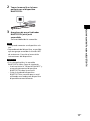
Turn on the BLUETOOTH function
on the BLUETOOTH device, search
for devices and select “HT-CT180.”
If a Passkey is requested, enter
“0000.”
Make sure that the BLUETOOTH
indicator (blue) lights up.
Connection has been established.
Note
• You can pair up to 8 BLUETOOTH
devices. If the 9th BLUETOOTH device
is paired, the least recently
connected device will be replaced by
the new one.
9GB
Sound Adjustment/BLUETOOTH Functions
Hold down AUDIO for 5 seconds, then
VOICE for 5 seconds to turn on or off
Dolby DRC.