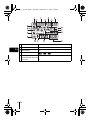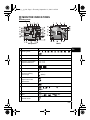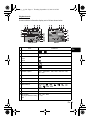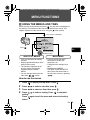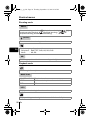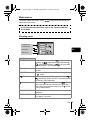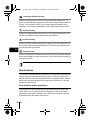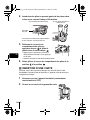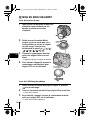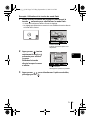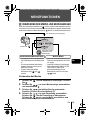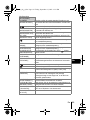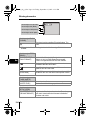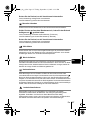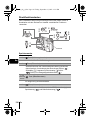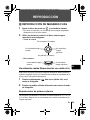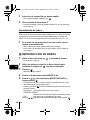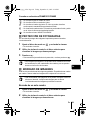
1
basic_e_p_6.fm Page 1 Thursday, September 12, 2002 8:26 PM DIGITAL CAMERA APPAREIL PHOTO NUMÉRIQUE DIGITALKAMERA CÁMERA DIGITAL C-5050ZOOM BASIC MANUAL MANUEL DE BASE EINFACHE ANLEITUNG MANUAL BÁSICO ENGLISH FRANÇAIS DEUTSCH ESPAÑOL basic_e_p_6.fm Page 2 Thursday, September 12, 2002 8:26 PM CONTENTS/TABLE DES MATIÉRES/INHALT/CONTENIDO ENGLISH . . . . . . . . . . . . . . . . . . . . . . . . . . . . . . . . . . . . . . 2 FRANÇAIS. . . . . . . . . . . . . . . . . . . . . . . . . . . . . . . . . . . . 52 DEUTSCH . . . . . . . . . . . . . . . . . . . . . . . . . . . . . . . . . . . 102 ESPAÑOL . . . . . . . . . . . . . . . . . . . . . . . . . . . . . . . . . . . 152 CONTENTS GETTING STARTED . . . . . . . . . . . . . . . . . . . . . . . . . . . . 4 MENU FUNCTIONS . . . . . . . . . . . . . . . . . . . . . . . . . . . . 19 MODE DIAL AND DIRECT BUTTON FUNCTIONS. . . . 26 En SHOOTING BASICS . . . . . . . . . . . . . . . . . . . . . . . . . . . 32 ADVANCED SHOOTING . . . . . . . . . . . . . . . . . . . . . . . . 37 PLAYBACK . . . . . . . . . . . . . . . . . . . . . . . . . . . . . . . . . . 39 PRINT SETTINGS . . . . . . . . . . . . . . . . . . . . . . . . . . . . . 44 DOWNLOADING PICTURES TO A COMPUTER . . . . . 45 ERROR CODES . . . . . . . . . . . . . . . . . . . . . . . . . . . . . . . 47 SPECIFICATIONS . . . . . . . . . . . . . . . . . . . . . . . . . . . . . 49 These instructions are only for quick reference. For more details on the functions described here, refer to the “Reference Manual” on CD-ROM. 2 En basic_e_p_6.fm Page 3 Thursday, September 12, 2002 8:26 PM Before using your camera, read this manual carefully to ensure correct use. We recommend that you take test shots to get accustomed to your camera before taking important photographs. J These instructions are only a basic manual. For more details on the functions described here, refer to the Reference Manual on the CD-ROM. For connection to the PC or installation of provided software, refer to the Software Installation Guide included in the CD-ROM package. J J For customers in North and South America For customers in USA Declaration of Conformity Model Number : C-5050ZOOM Trade Name : OLYMPUS Responsible Party : Olympus America Inc. Address : 2 Corporate Center Drive, Melville, New York 11747-3157 U.S.A. Telephone Number : 1-631-844-5000 Tested To Comply With FCC Standards FOR HOME OR OFFICE USE En This device complies with Part 15 of the FCC rules. Operation is subject to the following two conditions: (1) This device may not cause harmful interference. (2) This device must accept any interference received, including interference that may cause undesired operation. For customers in Canada This Class B digital apparatus meets all requirements of the Canadian Interference-Causing Equipment Regulations. For customers in Europe “CE” mark indicates that this product complies with the European requirements for safety, health, environment and customer protection. “CE” mark cameras are intended for sales in Europe. Trademarks • • • • IBM is a registered trademark of International Business Machines Corporation. Microsoft and Windows are registered trademarks of Microsoft Corporation. Macintosh is a trademark of Apple Computer Inc. All other company and product names are registered trademarks and/or trademarks of their respective owners. • The standards for camera file systems referred to in this manual are the “Design Rule for Camera File System/DCF” standards stipulated by the Japan Electronics and Information Technology Industries Association (JEITA). En 3 basic_e_p_6.fm Page 4 Thursday, September 12, 2002 8:26 PM GETTING STARTED J NAMES OF PARTS Flash Control panel Self-timer/Remote control lamp Hot shoe En AF illuminator Microphone Strap eyelet Remote control receiver Lens A/V OUT jack (MONO) USB connector DC-IN jack Connector cover 4 En basic_e_p_6.fm Page 5 Thursday, September 12, 2002 8:26 PM Viewfinder Orange lamp Green lamp AF target mark AEL button (AEL) Erase button ( ) Power switch Jog dial Monitor button (Quick View ) Speaker Card cover Card access lamp Arrow pad ( En ) OK/Menu button ( ) Card button (CF/xD•SM) Monitor Compact Flash/Microdrive slot xD-Picture Card/SmartMedia slot Eject button En 5 basic_e_p_6.fm Page 6 Thursday, September 12, 2002 8:26 PM Exposure compensation button ( AF/Macro/MF button ( ) ) Shutter button Zoom lever (T/W· ) Custom button ( Print button ( En ) Mode dial Self-timer/Remote control button ( ) Rotation button ( Metering button ( ) ) Protect button ( ) Diopter adjustment dial Flash mode button ( ) Battery compartment cover Battery compartment lock Tripod socket 6 En ) basic_e_p_6.fm Page 7 Thursday, September 12, 2002 8:26 PM J CONTROL PANEL INDICATIONS Items Indications 1 Battery check En , 2 Shutter speed 2ooo (1/2000 sec.), 2.5'' 3 Aperture value F1.8 4 Exposure compensation Flash intensity control +2.0, +1.0, 0.0, -1.0, -2.0 5 Macro mode Manual focus Super macro mode Super macro MF mode (Lights) MF (Lights) (Blinks) MF (Blinks) 6 Flash mode , , , SLOW, SLOW 7 Flash intensity control 8 Sequential shooting mode , , , BKT 9 Remote control 10 Self-timer 11 Sound record 12 Record mode RAW, TIFF, SHQ, HQ, SQ (SQ1, SQ2) 13 Noise reduction NR 14 AE lock AE memory AEL AEL 15 Metering , En 7 basic_e_p_6.fm Page 8 Thursday, September 12, 2002 8:26 PM Items En Indications 16 ISO ISO 17 White balance WB 18 Selected card 19 Number of storable still 30 pictures/Seconds remaining Error code -E- 8 En , , basic_e_p_6.fm Page 9 Thursday, September 12, 2002 8:26 PM J MONITOR INDICATIONS Shooting mode Movie Still picture Items Indications 1 Shooting mode , , 2 Shutter speed 16 – 1/2000 3 Aperture value F1.8 – F8.0 4 Exposure compensation Exposure differential -2.0 – +2.0 -3.0 – +3.0 5 Battery check , , , , , , , , En , 6 Green lamp 7 Flash stand-by/Camera movement warning Flash charge 8 Macro mode Super macro mode Manual focus (Lights) (Blinks) MF 9 Noise reduction 10 Flash mode , , , SLOW 11 Flash intensity control -2.0 – +2.0 12 Drive , , SLOW 1, , SLOW 2, , BKT 13 Self-timer Remote control En 9 basic_e_p_6.fm Page 10 Thursday, September 12, 2002 8:26 PM Movie Still picture Items Indications 14 Sound record En 15 Record mode RAW, TIFF, SHQ, HQ, SQ1, SQ2 16 Resolution 2560 × 1920, 2560 × 1696, 1280 × 960, 640 × 480, 320 × 240 17 AF target mark [ 18 Number of storable still pictures Seconds remaining 30 ] 36'' 19 AE lock AE memory 20 Spot metering 21 ISO ISO64, ISO100, ISO200, ISO400 22 White balance , , AWB, CWB 23 White balance compensation B1 – B7, R1 – R7 24 Saturation -5 – +5 25 Sharpness -5 – +5 26 Contrast -5 – +5 27 Scene preset , 28 Memory gauge 29 Selected card 10 En , , , , [xD], [SM], [CF] , , , , , , basic_e_p_6.fm Page 11 Thursday, September 12, 2002 8:26 PM Playback mode Screens with the information display set to ON are shown below. Still picture Movie Items 1 Battery check 2 Selected card 3 Print reservation, no. of prints Movie Indications En , [xD], [SM], [CF] x 10 4 Sound record 5 Protect 6 Record mode RAW, TIFF, SHQ, HQ, SQ1, SQ2 7 Number of pixels 2560 × 1920, 2560 × 1696, 1280 × 960, 640 × 480, 320 × 240 8 Aperture value F1.8 – F8.0 9 Shutter speed 16 – 1/2000 10 Exposure compensation -2.0 – +2.0 11 White balance WB AUTO, , , , , , , , , AWB, CWB 12 ISO ISO64, ISO100, ISO200, ISO400 13 Date and time '02.10.17 15:30 14 File number FILE : 100 – 0030 Playing time/total recording 0'' / 20'' time En 11 basic_e_p_6.fm Page 12 Thursday, September 12, 2002 8:26 PM Memory gauge The memory gauge lights up when you take a still picture. When the gauge is lit, the camera is saving a picture to the card. The memory gauge indication changes as shown below depending on the shooting status. The indication is not displayed during movie recording. Shoot Shoot Before shooting (Gauge is off) One picture taken (Lit) Shoot More than two taken (Lit) Wait No more pictures can be taken (Fully lit) Wait a while before taking the next shot. En Battery check If the remaining battery power is low, the battery check indication on the control panel and monitor changes as follows when the camera is turned on or while the camera is in use. Battery check No indication 12 En Control panel Monitor Status Lights Lights (green) (Goes off after a while) Remaining power level: high Blinks Blinks (red) Remaining power level: low Replace with new batteries. The green lamp and orange lamp at the side of the viewfinder blink. (The control panel turns off automatically.) Remaining power level: exhausted Replace with new batteries. basic_e_p_6.fm Page 13 Thursday, September 12, 2002 8:26 PM J ATTACHING THE STRAP AND LENS CAP 1 Pass the lens cap string through the hole in the lens cap. 2 Fasten the strap to the strap eyelet as shown in the diagram. 3 Adjust the strap to the desired length. Pull the strap through the stopper ( ) and make sure it is fastened securely. 4 Strap eyelet En Attach the strap to the other eyelet in the same way. J LOADING THE BATTERIES 1 2 Make sure the power switch is set to OFF. 3 Place your finger on the mark and slide the battery compartment cover in the direction of , then lift in the direction of . Slide the battery compartment lock from to . • Use the ball of your finger to slide the cover. Do not use your fingernail as this could result in injury. En 13 basic_e_p_6.fm Page 14 Thursday, September 12, 2002 8:26 PM 4 Insert the batteries, making sure that they are correctly oriented as shown in the illustration. When using AA (R6) batteries When using CR-V3 lithium battery packs Battery alignment The correct way to insert the AA batteries is indicated on the bottom of the camera. 5 En Close the battery compartment cover, then press it down and slide it in the direction shown . • Press the center of the cover, as it may be difficult to close properly by pressing the edge. • Make sure the cover is closed securely. 6 Slide the battery compartment lock from to . J INSERTING A CARD “Card” in this manual refers to the xD-Picture Card, SmartMedia, Compact Flash and Microdrive. The camera uses the card to record pictures. 1 2 14 En Make sure the power switch is set to OFF. Open the card cover. basic_e_p_6.fm Page 15 Thursday, September 12, 2002 8:26 PM 3 Insert a card. xD-Picture Card/SmartMedia • Hold the card straight and insert it correctly into the xD-Picture Card/SmartMedia slot. • An illustration showing the position for inserting the xD-Picture Card is next to the slot. Compact Flash/Microdrive • Hold the card straight and insert it as far as it will go into the Compact Flash/Microdrive slot. 4 Close the card cover securely until it clicks. Ejecting the card xD-Picture Card • Push the card all the way in to unlock it, then let it return slowly. The card is ejected a short way and then stops. Hold the card straight and pull it out. En Note Releasing your finger quickly after pushing the card all the way in may cause it to eject forcefully out of the slot. SmartMedia • Push the card in, then release it. The card will be ejected a short way to enable you to pull it out. Compact Flash/Microdrive • Press the eject button gently and allow it to pop out, then press it again all the way in. The card will be ejected a short way to enable you to pull it out. Switching cards Pictures are recorded on the card displayed on the control panel or monitor. Choose the card you want to record the picture on before taking the picture. The factory default setting is the card inserted in the xD-Picture Card/ SmartMedia slot. If only one card is inserted, that card is automatically selected. Card selection can also be made in Playback mode. En 15 basic_e_p_6.fm Page 16 Thursday, September 12, 2002 8:26 PM J TURNING THE POWER ON/OFF When shooting pictures En 1 Press the tabs on the lens cap as indicated by the arrows and remove the lens cap. 2 Turn the mode dial until the mode you want to use is aligned with the red line. Choose from / / / / / / / / / / . 3 Turn the power switch so that ON is aligned with the white line. Mode dial • The camera turns on and the lens extends. 4 To turn the power off, turn the power switch so that OFF is aligned with the white line. Power switch When playing back pictures 1 2 Turn the mode dial until is aligned with the red line. Turn the power switch so that ON is aligned with the white line. • The monitor turns on. 3 To turn the power off, turn the power switch so that OFF is aligned with the white line. • The monitor also turns off. 16 En basic_e_p_6.fm Page 17 Thursday, September 12, 2002 8:26 PM J SELECTING A LANGUAGE 1 Set the mode dial to and turn the camera on. • Be sure to remove the lens cap before you turn the camera on. • You can select the language in all modes. 2 Press . • The top menu is displayed. 3 4 5 6 7 8 Press on the arrow pad to select MODE MENU. Press to select the SETUP tab, then press Press to select Press to select a language, then press Press , then press . . . again to exit the menu. En To turn the camera off, set the power switch to OFF. J SETTING THE DATE AND TIME 1 Set the mode dial to and turn the camera on. • Be sure to remove the lens cap before you turn the camera on. • You can set the date and time in all modes. 2 Press . • The top menu is displayed. 3 4 5 Press on the arrow pad to select MODE MENU. Press to select the SETUP tab, then press Press to select , then press . • The green frame moves to the selected item. 6 Press to select one of the following date formats: YM-D (Year/Month/Day), M-D-Y (Month/Day/Year), D-M-Y (Day/Month/Year). Then press . • Move to the year setting. • The following steps show the procedure used when the date and time settings are set to Y-M-D. En 17 basic_e_p_6.fm Page 18 Thursday, September 12, 2002 8:26 PM 7 Press to set the year, then press month setting. • To move back to the previous setting, press the year are fixed. to move to the . The first two digits of 8 Repeat this procedure until the date and time are completely set. 9 Press . • For a more accurate setting, press when the time signal hits 00 seconds. The clock starts when you press the button. 10 To turn the camera off, set the power switch to OFF. Note En 18 En • The date and time settings will be canceled if the camera is left without batteries for approximately 1 hour. basic_e_p_6.fm Page 19 Thursday, September 12, 2002 8:26 PM MENU FUNCTIONS J USING THE MENUS AND TABS When you turn on the camera and press , the top menu is displayed on the monitor. The functions of this camera are set from the menus. This chapter explains how the menus work, using the mode screens. The top menu is displayed. DRIVE MODE MENU Press WB . En Use the arrow pad to select a menu. SHORTCUT MENUS MODE MENU • Take you directly to the setting screens. • Display operational buttons at the bottom of the screen. • The functions registered in the shortcut menus can also be accessed from the MODE MENU. • You can change shortcut menus other than modes. • Lets you access the menu selections to set the ISO, sharpness, etc. • Categorizes the settings into 4 tabs. • Displays the CAMERA, PICTURE, CARD and SETUP tabs. Select the desired tab on the left of the screen by pressing . How to use the menus 1 2 3 4 Press to display the top menu. Press Press to select a tab, then press Press to select an item, then press . . . Press to select a setting. Press to complete setting. Press again to exit the menu and return to shooting status. En 19 basic_e_p_6.fm Page 20 Thursday, September 12, 2002 8:26 PM Shortcut menus Shooting mode DRIVE Selects a shooting mode from (single-frame shooting), speed sequential shooting), (sequential shooting), sequential shooting) and BKT (auto bracketing). (high (AF (movies) Records sound when shooting a movie. En Sets the image quality and resolution. Still picture : RAW, TIFF, SHQ, HQ, SQ1, SQ2 Movie : HQ, SQ WB Sets the appropriate white balance according to the light source. Playback mode Runs through all saved pictures one after another. MOVIE PLAY MOVIE PLAYBACK Plays back movies. INDEX Creates an index picture of a movie in 9 frames. EDIT Edits a movie. INFO Displays all the shooting information on the monitor. Displays a histogram showing the luminance distribution of still pictures. 20 En basic_e_p_6.fm Page 21 Thursday, September 12, 2002 8:26 PM Mode menus The MODE MENU has 4 tabs. Press associated menu items. to select a tab and display the These instructions are only for quick reference. For more details on the functions described here, refer to the “Reference Manual” on CD-ROM. CAMERA tab PICTURE tab CARD tab SETUP tab SEt CARD PIC CAMERA Shooting mode DRIVE ISO MY MODE FLASH SLOW En IN+ SLOW1 CAMERA tab DRIVE Selects a shooting mode from (single-frame shooting), (high speed sequential shooting), (sequential shooting), (AF sequential shooting) and BKT (auto bracketing). ISO Selects the ISO sensitivity from AUTO, 64, 100, 200 and 400. MY MODE Selects a mode to be activated when taking pictures in mode. FLASH When using an external flash, selects from IN+ , and SLAVE. When “SLAVE” is selected, adjusts the intensity of the main flash. SLOW Selects from SLOW 1 (1st curtain), SLOW (1st curtain with red-eye reduction) and SLOW 2 (2nd curtain) when the flash mode is set to SLOW (slow synchronization). NOISE REDUCTION Reduces the noise that affects pictures during long exposures. DIGITAL ZOOM Extends the maximum optical zoom, making possible up to approx. 10x zoom. En 21 basic_e_p_6.fm Page 22 Thursday, September 12, 2002 8:26 PM FULLTIME AF AF MODE PANORAMA 2 IN 1 FUNCTION Keeps the image in focus at all times without having to press the shutter button halfway. Selects the auto focus method (iESP or SPOT). Records sound when taking a still picture. Allows panorama pictures to be taken with Olympus CAMEDIA-brand cards. Combines two still pictures taken in succession and stores them as a single picture. Lets you add special effects to pictures (BLACK & WHITE, SEPIA, WHITE BOARD, BLACK BOARD). Displays a histogram showing the luminance distribution of still pictures. PICTURE tab En WB CUSTOM WB SCENE MODES SHARPNESS CONTRAST SATURATION CARD tab CARD SETUP SETUP tab ALL RESET PW ON SETUP PW OFF SETUP 22 En Sets the image quality and resolution. Still picture : RAW, TIFF, SHQ, HQ, SQ1, SQ2 Movie : HQ, SQ Sets the appropriate white balance according to the light source. Lets you make fine changes to the white balance. Stores your preferred white balance setting. Lets you take pictures suited to the situation and the desired effect ( , , ). Adjusts the sharpness of the image. Adjusts the contrast of the image. Adjusts the level of color depth without changing the tint. Formats a card. Selects whether to keep the current camera settings when you turn off the power. Selects a language for on-screen display. Sets the picture displayed on the monitor when the power is turned on. Sets the picture displayed on the monitor when the power is turned off. basic_e_p_6.fm Page 23 Thursday, September 12, 2002 8:26 PM REC VIEW BEEP SHUTTER SOUND MY MODE SETUP FILE NAME PIXEL MAPPING m/ft VIDEO OUT SHORT CUT CUSTOM BUTTON DUAL CONTROL PANEL AF ILLUMINATOR Selects whether to display pictures on the monitor while saving them to a card. Sets the beep sound used for warnings and adjusts the volume. Sets the beep sound used for button operations and adjusts the volume. Sets the sound made when the shutter button is pressed and adjusts the volume. Customizes settings which are activated in the mode. Changes how file names are assigned. Checks the CCD and image processing functions for errors. Adjusts the brightness of the monitor. Sets the date and time. Sets the measurement unit (m/ft) used during manual focus. Selects NTSC or PAL according to your TV’s video signal type. TV video signal types differ depending on the region. Lets you assign frequently used functions as shortcut menus. Lets you assign a frequently used function to the camera’s custom button. Displays the same information on the control panel as on the monitor when the monitor is not in use. Turns on the AF illuminator to illuminate a dark subject. En En 23 basic_e_p_6.fm Page 24 Thursday, September 12, 2002 8:26 PM PLAY tab EDIT tab CARD tab SETUP tab SEt CARD EDIt PLAY Playback mode PLAY tab Adds sound to a still picture already taken. * The PLAY tab is not displayed during movie playback. En EDIT tab RAW DATA EDIT COPY CARD tab CARD SETUP SETUP tab ALL RESET PW ON SETUP PW OFF SETUP SCREEN SETUP 24 En Sets the image quality, white balance, etc. of pictures taken in RAW data format and saves them as new files. Makes the file size smaller and saves it as a new file. Crops part of a picture and saves it as a new file. Copies pictures to and from cards. Lets you select whether to copy all frames or only a selected frame. Formats a card. Erases all image data stored on the card. Selects whether to keep the current camera settings when you turn off the power. Selects a language for on-screen display. Sets the picture displayed on the monitor when the power is turned on. Sets the picture displayed on the monitor when the power is turned off. Registers a stored picture for use as the picture displayed when the power is turned on or off. basic_e_p_6.fm Page 25 Thursday, September 12, 2002 8:26 PM VOLUME BEEP VIDEO OUT Adjusts the sound volume during playback. Also adjusts the volume of the sound selected in PW ON SETUP and/or PW OFF SETUP. Sets the beep sound used for warnings and adjusts the volume. Sets the beep sound used for button operations and adjusts the volume. Adjusts the brightness of the monitor. Sets the date and time. Selects NTSC or PAL according to your TV’s video signal type. TV video signal types differ depending on the region. Selects the number of frames in the index display. En En 25 basic_e_p_6.fm Page 26 Thursday, September 12, 2002 8:26 PM MODE DIAL AND DIRECT BUTTON FUNCTIONS Mode dial The mode dial is used to select a shooting or playback mode. The shooting modes include modes where the optimal settings for the situation are automatically selected, and modes where you can select the settings best suited to the shooting conditions and the effect you wish to achieve. Shooting modes Playback mode En Program shooting Allows you to take still pictures. The camera sets the aperture and shutter speed. Other functions, such as flash modes and drive modes, can be adjusted manually. Aperture priority shooting Allows you to set the aperture manually. The camera sets the shutter speed automatically. Turn the jog dial to set the aperture value. Turn to the left to decrease the aperture value (F number). Turn to the right to increase the aperture value (F number). Shutter priority shooting Allows you to set the shutter speed manually. The camera sets the aperture automatically. 26 En basic_e_p_6.fm Page 27 Thursday, September 12, 2002 8:26 PM Turn the jog dial to set the shutter speed. Turn to the left to set a slower shutter speed. Turn to the right to set a faster shutter speed. Manual shooting Allows you to set the aperture and shutter speed manually. Set the aperture by turning the jog dial while holding down Turn to the left to decrease the aperture value (F number). Turn to the right to increase the aperture value (F number). . Turn the jog dial to set the shutter speed. Turn to the left to set a slower shutter speed. Turn to the right to set a faster shutter speed. My Mode Allows you to save your favorite settings as your own personal mode and use these customized settings when taking pictures. Current settings can also be saved for retrieving by this mode. En Movie record Allows you to record movies. The camera sets the aperture and shutter speed automatically. The camera maintains the correct focus and exposure even if the distance between your subject and the camera changes. Night Scene shooting Suitable for shooting pictures in the evening or at night. The camera sets a slower shutter speed than is used in normal shooting. For example, if you take a picture of a street at night in mode, the lack of brightness will result in a dark picture with only dots of light. In the Night Scene shooting mode, the true appearance of the street is captured. The camera automatically selects the optimal settings for this type of shooting condition. Since the shutter speed is slow, make sure you stabilize the camera by using a tripod. Landscape shooting Suitable for taking pictures of landscapes and other outdoor scenes. Both the foreground and the background are in focus. Since blues and greens are vividly reproduced in this mode, it is excellent for shooting natural scenery. The camera automatically sets the optimal shooting conditions. En 27 basic_e_p_6.fm Page 28 Thursday, September 12, 2002 8:26 PM Landscape+Portrait shooting Suitable for taking pictures of both your subject and the background. The picture is taken with the background as well as the subject in the foreground in focus. You can take pictures of your subject against a beautiful sky or landscape. The camera automatically sets the optimal shooting conditions. Sports shooting Suitable for capturing fast-moving action (such as sports) without blur. The camera automatically sets the optimal shooting conditions. Portrait shooting Suitable for taking a portrait-style shot of a person. This mode features an infocus subject against a blurred background. The camera automatically sets the optimal shooting conditions. En Playback mode Allows you to play back still pictures and movies. Pictures are edited and print reservation settings are made in this mode. Use this mode when connecting the camera to a PC. • The available settings vary depending on the mode. Note Direct buttons This camera is equipped with direct buttons for quick operation and setting of various shooting and playback-related functions. The direct buttons have different functions in the shooting mode and in the playback mode. Holding down one or two direct buttons and turning the jog dial allows you to make settings for each function. Flow of direct button operations The procedure for making settings using the direct buttons and jog dial is shown below. As the setting screens are displayed on the monitor when pressing the direct button, settings can be made by following the operation guide displayed at the bottom of the screen. 28 En basic_e_p_6.fm Page 29 Thursday, September 12, 2002 8:26 PM Ex: Using the flash mode button 1 Turn the jog dial while holding down mode. to select the flash • The monitor turns on and the setting screen is displayed. • The setting is made at the moment you release your finger from the direct button, and the monitor turns off. FLASH MODE AUtO SEt Operation guide: Displayed when further options are available. 2 Press while holding down to display the menu. Release the direct button after the menu is displayed. En SLOW SLOW1 SLOW SLOW2 CANCEL SELECt GO Operation guide: Possible operations are displayed. 3 Press to select the desired item, then press . En 29 basic_e_p_6.fm Page 30 Thursday, September 12, 2002 8:26 PM Direct button functions Holding down one or two direct buttons and turning the jog dial allows you to make settings for each function. 11 Jog dial En Shooting mode (exposure compensation) button Changes the exposure compensation value. (flash mode) button Selects a flash mode from auto (no indication), red-eye reduction ( ), fill-in flash ( ), slow synchronization ( SLOW/ SLOW) and flash off ( ). + Press at the same time (flash intensity control) button Adjusts the amount of light emitted by the flash. (metering) button Selects the metering method from ESP (no indication), spot metering ( ) and multi-metering ( ). (AF/Macro/MF) button Selects a focus mode from auto-focus (no indication), macro ( ), manual focus (MF), super macro ( blinks) and super macro MF (MF blinks). 30 En basic_e_p_6.fm Page 31 Thursday, September 12, 2002 8:26 PM (self-timer/remote control) button Enables the self-timer function ( ( ). ) or remote control function (custom) button Activates the function registered on the custom button. AEL (AE Lock) button Fixes the exposure. The lock function is alternately activated and canceled each time you press the button. Playback mode (protect) button Protects important pictures from accidental erasure. En (rotation) button Rotates pictures 90 degrees clockwise or counterclockwise. (print) button Stores print reservation data on the card. + RESET button Press at same time When pressed simultaneously for at least 3 seconds, resets the camera’s internal settings. 11 (erase) button Erases a selected picture. En 31 basic_e_p_6.fm Page 32 Thursday, September 12, 2002 8:26 PM SHOOTING BASICS J TAKING STILL PICTURES You can take still pictures using either the viewfinder or the monitor. Both methods are easy as all you have to do is to press the shutter button. Taking still pictures using the viewfinder En 1 Set the mode dial to turn the camera on. 2 Position the AF target mark in the viewfinder on the subject. 3 Press the shutter button gently (halfway) to adjust the focus. and • When the focus and exposure are locked, the green lamp lights. • If the orange lamp lights, the flash fires automatically. 4 Press the shutter button all the way (fully). • The camera takes the picture. • The card access lamp blinks while the picture is stored on the card. • When the green lamp stops blinking, you can take the next picture. Taking still pictures using the monitor 1 Set the mode dial to turn the camera on. 2 Press and to turn the monitor on. • You can also change the angle of the monitor when taking pictures. 3 Position the AF target mark on the subject while looking at the image on the monitor. Decide the composition of the picture. 4 Take the picture by following the same procedure as for shooting using the viewfinder. • When the focus is locked by pressing the shutter button halfway, the green lamp on the monitor lights. The AF target mark moves to the focused position. 32 En basic_e_p_6.fm Page 33 Thursday, September 12, 2002 8:26 PM • The available settings vary depending on the mode. Note J IF CORRECT FOCUS CANNOT BE OBTAINED (FOCUS LOCK) When the subject you want to focus on is not in the center of the frame and you cannot position the AF target mark on it, you can focus the camera on another point at roughly the same distance (focus lock) and take the picture as explained below. 1 Set the mode dial to turn the camera on. 2 Position the AF target mark on the subject you want to focus on. • When shooting a hard-to-focus subject or a fast-moving subject, point the camera at an object about the same distance away as the subject. 3 and En AF target mark Green lamp Press the shutter button halfway until the green lamp lights • When the focus and exposure are locked, the green lamp lights. • If the monitor is turned on, the AF target mark moves to the focused position. • When the green lamp blinks, the focus and exposure are not locked. Release your finger from the shutter button, re-position your subject and press the shutter button halfway again. 4 Keeping the shutter button pressed halfway, recompose your shot. 5 Press the shutter button fully. En 33 basic_e_p_6.fm Page 34 Thursday, September 12, 2002 8:26 PM J RECORDING MOVIES 1 Set the mode dial to and turn the camera on. • The monitor turns on and the available recording time on the card that you are using is displayed. 2 Decide the composition while looking at the image on the monitor. 3 Press the shutter button fully to start recording. • The orange lamp on the right of the viewfinder lights. • During movie recording, lights red. 4 Press the shutter button again to stop recording. • The card access lamp blinks while the movie is stored on the card. • When the remaining recording time has been used up, recording stops automatically. • When there is space in the card memory, the remaining recording time is displayed, and the camera is ready to shoot. En Note • During movie recording, the flash is disabled. • It takes longer to store movies than still pictures. • The seconds remaining varies depending on the record mode and the amount of space available on the card. J ZOOMING IN ON A SUBJECT (OPTICAL ZOOM) Telephoto and wide-angle shooting are possible at 3x magnification (the optical zoom limit, equivalent to 35 mm - 105 mm on a 35 mm camera). By combining the optical zoom with the digital zoom, zoom magnification can be increased to a maximum of approximately 10x. 1 Set the mode dial to and turn the camera on. 2 3 Turn the zoom lever. Take the picture while looking in the viewfinder. • Pictures taken with the digital zoom may appear grainy. Note 34 En basic_e_p_6.fm Page 35 Thursday, September 12, 2002 8:26 PM J USING THE FLASH 1 Set the flash mode by turning the jog dial while holding down . • The flash mode changes as follows and the selected mode is displayed on the control panel (if all modes are available): No indication (Auto-flash) (Flash off) 2 (Red-eye reduction flash) SLOW or (Fill-in flash) SLOW (slow synchronization) Press the shutter button halfway. • When the flash is ready to fire, the orange lamp lights steady. 3 Press the shutter button fully. En TIPS Flash working range W (max.): Approx. 0.8 m – 5.6 m (2.6 ft. – 18 ft.) T (max.) : Approx. 0.2 m – 3.8 m (0.7 ft. – 12 ft.) Auto-flash (No indication) The flash fires automatically in low light or backlight conditions. Red-eye reduction flash ( ) The red-eye reduction flash mode reduces this phenomenon by emitting preflashes before firing the regular flash. Fill-in flash ( ) The flash always fires every time the shutter button is released. Flash off ( ) The flash does not fire even in low light conditions. Slow synchronization SLOW1 1st curtain (front curtain) SLOW2 SLOW SLOW1 (factory default setting): Adjusts the flash for slow shutter speeds. 2nd curtain (rear curtain) SLOW2: In contrast to 1st curtain, 2nd curtain fires the flash just before the shutter closes. 1st curtain with red-eye reduction SLOW: Adjusts the flash for slow shutter speeds, and minimizes red-eye. En 35 basic_e_p_6.fm Page 36 Thursday, September 12, 2002 8:26 PM J USING THE SELF-TIMER This function is useful for taking pictures with yourself included in the photograph. Fix the camera securely on a tripod or stable surface for selftimer shooting. 1 Turn the jog dial while holding down . 2 Press the shutter button fully to start self-timer shooting. and select • The self-timer/remote control lamp lights for approximately 10 seconds, then starts blinking. After blinking for approximately 2 seconds, the picture is taken. • To cancel the self-timer, press . • The self-timer mode is automatically canceled after one shot. En 36 En basic_e_p_6.fm Page 37 Thursday, September 12, 2002 8:26 PM ADVANCED SHOOTING J SEQUENTIAL SHOOTING There are 4 sequential shooting modes: high speed sequential shooting, sequential shooting, AF sequential shooting and auto bracketing. Sequential shooting modes can be selected from the DRIVE mode menu. Sequential shooting cannot be performed when the record mode is set to TIFF. Drive mode Shoots 1 frame at a time when the shutter button is pressed. (Normal shooting mode, single-frame shooting) Pictures can be taken at a faster speed than normal sequential shooting. The sequential shooting speed varies depending on the record mode setting. 4 frames at 3.3 frames/sec. (3 frames in SHQ ENLARGE SIZE mode) Focus, exposure and white balance are locked at the first frame. Approx. 11 frames at 1.7 frames/sec. (in HQ mode) Focus is individually locked for each frame. The AF sequential shooting speed is slower than for normal sequential shooting. BKT When auto bracketing is set, the exposure is changed automatically for each frame when you start shooting. The exposure differential and number of frames can be selected in the menus. The focus and white balance are locked at the first frame. En MENU FUNCTIONS - Mode menus J METERING There are three ways of measuring the brightness of a subject. Digital ESP metering : Meters the center of the subject and the surrounding area separately. Spot metering : Exposure is determined by metering within the AF target area. In this mode, a subject can be shot with optimal exposure regardless of the background light. Multi-metering : Meters the brightness of the subject at up to 8 different points to set the optimal exposure based on the average brightness. This method is useful with a high contrast subject. MODE DIAL AND DIRECT BUTTON FUNCTIONS - Direct buttons En 37 basic_e_p_6.fm Page 38 Thursday, September 12, 2002 8:26 PM J AE LOCK This function is suitable for situations when optimal exposure is difficult to achieve, such as when there is excessive contrast between the subject and the surroundings. MODE DIAL AND DIRECT BUTTON FUNCTIONS - Direct buttons J MACRO MODE SHOOTING The macro mode allows you to shoot at a distance of 20 cm to 80 cm (0.7 ft. to 2.6 ft.) from your subject. MODE DIAL AND DIRECT BUTTON FUNCTIONS - Direct buttons J SUPER MACRO MODE SHOOTING En This mode lets you shoot from as close as 3 cm (1.2'') to your subject. In the mode, normal shooting is also possible, but the position of the zoom is fixed automatically and cannot be changed. MODE DIAL AND DIRECT BUTTON FUNCTIONS - Direct buttons J MANUAL FOCUS If auto focus is unable to focus on a subject, use manual focus. MODE DIAL AND DIRECT BUTTON FUNCTIONS - Direct buttons 38 En basic_e_p_6.fm Page 39 Thursday, September 12, 2002 8:26 PM PLAYBACK J PLAYING BACK STILL PICTURES 1 Set the mode dial to and turn the camera on. • The monitor turns on and displays the last picture taken. (Single-frame playback) 2 Use the arrow pad or jog dial to play back other pictures. • Arrow pad Jumps to the picture 10 frames back. Displays the previous picture. Displays the next picture. En Jumps to the picture 10 frames ahead. • Jog dial Displays the previous picture. Displays the next picture. Quick View (Double-click playback) This function lets you play back pictures while the camera is in the shooting mode. This is useful when you want to check shooting results and resume shooting quickly. 1 Press twice quickly (double-click) while in the shooting mode. 2 Press the shutter button halfway to return to the shooting mode. Close-up playback Pictures displayed on the monitor can be enlarged 1.5, 2, 2.5, 3, 3.5 or 4 times. This function is useful when you want to check the details of a picture. En 39 basic_e_p_6.fm Page 40 Thursday, September 12, 2002 8:26 PM 1 Select the still picture you want to enlarge. • You cannot enlarge pictures with 2 . Turn the zoom lever toward T. • To return the picture to the original size (1x), turn the zoom lever toward W. Index display This function lets you show several pictures at the same time on the monitor. It is useful for quickly finding the picture you want to view. The number of pictures shown can be 4, 9 or 16. 1 In the single-frame playback mode, turn the zoom lever toward W. • Use the arrow pad to select the picture. • To return to the single-frame playback, turn the zoom lever toward T. En J PLAYING BACK MOVIES 1 Set the mode dial to and turn the camera on. • The monitor turns on. 2 Use the arrow pad or jog dial to display the picture with you want to play back. 3 Press . • The top menu is displayed. 4 5 Press Press to select MOVIE PLAY. to select MOVIE PLAYBACK, then press • The movie is played back. When playback ends, the display automatically returns to the beginning of the movie. • Press again after playback ends to display the menu. PLAYBACK : Plays back the entire movie again. FRAME BY FRAME : Plays back the movie manually one frame at a time. EXIT : Leaves the movie playback mode. Press to select the desired operation, then press . 40 En . basic_e_p_6.fm Page 41 Thursday, September 12, 2002 8:26 PM When FRAME BY FRAME is selected : Displays the first frame of the movie. : Displays the last frame of the movie. : Displays the next frame. The movie can be played continuously by holding the button down. : Displays the previous frame. The movie can be played continuously in reverse by holding the button down. : Displays the MOVIE PLAYBACK menu. J PROTECTING PICTURES You are recommended to protect important pictures to avoid accidentally erasing them. 1 Set the mode dial to and turn the camera on. • The monitor turns on. 2 Use the arrow pad or jog dial to display the picture you want to protect. 3 Press . • To cancel protection, press Note En again. • Protected pictures cannot be erased by the single-frame/all-frame erase function, but they are all erased by formatting. J ERASING PICTURES This function enables you to erase recorded pictures. This can be done either one frame at a time or to all the pictures on the card at once. Note • Once erased, pictures cannot be restored. Check each picture before erasing to avoid accidentally erasing pictures you want to keep. Single-frame erase 1 Set the mode dial to and turn the camera on. • The monitor turns on. 2 Use the arrow pad or jog dial to display the picture you want to erase. En 41 basic_e_p_6.fm Page 42 Thursday, September 12, 2002 8:26 PM 3 Press • The 4 . ERASE screen is displayed. Press to select YES, then press . • The picture is erased and the menu is closed. All-frame erase 1 In the top menu, select MODE MENU → CARD → CARD SETUP, and press . 2 3 Press Press to select ALL ERASE, then press to select YES, then press . . • All the pictures are erased. J FORMATTING (CARD SETUP) En This function lets you format a card. Formatting prepares cards to receive data. Before using non-Olympus cards or cards which have been formatted on a PC, you must format them with this camera. • All existing data, including protected data, is erased when the card is formatted. Once erased, pictures cannot be restored, so make sure that you do not erase important image data. Download important image data to a PC before formatting the card. Note 1 In the top menu, select MODE MENU → CARD → CARD SETUP, and press . • The FORMAT screen is displayed. • The CARD SETUP screen is displayed. 2 If the mode dial is set to press to select FORMAT. If the mode dial is set to , press to select FORMAT, then press . The FORMAT screen is displayed. Press to select YES. 3 Press . • The busy bar is displayed and the card is formatted. 42 En , basic_e_p_6.fm Page 43 Thursday, September 12, 2002 8:26 PM J PLAYBACK ON A TV Use the AV cable provided with the camera to play back recorded images on your TV. 1 Make sure that the TV and camera are turned off. Connect the A/V OUT jack on the camera to the video input terminal on the TV using the AV cable. Connect to the TV’s video input (yellow) and audio input (white) terminals. AV cable A/V OUT jack (MONO) 2 En Turn the TV on and set it to the video input mode. • For details of switching to video input, refer to your TV’s instruction manual. 3 Turn the camera on and set the mode dial to . • The last picture taken is displayed on the TV. Use the arrow pad to select the picture you want to display. • The close-up playback, index display and slideshow functions can also be used on a TV screen. Note • You are recommended to use the optional AC adapter when using the camera with a TV. • Make sure that the camera’s video output signal type is the same as the TV’s video signal type. En 43 basic_e_p_6.fm Page 44 Thursday, September 12, 2002 8:26 PM PRINT SETTINGS By specifying the desired number of prints of each picture on the card and whether or not the date and time are to be printed, you can print out the desired pictures according to the print reservation data with a DPOFcompatible printer or at a DPOF photo lab. What is DPOF? DPOF is short for Digital Print Order Format. DPOF is a format used to record automatic print information from cameras. By storing the print reservation data on the card, the pictures can be printed easily by a DPOF-compatible photo lab or on a personal DPOF-compatible printer. All-frame reservation Use this feature to print all the pictures stored on the card. You can specify En the desired number of prints and whether or not the date and time are to be printed. Single-frame reservation Use this feature to print only selected pictures. Display the frame to be printed and select the desired number of prints. Trimming This function enables you to crop part of a recorded picture and print out the enlarged section only. Resetting the print reservation data This function allows you to reset all the print reservation data for pictures stored on the card. For more details, refer to the “Reference Manual” on CD-ROM. 44 En basic_e_p_6.fm Page 45 Thursday, September 12, 2002 8:26 PM DOWNLOADING PICTURES TO A COMPUTER By connecting the camera to a computer with the provided USB cable, images on a card can be transferred to the computer. Some OS’s (operating systems) may need a special setup before connecting to the camera for the first time. Follow the chart below. For details of the procedures in the chart, refer to the “Reference Manual” on the software CD. Also refer to the “Software Installation Guide” included in the CD-ROM package. Identifying the OS Windows 98/ 98 SE (Second Edition) Windows Me/2000/XP Mac OS 9.0 - 9.1/ OSX (10.0) * For OS 8.6, see below. En Installing the USB driver for Windows 98 Connecting the camera to the computer using the provided USB cable Confirming the computer recognizes the camera Downloading image files Disconnecting the USB cable * Even if your computer has a USB connector, data transfer may not function correctly if you are using one of the operating systems listed below or if you have an add-on USB connector (extension card, etc.). • Windows 95/NT 4.0 • Windows 98/98 SE upgrade from Windows 95 • Mac OS 8.6 or lower (except Mac OS 8.6 equipped with USB MASS Storage Support 1.3.5 installed at the factory) • Data transfer is not guaranteed on a home-built PC system or PCs with no factory installed OS. Note • You can view images using: graphics applications that support the JPEG file format (Paint Shop Pro, Photoshop, etc.); Internet browsers (Netscape Communicator, Microsoft Internet Explorer, etc.); CAMEDIA Master software; or other software. For details on using commercial graphics applications, refer to their instruction manuals. En 45 basic_e_p_6.fm Page 46 Thursday, September 12, 2002 8:26 PM • QuickTime is needed for playing back movies. QuickTime is included on the provided software CD. • If you want to process images, make sure to download them to your computer first. Depending on the software, image files may be destroyed if the images are processed (rotated, etc.) while they are on the card. J FOR OTHER OS USERS Users running other OS cannot use the provided USB cable to connect the camera directly to a computer. Windows 95 Windows NT Mac OS before OS 9 You can download images directly to your computer using an optional floppy disk adapter or PC card adapter. Does your computer have a USB interface? Is there a port marked on your computer? No Yes Yes En No Is your OS one of the following? • Windows 98 • Windows 2000 • Windows Me • Windows XP • Mac OS 9/X Connect the camera directly to your computer using the provided USB cable. Use the optional USB reader/ writer. *Certain card readers may not be compatible with Mac OS X. Check the Olympus website for the most up-to-date compatibility information. Does your computer have a built-in PC card slot? No Yes Use the optional PC card adapter. *Not supported by Windows NT4.0 or lower. Does your computer have a built-in floppy disk drive? No Yes Use the optional FlashPath floppy disk adapter. (only for SmartMedia) Consult your nearest Olympus representative. For more details, refer to the “Reference Manual” on CD-ROM. For connection to the PC, refer to the “Software Installation Guide” included in the CD-ROM package. 46 En basic_e_p_6.fm Page 47 Thursday, September 12, 2002 8:26 PM ERROR CODES Control panel Monitor indication Possible cause Corrective action NO CARD The card is not inserted, or it cannot be recognized. Insert a card or insert a different card. CARD ERROR Cannot record, play back or erase pictures on this card. Wipe the gold contacts with a commercially available cleaning paper and insert the card again. If the problem persists, format the card. If the card cannot be formatted, it cannot be used. Writing to the card is prohibited. Remove the write-protect seal attached to the card. For details, refer to the instruction manual provided with the card. The card is full. No more pictures can be taken or no more information such as print reservation can be recorded. Replace the card or erase unwanted pictures. Before erasing, download important images to a PC. NO PICTURE There are no pictures on the card. The card contains no pictures. Record pictures. PICTURE ERROR The selected picture cannot be played back on this camera. Use image processing software to view the picture on a PC. If that cannot be done, the image file is damaged. The card cover is open. Close the card cover. --- -E- -P- WRITEPROTECT CARD FULL 0 En 000 No indication -O- CARD COVER OPEN En 47 basic_e_p_6.fm Page 48 Thursday, September 12, 2002 8:26 PM CARD%SEtUP POWER%OFF FORMAt -FSELECt En 48 En GO The card is not formatted. Format the card. basic_e_p_6.fm Page 49 Thursday, September 12, 2002 8:26 PM SPECIFICATIONS Product type : Digital camera (for shooting and displaying) Recording system Still picture : Digital recording, TIFF (non-compression), JPEG (in accordance with Design rule for Camera File system (DCF)), Exif 2.2 compatible, Digital Print Order Format (DPOF), RAW data Still picture with sound : Wave format Movie : QuickTime Motion JPEG support Memory Recording image resolution : xD-Picture Card (16 – 128MB) SmartMedia (4MB, 8MB, 16MB, 32MB, 64MB, 128MB) *1 Compact Flash, Microdrive *2 *1 2MB and 5V SmartMedia cannot be used. *2 340MB Microdrive cannot be used. En : 3200 × 2400 pixels (ENLARGE SIZE SHQ, HQ) 2560 × 1920 pixels (RAW, TIFF, SHQ, HQ) 2560 × 1696 pixels (3:2 TIFF, SHQ, HQ) 2288 × 1712 pixels (TIFF, SQ1) 2048 × 1536 pixels (TIFF, SQ1) 1600 × 1200 pixels (TIFF, SQ1) 1280 × 960 pixels (TIFF, SQ2) 1024 × 768 pixels (TIFF, SQ2) 640 × 480 pixels (TIFF, SQ2) No. of storable pictures When a 32MB card : Approx. 4 frames (RAW: 2560 × 1920) Approx. 2 frames (TIFF: 2560 × 1920) used (without sound) Approx. 8 frames (SHQ: 2560 × 1920) Approx. 26 frames (HQ: 2560 × 1920) Approx. 64 frames (SQ1: 1600 × 1200 NORMAL) Approx. 331 frames (SQ2: 640 × 480 NORMAL) No. of effective pixels : 5,000,000 pixels Image pickup device : 1/1.8" CCD solid-state image pickup, 5,260,000 pixels (gross) En 49 basic_e_p_6.fm Page 50 Thursday, September 12, 2002 8:26 PM Lens En : Olympus lens 7.1 mm to 21.3 mm, f1.8 to 2.6, 8 elements in 6 groups (equivalent to 35 mm to 105 mm lens on 35 mm camera) Photometric system : Digital ESP metering, spot metering Aperture : F1.8 to F8.0 Shutter speed : 16 to 1/2000 sec. Shooting range : 0.8 m (2.6 ft.) to (normal) 0.2 m to 0.8 m (0.7 ft. to 2.6 ft.) (macro mode) Viewfinder : Optical real image viewfinder (with AF target mark) Monitor : 1.8" TFT color LCD display, 114,000 pixels Autofocus : TTL system autofocus Contrast detection method/focal adjustment range Outer connector : DC-IN jack, USB connector, A/V OUT jack Automatic calendar system : Up to 2099 Operating environment Temperature Humidity : 0°C to 40°C (32°F to 104°F) (operation) -20°C to 60°C (-4°F to 140°F) (storage) : 30% to 90% (operation)/10% to 90% (storage) Power supply : 2 CR-V3 lithium battery packs, or 4 AA (R6) alkaline batteries, lithium batteries, NiMH batteries or NiCd batteries. AC adapter (optional) Manganese (zinc-carbon) batteries cannot be used. Dimensions : 113.5 mm (W) × 69.5 mm (H) × 79.5 mm (D) (4.5'' × 2.7'' × 3.1'') (excluding protrusions) Weight : 375 g (0.8 lb.) (without batteries or card) SPECIFICATIONS ARE SUBJECT TO CHANGE WITHOUT ANY NOTICE OR OBLIGATION ON THE PART OF THE MANUFACTURER. 50 En basic_e_p_6.fm Page 51 Thursday, September 12, 2002 8:26 PM MEMO En En 51 basic_f_p_6.fm Page 52 Friday, September 13, 2002 2:19 PM TABLE DES MATIÈRES GUIDE RAPIDE DE DÉMARRAGE . . . . . . . . . . . . . . . . 54 FONCTIONS DU MENU . . . . . . . . . . . . . . . . . . . . . . . . . 69 FONCTIONS DE LA MOLETTE MODE ET DES TOUCHES DIRECTES . . . . . . . . . . . . . . . . . . . . . . . . . . . . . . . . . . . . 76 PRISE DE VUES – INSTRUCTIONS DE BASE . . . . . . 82 PRISE DE VUE ÉLABORÉE . . . . . . . . . . . . . . . . . . . . . 87 AFFICHAGE . . . . . . . . . . . . . . . . . . . . . . . . . . . . . . . . . . 89 RÉGLAGES D’IMPRESSION. . . . . . . . . . . . . . . . . . . . . 94 TRANSFERT DES PHOTOS VERS UN ORDINATEUR. . . . 95 CODES D’ERREUR . . . . . . . . . . . . . . . . . . . . . . . . . . . . 97 CARACTÉRISTIQUES . . . . . . . . . . . . . . . . . . . . . . . . . . 99 Fr Ces instructions sont uniquement destinées à une prise en main rapide. Vous trouverez un descriptif plus détaillé des fonctions dans le “Manuel de référence” sur le CD-ROM. 52 Fr basic_f_p_6.fm Page 53 Friday, September 13, 2002 2:19 PM Lisez soigneusement ce manuel avant d’utiliser votre appareil photo afin de garantir un usage correct. Nous vous conseillons d’effectuer quelques prises de vue d’essai pour vous familiariser avec votre appareil avant de prendre des photographies importantes. J Ce manuel contient uniquement des instructions de base. Vous trouverez un descriptif plus détaillé des fonctions dans le Manuel de référence sur le CD-ROM. Pour le raccordement à un ordinateur ou l’installation du logiciel fourni, reportez-vous au Guide d’installation du logiciel sur le CD-ROM. J J Pour les utilisateurs en Amérique du Nord et du Sud Pour les utilisateurs aux États-Unis Déclaration de conformité Numéro de modèle : C-5050ZOOM Marque : OLYMPUS Organisme responsable : Olympus America Inc. Adresse : 2 Corporate Center Drive, Melville, New York 11747-3157 U.S.A. Numéro de téléphone : 1-631-844-5000 Testé pour être en conformité avec la réglementation FCC POUR L’UTILISATION A LA MAISON OU AU BUREAU Cet appareil est conforme aux normes de la Section 15 des directives FCC. Son utilisation est soumise aux deux conditions suivantes: (1) Cet appareil ne doit pas causer de brouillage radioélectrique. (2) Cet appareil doit pouvoir résister à toutes les interférences, y compris celles susceptibles d’entraver son bon fonctionnement. Fr Pour les utilisateurs au Canada Cet appareil numérique de la catégorie B est conforme à la législation canadienne sur les appareils générateurs de parasites. Pour les utilisateurs en Europe Le label “CE” indique que ce produit est conforme aux normes européennes en matière de sécurité, de santé, d’environnement et de protection du consommateur. Les appareils photo comportant le label “CE” sont destinés à être vendus en Europe. Marques déposées • IBM est une marque déposée de la société International Business Machines Corporation. • Microsoft et Windows sont des marques déposées de la société Microsoft Corporation. • Macintosh est une marque de Apple Computer Inc. • Tous les autres noms de sociétés et appellations de produits sont des marques, déposées ou non, des propriétaires respectifs. • Les normes pour les systèmes de fichiers d’appareil photo indiquées dans ce manuel sont les normes “Design Rule for Camera File System/DCF” stipulées par l’association JEITA (Japan Electronics and Information Technology Industries Association). Fr 53 basic_f_p_6.fm Page 54 Friday, September 13, 2002 2:19 PM GUIDE RAPIDE DE DÉMARRAGE J NOMENCLATURE DES PIÈCES Flash Écran de contrôle Voyant de retardateur/télécommande Support actif Assistance AF Fr Microphone Œillet de courroie Récepteur de télécommande Objectif Prise A/V OUT (MONO) Connecteur USB Prise d’entrée CC (DC-IN) Couvercle de connecteur 54 Fr basic_f_p_6.fm Page 55 Friday, September 13, 2002 2:19 PM Viseur Voyant orange Voyant vert Repères de mise au point automatique Touche AEL (AEL) Touche d’effacement ( ) Commutateur marche/ arrêt Molette de réglage Touche de l’écran ACL (Contrôle rapide ) Haut-parleur Couvercle du logement de carte Voyant d’accès de carte Molette de défilement ( ) Fr Touche OK/Menu ( ) Touche de sélection de carte (CF/xD•SM) Écran ACL Logement pour Compact Flash/ Microdrive Logement pour carte xD-Picture Card/SmartMedia Touche d’éjection Fr 55 basic_f_p_6.fm Page 56 Friday, September 13, 2002 2:19 PM Touche de compensation d’exposition ( ) Touche Mise au point automatique/Gros plan/ Mise au point manuelle ( ) Déclencheur Levier de zoom (T/W· ) Touche personnalisée ( ) Touche d’impression ( ) Molette Mode Touche du retardateur/ télécommande ( ) Fr Touche de rotation ( Touche de mesure ( ) ) Touche de protection ( ) Molette de réglage dioptrique Touche Mode flash ( ) Couvercle du compartiment des piles Verrou du compartiment des piles Embase filetée de trépied 56 Fr basic_f_p_6.fm Page 57 Friday, September 13, 2002 2:19 PM J INDICATIONS DE L’ÉCRAN DE CONTRÔLE Éléments Indications 1 Contrôle des piles , 2 Vitesse d’obturation 2ooo (1/2000 sec), 2.5'' 3 Valeur de l’ouverture F1.8 Fr 4 Compensation d’exposition +2.0, +1.0, 0.0, -1.0, -2.0 Commande d’intensité du flash 5 Mode gros plan Mise au point manuelle Mode Super gros plan Super gros plan MF (Allumé) MF (Allumé) (Clignote) MF (Clignote) 6 Mode de flash , , , SLOW, SLOW 7 Commande d’intensité du flash 8 Mode Drive , , , BKT 9 Télécommande 10 Retardateur 11 Enregistrement du son 12 Mode d’enregistrement RAW, TIFF, SHQ, HQ, SQ (SQ1, SQ2) 13 Réduction des parasites NR 14 Mémorisation AE Mémoire AE AEL AEL Fr 57 basic_f_p_6.fm Page 58 Friday, September 13, 2002 2:19 PM Éléments Indications 15 Mesure Fr , 16 Sensibilité ISO ISO 17 Balance des blancs WB 18 Carte sélectionnée 19 Nombre de vues fixes enregistrables/secondes restantes Code d’erreur 58 Fr , 30 -E- , basic_f_p_6.fm Page 59 Friday, September 13, 2002 2:19 PM J INDICATIONS CONCERNANT L’ÉCRAN ACL Mode prise de vue Vidéo Vue fixe Éléments Indications 1 Mode prise de vue , , , 2 Vitesse d’obturation 16 – 1/2000 3 Valeur de l’ouverture F1.8 – F8.0 , , , , , , , Fr 4 Compensation d’exposition -2.0 – +2.0 Différentiel d’exposition -3.0 – +3.0 5 Contrôle des piles , 6 Voyant vert 7 Flash en attente/ Avertissement de bougé Chargement du flash 8 Mode gros plan Mode Super gros plan Mise au point manuelle (Allumé) (Clignote) MF 9 Réduction des parasites 10 Mode de flash , , , SLOW 1, SLOW 2, SLOW 11 Commande d’intensité du flash -2.0 – +2.0 12 Mode d’entraînement , , , , BKT 13 Retardateur Télécommande Fr 59 basic_f_p_6.fm Page 60 Friday, September 13, 2002 2:19 PM Vidéo Vue fixe Éléments Indications 14 Enregistrement du son Fr 15 Mode d’enregistrement RAW, TIFF, SHQ, HQ, SQ1, SQ2 16 Résolution 2560 × 1920, 2560 × 1696, 1280 × 960, 640 × 480, 320 × 240 17 Repère de mise au point automatique [ 18 Nombre de vues enregistrables Secondes restantes 30 ] 36'' 19 Mémorisation AE Mémoire AE 20 Mesure ponctuelle 21 Sensibilité ISO ISO64, ISO100, ISO200, ISO400 22 Balance des blancs , , AWB, CWB 23 Compensation de la balance B1 – B7, R1 – R7 des blancs 24 Saturation -5 – +5 25 Netteté -5 – +5 26 Contraste -5 – +5 27 Mode de la scène , 28 Bloc mémoire 29 Carte sélectionnée 60 Fr , , , , [xD], [SM], [CF] , , , , , , basic_f_p_6.fm Page 61 Friday, September 13, 2002 2:19 PM Mode affichage Les écrans avec l’affichage d’informations réglé sur ON sont montrés cidessous. Vidéo (pendant l’affichage) Vue fixe Éléments 1 Contrôle des piles 2 Carte sélectionnée 3 Réservation d’impression, nombre de copies Image vidéo Indications , [xD], [SM], [CF] Fr x 10 4 Enregistrement du son 5 Protection 6 Mode d’enregistrement RAW, TIFF, SHQ, HQ, SQ1, SQ2 7 Résolution 2560 × 1920, 2560 × 1696, 1280 × 960, 640 × 480, 320 × 240 8 Valeur de l’ouverture F1.8 – F8.0 9 Vitesse d’obturation 16 – 1/2000 10 Compensation d’exposition -2.0 – +2.0 11 Balance des blancs WB AUTO, , , , , AWB, CWB 12 Sensibilité ISO ISO64, ISO100, ISO200, ISO400, 13 Date et heure '02.10.17 15:30 14 Numéro de fichier Durée de lecture/durée d’enregistrement totale Fichier: 100 – 0030 0'' / 20'' , , , , Fr 61 basic_f_p_6.fm Page 62 Friday, September 13, 2002 2:19 PM Bloc mémoire Le bloc mémoire d’image s’allume lorsque vous effectuez une prise de vue fixe. Lorsque le bloc est allumé, l’appareil photo enregistre une image sur la carte. L’indication du bloc mémoire change comme indiqué ci-dessous en fonction de la situation de prise de vue. L’indication ne s’affiche pas pendant l’enregistrement d'une vidéo. Prise de vue Avant la prise de vue (Le bloc mémoire d’image est éteint) Prise de vue Une photo est prise (Allumé) Prise de vue Attente Plusieurs photos Aucune autre photo ne sont prises peut être prise (Allumé) (Complètement allumé) Attendez quelques instants avant la prise de vue suivante. Contrôle des piles Fr Si les piles sont faibles, le voyant de contrôle sur l’écran prend l’aspect indiqué ci-dessous lorsque l’appareil est mis en marche ou pendant son utilisation. Contrôle des piles Aucune indication 62 Fr Écran de contrôle Écran ACL Allumé Allumé (vert) (s’éteint après un certain temps) Clignote Clignote (rouge) Le voyant vert et le voyant orange à côté du viseur clignotent (l’écran de contrôle s’éteint automatiquement). État Énergie restante: élevée Énergie restante: faible Remplacer par des piles neuves. Énergie restante: épuisée Remplacer par des piles neuves. basic_f_p_6.fm Page 63 Friday, September 13, 2002 2:19 PM J FIXATION DE LA COURROIE ET DU BOUCHON D’OBJECTIF 1 Faire passer le cordon dans le trou du bouchon d’objectif. 2 Attachez la courroie à l’œillet comme illustré ci-contre. 3 Régler la courroie à la longueur souhaitée. Tirer sur la courroie à travers l’arrêtoir ( ) pour s’assurer qu’elle est bien serrée. 4 Fixez la courroie à l’autre œillet en suivant la même procédure. Œillet de courroie Fr J MISE EN PLACE DES PILES 1 Assurez-vous que l’appareil est éteint (commutateur marche/arrêt sur OFF). 2 Faites glisser le verrou du compartiment des piles de la position à la position . 3 Placez votre doigt sur le repère puis faites glisser le couvercle du compartiment des piles en direction de et levezle ensuite vers . • Faites glisser le couvercle avec le bout du doigt. N’utilisez pas votre ongle, vous risqueriez de vous blesser. Fr 63 basic_f_p_6.fm Page 64 Friday, September 13, 2002 2:19 PM 4 Introduisez les piles en prenant garde de les placer dans le bon sens, comme l’indique l’illustration. Si vous utilisez des piles AA (R6) Si vous utilisez des piles au lithium CR-V3 Orientation des piles Une marque sur le dessous de l’appareil indique le sens d’insertion correct des piles AA. 5 Refermez le couvercle du compartiment des piles en appuyant dessus et faites-le glisser dans le sens indiqué . • Appuyez sur le centre du couvercle, il risque d’être mal fermé si vous appuyez sur le bord. • Assurez-vous que le couvercle est bien fermé. Fr 6 Faites glisser le verrou du compartiment des piles de la position à la position . J INSERTION D’UNE CARTE Le terme “carte” dans ce manuel désigne une carte xD-Picture Card, SmartMedia, Compact Flash et Microdrive. L’appareil utilise la carte pour enregistrer les images. 1 Assurez-vous que l’appareil est éteint (commutateur marche/arrêt sur OFF). 2 Ouvrez le couvercle du logement de carte. 64 Fr basic_f_p_6.fm Page 65 Friday, September 13, 2002 2:19 PM 3 Insérez d’une carte. carte xD-Picture Card/SmartMedia • Tenez la carte droite et introduisez-la prudemment dans le logement pour carte xD-Picture Card/ SmartMedia comme illustré. • Une illustration montrant la position d’insertion de la carte xD-Picture se trouve à côté de la fente. Compact Flash/Microdrive • Tenez la carte droite et introduisez-la correctement dans le logement pour Compact Flash/Microdrive. 4 Faites glisser le capot de protection jusqu’à ce qu’il se bloque avec un déclic. Éjection de la carte carte xD-Picture Card • Poussez la carte à fond pour la déverrouiller puis laissez-la sortir lentement. La carte est éjectée sur une courte distance puis s’arrête. Tenez la carte droite et sortez-la. Fr Remarque Si vous retirez votre doigt rapidement après avoir enfoncé la carte à fond, elle risque d’être propulsée brutalement hors de son logement. SmartMedia • Poussez la carte à fond et relâchez-la. La carte sera éjectée sur une courte distance pour vous permettre de la sortir. Compact Flash/Microdrive • Enfoncez doucement la touche d’éjection et laissez-la ressortir, puis enfoncez-la à fond. La carte sera éjectée sur une courte distance pour vous permettre de la sortir. Commutation entre les cartes Les images sont enregistrées sur la carte indiquée sur l’écran de contrôle ou l’écran ACL. Sélectionnez la carte sur laquelle vous voulez enregistrer l’image avant d’effectuer la prise de vue. Par défaut, il s’agit de la carte insérée dans le logement pour carte xD-Picture Card/SmartMedia. Si l’appareil ne contient qu’une seule carte, celle-ci est automatiquement sélectionnée. La sélection de la carte est également possible en mode affichage. Fr 65 basic_f_p_6.fm Page 66 Friday, September 13, 2002 2:19 PM J MISE EN MARCHE/ARRÊT Lors de la prise de vue Fr 1 Appuyez sur les boutons du bouchon d’objectif comme indiqué par les flèches et retirez le bouchon d’objectif. 2 Faites tourner la molette Mode jusqu’à ce que le mode que vous voulez utiliser se trouve en regard du trait rouge. Vous pouvez sélectionner le mode / / / / / / / / / / . 3 Tournez le commutateur marche/ arrêt pour aligner ON sur le trait blanc. Molette Mode • L’appareil s’allume et l’objectif se déploie. 4 Pour éteindre l’appareil, tournez le commutateur marche/arrêt pour aligner OFF sur le trait blanc. Commutateur marche/arrêt Lors de l’affichage de photos 1 Faites tourner la molette Mode pour aligner le symbole sur le trait rouge. 2 Tournez le commutateur marche/arrêt pour aligner ON sur le trait blanc. 3 Pour éteindre l’appareil, tournez le commutateur marche/ arrêt pour aligner OFF sur le trait blanc. • L’écran ACL s’allume. • L’écran ACL s’éteint également. 66 Fr basic_f_p_6.fm Page 67 Friday, September 13, 2002 2:19 PM J SÉLECTION DE LA LANGUE 1 Amenez la molette Mode sur et allumez l’appareil. • N’oubliez pas de retirer le bouchon d’objectif avant d’allumer l’appareil. • Vous pouvez sélectionner la langue quel que soit le mode. 2 Appuyez sur . • Le menu principal s’affiche. 3 4 5 6 7 8 Appuyez sur pour sélectionner MODE MENU. Appuyer sur appuyez sur . pour sélectionner l’onglet SETUP et Appuyez sur appuyez sur . pour sélectionner Appuyez sur appuyez sur , puis pour sélectionner une langue, puis . Appuyez de nouveau sur pour quitter le menu. Fr Pour éteindre l’appareil, amenez le commutateur marche/ arrêt sur OFF. J RÉGLAGE DE LA DATE ET DE I’HEURE 1 Amenez la molette Mode sur et allumez l’appareil. • N’oubliez pas de retirer le bouchon d’objectif avant d’allumer l’appareil. • Vous pouvez régler la date et l’heure dans tous les modes. 2 Appuyez sur . • Le menu principal s’affiche. 3 4 5 Appuyez sur Appuyer sur appuyez sur Appuyez sur sur . pour sélectionner MODE MENU. pour sélectionner l’onglet SETUP et . pour sélectionner , puis appuyez • L’encadré vert passe sur l’élément sélectionné. Fr 67 basic_f_p_6.fm Page 68 Friday, September 13, 2002 2:19 PM 6 Appuyez sur pour sélectionner l’un des formats de date suivants: Y-M-D (Année/Mois/Jour), M-D-Y (Mois/ Jour/Année), D-M-Y (Jour/Mois/Année). Appuyez ensuite sur . • Passez au réglage de l’année. • Les étapes suivantes montrent la procédure utilisée lorsque le format de date est Y-M-D. 7 Appuyez sur pour régler l’année, puis appuyez sur pour passer au réglage du mois. • Pour revenir au réglage précédent, appuyez sur chiffres de l’année sont fixes. . Les deux premiers 8 Répétez cette procédure jusqu’à ce que la date et l’heure soient complètement réglées. 9 Appuyez sur . • Pour un réglage plus précis, appuyez sur lorsque l’horloge franchit 00 seconde. L’horloge démarre lorsque vous appuyez sur le bouton. Fr 10 Pour éteindre l’appareil, amenez le commutateur marche/ arrêt sur OFF. • La date et l’heure réglées seront annulées si vous laissez l’appareil sans pile pendant 1 heure. Remarque 68 Fr basic_f_p_6.fm Page 69 Friday, September 13, 2002 2:19 PM FONCTIONS DU MENU J UTILISATION DES MENUS ET DES ONGLETS Lorsque vous mettez l’appareil sous tension et que vous appuyez sur , le menu principal s’affiche à l’écran. C’est à partir des menus que vous réglez chacune des fonctions de l’appareil. Ce chapitre explique le fonctionnement des menus à partir des écrans du mode . Le menu principal s’affiche. DRIVE MODE MENU Appuyez sur WB . Utilisez la molette de défilement pour sélectionner un menu. Fr Menus Raccourcis MODE MENU • Vous amène directement aux écrans de réglage. • Affiche les touches à utiliser au bas de l’écran. • Les fonctions enregistrées dans les menus raccourcis sont également accessibles depuis le MODE MENU. • Vous pouvez modifier les menus raccourcis autres que les modes . • Permet d’accéder aux options de menu servant à définir la sensibilité ISO, le netteté, etc. • Organise les paramètres en 4 onglets. • Affiche les onglets CAMERA, PICTURE, CARD et SETUP. Sélectionnez l’onglet souhaité à gauche de l’écran en appuyant sur . Comment utiliser les menus 1 2 3 4 Appuyez sur pour afficher le menu principal. Appuyez sur . Appuyez sur pour sélectionner un onglet, puis appuyez sur Appuyez sur pour sélectionner un élément, puis appuyez sur . . Appuyez sur pour sélectionner un paramètre. Appuyez sur pour terminer le réglage. Appuyez de nouveau sur pour quitter le menu et retourner en mode prise de vue. Fr 69 basic_f_p_6.fm Page 70 Friday, September 13, 2002 2:19 PM Menus Raccourcis Mode prise de vue DRIVE Sélectionne le mode de prise de vue (prise de vue normale), (prise de vue en série à grande vitesse), (prise de vue en série), (prise de vue en série avec mise au point automatique) et BKT (bracketing automatique). (vidéos) Enregistre le son en même temps qu’une vidéo. Règle la qualité et résolution. Vue fixe : RAW, TIFF, SHQ, HQ, SQ1, SQ2 Vidéo : HQ, SQ Fr WB (Balance des blancs) Règle la balance des blancs appropriée selon la source de lumière. Mode affichage Affiche toutes les images enregistrées l’une après l’autre. MOVIE PLAY [LECT MOVIE] MOVIE PLAYBACK Lit les vidéos. [LECT MOVIE] INDEX [RETOUCHER] Crée une image index d’une vidéo en 9 vues fixes. EDIT Édition d’une vidéo. INFO [INFO] Affiche toutes les informations de prise de vue sur l’écran ACL. Affiche un histogramme indiquant la distribution de la lumière sur les images fixes. 70 Fr basic_f_p_6.fm Page 71 Friday, September 13, 2002 2:19 PM Menus Mode Le MODE MENU comprend 4 onglets. Appuyez sur un onglet et afficher les options correspondantes. pour sélectionner Ces instructions sont uniquement destinées à une prise en main rapide. Vous trouverez un descriptif plus détaillé des fonctions dans le “Manuel de référence” sur le CD-ROM. Onglet CAMERA Onglet PICTURE [PHOTO] Onglet CARD [CARTE] Onglet SETUP [CONFIG] SEt CARD PIC CAMERA Mode prise de vue DRIVE ISO MY MODE FLASH SLOW IN+ SLOW1 Fr Onglet CAMERA DRIVE Sélectionne le mode de prise de vue (prise de vue normale), (prise de vue en série à grande vitesse), (prise de vue en série), (prise de vue en série avec mise au point automatique) et BKT (bracketing automatique). ISO Sélectionne la sensibilité ISO (AUTO, 64, 100, 200 ou 400). MY MODE Sélectionne le mode à activer lors des prises de vue en mode . FLASH Si vous utilisez un flash externe, sélectionnez IN+ , ou SLAVE. Règle l’intensité du flash principal si vous avez choisi l’option “SLAVE”. SLOW Sélectionnez l’option SLOW 1 (Premier rideau), SLOW (Premier rideau avec atténuation des yeux rouges) et SLOW 2 (Second rideau) si vous avez choisi le mode flash SLOW (synchronisation lente). NOISE REDUCTION Réduit les parasites qui affectent les images pendant [REDUC BRUIT] les expositions longues. DIGITAL ZOOM Amplifie le zoom optique maximum, ce qui porte le facteur [ZOOM NUM] de grossissement à environ 10x. Fr 71 basic_f_p_6.fm Page 72 Friday, September 13, 2002 2:19 PM FULLTIME AF [AF CONTINU] AF MODE [MODE AF] PANORAMA [PANORAMIQUE] 2 IN 1 [2 EN 1] FUNCTION [FONCTION] Conserve la mise au point de l’image à tout moment sans qu’il soit nécessaire d’enfoncer le déclencheur à mi-course. Sélectionne la méthode de mise au point automatique (iESP ou SPOT). Enregistre le son lors d’une prise de vue fixe. Permet de prendre des photos panoramiques avec des cartes de marque Olympus CAMEDIA. Fusionne deux photos prises à la suite et les enregistre comme une seule image. Vous permet d’ajouter des effets spéciaux aux images (BLACK&WHITE, SEPIA, WHITE BOARD, BLACK BOARD). Affiche un histogramme indiquant la distribution de la lumière sur les images fixes. Onglet PICTURE [PHOTO] Fr Règle la qualité et résolution. Vue fixe : RAW, TIFF, SHQ, HQ, SQ1, SQ2 Vidéo : HQ, SQ WB Règle la balance des blancs appropriée selon la (Balance des blancs) source de lumière. Vous permet d’effectuer le réglage fin de la balance des blancs. Mémorise votre réglage préférentiel de la balance CUSTOM WB [PERSONNALISER des blancs. BALANCE BLANCS] SCENE MODES Vous permet d’effectuer des prises de vue en fonction [MODE RESULTAT] de la situation et de l’effet souhaité ( , , ). Règle la netteté de l’image. SHARPNESS [NETTETE] Règle le contraste de l’image. CONTRAST SATURATION Règle le niveau de profondeur des couleurs sans modifier la teinte. Onglet CARD [CARTE] CARD SETUP Formate une carte. [CONFIG CARTE] 72 Fr basic_f_p_6.fm Page 73 Friday, September 13, 2002 2:19 PM Onglet SETUP [CONFIG] ALL RESET Détermine si les réglages actuels de l’appareil [TOUT REINIT] doivent être conservés ou non lorsque vous coupez l’alimentation. Sélection de la langue des messages affichés. PW ON SETUP Définit l’image affichée sur l’écran ACL au moment [CONFIG ON] de la mise sous tension. PW OFF SETUP Définit l’image affichée sur l’écran ACL lors de l’arrêt. [CONFIG OFF] REC VIEW Détermine si les photos sont affichées ou non sur [VISUAL IMAGE] l’écran ACL pendant leur enregistrement sur une carte. Définit les signaux sonores utilisés pour les avertissements et règle le volume. BEEP Définit les signaux sonores utilisés pour les touches [BIP SONORE] et règle le volume. SHUTTER SOUND Définit le son émis en actionnant le déclencheur et [SON DECLENCH] règle le volume. Personnalise les paramètres activés en mode . MY MODE SETUP [MY MODE] FILE NAME Change la méthode d’attribution des noms de [NOM FICHIER] fichiers. PIXEL MAPPING Vérifie si les fonctions de CCD et de traitement de l’image ne présentent pas d’erreurs. Règle la luminosité de l’écran ACL. Règle la date et l’heure. m/ft Définit l’unité de mesure (m/ft) utilisée en mise au point manuelle. VIDEO OUT Sélectionnez NTSC ou PAL suivant le type de signal vidéo de votre téléviseur. Le type de signal vidéo TV varie en fonction de la région. SHORT CUT Vous permet d’affecter les fonctions fréquemment [RACCOURCI] utilisées aux menus raccourcis. CUSTOM BUTTON Vous permet d’affecter une fonction fréquemment utilisée à la [BOUT PERSO] touche personnalisée de l’appareil photo. DUAL CONTROL Affiche les mêmes informations sur l’écran de PANEL [AFFICHAGE contrôle que sur l’écran ACL lorsque ce dernier n’est INFO SUR ECRAN] pas allumé. Allume l’assistance AF automatique pour éclairer un AF ILLUMINATOR [ASSISTANCE AF] sujet sombre. Fr Fr 73 basic_f_p_6.fm Page 74 Friday, September 13, 2002 2:19 PM Onglet PLAY [LECTURE] Onglet EDIT [RETOUCHER] Onglet CARD [CARTE] Onglet SETUP [CONFIG] SEt CARD EDIt PLAY Mode affichage Onglet PLAY [LECTURE] Ajoute des sons à une vue fixe déjà prise. * L’onglet PLAY ne s’affiche pas pendant la lecture d’une vidéo. Fr Onglet EDIT [RETOUCHER] RAW DATA EDIT Définit la qualité de l’image, la balance des blancs, [EDITER RAW] etc. des photos prises au format RAW et les enregistre dans un nouveau fichier. Diminue la taille du fichier et l’enregistre sous un nouveau nom. Détoure une partie de l’image et l’enregistre dans un nouveau fichier. Copie les photos depuis et vers les cartes. Vous COPY [COPIER] permet de choisir de copier toutes les photos ou seulement une photo sélectionnée. Onglet CARD [CARTE] CARD SETUP Formate une carte. [CONFIG CARTE] Supprime toutes les données d’images stockées sur la carte. Onglet SETUP [CONFIG] ALL RESET Détermine si les réglages actuels de l’appareil [TOUT REINIT] doivent être conservés ou non lorsque vous coupez l’alimentation. Sélection de la langue des messages affichés. PW ON SETUP Définit l’image affichée sur l’écran ACL au moment [CONFIG ON] de la mise sous tension. PW OFF SETUP Définit l’image affichée sur l’écran ACL lors de [CONFIG OFF] l’arrêt. 74 Fr basic_f_p_6.fm Page 75 Friday, September 13, 2002 2:19 PM SCREEN SETUP [DEF ECRAN] VOLUME BEEP [BIP SONORE] VIDEO OUT Mémorise une image enregistrée qui sera affichée lors de la mise en marche ou de l’arrêt de l’appareil. Règle le volume sonore pendant la lecture. Règle également le volume du signal sonore choisi dans PW ON SETUP et PW OFF SETUP. Définit les signaux sonores utilisés pour les avertissements et règle le volume. Définit les signaux sonores utilisés pour les touches et règle le volume. Règle la luminosité de l’écran ACL. Règle la date et l’heure. Sélectionnez NTSC ou PAL suivant le type de signal vidéo de votre téléviseur. Le type de signal vidéo TV varie en fonction de la région. Sélectionne le nombre de photos dans l’affichage d’index. Fr Fr 75 basic_f_p_6.fm Page 76 Friday, September 13, 2002 2:19 PM FONCTIONS DE LA MOLETTE MODE ET DES TOUCHES DIRECTES Molette Mode La molette Mode est utilisée pour sélectionner un mode de prise de vue ou d’affichage. Les modes de prise de vue incluent notamment les modes dans lesquels les réglages optimaux de l’image sont sélectionnés automatiquement et les modes dans lesquels vous pouvez choisir les réglages les mieux adaptés aux conditions de prise de vue et aux effets que vous souhaitez obtenir. Modes prise de vue Mode affichage Fr Prise de vue programmée Vous permet d’effectuer des prises de vue fixes. L’appareil photo règle l’ouverture et la vitesse d’obturation. Les autres fonctions telles que le flash et les modes Drive peuvent être réglées manuellement. Prise de vue avec priorité à l’ouverture Vous permet de régler l’ouverture manuellement. L’appareil photo règle automatiquement la vitesse d’obturation. Tourner la molette de réglage pour régler la valeur de l’ouverture. Tourner vers la gauche pour diminuer la valeur de l’ouverture (indice F). Tourner vers la droite pour augmenter la valeur de l’ouverture (indice F). Prise de vue avec priorité à la vitesse Vous permet de régler manuellement la vitesse d’obturation. L’appareil photo règle automatiquement l’ouverture. Tourner la molette de réglage pour régler la vitesse d’obturation. Tourner vers la gauche pour diminuer la vitesse d’obturation. Tourner vers la droite pour augmenter la vitesse d’obturation. 76 Fr basic_f_p_6.fm Page 77 Friday, September 13, 2002 2:19 PM Prise de vue manuelle Vous permet de régler manuellement l’ouverture et la vitesse d’obturation. Régler l’ouverture en faisant tourner la molette de réglage tout en maintenant la touche enfoncée. Tourner vers la gauche pour diminuer la valeur de l’ouverture (indice F). Tourner vers la droite pour augmenter la valeur de l’ouverture (indice F). Tourner la molette de réglage pour régler la vitesse d’obturation. Tourner vers la gauche pour diminuer la vitesse d’obturation. Tourner vers la droite pour augmenter la vitesse d’obturation. MY MODE Vous permet de mémoriser vos réglages préférés en tant que mode personnel et utilise ces réglages personnalisés lors des prises de vue. Vous pouvez également mémoriser les paramètres actuels et les rétablir à l’aide de ce mode. Enregistrement vidéo Permet d’enregistrer des vidéos. L’appareil photo règle automatiquement l’ouverture et la vitesse d’obturation. L’appareil photo conserve la mise au point et l’exposition appropriées même si la distance entre le sujet et l’appareil change. Fr Prise de vue nocturne Permet de faire des photos le soir ou la nuit. L’appareil photo ralentit la vitesse d’obturation par rapport à une prise de vue normale. Si vous utilisez le mode , par exemple, pour prendre une photo dans la rue la nuit, le manque de luminosité produit une image noire avec des points lumineux. Le mode Prise de vue nocturne permet de restituer l’aspect réel de la rue. L’appareil photo règle automatiquement les paramètres optimaux pour ce type de prise de vue. Comme la vitesse d’obturation est lente, assurez-vous de stabiliser l’appareil photo sur un trépied. Photo de paysage Permet de photographier des paysages et des scènes en extérieur. La mise au point s’effectue à la fois sur le premier plan et sur l’arrière-plan. Ce mode est particulièrement adapté à la photographie de paysages naturels car il amplifie l’éclat du bleu et du vert. L’appareil photo règle automatiquement des conditions de prise de vue optimales. Fr 77 basic_f_p_6.fm Page 78 Friday, September 13, 2002 2:19 PM Photo de paysage + portrait Permet de photographier à la fois le sujet et l’arrière-plan. La mise au point s’effectue à la fois sur l’arrière-plan et sur le sujet au premier plan. Vous pouvez ainsi photographier un sujet devant un beau ciel ou un magnifique paysage. L’appareil photo règle automatiquement des conditions de prise de vue optimales. Photo sportive Permet de capturer une action rapide (comme lors d’une épreuve sportive) sans flou de bougé. L’appareil photo règle automatiquement des conditions de prise de vue optimales. Photo de portrait Permet de prendre une photo-portrait d’une personne. Ce mode effectue la mise au point sur le sujet, l’arrière-plan étant flou. L’appareil photo règle automatiquement des conditions de prise de vue optimales. Mode d’affichage Fr Vous permet de revoir les photos et les vidéos. Ce mode permet également d’éditer les photos et de définir les paramètres de réservation de l’impression. Utilisez ce mode lorsque l’appareil est raccordé à un ordinateur. • Les paramètres disponibles varient en fonction du mode. Remarque Touches directes Cet appareil photo est équipé de touches directes qui permettent la commande et le réglage rapides des différentes fonctions de prise de vue et d’affichage. Les touches directes ont des fonctions différentes en mode prise de vue et en mode affichage. Vous pouvez effectuer le paramétrage de chacune des fonctions. En maintenant l’une des touches directes ou les deux enfoncées et en faisant tourner la molette de réglage. Une action répétée de la touche directe est nécessaire pour le paramétrage de certaines fonctions. Séquence des fonctions des touches directes La procédure de réglage à l’aide des touches directes et de la molette de réglage est décrite ci-dessous. Comme les écrans de réglage sont affichés sur l’écran ACL lorsque vous appuyez sur la touche directe, vous pouvez effectuer les réglages en suivant le guide d’utilisation qui s’affiche en bas de l’écran. 78 Fr basic_f_p_6.fm Page 79 Friday, September 13, 2002 2:19 PM Exemple: Utilisation de la touche du mode flash 1 Faites tourner la molette de réglage en maintenant la touche enfoncée pour sélectionner le mode flash. • L’écran ACL s'allume et affiche l’écran de réglage. • Le réglage est effectué au moment où vous relâchez la touche directe et l’écran ACL s’éteint. FLASH MODE AUtO SEt Guide d’utilisation: S’affiche si d’autres options sont disponibles. 2 3 Appuyez sur tout en maintenant la touche enfoncée pour afficher le menu. Relâchez la touche directe lorsque le menu s’affiche. SLOW Fr SLOW1 SLOW SLOW2 CANCEL SELECt GO Guide d’utilisation: Affichage des opérations possibles. Appuyez sur pour sélectionner l’option souhaitée, puis appuyez sur . Fr 79 basic_f_p_6.fm Page 80 Friday, September 13, 2002 2:19 PM Fonctions des touches directes Vous pouvez effectuer le paramétrage de chacune des fonctions en maintenant l’une des touches directes ou les deux enfoncées et en faisant tourner la molette de réglage. 11 Molette de réglage Fr Mode prise de vue Touche (compensation d’exposition) Modifie la valeur de compensation d’exposition. Touche (mode du flash) Permet de sélectionner le mode du flash automatique (aucune indication), avec atténuation des yeux rouges ( ), flash d’appoint ( ), synchronisation lente ( SLOW/ SLOW) et flash désactivé ( ). + Enfoncées Touche simultanément (commande d’intensité du flash) Permet de régler la quantité de lumière émise par le flash. Touche (mesure) Permet de sélectionner la méthode de mesure ESP (aucune indication), mesure ponctuelle ( ) et mesure multiple ( ). 80 Fr basic_f_p_6.fm Page 81 Friday, September 13, 2002 2:19 PM Touche au point manuelle) (Mise au point automatique/Gros plan/Mise Permet de sélectionner le mode de mise au point automatique (aucune indication), gros plan ( ), manuelle (MF), Super gros plan ( clignote) et Super gros plan MF (MF clignote). Touche (retardateur/télécommande) Permet d’accéder à la fonction retardateur ( télécommande ( ). Touche ) ou (personnalisée) Permet d’activer la fonction enregistrée pour la touche personnalisée. Touche AEL (mémorisation AE) Fige l’exposition. Chaque nouvelle pression sur la touche active et désactive successivement la fonction. Mode affichage Touche Fr (protection) Protège les images importantes contre une suppression accidentelle. Touche (rotation) Fait pivoter les images de 90 degrés soit dans le sens des aiguilles d’une montre, soit dans le sens inverse. Touche (impression) Enregistre les données de réservation d’impression sur la carte. + Enfoncées Touche RESET simultanément Une pression simultanée pendant au moins 3 secondes réinitialise les paramètres internes de l’appareil photo. 11 Touche (effacement) Supprime la photo sélectionnée. Fr 81 basic_f_p_6.fm Page 82 Friday, September 13, 2002 2:19 PM PRISE DE VUES – INSTRUCTIONS DE BASE J PRISE DE VUE FIXE Vous pouvez effectuer des prises de vue fixe soit à l’aide du viseur, soit à l’aide de l’écran ACL. Les deux méthodes sont simples, il vous suffit d’appuyer sur le déclencheur. Prise de vue fixe à l’aide du viseur Fr 1 Amenez la molette Mode sur et allumez l’appareil. 2 Placez les repères de mise au point automatique autour du sujet dans le viseur. 3 Appuyez doucement sur le déclencheur jusqu’à mi-course pour effectuer la mise au point. • Lorsque la mise au point et l’exposition sont mémorisées, le voyant vert s’allume. • Le voyant orange, s’il s’allume, indique que le flash se déclenchera automatiquement. 4 Enfoncez complètement le déclencheur. • L’appareil prend la photo. • Le voyant d’accès à la carte clignote pendant l’enregistrement de l’image. • Vous pouvez effectuer la prise de vue suivante lorsque le voyant vert cesse de clignoter. Prise de vue fixe à l’aide de l’écran ACL 1 Amenez la molette Mode sur et allumez l’appareil. 2 Appuyez sur pour allumer l’écran ACL. • Vous pouvez également modifier l’orientation de l’écran ACL pendant que vous effectuez des prises de vue. 3 Placez les repères de mise au point automatique autour du sujet tout en observant l’image sur l’écran ACL. Choisissez le cadrage de la photo. 4 Procédez de la même façon que lorsque vous utilisez le viseur pour prendre la photo. • Le voyant vert de l’écran ACL s’allume lorsque la mise au point automatique est mémorisée après avoir enfoncé le déclencheur à mi-course. Les repères de mise au point automatique se déplacent sur la position ayant servi à la mise au point. 82 Fr basic_f_p_6.fm Page 83 Friday, September 13, 2002 2:19 PM • Les paramètres disponibles varient en fonction du mode. Remarque J SI UNE MISE AU POINT SATISFAISANTE EST IMPOSSIBLE (MÉMORISATION DE LA MISE AU POINT) Lorsque le sujet sur lequel vous voulez effectuer la mise au point n’est pas au centre du cadre et que vous ne parvenez pas à placer les repères de mise au point autour de lui, vous pouvez effectuer la mise au point sur quelque chose d’autre qui se trouve plus ou moins à la même distance (mémorisation de la mise au point) et prendre la photo selon la procédure décrite ci-dessous. 1 Amenez la molette Mode sur et allumez l’appareil. 2 Placez les repères de mise au point automatique autour du sujet sur lequel vous voulez effectuer la mise au point. • Lorsque vous prenez en photo un sujet sur lequel il est difficile d’effectuer la mise au point ou un sujet en mouvement, visez un sujet placé à peu près à la même distance. 3 Fr Repères de mise au point automatique Voyant vert Enfoncez le déclencheur à micourse jusqu’à ce que le voyant vert s’allume. • Lorsque la mise au point et l’exposition sont mémorisées, le voyant vert s’allume. • Si l’écran ACL est allumé, les repères de mise au point automatique se déplacent sur la position ayant servi à la mise au point. • Le voyant vert clignote si la mise au point et l’exposition ne sont pas mémorisées. Retirez votre doigt du déclencheur, recadrez le sujet puis enfoncez à nouveau le déclencheur à mi-course. 4 Recadrez votre photo tout en maintenant le déclencheur enfoncé à mi-course. 5 Enfoncez complètement le déclencheur. Fr 83 basic_f_p_6.fm Page 84 Friday, September 13, 2002 2:19 PM J ENREGISTREMENT DE FILMS 1 Amenez la molette Mode sur et allumez l’appareil. • L’écran ACL s’allume et affiche la durée d’enregistrement disponible sur la carte que vous utilisez. 2 Cadrez l’image tout en observant votre sujet sur l’écran ACL. 3 Appuyez complètement sur le déclencheur pour commencer l’enregistrement. • Le voyant orange à droite du viseur s’allume. • Pendant l’enregistrement d’une vidéo, s’allume en rouge. 4 Appuyez de nouveau sur le déclencheur pour arrêter l’enregistrement. • Le voyant d’accès à la carte clignote pendant l’enregistrement de la vidéo sur la carte. • Lorsque le temps d’enregistrement restant est épuisé, l’enregistrement s’arrête automatiquement. • S’il existe de l’espace disponible sur la carte mémoire, le temps d’enregistrement restant s’affiche et l’appareil est prêt à effectuer une prise de vue. Fr Remarque • En mode d’enregistrement de vidéo, le flash est désactivé. • L’enregistrement est plus long pour les vidéos que pour les vues fixes. • Le nombre de secondes restantes varie selon le mode d’enregistrement et l’espace disponible sur la carte. J ZOOM AVANT SUR UN SUJET (ZOOM OPTIQUE) La prise de vue au téléobjectif et au grand angle est possible en agrandissant jusqu’à 3x (limite du zoom optique, équivalent à 35 mm - 105 mm sur un appareil photo de 35 mm). La combinaison du zoom optique et du zoom numérique permet d’atteindre un facteur de grossissement maximum d’environ 10x. 1 Amenez la molette Mode sur et allumez l’appareil. 2 3 Faire tourner le levier de zoom. Prenez la photo en regardant dans le viseur. • Les photos prises avec le zoom numérique peuvent avoir du grain. Remarque 84 Fr basic_f_p_6.fm Page 85 Friday, September 13, 2002 2:19 PM J UTILISATION DU FLASH 1 Sélectionnez le mode flash en faisant tourner la molette de réglage tout en maintenant la touche enfoncée. • Le mode du flash change dans l’ordre suivant et le mode sélectionné est affiché sur l’écran de contrôle (si tous les modes sont disponibles). Aucune indication (Flash automatique) (flash débrayé) 2 (flash atténuant les yeux rouges) SLOW ou (flash d’appoint) SLOW (synchronisation lente) Enfoncez le déclencheur à mi-course. • Lorsque le flash est prêt pour la prise de vue, le voyant orange reste allumé. 3 Enfoncez complètement le déclencheur. CONSEILS Plage de fonctionnement du flash W (max.):environ 0,8 m à 5,6 m T (max.) :environ 0,2 m à 3,8 m Fr Flash automatique (Pas d’indication) Le flash se déclenche automatiquement lorsque l’éclairage est faible ou à contre-jour. Flash atténuant l’effet “yeux rouges” ( ) Ce mode permet d’atténuer sensiblement l’effet “yeux rouges” en émettant une série de pré-éclairs avant de déclencher l’éclair principal. Flash d’appoint ( ) Le flash se déclenche après chaque pression du déclencheur. Flash désactivé ( ) Le flash ne se déclenche pas, même dans des situations de faible éclairage. Synchronisation lente Premier rideau (rideau avant) SLOW1 SLOW2 SLOW SLOW1 (réglage d’usine par défaut): Ajuste le flash pour des vitesses d’obturation lentes. Second rideau (rideau arrière) SLOW2: En contraste avec le premier rideau, le second rideau déclenche le flash juste avant la fermeture de l’obturateur. Premier rideau avec atténuation de l’effet “yeux rouges” SLOW: Ajuste le flash pour des vitesses d’obturation lentes, et minimise l’effet “yeux rouges”. Fr 85 basic_f_p_6.fm Page 86 Friday, September 13, 2002 2:19 PM J UTILISATION DU RETARDATEUR Cette fonction est utile lorsque la personne qui prend la photo veut être dessus. Pour la prise de vue avec retardateur, fixez solidement l’appareil sur un trépied ou une surface stable. 1 Faites tourner la molette de réglage en maintenant la touche enfoncée et sélectionnez . 2 Appuyez complètement sur le déclencheur pour lancer la prise de vue retardée. • Le voyant du retardateur/télécommande s’allume pendant 10 secondes environ, puis commence à clignoter. La photo est prise après environ 2 secondes de clignotement. • Appuyez sur pour annuler le retardateur. • Le mode retardateur est automatiquement annulé après une prise de vue. Fr 86 Fr basic_f_p_6.fm Page 87 Friday, September 13, 2002 2:19 PM PRISE DE VUE ÉLABORÉE J PRISE DE VUE EN SÉRIE Il existe 4 modes de prise de vue en série: prise de vue en série à grande vitesse prise de vue en série, prise de vue en série avec mise au point automatique, et bracketing automatique. Vous pouvez sélectionner les modes de prise de vue en série dans le menu DRIVE. La prise de vue en série est impossible lorsque le mode d’enregistrement est TIFF. Mode d’entraînement (DRIVE) Effectue une prise de vue à la fois lorsque le déclencheur est enfoncé (mode prise de vue normale, une photo à la fois). Les photos peuvent être prises plus rapidement que lors d’une prise de vue en série normale. La vitesse de la prise de vue en série varie en fonction du mode d’enregistrement sélectionné. 4 photos, à 3,3 images/sec. (3 images en mode SHQ ENLARGE SIZE.) La mise au point, l’exposition et la balance des blancs sont réglées lors de la première photo. environ 11 photos, à 1,7 images/sec. (en mode HQ) La mise au point est réglée séparément pour chaque prise de vue. La vitesse de prise de vue en série AF est plus lente que pour la prise de vue en série normale. BKT En mode bracketing automatique, l’exposition est modifiée automatiquement à chaque photo lorsque vous déclenchez la prise de vue. Vous pouvez sélectionner le différentiel d’exposition et le nombre de photos dans les menus. La mise au point et la balance des blancs sont réglées lors de la première photo. Fr FONCTIONS DU MENU - Menus Mode J MESURE Il existe trois méthodes pour mesurer la luminosité d’un sujet. Mesure ESP numérique : mesure séparément le centre du sujet et la zone qui l’entoure. Mesure ponctuelle : l’exposition est déterminée en effectuant la mesure à l’intérieur de la zone de mise au point automatique. Ce mode permet de photographier un sujet avec une exposition optimale indépendamment de la lumière en arrière-plan. Mesure multiple : mesure la luminosité du sujet sur 8 points différents pour déterminer l’exposition optimale en fonction de la luminosité moyenne. Cette méthode est utilise en présence d’un sujet fortement contrasté. FONCTIONS DE LA MOLETTE MODE ET DES TOUCHES DIRECTESTouches directes Fr 87 basic_f_p_6.fm Page 88 Friday, September 13, 2002 2:19 PM J MÉMORISATION AE Cette fonction est intéressante dans les situations où une exposition optimale est difficile à obtenir, par exemple en présence d’un contraste excessif entre le sujet et la scène qui l’entoure. FONCTIONS DE LA MOLETTE MODE ET DES TOUCHES DIRECTESTouches directes J PRISE DE VUE EN MODE GROS PLAN Le mode gros plan vous permet de prendre la photo d’un sujet se trouvant à une distance comprise entre 20 et 80 cm. FONCTIONS DE LA MOLETTE MODE ET DES TOUCHES DIRECTESTouches directes J PRISE DE VUE EN MODE SUPER GROS PLAN Fr Ce mode vous permet de prendre des photos à 3 cm du sujet. Les prises de vue normales sont également possibles en mode , mais la position du zoom est fixée automatiquement et ne peut pas être modifiée. FONCTIONS DE LA MOLETTE MODE ET DES TOUCHES DIRECTESTouches directes J MISE AU POINT MANUELLE Utilisez la mise au point manuelle lorsque la mise au point automatique sur un sujet est impossible. FONCTIONS DE LA MOLETTE MODE ET DES TOUCHES DIRECTESTouches directes 88 Fr basic_f_p_6.fm Page 89 Friday, September 13, 2002 2:19 PM AFFICHAGE J AFFICHAGE DE VUES FIXES 1 Amenez la molette Mode sur et allumez l’appareil. • L’écran ACL s’allume et affiche la dernière photo prise. (Affichage d’une seule photo) 2 Utilisez la molette de défilement ou la molette de réglage pour afficher d’autres photos. • Molette de défilement Affiche la 10ème photo en arrière. Affiche la photo précédente. Affiche la photo suivante. Affiche la 10ème photo en avant. • Molette de réglage Affiche la photo précédente. Fr Affiche la photo suivante. Contrôle rapide (Affichage sur double clic) Cette fonction vous permet d’afficher les images pendant que l’appareil photo est en mode prise de vue. Elle est utile lorsque vous voulez vérifier rapidement les résultats de la prise de vue avant de continuer. 1 Appuyez deux fois rapidement (double-cliquez) sur lorsque l’appareil se trouve en mode de prise de vues. 2 Enfoncez le déclencheur à mi-course pour revenir au mode prise de vue. Affichage en gros plan Les images affichées sur l’écran ACL peuvent être agrandies 1,5. 2. 2,5. 3. 3,5 ou 4 fois. Cette fonction est utile lorsque vous voulez vérifier les détails d’une photo. Fr 89 basic_f_p_6.fm Page 90 Friday, September 13, 2002 2:19 PM 1 Sélectionner la photo que vous voulez agrandir. • Vous ne pouvez pas agrandir les images qui comportent le symbole 2 . Faire tourner le levier de zoom vers “T”. • Pour revenir à la taille originale de l’image (1x), actionnez le levier de zoom vers W. Affichage d’index Cette fonction vous permet d’afficher plusieurs images à la fois sur l’écran ACL. Elle est utile lorsque vous voulez rechercher une photo particulière. Vous pouvez afficher 4, 9 ou 16 images. 1 En mode affichage d’une seule image, actionnez le levier de zoom vers W. • Utilisez la molette de défilement pour sélectionner la photo. • Pour revenir à l’affichage d’une seule image, actionnez le levier de zoom vers T. J LECTURE DE VIDÉOS Fr 1 Amenez la molette Mode sur et allumez l’appareil. • L’écran ACL s’allume. 2 Utilisez la molette de défilement ou la molette de réglage pour afficher l’image comportant un symbole que vous voulez revoir. 3 Appuyez sur . • Le menu principal s’affiche. 4 5 Appuyez sur pour sélectionner MOVIE PLAY. Appuyez sur puis appuyez sur pour sélectionner MOVIE PLAYBACK, . • La vidéo est lue. Lorsque la fin de la vidéo est atteinte, l’affichage revient automatiquement à son début. • Appuyez de nouveau sur à la fin de la lecture pour afficher le menu. PLAYBACK : Relit la vidéo intégralement. FRAME BY FRAME: Vous permet de faire défiler la vidéo manuellement, une image à la fois. EXIT : Quitte le mode lecture de vidéos. Appuyez sur pour sélectionner l’opération désirée, puis appuyez sur . 90 Fr basic_f_p_6.fm Page 91 Friday, September 13, 2002 2:19 PM Lorsque l’option FRAME BY FRAME est sélectionnée : Affiche la première image de la vidéo. : Affiche la dernière image de la vidéo. : Affiche l’image suivante. La vidéo défile en continu si vous maintenez la touche enfoncée. : Affiche l’image précédente. La vidéo défile en continu en marche arrière si vous maintenez la touche enfoncée. : Affiche le menu MOVIE PLAYBACK. J PROTECTION DES PHOTOS Il est conseillé de protéger les photos importantes pour éviter de les effacer accidentellement. 1 Amenez la molette Mode sur et allumez l’appareil. • L’écran ACL s’allume. 2 Utilisez la molette de défilement ou la molette de réglage pour afficher l’image que vous voulez protéger. 3 Appuyez sur Fr . • Pour annuler la protection, appuyez de nouveau sur Remarque . • Les photos protégées ne peuvent être supprimées ni avec la fonction d’effacement de toutes les photos, ni avec la fonction d’effacement d’une seule photo, mais elles seront toutes effacées par un formatage. J EFFACEMENT DE PHOTOS Cette fonction vous permet d’effacer des images enregistrées. Vous pouvez effacer les photos une par une ou toutes les photos de la carte à la fois. Remarque • Une fois effacées, les photos ne peuvent pas être récupérées. Par conséquent, vérifiez chaque photo avant de l’effacer pour éviter toute suppression accidentelle. Effacement d’une photo à la fois 1 Amenez la molette Mode sur et allumez l’appareil. • L’écran ACL s’allume. 2 Utilisez la molette de défilement ou la molette de réglage pour afficher l’image que vous voulez effacer. Fr 91 basic_f_p_6.fm Page 92 Friday, September 13, 2002 2:19 PM 3 Appuyez sur • L’écran 4 . ERASE s’affiche. Appuyez sur pour sélectionner YES, puis appuyez sur . • La photo est effacée et le menu est fermé. Effacement de toutes les photos 1 Dans le menu principal, sélectionnez MODE MENU → CARD → CARD SETUP et appuyez sur . 2 Appuyez sur puis appuyez sur 3 Appuyez sur pour sélectionner . ALL ERASE, pour sélectionner YES, puis appuyez sur . • Toutes les photos sont effacées. J FORMATAGE (CONFIGURATION DE LA CARTE) Fr Cette fonction vous permet de formater des cartes. Le formatage prépare les cartes à recevoir des données. Avant d’utiliser des cartes d’une marque autre que Olympus ou des cartes qui ont été formatées sur un ordinateur, vous devez les formater avec cet appareil photo. Remarque 1 • Toutes les données existantes, y compris les données protégées, sont effacées lorsque la carte est formatée. Une fois effacées, les photos ne peuvent être restaurées. Par conséquent assurez-vous que vous n’effacez pas des données importantes. Téléchargez les données importantes sur un ordinateur avant de formater la carte. Dans le menu principal, sélectionnez MODE MENU → CARD → CARD SETUP et appuyez sur . • L’écran FORMAT s’affiche. • L’écran CARD SETUP s’affiche. 2 Si la molette Mode est sur , appuyez sur pour sélectionner FORMAT. Si la molette Mode est sur , appuyez sur pour sélectionner FORMAT et appuyez sur . L’écran FORMAT s’affiche. Appuyez sur pour sélectionner YES. 3 Appuyez sur . • La barre d’opération en cours s’affiche pendant le formatage de la carte. 92 Fr basic_f_p_6.fm Page 93 Friday, September 13, 2002 2:19 PM J AFFICHAGE SUR UN TÉLÉVISEUR Utilisez le câble vidéo fourni avec l’appareil photo pour afficher les images enregistrées sur votre téléviseur. 1 Assurez-vous que le téléviseur et l’appareil photo sont éteints. Branchez la prise A/V OUT de l’appareil photo à la prise d’entrée vidéo du téléviseur avec le câble AV. À brancher aux bornes d’entrée vidéo (jaune) et d’entrée audio (blanc) du téléviseur. Câble AV Prise A/V OUT (MONO) 2 Allumez le téléviseur et mettez-le en mode entrée vidéo. Fr • Reportez-vous au mode d’emploi du téléviseur pour la procédure de sélection de l’entrée vidéo. 3 Allumez l’appareil photo et amenez la molette Mode sur . • La dernière photo prise est affichée sur le téléviseur. Utilisez la molette de défilement pour sélectionner la photo que vous voulez afficher. • Vous pouvez également afficher des photos en gros plan, des index et des diaporamas sur l’écran du téléviseur. Remarque • Il est conseillé d’utiliser l’adaptateur secteur en option lorsque vous vous servez de l’appareil photo avec un téléviseur. • Vérifiez si le signal de sortie de l’appareil photo est le même que le signal vidéo de votre téléviseur. Fr 93 basic_f_p_6.fm Page 94 Friday, September 13, 2002 2:19 PM RÉGLAGES D’IMPRESSION En indiquant le nombre de tirage voulu pour chaque photo sur la carte et en précisant si l’heure et la date doivent ou non y figurer, vous pouvez imprimer les photos souhaitées en fonction des données de réservation d’impression avec une imprimante compatible DPOF ou auprès d’un laboratoire photo qui prend en charge le format DPOF. Que signifie DPOF? DPOF est l’abréviation de l’anglais “Digital Print Order Format” (Format de commande de tirage numérique). Il s’agit d’un format utilisé pour enregistrer automatiquement les informations d’impression à partir des appareils photo numériques. En stockant les données de réservation d’impression sur la carte, vous pouvez imprimer facilement les photos dans un laboratoire de tirage compatible DPOF ou sur une imprimante personnelle compatible DPOF. Réservation de toutes les images Cette fonction vous permet d’imprimer toutes les photos enregistrées sur la Fr carte. Vous pouvez spécifier le nombre de photos souhaitées et indiquer si la date et l’heure doivent ou non être imprimées. Réservation d’une seule image Utilisez cette fonction pour n’imprimer que les photos sélectionnées. Affichez les photos à imprimer et sélectionnez le nombre souhaité de tirages. Détourage Cette fonction vous permet de rogner une section d’une photo enregistrée et d’imprimer uniquement la section agrandie. Réinitialisation des données de réservation d’impression Cette fonction vous permet de réinitialiser toutes les données de réservation d’impression pour les images enregistrées sur la carte. Reportez-vous au “Manuel de référence” sur le CD-ROM pour plus d’informations. 94 Fr basic_f_p_6.fm Page 95 Friday, September 13, 2002 2:19 PM TRANSFERT DES PHOTOS VERS UN ORDINATEUR En raccordant l’appareil photo à un ordinateur avec le câble USB fourni, vous pouvez transférer des images d’une carte vers l’ordinateur. Certains systèmes d’exploitation peuvent nécessiter un réglage spécial avant du premier branchement de l’appareil. Suivre le schéma ci-dessous. Pour plus de détails sur les procédures décrites dans le tableau, se référer au “Manuel de référence” sur le logiciel CD. Veuillez également consulter le “Guide d'installation de logiciel” livré avec le CD-ROM. Identification du système d’exploitation Windows 98/ 98 SE (Second Edition) Windows Me/2000/XP Mac OS 9.0 - 9.1/ OS X (10.0) * Pour OS 8.6, voir ci-dessous. Installation du pilote USB pour Windows 98 Fr Raccordement de l’appareil photo à un ordinateur en utilisant le câble USB Confirmation que l’ordinateur reconnaît l’appareil photo Téléchargement de fichiers d’image Retrait du câble USB * Même si votre ordinateur dispose d’un connecteur USB, le transfert de données peut ne pas fonctionner correctement si vous utilisez l’un des systèmes d’exploitation indiqués ci-dessous ou si vous avez un connecteur USB additionnel (carte d’extension, etc.). • Windows 95/NT 4.0 • Windows 98/98 SE actualisé à partir de Windows 95 • Mac OS 8.6 ou inférieur (sauf Mac OS 8.6 avec USB MASS Storage Support 1.3.5 installés en usine) • Le transfert de données n’est pas garanti sur un système d’ordinateur construit à la maison ou sur un ordinateur sans système d’exploitation installé en usine. Remarque • Vous pouvez visionner des images en utilisant: des applications graphiques qui supportent le format de fichier JPEG (Paint Shop Pro, Photoshop, etc.); des navigateurs Internet (Netscape Communicator, Microsoft Internet Explorer, etc.); CAMEDIA Master; ou d’autres logiciels. Pour des détails sur l’utilisation des applications graphiques disponibles dans le commerce, reportez-vous à leurs manuels d’utilisations. • QuickTime est nécessaire pour visionner des vidéos. QuickTime figure sur le CD fourni. Fr 95 basic_f_p_6.fm Page 96 Friday, September 13, 2002 2:19 PM • Si vous voulez éditer des images, vous devez d’abord les télécharger sur votre ordinateur. Avec certains types de logiciels, les fichiers d’image peuvent être détruits si vous tentez d’éditer (faire pivoter, etc.) alors qu’ils sont toujours sur la carte. J POUR LES UTILISATEURS D’AUTRES SYSTÈMES D’EXPLOITATION Les utilisateurs d’autres systèmes d’exploitation ne peuvent pas utiliser le câble USB fourni pour connecter l’appareil photo directement à l’ordinateur. Windows 95 Windows NT Mac OS avant OS 9 Vous pouvez télécharger des images directement vers votre ordinateur en utilisant un adaptateur de disquette (en option) ou un adaptateur de carte PC (en option). Votre ordinateur possède-t-il une interface USB? Existe-t-il un port avec la marque sur votre ordinateur? Oui Non Non Fr Votre système d’exploitation figure-t-il parmi les suivants? • Windows 98 • Windows 2000 • Windows Me • Windows XP • Mac OS 9/X Oui Connectez l’appareil photo directement à l’ordinateur à l’aide du câble USB fourni. Utilisez le lecteur/graveur USB en option. *Certains lecteurs de carte ne sont pas compatibles avec Mac OS X. Veuillez consulter le site web d'Olympus pour obtenir les informations de compatibilité les plus récentes. Votre ordinateur possède-t-il un logement de carte PC intégré? Non Oui Utilisez l’adaptateur de carte PC en option. * Non supporté avec Windows NT4.0 et les systèmes inférieurs. Votre ordinateur possède-t-il un lecteur de disquette intégré? Non Oui Utilisez l’adaptateur de disquette FlashPath en option. (Seulement pour SmartMedia) Adressez-vous au représentant Olympus le plus près de chez vous. Reportez-vous au “Manuel de référence” sur le CD-ROM pour plus d’informations. Pour la connexion à l'ordinateur, veuillez consulter le “Guide d'installation de logiciel” livré avec le CD-ROM. 96 Fr basic_f_p_6.fm Page 97 Friday, September 13, 2002 2:19 PM CODES D’ERREUR Écran de contrôle Indication de l’écran ACL NO CARD --- CARD ERROR -E- -P- WRITEPROTECT CARD FULL 0 NO PICTURE 000 Cause possible Solution [PAS DE CARTE] Insérez une carte ou insérez Aucune carte n’a une autre carte. été insérée ou vous avez inséré une carte qui n’est pas reconnue. [ERR CARTE] Impossible d’enregistrer, d’afficher ou de supprimer des photos sur cette carte. Essuyez les zones de contacts dorées avec du papier de nettoyage (disponible dans le commerce) et insérez à nouveau la carte. Si le problème persiste, formatez la carte. Si la carte ne peut pas être formatée, vous ne pouvez pas l’utiliser. [ECRIT PROTEGE] Il est impossible d’écrire sur la carte. Retirez le scellé de protection en écriture collé sur la carte. Reportez-vous au manuel d’utilisation fourni avec la carte pour plus d’informations. [CART PLEINE] La carte est pleine. Vous ne pouvez plus prendre de photo et vous ne pouvez plus y enregistrer d’informations telles qu’une réservation d’impression. Remplacez la carte ou effacez une partie des photos. Avant de les effacer, téléchargez les images importantes sur un ordinateur. [PAS D’IMAGE] Il n’y a aucune photo sur la carte. La carte ne contient aucune photo. Enregistrez des photos. Fr Fr 97 basic_f_p_6.fm Page 98 Friday, September 13, 2002 2:19 PM Aucune indication PICTURE ERROR -O- CARD COVER OPEN CARD%SEtUP POWER%OFF FORMAt -FSELECt Fr 98 Fr GO [ERREUR D’IMAGE] La photo sélectionnée ne peut être affichée sur l’écran de l’appareil. Utilisez un logiciel de traitement d’image pour l’afficher sur un ordinateur. Si vous n’y parvenez pas, cela signifie que le fichier image est endommagé. [COUV CARTE OUV] Le couvercle du logement de la carte est ouvert. Fermez le couvercle du logement de carte. La carte n’est pas formatée. Formatez la carte. basic_f_p_6.fm Page 99 Friday, September 13, 2002 2:19 PM CARACTÉRISTIQUES Type d’appareil : Appareil photo numérique (prise de vue et affichage) Système d’enregistrement Vue fixe : Enregistrement numérique, TIFF (sans compression), JPEG (conforme au système Design rule for Camera File system (DCF)), compatible Exif 2,2, Digital Print Order Format (DPOF), format RAW Vue fixe avec son : Format Wave Vidéo Mémoire Résolutions d’enregistrement des images : Prise en charge de QuickTime Motion JPEG : carte xD-Picture Card (16 – 128 Mo) SmartMedia (4 Mo, 8 Mo, 16 Mo, 32 Mo, 64 Mo, 128 Mo)*1 Compact Flash, Microdrive*2 *1 Vous ne pouvez pas utiliser de cartes SmartMedia de 2 Mo et de 5V. *2 Vous ne pouvez pas utiliser de cartes Microdrive de 340 Mo. Fr : 3.200 × 2.400 pixels (ENLARGE SIZE SHQ, HQ) 2.560 × 1.920 pixels (RAW, TIFF, SHQ, HQ) 2.560 × 1.696 pixels (3:2 TIFF, SHQ, HQ) 2.288 × 1.712 pixels (TIFF, SQ1) 2.048 × 1.536 pixels (TIFF, SQ1) 1.600 × 1.200 pixels (TIFF, SQ1) 1.280 × 960 pixels (TIFF, SQ2) 1.024 × 768 pixels (TIFF, SQ2) 640 × 480 pixels (TIFF, SQ2) Nombre d’images enregistrables Quand une carte (32Mo) sans enregistrement de son est utilisée : environ 4 images (RAW: 2.560 × 1.920) environ 2 images (TIFF: 2.560 × 1.920) environ 8 images (SHQ: 2.560 × 1.920) environ 26 images (HQ: 2.560 × 1.920) environ 64 images (SQ1: 1.600 × 1.200 NORMAL) environ 331 images (SG2: 640 × 480 NORMAL) Nombre de pixels effectifs : 5.000.000 pixels Capteur d’image : Capteur d’image CCD à semiconducteurs de 1/1,8 pouces à 5.260.000 de pixels (brut) Fr 99 basic_f_p_6.fm Page 100 Friday, September 13, 2002 2:19 PM Fr Objectif : Objectif Olympus 7,1 mm à 21,3 mm, f1,8 à 2,6, 8 éléments en 6 groupes (équivalent à un objectif de 35 mm à 105 mm sur un appareil photo de 35 mm) Système de mesure : Mesure ESP numérique, Mesure ponctuelle Ouverture : F1,8 à F8,0 Vitesse d’obturation : 16 à 1/2.000 sec. Portée de prise de vue : 0,8 m à (normal) 0,2 m à 0,8 m (mode gros plan) Viseur : Viseur optique à image réelle (avec repères de mise au point automatique) Écran ACL : Écran couleur à cristaux liquides TFT de 1,8", 114.000 pixels Mise au point automatique : Mise au point à système TTL Méthode de détection de contraste/plage de réglage focal Connecteurs externes : Prise d’entrée CC (DC IN), connecteur USB prise de sortie A/V Calendrier automatique : Jusqu’à l’an 2099 Conditions de fonctionnement Température : 0°C à 40°C (fonctionnement) -20°C à 60°C (stockage) Humidité : 30% à 90% (fonctionnement)/10% à 90% (stockage) Alimentation : 2 piles au lithium CR-V3 ou 4 piles AA (R6) alcalines, au nickel-hydrure, au nickel-cadmium ou au lithium. Adaptateur secteur (en option) Les piles au manganèse (zinc-carbone) ne peuvent pas être utilisées. Dimensions : 113,5 mm (L) × 69,5 mm (H) × 79,5 mm (P) (à l’exclusion des protubérances) Poids : 375 g (sans piles ni carte) CARACTÉRISTIQUES MODIFIABLES SANS PRÉAVIS NI OBLIGATIONS DE LA PART DU FABRICANT. 100 Fr basic_f_p_6.fm Page 101 Friday, September 13, 2002 2:19 PM MÉMO Fr Fr 101 basic_de_p_6.fm Page 102 Friday, September 13, 2002 12:33 PM INHALT ERSTE SCHRITTE . . . . . . . . . . . . . . . . . . . . . . . . . . . . 104 MENÜFUNKTIONEN . . . . . . . . . . . . . . . . . . . . . . . . . . 119 DIE PROGRAMMWÄHLSCHEIBE UND DIE DIREKTFUNKTIONSTASTEN . . . . . . . . . . . . . . . . . . . 126 GRUNDSÄTZLICHE AUFNAHMEFUNKTIONEN . . . . 132 WEITERE AUFNAHMEFUNKTIONEN . . . . . . . . . . . . 137 WIEDERGABE . . . . . . . . . . . . . . . . . . . . . . . . . . . . . . . 139 DRUCKBEZOGENE EINSTELLUNGEN . . . . . . . . . . . 144 HERUNTERLADEN VON BILDERN AUF IHREN COMPUTER . . . . . . . . . . . . . . . . . . . . . . . . . . . . . . . . . 145 FEHLERMELDUNGEN . . . . . . . . . . . . . . . . . . . . . . . . 147 TECHNISCHE DATEN . . . . . . . . . . . . . . . . . . . . . . . . . 149 De Diese Bedienhinweise sind ausschließlich als Kurzinformation zu verstehen. Weitere Einzelheiten zu den hier beschriebenen Funktionen finden Sie im “Referenzhandbuch” auf der CD-ROM. 102 De basic_de_p_6.fm Page 103 Friday, September 13, 2002 12:33 PM Lesen Sie sich dieses Handbuch sorgfältig durch, bevor Sie die Kamera benutzen, um eine ordnungsgemäße Bedienung zu gewährleisten. Wir empfehlen, vor wichtigen Aufnahmen Probeaufnahmen vorzunehmen, um sich mit der Bedienung und den Funktionen der Kamera vertraut zu machen. J Diese Bedienhinweise sind lediglich als einfache Anleitung zu verstehen. Weitere Einzelheiten zu den hier beschriebenen Funktionen finden Sie im Referenzhandbuch auf der CD-ROM. Zum Anschließen an einen Personal Computer oder zu Installation der mitgelieferten Software lesen Sie bitte die Software-Installationsanleitung (ist dem CD-ROM-Paket als Ausdruck beigefügt). J J Für Kunden in Nord- und Südamerika Für Kunden in den USA Betriebserlaubnis Modellnummer Markenname Verantwortlicher Hersteller Adresse : : : : Telefonnummer : C-5050ZOOM OLYMPUS Olympus America Inc. 2 Corporate Center Drive, Melville, New York11747-3157, USA 1-631-844-5000 Auf Übereinstimmung mit den FCC-Bestimmungen geprüft. FÜR DEN HEIM- UND BÜROGEBRAUCH Dieses Gerät erfüllt die Auflagen unter Abschnitt 15 der FCC-Bestimmungen. Das Betreiben dieses Geräts ist zulässig, wenn die nachfolgend genannten Auflagen erfüllt werden: (1) Von diesem Gerät dürfen keine schädlichen Störeinstreuungen ausgehen. (2) Dieses Gerät muss die Einwirkung von Störeinstreuungen zulassen. Dies schließt Störeinstreuungen ein, welche Beeinträchtigungen der Funktionsweise oder Betriebsstörungen verursachen können. De Für Kunden in Kanada Dieses digitale Gerät der Klasse B erfüllt alle Anforderungen der Vorschriften für Geräte, die Störeinstreuungen verursachen. Für Kunden in Europa Das (CE)-Zeichen bestätigt, dass dieses Produkt mit den europäischen Bestimmungen für Sicherheit, Gesundheit, Umweltschutz und Personenschutz übereinstimmt. Mit dem (CE)-Zeichen versehene Kameras sind für den europäischen Markt bestimmt. Warenzeichen • • • • IBM ist ein eingetragenes Warenzeichen der International Business Machines Corporation. Microsoft und Windows sind eingetragene Warenzeichen der Microsoft Corporation. Macintosh ist ein Warenzeichen der Apple Computer Inc. Alle weiteren Firmen- und Produkteigennamen sind eingetragene Warenzeichen/ Handelsmarken der jeweiligen Rechteinhaber. • Die Bilddatenverwaltung dieser Kamera unterstützt die DCF-Norm „Design Rule for Camera File System“ der JEITA (Japan Electronics and Information Technology Industries Association). De 103 basic_de_p_6.fm Page 104 Friday, September 13, 2002 12:33 PM ERSTE SCHRITTE J BESCHREIBUNG DER TEILE Blitz LCD-Feld Selbstauslöser-/Fernauslöser-LED Zubehörschuh AF-Licht Mikrofon Trageriemenöse De Fernauslösersensor Objektiv A/V OUT-Buchse (MONO) USB-Anschluss Gleichspannungseingang Buchsenabdeckung 104 De basic_de_p_6.fm Page 105 Friday, September 13, 2002 12:33 PM Sucher Orangefarbene Sucher-LED Grüne Sucher-LED AF-Markierung AEL-Taste (AEL) Löschtaste ( ) Ein-/Ausschalter Drehrad LCD-Monitor-Taste (Quick View ) Lautsprecher Kartenfachdeckel Schreibanzeige Pfeiltasten ( ) OK/Menü-Taste ( ) Kartentaste (CF/xD•SM) De LCD-Monitor Karten-Einschubfach für Compact Flash/Microdrive Karten-Einschubfach für xDPictureCard-Karte/SmartMedia-Karte Auswurftaste De 105 basic_de_p_6.fm Page 106 Friday, September 13, 2002 12:33 PM Taste für Belichtungskorrektur ( AF/Macro/MF-Taste ( ) ) Auslöser Zoomregler (T/W· ) Anpassbare Funktionstaste ( Drucktaste ( ) ) Programmwählscheib Selbstauslöser-/ Fernauslöser-Taste ( Bilddrehungstaste ( De Messwerttaste ( ) Schreibschutztaste ( ) Dioptrienregler Blitzmodustaste ( ) Batteriefachdeckel Batteriefachdeckelentriegelung Stativgewinde 106 De ) ) basic_de_p_6.fm Page 107 Friday, September 13, 2002 12:33 PM J LCD-FELDANZEIGEN Funktionen Anzeigen 1 Batterieladezustand , 2 Verschlusszeit 2ooo (1/2000 Sek.), 2.5'' 3 Blendenwert F1.8 4 Belichtungskorrektur Blitzstärkensteuerung +2.0, +1.0, 0.0, -1.0, -2.0 De (leuchtet) 5 Nahaufnahmemodus Manuelle Scharfstellung MF (leuchtet) (blinkt) Super-Nahaufnahmemodus Super-Nahaufnahmemodus MF (blinkt) mit manueller Scharfstellung 6 Blitzmodus , , , SLOW, SLOW 7 Blitzstärkensteuerung 8 Auslösermodus , , , BKT 9 Fernauslöser 10 Selbstauslöser 11 Tonaufzeichnung 12 Speichermodus RAW, TIFF, SHQ, HQ, SQ (SQ1, SQ2) 13 Rauschminderung NR De 107 basic_de_p_6.fm Page 108 Friday, September 13, 2002 12:33 PM Funktionen Anzeigen 14 AE-Speicher (AE Lock) AEL AE Memory AEL , 15 Belichtungsmessmethode 16 ISO ISO 17 Weißabgleich WB (Weißabgleich) 19 Anzahl der speicherbaren Einzelbilder/ Aufnahmerestzeit Fehlermeldungen 30 De 18 Aktive Karte 108 De , -E- , basic_de_p_6.fm Page 109 Friday, September 13, 2002 12:33 PM J LCD-MONITOR-ANZEIGEN Speichermodus Movie Einzelbild Funktionen Anzeigen 1 Speichermodus , , 2 Verschlusszeit 16 – 1/2000 3 Blendenwert F1.8 – F8.0 4 Belichtungskorrektur Belichtungsrichtwert -2.0 – +2.0 -3.0 – +3.0 5 Batterieladezustand , , , , , , , , De , 6 Grüne Sucher-LED 7 Blitzbereitschaft/ Verwackelungs-warnanzeige Blitzladebetrieb (leuchtet) (blinkt) 8 Nahaufnahmemodus Super-Nahaufnahmemodus Manuelle Scharfstellung MF 9 Rauschminderung 10 Blitzmodus , , , SLOW 11 Blitzstärkensteuerung -2.0 – +2.0 12 Auslösermodus , , SLOW 1, , SLOW 2, , BKT 13 Selbstauslöser Fernauslöser De 109 basic_de_p_6.fm Page 110 Friday, September 13, 2002 12:33 PM Movie Einzelbild Funktionen Anzeigen 14 Tonaufzeichnung De 15 Speichermodus RAW, TIFF, SHQ, HQ, SQ1, SQ2 16 Bildauflösung 2,560 × 1,920, 2,560 × 1,696, 1,280 × 960, 640 × 480, 320 × 240 17 AF-Markierung [ 18 Anzahl der speicherbaren Einzelbilder Aufnahmerestzeit 30 ] 36'' 19 AE-Speicher (AE Lock) AE Memory 20 Spotmessung 21 ISO ISO64, ISO100, ISO200, ISO400 22 Weißabgleich , , AWB, CWB 23 Weißabgleichskorrektur B1 – B7, R1 – R7 24 Farbsättigung -5 – +5 25 Bildschärfe -5 – +5 26 Kontrast -5 – +5 27 Bestgeeigneter Speichermodus (SCENE MODES) , 28 Speichersegmente 29 Aktive Karte 110 De , , , , [xD], [SM], [CF] , , , , , , basic_de_p_6.fm Page 111 Friday, September 13, 2002 12:33 PM Wiedergabemodus Bei den nachfolgenden Anzeigedarstellungen wurde für die Informationsanzeige ON gewählt. Einzelbild Funktionen 1 Batterieladezustand 2 Aktive Karte 3 Druckvorauswahl, Anzahl der Ausdrucke Movie Movie Anzeigen , [xD], [SM], [CF] x 10 De 4 Tonwiedergabe 5 Schreibschutz 6 Speichermodus RAW, TIFF, SHQ, HQ, SQ1, SQ2 7 Bildauflösung 2,560 × 1,920, 2,560 × 1,696, 1,280 × 960, 640 × 480, 320 × 240, usw. 8 Blendenwert F1.8 – F8.0 9 Verschlusszeit 16 – 1/2000 10 Belichtungskorrektur -2.0 – +2.0 11 Weißabgleich WB AUTO, , , , , AWB, CWB 12 ISO ISO64, ISO100, ISO200, ISO400 13 Datum und Zeit '02.10.17 15:30 , , , , 14 Dateinummer Spielzeit/ FILE : 100 – 0030 Gesamtspielzeit 0'' / 20'' De 111 basic_de_p_6.fm Page 112 Friday, September 13, 2002 12:33 PM Speichersegmente Die Speichersegmente leuchten, wenn Sie ein Einzelbild erstellen. Wenn die Speichersegmente leuchten, speichert die Kamera gerade ein Bild auf die Karte. Während die Anzeige leuchtet, wird die Aufnahme auf der Karte gespeichert. Die Speichersegmente ändert sich wie nachfolgend gezeigt je nach Aufnahmestatus. Bei der Movie-Aufnahme erscheint diese Anzeige nicht. Aufnehmen Vor der Aufnahme (Anzeige ist aus) Aufnehmen Nach einer Aufnahme (leuchtet) Aufnehmen Nach mehr als zwei Aufnahmen (leuchtet) Warten Es können keine weiteren Aufnahmen erstellt werden (leuchtet vollständig) Warten Sie bitte einen Moment, bis Sie die nächste Aufnahme tätigen. Batterieladezustand De Ist die verbleibende Batterieleistung gering, verändert sich die Batteriezustandsanzeige auf dem LCD-Feld und LCD-Monitor wie folgt, während die Kamera eingeschaltet oder in Benutzung ist. Anzeige Keine Anzeige 112 De LCD-Feld LCD-Monitor leuchtet leuchtet (grün) (erlischt nach wenigen Augenblicken) blinkt blinkt (rot) Die seitlich vom Sucher angeordnete grüne LED und orangefarbene LED blinken. (Das LCD-Feld schaltet sich automatisch ab.) Status Verbleibende Batterieleistung: hoch Verbleibende Batterieleistung: niedrig Neue Batterien einlegen. Verbleibende Batterieleistung: erschöpft Neue Batterien einlegen. basic_de_p_6.fm Page 113 Friday, September 13, 2002 12:33 PM J ANBRINGEN DES TRAGERIEMENS UND OBJEKTIVSCHUTZ 1 Führen Sie die das Befestigungsschnürchen für den Objektivschutz durch das Loch im Objektivschutz. 2 Führen Sie das kurze Ende des Trageriemens wie in der Abbildung gezeigt durch die Trageriemenöse. 3 4 Trageriemenöse Bringen Sie den Trageriemen auf die gewünschte Traglänge. Ziehen Sie den Trageriemen durch den Stopper ( ) und vergewissern Sie sich, dass er sicher befestigt ist. Befestigen Sie den Trageriemen nun ebenso an der anderen Trageriemenöse. De J EINLEGEN DER BATTERIEN 1 Achten Sie darauf, dass der Ein-/Ausschalter der Kamera auf OFF gestellt ist. 2 Schieben Sie die Batteriefachdeckelentriegelung von nach . 3 Legen Sie Ihren Finger auf die Markierung und schieben Sie den Batteriefachdeckel in Richtung . Heben Sie den Batteriefachdeckel anschließend in Richtung an. • Zum Bewegen des Batteriefachdeckels die Fingerkuppe verwenden. Verwenden Sie nicht Ihren Fingernagel, da es dadurch zu Verletzungen kommen kann. De 113 basic_de_p_6.fm Page 114 Friday, September 13, 2002 12:33 PM 4 Legen Sie die Batterien wie in der Abbildung gezeigt mit der richtigen Polarität ein. Bei Verwendung von AA (R6) Batterien Bei Verwendung der CR-V3 Lithium-Blockbatterien Ausrichtung der Batterien Den Hinweis zum richtigen Einlegen der AA (R6) Batterien finden Sie auf der Unterseite der Kamera. 5 De Schließen Sie den Batteriefachdeckel, drücken Sie ihn anschließend nach unten und schieben Sie ihn wie gezeigt in die richtige Richtung . • Drücken Sie dabei auf die Mitte des Batteriefachdeckels, da er sich unter Umständen schwer schließen lässt, wenn Sie auf die Seitenkante drücken. • Achten Sie darauf, dass der Batteriefachdeckel sicher geschlossen ist. 6 Schieben Sie die Batteriefachdeckelentriegelung von nach . J EINLEGEN EINER KARTE Die Bezeichnung „Karte“ bezieht sich in diesem Handbuch auf die Fabrikate xD- PictureCard-Karte, SmartMedia, Compact Flash und Microdrive. Die Kamera verwendet die Karte, um darauf Bilder abzuspeichern. 1 Achten Sie darauf, dass der Ein-/Ausschalter der Kamera auf OFF gestellt ist 2 Den Kartenfachdeckel öffnen. 114 De basic_de_p_6.fm Page 115 Friday, September 13, 2002 12:33 PM 3 Einlegen einer Karte. xD-PictureCard-/SmartMedia-Karte • Halten Sie die Karte gerade und führen Sie sie wie gezeigt in das xD-PictureCard-/SmartMedia-KartenEinschubfach ein. • Neben dem Einschub finden Sie eine Darstellung, auf der die richtige Position für das Einlegen der xDPictureCard-Karte dargestellt wird. Compact Flash/Microdrive • Halten Sie die Karte gerade und führen Sie sie soweit es geht in das Einschubfach für Compact Flash/Microdrive ein. 4 Den Kartenfachdeckel so schließen, dass sie hörbar einrastet. Auswerfen einer Karte xD-PictureCard-Karte • Drücken Sie die Karte zum Entriegeln vorsichtig nach innen und lassen Sie diese anschließend langsam herausgleiten. Die Karte wird dabei ein kleines Stück aus dem Einschubfach ausgeschoben und bleibt danach stehen. Halten Sie die Karte gerade und ziehen Sie sie heraus. De Hinweis Wenn Sie Ihren Finger zu schnell von der Karte lösen, nachdem Sie diese vollständig nach innen gedrückt haben, kann es passieren, dass die Karte unvermittelt aus dem Einschub ausgeworfen wird. SmartMedia • Drücken Sie die Karte nach innen und lassen Sie sie anschließend los. Die Karte wird ein kleines Stück aus dem Einschubfach ausgeschoben, so dass Sie diese herausziehen können. Compact Flash/Microdrive • Drücken Sie die Auswurftaste und lassen Sie das Compact Flash oder Microdrive ein Stück herausfedern, bevor Sie die Taste erneut vollständig hineindrücken. Die Karte wird ein kleines Stück aus dem Einschubfach ausgeschoben, so dass Sie diese herausziehen können. De 115 basic_de_p_6.fm Page 116 Friday, September 13, 2002 12:33 PM Aktive Karte wählen Die Karte, auf die die Bilder gespeichert werden, wird auf dem LCD-Feld oder dem LCD-Monitor angezeigt. Wählen Sie vor Ihrer Aufnahme die Karte, auf der Sie das erstellte Bild abspeichern möchten. Werkseitig ist die Karte eingestellt, die sich im xD-PictureCard/SmartMediaKarten-Einschubfach befindet. Befindet sich nur eine einzelne Karte in der Kamera, wird diese automatisch ausgewählt. Die Auswahl der Karte kann auch im Wiedergabemodus erfolgen. J EIN- UND AUSSCHALTEN DER KAMERA Zum Aufnehmen De 1 Drücken Sie wie durch die Pfeile angezeigt auf die beiden äußeren Riegel des Objektivschutzes und nehmen Sie diesen vom Objektiv ab. 2 Drehen Sie die Programmwählscheibe soweit, bis sich der von Ihnen gewünschte Modus in einer Linie mit dem roten Strich befindet. Wählen Sie zwischen / / / / / / / / / / . 3 Stellen Sie den Ein-/Ausschalter der Kamera so ein, dass ON über dem weißen senkrechten Strich steht. • Die Kamera schaltet sich ein und das Objektiv wird ausgeschoben. • Wenn der Objektivschutz noch nicht entfernt wurde, ertönt ein Warnton, und die Kamera bleibt ausgeschaltet. Entfernen Sie daher vor dem Einschalten immer erst den Objektivschutz. 116 De Programmwählscheibe Ein-/Ausschalter basic_de_p_6.fm Page 117 Friday, September 13, 2002 12:33 PM 4 Stellen Sie den Ein-/Ausschalter der Kamera so ein, dass OFF Markierung über dem weißen senkrechten Strich steht. Bei der Bildwiedergabe 1 Drehen Sie die Programmwählscheibe so weit, bis sich direkt neben dem roten Strich befindet. 2 Um die Kamera einzuschalten, stellen Sie den Ein-/ Ausschalter so ein, dass ON über dem weißen senkrechten Strich steht. • Der LCD-Monitor wird automatisch eingeschaltet. 3 Um die Kamera auszuschalten, stellen Sie den Ein-/ Ausschalter so ein, dass OFF über dem weißen senkrechten Strich steht. • Der LCD-Monitor wird ebenfalls ausgeschaltet. J AUSWÄHLEN EINER SPRACHE 1 Stellen Sie die Programmwählscheibe auf Sie die Kamera ein. und schalten • Entfernen Sie vor dem Einschalten unbedingt erst den Objektivschutz. • Sie können die Sprache in jedem Modus ändern. 2 Drücken Sie De . • Das Hauptmenü wird angezeigt. 3 Drücken Sie auf die Pfeiltaste MENU. 4 Drücken Sie und wählen Sie den Menüanzeiger SETUP. Drücken Sie anschließend . 5 Drücken Sie anschließend und wählen Sie MODE und wählen Sie . Drücken Sie . 6 Drücken Sie und wählen Sie die gewünschte Sprache. Drücken Sie anschließend . 7 8 Drücken Sie erneut, um das Menü zu schließen. Stellen Sie den Ein-/Ausschalter der Kamera auf OFF, um sie auszuschalten. De 117 basic_de_p_6.fm Page 118 Friday, September 13, 2002 12:33 PM J EINSTELLEN VON DATUM UND ZEIT 1 Stellen Sie die Programmwählscheibe auf Sie die Kamera ein. und schalten • Entfernen Sie vor dem Einschalten unbedingt erst den Objektivschutz. • Sie können das Datum und die Zeit in jedem Modus ändern. 2 Drücken Sie . • Das Hauptmenü wird angezeigt. 3 Drücken Sie auf die Pfeiltaste MENU. 4 Drücken Sie und wählen Sie den Menüanzeiger SETUP. Drücken Sie anschließend . 5 Drücken Sie anschließend und wählen Sie MODE und wählen Sie . Drücken Sie . • Der grüne Begrenzungsrahmen bewegt sich zur gewählten Funktion. 6 Drücken Sie und wählen Sie eines der nachfolgenden Datumsformate: Y-M-D (Jahr/Monat/Tag), M-D-Y (Monat/Tag/ Jahr), D-M-Y (Tag/Monat/Jahr). Drücken Sie anschließend . • Wechseln Sie auf die Einstellung der Jahreszahl. • In diesem Anwendungsbeispiel wird das Datumsformat Y-M-D verwendet. De 7 Drücken Sie anschließend gelangen. zum Einstellen des Jahres und , um zur Einstellung für die Monatszahl zu • Drücken Sie , um zur vorherigen Einstellung zurückzugelangen. Die ersten beiden Ziffern der Jahreszahl lassen sich nicht ändern. 8 Wiederholen Sie diese Bedienungsschritte, bis Datum und Zeit vollständig eingestellt sind. 9 Drücken Sie . • Zur sekundengenauen Zeitmessung zur vollen Minute (00 Sekunden) drücken. Die Zeitmessung wird beim Drücken dieser Taste aktiviert. 10 Stellen Sie den Ein-/Ausschalter der Kamera auf OFF, um sie auszuschalten. • Die Einstellungen für Datum und Zeit werden jedoch gelöscht, wenn in der Hinweis 118 De Kamera für circa 1 Stunde keine Batterien eingelegt sind. basic_de_p_6.fm Page 119 Friday, September 13, 2002 12:33 PM MENÜFUNKTIONEN J VERWENDEN DER MENÜS UND MENÜANZEIGER Wenn Sie die Kamera einschalten und drücken, erscheint das Hauptmenü auf dem LCD-Monitor. Die Funktionen der Kamera werden über Menüs eingestellt. Dieses Kapitel erklärt Ihnen anhand von Monitoranzeigen im Modus, wie diese Menüs funktionieren. Das Hauptmenü wird angezeigt. DRIVE MODE MENU Drücken Sie . WB Verwenden Sie die Pfeiltasten für die Menüauswahl. AUSWECHSELBARE MENÜFUNKTIONEN MODE MENU • Damit gelangen Sie direkt zu den Einstellmenüs. • Zeigt Funktionstasten am unteren Bildschirmrand an. • Die in den auswechselbaren Menüfunktionen enthaltenen Funktionen sind auch über das MODE MENU erreichbar. • Sie können andere auswechselbare Menüfunktionen außer und verändern. • Damit können Sie auf die Menüauswahl für das Einstellen der ISO-Empfindlichkeit, der Schärfe, usw. zugreifen. • Unterteilt die Einstellungen in 4 Menüanzeiger. • Öffnet die Menüanzeiger CAMERA, PICTURE, CARD und SETUP. Wählen Sie den gewünschten Menüanzeiger im linken Bildschirmbereich, indem Sie auf die Tasten drücken. De Verwenden der Menüs 1 2 3 4 Drücken Sie , um das Hauptmenü anzuzeigen. Drücken Sie . Drücken Sie , um einen Menüanzeiger auszuwählen und anschließend . Drücken Sie und wählen Sie die gewünschte Funktion. Drücken Sie anschließend . Drücken Sie , um eine Einstellung auszuwählen. Drücken Sie , um die Einstellung zu übernehmen. Drücken Sie erneut, um das Menü zu schließen und zum Aufnahmestatus zurückzukehren. De 119 basic_de_p_6.fm Page 120 Friday, September 13, 2002 12:33 PM Auswechselbare Menüfunktionen Speichermodus DRIVE Verändert den Speichermodus zwischen (Einzelbildmodus), (Hochgeschwindigkeits-Serienaufnahme), (Serienaufnahme), (AF-Serienaufnahme) und BKT (automatische Belichtungsreihen). (Movie-Aufnahmen) Zur gleichzeitigen Tonaufzeichnung bei Movie-Aufzeichnungen. Zum Einstellen von Bildqualität und Bildauflösung. Einzelbild : RAW, TIFF, SHQ, HQ, SQ1, SQ2 Movie-Aufnahme: HQ, SQ WB (Weißabgleich) Zur Wahl des passenden Weißabgleichs entsprechend der Lichtquelle. De Wiedergabemodus Zeigt jedes gespeicherte Bild nacheinander an (Diashow). MOVIE PLAY [MOVIE-WIEDERG.] MOVIE PLAYBACK Spielt ein Movie ab. [MOVIE-WIEDERG.] INDEX Erzeugt für ein Movie einen Index mit 9 Bildern. EDIT [BEARBEITEN] Zum Bearbeiten eines Movies. INFO Zeigt alle Aufnahmeinformationen auf dem LCD-Monitor an. Zur Anzeige des Luminanzhistogramms der aufgenommenen Bilder. 120 De basic_de_p_6.fm Page 121 Friday, September 13, 2002 12:33 PM MODE-Menü Das MODE MENU verfügt über 4 Menüanzeiger. Drücken Sie , um einen Menüanzeiger auszuwählen und die zugehörigen Menüfunktionen anzuzeigen. Diese Bedienhinweise sind ausschließlich als Kurzinformation zu verstehen. Weitere Einzelheiten zu den hier beschriebenen Funktionen finden Sie im “Referenzhandbuch” auf der CD-ROM. Menüanzeiger CAMERA [KAMERA] Menüanzeiger PICTURE [BILD] Menüanzeiger CARD [KARTE] Menüanzeiger SETUP [EINR] SEt CARD PIC CAMERA Speichermodus DRIVE ISO MY MODE FLASH SLOW IN+ SLOW1 Menüanzeiger CAMERA [KAMERA] DRIVE ISO MY MODE [MEIN MODUS] FLASH [ BLITZ] SLOW NOISE REDUCTION [RAUSCHMIND.] Verändert den Speichermodus zwischen (Einzelbildmodus), (HochgeschwindigkeitsSerienaufnahme), (Serienaufnahme), (AF-Serienaufnahme) und BKT (automatische Belichtungsreihen). Verändert die Einstellung der ISO-Empfindlichkeit zwischen AUTO, 64, 100, 200 und 400. Zum Auswählen eines Modus bei der Aufnahmeerstellung im Modus. Wechselt bei der Blitzverwendung zwischen IN+ , und SLAVE. Wenn „SLAVE“ eingestellt ist, wird auch die Lichtstärke des Hauptblitzes angepasst. Wechselt zwischen SLOW 1 (1. Blitzabgabe bei Öffnen des Verschlusses), SLOW (1. Blitzabgabe beim Öffnen des Verschlusses mit Vorblitzabgabe) und SLOW 2 (2. Blitzabgabe beim Schließen des Verschlusses), wenn der Blitzmodus auf SLOW (Blitzsynchronisation mit einer langen Verschlusszeit) eingestellt wird. Vermindert das Bildrauschen, das bei langen Verschlusszeit entstehen kann. De De 121 basic_de_p_6.fm Page 122 Friday, September 13, 2002 12:33 PM DIGITAL ZOOM [DIGITALZOOM] FULLTIME AF [AF PERMANENT] AF MODE [AF-MODUS] PANORAMA 2 IN 1 [2-IN-1] FUNCTION [AUFNAHMEFKT] Erweitert den größtmöglichen optischen Zoom und ermöglicht Zoom-Vergrößerungen auf das ungefähr 10fache. Zur permanenten Scharfstellung, ohne dass hierzu der Auslöser halb nach unten gedrückt gehalten werden muss. Wechselt die Autofokus-Methode (iESP oder SPOT). Zur gleichzeitigen Tonaufzeichnung bei der Einzelbildmodus. Bei der Verwendung von Olympus CAMEDIA-Karten können Panoramaaufnahmen angefertigt werden. Dabei werden zwei nacheinander getätigte Aufnahmen als ein Bild abgespeichert. Damit können Sie Ihren Bildern Spezialeffekte hinzufügen (schwarz/weiß, Sepia, weißer Hintergrund für schwarze Buchstaben, schwarzer Hintergrund für weiße Buchstaben). Zur Anzeige des Luminanzhistogramms der aufgenommenen Bilder. Menüanzeiger PICTURE [BILD] De WB (Weißabgleich) CUSTOM WB [PERSÖNLICHE EINSTELLUNG] SCENE MODES [PROGRAMM MODUS] SHARPNESS [SCHÄRFE] CONTRAST [KONTRAST] SATURATION [FARBSÄTTIGUNG] Zum Einstellen von Bildqualität und Bildauflösung. Einzelbild : RAW, TIFF, SHQ, HQ, SQ1, SQ2 Movie-Aufnahme : HQ, SQ Zur Wahl des passenden Weißabgleichs entsprechend der Lichtquelle. Damit können Sie Feinabstimmungen am Weißabgleich vornehmen. Damit können Sie die von Ihnen bevorzugte Einstellung für den Weißabgleich speichern. Damit können Sie Bilder je nach Situation und gewünschtem Effekt erstellen ( , , ). Reguliert die Bildschärfe. Reguliert den Bildkontrast. Reguliert die Farbsättigung, ohne die Farben selbst zu verändern. Menüanzeiger CARD [KARTE] CARD SETUP [KARTE EINR.] 122 De Formatiert eine Karte. basic_de_p_6.fm Page 123 Friday, September 13, 2002 12:33 PM Menüanzeiger SETUP [EINR] ALL RESET [GESAMT RÜCKST.] PW ON SETUP [WIEDERGABE EIN] PW OFF SETUP [WIEDERGABE AUS] REC VIEW [WIEDER B. AUFN] BEEP [SOUND] SHUTTER SOUND [AUSLÖSERTON] MY MODE SETUP [MEIN MODUS EIN] FILE NAME [DATEINAME] PIXEL MAPPING [CCD-KOMP.] Legt fest, ob Sie die jeweils aktuellen Einstellung nach dem Ausschalten der Kamera beibehalten möchten oder nicht. Verändert die Sprache der Bildschirmmenütexte. Wählt das angezeigte Bild als Begrüßungsbild beim Einschalten der Kamera aus. Wählt das angezeigte Bild als Verabschiedungsbild beim Ausschalten der Kamera aus. Legt fest, ob Aufnahmen beim Speichern auf dem LCDMonitor angezeigt werden. Stellt den Piepton für Warnhinweise ein und ermöglicht eine Lautstärkeanpassung. Stellt den Piepton für die Tastenbedienung ein und ermöglicht eine Lautstärkeanpassung. Stellt den Piepton für die Auslöserbetätigung ein und ermöglicht eine Lautstärkeanpassung. Zum Anpassen der Einstellungen, die im Modus aktiviert werden. Ermöglicht eine veränderte Zuweisung von Dateinamen. Überprüft den CCD-Chip und die Bildverarbeitungsfunktionen der Kamera auf eventuelle Fehler. Zur LCD-Monitor-Helligkeitseinstellung. Zur Einstellung von Datum und Zeit. m/ft Wechselt für den Messwert der manuellen Scharfstellung zwischen den Messgrößen m (Meter) und ft (Fuß). VIDEO OUT Wählt je nach angeschlossenem Fernseher zwischen [VIDEOAUS.] NTSC oder PAL als Videosignal. Das jeweilige Videosignal hängt von der Region ab, in der Sie Ihren Fernseher gekauft haben. SHORT CUT Damit können Sie häufig verwendete Funktionen als [AUSW. MENÜFKT.] auswechselbare Menüfunktionen einstellen. CUSTOM BUTTON Damit können Sie der Anpassbaren Funktionstaste eine [ANPASSB. TASTE] häufig benutzte Funktion Ihrer Wahl zuweisen. DUAL CONTROL PANEL Zeigt dieselben Informationen auf dem LCD-Feld an, wenn der LCD-Monitor nicht benutzt wird. [LCD MONITOR] AF ILLUMINATOR Aktiviert das AF-Licht zum Ausleuchten dunkler Motive. [AF-LICHT] De De 123 basic_de_p_6.fm Page 124 Friday, September 13, 2002 12:33 PM Menüanzeiger PLAY [W.GAB] Menüanzeiger EDIT [BEAR.] Menüanzeiger CARD [KARTE] Menüanzeiger SETUP [EINR] SEt CARD EDIt PLAY Wiedergabemodus Menüanzeiger PLAY [W.GAB] Fügt einer bereits erstellten Einzelaufnahme Ton hinzu. * Während der Movie-Wiedergabe ist der Menüanzeiger PLAY nicht sichtbar. De Menüanzeiger EDIT [BEAR.] RAW DATA EDIT [RAW FORMAT] COPY [KOPIEREN] Stellt die Qualität, den Weißabgleich usw. von Bildern ein, die im RAW-Datenformat erstellt wurden und speichert diese als neue Dateien. Verringert die Dateigröße und speichert das veränderte Bild als neue Datei. Vergrößert den Ausschnitt eines Bildes und speichert ihn als neue Datei. Kopiert Bilder von und auf Karten. Legt fest, ob Sie alle Bilder oder nur das aktive Bild kopieren wollen. Menüanzeiger CARD [KARTE] CARD SETUP [KARTE EINR.] Formatiert eine Karte. Löscht alle auf der Karte gespeicherten Daten. Menüanzeiger SETUP [EINR] Legt fest, ob Sie die jeweils aktuellen Einstellung ALL RESET [GESAMT RÜCKST.] nach dem Ausschalten der Kamera beibehalten möchten oder nicht. 124 De basic_de_p_6.fm Page 125 Friday, September 13, 2002 12:33 PM PW ON SETUP [WIEDERGABE EIN] PW OFF SETUP [WIEDERGABE AUS] SCREEN SETUP [BILD ÜBERN.] VOLUME [LAUSTÄRKE] BEEP [SOUND] VIDEO OUT [VIDEOAUS.] Verändert die Sprache der Bildschirmmenütexte. Wählt das angezeigte Bild als Begrüßungsbild beim Einschalten der Kamera aus. Wählt das angezeigte Bild als Verabschiedungsbild beim Ausschalten der Kamera aus. Wählt ein gespeichertes Bild als Begrüßungsbild beim Einschalten der Kamera oder als Verabschiedungsbild beim Ausschalten der Kamera. Zum Anpassen der Lautstärke bei der Wiedergabe. Zum Anpassen der Lautstärke des Tons, der für die Funktion PW ON SETUP und PW OFF SETUP gewählt wurde. Stellt den Piepton für Warnhinweise ein und ermöglicht eine Lautstärkeanpassung. Stellt den Piepton für die Tastenbedienung ein und ermöglicht eine Lautstärkeanpassung. Zur LCD-Monitor-Helligkeitseinstellung. Zur Einstellung von Datum und Zeit. Wählt je nach angeschlossenem Fernseher zwischen NTSC oder PAL als Videosignal. Das jeweilige Videosignal hängt von der Region ab, in der Sie Ihren Fernseher gekauft haben. Zur Wahl der Bildzahl bei der Indexwiedergabe. De De 125 basic_de_p_6.fm Page 126 Friday, September 13, 2002 12:33 PM DIE PROGRAMMWÄHLSCHEIBE UND DIE DIREKTFUNKTIONSTASTEN Programmwählscheibe Mit der Programmwählscheibe können Sie einen Speicher- oder den Wiedergabemodus auswählen. Unter den Speichermodi gibt es solche, bei denen die optimalen Einstellungen für die jeweilige Aufnahmesituation automatisch ausgewählt werden. Zusätzlich gibt es Modi, bei denen Sie die Einstellungen selbst auswählen können, so dass sie am besten zu den Aufnahmebedingungen und dem Effekt passen, den Sie erzielen möchten. Aufnahmemodus Wiedergabemodus De Programmaufnahme Ermöglicht das Erstellen von Einzelaufnahmen. Die Kamera stellt den Blendenwert und die Verschlusszeit ein. Andere Funktionen wie der Blitz- oder Auslösermodus lassen sich manuell anpassen. Aufnahme mit vorrangigem Blendenwert Hierbei können Sie den gewünschten Blendenwert manuell einstellen. Die Kamera stellt die erforderliche Verschlusszeit automatisch ein. Drehen Sie das Drehrad, um den Blendenwert einzustellen. Jede Linksdrehung vermindert den Blendenwert (F-Nummer). Jede Rechtsdrehung erhöht den Blendenwert (F-Nummer). Aufnahme mit vorrangiger Verschlusszeit Hierbei können Sie die gewünschte Verschlusszeit manuell einstellen. Die Kamera stellt den erforderlichen Blendenwert automatisch ein. 126 De basic_de_p_6.fm Page 127 Friday, September 13, 2002 12:33 PM Drehen Sie das Drehrad, um die Verschlusszeit einzustellen. Jede Linksdrehung verlängert die Verschlusszeit. Jede Rechtsdrehung verkürzt die Verschlusszeit. Manuelle Aufnahme Hierbei können Sie den Blendenwert und die Verschlusszeit manuell einstellen. Stellen Sie den gewünschten Blendenwert ein, indem Sie das Drehrad betätigen und gedrückt halten. Jede Linksdrehung vermindert den Blendenwert (F-Nummer). Jede Rechtsdrehung erhöht den Blendenwert (F-Nummer). Drehen Sie das Drehrad, um die Verschlusszeit einzustellen. Jede Linksdrehung verlängert die Verschlusszeit. Jede Rechtsdrehung verkürzt die Verschlusszeit. Mein Modus Hierbei können Sie von Ihnen bevorzugte Einstellungen als persönlichen Modus abspeichern und je nach Bedarf bei Ihren Aufnahmen verwenden. Auch aktuelle Einstellungen lassen sich mit diesem Modus abspeichern. Movie-Aufnahme Dieser Modus eignet sich zum Aufzeichnen von Movies. Die Kamera stellt automatisch den Blendenwert und die Verschlusszeit ein. Auch wenn sich Ihr Motiv bewegt oder sich der Abstand zwischen Motiv und Kamera verringert, behält die Kamera die richtige Schärfe und Belichtungsstärke bei. De Nachtaufnahmen Dieser Modus eignet sich zum Erstellen von Bildern am Abend oder bei Nacht. Dabei verwendet die Kamera eine längere Verschlusszeit als sonst. Wenn Sie beispielsweise im Modus eine Straße bei Nacht fotografieren, kann es sein, dass Sie aufgrund der fehlenden Helligkeit nur ein dunkles Bild mit ein paar hellen Flecken erzielen. Im Nachtaufnahmemodus wird jedoch das tatsächliche Aussehen der Straße abgebildet. Die Kamera wählt automatisch die optimalen Einstellungen für diese Art von Aufnahmesituation. Da die Verschlusszeit länger ausfällt, sollten Sie die Kamera unbedingt auf einem Stativ stabilisieren. Landschaftsaufnahmen Dieser Modus eignet sich zum Fotografieren von Landschaften und anderen Außenmotiven. Dabei werden der Bildvorder- und hintergrund gleichmäßig scharf abgebildet. Da die Blau- und Grüntöne in diesem Modus besonders kräftig wiedergegeben werden, eignet er sich hervorragend zum Aufnehmen von Naturmotiven. Die Kamera wählt hierfür automatisch die optimalen Aufnahmeeinstellungen. De 127 basic_de_p_6.fm Page 128 Friday, September 13, 2002 12:33 PM Landschafts- und Porträtaufnahmen Dieser Modus eignet sich zum gleichzeitigen Aufnehmen von Motiv und Hintergrund. Das im Vordergrund befindliche Motiv sowie der Hintergrund werden scharf abgebildet. Damit können Sie Ihr Motiv vor einem strahlenden Himmel oder einer wunderschönen Landschaft fotografieren. Die Kamera wählt hierfür automatisch die optimalen Aufnahmebedingungen. Sportaufnahmen Mit diesem Modus können Sie sehr schnell bewegte Motive (zum Beispiel beim Sport) verzerrungsfrei aufnehmen. Porträtaufnahmen Mit diesem Modus können Sie Porträtaufnahmen anfertigen. Er bietet die Möglichkeit, Motive vor einem unscharfen Hintergrund scharf abzubilden. Die Kamera wählt hierfür automatisch die optimalen Aufnahmeeinstellungen. Wiedergabemodus Mit diesem Modus können Sie Einzelbilder und Movies wiedergeben. Außerdem können Sie Ihre Aufnahmen bearbeiten und die Einstellungen zur Druckvorauswahl vornehmen. Verwenden Sie diesen Modus, wenn die Kamera an einen Personal Computer angeschlossen ist. De Hinweis • Die verfügbaren Einstellungen richten sich nach dem jeweiligen Modus. Direkttasten Diese Kamera ist mit Direkttasten zur schnellen Ausführung und Einstellung verschiedener aufnahme- und wiedergabebezogener Funktionen ausgestattet. Die Direkttasten verfügen jeweils über unterschiedliche Funktionen im Speicher- und Wiedergabemodus. Zwei Direkttasten lassen sich gleichzeitig drücken oder jeweils einzeln in Kombination mit dem Drehrad zur Auswahl verschiedener Funktionen verwenden. Ablauf der Direkttastenbedienung Nachfolgend finden Sie den Ablauf zum Vornehmen von Einstellungen mit den Direkttasten und dem Drehrad. Da die Einstellmenüs durch Drücken der Direkttaste bei eingeschaltetem LCD-Monitor auf diesem angezeigt werden, können die Einstellungen nach den Bedienungsanleitungen vorgenommen werden, die am unteren Rand des LCD-Monitors eingeblendet werden. 128 De basic_de_p_6.fm Page 129 Friday, September 13, 2002 12:33 PM Bsp.: Verwendung der Blitzmodustaste 1 Drehen Sie das Drehrad bei gedrückter Blitzmodus auszuwählen. Taste, um den • Der LCD-Monitor schaltet sich ein, und das Einstellmenü wird angezeigt. • Die Einstellung wird vorgenommen, sobald Sie die Direkttaste loslassen. Der LCD-Monitor schaltet sich danach ab. FLASH MODE AUtO SEt Bedienungsanleitung: Wird angezeigt, wenn weitere Optionen zur Verfügung stehen. 2 Drücken Sie bei gedrückter Taste, um das Menü aufzurufen. Lassen Sie die Direkttaste los, sobald das Menü angezeigt wird. SLOW SLOW1 SLOW De SLOW2 CANCEL SELECt GO Bedienungsanleitung: Alle möglichen Funktionen werden angezeigt. 3 Drücken Sie und wählen Sie die gewünschte Funktion. Drücken Sie anschließend . De 129 basic_de_p_6.fm Page 130 Friday, September 13, 2002 12:33 PM Direktfunktionstasten Zwei Direkttasten lassen sich gleichzeitig drücken oder jeweils einzeln in Kombination mit dem Drehrad zur Auswahl verschiedener Funktionen verwenden. 11 Drehrad Speichermodus Taste (Belichtungskorrektur) De Ändert den Wert für die Belichtungskorrektur. Taste (Blitzmodus) Wechselt zwischen den unterschiedlichen Blitzmodi Automatik (keine Anzeige), Verminderung des Rote-Augen-Effekts ( ), Aufhellblitz ( ), langsame Synchronisation ( SLOW/ SLOW) und zwangsabgeschalteter Blitz ( ). + Gleichzeitig drücken Taste (Blitzstärkentaste) Zur Regulierung der Blitzlichtstärke. Taste (Messwert) Wechselt zwischen den Messmethoden ESP (keine Anzeige), Spotmessung ( ) und Mehrfachmessung ( ). 130 De basic_de_p_6.fm Page 131 Friday, September 13, 2002 12:33 PM Taste (AF/Macro/MF) Zum Umschalten auf einen Scharfstellmodus wie Autofokus (keine Anzeige), Nahaufnahme ( ), manuelle Scharfstellung (MF), Super-Nahaufnahmemodus ( blinkt) und SuperNahaufnahmemodus mit manueller Scharstellung (MF blinkt). Taste (Selbstauslöser-/Fernauslöser) Aktiviert entweder die Selbstauslöserfunktion ( Fernauslöserfunktion ( ). ) oder die Taste (Anpassbare Funktionstaste) Aktiviert die Funktion, die der Anpassbaren Funktionstaste zugewiesen wurde. AEL-Taste (AE-Speicher) Speichert eine feste Belichtungsstärke. Durch Drücken der Taste wird die AEL-Funktion jeweils aktiviert oder deaktiviert. Wiedergabemodus Taste (Schreibschutz) Schützt wichtige Aufnahmen vor dem versehentlichen Löschen. De Taste (Bilddrehen) Dreht die Aufnahmen um 90 Grad nach rechts oder links. Taste (Drucken) Speichert die Druckvorauswahldaten auf der Karte. + RESET Taste Gleichzeitig drücken Durch Drücken dieser Taste für mindestens 3 Sekunden werden die internen Kameraeinstellungen zurückgesetzt. 11 Taste (Löschen) Löscht eine aktive Aufnahme. De 131 basic_de_p_6.fm Page 132 Friday, September 13, 2002 12:33 PM GRUNDSÄTZLICHE AUFNAHMEFUNKTIONEN J EINZELBILDMODUS Für Einzelbildaufnahmen können Sie entweder den Sucher oder den LCDMonitor verwenden. Beide Methoden sind einfach, denn Sie müssen dabei lediglich auf den Auslöser drücken. Einzelbildmodus bei Verwendung des Suchers 1 Stellen Sie die Programmwählscheibe auf und schalten Sie die Kamera ein. 2 3 Richten Sie die AF-Markierung im Sucher auf das Motiv. Den Auslöser ruckfrei halb nach unten drücken, damit die Schärfe eingestellt wird. • Wenn die grüne LED aufleuchtet, sind Schärfe und Belichtungsstärke gespeichert. • Wenn die orangefarbene LED leuchtet, wird der Blitz automatisch zugeschaltet. 4 De Drücken Sie den Auslöser aus der halb gedrückten Position vollständig nach unten. • Die Kamera stellt die Aufnahme her. • Die Schreibanzeige blinkt, solange das Bild auf der Karte gespeichert wird. • Wenn die grüne LED erlischt, können Sie die nächste Aufnahme erstellen. Einzelbildmodus bei Verwendung des LCD-Monitors 1 Stellen Sie die Programmwählscheibe auf und schalten Sie die Kamera ein. 2 Drücken Sie , um den LCD-Monitor einzuschalten. • Sie können bei der Aufnahmeerstellung auch den Ausklappwinkel des LCD-Monitors verändern. 3 Richten Sie die AF-Markierung auf das Motiv, während Sie das Bild auf dem LCD-Monitor beobachten. Wählen Sie den gewünschten Bildausschnitt. 4 Tätigen Sie die Aufnahme, indem Sie dieselbe Methode wie bei der Verwendung des Sucher anwenden. • Wenn die Schärfe durch das Herabdrücken des Auslösers in die Halbposition gespeichert ist, leuchtet die grüne Sucher-LED. Die AFMarkierung bewegt sich zum scharfgestellten Bereich. 132 De basic_de_p_6.fm Page 133 Friday, September 13, 2002 12:33 PM Hinweis • Die verfügbaren Einstellungen richten sich nach dem jeweiligen Modus. J WENN DIE RICHTIGE BILDSCHÄRFE NICHT ERZIELT WERDEN KANN (SCHÄRFESPEICHER) Wenn sich das scharfzustellende Motiv nicht im Mittelpunkt des Aufnahmebereichs befindet und Sie die AF-Markierung nicht darauf ausrichten können, lässt sich die Kamera auf einen anderen Punkt richten, der ungefähr genauso weit entfernt ist (Schärfespeicher) und die Aufnahme wie nachfolgend beschrieben erstellen. 1 Stellen Sie die Programmwählscheibe auf und schalten Sie die Kamera ein. 2 Richten Sie die AF-Markierung auf das Motiv, dass Sie scharfstellen möchten. • Wenn Sie ein Motiv aufnehmen möchten, das sich schwer scharfstellen lässt oder das sich schnell bewegt, richten Sie die Kamera auf ein Motiv, das genauso weit von der Kamera entfernt ist. 3 AF-Markierung Grüne SucherLED De Drücken Sie den Auslöser halb nach untern, bis die grüne Sucher-LED leuchtet. • Wenn die grüne LED aufleuchtet, sind Schärfe und Belichtungsstärke gespeichert. • Wenn der LCD-Monitor eingeschaltet ist, bewegt sich die AFMarkierung zum scharfgestellten Bereich. • Wenn die grüne LED blinkt, sind Schärfe und Belichtungsstärke nicht gespeichert. Lassen Sie den Auslöser los, richten Sie die Kamera noch einmal auf Ihr Motiv und drücken Sie den Auslöser erneut halb nach unten. 4 Richten Sie die Kamera nun bei halb gedrücktem Auslöser wieder auf das gewünschte Motiv aus. 5 Den Auslöser vollständig nach unten drücken. De 133 basic_de_p_6.fm Page 134 Friday, September 13, 2002 12:33 PM J MOVIE-AUFNAHME 1 Stellen Sie die Programmwählscheibe auf schalten Sie die Kamera ein. und • Der LCD-Monitor schaltet sich ein, und die verbleibende Aufnahmezeit auf der von Ihnen verwendeten Karte wird angezeigt. 2 Wählen Sie den gewünschten Bildausschnitt, während Sie Ihr Motiv im LCD-Monitor betrachten. 3 Drücken Sie den Auslöser vollständig, um die Aufnahme zu starten. 4 Drücken Sie den Auslöser erneut vollständig nach unten, um die Aufnahme zu beenden. • Die rechts vom Sucher befindliche orangefarbene Sucher-LED leuchtet. • Bei der Movie-Aufnahme leuchtet das Symbol rot. • Die Schreibanzeige blinkt, solange das Movie auf die Karte gespeichert wird. • Wenn die verbleibende Aufnahmezeit verstrichen ist, stoppt die Aufnahme automatisch. • Wenn auf dem Kartenspeicher Speicherplatz verfügbar ist, wird die Restaufnahmezeit angezeigt, und die Kamera ist zur Aufnahmeerstellung bereit. De • Während der Movie-Aufnahme ist der Blitz nicht verfügbar. • Das Abspeichern von Bildern dauert hier länger als bei Einzelbildern. Hinweis • Die Anzahl der verbleibenden Sekunden hängt vom Aufnahmemodus ab, bzw. ob das Movie auf der Karte abgelegt wird und von dem auf der Karte. J EINZOOMEN EINES MOTIVS (OPTISCHER ZOOM) Mit dem optischen Zoom sind Telezoom- und Weitwinkelzoom-Aufnahmen bei 3facher Vergrößerung möglich (entspricht 35 mm - 105 mm bei einer 35-mm-Kamera). Durch die Kombination des optischen mit dem digitalen Zoom können Sie eine Zoom-Vergrößerung erzielen, die maximal einer ungefähr 10fachen Vergrößerung entspricht. 1 Stellen Sie die Programmwählscheibe auf und schalten Sie die Kamera ein. 2 3 Betätigen Sie den Zoomregler. Erstellen Sie die Aufnahme, während Sie in den Sucher schauen. • Bei Verwendung des Digitalzooms kann das Bild grobkörnig wirken. Hinweis 134 De basic_de_p_6.fm Page 135 Friday, September 13, 2002 12:33 PM J BLITZPROGRAMMWAHL 1 Stellen Sie den gewünschten Blitzmodus ein, indem Sie das Drehrad betätigen und gedrückt halten. • Der Blitzmodus ändert sich wie nachfolgend gezeigt, und der eingestellte Modus wird auf dem LCD-Feld angezeigt (wenn alle Modi verfügbar sind). Keine Anzeige (Automatische Blitzabgabe) (Zwangsabgeschalteter Blitz) (Blitz mit Rote-Augen-Effekt-Reduzierung) SLOW oder (Aufhellblitz) SLOW (langsame Synchronisation) 2 Den Auslöser halb nach unten drücken. 3 Den Auslöser vollständig nach unten drücken. • Wenn der Blitz auslösebereit ist, leuchtet die orangefarbene Sucher-LED. TIPPS Wirkungsbereich des Blitzes W (max.): ca. 0,8 m bis 5,6 m T (max.) : ca. 0,2 m bis 3,8 m Automatische Blitzabgabe (Keine Anzeige) Bei niedriger Umgebungshelligkeit oder starkem Gegenlicht löst der Blitz automatisch aus. Blitz mit Rote-Augen-Effekt-Reduzierung ( ) De Der Blitz mit Rote-Augen-Effekt-Reduzierung mindert dieses Phänomen, indem er vor dem eigentlichen Blitz mehrere Vorblitze aussendet. Aufhellblitz ( ) Der Blitz löst immer dann aus, wenn der Auslöser gedrückt wird. Zwangsabgeschalteter Blitz ( ) Die Blitzabgabe unterbleibt auch bei unzureichender Umgebungshelligkeit. Blitzsynchronisation mit einer langen Verschlusszeit SLOW1 SLOW2 SLOW Blitzabgabe bei Öffnen des Verschlusses (Grundeinstellung ab Werk): SLOW1 Reguliert den Blitz bei langen Belichtungszeiten. Blitzabgabe bei Schließen des Verschlusses SLOW2: Der Blitz wird bei dieser Blitzsynchronisation unmittelbar vor Schließen des Verschlusses abgegeben. Blitzabgabe beim Öffnen des Verschlusses mit Vorblitzabgabe SLOW: Reguliert den Blitz bei langen Belichtungszeiten und minimiert den RoteAugen-Effekt. De 135 basic_de_p_6.fm Page 136 Friday, September 13, 2002 12:33 PM J DEN SELBSTAUSLÖSER VERWENDEN Diese Funktion ist dann hilfreich, wenn Sie selbst auf einer Aufnahme erscheinen möchten. Schrauben Sie die Kamera beim Erstellen von Aufnahmen im Selbstauslösermodus auf ein Stativ oder legen Sie diese auf eine stabile Unterlage. 1 Drehen Sie das Drehrad bei gedrückter wählen Sie . 2 Drücken Sie den Auslöser vollständig nach unten, um die Selbstauslöser-Aufnahme zu starten. Taste und • Die Selbstauslöser-/Fernauslöser-LED leuchtet für ca. 10 Sekunden und wechselt dann auf ein Blinksignal. Die Aufnahme erfolgt nach ungefähr 2 Sekunden Blinken. • Um den Selbstauslöser zu deaktivieren, drücken Sie . • Nach einer Aufnahme wird der Selbstauslösermodus automatisch deaktiviert. De 136 De basic_de_p_6.fm Page 137 Friday, September 13, 2002 12:33 PM WEITERE AUFNAHMEFUNKTIONEN J SERIENAUFNAHMEMODUS Es gibt vier verschiedene Serienaufnahmemodi: Hochgeschwindigkeits-Serienaufnahme, Serienaufnahme, AF-Serienaufnahme und automatische Belichtungsreihen. Die einzelnen Serienaufnahmemodi lassen sich über das Menü zum Auslösermodus auswählen. Die Serienaufnahme steht im Speichermodus TIFF nicht zur Verfügung. Auslösermodus (Einzel-Serienaufnahme) Bei jedem Auslösen wird jeweils eine Aufnahme erstellt. (normaler Speichermodus, Einzelbildaufnahme) Bilder lassen sich mit einer kürzeren Verschlusszeit als bei der normalen Serienaufnahme erstellen. Bei der Serienaufnahme variiert die Aufnahmegeschwindigkeit je nach gewählten Speichermodus. 4 Bilder bei 3,3 Bildern/Sek. (3 Bilder im Modus SHQ ENLARGE SIZE.) Schärfe, Belichtungsstärke und Weißabgleich werden bei der ersten Aufnahme gespeichert. Ca. 11 Bilder bei 1,7 Bildern/Sek. (im HQ-Modus) Bei jedem Bild wird die Schärfe einzeln gespeichert. Bei der Serienaufnahme mit Autofokus ist die Verschlusszeit länger als bei der normalen Serienaufnahme. BKT Bei der automatischen Belichtungsreihe wählt die Kamera für jede Aufnahme automatisch eine andere vorbestimmte Belichtungsstufe. Die Anzahl der Bilder und die Belichtungsstufen können im Menü eingestellt werden. Die bei der ersten Aufnahme verwendeten Einstellungen für Scharfstellung und Weißabgleich werden für alle weiteren Bilder der Belichtungsreihe beibehalten. De MENÜFUNKTIONEN - MODE-Menü J BELICHTUNGSMESSMETHODEN Es gibt drei verschiedene Methoden, um die Helligkeit eines Motivs zu ermitteln. Digital-ESP-Messung: Misst den Mittelpunkt des Motivs sowie getrennt davon die Umgebung. Spotmessung : Die Belichtungsstärke wird durch eine Messung innerhalb des AF-Markierungsbereichs festgelegt. In diesem Modus lässt sich ein Motiv ohne Berücksichtigung des Hintergrundlichts optimal belichten. Mehrfachmessung : Misst die Helligkeit des Motivs an bis zu 8 verschiedenen Punkten und stellt die optimale Belichtungsstärke anhand der durchschnittlichen Helligkeit ein. Diese Methode ist nützlich, wenn ein Motiv mit hohem Kontrast aufgenommen werden soll. DIE PROGRAMMWÄHLSCHEIBE UND DIE DIREKTFUNKTIONSTASTEN - Direkttasten De 137 basic_de_p_6.fm Page 138 Friday, September 13, 2002 12:33 PM J AE LOCK Diese Funktion eignet sich für Situationen, in denen sich die optimale Belichtungsstärke schwer erzielen lässt, beispielsweise wenn zwischen Motiv und Umgebung ein starker Kontrastunterschied herrscht. DIE PROGRAMMWÄHLSCHEIBE UND DIE DIREKTFUNKTIONSTASTEN - Direkttasten J NAHAUFNAHMEN Mit dem Nahaufnahmemodus können Sie ein Motiv in einer Entfernung zwischen 0,2 - 0,8 m aufnehmen. DIE PROGRAMMWÄHLSCHEIBE UND DIE DIREKTFUNKTIONSTASTEN - Direkttasten J SUPER-NAHAUFNAHMEMODUS Mit diesem Modus können Sie Nahaufnahmen mit einer Entfernung von lediglich 3 cm zu Ihrem Motiv erstellen. Im sind auch normale Aufnahmen möglich, aber die Zoomposition ist dann fest eingestellt und lässt sich nicht verändern. DIE PROGRAMMWÄHLSCHEIBE UND DIE DIREKTFUNKTIONSTASTEN - Direkttasten De J MANUELLE SCHARFSTELLUNG Wenn der Autofokus ein Motiv nicht scharf stellen kann, verwenden Sie die manuelle Scharfstellung. DIE PROGRAMMWÄHLSCHEIBE UND DIE DIREKTFUNKTIONSTASTEN - Direkttasten 138 De basic_de_p_6.fm Page 139 Friday, September 13, 2002 12:33 PM WIEDERGABE J EINZELBILDWIEDERGABE 1 Stellen Sie die Programmwählscheibe auf schalten Sie die Kamera ein. und • Der LCD-Monitor schaltet sich ein und zeigt die zuletzt erstellte Aufnahme. (Wiedergabe eines Bildes) 2 Verwenden Sie die Pfeiltasten oder das Drehrad, wenn Sie andere Bilder wiedergeben möchten. • Pfeiltasten Wiedergabesprung um 10 Bilder rückwärts. Wiedergabe des vorherigen Bildes. Wiedergabe des nächsten Bildes. Wiedergabesprung um 10 Bilder vorwärts. • Drehrad Wiedergabe des vorherigen Bildes. De Wiedergabe des nächsten Bildes. Schnellwiedergabe (Doppelklick-Wiedergabe) Mit dieser Funktionen können Sie Bilder wiedergeben, während sich die Kamera im Speichermodus befindet. Diese Funktion ist nützlich, wenn Sie Ihre Aufnahmen kurz überprüfen und schnell wieder in den Speichermodus zurückkehren möchten. 1 Drücken Sie im Speichermodus zweimal kurz hintereinander (Doppelklick). 2 Drücken Sie den Auslöser halb nach unten, um in den Speichermodus zurückzukehren. Wiedergabe mit Ausschnittsvergrößerung Die auf dem LCD-Monitor dargestellten Bilder lassen sich um das 1,5, 2, 2,5, 3, 3,5 oder 4fache vergrößern. Diese Funktion ist nützlich, wenn Sie bestimmte Details einer Aufnahme näher untersuchen möchten. De 139 basic_de_p_6.fm Page 140 Friday, September 13, 2002 12:33 PM 1 Wählen Sie das zu vergrößernde Bild aus. • Mit 2 können Sie keine Bilder vergrößern. Bewegen Sie den Zoomregler in Richtung T. • Um das Bild wieder in Normalgröße (1x) darzustellen, schieben Sie den Zoomregler in Richtung W. Indexwiedergabe Mit dieser Funktion können Sie gleichzeitig mehrere Bilder auf dem LCD-Monitor anzeigen. Diese Funktion ist nützlich, wenn Sie ein gewünschtes Bild schnell auffinden möchten. Die Anzahl der anzeigbaren Bilder beträgt dabei wahlweise 4, 9 oder 16. 1 Schieben Sie den Zoomregler im EinzelbildWiedergabemodus in Richtung W. • Verwenden Sie die Pfeiltasten für die Bildauswahl. • Um zur Einzelbildwiedergabe zurückzukehren, schieben Sie den Zoomregler in Richtung T. J MOVIE-WIEDERGABE 1 Stellen Sie die Programmwählscheibe auf und schalten Sie die Kamera ein. De • Der LCD-Monitor wird eingeschaltet. 2 Verwenden Sie die Pfeiltasten oder das Drehrad, um das gewünschte Bild mit anzuzeigen, das Sie wiedergeben möchten. 3 Drücken Sie . • Das Hauptmenü wird angezeigt. 4 5 Drücken Sie und wählen Sie MOVIE PLAY. Drücken Sie und wählen Sie MOVIE PLAYBACK. Drücken Sie anschließend . • Das Movie wird wiedergegeben. Wenn die Wiedergabe beendet ist, kehrt die Anzeige automatisch an den Anfang des Movies zurück. • Drücken Sie nach dem Ende der Wiedergabe erneut, um das Menü anzuzeigen. PLAYBACK : Erneute Wiedergabe der gesamten Movie-Aufnahme. FRAME BY FRAME : Bild-für-Bild-Wiedergabe der gewählten Movie-Aufnahme. EXIT : Beendet den Movie-Wiedergabemodus. Drücken Sie und wählen Sie die gewünschte Funktion. Drücken Sie anschließend . 140 De basic_de_p_6.fm Page 141 Friday, September 13, 2002 12:33 PM Funktionen im Modus FRAME BY FRAME (Bild-für-Bild-Wiedergabe) : Zeigt das erste Bild des Movies an. : Zeigt das letzte Bild des Movies an. : Zur Wiedergabe des nächsten Bildes. Die Taste gedrückt halten, um die Movie-Bilder durchgehend anzuzeigen. : Zur Wiedergabe des vorherigen Bildes. Diese Taste gedrückt halten, um die Movie-Bilder durchgehend rücklaufend zu zeigen. : Ruft das Menü MOVIE PLAYBACK auf. J BILDER VOR DEM LÖSCHEN SCHÜTZEN Wichtige Bilder sollten Sie vor dem Löschen schützen, damit diese nicht versehentlich gelöscht werden. 1 Stellen Sie die Programmwählscheibe auf schalten Sie die Kamera ein. und • Der LCD-Monitor wird eingeschaltet. 2 Verwenden Sie die Pfeiltasten oder das Drehrad, um das Bild auszuwählen, das Sie schützen möchten. 3 Drücken Sie . • Um den Schreibschutz aufzuheben, drücken Sie erneut. • Schreibgeschützte Bilder können nicht mit der Funktion Einzelbild/ Alle Bilder löschen entfernt werden, sondern nur mit der Hinweis Formatierungsfunktion. De J BILDLÖSCHUNG Mit dieser Funktion können Sie aufgenommene Bilder wieder löschen. Sie können die auf der Karte gespeicherten Bilder entweder einzeln nacheinander oder insgesamt löschen. Hinweis • Die Bilddaten gelöschter Bilder gehen unwiderruflich verloren. Überprüfen Sie daher vor dem Löschen noch einmal jedes Bild dahingehend, ob Sie dieses wirklich endgültig löschen möchten. Löschen einzelner Bilder 1 Stellen Sie die Programmwählscheibe auf Sie die Kamera ein. und schalten • Der LCD-Monitor wird eingeschaltet. 2 Verwenden Sie die Pfeiltasten oder das Drehrad, um das Bild anzuzeigen, das Sie löschen möchten. De 141 basic_de_p_6.fm Page 142 Friday, September 13, 2002 12:33 PM 3 Drücken Sie • Das Menü 4 Drücken Sie anschließend . ERASE wird angezeigt. und wählen Sie YES. Drücken Sie . • Das Bild wird gelöscht und das Menü geschlossen. Löschen aller Bilder 1 WähIen Sie im Hauptmenü MODE MENU → CARD → CARD SETUP und drücken Sie . 2 Drücken Sie und wählen Sie Drücken Sie anschließend . 3 Drücken Sie anschließend ALL ERASE. und wählen Sie YES. Drücken Sie . • Alle Bilder werden gelöscht. J KARTENFORMATIERUNG (CARD SETUP) De Mit dieser Funktion können Sie eine Karte formatieren. Andernfalls können keine Daten auf die Karte geschrieben werden. Wenn Sie Karten von Fremdherstellern verwenden möchten oder Karten, die auf einem Personal Computer formatiert wurden, müssen Sie diese in der Kamera formatieren. Hinweis 1 • Alle vorhandenen Daten einschließlich der lösch- und schreibgeschützten Daten werden gelöscht, wenn die Karte formatiert wird. Einmal gelöschte Bilder sind unwiederbringlich verloren. Achten Sie also darauf, dass Sie versehentlich keine wichtigen Daten löschen. Laden Sie vor dem Formatieren der Karte alle wichtigen Bilddaten auf einen Personal Computer herunter. WähIen Sie im Hauptmenü MODE MENU → CARD → CARD SETUP und drücken Sie . • Das Menü FORMAT wird angezeigt. • Das Menü CARD SETUP wird angezeigt. 2 142 De Wenn die Programmwählscheibe auf eingestellt ist, drücken Sie und wählen FORMAT. Wenn die Programmwählscheibe auf eingestellt ist, drücken Sie und wählen FORMAT. Drücken Sie anschließend . Das Menü FORMAT wird angezeigt. Drücken Sie und wählen Sie YES. basic_de_p_6.fm Page 143 Friday, September 13, 2002 12:33 PM 3 Drücken Sie . • Die Fortschrittsanzeige wird angezeigt, während die Karte formatiert wird. J WIEDERGABE AUF EINEM FERNSEHGERÄT Verwenden Sie das mitgelieferte AV-Kabel, wenn Sie Ihre Aufnahmen auf einem Fernsehgerät wiedergeben möchten. 1 Vergewissern Sie sich, dass Fernseher und Kamera ausgeschaltet sind. Verbinden Sie anschließend das AVKabel mit der AV/OUT- Buchse an der Kamera sowie mit dem Videoeingang am Fernsehgerät. An den Videoeingang (gelb) und die Audioeingänge (weiß) des Fernsehgeräts anschließen. AV-Kabel A/V OUT-Buchse (MONO) 1 Schalten Sie das Fernsehgerät ein und stellen Sie den AVKanal ein. De • Weitere Informationen zum AV-Eingangsmodus finden Sie in der Bedienungsanleitung Ihres Fernsehgeräts. 2 Schalten Sie die Kamera ein und stellen Sie die Programmwählscheibe auf . • Die zuletzt erstellte Aufnahme wird auf dem Fernsehgerät wiedergegeben. Verwenden Sie die Pfeiltasten für die Bildauswahl. • Die Funktionen Wiedergabe mit Ausschnittsvergrößerung, IndexWiedergabe und Diashow können auch bei der Wiedergabe auf einem Fernsehgerät verwendet werden. • Beim Anschließen an ein Fernsehgerät sollten Sie die Kamera mit einem Netzteil betreiben. Hinweis • Achten Sie darauf, dass das Video-Ausgangssignal der Kamera dem Video-Signaltyp des Fernsehgeräts entspricht. De 143 basic_de_p_6.fm Page 144 Friday, September 13, 2002 12:33 PM DRUCKBEZOGENE EINSTELLUNGEN Durch das Speichern der Druckvorauswahldaten (z.B. Anzahl der gewünschten Ausdrucke pro Bild, mit oder ohne Aufnahmedatum und -zeit) auf der Karte können die Bilder leicht in einem DPOF-Fotolabor oder auf einem DPOF-kompatiblen Drucker ausgedruckt werden. Was ist DPOF? DPOF ist die Abkürzung für Digital Print Order Format. Das DPOF-Format wird verwendet, um die Druckinformationen von Kameras automatisch aufzuzeichnen. Durch das Speichern der Druckvorauswahldaten auf der Karte können die Bilder leicht in einem DPOF-Fotolabor oder auf einem DPOF-kompatiblen Drucker ausgedruckt werden. Druckvorauswahl für alle Bilder Mit dieser Funktion lassen sich alle auf der Karte gespeicherten Bilder ausdrucken. Sie können die gewünschte Anzahl der Ausdrucke festlegen und ebenfalls, ob das Aufnahmedatum und die Aufnahmezeit mit ausgedruckt werden sollen. Druckvorauswahl für Einzelbilder De Mit dieser Funktion lassen sich ausgewählte Bilder ausdrucken. Lassen Sie sich das zu druckende Bild anzeigen und wählen Sie die gewünschte Anzahl der Ausdrucke. Bildausschnitt vergrößern Mit dieser Funktion können Sie den Ausschnitt eines gespeicherten Bildes vergrößern und diesen anschließend ausdrucken. Zurücksetzen der Druckvorauswahldaten Mit dieser Funktion können Sie alle Druckvorauswahldaten für die auf der Karte gespeicherten Bilder löschen. Wenn Sie weitere Einzelheiten benötigen, lesen Sie bitte das auf der CD-ROM befindliche „Referenzhandbuch“. 144 De basic_de_p_6.fm Page 145 Friday, September 13, 2002 12:33 PM HERUNTERLADEN VON BILDERN AUF IHREN COMPUTER Wird die Kamera mittels des mitgelieferten USB-Kabels an einen Personal Computer angeschlossen, können Bilder auf den Personal Computer heruntergeladen werden. Je nach Betriebssystem des Computers kann vor dem ersten Anschluss der Kamera eine spezifische Softwareinstallation erforderlich werden. Beachten Sie bitte die diesbezüglichen Angaben in der nachfolgenden Tabelle. Einzelheiten zu den in der Tabelle genannten Abläufen finden Sie im auf der Software-CD-ROM befindlichen „Referenzhandbuch“. Bitte lesen Sie auch das „Software-Installationsanleitung“ (auf der CD-ROM enthalten). Betriebssystem wird identifiziert Windows 98/ 98 SE (Second Edition) Windows Me/2000/XP Mac OS 9.0 - 9.1/OS X (10.0) * für OS 8.6, siehe nachfolgend. Installation des USBTreibers für Windows 98 Anschluss der Kamera an einen Personal Computer per USB-Kabel Bestätigen der vom Computer erkannten Kamera De Herunterladen von Bilddateien Abtrennen des USB-Kabels * Auch wenn der verwendete Personal Computer eine USB-Schnittstelle hat, kann die Datenübertragung ggf. nicht ausgeführt werden, wenn der Personal Computer unter einem der nachfolgend aufgelisteten Betriebssysteme arbeitet oder wenn eine externe USB-Schnittstelle (Steckkarte etc.) verwendet wird. • Windows 95/NT 4.0 • Windows 98/98 SE als Upgrade-Version von Windows 95 • Mac OS 8.6 oder darunter (außer ab Werk installiertes Betriebssystem Mac OS 8.6 mit USB MASS Storage-Unterstützung [Version 1.3.5]) • Auf Eigenbau-PCs oder Personal Computer ohne vorinstalliertes Betriebssystem funktioniert der Datentransfer ggf. nicht richtig. Hinweis • Zur Darstellung der Bilddaten auf dem Computerbildschirm ist eine geeignete Anwendungssoftware erforderlich: Grafiksoftware mit Unterstützung des JPEGFormats (wie Paint Shop Pro oder Photoshop); Internet-Browser (wie Netscape Communicator oder Microsoft Internet Explorer); CAMEDIA Master-Software. Weitere Angaben zur Verwendung einer geeigneten Anwendungssoftware siehe jeweils die Software-Bedienungsanleitung. • Für die Movie Wiedergabe ist QuickTime erforderlich und befindet sich auf der beigefügten Software-CD. De 145 basic_de_p_6.fm Page 146 Friday, September 13, 2002 12:33 PM • Wenn Sie Bilder bearbeiten möchten, müssen Sie diese zunächst von Ihrem Computer herunterladen. Je nach verwendeter Software ist es möglich, dass Bilddateien auf der Karte zerstört werden, wenn Sie diese direkt bearbeiten (z. B. drehen usw.). J FÜR DIE ANWENDER ANDERER BETRIEBSSYSTEME Wenn Sie andere Betriebssysteme verwenden, können Sie die Kamera nicht direkt an einen Computer anschließen. Windows 95 Windows NT Betriebssystem Mac OS vor der Version 9 Sie können die Bilder direkt auf Ihren Computer laden, wenn Sie einen FloppyDisketten-Adapter oder einen PC-Karten-Adapter verwenden. Hat Ihr PC eine USB-Schnittstelle? Gibt es einen mit markierten Eingang an Ihrem Computer? Ja Nein Nein Verwenden Sie eines der folgenden Betriebssysteme? • Windows 98 • Windows 2000 • Windows Me • Windows XP • Mac OS 9/X De Ja Schliessen Sie die Kamera mit dem mitgelieferten USB-Kabel direkt an Ihren Personal Computer an. Verwenden Sie das optionale USB Lese-/Schreibgerät. * Einige Kartenauslesevorrichtungen sind evtl. nicht mit Mac OS X kompatibel. Besuchen Sie die Olympus Internetseite, um die neuesten Informationen zur Kompatibilität in Erfahrung zu bringen. Hat Ihr PC einen eingebauten PC-Karteneinschub? Verwenden Sie den optionalen PC-Karten-Adapter.* Nein Ja * Keine Unterstützung bei Windows NT Version 4.0 oder niedriger. Hat Ihr PC ein eingebautes 3,5 Zoll Diskettenlaufwerk? Nein Ja Verwenden Sie den optionalen FlashPath Floppy-Disketten-Adapter. (Nur für SmartMedia) Wenden Sie sich an Ihren nächstgelegenen Olympus-Repräsentanten. Wenn Sie weitere Einzelheiten benötigen, lesen Sie bitte das auf der CD-ROM befindliche „Referenzhandbuch“. Für das Anschließen an einen Personal Computer lesen Sie bitte das „Software-Installationsanleitung“ (auf der CD-ROM enthalten). 146 De basic_de_p_6.fm Page 147 Friday, September 13, 2002 12:33 PM Fehlermeldungen LCD-Feld LCD-MonitorAnzeige --- -E- -P- 0 000 NO CARD CARD ERROR Mögliche Ursache Abhilfemaßnahme [KEINE KARTE] Keine oder eine nicht identifizierbare Karte eingelegt. Legen Sie eine Karte ein oder verwenden Sie eine andere Karte. [KARTEHFEHLER] Aufnahme, Wiedergabe oder Löschung für die eingelegte Karte ist nicht möglich. Reinigen Sie die goldenen Kontakte mit einem Stück Reinigungspapier (im Handel erhältlich) und legen Sie die Karte wieder ein. Lässt sich das Problem dadurch noch immer nicht beheben, müssen Sie die Karte formatieren. Lässt sich die Karte nicht formatieren, können Sie diese nicht benutzen. [SCHREIBSCHUTZ] Schreibgeschützte Karte. Die Karte ist mit einem Schreibschutzsiegel versehen, das Sie entfernen müssen. Weitere Einzelheiten finden Sie in der Bedienungsanleitung der Karte. [KARTE VOLL] Die Karte ist voll. Es können keine weiteren Aufnahmen erstellt und keine weiteren Informationen wie beispielsweise Druckvorauswahldaten gespeichert werden. Die Karte auswechseln oder nicht benötigte Aufnahmen löschen. Laden Sie die Aufnahmen vor dem Löschen auf einen Personal Computer herunter. [KEINE BILDER] Es sind keine Bilder auf der Karte vorhanden. Auf der Karte sind keine Bilder gespeichert. Stellen Sie eine oder mehrere Aufnahmen her. WRITEPROTECT CARD FULL NO PICTURE De De 147 basic_de_p_6.fm Page 148 Friday, September 13, 2002 12:33 PM Keine Anzeige PICTURE ERROR -O- CARD COVER OPEN CARD%SEtUP POWER%OFF FORMAt -FSELECt De 148 De GO [BILDFEHLER] Das aktive Bild kann auf dieser Kamera nicht angezeigt werden. Verwenden Sie eine Bildverarbeitungssoftware, um sich das Bild auf einem Personal Computer anzusehen. Wenn sich diese Funktion nicht ausführen lässt, ist die Bilddatei beschädigt. [KARTEFACH OFFEN] Der Kartenfachdeckel ist offen. Schließen Sie den Kartenfachdeckel. Die Karte ist nicht formatiert. Die Karte formatieren. basic_de_p_6.fm Page 149 Friday, September 13, 2002 12:33 PM Technische Daten Produkttyp : Digitalkamera (zur Bildaufzeichnung und -wiedergabe) Aufnahmesystem Einzelbild : Digital-Aufzeichnung, TIFF (unkomprimiert), JPEG (in Übereinstimmung mit der Design rule for Camera File system [DCF]), Exif-2.2-kompatibel, Digital Print Order Format (DPOF), RAW data Einzelbild mit Ton : Wave-Audioformat Movie : QuickTime Motion JPEG-Unterstützung Speicher : xD-PictureCard-Karte (16 – 128 MB) SmartMedia-Karte (4 MB, 8 MB, 16 MB, 32 MB, 64 MB, 128 MB)*1 Compact Flash, Microdrive*2 *1 2MB und 5 V SmartMedia-Karten können nicht verwendet werden. *2 340 MB Microdrive können nicht verwendet werden. Bildauflösungen bei der Aufnahme : 3.200 × 2.400 Pixel (ENLARGE SIZE im Modus SHQ und HQ) 2.560 × 1.920 Pixel (RAW, TIFF, SHQ, HQ) 2.560 × 1.696 Pixel (3:2 TIFF, SHQ, HQ) 2.288 × 1.712 Pixel (TIFF, SQ1) 2.048 × 1.536 Pixel (TIFF, SQ1) 1.600 × 1.200 Pixel (TIFF, SQ1) 1.280 × 960 Pixel (TIFF, SQ2) 1.024 × 768 Pixel (TIFF, SQ2) 640 × 480 Pixel (TIFF, SQ2) De Anzahl der Einzelaufnahmen Bilder (RAW: 2.560 × 1.920) Bilder (TIFF: 2.560 × 1.920) Bilder (SHQ: 2.560 × 1.920) Bilder (HQ: 2.560 × 1.920) Bilder (SQ1: 1.600 × 1.200 NORMAL) Bilder (SQ2: 640 × 480 NORMAL) Wenn eine Karte (32 MB) ohne Tonaufzeichnung verwendet wird : Ca. 4 Ca. 2 Ca. 8 Ca. 26 Ca. 64 Ca. 331 Anzahl der effektiven Pixel : 5.000.000 Pixel Bildwandler : 1/1,8 Zoll CCD-Chip, 5.260.000 Pixel (brutto) De 149 basic_de_p_6.fm Page 150 Friday, September 13, 2002 12:33 PM Objektiv : Olympus-Objektiv, 7,1 mm bis 21,3 mm, Blenden F1,8 bis 2,6, 8 Elemente in 6 Gruppen (entspricht einem 35 mm - 105 mm Objektiv an einer 35-mm-Kamera) Belichtungsmessung : Digital-ESP-Messung, Spotmessung Blendenwert : F1,8 bis F8,0 Verschlusszeit : 16 to 1/2000 Sek. Aufnahmebereich : 0,8 m bis (normal) 0,2 m bis 0,8 m (Nahaufnahmemodus) Sucher : Optischer Realbildsucher (mit AF-Markierung) LCD-Monitor : 1,8 Zoll TFT Farb-LCD-Monitor mit 114.000 Pixeln Autofokus : TTL System Autofokus Kontrastvergleichssystem Scharfstellbereich Anschlussbuchsen : Gleichstrom-Netzteilanschluss (DC), USBAnschluss, A/V OUT Buchse Automatisches Kalendersystem : bis zum Jahr 2099 Umgebungsbedingungen De Temperatur : 0°C bis 40°C (Betrieb) -20°C bis 60°C (Lagerung) Luftfeuchtigkeit : 30% bis 90% (Betrieb)/10% bis 90% (Lagerung) Spannungsversorgung : 2 CR-V3 Lithium-Blockbatterien oder 4 AA (R6) Alkali-Batterien, NiMH-, NiCd- oder LithiumBatterien. Netzteil (optional) Zinkkohle (Mangan)-Batterien dürfen nicht verwendet werden. Abmessungen : 113,5 mm (B) × 69,5 mm (H) × 79,5 mm (T) (ohne Gehäusevorsprünge) Gewicht : 375 g (ohne Batterien und Karte) Änderungen der technischen Daten sind ohne Vorankündigung und Verpflichtung seitens des Herstellers möglich. 150 De basic_de_p_6.fm Page 151 Friday, September 13, 2002 12:33 PM MEMO De De 151 basic_sp_p_6.fm Page 152 Friday, September 13, 2002 2:30 PM CONTENIDO PRIMEROS PASOS . . . . . . . . . . . . . . . . . . . . . . . . . . . 154 FUNCIONES DE LOS MENÚS . . . . . . . . . . . . . . . . . . 169 DISCO DE MODO Y FUNCIONES DE LOS BOTONES DE ACCESO DIRECTO . . . . . . . . . . . . . . . . . . . . . . . . . . . . 176 OPERACIONES BÁSICAS . . . . . . . . . . . . . . . . . . . . . 182 FOTOGRAFÍA AVANZADA . . . . . . . . . . . . . . . . . . . . . 187 REPRODUCCIÓN . . . . . . . . . . . . . . . . . . . . . . . . . . . . 189 AJUSTES DE IMPRESIÓN . . . . . . . . . . . . . . . . . . . . . 194 DESCARGAR FOTOGRAFÍAS A UN ORDENADOR . . . 195 CÓDIGOS DE ERROR . . . . . . . . . . . . . . . . . . . . . . . . . 197 ESPECIFICACIONES. . . . . . . . . . . . . . . . . . . . . . . . . . 199 Estás instrucciones están concebidas sólo para referencia rápida. Si desea información más detallada sobre las funciones aquí descritas, consulte el “Manual de consulta” en CD-ROM. Es 152 Es basic_sp_p_6.fm Page 153 Friday, September 13, 2002 2:30 PM Antes de empezar a utilizar la cámara, lea con atención este manual para asegurarse que la usa de forma correcta. Antes de tomar fotografías importantes, le recomendamos realizar varias tomas de prueba para familiarizarse con el uso de su cámara. J Estas instrucciones son sólo un manual básico. Si desea información más detallada sobre las funciones aquí descritas, consulte el Manual de consulta del CD-ROM. Para conectar la cámara al ordenador o para instalar el software adjunto, consulte la Guía de instalación del software incluida en el paquete del CD-ROM. J J Para clientes de Norte y Sudamérica Para los clientes de Estados Unidos Declaración de Conformidad Número de modelo : C-5050ZOOM Nombre comercial : OLYMPUS Entidad responsable : Olympus America Inc. Dirección : 2 Corporate Center Drive, Melville, New York 11747-3157 U.S.A. Número de teléfono : 1-631-844-5000 Se ha probado su cumplimiento con las normas FCC PARA USO DOMÉSTICO O COMERCIAL Este dispositivo cumple con el Apartado 15 de las normas FCC. La operación se encuentra sujeta a las dos condiciones siguientes: (1) Este dispositivo podría no causar interferencia perjudicial. (2) Este dispositivo debe aceptar cualquier interferencia que se reciba, incluyendo aquellas interferencias que pueden provocar un funcionamiento no deseado. Para los clientes de Canadá Esta aparato digital de Clase B cumple con todos los requisitos de las reglamentaciones canadienses sobre equipos generadores de interferencia. Es Para los clientes de Europa La marca “CE” indica que este producto cumple con los requisitos europeos sobre protección al consumidor, seguridad, salud y protección del medio ambiente. Las cámaras con la marca “CE” están destinadas a la venta en Europa. Marcas comerciales • • • • IBM es una marca registrada de International Business Machines Corporation. Microsoft y Windows son marcas registradas de Microsoft Corporation. Macintosh es una marca comercial de Apple Computer Inc. Todos los demás nombres de compañías y productos son marcas registradas y/o marcas comerciales de sus respectivos propietarios. • Las normas para sistemas de archivos de cámara referidas en este manual son las “Normas de Diseño para Sistema de Archivos de Cámara/DCF” estipuladas por la Asociación de Industrias Electrónicas y de Tecnología de Información de Japón (JEITA). Es 153 basic_sp_p_6.fm Page 154 Friday, September 13, 2002 2:30 PM PRIMEROS PASOS J NOMBRES DE LAS PARTES Flash Panel de control LED del disparador automático/del control remoto Zapata para accesorios Iluminador de enfoque automático (AF) Micrófono Enganche para correa Receptor del control remoto Es Objetivo Jack A/V OUT (MONO) Conector USB Jack DC-IN Tapa del conector 154 Es basic_sp_p_6.fm Page 155 Friday, September 13, 2002 2:30 PM Visor Lámpara naranja Lámpara verde Marca de objetivo de enfoque automático (AF) Botón AEL (AEL) Botón de borrado ( ) Interruptor de encendido Disco selector Botón del monitor (visualización rápida ) Altavoz Tapa de la tarjeta Lámpara de control de la tarjeta Teclas de control ( ) Botón OK/menú ( ) Botón de la tarjeta (CF/xD•SM) Monitor Ranura de la tarjeta Compact Flash/Microdrive Ranura de la tarjeta xD-Picture Card/SmartMedia Es Botón de expulsión Es 155 basic_sp_p_6.fm Page 156 Friday, September 13, 2002 2:30 PM Botón de compensación de la exposición ( Botón AF/Macro/MF ( ) ) Botón obturador Mando de zoom (T/W· ) Botón CUSTOM ( ) Botón de impresión ( ) Disco de modo Botón del disparador automático/ del control remoto ( ) Botón de rotación ( Botón de medición ( ) Botón de protección ( ) Disco de ajuste dióptrico Es Botón del modo de flash ( ) Tapa del compartimiento de las pilas Bloqueo del compartimiento de las pilas Rosca trípode 156 Es ) basic_sp_p_6.fm Page 157 Friday, September 13, 2002 2:30 PM J INDICACIONES DEL PANEL DE CONTROL Opciones Indicaciones 1 Verificación de las pilas , 2 Velocidad del obturador 2ooo (1/2000 seg.), 2.5'' 3 Valor de abertura F1.8 4 Compensación de la +2.0, +1.0, 0.0, -1.0, -2.0 exposición Control de intensidad del flash 5 Modo macro Enfoque manual Modo supermacro Supermacro de enfoque manual 6 Modo de flash Es (Se ilumina) MF (Se ilumina) (Parpadea) MF (Parpadea) , , , SLOW, SLOW 7 Control de intensidad del flash 8 Modo de velocidad del motor , , , BKT 9 Control remoto 10 Disparador automático 11 Grabación de sonido Es 157 basic_sp_p_6.fm Page 158 Friday, September 13, 2002 2:30 PM Opciones Indicaciones 12 Modo de grabación RAW, TIFF, SHQ, HQ, SQ (SQ1, SQ2) 13 Reducción de ruidos NR 14 Bloqueo AE Memoria AE AEL AEL 15 Medición Es , 16 ISO ISO 17 Balance del blanco WB 18 Tarjeta seleccionada 19 Número de imágenes fijas 30 almacenables/segundos restantes Código de error -E- 158 Es , , basic_sp_p_6.fm Page 159 Friday, September 13, 2002 2:30 PM J INDICACIONES DEL MONITOR Modo de fotografía Vídeo Imagen fija Opciones Indicaciones 1 Modo de la toma , , , 2 Velocidad del obturador 16 – 1/2000 3 Valor de abertura F1.8 – F8.0 , , , , , , , 4 Compensación de la exposición -2.0 – +2.0 Diferencial de exposición -3.0 – +3.0 5 Verificación de las pilas , Es 6 Lámpara verde 7 Flash en estado de reposo (stand-by)/Aviso de movimiento de la cámara Carga del flash 8 Modo macro Modo supermacro Enfoque manual (Se enciende) (Parpadea) MF 9 Reducción de ruidos 10 Modo de flash , 11 Control de intensidad del flash -2.0 – +2.0 , , 12 Drive , , SLOW 1, , SLOW 2, SLOW , BKT 13 Disparador automático Control remoto Es 159 basic_sp_p_6.fm Page 160 Friday, September 13, 2002 2:30 PM Vídeo Imagen fija Opciones Indicaciones 14 Grabación de sonido 15 Modo de grabación RAW, TIFF, SHQ, HQ, SQ1, SQ2 16 Resolución 2560 × 1920, 2560 × 1696, 1280 × 960, 640 × 480, 320 × 240 17 Marca de objetivo de enfoque [ automático (AF) 18 Número de imágenes fijas almacenables Segundos restantes Es ] 30 36'' 19 Bloqueo AE Memoria AE 20 Medición puntual 21 ISO ISO64, ISO100, ISO200, ISO400 22 Balance del blanco , , AWB, CWB 23 Compensación del balance del blanco B1 – B7, R1 – R7 24 Saturación -5 – +5 25 Nitidez -5 – +5 26 Contraste -5 – +5 27 Preselección de escenas , 28 Indicador de memoria 29 Tarjeta seleccionada 160 Es , , , , [xD], [SM], [CF] , , , , , , basic_sp_p_6.fm Page 161 Friday, September 13, 2002 2:30 PM Modo de reproducción Las pantallas con la visualización de información ajustadas en ON se muestran abajo. Imagen fija Vídeo Opciones 1 Verificación de las pilas 2 Tarjeta seleccionada 3 Reserva de impresión, Número de impresiones Vídeo Indicaciones , [xD], [SM], [CF] x 10 4 Grabación de sonido 5 Protección Es 6 Modo de grabación RAW, TIFF, SHQ, HQ, SQ1, SQ2 7 Resolución 2560 × 1920, 2560 × 1696, 1280 × 960, 640 × 480, 320 × 240 8 Valor de abertura F1.8 – F8.0 9 Velocidad del obturador 16 – 1/2000 10 Compensación de la exposición -2.0 – +2.0 11 Balance del blanco WB AUTO, , , , , AWB, CWB 12 ISO ISO64, ISO100, ISO200, ISO400 13 Fecha y hora '02.10.17 15:30 14 Número de archivo Tiempo de reproducción/ tiempo total de grabación FILE : 100 – 0030 0'' / 20'' , , , , Es 161 basic_sp_p_6.fm Page 162 Friday, September 13, 2002 2:30 PM Indicador de memoria El indicador de memoria se enciende cuando se fotografían imágenes fijas. El indicador permanece encendido mientras la cámara almacena una imagen en la tarjeta. Tal como se observa abajo, el indicador de memoria cambia dependiendo del estado de disparo. La indicación no se muestra durante la grabación de vídeos. Fotografiar Antes de fotografiar (El indicador está apagado) Fotografiar Fotografiar Esperar No se pueden tomar Más de dos más imágenes imágenes fotografiadas (Completamente iluminado) (Iluminado) Espere unos momentos antes de realizar la siguiente toma. Una imagen fotografiada (Iluminado) Verificación de las pilas Si la carga restante de la batería es baja, la indicación de verificación de las pilas en el panel de control y el monitor cambiará de la manera indicada abajo mientras la cámara se encuentre encendida o mientras la cámara está siendo usada. Verificación de las pilas Es Ninguna indicación 162 Es Panel de control Monitor Estado Se ilumina Se ilumina (verde) (Se apaga tras unos momentos) Nivel de carga restante: alto Parpadea Parpadea (rojo) Nivel de carga restante: bajo Cambie por pilas nuevas. Las lámparas verde y naranja próximas al visor parpadearán. (El panel de control se apaga automáticamente.) Nivel de carga restante: agotado Cambie por pilas nuevas. basic_sp_p_6.fm Page 163 Friday, September 13, 2002 2:30 PM J FIJACIÓN DE LA CORREA 1 Pase el cordón del protector del objetivo por el ojalillo. 2 Apriete la correa en el enganche, tal y como se muestra en el diagrama. 3 Ajuste la correa hasta obtener la longitud deseada. Tire de la correa en la trabilla ajustable ( ) para comprobar que esté firmemente apretada. 4 Fije la correa al otro enganche de la misma manera. Enganche de la correa J INSTALACIÓN DE LAS PILAS Es 1 2 Asegúrese de que el interruptor de encendido esté en OFF. 3 Coloque el dedo en la marca y deslice la tapa del compartimiento de las pilas en la dirección de , luego levántela en la dirección de . Deslice el bloqueo del compartimiento de las pilas de a . • Deslice la tapa con la yema del dedo. No use la uña, ya que podría hacerse daño. Es 163 basic_sp_p_6.fm Page 164 Friday, September 13, 2002 2:30 PM 4 Inserte las pilas, asegurándose de orientarlas correctamente, tal como se observa en la ilustración. Cuando utilice pilas AA (R6) Cuando utilice pilas de litio CR-V3 Alineación de las pilas En la parte trasera de la cámara se muestra el modo correcto en que deben insertarse las pilas AA. 5 Cierre la tapa del compartimiento de las pilas, luego presione y deslícela en la dirección mostrada . • Empuje el centro de la tapa, puesto que podría costar trabajo cerrarla bien si se presiona el borde. • Asegúrese de que la tapa está bien cerrada. 6 Es Deslice el bloqueo del compartimiento de las pilas de . a J INSERCIÓN DE LA TARJETA En este manual se emplea el término “tarjeta” para referirse a las tarjetas xDPicture Card, SmartMedia, Compact Flash y Microdrive. La cámara utiliza la tarjeta para grabar imágenes. 1 Asegúrese de que el interruptor de encendido esté en OFF. 2 Abra la tapa de la tarjeta. 164 Es basic_sp_p_6.fm Page 165 Friday, September 13, 2002 2:30 PM 3 Inserte la tarjeta. xD-Picture Card/SmartMedia • Mantenga la tarjeta recta e insértela de forma correcta en la ranura de la xD-Picture Card/ SmartMedia, tal y como se indica. • Junto a la ranura, una ilustración muestra la posición en la que se debe insertar la xD-Picture Card. Compact Flash/Micro Drive • Mantenga la tarjeta recta e insértela hasta el fondo en la ranura de la Compact Flash/Microdrive. 4 Cierre firmemente la tapa de la tarjeta hasta escuchar un clic. Expulsión de la tarjeta xD-Picture Card • Empuje la tarjeta hasta el fondo para desengancharla, y luego déjela volver despacio. La tarjeta sale un poco hacia fuera y luego se detiene. Mantenga la tarjeta recta y tire de ella hacia afuera. Nota Si retira el dedo rápidamente después de empujar a fondo la tarjeta, ésta podría salirse con fuerza de la ranura. SmartMedia • Empuje hacia dentro la tarjeta, y luego suéltela. La tarjeta saldrá un poco para que pueda sacarla. Es Compact Flash/Micro Drive • Presione suavemente el botón de expulsión y espere a que salga, y luego vuelva a presionarlo hasta el fondo. La tarjeta saldrá un poco para que pueda sacarla. Intercambio de tarjetas Las imágenes se graban en la tarjeta que se muestra en el panel de control o en el monitor. Antes de realizar la fotografía, elija la tarjeta en la que desea grabar la imagen. El ajuste por defecto de fábrica es la tarjeta insertada en la ranura de la tarjeta xD-Picture Card/SmartMedia. Si sólo hay insertada una tarjeta, quedará seleccionada de manera automática. La tarjeta puede seleccionarse también en el modo de reproducción. Es 165 basic_sp_p_6.fm Page 166 Friday, September 13, 2002 2:30 PM J ENCENDER/APAGAR LA CÁMARA Al realizar las tomas 1 Presione las lengüetas del protector del objetivo como lo indican las flechas y extráigalo. 2 Ajuste el disco de modo hasta que el modo deseado se alinee con la línea roja. Elija de entre / / / / / / / / / / . 3 Ajuste el interruptor de encendido de manera que ON esté alineado con la línea blanca. Disco de modo • La cámara se enciende y se extiende el objetivo. 4 Es Para desconectar la alimentación, ajuste el interruptor de encendido de manera que OFF esté alineado con la línea blanca. Interruptor de encendido Cuando se reproducen las imágenes 1 Ajuste el disco de modo hasta que la línea roja. 2 Ajuste el interruptor de encendido de manera que ON esté alineado con la línea blanca. • El monitor se enciende. 166 Es esté alineado con basic_sp_p_6.fm Page 167 Friday, September 13, 2002 2:30 PM 3 Para desconectar la alimentación, ajuste el interruptor de encendido de manera que OFF esté alineado con la línea blanca. • El monitor también se apaga. J SELECCIÓN DE UN IDIOMA 1 Ajuste el disco de modo en y encienda la cámara. • Asegúrese de retirar el protector del objetivo antes de encender la cámara. • Puede seleccionar el idioma en todos los modos. 2 Presione . • Aparece el menú superior. 3 Presione en las teclas de control para seleccionar MODE MENU. 4 Presione para seleccionar la pestaña SETUP, y luego presione . 5 Presione . 6 Presione presione 7 8 para seleccionar , y luego presione para seleccionar un idioma, y luego . Vuelva a presionar Es para salir del menú. Para apagar la cámara, ajuste el interruptor de encendido en OFF. J AJUSTE DE LA FECHA Y LA HORA 1 Ajuste el disco de modo en y encienda la cámara. • Asegúrese de retirar el protector del objetivo antes de encender la cámara. • Puede ajustar la fecha y la hora en todos los modos. 2 Presione . • Aparece el menú superior. 3 Presione en las teclas de control para seleccionar MODE MENU. Es 167 basic_sp_p_6.fm Page 168 Friday, September 13, 2002 2:30 PM 4 Presione para seleccionar la pestaña SETUP, y luego presione . 5 Presione para seleccionar , y luego presione . • El marco verde se mueve a la opción seleccionada. 6 Presione para seleccionar uno de los siguientes formatos de fecha: Y-M-D (Año/Mes/Día), M-D-Y (Mes/Día/ Año), D-M-Y (Día/Mes/Año). Luego, presione . • Muévase hasta el ajuste de año. • Los pasos siguientes muestran el procedimiento a seguir para ajustar la fecha y la hora a Y-M-D (Año/Mes/Día). 7 Presione para ajustar el año, y luego presione para desplazarse al ajuste de mes. • Presione para volver al ajuste del campo anterior. Los dos primeros dígitos del año están fijados. 8 Repita el mismo procedimiento hasta terminar de ajustar la fecha y la hora. 9 Presione . • Para un ajuste más preciso, presione cuando el reloj marque 00 segundos. El reloj se pone en marcha cuando usted presiona el botón. 10 Para apagar la cámara, ajuste el interruptor de encendido en OFF. Es Nota 168 Es • Los ajustes de fecha y de hora se cancelarán si se deja la cámara sin pilas durante aproximadamente 1 hora. basic_sp_p_6.fm Page 169 Friday, September 13, 2002 2:30 PM FUNCIONES DE LOS MENÚS J USO DE LOS MENÚS Y LAS PESTAÑAS Al encender la cámara y presionar , se visualizará el menú superior en el monitor. Las funciones de esta cámara se ajustan con los menús. En este capítulo se explica cómo funcionan los menús, utilizando las pantallas del modo . Aparece el menú superior. DRIVE MODE MENU Presione . WB Utilice las teclas de control para seleccionar un menú. MENÚS DE ACCESO DIRECTO • Se accede directamente a las pantallas de ajuste. • Muestra los botones operacionales en la parte inferior de la pantalla. • Las funciones registradas en los menús de acceso directo se podrán acceder también desde MODE MENU. • Podrá modificar los menús de acceso directo, salvo los modos . MODE MENU • Le permite acceder a las selecciones del menú para ajustar el ISO, la nitidez, etc. • Clasifica los ajustes en 4 pestañas. • Se visualiza las pestañas CAMERA, PICTURE, CARD y SETUP. Seleccione la pestaña deseada a la izquierda de la pantalla presionando . Es Cómo usar los menús 1 2 3 4 Presione para que se muestre el menú superior. Presione Presione para seleccionar una pestaña, y luego presione . . Presione para seleccionar una opción, y luego presione . Presione para seleccionar un ajuste. Presione para concluir el ajuste. Vuelva a presionar para salir del menú y volver al estado de disparo. Es 169 basic_sp_p_6.fm Page 170 Friday, September 13, 2002 2:30 PM Menús de acceso directo Modo de fotografía DRIVE Selecciona uno de los siguientes modos de fotografía: (fotografía de un solo cuadro), (fotografía secuencial de alta velocidad), (fotografía secuencial), (fotografía secuencial de enfoque automático (AF)) y BKT (soporte automático). (vídeos) Graba sonido al rodar un vídeo. Ajusta la calidad y resolución. Imagen fija : RAW, TIFF, SHQ, HQ, SQ1, SQ2 Vídeo : HQ, SQ WB Ajusta al balance del blanco apropiado de acuerdo con la fuente de luz. Modo de reproducción Es Recorre todas las imágenes almacenadas una por una. MOVIE PLAY [REP. VIDEO] MOVIE PLAYBACK Reproduce imágenes de vídeo. [REP. VIDEO] INDEX [INDICE] Crea una imagen de índice de un vídeo en 9 cuadros. EDIT [EDITAR] Edita un vídeo. INFO Visualiza en el monitor toda la información sobre la toma de fotografías. Muestra un histograma indicando la distribución de luminancia de las imágenes fijas. 170 Es basic_sp_p_6.fm Page 171 Friday, September 13, 2002 2:30 PM Menús de modo El MODE MENU tiene 4 pestañas. Presione para seleccionar una pestaña y que se muestren las opciones asociadas al menú. Estás instrucciones están concebidas sólo para referencia rápida. Si desea información más detallada sobre las funciones aquí descritas, consulte el “Manual de consulta” en CD-ROM. Pestaña CAMERA Pestaña PICTURE [IMAGEN] Pestaña CARD [TARJETA] Pestaña SETUP [CONFIG.] SEt CARD PIC CAMERA Modo de fotografía DRIVE ISO MY MODE FLASH SLOW IN+ SLOW1 Pestaña CAMERA DRIVE Selecciona uno de los siguientes modos de fotografía: (fotografía de un solo cuadro), (fotografía secuencial de alta velocidad), (fotografía secuencial), (fotografía secuencial de enfoque automático (AF)) y BKT (soporte automático). ISO Selecciona una de estas sensibilidades ISO: AUTO, 64, 100, 200 y 400. MY MODE Selecciona un modo para que se active al realizar [MI MODO] fotografías en el modo . FLASH Cuando se utiliza un flash externo, selecciona entre IN+ , y SLAVE. Cuando se selecciona “SLAVE”, se ajusta la intensidad del flash principal. SLOW Selecciona SLOW 1 (primera cortina), SLOW (primera cortina con reducción del efecto de ojos rojos) o SLOW 2 (segunda cortina) cuando el modo de flash está ajustado a SLOW (sincronización lenta). NOISE REDUCTION Reduce el ruido que afecta a las imágenes durante [RED. RUIDOS] exposiciones prolongadas. Es Es 171 basic_sp_p_6.fm Page 172 Friday, September 13, 2002 2:30 PM DIGITAL ZOOM [ZOOM DIG.] FULLTIME AF [AF CONTINUO] AF MODE [MODO AF] PANORAMA 2 IN 1 [2 EN 1] FUNCTION [FUNCION] Extiende el zoom óptico al máximo, permitiendo fotografiar con un zoom de aproximadamente 10x. Mantiene la imagen enfocada de forma permanente, sin necesidad de presionar a medias el botón obturador. Selecciona el método de enfoque automático (iESP o SPOT). Graba sonido mientras se fotografían imágenes fijas. Le permite tomar imágenes panorámicas con las tarjetas de la marca Olympus CAMEDIA. Combina dos imágenes fijas tomadas una detrás de la otra y las almacena como una sola foto. Le permite agregar efectos especiales a las fotografías (BLACK&WHITE, SEPIA, WHITE BOARD, BLACK BOARD). Muestra un histograma indicando la distribución de luminancia de las imágenes fijas. Pestaña PICTURE [IMAGEN] WB Es CUSTOM WB [BALANCE BLANCOS PERSONALIZARD] SCENE MODES [PRESELECCION DE ESCENAS] SHARPNESS [NITIDEZ] CONTRAST [CONTRASTE] SATURATION [SATURACION] Pestaña CARD [TARJETA] CARD SETUP [CONFIG. TARJ.] 172 Es Ajusta la calidad y resolución. Imagen fija: RAW, TIFF, SHQ, HQ, SQ1, SQ2 Vídeo:HQ, SQ Ajusta al balance del blanco apropiado de acuerdo con la fuente de luz. Le permite realizar cambios precisos en el balance del blanco. Almacena su ajuste preferido de balance del blanco. Le permite realizar fotografías adecuadas a la situación y el efecto deseado ( , , ). Ajusta la nitidez de las imágenes. Ajusta el contraste de las imágenes. Ajusta el nivel de intensidad del color sin necesidad de cambiar el matiz. Formatea las tarjetas. basic_sp_p_6.fm Page 173 Friday, September 13, 2002 2:30 PM Pestaña SETUP [CONFIG.] ALL RESET [REP. TOTAL] PW ON SETUP [CONF. ENC.] PW OFF SETUP [CONF. APAG.] REC VIEW [VIS. GRAB.] BEEP SHUTTER SOUND [SONIDO OBT.] MY MODE SETUP [AJ. MI MODO] FILE NAME [NOMBRE ARC.] PIXEL MAPPING [MAPEO PIX.] m/ft VIDEO OUT [SAL. VIDEO] SHORT CUT [ATAJO] CUSTOM BUTTON [BOT. CUSTOM] DUAL CONTROL PANEL [PANEL DE CONTROL] AF ILLUMINATOR [ILUMIN AF] Permite seleccionar entre guardar o no los ajustes actuales al apagar la cámara. Se puede seleccionar un idioma para la indicación en pantalla. Ajusta la fotografía mostrada en el monitor cuando se enciende la cámara. Ajusta la fotografía mostrada en el monitor cuando se apaga la cámara. Permite visualizar o no imágenes en el monitor mientras las está guardando. Ajusta el tono de pitido usado para avisos y ajusta el volumen. Ajusta el tono de pitido usado para operaciones con los botones y ajusta el volumen. Ajusta el sonido emitido cuando se presiona el botón obturador y ajusta el volumen. Personaliza ajustes que se activaron en el modo . Permite cambiar la forma en que se asignan los nombres a los archivos. Verifica que el CCD y las funciones de procesamiento de imágenes se realicen sin errores. Ajusta el brillo del monitor. Ajusta la fecha y la hora. Ajusta la unidad de medida (m/ft) utilizada durante el enfoque manual. Selecciona NTSC o PAL, dependiendo del tipo de señal de vídeo del televisor. Los tipos de señal de vídeo de los televisores varían según la zona. Le permite asignar a menús de acceso directo las funciones que utiliza con más frecuencia. Le permite asignar al botón personalizado de la cámara las funciones que utiliza con más frecuencia. Muestra la misma información en el panel de control y en el monitor cuando éste no se está utilizando. Es Activa el iluminador de enfoque automático (AF) para iluminar un sujeto oscuro. Es 173 basic_sp_p_6.fm Page 174 Friday, September 13, 2002 2:30 PM Pestaña PLAY [REPROD.] Pestaña EDIT [EDICION] Pestaña CARD [TARJETA] Pestaña SETUP [CONFIG.] SEt CARD EDIt PLAY Modo de reproducción Pestaña PLAY [REPROD.] Agrega sonido a una imagen fija ya tomada. * La pestaña PLAY no se muestra durante la reproducción de imágenes de vídeo. Es Pestaña EDIT [EDICION] RAW DATA EDIT Ajusta la calidad de la imagen, el balance del [EDICION DATOS RAW] blanco, etc. de las fotografías tomadas en el formato de datos RAW y las almacena como nuevos archivos. Reduce el tamaño del archivo y lo almacena como un nuevo archivo. Corta parte de una imagen y la almacena como un nuevo archivo. COPY Copia fotografías desde las tarjetas y en ellas. [COPIAR] Le permite seleccionar si copia todos los cuadros o sólo los cuadros seleccionados. Pestaña CARD [TARJETA] CARD SETUP [CONFIG. TARJ.] 174 Es Formatea las tarjetas. Borra todos los datos de imágenes almacenados en la tarjeta. basic_sp_p_6.fm Page 175 Friday, September 13, 2002 2:30 PM Pestaña SETUP [CONFIG.] ALL RESET [REP. TOTAL] PW ON SETUP [CONF. ENC.] PW OFF SETUP [CONF. APAG.] SCREEN SETUP [CONF. PANT.] VOLUME [VOLUMEN] BEEP VIDEO OUT [SAL. VIDEO] Permite seleccionar entre guardar o no los ajustes actuales al apagar la cámara. Se puede seleccionar un idioma para la indicación en pantalla. Ajusta la fotografía mostrada en el monitor cuando se enciende la cámara. Ajusta la fotografía mostrada en el monitor cuando se apaga la cámara. Registra una imagen almacenada para que se muestre cuando se encienda o se apague la cámara. Ajusta el volumen del sonido durante la reproducción. Ajusta también el volumen del sonido seleccionado en PW ON SETUP y PW OFF SETUP. Ajusta el tono de pitido usado para avisos y ajusta el volumen. Ajusta el tono de pitido usado para operaciones con los botones y ajusta el volumen. Ajusta el brillo del monitor. Ajusta la fecha y la hora. Selecciona NTSC o PAL, dependiendo del tipo de señal de vídeo del televisor. Los tipos de señal de vídeo de los televisores varían según la zona. Selecciona el número de cuadros en la visualización de índice. Es Es 175 basic_sp_p_6.fm Page 176 Friday, September 13, 2002 2:30 PM DISCO DE MODO Y FUNCIONES DE LOS BOTONES DE ACCESO DIRECTO Disco de modo El disco de modo se utiliza para seleccionar un modo de fotografía o de reproducción. Entre los modos de fotografía se incluyen modos en los que se seleccionan automáticamente los ajustes óptimos para la situación, y modos en los que se pueden seleccionar los ajustes más adecuados a las condiciones de fotografía y al efecto que se desea lograr. Modos de fotografía Modo de reproducción Toma programada Es Le permite tomar imágenes fijas. La cámara ajusta la abertura y la velocidad del obturador. Las otras funciones, como los modos de flash y modos de accionamiento, pueden ser ajustadas de forma manual. Toma con prioridad de abertura Le permite ajustar la abertura de forma manual. La cámara ajusta la velocidad del obturador automáticamente. Gire el disco selector para ajustar el valor de abertura. Gírelo hacia la izquierda para disminuir el valor de abertura (número F). Gírelo hacia la derecha para aumentar el valor de abertura (número F). Toma con prioridad del obturador Le permite ajustar la velocidad del obturador de forma manual. La cámara ajusta la abertura automáticamente. Gire el disco selector para ajustar la velocidad de obturación. Gírelo hacia la izquierda para ajustar una velocidad de obturación más lenta. Gírelo hacia la derecha para ajustar una velocidad de obturación más rápida. 176 Es basic_sp_p_6.fm Page 177 Friday, September 13, 2002 2:30 PM Toma manual Le permite ajustar la abertura y la velocidad del obturador de forma manual. Para ajustar la abertura, gire el disco selector mientras lo mantiene presionado . Gírelo hacia la izquierda para disminuir el valor de abertura (número F). Gírelo hacia la derecha para aumentar el valor de abertura (número F). Gire el disco selector para ajustar la velocidad de obturador. Gírelo hacia la izquierda para ajustar una velocidad del obturador más lenta. Gírelo hacia la derecha para ajustar una velocidad del obturador más rápida. Mi modo Este modo le permite almacenar sus ajustes favoritos como un modo personal y utilizar estos ajustes personalizados cuando realice fotografías. Los ajustes actuales también pueden almacenarse para activarlos mediante este modo. Grabación de imágenes de vídeo Le permite grabar imágenes de vídeo. La cámara ajusta la abertura y la velocidad del obturador automáticamente. La cámara conserva el enfoque y la exposición correctos, aunque varíe la distancia entre el sujeto y la cámara. Toma de escenas nocturnas Adecuada para realizar fotos por la tarde o de noche. La cámara se ajusta a una velocidad del obturador más lenta que en condiciones normales de fotografía. Por ejemplo, si se fotografía una calle de noche en el modo , el resultado será una imagen oscura, en la que sólo aparecerán puntos de luz debido a la pérdida de brillo. En este modo de fotografía de escena nocturna, se reproducirá el aspecto real de la calle. La cámara selecciona automáticamente los ajustes óptimos para este tipo de condiciones de fotografía. Puesto que la velocidad del obturador es lenta, asegúrese de estabilizar la cámara utilizando un trípode. Es Toma de paisajes Adecuada para fotografiar paisajes y otras escenas exteriores. Tanto el primer plano como el fondo están enfocados. El modo de paisaje resulta ideal para fotografiar escenarios naturales, ya que logra reproducir de forma magnífica los tonos azules y verdes. La cámara se ajusta automáticamente a las condiciones óptimas de fotografía. Es 177 basic_sp_p_6.fm Page 178 Friday, September 13, 2002 2:30 PM Toma de paisajes+retratos Adecuada para incluir en la fotografía el sujeto y el fondo. Se toma la fotografía incluyendo el fondo y enfocando al sujeto en primer plano. Podrá tomar fotos del sujeto con un bonito cielo o paisaje. La cámara se ajusta automáticamente a las condiciones óptimas de fotografía. Toma deportiva Adecuada para captar acciones en rápido movimiento (como deportes) sin que aparezcan borrosas. La cámara se ajusta automáticamente a las condiciones óptimas de fotografía. Toma de retratos Adecuada para realizar una fotografía estilo retrato de una persona. Con este modo se logra el enfoque del sujeto contra un fondo borroso. La cámara se ajusta automáticamente a las condiciones óptimas de fotografía. Modo de reproducción Le permite reproducir imágenes fijas y vídeos. En este modo se modifican las imágenes y se procede a los ajustes para la reserva de impresión. Use este modo al conectar la cámara a un ordenador. • Los ajustes disponibles varían dependiendo del modo. Es Nota Botones de acceso directo Esta cámara viene equipada con botones de acceso directo para operar y ajustar rápidamente distintas funciones de fotografía y de reproducción. Los botones de acceso directo tienen funciones distintas en el modo de fotografía y en el modo de reproducción. Si mantiene presionados uno o dos botones de acceso directo y gira el disco selector, podrá realizar ajustes para cada función. Flujo de operaciones con los botones de acceso directo A continuación se describe el procedimiento a seguir para realizar ajustes con los botones de acceso directo y el disco selector. Como las pantallas de ajuste se muestran en el monitor cuando se presiona el botón de acceso directo, los ajustes pueden realizarse con ayuda de las instrucciones que aparecen en la parte inferior de la pantalla. 178 Es basic_sp_p_6.fm Page 179 Friday, September 13, 2002 2:30 PM Ej.: Uso del botón del modo de flash 1 Gire el disco selector mientras mantiene presionado para seleccionar el modo de flash. • Se enciende el monitor y aparece la pantalla de ajuste. • El ajuste se realiza en el momento en que retira los dedos del botón de acceso directo, y se apaga el monitor. FLASH MODE AUtO SEt Instrucciones: Se muestran cuando hay opciones disponibles adicionales. 2 3 Presione mientras mantiene presionado para que se muestre el menú. Cuando aparezca el menú, deje de presionar el botón de acceso directo. SLOW SLOW1 SLOW SLOW2 CANCEL SELECt GO Instrucciones: Se muestran las operaciones posibles. Es Presione para seleccionar la opción deseada, y luego presione . Es 179 basic_sp_p_6.fm Page 180 Friday, September 13, 2002 2:30 PM Funciones de los botones de acceso directo Si mantiene presionados uno o dos botones de acceso directo y gira el disco selector, podrá realizar ajustes para cada función. 11 Disco selector Modo de fotografía Botón (compensación de la exposición) Cambia el valor de compensación de la exposición. Botón (modo de flash) Selecciona uno de los siguientes modos de flash: auto (sin indicación), reducción del efecto de ojos rojos ( ), flash de relleno ( ), sincronización lenta ( SLOW/ SLOW) y flash apagado ( ). Es + Presione Botón a la vez (control de intensidad del flash) Ajusta la cantidad de luz emitida por el flash. Botón (medición) Selecciona el modo de medición de ESP (sin indicación), medición puntual ( ) y multimedición ( ). Botón (AF/Macro/MF) Selecciona un modo de enfoque de los siguientes: enfoque automático (sin indicación), macro ( ), enfoque manual (MF), supermacro ( parpadea) y supermacro de enfoque manual (MF) (MF parpadea). 180 Es basic_sp_p_6.fm Page 181 Friday, September 13, 2002 2:30 PM Botón (disparador automático/control remoto) Activa la función de disparador automático ( remoto ( ). Botón ) o de control (CUSTOM) Activa la función registrada en el botón CUSTOM. Botón AEL (bloqueo de exposición automática (AE)) Fija la exposición. La función de bloqueo se activa y se cancela alternativamente cada vez que se presiona el botón. Modo de reproducción Botón de protección Protege las imágenes importantes contra el borrado accidental. Botón (rotación) Rota las imágenes en 90 grados en el sentido de las agujas del reloj o en sentido contrario. Botón de impresión Almacena los datos de la reserva de impresión en la tarjeta. Es + Presione Botón RESET a la vez Cuando se presionan simultáneamente durante al menos 3 segundos, se restablecen los ajustes internos de la cámara. 11 Botón (borrado) Borra una imagen seleccionada. Es 181 basic_sp_p_6.fm Page 182 Friday, September 13, 2002 2:30 PM OPERACIONES BÁSICAS J FOTOGRAFÍA DE IMÁGENES FIJAS Las imágenes fijas se pueden fotografiar usando ya sea el visor o el monitor. Ambos métodos son sencillos ya que sólo tendrá que presionar el botón disparador. Fotografiar imágenes fijas usando el visor 1 Ajuste el disco de modo en y encienda la cámara. 2 En el visor, sitúe la marca de objetivo de enfoque automático (AF) sobre el sujeto. 3 Presione suavemente el botón obturador (a medias) para ajustar el enfoque. • Cuando se enciende la lámpara verde, el enfoque y la exposición quedan bloqueados. • Si se enciende la lámpara naranja, el flash se dispara de forma automática. 4 Es Presione el botón obturador a fondo. • La cámara toma la foto. • La lámpara de control de la tarjeta parpadea mientras la imagen se almacena en la tarjeta. • Cuando la lámpara verde deje de parpadear, podrá tomar la siguiente fotografía. Fotografía de imágenes fijas usando el monitor 1 Ajuste el disco de modo en y encienda la cámara. 2 Presione 3 Sitúe la marca de objetivo de enfoque automático (AF) sobre el sujeto mientras mira la imagen en el monitor. Determine la composición de la imagen. 4 Tome la foto utilizando el mismo procedimiento que para fotografiar utilizando el visor. para encender el monitor. • Es posible también variar el ángulo del monitor al realizar fotografías. • Cuando el enfoque se bloquea por presionar a medias el botón obturador, se enciende la lámpara verde del monitor. La marca de objetivo de enfoque automático (AF) se mueve a la posición enfocada. 182 Es basic_sp_p_6.fm Page 183 Friday, September 13, 2002 2:30 PM • Los ajustes disponibles varían dependiendo del modo. Nota J SI NO SE PUEDE OBTENER UN ENFOQUE CORRECTO (BLOQUEO DE ENFOQUE) Cuando el sujeto que desea enfocar no está en el centro del cuadro y no puede situar sobre él la marca de objetivo de enfoque automático (AF), podrá ajustar el enfoque de la cámara sobre otro punto que se encuentre aproximadamente a la misma distancia (bloqueo de enfoque), y tomar la foto de la manera descrita abajo. 1 Ajuste el disco de modo en y encienda la cámara. 2 Sitúe la marca de objetivo de enfoque automático (AF) sobre el sujeto que desea enfocar. • Para fotografiar un sujeto difícil de enfocar o que se esté moviendo rápidamente, dirija la cámara hacia un objeto que se encuentre aproximadamente a la misma distancia que su sujeto. 3 Marca de objetivo Lámpara verde de enfoque automático (AF) Presione a medias el botón obturador hasta que se encienda la lámpara verde. Es • Cuando se bloquean el enfoque y la exposición, se enciende la lámpara verde. • Si el monitor está encendido, la marca de objetivo de enfoque automático (AF) se mueve a la posición enfocada. • Cuando parpadea la lámpara verde, el enfoque y la exposición no están bloqueados. Retire el dedo del botón obturador, vuelva a posicionar su sujeto y presione de nuevo a medias el botón obturador. 4 Vuelva a componer la toma en el visor manteniendo el botón obturador presionado a medias. 5 Presione el botón obturador a fondo. Es 183 basic_sp_p_6.fm Page 184 Friday, September 13, 2002 2:30 PM J GRABACIÓN DE VÍDEOS 1 Ajuste el disco de modo en y encienda la cámara. • Se enciende el monitor y se muestra el tiempo de grabación disponible en la tarjeta que se está utilizando. 2 Determine la composición de la imagen mientras la mira en el monitor. 3 Presione el botón obturador a fondo para iniciar la grabación. • Se encenderá la lámpara naranja a la derecha del visor. • Durante la grabación de vídeos, se enciende de color rojo. 4 Presione de nuevo el botón obturador para detener la grabación. • La lámpara de control de la tarjeta parpadea mientras que la imagen se almacena en la tarjeta. • Cuando el tiempo de grabación restante se haya cumplido, la grabación se detiene automáticamente. • Cuando hay espacio disponible en la memoria de la tarjeta, se muestra el tiempo de grabación restante y la cámara está lista para realizar fotografías. Nota Es • Durante la grabación de vídeos, el flash no se dispara. • Se tarda más en almacenar vídeos que imágenes fijas. • Los segundos restantes varían dependiendo del modo de grabación y de la cantidad de espacio disponible en la tarjeta. J ZOOM DE ACERCAMIENTO SOBRE EL SUJETO (ZOOM ÓPTICO) La fotografía telefoto y gran angular es posible con un aumento de 3x (el límite del zoom óptico, equivalente a 35 mm - 105 mm en una cámara de 35 mm). Combinando el zoom óptico con el digital, podrá lograr un aumento máximo de aproximadamente 10x. 1 Ajuste el disco de modo en y encienda la cámara. 2 3 Nota 184 Es Gire el mando de zoom. Tome la fotografía mientras mira a través del visor. • Las imágenes tomadas con el zoom digital pueden aparecer granuladas. basic_sp_p_6.fm Page 185 Friday, September 13, 2002 2:30 PM J USO DEL FLASH 1 Para ajustar el modo de flash, gire el disco selector mientras mantiene presionado . • El modo de flash cambia de la manera indicada y el modo seleccionado se muestra en el panel de control (si están disponibles todos los modos): (flash con reducción de ojos rojos) Sin indicación (Flash automático) (flash desactivado) 2 SLOW o (flash de relleno) SLOW (sincronización lenta) Presione a medias el botón obturador. • Cuando el flash está listo para disparar, se enciende la lámpara naranja. 3 Presione el botón obturador a fondo. SUGERENCIAS Alcance útil del flash W (máx.): Aprox. 0,8 m – 5,6 m T (máx.) : Aprox. 0,2 m – 3,8 m Flash automático (sin indicación) El flash se dispara automáticamente en condiciones de baja iluminación o de contraluz. Flash con reducción de ojos rojos ( ) Es El modo de flash con reducción de ojos rojos reduce este fenómeno emitiendo destellos previos antes que se dispare el flash regular. Flash de relleno ( ) El flash se dispara siempre, cada vez que se libera el botón disparador. Flash desactivado ( ) El flash no se dispara, ni siquiera en condiciones de baja iluminación. Sincronización lenta SLOW1 Primera cortina (cortina frontal) de fábrica): SLOW2 SLOW SLOW1 (ajuste por defecto Ajusta el flash en velocidades lentas de obturación. Segunda cortina (cortina posterior) SLOW 2: Al contrario de la primera cortina, la segunda cortina dispara el flash justo antes de que el obturador se cierre. Es 185 basic_sp_p_6.fm Page 186 Friday, September 13, 2002 2:30 PM Primera cortina con reducción del efecto de ojos rojos SLOW: Ajusta el flash a velocidades lentas de obturación y minimiza el fenómeno de ojos rojos. J USO DEL AUTODISPARADOR Esta función es útil para tomar fotos cuando usted también desea incorporarse a la escena. Para la fotografía con autodisparador, coloque primero la cámara sobre un trípode u otra superficie estable. 1 Gire el disco selector mientras mantiene presionado y seleccione . 2 Presione a fondo el botón obturador para iniciar la fotografía con disparador automático. • La LED del disparador automático/del control remoto se enciende durante aproximadamente 10 segundos, y luego empieza a parpadear. Tras parpadear durante dos segundos aproximadamente, se realiza la fotografía. • Si desea cancelar el disparador automático, presione . • El modo de autodisparo se cancela de forma automática tras una toma. Es 186 Es basic_sp_p_6.fm Page 187 Friday, September 13, 2002 2:30 PM FOTOGRAFÍA AVANZADA J FOTOGRAFÍA SECUENCIAL Hay 4 modos de fotografía secuencial: fotografía secuencial de alta velocidad, fotografía secuencial, fotografía secuencial de enfoque automático (AF), y soporte automático. Los modos de fotografía secuencial pueden seleccionarse desde el menú del modo DRIVE. Modo de accionamiento (DRIVE) Fotografía un cuadro cada vez que se presiona el botón obturador. (Modo de fotografía normal, fotografía de un solo cuadro) Podrá realizar fotografías a una velocidad superior a la de la fotografía secuencial normal. La velocidad de la fotografía secuencial varía dependiendo del ajuste del modo de grabación. 4 cuadros a 3,3 cuadros/segundo (3 cuadros en el modo SHQ ENLARGE SIZE.) El enfoque, la exposición y el balance del blanco quedan bloqueados en el primer cuadro. Approx.de 11 cuadros a 1,7 cuadros/segundo (en el modo HQ) El enfoque queda bloqueado de forma individual, para cada uno de los cuadros. La velocidad en el modo de fotografía secuencial de enfoque automático (AF) es menor que en el de modo de fotografía secuencial normal. BKT Cuando se ajusta el soporte automático, la exposición cambiará de forma automática para cada cuadro al empezar a fotografiar. El diferencial de exposición y el número de cuadros pueden seleccionarse en los menús. El enfoque y el balance del blanco quedan bloqueados en el primer cuadro. Es FUNCIONES DE LOS MENÚS – Menús de modo J MEDICIÓN Hay tres formas de medir el brillo de un sujeto. Medición ESP digital : Mide de forma separada el centro del sujeto y el área que lo circunda. Medición puntual : La exposición se determina midiendo el área que queda dentro de la marca de objetivo de enfoque automático (AF). En este modo, los sujetos se pueden fotografiar con una exposición óptima, independientemente de la luz de fondo. Es 187 basic_sp_p_6.fm Page 188 Friday, September 13, 2002 2:30 PM Multimedición : Mide la intensidad del brillo del sujeto en un máximo de 8 puntos distintos para ajustar la exposición óptima basada en la intensidad media de brillo. Este método resulta muy conveniente con sujetos que presenten un gran contraste. DISCO DE MODO Y FUNCIONES DE LOS BOTONES DE ACCESO DIRECTO – Botones de acceso directo J BLOQUEO AE Esta función resulta conveniente cuando sea difícil de lograr la exposición óptima, por ejemplo cuando haya demasiado contraste entre el sujeto y el entorno. DISCO DE MODO Y FUNCIONES DE LOS BOTONES DE ACCESO DIRECTO – Botones de acceso directo J FOTOGRAFÍA EN EL MODO MACRO El modo macro le permite fotografiar situado a una distancia de 20 cm – 80 cm del sujeto. DISCO DE MODO Y FUNCIONES DE LOS BOTONES DE ACCESO DIRECTO – Botones de acceso directo J FOTOGRAFÍA EN EL MODO SUPERMACRO Es Este modo le permite fotografiar a una distancia de 3 cm del sujeto. En el modo es posible también la fotografía normal, pero la posición del zoom se fija de forma automática y no podrá modificarse. DISCO DE MODO Y FUNCIONES DE LOS BOTONES DE ACCESO DIRECTO – Botones de acceso directo J ENFOQUE MANUAL Si no se puede enfocar el sujeto con el enfoque automático, utilice el enfoque manual. DISCO DE MODO Y FUNCIONES DE LOS BOTONES DE ACCESO DIRECTO – Botones de acceso directo 188 Es basic_sp_p_6.fm Page 189 Friday, September 13, 2002 2:30 PM REPRODUCCIÓN J REPRODUCCIÓN DE IMÁGENES FIJAS 1 Ajuste el disco de modo en y encienda la cámara. • El monitor se enciende y se visualiza la última imagen fotografiada. (Reproducción de un solo cuadro) 2 Utilice las teclas de control o el disco selector para reproducir otras imágenes. • Teclas de control Se retroceden 10 cuadros. Se visualiza la imagen siguiente. Se visualiza la imagen anterior. Se avanzan 10 cuadros. • Disco selector Se visualiza la imagen siguiente. Se visualiza la imagen anterior. Visualización rápida (Reproducción con doble clic) Es Esta función le permite reproducir imágenes mientras la cámara está en el modo de fotografía. Esto es útil cuando desea verificar los resultados de la toma y volver a fotografiar rápidamente. 1 Presione rápidamente modo de fotografía. 2 Presione a medias el botón obturador para volver al modo de fotografía. dos veces (doble clic) en el Reproducción de primeros planos Las imágenes visualizadas en el monitor se pueden ampliar en 1,5, 2, 2,5, 3, 3,5 ó 4 veces. Esta función es conveniente para verificar los detalles de la imagen capturada. Es 189 basic_sp_p_6.fm Page 190 Friday, September 13, 2002 2:30 PM 1 Seleccione la imagen fija que desee ampliar. • No es posible ampliar imágenes con 2 . Gire el mando de zoom hacia T. • Para que la imagen vuelva al tamaño original (1x), gire el mando de zoom hacia W. Visualización de índice Esta función le permite visualizar varias imágenes en el monitor de manera simultánea. Es conveniente para encontrar rápidamente la imagen que desea ver. El número de imágenes que se muestra puede ser 4, 9 o 16. 1 En el modo de reproducción de un solo cuadro, gire el mando de zoom hacia W. • Utilice las teclas de control para seleccionar la imagen. • Para volver a la reproducción de un solo cuadro, gire el mando de zoom hacia T. J REPRODUCCIÓN DE VÍDEOS 1 Ajuste el disco de modo en y encienda la cámara. • Se enciende el monitor. 2 Utilice las teclas de control o el disco selector para visualizar la imagen con que desee reproducir. 3 Presione Es . • Aparece el menú superior. 4 5 Presione para seleccionar MOVIE PLAY. Presione para seleccionar MOVIE PLAYBACK, y luego presione . • Se reproducirá el vídeo. Cuando finalice la reproducción, se vuelve automáticamente al principio del vídeo. • Vuelva a presionar una vez finalizada la reproducción para que se muestre el menú. PLAYBACK : Se reproduce otra vez el vídeo entero. FRAME BY FRAME : Reproduce el vídeo de forma manual, cuadro por cuadro. EXIT : Sale del modo de reproducción de vídeo. Presione para seleccionar la operación deseada, y luego presione . 190 Es basic_sp_p_6.fm Page 191 Friday, September 13, 2002 2:30 PM Cuando se selecciona FRAME BY FRAME : Se visualiza el primer cuadro del vídeo. : Se visualiza el último cuadro del vídeo. : Se visualiza el cuadro siguiente. El vídeo se puede visualizar continuamente manteniendo presionado el botón. : Se visualiza el cuadro anterior. Si mantiene presionado el botón, podrá ver el vídeo de forma continuada hacia atrás. : Se visualiza el menú MOVIE PLAYBACK. J PROTECCIÓN DE FOTOGRAFÍAS Se recomienda proteger las imágenes importantes para no borrarlas involuntariamente. 1 Ajuste el disco de modo en y encienda la cámara. • Se enciende el monitor. 2 Utilice las teclas de control o el disco selector para visualizar la imagen que desea proteger. 3 Presione . • Para cancelar el procedimiento de protección, vuelva a presionar Nota . • Las imágenes protegidas no se pueden borrar mediante la función de borrado de un solo cuadro/todos los cuadros, pero se pueden borrar con la función de formateo. Es J BORRADO DE IMÁGENES Esta función permite borrar las imágenes grabadas. Es posible borrar cuadro por cuadro o borrar todas las imágenes de la tarjeta de una sola vez. Nota • Una vez borradas, las imágenes no se pueden recuperar. Antes de efectuar el borrado, verifique cada imagen para no borrar involuntariamente las imágenes que desea conservar. Borrado de un solo cuadro 1 Ajuste el disco de modo en y encienda la cámara. • Se enciende el monitor. 2 Utilice las teclas de control o el disco selector para visualizar la imagen que desea borrar. Es 191 basic_sp_p_6.fm Page 192 Friday, September 13, 2002 2:30 PM 3 Presione . • Se visualiza la pantalla 4 Presione . ERASE. para seleccionar YES, y luego presione • La imagen se borra y el menú se cierra. Borrar todos los cuadros 1 En el menú superior, seleccione MODE MENU → CARD → CARD SETUP y presione . 2 Presione presione . Presione para seleccionar YES, y luego presione 3 para seleccionar ALL ERASE, y luego . • Se borran todas las imágenes. J FORMATEO (CARD SETUP) Esta función le permite formatear la tarjeta. Al formatearlas, las tarjetas quedan preparadas para recibir los datos. Antes de utilizar tarjetas que no sean de Olympus o que hayan sido formateadas en un ordenador, deberá formatearlas con esta cámara. Es • Todos los datos existentes, incluyendo los datos protegidos, se borran cuando se formatea la tarjeta. Una vez borradas, las imágenes no se pueden recuperar; por lo tanto, asegúrese de no borrar datos importantes. Antes de formatear la tarjeta, transfiera las imágenes importantes a un ordenador. Nota 1 En el menú superior, seleccione MODE MENU → CARD → CARD SETUP y presione . • Se visualiza la pantalla FORMAT. • Se visualiza la pantalla CARD SETUP. 2 192 Es Si el disco de modo está ajustado en , presione para seleccionar FORMAT. Si el disco de modo está ajustado en , presione para seleccionar FORMAT, y luego presione . Se visualiza la pantalla FORMAT. Presione para seleccionar YES. basic_sp_p_6.fm Page 193 Friday, September 13, 2002 2:30 PM 3 Presione . • Se muestra la barra de disponibilidad y se formatea la tarjeta. J REPRODUCCIÓN EN UN TELEVISOR Emplee el cable AV proporcionado con la cámara para reproducir en el televisor imágenes grabadas. 1 Compruebe que el televisor y la cámara estén apagados. Conecte el jack A/V OUT de la cámara al terminal de entrada VIDEO del televisor empleando el cable AV. Conéctelo a los terminales de entrada de vídeo (amarillo) y de entrada de sonido (blanco) del televisor. Cable AV Jack A/V OUT (MONO) 2 Encienda el televisor y cambie al modo de entrada de vídeo. • Si desea información sobre cómo cambiar a entrada de vídeo, consulte el manual de instrucciones del televisor. 3 Encienda la cámara y ajuste el disco de modo a . • En el televisor aparecerá la última imagen tomada. Utilice las teclas de control para seleccionar la imagen que desea visualizar. • Las funciones de reproducción de primeros planos, de visualización de índice y de reproducción de diapositivas también se pueden usar en una pantalla de televisor. Nota Es • Se recomienda utilizar el adaptador de CA opcional cuando utiliza la cámara con un televisor. • Compruebe que el tipo de señal de salida de vídeo de la cámara coincida con el tipo de señal de vídeo del televisor. Es 193 basic_sp_p_6.fm Page 194 Friday, September 13, 2002 2:30 PM AJUSTES DE IMPRESIÓN Con solo especificar el número de impresiones que desea de cada imagen de la tarjeta y si desea incluir o no la fecha y la hora, podrá imprimir las imágenes deseadas según los datos de la orden de impresión, con una impresora compatible con DPOF o en un establecimiento fotográfico DPOF. ¿Qué es DPOF? DPOF son las siglas de Digital Print Order Format. DPOF es el formato utilizado para registrar información sobre impresión automática desde las cámaras. Si se almacenan en la tarjeta los datos de la orden de impresión, las imágenes pueden imprimirse fácilmente en los establecimientos fotográficos DPOF compatibles o en su casa con una impresora DPOF compatible. Orden de impresión de todos los cuadros Utilice esta función para imprimir todas las imágenes almacenadas en la tarjeta. Podrá especificar el número de impresiones deseado y si debe imprimirse o no la fecha y la hora. Orden de impresión de un solo cuadro Utilice esta función para imprimir sólo las imágenes seleccionadas. Visualice el cuadro que desea imprimir y seleccione el número de impresiones. Recorte Esta función le permite cortar parte de una imagen grabada e imprimir sólo Es la sección ampliada. Reponer los datos de la orden de impresión Esta función le permite reponer todos los datos de la orden de impresión de las imágenes almacenadas en la tarjeta. Para mayores detalles, consulte con el “Manual de consulta” del CD-ROM. 194 Es basic_sp_p_6.fm Page 195 Friday, September 13, 2002 2:30 PM DESCARGAR FOTOGRAFÍAS A UN ORDENADOR Si conecta la cámara a un ordenador mediante el cable USB suministrado, las imágenes de la tarjeta pueden ser transferidas al ordenador. Algunos OS (sistemas operativos) pueden requerir una configuración especial antes de conectar a la cámara por primera vez. Siga el diagrama de abajo. Para mayors detalles sobre los procedimientos de la tabla, consulte con el “Manual de consulta” del software del CD. Consulte también la “Guía de instalación del software” incluida en el paquete del CD-ROM. Identificar el OS Windows 98/ 98 SE (Second Edition) Windows Me/2000/XP Mac OS 9.0 - 9.1/ OS X (10.0) * Para OS 8.6, véase lo que sigue. Instalar el controlador USB para Windows 98 Conectar la cámara a un ordenador utilizando el cable USB suministrado Confirmar que el ordenador reconoce la cámara Descargar archivos de imágenes Es Desconectar el cable USB * Aunque su ordenador tenga un conector USB, puede suceder que la transferencia de datos no pueda efectuarse correctamente si está utilizando cualquiera de los sistemas operativos indicados abajo, o si tiene un conector USB add-on (tarjeta de extensión, etc.). • Windows 95/NT 4.0 • Windows 98/98 SE actualizado de Windows 95 • Mac OS 8.6 o inferior (excepto Mac OS 8.6 equipado con Soporte USB MASS Storage 1.3.5 instalado en la fábrica) • No se garantiza la transferencia de datos en un sistema de ordenador de fabricación casera o en un OS no instalado en fábrica. Note • Usted puede ver imágenes utilizando aplicaciones gráficas que soporten JPEG (Paint Shop Pro, Photoshop, etc.); browsers (navegadores) de Internet (Netscape Communicator, Microsoft Internet Explorer, etc.); software CAMEDIA Master; u otro software. Para los detalles sobre el uso de aplicaciones gráficas comerciales, refiérase a sus respectivos manuales de instrucciones. Es 195 basic_sp_p_6.fm Page 196 Friday, September 13, 2002 2:30 PM • Se requiere QuickTime para reproducir vídeos. QuickTime está incluido en el CD de software suministrado. • Si desea procesar imágenes, asegúrese de descargarlas primero a su ordenador. Dependiendo del software, los archivos de imágenes se pueden destruir si se procesan (rotan, etc.) las imágenes mientras se encuentran en la tarjeta. J PARA USUARIOS DE OTROS OS Los usuarios que están utilizando otros OS no pueden utilizar el cable USB suministrado para conectar la cámara directamente al ordenador. Windows 95 Windows NT Mac OS anterior a OS 9 Puede descargar imágenes directamente a su ordenador utilizando un adaptador de disquetes opcional, o un adaptador para tarjetas PC. ¿Su ordenador dispone de un interfaz USB? ¿Hay un puerto marcado en su ordenador? No Sí No ¿Es su OS uno de los siguientes? • Windows 98 • Windows 2000 • Windows Me • Windows XP • Mac OS 9/X Es Sí Conectar la cámara directamente a su ordenador utilizando el cable USB suministrado. Utilice el lector/escritor USB opcional. * Determinados lectores de tarjeta podrían no ser compatibles con Mac OS X. Para obtener la información más actualizada posible acerca de la compatibilidad, consulte la página web de Olympus. ¿Su ordenador dispone de una ranura para tarjetas PC incorporada? No Sí Utilice el adaptador para tarjetas PC opcional. *No soportado por Windows NT4.0 ni menor. ¿Su ordenador dispone de una unidad de disquetes incorporada? No Sí Utilice el adaptador de disquetes FlashPath opcional. (Sólo para SmartMedia) Consulte con el representante Olympus más cercano. Para mayores detalles, consulte con el “Manual de consulta” del CD-ROM. Para la conexión al ordenador, consulte la “Guía de instalación del software” incluida en el paquete del CD-ROM. 196 Es basic_sp_p_6.fm Page 197 Friday, September 13, 2002 2:30 PM CÓDIGOS DE ERROR Panel de control Indicaciones del monitor NO CARD --- CARD ERROR -E- -P- WRITEPROTECT CARD FULL 0 NO PICTURE Causas posibles Acciones correctivas [NO TARJETA] La tarjeta no está insertada, o no puede ser reconocida. Inserte una tarjeta, o inserte una tarjeta diferente. [ERROR TARJETA] No es posible grabar, reproducir o borrar las imágenes de esta tarjeta. Limpie los contactos de color dorado con un papel limpiador (en venta en las tiendas del ramo) e inserte la tarjeta otra vez. Si el problema persiste, formatee la tarjeta. Si no puede formatearse la tarjeta, no podrá utilizarla. [PROT. ESCR] Está prohibido escribir en esta tarjeta. Retire el sello de protección contra escritura que hay fijado a la tarjeta. Si desea información adicional, consulte el manual de instrucciones que se adjunta a la tarjeta. [TARJ. LLENA] La tarjeta está llena. No pueden realizarse más fotografías o no puede grabarse más información, como por ejemplo reservas de impresión. Reemplace la tarjeta o borre las imágenes no deseadas. Antes de borrar, transfiera las imágenes importantes a un ordenador. Es [NO IMAGEN] No hay ninguna imagen No hay imágenes contenida en la tarjeta. Grabe en la tarjeta. las imágenes. 000 Es 197 basic_sp_p_6.fm Page 198 Friday, September 13, 2002 2:30 PM Ninguna indicación PICTURE ERROR -O- CARD COVER OPEN CARD%SEtUP POWER%OFF FORMAt -FSELECt Es 198 Es GO [ERROR IMAGEN] La imagen seleccionada no puede ser reproducida en esta cámara. Para verla, utilice el software de procesamiento de imágenes en un ordenador. Si aún no consigue reproducirla, significa que el archivo de imágenes está dañado. [TAPA TARJ. AB.] La tapa de la tarjeta está abierta. Cierre la tapa de la tarjeta. La tarjeta no está formateada. Formatee la tarjeta. basic_sp_p_6.fm Page 199 Friday, September 13, 2002 2:30 PM ESPECIFICACIONES Tipo de producto : Cámara digital (para fotografía y visualización) Sistema de grabación Imagen fija : Grabación digital, TIFF (sin compresión), JPEG (de acuerdo con las Normas de Diseño para Sistema de Archivos de Cámara (DCF)), Compatible con la norma Exif 2.2, Formato de Reserva de impresión Digital (DPOF), RAW datos Imagen fija con : Formato de onda sonido Vídeo : Soporte QuickTime Motion JPEG Memoria : xD-Picture Card (16 – 128 MB) SmartMedia (4 MB, 8 MB, 16 MB, 32 MB, 64 MB, 128 MB)*1 Compact Flash/Microdrive*2 *1 No pueden utilizarse tarjetas SmartMedia de 2 MB y 5 V. *2 No pueden utilizarse tarjetas de 340 MB. : 3.200 × 2.400 pixels (ENLARGE SIZE SHQ, HQ) Resolución de la 2.560 × 1.920 pixels (RAW, TIFF, SHQ, HQ) imagen de 2.560 × 1.696 pixels (3:2 TIFF, SHQ, HQ) grabación 2.288 × 1.712 pixels (TIFF, SQ1) 2.048 × 1.536 pixels (TIFF, SQ1) 1.600 × 1.200 pixels (TIFF, SQ1) 1.280 × 960 pixels (TIFF, SQ2) 1.024 × 768 pixels (TIFF, SQ2) 640 × 480 pixels (TIFF, SQ2) Núm. de imágenes almacenables : Aprox. 4 cuadros (RAW: 2.560 × 1.920) Cuando se utiliza Aprox. 2 cuadros (TIFF: 2.560 × 1.920) una carta (32MB) Aprox. 8 cuadros (SHQ: 2.560 × 1.920) sin grabación de Aprox. 26 cuadros (HQ: 2.560 × 1.920) sonido Aprox. 64 cuadros (SQ1: 1.600 × 1.200 NORMAL) Aprox. 331 cuadros (SQ2: 640 × 480 NORMAL) Núm. de pixels : 5.000.000 pixels efectivos Elemento captador : Elemento captador de imágenes CCD de estado de imágenes sólido, de 1/1,8", 5.260.000 pixels (total) Es Es 199 basic_sp_p_6.fm Page 200 Friday, September 13, 2002 8:47 PM Objetivo Sistema fotométrico Abertura Velocidad del obturador Alcance de disparo Visor Monitor Enfoque automático Es : Objetivo Olympus de 7,1 mm a 21,3 mm, f1,8 a 2,6, 8 elementos en 6 grupos (equivalente a un objetivo de 35 mm a 105 mm en una cámara de 35 mm) : Medición ESP digital, medición puntual : F1,8 - F8,0 : 16 a 1/2.000 seg. : 0,8 m a (normal) 0,2 m a 0,8 m (modo macro) : Visor óptico de imagen real (con marca de objetivo de enfoque automático (AF)) : Pantalla LCD TFT a color de 1,8", 114.000 pixels : Sistema de enfoque automático TTL Método de detección de contraste/margen de ajuste focal : Jack DC-IN, conector USB, jack A/V OUT : Hasta 2099 Conector exterior Sistema de calendario automático Entorno de funcionamiento Temperatura : 0°C a 40°C (funcionamiento) -20°C a 60°C (almacenamiento) Humedad : 30% - 90% (funcionamiento)/10% - 90% (almacenamiento) Fuente de : 2 pilas de litio CR-V3, o 4 pilas alcalinas AA (R6), alimentación pilas de litio, pilas NiMH o pilas de níquel cadmio. Adaptador de CA (opcional) No se pueden usar pilas de manganeso (zinc-carbón). Dimensiones : 113,5 mm (An.) × 69,5 mm (Alt.) × 79,5 mm (P.) (excluyendo los salientes) Peso : 375 g (sin las pilas ni la tarjeta) LAS ESPECIFICACIONES SE ENCUENTRAN SUJETAS A CAMBIOS SIN PREVIO AVISO NI OBLIGACION ALGUNA POR PARTE DEL FABRICANTE. 200 Es basic_sp_p_6.fm Page 201 Friday, September 13, 2002 2:30 PM MEMO Es Es 201 basic_sp_p_6.fm Page 202 Friday, September 13, 2002 8:47 PM MEMO 202 basic_sp_p_6.fm Page 203 Friday, September 13, 2002 8:47 PM MEMO 203 basic_e_hyo4.fm Page 1 Friday, September 13, 2002 1:06 PM http://www.olympus.com/ OLYMPUS OPTICAL CO., LTD. San-Ei Building, 22-2, Nishi Shinjuku 1-chome, Shinjuku-ku, Tokyo, Japan Customer support (Japanese language only): Tel. 0426-42-7499 Tokyo OLYMPUS AMERICA INC. Two Corporate Center Drive, Melville, NY 11747-3157, U.S.A. Tel. 631-844-5000 Technical Support (USA) 24/7 online automated help: http://support.olympusamerica.com/ Phone customer support: Tel. 1-888-553-4448 (Toll-free) Our phone customer support is available from 8 am to 10 pm (Monday to Friday) ET E-Mail: [email protected] Olympus software updates can be obtained at: http://olympus.com/digital/ Adobe [Photoshop] Support Adobe software updates and technical information can be obtained at: http://www.adobe.com/support/ OLYMPUS OPTICAL CO. (EUROPA) GMBH. Premises/Goods delivery: Wendenstrasse 14-18, 20097 Hamburg, Germany Tel. 040-237730 Letters: Postfach 10 49 08, 20034 Hamburg, Germany Hotline Numbers for customers in Europe: Tel. 01805-67 10 83 Tel. 00800-67 10 83 00 Tel. +49 180 5-67 10 83 Tel. +49 40-237 73 899 for Germany for Austria, Belgium, Denmark, France, Netherlands, Norway, Sweden, Switzerland, United Kingdom for Finland, Italy, Luxembourg, Portugal, Spain, Czech Republic for Greece, Croatia, Hungary, and the rest of Europe Our Hotline is available from 9 am to 6 pm (Monday to Friday) E-Mail: [email protected] 2002 OLYMPUS OPTICAL CO., LTD. Printed in Japan 1AG6P1P1440-- VT406701