1
Viewing and Deleting Files
The camera offers the user different options for viewing their
images. You can view images or videos either on your computer,
or your home TV that’s equipped with an RCA Input jack. The
status display on the front of the housing will show the number
of images stored on the SD memory card.
NOTE: The instructions below are based on starting with
a camera in the OFF position.
Viewing files on a computer
Your camera is a plug and play USB storage device for users of
Windows 2000 / ME / XP / Vista / Windows 7 operating systems.
This camera is compatible with MAC 10.6 and above.
Viewing files on your computer via USB connection
•
•
Make sure the camera’s switch is in the OFF position.
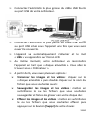
Plug the larger end of the supplied USB cable into an
available USB port on your computer.
•
Open the cover of the camera and then plug the smaller
end of the USB cable into the camera’s USB port on the
bottom.
69/80