1
TANDBERG ConferenceMe™ Version 1.0 Release notes
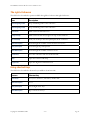
The right-click menu
The table below describes the options available through the ConferenceMe right-click menu:
Item
Description
Mute outgoing audio
Stop contributing audio to the conference
Mute outgoing video
Stop contributing video to the conference
Full screen
Make ConferenceMe full screen
Always on top
Make ConferenceMe always appear on top of other windows
Send desktop
Send your desktop to the other participants in the conference
Next local layout
Scroll through the available content and self-view layouts
Next participant
Scroll through the participant list
Next MCU layout
Scroll through the available conference views
Disconnect
Leave the conference and close ConferenceMe
Help
Open the ConferenceMe help
Diagnostics
Open the diagnostics information box
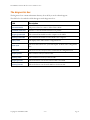
Using shortcut keys
The table below describes the shortcut keys available in ConferenceMe:
Feature
Shortcut key
Full screen
F or f, F11, Ctrl+F11, Alt+Enter, double-click
Next local layout
L or l
Next participant
Left or Right arrow keys
Next MCU layout
Up or Down arrow keys
Copyright © TANDBERG 2009
v1.0
Page 14