1
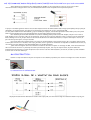
Pour trouver un clone chinois sur ebay entrer les recherches suivantes en fonction de votre choix :
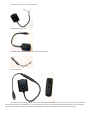
Pour le clone filaire : s100fs remote release
Pour la télécommande RF : Wireless Remote Control for Olympus pour canon cela serait a priori idem voir moins cher mais il faudra vérifier le
câblage de la prise d’extrémité et s’assurer au préalable que le modèle canon est bien compatible avec une télécommande de type Switch
Mode d’emploi de la télécommande RF que j’ai utilisé :
Wirelessly Trigger Your Camera's Shutter
-With the receiver connected to your camera's remote control socket, you can press the button on the remote control to trigger your camera's shutter
wirelessly!
Two-Level Shutter Button, Auto focus, Continuous Drive & Bulb Mode Supported Too!
-The shutter button can be pressed halfway or all the way.
-You can activate auto focus, release shutter, activate continuous drive mode or keep the shutter open for bulb photography as well.
16 Channels with Working Distance of 50 Meters!
-Strong resistance to interference.
-There are 16 channels available so that you can switch to other channels to avoid jamming frequency.
-Maximum working distance is about 100 Meters in open area without blockage.
Energy Saving Design, Long Working Hour
-With its low voltage and energy saving design, you don't have to change the battery often.
-With a new battery, the receiver standby time is about 1000 hours.
-With a new battery, the remote control can trigger about 20,000 times.
How to Connect?
1.
2.
3.
4.
Switch off the camera.
Make sure the receiver and remote control are on the same channel (check the switches on them).
Connect the receiver to your camera's remote control socket.
Press the button on the receiver to turn it on (the Power LED should blink red when it is on).
Please make sure you turn off the receiver, before switching the channels
How to Use?
With the shutter button on the remote control, you can do the followings:
Auto focus:
-Press it halfway to activate auto focus.
Release Shutter:
-Press it all the way to release shutter and take pictures.
Continuous Drive:
1. Switch the camera to continuous drive mode.
2. Press it all the way to release shutter continuously.
Bulb Mode:
1. Switch the camera to Bulb mode.
2. Press the button on the transmitter for 4 seconds until the Red LED on the transmitter is automatically off.
3. The receiver is in bulb mode now. (Indicated by continuously-on Red LED on the receiver)
4. Press the button on the transmitter again to close the shutter.
Note:
the receiver can also work as a remote cable release without the transmitter (does not need the battery in this case)
package content
1 x Wireless Remote Control (Receiver and transmitter)
1 x CR2 Battery (included for testing purpose only)
1 x 23A Battery (included for testing purpose only)