1
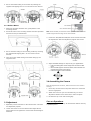
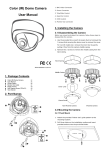
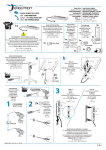
3. Secure the middle casing to the surface by inserting the supplied self-tapping TP4 x 31 mm screws into the anchors. 3.2.1 Surface Mount 1. Attach the provided "Outdoor Use" guide pattern to the mounting surface. 2. Drill three holes on the mounting surface and insert provided anchors into the pre-drilled holes. Note: For IR models, do not tilt the lens upward further when the marker aligns with the edge of the lens bracket. . 3. Loosen the Tele/Wide and Near/Far control screws and make the adjustment. After the adjustment, tighten the screws. 3. Secure the base casing to the mounting surface by inserting the supplied self-tapping TP4 x 31 mm screws into the anchors. 4. Then secure the middle casing to the base casing by the original screws. 4. Adjust the OSD settings as required by your applications. Press the OSD joystick control straight down to enter the OSD menu. Move the OSD joystick control UP, DOWN, LEFT and RIGHT to navigate through menus and options. Press the joystick to make a selection. 3.4 Assembling the Camera Once all adjustments are done, attach and secure the camera housing: 1. Use a soft, lint-free cloth to wipe the dome cover clean and remove fingerprints. 2. Attach the inner liner (for non-IR model only) to the tilt adjustment bracket. Push down until it clicks into place. 3. Put back the top cover and screw tightly. 3.3 Adjustment 1. Optionally connect a monitor to the “Monitor Out” connector for adjustment purpose. 2. Loosen the screws on the lens bracket and adjust the tilt angle. Make sure to tighten the screws when desired angle is achieved. Care on Operations To guarantee the performance, all maintenance shall be done by a qualified person.