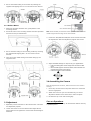
1
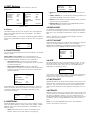
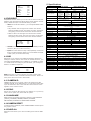
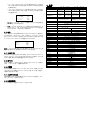
SPEED DELAY CNT ATW FRAME ENVIRONMENT 4. OSD Settings Use the OSD menu to set up the camera for optimum performance. LENS SHUTTER/AGC WHITE BAL BACKLIGHT PICT ADJUST MOTION DET ATR NEXT EXIT AUTO AUTO ATW OFF OFF OFF SAVE ALL PRIVACY DAY/NIGHT NR CAMERA ID SYNC LANGUAGE CAMERA RESET BACK EXIT OFF AUTO OFF INT ENGLISH SAVE ALL OSD Main Menu 4.1 Lens The LENS settings allow you to configure Lens and brightness. Options are AUTO (Auto Iris lens) and MANUAL. The default setting is AUTO. In the AUTO submenu, you can set the MODE as OPEN, CLOSE or AUTO. Then select SPEED to adjust the DC Iris Lens convergence speed. TYPE MODE SPEED DC OPEN 046 MANUAL: You can manually adjust the LEVEL from 15 to 69. USER1/USER2: You can adjust blue setting (B-GAIN) and red setting (R-GAIN) value from 0 to 255. PUSH: When selected in the appropriate position, the whole area will perform white balance. PUSH LOCK: When selected in the appropriate position, WHITE BALANCE will perform once. 4.4 BACKLIGHT Set Backlight compensation function. It controls the light level to overcome sever backlight conditions. Available options include OFF, BLC or HLC (Highlight Compensation) mode. The default is OFF. If HLC is selected, HLC is activated automatically when the camera detects high-luminance. 4.5 PICT ADJUST PICTURE ADJUST allows you to adjust picture settings for optimal image. In the PICT ADJUST submenu, you can adjust BRIGHTNESS, CONTRAST, SHARPNESS, HUE and GAIN value. In addition, you can set MIRROR to ON to reflect the image. MIRROR BRIGHTNESS CONTRAST SHARPNESS HUE GAIN 4.2 SHUTTER/AGC You can set the SHUTTER/AGC as AUTO or MANUAL. The default setting is AUTO. When LENS is set to AUTO: It is recommended to set SHUTTER/AGC to AUTO mode. In the AUTO submenu, adjust HIGH LUMINANCE MODE according to your application: AUTO IRIS mode: Use this for normal condition application environments. The IRIS level will be controlled by camera brightness. SHUT+AUTO IRIS mode: Use this for high light application environments. The exposure will be controlled by AES or the DC Iris. The iris level will be controlled by camera brightness. HIGH LUMINANCE MODE BRIGHTNESS AUTO IRIS 024 LOW LUMINANCE MODE BRIGHTNESS AGC x0.25 If SHUTTER/AGC is set to MANUAL, the submenu is shown as below. The shutter speed is a variable from 1/50(1/60)sec to 1/10000sec and the AGC is selectable depending on your environment condition. MODE SHUTTER AGC SHUT+AGC 1/50(1/60) 6.0 4.3 WHITE BAL WHITE BALANCE controls color on the screen. Options include ATW (Auto White Balance), PUSH, PUSH LOCK, USER1, USER2, ANTI CR (Anti Color Rolling Suppression) and MANUAL. The default is ATW. ATW: Select ATW when the scene illumination varies between indoor scenes and outdoor scene lighting. 171 152 X0.50 INDOOR OFF 000 128 128 128 128 4.6 ATR* Set ATR (Adaptive Tone-curve Reproduction) function. You can select ON or OFF. The default is OFF. If selecting ON, you will enter the ATR submenu, where you can set LUMINACE and CONTRAST to optimize by image. LUMINANCE CONTRAST LOW LOW *Also known as Wide Dynamic Range. This function expands the video dynamic range of the camera and improves visibility of images even in high contrast environments. 4.7 MOTION DET MOTION DET allows to detect moving objects on the screen. The default is OFF. If selecting ON, you will enter the MOTION DET submenu. You can set up to 4 motion areas to detect moving objectives and adjust the motion detection sensitivity from 0 to 127. 4.8 PRIVACY PRIVACY function mask up to 8 privacy areas on the screen from video monitoring. The default setting is OFF. If selecting ON, you will enter the PRIVACY submenu. You can configure up to 8 privacy areas and set color and transparency of the privacy zones. In addition, you can enable MOISAIC function for the privacy zone. Note: If you enable MOTION DET function, then PRIVACY function will support 4 zones only.