1
10.
Command Line Interface (CLI)
Introduction to commands
Command Syntax
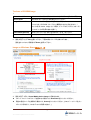
コマンドは、次の様なフォーマットで成り立っています。
<action> <category> <parameter(s)>
<action>; set / show / connect / diag / admin / logout のコマンドが使用可能です。
<category>;
構成や表示群の関連したパラメータです。
例として、devicegroup / account / network 等があります。
<parameter(s)>;
Action 及び Category のオプション
Action
Category
set
sshkey | history | network
show
sshkey | history | network
connect
serial
admin
version | config
logout
Terminates CLI session.
Command Help
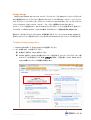
入力:help
特定コマンドの詳細については、“help”の入力後にコマンドを入力します。 help set network
もしくは、コマンドの後ろに “?” を付記します。 set network?
Configuration Commands
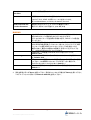
admin config
Syntax: admin config factorydefaults
Description : Spider自体と内部のデータベースを工場出荷時に戻します。
Note: このコマンド実行後、現在の設定項目は全て失われます。
Connect Commands
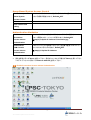
connect serial
Syntax: connect serial
60
SecureLinx SpiderTM Users Guide