1
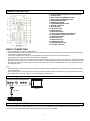
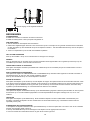
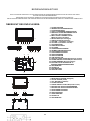
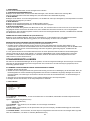
REMOTE CONTROL UNIT 1. SCREEN ON/OFF & BRI/COL ADJUST BUTTON 2. TITLE BUTTON 3. PREV & FAST BACKWARD BUTTON 4. NEXT & FAST FORWARD BUTTON 5. NAVIGATION BUTTONS 6. NUMERIC BUTTONS 7. PROGRAM/ANGLE BUTTON 8. VOLUME - BUTTON 9. MUTE BUTTON 10. SETUP BUTTON 11. MENU BUTTON 12. DISPLAY BUTTON 13. STOP &USB/SD/MMC CARD BUTTON 14. OK/ENTER(PLAY/PAUSE) BUTTON 15. SUBTITLE BUTTON 16. AUDIO BUTTON 17. SEARCH BUTTON 18. REPEAT BUTTON 19. ZOOM/SLOW BUTTON 20. VOLUME + BUTTON BASIC CONNECTION It is recommended to connect a multi-system TV. Ensure that this player and other equipment to be connected are set to the standby mode or off and disconnect the AC power cords before commencing connection. Do not block ventilation holes of any of the equipment and arrange them so that air can circulate freely. Read through the instructions before connecting other equipment. Observe the color coding when connecting audio and video cables, for instance connect yellow plug to the yellow jack, the red plug to the red jack and so on. If the A/V connected cable is only supplied, please link one end of the A/V connected cable with A/V cable according to the color coding, and connect the other end of the A/V connected cable to the unit, finally connect the AV cable with TV set. Note: During DVD play, the TV volume may be at a lower level than during TV broadcasts, etc. If this is the case, adjust the volume to the desired level. If the DVD/CD player is connected to the TV through a video cassette recorder, the picture may not be played back normally with some DVDs. If this is the case, do not connect the player via the VCR. Connecting to a stereo TV set A U D IO R A U D IO L S -V ID E O V ID E O IN Y U V IN P U T AV A U D IO /V ID E O IN P U T TV SET A/V cable Connecting to an affiliated screen This unit is equipped with another affiliated screen, you can use the affiliated screen and player to appreciate the programme at the same time, the connecting method is illustrated as below using the in car adaptor. 2