1
TechniPlayer_GB.qxp:BDA_MP4-Player
02.10.2007
11:05 Uhr
Converting video files
>
Note!
Not all codecs are supported. The conversion software supports converting files into the following formats: RAW, AVI, DIVX, MICROSOFT,
INTEL, INDEO, WMV and MPG.
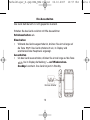
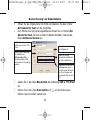
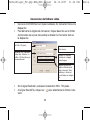
In the TargetFile line, click on
to select the path under which the
converted files are to be saved.
Please note:
The target file must end with AVI. This must be entered
manually.
>
>
>
In the quality line, enter the desired quality and the aspect ratio. The
larger the available memory space, the better the quality of the video.
We recommend that you select this setting based on the free memory
capacity.
In the "Begin from" line, you can select a time segment of the video
file to be converted.
If you have made these settings, click on AVIConverter in order to
start the conversion, press StopConverter if necessary in order to
end the conversion.
33
Seite