1
ENGLISH
Always use the tool with the side handle
properly assembled.
• Loosen the side handle.
• For RH-users, slide the side handle clamp over the
collar behind the tool holder, handle at the left.
• For LH-users, slide the side handle clamp over the
collar behind the tool holder, handle at the right.
• Rotate the side handle to the desired position
and tighten the handle.
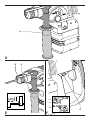
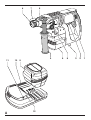
Setting the drilling depth (fig. E)
• Insert the required drill bit.
• Slacken the side handle (4).
• Fit the depth adjustment rod (5) through the hole
in the side handle clamp.
• Adjust the drilling depth as shown.
• Tighten the side handle.
Forward/reverse slider (fig. F)
• Push the forward/reverse slider (2) to the LH-side
for forward (RH) rotation. See arrows on tool.
• Push the forward/reverse slider (2) to the RH-side
for reverse (LH) rotation.
• Move the forward/reverse slider (2) to the central
position to lock the switch when changing
accessories, inserting the battery pack or when
storing or transporting the tool.
Always wait until the motor has come to
a complete standstill before changing the
direction of rotation.
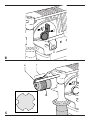
Replacing the dust cover (fig. C)
The dust cover (6) prevents dust ingress into the
mechanism. Replace a worn dust cover
immediately.
• Pull back the tool holder locking sleeve (13) and
pull the dust cover (6) off.
• Fit the new dust cover.
• Release the tool holder locking sleeve.
Instructions for use
• Always observe the safety instructions
and applicable regulations.
• Be aware of the location of pipework and
wiring.
en - 6
• Apply only a gentle pressure to the tool
(approx. 5 kg). Excessive force does not
speed up drilling but decreases tool
performance and may shorten tool life.
• Do not drill or drive too deep to prevent
damage to the dust cover.
Switching on and off (fig. A)
• To run the tool, press the variable speed switch (1).
The pressure exerted on the variable speed
switch determines the tool speed.
• To stop the tool, release the switch.
Hammer drilling (fig. A)
• Select the hammer drilling mode.
• Insert the appropriate SDS-plus bit. For best
results use high quality carbide-tipped bits.
• Mark the spot where the hole is to be drilled.
• Press the tool against the workpiece.
• Switch the tool on by pressing the variable speed
switch (1). The hammer mechanism should run
smoothly and the tool should not bounce.
If necessary, increase the pressure on the switch.
Rotary drilling (fig. A)
• Select the rotary drilling mode.
• Proceed as described for hammer drilling. Special
SDS-plus adaptors with threaded sections are
available for use with standard 10 or 13 mm
chucks to enable straight shank bits to be used.
Never use standard chucks in the
hammer drilling mode.
Screwdriving (fig. A)
• Select the rotary drilling mode.
• Select the direction of rotation.
• Insert the special SDS-plus screwdriving adaptor
for use with hexagonal screwdriver bits.
• Insert the appropriate screwdriver bit into the
adaptor. When driving slotted head screws
always use bits with a finder sleeve.
• Gently press the variable speed switch (1) to
prevent damage to the screw head. In reverse
(LH) rotation the tool speed is automatically
reduced for easy screw removal.
• When the screw is flush with the workpiece,
release the variable speed switch to prevent the
screw head from penetrating into the workpiece.
21