1
Overview
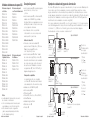
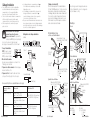
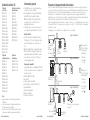
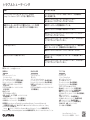
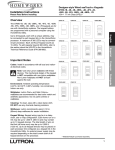
QS Wallstation Models
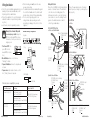
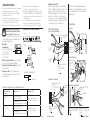
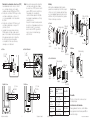
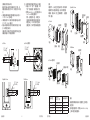
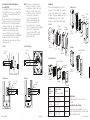
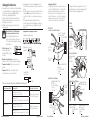
Installation Instructions
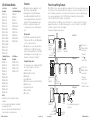
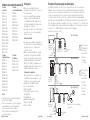
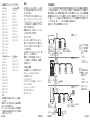
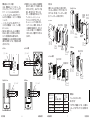
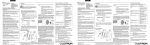
Power Group Wiring Example
• QS wallstations can be programmed to control
lights, shades, or lights and shades.
• Unprogrammed (out-of-box) QS wallstations,
Sivoia® QS shades, GRAFIK Eye® QS control
units, and Energi Savr NodeTM units will all work
together until they are programmed otherwise.
• Contact closure inputs allow operation with
occupancy/vacancy sensors, partitioning, and
more.
seeTouch®
seeTouch®
International Keypads
Keypads
QSWE-2B
QSWS2-1B
QSWE-3B
QSWS2-2B
QSWE-4B
QSWS2-3B
QSWE-5BRL
QSWS2-5B
QSWE-5BRLIR
QSWS2-7B
QSWE-6BRL
QSWS2-2BRL
QSWE-7BRL
QSWS2-3BRL
QSWE-8BRL
QSWS2-5BRL
QSWE-8BRLIR
QSWS2-2BRLIR
QSWE-10BRL
QSWS2-3BRLIR
QSWS2-5BRLIR
QSWS2-1RLD
QSWS2-2RLD
QSWS2-3BD
ArchitraveTM
Signature SeriesTM
Keypads
Keypads
QSWA-KP5-DN
QSWAS-1B
QSWA-KP5-DW
QSWAS-2B
QSWA-KP7-DN
QSWAS-3B
QSWA-KP7-DW
QSWAS-5B
QSWAS-7B
QSWAS-2BRL
QSWAS-3BRL
QSWAS-5BRL
QSWAS-1RLD
QSWAS-2RLD
QSWAS-3BD
Notes
• Read all instructions carefully before starting
installation.
• Lutron recommends that wallstations be installed
by a qualified electrician.
• Use only a cloth with warm water and mild soap to
clean faceplates (no chemical cleaners).
QS Link Limits
• The QS wired communication link is limited to
100 devices and 100 zones. Each QS wallstation
counts as 1 device and 0 zones.
• QS wallstations use 1 power draw unit (PDU) on
the QS link. Refer to the QS Link Power Draw
Units specification submittal (Lutron P/N 369405)
and the diagram on the opposite page for more
information concerning Power Draw Units.
Compatible Components
The following devices are compatible with the QS
link. For more information on each, refer to
www.lutron.com/qs
• GRAFIK Eye® QS control units
• QS wallstations
•Sivoia® QS shades
• QS Interfaces (contact closure, Ethernet/RS232)
•Quantum® system
• Energi Savr NodeTM units
• QS Sensor Module
• QS Keyswitch
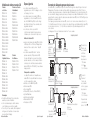
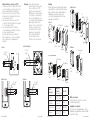
On the QS link, there are devices that supply power and devices that consume power. Each device has a
specific number of Power Draw Units (PDUs) it either supplies or consumes. A Power Group consists of one
device that supplies power and one or more devices that consume power; each Power Group may have
only one power-supplying device. Refer to the QS Link Power Draw Units specification submittal
(Lutron P/N 369405) for more information concerning PDUs.
Within Power Groups on the QS link, connect all 4 terminals (1, 2, 3, and 4), shown by the letter A in the
diagram. Between devices on the QS link that supply power, connect only terminals 1, 3, and 4 (NOT
terminal 2), shown by the letter B on the diagram.
Wiring can be T-tapped or daisy-chained.
A
Power Group 1
LUTRON
GRAFIK Eye® QS
control unit
Supplies PDUs
B
(Do not connect
Terminal 2: 24 V )
Wallstations
Consume PDUs
B
LUTRON
LUTRON
(Do not connect
Terminal 2: 24 V
Connect only 3
terminals between
power groups:
1: Common
3 and 4: Data
B
Energi Savr NodeTM
unit
Supplies PDUs
)
Power Group 3
Do not connect
Terminal 2: 24 V
A
LUTRON
QS Sensor Module with Occupancy Sensor
Consume PDUs
B
(Do not connect
Terminal 2: 24 V )
Occupant Copy
LUTRON
Connect all 4
terminals within a
power group:
1: Common
2: 24 V
3 and 4: Data
Power Group 2
A
QS Power Supply
Supplies PDUs
2
A
LUTRON
Control Interfaces
Consume PDUs
Occupant Copy
Quantum® Panel
Supplies PDUs
3
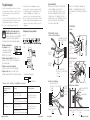
Installation Instructions