1
seeTouch®
:
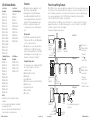
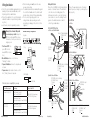
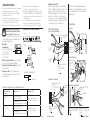
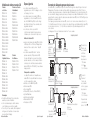
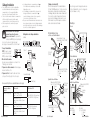
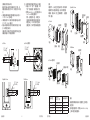
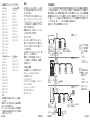
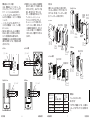
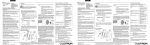
Mounting
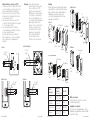
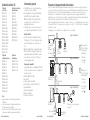
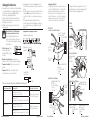
Carefully mount and align the wallstation as
shown. Screw top and bottom screw into the
control and wallbox. Replace adapter (for insert
versions; screw to control), button assembly, and
faceplate in the order shown.
Signature SeriesTM
Adapter
screws Mounting
screws
seeTouch®
Mounting screws
Adapter
screws
Wallbox
Control
Buttons
Adapter
Wallbox
seeTouch® International
Control
(3) 18 AWG
(1.0 mm2)
A
1
2
3
B
Common
Input 2
Input 1
ArchitraveTM
Mounting screws
Faceplate
C
Common
Input 2
Input 1
Faceplate
Buttons
Adapter
4
AC N
099 942 971
(3) 18 AWG
(1.0 mm2)
Note: If a wallstation has devices connected
to it through contact closure inputs,
CCI1 “presses” the top button and CCI2
“presses” the bottom button. To change
this behavior, refer to Application Note 428
(seeTouch® Advanced Programming Mode)
at www.lutron.com.
Exception: On a 2-button wallstation
configured for partitioning, panic, or
sequencing functionality, CCI1 closure
action follows the top button and opening
action follows the bottom button.
CO O P E R S BURG , P A 18036 US A
30 mA
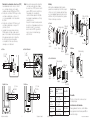
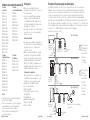
Wiring the Contact Closure Input (CCI)
The contact closure inputs must be dry contact
closure, solid state, open collector, or active-low
(NPN)/active-high (PNP) output.
• Open collector NPN or active-low on-state voltage
must be less than 2 V and sink 3.0 mA.
• Open collector PNP or active-high on-state voltage
must be greater than 12 V and source 3.0 mA.
• The outputs must stay in the closed or open states
for at least 60 msec in order to be recognized by
the wallstation.
If there is any question as to whether the third-party
device generating these outputs is compatible with
these specifications, contact the manufacturer.
seeTouch® International
Mounting screws
Adapter screws
Wallbox
Wallbox
Control
Faceplate
Control
Adapter
ArchitraveTM
Signature SeriesTM
(3) 18 AWG
(1.0 mm2)
A
B
C
Faceplate
(3) 18 AWG
(1.0 mm2)
Input 1
Input 2
Common
A
B
C
Input 1
Input 2
Common
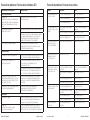
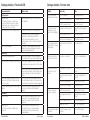
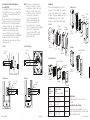
Wallstation Type
Wallbox Size
(high x wide x deep)
Lutron P/N
seeTouch®
3.7 x 2.2 x 2.75 in
95 x 55 x 70 mm
3 x 3 x 1.4 in
75 x 75 x 35 mm
4.4 x 1.5 x 2.8 in
113 x 39.x 71 mm
4.4 x 1.25 x 2.75 in
112 x 32 x 70 mm
241519
seeTouch®
International
Signature SeriesTM
ArchitraveTM
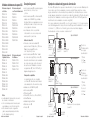
Installation Instructions
Buttons
6
Occupant Copy
Occupant Copy
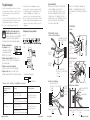
Power Up
Turn ON control breaker, or replace main fuse.
Installation is Complete
For Programming functions, see the
QS Wallstation Programming Guide at
www.lutron.com/qs.
241683
WBOX-SA1-Q1
241399
7
Installation Instructions