1
INSTRUMENT DESCRIPTION
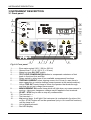
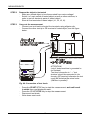
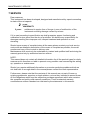
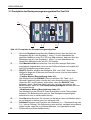
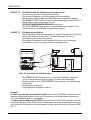
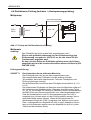
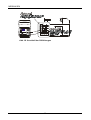
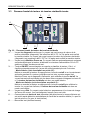
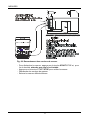
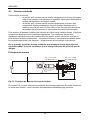
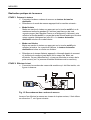
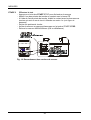
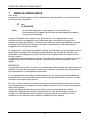
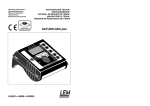
3.3 Front panel of hand-held Residual Voltage Tester
5
4
Result
6
1
2
3
Fig. 03: Front panel of Residual Voltage Tester
1.............. Green/red Result control lamp. Green colour is “on” when the value of
Residual Voltage (result) is below 60 V DC 1s / 5s after switching off tested
machine. Red colour is “on” when the value of Residual Voltage (result) is
above 60 V DC 1s / 5s after switching off tested machine.
2.............. Red Machine Power on control lamp. It is automatically switched “on” a
few seconds after detecting stable mains AC or DC voltage connected to
test terminals.
3.............. ON/OFF key to switch the tester “on” or “off”. Automatic “off” occurs in case
the tester has not been used for more than 5 minutes.
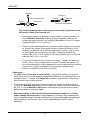
-Linear mode (Description see 4.3):
Switch on the tester pressing the on/off key and keeping it pressed for
approx. 2s until all three red control lamps (bat, Machine Power on and
Result) go “on”, then release the on/off key. After 1s two lamps go “off” while
the bat lamp stays “on”. Residual Voltage Tester is thus in Linear mode.
-Non-linear mode (Description see 4.3):
Switch on the tester pressing the on/off key and releasing it. Bat lamp goes
“on”, Residual Voltage Tester is thus in linear mode.
4.............. Red Bat control lamp. The lamp continuously lights if battery is in good
condition and starts to blink when the battery is in empty condition.
5.............. Test duration switch to select waiting time (1s – plug test or 5s – internal
test) activated after automatic recognition of switching “off” tested machine.
6.............. Test terminals (banana sockets).
8