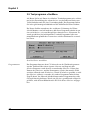
1
MultiFaceSoftware
MultiFaceCard
SerialMaster
1
English
2
MultiFaceSoftware
MultiFaceCard
SerialMaster
3
License Agreements
This product is copyright protected. No part of this product may be copied, distributed or
processed electronically or any other means without written consent of bsc
büroautomation AG. The buyer is granted a non-exclusive right of use with one
Computer respectively.
We guarantee warranty for the original product from the date of purchase, under the
condition that the registration card is returned to us immediately after the purchase.
Warranty covers the rectification of evident flaws of material or function for products
that are sent to us freight paid and with a copy of the receipt. Change or repair of parts
does not extend the term of warranty.
If the product is not installed or used according to design and instructions or if it was
altered or modified or if the computer is deficient, the warranty is void. We reject any
liability for damages caused directly or indirectly by the product. We guarantee
however, having performed a thorough product quality test with the result of flawless
performance prior to shipment.
We reserve the right to technical changes and changes in the contents of this product.
All rights reserved.
Copyright 1991-1993 bsc büroautomation AG
Trademarks
»Commodore«, the Commodore Logo, and »CBM« are registered trademarks of
Commodore Electronics Limited. »Amiga«, »AmigaDOS«, »Amiga Kickstart«, »Amiga
Workbench« and »AUTOCONFIG« are registered trademarks of Commodore
Electronics Limited. »Centronics« is a registered trademark of Centronics Data
Computer Corp. »Epson« is a registered trademark of Epson America, Inc. »LaserJet« is
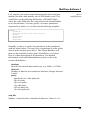
a registered trademark of Hewlett-Packard Company. »PageStream« is a registerd
trademark of SoftLogik Publishing Corporation. »PostScript« is a registered trademark
of Adobe Systems Inc. »MultiFaceSoftware«, »MultiFaceCard«, »SerialMaster« and
»TopScan« are trademarks of bsc büroautomation AG. »BOISE« is the name of the
bidirectional protocol of parallel ports as defined by Hewlett-Packard. Other trademarks
may be copyright protected without explicit notice.
3. Edition
l.Print 9/93
4
Table of Contents
Preface
1. Introduction
1.1 Registration
1.2 Hotline
1.3 Updates
1.4 Backup Copy
1.5 Contents of the MultiFaceSoftware 3 Disk
1.6 System Requirements
2. Installation of the MultiFaceSoftware 3
2.1 Automatic Installation
2.2 Manual Installation
2.3 Undoing the Installation
2.4 Installing Updates
2.5 Querying Driver Versions
3. MultiFaceSoftware 3
3.1 »Devices«
3.1.1 »duart.device«
3.1.2 »pit.device«
3.1.3 »mfc.resource«
3.2 »DOSDrivers«
3.2.1 »Pit-Handler«
3.2.2 »Duart-Handler«
3.2.3 »Terminal-Handler«
3.3 »DuartPrefs«
3.3.1 »Baudrate«
3.3.2 »Data bits«
3.3.3 »Stop bits«
3.3.4 »Parity«
3.3.5 »CtrlChars«
3.3.6 »Handshake«
3.3.7 »Breaklen«
3.3.8 »Buffersize«
3.3.9 Buttons
3.3.10 Pull Down Menues
3.3.11 Hints for Using the Program
3.4 Utility Program »MapDevice«
3.5 Test-program »SerMon«
3.6 ParNet, PitNet and PiaNet
7
9
10
10
11
12
12
14
15
15
20
21
22
22
23
24
24
26
28
28
31
32
34
35
36
36
37
37
38
38
40
40
41
42
43
43
47
49
5
4. Tips & Tricks
4.1 »Patching« of Programs
4.2 Removing a DOS-driver with »Assign REMOVE«
4.3 Using Several Printers
4.4 Example Programs
4.4.1 »Term«
4.4.2 Postscript Printers
4.4.3 Plotters
4.4.4 »PageStreamD« with its own Printer Drivers
4.5 MIDI-Operation with SerialMaster500 or MultiFaceCard 2
4.6 MIDI-Operation with MultiFaceCard 3
4.7 MultiFaceCard 2 with TopScan
4.8 MultiFaceCard 3 with TopScan
4.9 Null-Modem-Cable
5. Description of the Hardware
5.1 MultiFaceCard 3
5.1.1 Installation MultiFaceCard 3
5.1.2 Technical Data MultiFaceCard 3
5.1.3 Contents of MultiFaceCard 3 Package
5.2 MultiFaceCard 2+, MultiFaceCard 2, MultiFaceCard l
5.2.1 Installation MultiFaceCard 2+
5.2.2 Technical Data MultiFaceCard 2+,
MultiFaceCard 2 and MultiFaceCard l
5.2.3 Contents of MultiFaceCard 2+ Package
5.3 SerialMaster 500+ and SerialMaster500
5.3.1 Technical Data SerialMaster500+, SerialMaster500
5.3.2 Contents of SerialMaster500+ Package
5.4 MultiFaceCard 2+ Upgrade-Kit
5.4.1 Contents
5.4.2 Upgrade Instructions
5.5 SerialMaster500+ Upgrade-Kit
5.5.1 Contents
5.5.2 Upgrade Instructions
Appendix
Serial Connector Configurations
Parallel ConnectorConfigurations
Credits
Index
6
55
55
56
56
57
57
58
59
59
61
62
63
64
65
67
68
69
70
71
71
73
74
75
75
77
77
78
78
78
80
80
80
83
83
85
89
91
Preface
Preface
You own a dot matrix printer, a laser printer, a digitizer and a
modem? Then you probably know the problem: In order to use
one of these peripherals you have to power off your computer and
connect the corresponding cables to the serial or parallel port. As
this is not only nerve-racking but also not good for your Amiga,
you have decided to purchase the MultiFaceCard (MFC) or the
SerialMaster.
Or are you losing data sporadically with your high speed modem
when your Amiga has a high computing load? Even here MFC or
SerialMaster helps.
We congratulate you to your decision to purchase a multi-portexpansion from bsc and thank you for your confidence in our
products.
Please read the license agreements and the introduction first. For
the installation of the hardware please follow the instructions in
chapter 5 according to your product.
Have fun!
7
Chapter 1
8
Introduction
1. Introduction
This manual describes the new MultiFaceSoftware Version 3. The
MultiFaceSoftware is a program package for the usage of a
MultiFaceCard or a SerialMaster. For the installation of the
hardware please follow the instructions for the appropriate
hardware in chapter 5. In case you purchased an Upgrade-Kit it is
absolutely necessary to read the instructions in chapter 5. First of
all please check the completeness of contents of your product.
You'll find the listed contents for each product in chapter 5.
The installation of the MultiFaceSoftware is described in chapter
2, the functionality of the various components in chapter 3. Please
also read chapter 4 as it contains many useful hints and tricks and
especially program examples and solutions to many problems.
In the appendices you will find handy connector configuration
tables.
The latest news about this product is found in a »ReadMe« file on
the disk. Please read the latest information prior to the installation
and usage of the product. You can display the contents of this file
by double-clicking on the respective icon. By pressing the
<spacebar> or <backspace> key you can flip through the pages
forward and backwards.
We assume, by the way, that you know your Amiga Computer a
little and that you execute certain procedures »by heart«.
9
Chapter 1
1.1 Registration
Please complete the registration card writing in print and use
one of the following stickers for mailing according to your
Country.
bsc büroautomation AG
Europe:
Postfach 400368
D-80703 München
Germany
Alfa Data US
North America:
P.O. Box 6990, Champaign,
Il. 61826, U.S.A.
Alfa Data Computer Technic Corp.
Others:
3F, No. 8, Lane 263, Chung Yang RD.
Nan Kang, Taipei, Taiwan, R.O.C.
Only then will you be registered as a legitimate user and can
benefit from our update and hotline services.
All data submitted on the registration card will be used for
internal evaluation purposes only and will not be forwarded to
third parties.
1.2 Hotline
Please always try to solve a problem with your own means.
Most important, try and find your problem in the manual first.
Should you have an unsolvable problem nevertheless, you are
welcome to contact our hotline under the following telephone
number: ++49-89-357130-80.
Our hotline is available on
Monday, Wednesday and Friday, 2 pm till 3.30 pm CET
Tuesday and Thursday, 4.30 pm till 6 pm CET
Before calling, please prepare all the possibly needed
information:
ü Product name (MultiFaceCard 2+, MultiFaceCard 3
or SerialMaster500+ etc.)
ü Modelversion of your Amiga (maybe also serial- and
revisionnumber)
ü Version number of your MultiFaceSoftware as printed
on the disk
10
Introduction
ü Version number of the »duart.device« and »pit-device« (these
can be determined with the installation program as described in
the main section)
ü Version number of your workbench (can be determined with
the pull down menu in the workbench)
ü The specific product names and version numbers of your used
peripherals and software applications
In some cases the hotline might not be able to help you right a
way. In this case it is necessary for you to send us a precise
written description of your problem. This will then be forwarded
to a developer. You will be contacted as soon as we have reached
a solution.
If you have access to an electronic network you can also direct
your questions to our e-mail address
[email protected]
This is the fastest and easiest method for you, as well as for us to
solve your problems.
1.3 Updates
By sending us your original disk you can obtain the latest version
at a lower price upon prepayment. In any case you need the
original disk. For questions concerning our updates please consult
the hotline.
We inform about new updates in several printed media and we
will also inform you by mail. Not registered users will not receive
updates. It is only fair to inform you of this policy in advance.
In order to constantly improve MultiFaceSoftware we are also
highly interested in your opinion. If you have any
recommendations for improvement or if you find an error in the
program please contact us.
11
Chapter 1
1 .4 Backup Copy
Before you start playing and experimenting with the
MultiFaceSoftware you should make at least one backup copy of
the original disk. You can save a lot of distress in the event that
your original disk is faulty or destroyed.
You will find the information on how to copy a disk in the
Workbench Users Manual. Rename your backup copy from
»Copy_of_MFS3« to »MFS3« and in the future work only with
this backup copy. Never remove the write protection from the
disk. Store the disk at a safe place (not next to a monitor, tv,
telephone or other electromagnetic emitter). You will definitely
need the original disk if you wish to update in the future.
1 .5 Contents of the MultiFaceSoftware 3 Disk
The MultiFaceSoftware Disk »MFS3« contains the installation
program »Install«, various drawers and the »ReadMe«-file.
Furthermore there are a couple of system files without icons and
they are accessed best from the AmigaShell (for historians: from
the CLI).
You can verify whether any files on the disk are missing
(naturally this should not be the case) by the means of the
following complete content list.
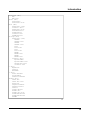
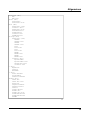
12
Introduction
Expansion (dir)
MFC
MFC.info
Prefs (dir)
DuartPrefs
DuartPrefs.info
Devs (dir)
DOSDrivers (dir)
Scanners (dir)
DOSDrivers.info
DuartMountList
PitMountList
Scanners.info
TermMountList
Storage (dir)
DOSDrivers (dir)
DUART0
DUART0.info
DUART1
DUARTl.info
PIT0
PIT0.info
PIT1
PITl.info
TERM0
TERM0.info
TERM1
TERM1.info
Scanners (dir)
EpsonParMFC
EpsonParMFC.info
DOSDrivers.info
Scanners.info
c (dir)
MapDevice
Version
WhichMFC
l (dir)
Duart-Handler
Pit-Handler
Terminal-Handler
ParNet (dir)
Cable.doc
Cable.doc.info
mountlist
netpnet-handler
netpnet-server
netstat
parnet.device
ParNet.doc
ParNet.doc.info
ParNet0MountList
ParNet1MountList
ReadMe
ð
13
Chapter 1
ReadMe.info
PitNet (dir)
netpitnet-handler
netpitnet-server
pitnet.device
PitNet0MountList
PitNet1MountList
ReadMe
ReadMe.info
PiaNet (dir)
netpianet-handler
netpianet-server
pianet.device
PiaNet0MountList
PiaNet1MountList
ReadMe
ReadMe.info
SerMon (dir)
SerMon
SerMon.info
Devs.info
disk.info
Expansion.info
Install
Install.info
Installer
ParNet.info
PitNet.info
Prefs.info
ReadMe
ReadMe.info
SerMon.info
Storage.info
1.6 System Requirements
An Amiga with the minimum RAM storage and disk capacity is
sufficient for the use of the MultiFaceSoftware. Inevitable
although, is that your Amiga uses at least Kickstart 2.04 with the
appropriate Workbench.
The MultiFaceSoftware has been tested successfully with the
operating System versions 2.04, 2.1, 3.0 and 3.1.
14
Installation of the MultiFaceSoftware 3
2. Installation of the MultiFaceSoftware 3
The entire MultiFaceSoftware is on the delivered disk and must be
installed on your system prior to usage. The installation procedure
is described in this chapter.
Before you start with the installation of the MultiFaceSoftware it
is essential that you have already installed the hardware as
described in chapter 5. The decisions that have to be made during
the installation process will probably be easier for you if you read
the entire manual beforehand.
2.1 Automatic Installation
In order for the installation to be as easy and convenient as
possible the MFS3-disk offers an interactive installation program.
This program installs the entire MFS3-software or only parts of it
according to your desires. It is also possible to undo an existing
installation or to update to a newer version. This program is also
used to determine the specific driver versions.
You will be guided through the program with detailed info-signs
and help-messages. You may press the <help> key at any time to
receive further help. Please follow the succeeding installation
instructions.
As you will probably want to work with the familiar Amiga
environment, you will need to boot from your hard drive or
Workbench disk prior to copying the appropriate programs of the
MultiFaceSoftware to your System.
preparation
15
Chapter 2
Next you will need to determine whether you have sufficient hard
disk or disk space available for the new programs. Naturally the
amount of disk space needed depends on how much of the
MultiFaceSoftware you would like to install. For the absolute
minimum installation you will need about 50 kByte, for a
complete installation 500 kByte of free disk space. If this is not
the case, please erase any unnecessary files until you have enough
disk space. The amount of free memory on your hard drive or disk
is displayed in the Workbench on the titlebar of the root directory
window.
Furthermore you should use an unalterted »Startup-Sequence«. In
case you insist on altering your »Startup-Sequence« please make
sure that the command »BindDrivers« as well as appropriate
commands for the installation of environment variables exist.
starting
installation
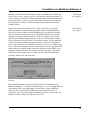
The »Install«-icon is situated in the root directory of the MFS3disk. Start the installation with a double-click on that icon. As
soon as the program is loaded and the internal initialisation is
completed a welcome message appears. Please press the
»Proceed« button to continue.
If you would like to stop the installation, that is the installation
progam at this point, press the button labeled »Abort Install«. You
will then be asked to confirm your choice. Click »Yes« to actually
abort the installation program or »No« to continue with the
installation.
level of
installation
16
The installation program will now ask you for your knowledge of
the Amiga. You have the choice between »Novice User« (all
actions of the installation run automatically), »Intermediate User«
(for the average user, you may choose which parts of the
MultiFaceSoftware are installed) and »Expert User« (for the pro,
the installation program informs you about any action and asks for
your permission).
Installation of the MultiFaceSoftware 3
If you are installing the MultiFaceSoftware for the first time,
please choose »Novice User« no matter how well you know your
Amiga. In this mode all files that are needed for normal use are
copied to your System. In 99% of all cases this will be sufficient.
After the files have been copied the installation program will be
terminated automatically. Done!
In case you choose »Intermediate User« or »Expert User« before,
the installation program will offer you further possibilities for
selection. You may choose between »Pretend to Install« or
»Install for Real« if you really intend to install
MultiFaceSoftware. If you are uncertain of the steps that follow in
the installation procedure you can practice with »Pretend to
Install«. As you are confident in our installation program you
choose »Install for Real«. You can record all actions in a »Log
File« or print them on your »Printer«. The log file will be saved
on your »RAM-DISK« with the name »Install-MFS3-Log«. If you
decide not to record the installation process, please choose
»None«. Click »Proceed« after you have made your decision.
novice user
intermediate
or expert user
Installer
The installation window now displays the title »Installation of the
MultiFaceSoftware...« with the prompt to choose one of four
possibilities. The first possibility you have is the first time
installation of the MultiFaceSoftware. Choose »Install Drivers« to
do so. If you would like to remove an already existing version of
MultiFaceSoftware from your System disk, choose »Remove
Drivers«. If you would like to copy a new, updated version of
MultiFaceSoftware to your already installed System disk, choose
»Update Drivers«.
17
Chapter 2
Information about an installed version of MultiFaceSoftware is
given with the option »Query Driver Versions«. You will need
this information in case you have problems and would like to call
our hotline. For now you will probably want to install the
MultiFaceSoftware. In order to do so please click »Install
Drivers« and then the »Proceed« button.
The installation program will then copy the file »MFC« in the
»Expansion« directory of your system. If that directory does not
exist, it will be created automatically. The basic drivers will be
binded automatically with the »BindDrivers« command in the
»Startup-Sequence« of this directory.
Moreover all necessary files for the use of the DOS driver will be
copied to your system and the »MFS« command »MapDevice«
will be copied to your command directory.
Parallel Port
18
In case you have a MultiFaceCard, the installation will proceed
with the question »Do you wish that all printer output shall be
redirected to parallel port 0 of the MultiFaceCard?«. If you are
owner of a SerialMaster this question will be skipped. Click
»Yes« for redirection to port 0 or »No« if you would like to
continue printing through the Amiga's parallel port. If you choose
»Yes« a redirection command will be added to your »UserStartup«-sequence. For further information about redirecting
peripheral input/output please refer to the section concerning the
utility program »MapDevice«.
Installation of the MultiFaceSoftware 3
Let's proceed with the installation of the »Handlers« often called
»DOSDrivers«. For 99% of all applications you will not need
these. So if you are uncertain you should definitely click »No«.
Believe us, if you need »DOSDrivers« for any reason, you'll know
it. Nevertheless, if you choose you need them then you will need
to choose from a selection of »DOSDrivers«. You may choose
one or more from the following list:
DOSDriver
»DUART0«, »DUART1«, »TERM0«, »TERM1«, »PIT0« (only
for the MultiFaceCard) and »PIT1« (only for the MultiFaceCard).
The ending digit of these device names correspond to the used
port number.
»DUART0« and »DUART1« are simple »DOSDrivers«
equivalent to the Amigas' standard»DOSHandler« »SER«.
»TERM0« and »TERM1« correspond to »AUX«, »PIT0« and
»PIT1« correspond to »PAR«.
Of course all of these can only be used with the appropriate ports
of the MultiFaceCard or SerialMaster. Click »Proceed« to
continue. Depending on your Workbench-version all necessary
flies will be copied to your system and the information added to
your »User-Startup«-sequence. For further detailed information
please read the sections »Handler« and »DOSDriver« in this
manual.
The preferences program »DuartPrefs« can be copied to the
»Prefs« directory of your system. In order to do this, please click
»Yes« after the question »Do you wish to install the DuartPrefs
editor program into your systems Prefs drawer?«. If the »Prefs«
drawer does not exist it will be created automatically.
DuartPrefs
For owners of the SerialMaster the installation process ends at this
point. The installation program quits with the message
»Installation of the MultiFaceSoftware complete« and »Have
Fun!«. Click »Proceed« to remove these messages. In order to
activate your MultiFaceSoftware you will only need to reboot
your Computer.
19
Chapter 2
Netwerk ParNet
For owners of a MultiFaceCard the installation procedure
continues. The following window asks »Do you wish to install the
PitNet« - the networking software. Before immediately clicking
on »Yes«, please read the section in chapter 3 about »ParNet«,
»PitNet« and »PiaNet« first. If you haven't read these sections yet
you should rather click »No«. The Installation process will then be
terminated as described above.
The »PitNet« installation begins with the question of the number
(»Unit«) of this Amiga. It doesn't matter whether you choose
»Unit0« or »Unit1« as long as you choose the opposite for the
Amiga on the other side of the cable. Just click »Proceed« and the
installation program will do the rest. That is definitely all for now.
The program terminates as described above.
2.2 Manual Installation
It may be possible that the automatic installation procedure as
described above does not suit your expectation. This section gives
you information that you might need for a manual installation. In
any case please read the section »Automatic Installation« anyway.
That section covers basic information, that you will need for a
manual installation.
A manual installation can be as easy as moving an icon. After
having started the Workbench place the »MFC« icon from the
»Expansion«-directory of the »MFS3« disk in the same directory
(»Expansion«) of your Workbench. After the next boot process of
your Amiga the basic drivers will be activated automatically.
It is advisable to copy the program »DuartPrefs« from the »Prefs«
directory to your system so that it is easily available, if you should
need it in the future.
20
Installation of the MultiFaceSoftware 3
The utility program »MapDevice« is located in the »C«-directory
of the »MFS3« disk. The functionality of this program is
described in a seperate section. With this program you can redirect
your printer output for example. This program has no icon so you
should use the AmigaShell to copy it to your »Path«.
Utility
MapDevice
For MultiFaceCard owners: The installation for the »ParNet«-,
»PitNet«- and »PiaNet«-software is described in section 3.6.
2.3 Undoing the Installation
The installation program can not only copy the MultiFaceSoftware
to your Workbench but also remove it completely. In order to do
this you need to choose at least »Intermediate User« at the prompt
»Set Installation Mode« and »Install for Real« in the next
window. Now you can select »Remove Drivers« and click
»Proceed« to go on. The installation program will warn you one
last time. Click »Proceed« again to confirm your selection. Now
all files belonging to the MultiFaceSoftware are deleted and all
new entries to the »User-Startup« sequence are removed. After
this process is done the installation program ends with »Too
late!«, click »Proceed« one last time.
Remove Drivers
21
Chapter 2
2.4 Installing Updates
You have been working with an older version of MultiFaceSoftware and want to update your existing software. For this
process you can use the installation program as well. After the
prompt »Set Installation Mode« choose »Intermediate User« and
»Click Proceed with Install«. In the next window titled
»Installation Options« choose »Install for Real« and click
»Proceed«. Now comes the main question »You have the
following four choices to continue«. Choose »Update Drivers«
and click »Proceed« again. The installation program will then
replace all existing drivers on your system disk with the latest
version without changing anything of the functionality of your
installation. After having completed the update, the program quits
after you click »Proceed«.
2.5 Querying Driver Versions
If you run into problems with your MultiFaceCard or your
SerialMaster you may contact our hotline if you are a registered
user. In order for us to be able to help you efficiently, we need
various information that you can determine with the help of the
installation program. Before you can query the driver version the
MultiFaceSoftware must have been installed as described above.
Start the installation program, click »Proceed« after the welcome
message and choose »Intermediate User« at the next window,
even if you consider yourself being a novice. Click »Proceed with
Install« and »Proceed« again to skip the following window. Now
you must select »Query Driver Versions« and the next window
will show you various information. Please make an exact note of
this information and forward it to our employees at the hotline
upon request. Click »Proceed« to end the program.
22
MultiFaceSoftware 3
3. MultiFaceSoftware 3
The MultiFaceSoftware contains all necessary driver programs for
the usage of a MultiFaceCard or SerialMaster with the Amiga.
These programs bind the new ports to the various levels of your
Amiga-system and make them available to you.
Some peripherals though, are designed to communicate directly
with the Amiga's hardware (e.g. video- and audio-digitizers).
Peripherals of this kind must therefore be connected to the
standard parallel or serial port of the Amiga.
There are also application programs that can only work with the
standard ports of an Amiga. Especially the MIDI (Musical
Instruments Digital Interface) supporting applications belong to
this category, as they use the Amiga's hardware directly because
of the time critical nature of the MIDI-control. This is, by the way,
the reason that the MIDI-operation is not supported in the standard
specifications of the MultiFaceCard or SerialMaster. We have no
knowledge of any reasonable software that you can use in
connection with MultiFaceCard or SerialMaster.
The lowest level of system integration - not counting direct
hardware access - is the »Device« level. A »Device« is managed
by the Amiga »Exec«, the lowest instance of the System.
AmigaDOS is constructed from this level. The »DOSDrivers«
also named »Handlers« are responsible for the integration into
AmigaDOS.
MIDI
driver levels
23
Chapter 3
3.1 »Devices«
The lowest and most important level of drivers are the so called
»Devices«. The MultiFaceCard enlarges your Amiga operating
system by additional »Devices« in order to be able to address the
new ports according to the systems standards.
The new »Devices« are compatible in their behaviour to the
standard Amiga »Devices« and can therefore be substituted easily.
The »Devices« are integrated automatically with the
»BindDrivers« command of the »Startup-Sequence« from the
»MFC« file that is located in the »Expansion« directory of your
system. You will not find a »duart.device« or »pit.device« in the
»DEVS:« directory as these are directly integrated into the system
automatically.
If you have a MultiFaceCard the »Devices« »duart.device« and
»pit.device« are integrated. If you are owner of a SerialMaster
only the »duart.device« will be added to your system. In both
cases a »mfc.resource« will also be added.
3.1.1 »duart.device«
compatibility
The »duart.device« handles all serial ports of all connected
MultiFaceCards and SerialMasters. The »duart.device« is as
compatible as possible to the »serial.device« and may be used in
all application programs instead.
setup
applications
The most important use of serial ports are for external modems.
Perhaps you already own a modem and you have it connected to
the Amigas' serial port. Because of its higher reliability and
efficiency it is advisable to connect the modem to the SerialMaster
or MultiFaceCard.
24
MultiFaceSoftware 3
All you need to do is to change to the »duart.device« and select
the correct port number in your favourite communication
program. In most of these programs you will find the possibility to
enter the name of the used »Devices« and the appropriate »Port«
number somewhere. Sometimes this can be done easily through a
requester and sometimes a little more fussy by changing the
»ToolType« entry in the icon. Please refer to the programs'
manual for the correct method. In case your favourite program
does not offer one of these two possibilities all is not lost. You
might be able to solve this problem with the utility program
»MapDevice«. Please refer to section 3.6 for further details.
The correct choice of the port number depends on many factors.
Firstly, it depends to which connector you connected the
peripheral device. Please refer to the hardware section of your
product in this manual to check which connector corresponds to
which port number. In case you are simultaneously using more
than one MultiFaceCard or SerialMaster the port numbers just
continue. That means port »zero« of the second MultiFaceCard
corresponds to the port number »two«. The order of the
MultiFaceCards depends on the used slots. The Amiga 2000
initializes the slots from right to left, the port numbers increment
in that direction. For the Amiga 3000 and 4000 the order is from
bottom to top. The Amiga 500 initializes the SerialMasters
starting from the Amiga and moving outwards. If an expansion
board or other peripheral is located between two MultiFaceCards
or SerialMasters the manner of port number incrementation is not
affected.
counting of the
unit-numbers
25
Chapter 3
3.1.2 »pit.device«
All parallel ports of MultiFaceCards are handled by the
»pit.device«. Just like the »duart.device« can replace the
»serial.device«, the »pit.device« can be used to replace the
»parallel.device«. Compatability is guaranteed here as well.
parallel
interface
applications
Parallel interfaces are usually used to connect printers. This
interface is called »Centronics« interface and a printer port is
defined explicitly. By the way: »Centronics« was a printer
manufacturer that invented this kind of printer interface. Many
other printer manufacturers followed soon thereafter and today
almost every printer comes with a »Centronics« port.
Recently the classical (printer-) parallel interface has been abused
for many other applications.
In bidirectional form it is also very common for scanners. It can
even be used for networking. Please refer to sections »ParNet«,
»PitNet« and »PiaNet« in chapter 3 for more details. Parallel ports
are also widely uses for the connection of plotters.
Unfortunately none of the interfaces have ever been standardized
or at least specified clearly so every manufacturer specifies bis
own standards and it is a miracle that the various peripheral
devices function properly with the various interfaces. In order for
the parallel interfaces of the MultiFaceCard to function properly
with as many peripheral devices as possible, dozens of
compatability tests were made with the most exotic printers and
peripheral devices.
setup of
applications
with MapDevice
26
The usage of the »pit.device« in various application programs is a
little more complicated than with the »duart.device« as generally
the possibility to explicitly choose the desired »Device« is not
given. The »TopScan« program is an exception. Please refer to
section 4.9 for further details on using a scanner with TopScan in
connection with the MultiFaceCard.
MultiFaceSoftware 3
Application programs that support printer output usually use the
»printer.device«. This is a device situated between the program
and the »parallel.device«. Its job is to adjust the data to be printed
to the printer selected in the »Preferences«. The »Printer« program
for selecting the printer port only lets you choose between serial
or parallel meaning »serial.device« or »parallel.device«. The
redirection to the »pit.device« ist therefore only possible by
tricking the system. To do this, it is easiest to use the
»MapDevice« utility program described later in this manual.
The connection of a PostScript printer, though, is usually a lot
easier. Here all data is send directly from the application program
to the parallel port by avoiding the »printer.device«. However, the
print output will then be performed in a different level of the
operating system, the DOS-level. This means that in your
application program (e.g. »PageStream« or »Professional Page«)
you do not select the name of a device like »pit.device« but the
name of a »DOSDriver« (used to be called »Handler«). For this
sort of problem please refer to the section covering »DOSDrivers«
and the chapter »Tips & Tricks«, especially the section »Example
Program with PostScript Printer« found in this manual.
setup with
DOSDrivers
Plotters are dealt with just like PostScript printers. They are also
addressed through a »DOSHandler« when plotting from an
application program. You will find all necessary information in
the section »DOSDrivers« and the chapter »Tips & Tricks«.
27
Chapter 3
3.1.3 »mfc.resource«
An invisible component of the MultiFaceSoftware ist the
»mfc.resource«. This resource is for the internal management of
the individual interfaces and is therefore only of interest for
programers.
overall control
All interfaces of all MultiFaceCards and SerialMasters are
registered in the »mfc.resource« when the system is booted.
Driver programs like the devices described above request access
to the individual interfaces from the »mfc.resource«. If the desired
interface is already in use by another driver, then the request will
be rejected. This prevents for example the PitNet-software from
sharing the same port with a »pit.device« at the same time and
causing a chaos or even a system crash.
developer
package
For the developers among you a »Developer«-kit exists for the
MultiFaceCard and SerialMaster. In this kit all necessary
information for the programming of your own drivers is included.
Please contact us if you are interested in this kit.
3.2 »DOSDrivers«
These DOS-level drivers were formerly called »Handlers« and
renamed more appropriately to »DOSDrivers« beginning with the
Workbench 2.1. At the same time the mechanism for integrating
(binding) DOS-drivers was changed a little. Therefore we ask you
to please pay attention to the small differences between
Workbench 2.04 and later versions as we describe them in this
section. The DOS-drivers of the MultiFaceSoftware will still be
called »Pit-Handler«, »Duart-Handler« and »Terminal-Handler«
for historical reasons.
Use
28
A DOS-driver allows you to address a peripheral device like a file.
Perhaps you already have a little experience with the use of DOSdrivers from the Workbench, like »DF0:« or »PRT:«. For example
you can copy a file to a peripheral device in the AmigaShell with:
Copy FileName PRT:
MultiFaceSoftware 3
The DOS-drivers of the MultiFaceSoftware work exactly the same
way, except that they offer a lot more functionality. The following
sections describe the characteristics of the included
»DOSDrivers«.
The declaration of DOSDrivers is called mounting. It is done with
the »Mount« command, which is part of the Workbench and is
executed from the AmigaShell. The necessary information for the
declaration is read from a so called »MountList« file. In
Workbench 2.04 the MountLists are located in the logical
»DEVS:« directory. These may contain more than one entry for
several DOS-drivers. In Workbench 2.1 and later versions a
separate »MountList« exists for every DOS-driver and is located
in the »DOSDrivers« directory in the »Devs« drawer. MountLists
under Workbench 2.04 can not be accessed from the Workbench
as opposed to Workbench 2.1, where the directories »Devs« and
»DOSDrivers« as well as all individual »MountList« files have
seperate icons.
mounting a
DOS-driver
Following are some details on declaring a DOS-driver under
Workbench 2.04. For further information please refer to your
AmigaDOS User Manual. If you want your DOS-driver declared
permanently then its best to use the installation program described
above. If not, you will need an open AmigaShell in order to
execute the »Mount« command. For Workbench 2.04 the MFS3disk offers the three files »PitMountList«, »DuartMountList« and
»TermMountList« in the »Devs« directory. These were
automatically copied to your system directory during the
installation process. In these MountLists the appropriate
»Handlers« are referenced, like »Handler = L:Pit-Handler«. The
installation program also copied these files automatically to your
system disk. A DOS-driver can therefore be declared using the
»Mount« command in the AmigaShell. Example:
Mount PIT0: FROM DEVS:PitMountList
specifies under
Workbench 2.04
29
Chapter 3
The name of the DOS-device is »PIT0:« and is also included in
the PitMountList. The corresponding parameters are defined in the
following lines. The valid MountList entry for »PIT0:« is ended
by the number symbol »#« at the beginning of a line. This is the
correct entry for »PIT0:« from the above example:
PIT0:
Handler = L:Pit-Handler
Priority = 5
StackSize = 2000
GlobVec = -l
Startup = 0
/* This is the unit number for the pit.device */
#
specifies under
Workbench 2.1
If you are using Workbench 2.1 or a later version then you can
declare the DOS-driver from the Workbench. The installation
program has copied the necessary »DOSDriver« icons to the
»Storage« directory of your system. Icons of other DOS-drivers
for the system are located there, as well. Generally, a DOS-driver
is declared by double-clicking the appropriate icon (»PIT0« for
example, like in the example above). If the declaration should be
permanent, move the corresponding icon from the
»Storage/DOSDrivers« drawer to the »Devs/DOSDrivers« drawer.
That's it!
The contents of a »DOSDrivers« file is almost like the old
MountList shown above. The name of the DOS-device is simply
taken from the filename and does not appear in the »DOSDrivers«
file itself. Also, the number symbol is not included anymore, as
only one entry is listed in this file anyway. The parameters for the
»Mount« command can also be entered through the »ToolTypes«
mechanism.
in practice
30
Here's an example of how to install a »DOSDrivers« file for
another parallel port of a second MultiFaceCard: To start out, use
the »DOSDrivers« file »PIT0« and make a copy of it using the
Workbench. Rename the new file »Copy_of_PIT0« in »PIT2«.
Then add the entry »STARTUP=2« to the ToolTypes of this file.
Done!
MultiFaceSoftware 3
Users of the Workbench 2.04 only need to enter the command
»Mount PIT2: FROM DEVS:PitMountList« in an AmigaShell
instead. The predefined »PitMountList« contains files for the
declaration of up to 10 parallel DOS-drivers: »PIT0« to »PIT9«.
Of course, the »DuartMountList« and the »TermMountList«
contain entries for the declaration of 10 DOS-drivers as well.
3.2.1 »Pit-Handler«
The »Pit-Handler« is only of interest for users of a
MultiFaceCard. This DOS-driver is responsible for the parallel
ports. Although you may choose any DOS-name, the
MultiFaceSoftware uses the names »PIT0:«, »PIT1:« etc. by
default.
The »DOSDriver« »PIT0« uses the »pit.device« with the port
number zero, »PIT1« uses the port number one. The port number
may be set to any desired value by changing the »Startup«-value
in the »MountList«-file.
The following parameters are already entered in the MountList.
For owners of a Workbench 2.1 or later version we suggest that
you override these values with the appropriate »ToolType«-entries
and not by changing these values in the file itself.
Handler = L:Pit-Handler
Here the »Pit-Handler« is the name of the responsible DOSdriver for the declaration. It is loaded from the »L:«-directory
in the operating system. You should always include the entire
path of the file.
Priority = 5
Defines the process priority for the DOS-driver. The value 5 is
normal, selected through experience. Larger values should not
be used in favour of the »Multitasking«, lower values do not
save any computing power. If you don't believe us: this value
must range from -128 to +127.
31
Chapter 3
StackSize = 2000
Defines the size of the stack needed by the DOSDriver. Values
lower than 2000 may cause your system to crash suddenly.
Larger values may waste valuable memory space.
GlobVec = -1
A relict from the good old Amiga times. Must be -l for all up
to date DOS-drivers.
Startup = 0
This parameter is evaluated by the »Pit-Handler« and
interpreted as the desired port number. For pro's: The number
specified here is the »Unit«-number that is used to open the
»pit.device«.
You can find example programs for the »Pit-Handler« in the
section »Example Program with PostScript Printer« and »Example
Program with Plotter«.
3.2.2 »Duart-Handler«
This DOS-driver works very similar to the »Pit-Handler« but uses
the »duart.device« to address the serial interface of a
MultiFaceCard or SerialMaster. Therefore we ask you to please
read the section above concerning the »Pit-Handler«, as the basic
information given above will not be repeated.
Only the MountList-parameter »Handler« differs compared to the
»Pit-Handler«-version and must be as follows: »Handler =
L:Duart-Handler«. Makes sense, doesn't it!? The priviliged name
is »DUART0« or »DUART1«.
As an extra little »treat« the »Duart-Handler« gives you the
possibility to directly configure the port via the DOS-name. If the
serial interface is opened with a »Duart-Handler« you can specify
the desired parameters by adding the specific path. An example
will demonstrate this most efficiently:
32
MultiFaceSoftware 3
Let's suppose you want to send data through the first serial port
making sure that a data transfer rate of 9600 baud is used. You
would then use the following DOS-name: »DUART0:9600«
where the value 9600 after the colon instructs the Duart-Handler
to use this baudrate. You may specify even more parameters
separated by a slash (»/«), as shown in the following template:
direct
configuration
DUART0:
<baudrate>/
<data bits><parity><stop bits><protocol>/
<buffer>/
<break-time>/
<xOn-code>/
<xOff-code>
Naturally you have to replace the parameters in the parenthesis
with the actual values. You may leave out parameters at the end as
shown in the example given above. The »Duart-Handler« will
then use the predefined values from »DuartPrefs« (see below).
Here is a short description of all parameters. For detailed
information on the individual parameters please refer to the
section »DuartPrefs«.
baudrate
Specifies the desired data transfer rate (e.g. 9600 or 115200)
data bits
Number of data bits in a transferred character. Ranges between
5 and 8.
parity
Specify the use of the parity bit.
»N« no parity
»E« even parity
»O« odd parity
»M« set parity bit
»S« clear parity bit
stop bits
Number of stop bits after a transferred character. Values: l or 2.
33
Chapter 3
protocol
Specifies the used »handshaking«-protocol.
»N« no protocol
»X« software handshaking with »xON/xOFF«-character
»7« hardware handshaking (7-wire-handshaking)
buffer
Size of the buffer for received characters.
break-time
Length of a sent »break« in microseconds.
xOn-code
Character code for the xOn-character in the software
handshaking protocol.
xOff-code
Code for the xOff-character in the software handshaking
protocol.
The last four values were only implemented for full coverage but
should actually not be used. Here is an example for a possible
configuration:
DUART0:115200/8N17
With this entry the »duart.device« is addressed with a data rate of
115200 baud, 8 data bits, no parity bit, one stop bit and hardware
handshaking.
3.2.3 »Terminal-Handler«
As an alternative to the »Duart-Handler« described above you
may also use the »Terminal-Handler«. As the name already states,
it should only be used for an interactive terminal. This
corresponds to the »AUX-handler« of the Workbench. The
difference is, that data received through this DOS-driver is
buffered and line-oriented. This has the advantage that a typed
line may still be corrected and will only be sent after you hit the
<Enter>-key.
34
MultiFaceSoftware 3
Please read the section »Duart-Handler« described above as this is
also valid for the »Terminal-Handler«. The suggested names for
the declaration are »TERM0«, »TERM1« and so on.
3.3 »DuartPrefs«
Just like the »serial.device« of the Amiga you can configure the
parameters of the »duart.device« with a preference program.
Compared to the Amiga-preferences for the serial interface, the
Duart-preferences program offers a wider variety of possibilities.
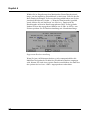
DuartPrefs
In order to set the configuration of the serial Duart-interfaces of
the MultiFaceCard double-click the »DuartPrefs«-icon located in
the »Prefs«-drawer. A window appears on the screen in which you
can select the desired option by clicking the button next to it.
There are also several string gadgets for you to enter a desired
value.
35
Chapter 3
3.3.1 »Baudrate«
This is the serial data transmission rate. The meaning of this
expression is a lot more specific, but here we use the more
coloquially meaning: the serial data transmission rate measured in
bits per second.
The baudrate that you select, must coincide with the baudrate of
the peripheral device you wish to communicate with. By
increasing this value the speed of data transmission increases
accordingly. You can select a commonly used baudrate between
2400 and 115200 baud by selecting one of the eight radio buttons.
By choosing the last button you are prompted to enter a baudrate
between 2 and 172800 baud in the adjoining string gadget.
Attention: not all baudrates are possible!
In case you choose an impossible baudrate the »duart.device« will
use 9600 baud. Please refer to the hardware chapter for more
information on the technical specifications of your product.
3.3.2 »Data bits«
You may choose between 5 to 8 data bits for the transmission of a
character. Generally you should choose either 7 or 8 data bits, as 5
or 6 data bits are hardly ever used (e.g. telex has 5 bits).
36
MultiFaceSoftware 3
3.3.3 »Stop bits«
Stop bits are extra bits that are added at the end of a character.
When using a baudrate of 300 bits per second, you should always
use 2 stop bits. For the transmission with 8 data bits, one stop bit
should be selected.
The receiving peripheral device will check these stop bits and can
determine whether the received signal actually was a complete
character. A frame around the character is formed with the start bit
along with the stop bit. If this frame can not be detected correctly
by the receiver, either a transmission error occurred, or sender and
receiver are using different baudrates. The latter happens more
often.
3.3.4 »Parity«
The parity bit is an additional possibility to detect transmission
errors. By adding an additional bit a simple checksum of the
transferred data bit can be performed. Choices for selection are:
Even
The number of data bits plus the parity bit, with the value »1«
is even.
Odd
The number of data bits plus the parity bit, with the value »1«
is odd.
Mark
Parity bit is always »1«.
Space
Parity bit is always »0«.
None
No parity bit is used.
37
Chapter 3
3.3.5 »CtrIChars«
The usage of the »xOn/xOff handshaking protocol« (software
handshaking protocol) requires that specific control characters are
transferred. When sending a »xOff«-character the receiving party
is told to stop the data transmission temporarily. After the
transmission of a »xOn«-character, the transmission is resumed.
The data flow in the opposite direction is controlled identically.
With the help of the two string gadgets you can select the
preferred ASCII-code to be used for the »xOn« and »xOff«character. Commonly used values are 17 for »xOn« and 19 for
»xOff«.
3.3.6 »Handshake«
It is often necessary to use a so called transmission protocol for
the control of the information flow from one device to another. A
slower device for example, can indicate a faster device that it
needs a short transmission break. Naturally both devices have to
use the same protocol to ensure proper control. Following are the
possible protocols:
xOn/xOff
This method, often called software handshaking, depends on
the transmission of control characters that are included in the
data flow. Please refer to the section above for further
information.
A great advantage of this method is, that only a 3-lead wire is
needed for proper transmission. The major disadvantage
though, is that under certain circumstances characters may be
lost during transmission. Data transmission is therefore not
100% secure.
38
MultiFaceSoftware 3
Sometimes this protocol is used in the interactive terminal mode.
The data output on the terminal can be halted temporarily by
pressing a specific key combination. The default key
combinations are <Ctrl>+<S> and <Ctrl>+<Q> to halt and resume
the output.
RTS/CTS
This method uses specific control lines (»RTS« and »CTS«) to
control the data flow. Two other control lines »DTR« and »DSR«
are used as well. This method is also referred to as »hardware
handshake« or »7-Wire-Handshake«.
As this is the most secure method for data transfer control, it
should be used whenever possible. The functionality of this
method is implemented in the MultiFaceCard's and the
SerialMaster's hardware so that it is technically speaking
impossible for a character to get lost during transmission.
Compare this to the Amigas own interface and many other multiI/O boards, where the RTS/CTS control lines are addressed
through the driver software and therefore errors during the data
transmission are still possible.
Please pay attention that all seven necessary wires are connected
correctly in the cable you are using. The receiving party must be
configured accordingly, sometimes that isn't easy when using
modems.
None
This mode works without any protocol. Take caution when using
it, as your Amiga will loose data if it can't hold up with the
receiving of the constant data flow.
39
Chapter 3
3.3.7 »Breaklen«
A »break« is a special condition on a serial data line. This
condition is marked by continually setting a »space« (logical zero)
on the transmission line. As a start bit also appears when sending
the zero byte, the receiver can distinguish between a »break« and
a normal character transmission.
This method of control is practically not used anymore today.
Sometime it is still used for specific applications, like resetting the
receiver or other tasks.
Enter the length of such a »break« in microseconds (1/1000000
seconds) in the string gadget. The range is between 1 and 999999.
Default and suggested value is 250000.
3.3.8 »Buffersize«
Enter the input buffer size in the string gadget. The higher you
choose this value the more you lose remaining computer memory.
On the other hand it is possible to speed up the data transmission
with a higher value.
Example: For a z-modem transmission with a block size of 1024
bytes, you should select at least 2048 bytes of buffer, meaning
double the block size. Otherwise pauses will be made
continuously during data transfer.
The default value of 512 characters is made in favour of Amiga
users with only a minimal amount of memory. If your Amiga has
one or more megabytes of memory, you should sacrifice some of
your memory towards a buffer the size of 16384 characters.
40
MultiFaceSoftware 3
3.3.9 Buttons
Located at the bottom edge of the window are four buttons that
may be clicked on:
»Unit0«
For every single serial interface of your extension board you
can make separate selections. The current interface is always
the unit number displayed in the button. (»Unit 0« = first serial
interface, »Unit 1« = second serial interface and so on). With a
mouse click on this button you can switch from one interface
to the next in ascending order.
»Save«
When clicking this button with the mouse, the made selections
of the current unit are stored in your environment on the
system disk. These settings are also available after booting up
your computer.
»Use«
When clicking this button with the mouse the made selections
of the current unit are used until your computer is booted the
next time.
»Cancel«
Click this button with your mouse to quit the duart preference
program. Changes since the last »Save« or »Use« operation
will be lost. You can also use the close window button in the
upper left hand corner of the window to achieve the same
effect.
41
Chapter 3
3.3.10 Pull Down Menues
Whenever your window is active, meaning selected, you can
choose between several functions from three pull down menues by
holding down the right mouse button:
»Project/Open...«
Saved preferences can be retrieved subsequently. Default path
is the »SYS:Prefs/Presets« drawer.
»Project/Save As...«
This command saves your settings under a name you may
specify. Default path is the »SYS:Prefs/Presets« drawer.
»Project/About...«
Select this item, and the author, as well as the version number
of this program is displayed on the screen. Click »Ok« to get
back to the program.
»Project/Quit«
This item is used to quit the duart preferences program. It is
identical to selecting »Cancel« or clicking the windows' close
button.
»Edit/Reset to defaults«
If you would like to set all values to the recommended default
parameter values, select this item.
»Edit/Last Saved«
This item sets all parameters to the values last saved with the
»Save«-command, independent of settings activated with the
»Use«-command.
»Edit/Restore«
If you deleted your new settings using »Reset to defaults«,
»Last Saved« or clicked the wrong button by mistake, you can
retrieve the correct parameter values by selecting this item.
»Options/Save Icons?«
This item works like a switch. Selecting this item will either
set a tick-mark or erase it depending whether it was selected or
not. If it is set, an icon will be created on your disk whenever
you save your settings with the »Project/Save As...« command.
If not, no icon will be created. When saving with the »Save«
command, no icons are created either.
42
MultiFaceSoftware 3
3.3.11 Hints for Using the Program
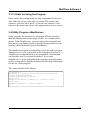
Please notice that settings made are only implemented when you
click either the »Use« or the »Save«-button. This means, that
whenever you click on »Unit #«, »Cancel«, the windows' close
button or the menu item »Quit« all settings made just now are lost.
3.4 Utility Program »MapDevice«
Some programs do not allow for selecting a different interface
than the standard one for the output of data, for example with a
printer. With »MapDevice« you can redirect the commands and
data sent to your standard serial or parallel Amiga interface to an
interface of the MultiFaceCard or SerialMaster.
The installation program automatically copied the utility program
»MapDevice« to your system disk in the command directory »C:«.
»MapDevice« is implemented as an AmigaShell command and
can therefore only be executed from there. If you enter
»MapDevice ?« in the AmigaShell the copyright and information
on the version will be displayed along with some help information
for the use of this program.
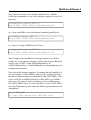
The output should be like follows:
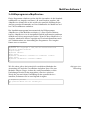
1> MapDevice ?
MapDevice V2.3 Copyright © 1991, 1993 bsc büroautomation AG
written by Andreas Hofbauer
Inquire Usage: MapDevice <device>
Remap Usage:
MapDevice <fromDevice> <fromUnit> TO <toDevice> <toUnit>
Unmap Usage:
MapDevice <fromDevice> <fromUnit> REMOVE
1>
43
Chapter 3
inquiry
As you can see there are three basic methods of usage for
performing three different tasks. »Inquire Usage« lets you find out
what kinds of redirection exist for the stated »device«. If no
redirection has been performed for this »parallel.device« yet, the
following message will be displayed:
1> MapDevice parallel
The parallel.device was not touched yet!
1>
The example also shows, that the suffix ».device« is not
absolutely necessary. If you like, you may of course state the
entire »Device«-name.
An example: All printer output handled by the printer driver of the
Workbench can be redirected to the first interface of a
MultiFaceCard (under the condition that you choose to send your
printer output to the parallel interface in the printer preferences
program):
1> MapDevice parallel 0 TO pit 0
1>
remap
This is the second method »Remap Usage«. This command
redirects all data sent to the standard Amiga parallel interface to
the first parallel port of the MultiFaceCard. You may check the
performed redirection by using the first method »Inquire Usage«:
1> MapDevice parallel
parallel.device unit 0 is remapped to pit.device unit 0
44
MultiFaceSoftware 3
The displayed message explains that any access to the
»parallel.device« through port number 0 is redirected to the
»pit.device« with port number 0. If you do not need the installed
redirection anymore, you can undo it by entering the following
command:
remove
1> MapDevice parallel 0 REMOVE
Removed remapping of parallel.device unit 0.
Removed remapping resource for parallel.device.
1>
The first line displayed confirms that the redirection has been
removed (of course you can check again using the first method
»Inquire Usage«). The second line displays that no other
redirection exists for any port number of the »parallel.device«.
»MapDevice« has even more features. If you like, you may also
redirect through several stations. The following commands
redirect the printer output to an imaginary port 1000 of the
»duart.device« and from there to the »pit.device«.
multiple
remapping
1> MapDevice parallel 0 TO duart 1000
1> MapDevice duart 1000 TO pit 0
1>
Of course »MapDevice« is smart enough to detect a cyclic
redirection:
1> MapDevice pit 0 TO parallel 0
Refuse to install a cyclic remapping
1>
45
Chapter
As demonstrated above, you may define a name for
<fromDevice> that does not exist as »Device« in the system. In
that case »MapDevice« simply creates one with that name. The
newly created »Device« though, has no functionality, it's just a
reference point for the desired redirection:
1> MapDevice duart1.device 0 TO duart.device 1
Creating duart1.device.
1>
Now you can address the unit number 1 of the »duart.device«
through the virtual unit number 0 of the »duart1.device«. This
offers great advantages for patching programs as you can instruct
them to use unit 1 of the »duart.device« instead of unit 0 of the
»serial.device«. This advantage is of importance, as generally you
can only modify the »Device«-name and not the port number.
Please refer to the section »Patching of Programs« for further
details.
46
MultiFaceSoftware 3
3.5 Test-program »SerMon«
As a little treat we also included a simple terminal program that
was very handy for the development of the »duart.device«. Maybe
you have a use for it. You'll find the program in the identically
named drawer on the MultiFaceSoftware disk.
The name »SerMon« is the abbreviation for »Serial-Monitor« and
indicates that the program is supposed to rnonitor and test a
»serial.device« like the »duart.device«. It was written as normal
terminal programs are not satisfactory for thorough testing of
serial interfaces.
Choose Serial Device
The program may be started from the CLI (AmigaShell) or from
the Workbench, whichever you prefer.
SerMon will display its own window and will ask you with the
»Device Requester« for the »Device« you would like to use. Apart
from the name of the »Device« and the »Unit«-number you may
choose between »Shared« and »Exclusive«. If you select
»Exclusive« the »Device« will be used exclusively by SerMon
and no other program will have access to that »Device«. The
»Shared«-mode allows other programs access to that »Device« at
the same time. As soon as a »Device« is selected and correctly
opened the screen will display an ID-line of the »Device«.
47
Chapter 3
As usual you access the various pull down menues by pressing
and holding the right mouse button. Many of the menue items are
hatched, meaning that they cannot be selected. The reason is, that
these functions were never programmed.
You'll find the usual items »About...« and »Quit«. The menu item
»Device« in the »Serial«-menu lets you select the desired
»Device« again. To choose the preferred parameters select
»Parameters...« in the same menu. A window appears that is
almost identical to the »DuartPrefs« program that you already
know. Please refer to the section »DuartPrefe« for a detailed
description of the selectable options. The menu item »Upload...«
in the »File«-menu lets you transfer a text file. You will also find
the items »Dragbar« and »Clear Screen« in the »Special«-menu.
»Dragbar« enables or disables the windows' dragbar and the latter
clears the screen.
Serial parameters
48
MultiFaceSoftware 3
One of our favourite applications of this program is testing the
serial data connection between two Amiga computers. To do this
start »SerMon« on both computers connected with a null-modemcable. Characters typed on one computer will then appear on the
other and vice versa. If that does not work, please check your
serial parameters. These have to be identical for both computers.
If you are still without success, the only possible reason left could
be the cable you are using. Refer to section »Null-Modem-Cable«
for the correct wiring.
3.6 ParNet, PitNet and PiaNet
»When connecting two or more Computers with a cable you have
a network. Great. But when application programs start using this
cable you have a revolution.«
Dale Larson
The first parallel interface of the MultiFaceCard 2, the
MultiFaceCard 2+ and of course the MultiFaceCard 3 may be
used for a direct data connection with another Amiga computer.
This way you can create a small, so called desktop area network.
Tests with such a network have proven that accessing the RAMdisk of the other Amiga makes data transmission rates of up to
100 kByte/second possible (both Amiga computers were equipped
with a fast MC68030 processor, though).
49
Chapter 3
For the blessing of all Amiga users there is a public domain
software called ParNet, developed by Matthew Dillon and the
Software Distillery. This program package contains the complete
necessary software for networking two Amiga computers via the
parallel port. Unfortunately it is only usable for the Amigas
standard parallel port. The good news is though, that an adjusted
version for MultiFaceCard 2 called »PitNet« and »PiaNet« for the
MultiFaceCard 3 is available and included in your program
package. Now it is possible to connect two MultiFaceCards or one
MultiFaceCard and an Amiga standard parallel port. All you need
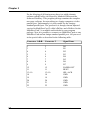
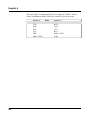
is the special cable as described in the following table:
50
Connector 1 çè
Connector 2
Signal Name
2
3
4
5
6
7
8
9
12
11
13+10
18
19
20
21
22
2
3
4
5
6
7
8
9
12
11
13+10
18
19
20
21
22
D0
Dl
D2
D3
D4
D5
D6
D7
PAPER-OUT
BUSY
SEL+ACK
GND
GND
GND
GND
GND
MultiFaceSoftware 3
In order to make a ParNet cable its best to take a 25-lead parallel
cable and modify it according to the specifications given above.
Please pay attention that the connectors on both ends fit to the
connectors of the Amiga ports when you buy the cable. Generally
you need »male« connectors on both ends of the cable. To connect
to the parallel port of the Amiga 1000 you need a »female«
connector, though.
Under no circumstances connect an unmodified standard cable
into both computers as you might destroy your Amiga or even
your MultiFaceCard. Please note: The ACK and SEL lines are
locally connected to each other on both ends of the cable.
To make life easier for you, we included the original ParNet
software on your MultiFaceSoftware disk. Also included is a
detailed description of the program and the principles of ParNet.
Of course, these are valid for the PitNet and the PiaNet, as well. In
order to avoid misunderstandings the program names of PitNet
and PiaNet differ from the original program name, ParNet.
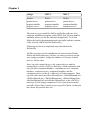
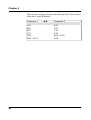
Therefore you must use the following list giving the equivalent
names when reading the ParNet documentation.
51
Chapter 3
Amiga
MFC 2
MFC 3
ParNet
parnet.device
netpnet-handler
netpnet-server
PitNet
pitnet.device
netpitnet-handler
netpitnet-server
PiaNet
pianet.device
netpianet-handler
netpianet-server
The easiest way to install the PitNet and PiaNet software is by
using the installation program on the MFS3 disk. Do not install it
manually unless you are the absolute Amiga-freak. To do this
follow the ParNet documentation and especially read the contents
of the text file »MFS3:ParNet/ParNet.doc«.
Following are the most important steps described in the
ParNet.doc:
All files necessary for the installation are located in the PiaNet,
PitNet and ParNet directory. Before you start you need to assign
your Amiga a number. Assign the number »0« for one of them
and »1« for the other.
Next, copy the »pitnet.device«, the »pianet.device« and the
»parnet.device« in the »DEVS:«-directory of both computers and
copy the files »netpitnet-handler«, »netpitnet-server«, »netpnethandler«, »netpnet-server«, »netpianet-handler« and the
»netpianet-server« to the »L:«-directory of both computers. Then
copy the other necessary files »MountLists«, »PitNet0MountList«,
»PitNet1MountList«, »PiaNet0MountList«, »PiaNet1MountList«,
»ParNet0MountList« and »ParNet1MountList« to the »DEVS:«directory of both Amiga computers. Even if you do not actually
need all of these files it easiest to just copy all of them, so that you
have them for possible later use.
52
MultiFaceSoftware 3
Now, please sit down at the Amiga numbered »0«. Add the
following commands to your »user-startup«-sequence in the »S:«directory:
L:netpitnet-server UNIT 0
Mount NET: FROM DEVS:PitNet1MountList
or, if you would like to use the Amigas' standard parallel port:
L:netpnet-server UNIT 0
Mount NET: FROM DEVS:ParNet1MountList
or, if you are using a MultiFaceCard 3 use:
L:netpianet-server UNIT 0
Mount NET: FROM DEVS:PiaNet1MountList
That completes the installation of Amiga number zero. Please
change the »user-startup«-sequence of the other Amiga. But don't
forget to use »UNIT 1« and »PitNet0MountList« or
»ParNet0MountList« or »PiaNet0MountList« (depending on your
configuration) instead.
Now boot both Amiga computers. Assuming that the harddrive of
one the Amigas is called »DH0:« then it may be addressed from
the other Amiga through the AmigaShell with »NET:DH0«. This
is also valid for available DOS-devices like »DF0:« or »RAM«
and so on. Of course it is also possible to access subdirectories
like »NET:DH0/Tools«. If you would like to access »NET:DH0«
from the Workbench, please enter the following commands in the
AmigaShell.
1> CD NET:DH0
1> Copy SYS:System.info NET:DH0.info
53
Chapter 3
The first command line makes sure that DH0 is recognizable, the
second line copies an icon for DH0. The ParNet software saves
this icon under the name »node.rinfo« on the harddrive »DH0:« of
the connected Amiga. The icon can only be erased by deleting this
file.
A relatively unknown fact is that you can connect more than only
two Amigas with the ParNet principle. The cable must then be
looped through from one Amiga to the next. But don't forget to
locally connect the ACK and SEL line at each connector ! The
installation of the software is a litte more difficult, though.
Every Amiga that is supposed to share its harddrive with others
needs a running version of the server software. When starting up,
please enter the station number of the Amiga on which the server
software is running. If you would like to use the harddrive of
another Amiga you will need a specially adapted MountList. In
this MountList you specify in »Unit« the station number of the
Amiga acting as the server. If you would also like to import the
harddrives of other Amigas you will need various MountList
entries with varying DOS-names (they can't all be called »NET:«)
that are mounted one after the other.
A PitNet-installation for three Amiga Computers with one
»Server« and two »Clients« could be as follows:
Amiga-0 (Server):
L:netpitnet-server UNIT 0
Amiga-1 (Client):
Mount NET: FROM DEVS:PitNet0MountList
Amiga-2 (Client):
Mount NET: FROM DEVS:PitNet0MountList
54
Tips & Tricks
4. Tips & Tricks
This chapter gives useful tips and tricks for using the
MultiFaceSoftware under various conditions. Many of the
application examples are also valid for other application
programs. Therefore we ask you to please read the entire chapter,
even if you are not having the addressed problem right now.
4.1 »Patching« of Programs
Here is a tip for advanced users to adapt their program to either
the MultiFaceCard or SerialMaster interface: First of all please
make a backup copy of the program you would like to patch.
You'll save a lot of grief! Use a file editor (like »NewZap« or
»FedUp«) and search for »serial.device« or »parallel.device« in
the program code. Replace any existing entries with the
corresponding »Device« name, either »duart.device« or
»pit.device«. Fill zero bytes (hexadecimal 0x00) in the remaining
blanks.
This will only be successful though, if the program that you want
to patch uses the drivers instead of addressing the Amigas'
hardware directly. Also, only the name of the device driver is
adapted, not the port number which stays unchanged, probably as
»0«. Unfortunately you can't tell for sure. Redirecting to a
different port number though can be done creating a virtual
»Device« using the »MapDevice«-program.
55
Chapter 4
4.2 Removing a DOS-driver with »Assign
REMOVE«
A DOS-driver declared with the »Mount« command may be
removed again with the command »Assign« in the AmigaShell.
This may be useful if, for example you would prefer to use the
DOS-name »PAR:« for a parallel port of the MultiFaceCard. Enter
the following commands in the AmigaShell to do so:
1> Assign PAR: REMOVE
1> Mount PAR: FROM DEVS:PitMountList
1>
You may also redefine the DOS-names »SER:« and »AUX:«
using these commands.
4.3 Using Several Printers
Unfortunately, the current AmigaDOS (incl. Version 3.1) only
supports the use of one single printer. The connection of several
printers is not accomplished easily. Exceptions are PostScript
printers, or programs that use their own printer driver (like
»WordPerfect«, »PageStream« and others).
For now, the only thing to do is to hope that Commodore will
change this soon.
Following are attempts to solve these and other problems
demonstrated on various application examples.
56
Tips & Tricks
4.4 Example Programs
4.4.1 »Term«
My favourite terminal program for the Amiga is »Term« written
by Olaf Barthel. That's why I won't hold back from you, how to
use »Term« best in combination with your MultiFaceCard or
SerialMaster.
For using »Term« you won't need »DOSDrivers«. So don't install
any DOS-drivers for the desired port and you will save a little
memory.
The configuration of »Term« for the MultiFaceCard or
SerialMaster is simple. Select the menu item »Settings/Serial...«
and a window titled »Serial Settings« appears. Enter
»duart.device« in the string gadget labled »Serial device«.
Unfortunately you can not choose from a pop up list of all
»Devices« available. Enter the desired port number in the string
gadget below and that was it!
Term with serial settings
In this window you may make several other adjustments to the
serial port. Please refer to the documentation of »Term« and the
information given in chapter 3 concerning »DuartPrefs«.
57
Chapter 4
4.4.2 PostScript Printers
As a proud owner of a Postscript printer you have the best
opportunities to use the MultiFaceCard most efficiently. Connect
your printer preferably to a parallel port of the MultiFaceCard.
You will be surprised how much faster data is transferred to your
printer than you know it from the past.
Programs that offer the output of Postscript usually do this by
avoiding the Amigas printer drivers. This makes sense too, as the
data that needs to be printed is already in the correct form and
does not need to be transformed again. These programs usually
ask for the name of a DOS-driver to direct the output to. Please
enter »PIT0:« or »PIT1:« depending on the port you prefer.
Naturally the DOS-driver must be installed and declared
beforehand. The Installation program will help you to do so.
If you have a postscript file that you would like to print, please
enter the following in an AmigaShell:
1> Copy PostscriptFile TO PIT1:
1>
Alternatively you can also enter
1> Type PostscriptFile TO PIT1:
1>
This offers the advantage to stop the output with <Ctrl>+<c>.
As you can see, the output to Postscript printers is easy and should
not cause you any problems.
58
Tips & Tricks
4.4.3 Plotters
CAD application programs often output their technical designs to
so called plotters. In 99% of all cases this is down using the
parallel interface. Naturally you can connect a plotter to the
MultiFaceCard.
Sending output to the plotter is done just like in the example
above, printing with Postscript printers. If you have an HPGL-file
for your plotter enter:
1> Type HPGLFile TO PIT1:
1>
Please refer to the manual of your CAD program or to the section
above for further information.
4.4.4 »PageStream« with its own Printer Drivers
The desktop publishing (DTP) program »PageStream« comes with
its own printer drivers. Although it can also print using the
standard Workbench printer, you should use these drivers when
connecting your printer to the MultiFaceCard. Let's assume you
have connected your printer to the first parallel port of the
MultiFaceCard and you have installed and declared the DOSdriver »PIT0:« as described.
59
Chapter 4
Start up »PageStream« and select the item »Extras/PrinterPrefs«
to activate the corresponding window. In case you haven't loaded
the necessary driver for your printer then click on »Load...«. After
selecting the printer driver, click on the button before »Device:«.
This redirects the print output to the DOS-driver displayed in the
box. Now change that name from »LSR:« to »PIT0:«. Last but not
least save the printer preferences using »Defaults«.
Pagestream
When you print a document now it will automatically be printed
with the MultiFaceCard. As the Workbench printer is bypassed
you can connect a second printer that will then be addressed by
the »printer.device« or »PRT:«.
60
Tips & Tricks
4.5 MIDI-Operation with SerialMaster500 or
MultiFaceCard 2
Both the SerialMaster500 and the MultiFaceCard 2 can be used
for MIDI-control (Musical Instruments Digital Interface) after a
small change of components. Follow the instructions of the
Upgrade-Kit for the MultiFaceCard 2+ (or the SerialMaster500)
and exchange the quartz-timer with a 4,00 MHz type. After this
hardware operation the necessary baudrate of 31250 baud can be
selected, although many other common data transmission
baudrates are not possible anymore (like 19200, 38400 and
57600). Slower baudrates like 300, 1200 and 2400 baud are still
possible, though.
Owners of a SerialMaster500 (or should we rather call it
MIDIMaster500) can directly connect the MIDI-interface to the
25-pin connector mounted on the case. The cable with the
connector at the end that comes out of the case can not be
connected! The internal 26-pin male connector offers all the
necessary signals (see appendix for the list of serial signal names).
If necessary you can connect a 26-lead flat wire cable with a
female connector from there.
Unfortunately it is not possible to directly connect a standard, »off
the shelf« MIDI-interface to the MultiFaceCard. The optional 26pin male connectors on the circuit board of the MultiFaceCard all
carry the necessary signals, though. (Attention: Do not mistake
these with the 26-pin male connectors of the parallel interface!).
All you need to do is to solder a appropriate connector to the
circuit board and buy an adapter to a 25-pin connector to which
you connect the MIDI-interface.
61
Chapter 4
4.6 MIDI-Operation with MultiFaceCard 3
The MultiFaceCard 3 can be altered with a minor hardware
operation to support MIDI-control, as well. Exchange the 7,3728
MHz quartz on the circuit board with a 4,0 MHz quartz.
A MIDI-interface »off the shelf« can then be connected to the 25pin connector without problems. The 9-pin sub-d connector does
not supply the necessary voltage for MIDI-operation.
62
Tips & Tricks
4.7 MultiFaceCard 2 with TopScan
The new MultiFaceSoftware Version 3 can address an EPSON GT
Scanner from the parallel port using the scanner software
TopScan. The scanning process is about twice as fast compared to
the use of the Amigas own parallel interface. All you need is a
special cable that is easily made from a standard printer cable.
25-pin
sub-d
1
2
3
4
5
6
7
8
9
10
11
12
çè
36-pin
Centronics
Signal Name
1
2
3
4
5
6
7
8
9
10
11
12
/STROBE
DATA0
DATA1
DATA2
DATA3
DATA4
DATA5
DATA6
DATA7
/ACK
BUSY
PAPER-OUT/DIR
The necessary cable requires a 36-pin Centronics connector for
the scanner side and a 25-pin sub-d connector on the Amigas end.
Modify the cable as follows: Open the casing of the 25-pin
connector and remove the wire on pin 12. Usually the pin number
is next to the pin in very small print. Make sure that the removed
wire cannot short circuit anything, especially the shielding of the
cable. Desolder the wire from pin 17 and solder it to pin 12. Close
the connector and you're all set.
63
Chapter 4
The TopScan scanner driver »EpsonParMFC« is part of the
MultiFaceSoftware and was installed automatically during the
installation in the correct directory. Now choose this driver in
»Select scanner type« and set the unit number appropriately. In
case you connected the scanner to the first parallel port of the
MultiFaceCard 2, select »0«, if you connected it to the second port
of the MultiFaceCard 2, select »1«. Make sure that you always
enter »pit.device« in the »Device«-box. You also need at least
Version 3 of the MultiFaceSoftware. It is recommendable to
connect the scanner to the first parallel port of the MultiFaceCard
2 as the controlling software was optimized for this port and the
scanning process is a little faster than on the second port.
4.8 MultiFaceCard 3 with TopScan
The MultiFaceCard 3 is perfectly suitable for the addressing of the
EPSON GT Flatbed Scanner in connection with the »TopScan«software. You can directly connect the scanner to the
MultiFaceCard 3 with a standard printer cable. A special cable is
not required.
The addressing of the scanner is done identically to the
MultiFaceCard 2, using the TopScan scanner driver
»EpsonParMFC«. Please read the section above on how to
configure TopScan.
64
Tips & Tricks
4.9 Null-Modem-Cable
You can connect two computers with one serial cable to exchange
data, for example. The cable necessary for this purpose is called
null-modem-cable. You can often find connection diagrams for
null-modem-cables in so called professional journals, but they are
almost alway incorrect! What a correct null-modem-cable has to
look like, is perfectly clear once you have understood how it
works.
The serial data is sent through TxD and received with RxD.
Therefore these need to crossed over (TxD connects to RxD and
vice versa). In order to have the same electrical level on both sides
the GND pins are connected to each other. With the RTS wire a
device indicates that the other party may send data. The receiving
party confirms with a CTS signal. For data transfer in the other
direction the procedure is exactly the opposite. This is the so
called hardware handshaking protocol. The DTR line indicates
that the device is ready, meaning »I'm here!«. Whether the recever
is ready as well, is checked through the DSR input. The DCD line
indicates that a transfer signal is available from the receiver. This
line is usually set by the modem if a special signal tone is detected
on the phone line. As no modern or carrier signal is present during
direct data transfer, it is necessary to do a little trick. It is practical
to set the DCD whenever the receiving party is ready. For this
reason the DCD input is connected with the DTR signal of the
other side.
65
Chapter 4
The necessary wiring is given in the following table. Never trust a
cable that's wired differently!
Connector 1
TxD
RxD
RTS
CTS
DTR
DSR + DCD
66
çè
Connector 2
RxD
TxD
CTS
RTS
DSR + DCD
DTR
Description of the Hardware
5. Description of the Hardware
The following chapter deals with all the bsc multi-interface
hardware expansion boards. Please read the section corresponding
to your product. The installation of the hardware, technical data
and the contents of the expansion kit is described in those
sections.
Since you are reading this manual you probably purchased either a
MultiFaceCard 3, a SerialMaster500+, an Upgrade-Kit or just the
MultiFaceSoftware-Update.
MultiFaceCard 3 owners please read the very important section
»MultiFaceCard 3«.
Owners of a MultiFaceCard 1 (the original) or a MultiFaceCard 2
can update to a MultiFaceCard 2+. In order to do so you will need
the »MultiFaceCard 2+ Upgrade-Kit« available through our bsc
hotline. Please refer to sections »MultiFaceCard 2+« as well as
»MultiFaceCard 2+ Upgrade-Kit«.
If you own a SerialMaster500 you can also upgrade to a
SerialMaster500+. In order to do so you will need the
»SerialMaster500+ Upgrade-Kit«. Please refer to sections
»SerialMaster500+« and »SerialMaster500+ Upgrade-Kit«.
67
Chapter 5
5.1 MultiFaceCard 3
The MultiFaceCard 3 (MFC3) was developed for the internal slots
used in Amigas with Zorro-II slots (e.g. Amiga 2000, Amiga
3000, Amiga 3000T, Amiga 4000 or Amiga 4000T). The interface
connectors are positioned in the rear brackets in contrary to the
MultiFaceCard 2.
Schema of MultiFaceCard 3
The MultiFaceCard 3 is a new design, developed based on the
experience made with the MultiFaceCard 2.
Located above the Zorro-II connector is a connected jumper
labeled »OFF«. If you remove this jumper, the MFC is off-line.
Please do not remove the jumper.
Located directly next to the 9-pin sub-d connector of the first
serial interface there is room for two 26-pin connectors. One of
them is used for the connection with the cable sets of the second
serial interface, the other is empty. This optional connector is
wired parallel to the 9-pin sub-d connector of the first serial
interface. Of course you can also solder a male connector to the
circuit board in order to connect a second set of cables with 25-pin
Standard connectors. If you like, you may also have this done by a
bsc dealer.
68
Description of the Hardware
5.1.1 Installation MultiFaceCard 3
Please turn off your Amiga, as well as all other connected devices
and unplug the power plug. Next, remove all other cables firom
the Amiga. Using a phillips-screwdriver unscrew all screws of the
Amigas case and open it. The exact procedure is described in
further detail in the chapter »Installing of Expansion Boards« in
your Amiga manual.
Choose an empty slot for your MultiFaceCard 3 and remove the
mounted bracket. You won't need it anymore but we suggest you
keep it in case you want to remove the MultiFaceCard one day.
Slide and push the MFC3 into the slot. Check whether the bracket
fits correctly as it usually tends to rest on the motherboard
preventing the MultiFaceCard from snapping correctly into the
slot. Make sure that the MultiFaceCard 3 sits correctly (not
slanted) and press it with force, but not with brutal force into the
slot. Usually you can hear and feel it snap lightly into place.
Finally mount the MFC3 with the phillips-type screw at the
bracket.
Now all you have to do is mount the bracket that holds the second
serial interface connector. Remove an unused bracket and mount
this connector bracket instead. Commodore suggests to mount the
port connectors so that they are continuously numbered from left
to right or from top to bottom, as seen from the back of the case.
In this case mount the bracket to the right or below the
MultiFaceCard 3 itself. Now close the lid, tighten all screws,
connect all cables and off you go! You may now start up your
computer and continue working.
69
Chapter 5
5.1.2 Technical Data MultiFaceCard 3
q
q
q
q
q
q
q
q
q
q
70
Two serial interfaces are led to a 9-pin sub-d connector and
a 25-pin sub-d connector.
Maximum serial baudrates: 115200, 76800, 57600, 46080
and so on (but no usable approach towards 31250 baud);
Formula for calculation:
Baud = 230400 / N with l < N < 65536.
Handshake protocols: RTS/CTS (real hardware handshake),
xON/xOFF (software handshake) and none.
Data bits: 5, 6, 7 or 8
Stop bits: l or 2
Parity: Even, Odd, Mark, Space or none.
Specifications of the »duart.device«: breaks with
programmable length, shared or exclusive access, supports
EOFMODE, deactivates DTR when device is closed,
supports selectable default parameters.
One parallel interface with a 25-pin sub-d female connector.
Supported parallel protocols: Centronics; BOISE (Bitronics,
e.g. HP LaserJet 4L); EPSON GT Scanner (with TopScan
and a normal printer cable).
Specifications of »pit.device«: shared or exclusive access,
supports EOFMODE.
Description of the Hardware
5.1.3 Contents of MultiFaceCard 3 Package
After you have received your product please check the
completeness of the package. It should include the following:
ü MultiFaceSoftware manual (that you are reading right now)
ü MFS3-disk registration card
ü MultiFaceCard 3
ü two adapter cables 8-pin Mini-DIN to 25-pin sub-d connector
for the serial ports
If a part is missing, please contact your dealer.
5.2 MultiFaceCard 2+, MultiFaceCard 2 and
MultiFaceCard 1
The MultiFaceCard (MFC) was designed for the internal slots of
the Amiga with Zorro-II slots (e.g. Amiga 2000, Amiga 3000,
Amiga 3000T, Amiga 4000 or Amiga 4000T).
Schema of MultiFaceCard 2
71
Chapter 5
The MultiFaceCard 2 (MFC2) and also the MultiFaceCard 2+
(MFC2+) are the enhanced design of the original MultiFaceCard
1. Any MFC can be upgraded to the latest technical version of the
MFC2+. For further information please contact your dealer.
Located in the upper left hand corner of the MFC2 and the
MFC2+ is a connected jumper labeled »OFF«. If you remove this
jumper the MFC is off-line. Please do not remove the jumper. The
MFC1 comes with a row of DIP switches instead. By switching
the DIP switch number seven you can turn on/off the
MultiFaceCard. The remaining DIP switches are not used by the
MultiFaceSoftware.
The contents of the package are two cable sets with both a 25-pin
sub-d female connector and a 9-pin sub-d connector mounted to a
bracket. The 25-pin female connector is for a parallel interface,
the 9-pin male connector for serial interface.
The cable sets must be connected to the pin connector of the
MultiFaceCard. The side of the cable that is marked red indicates
the position of pin 1 and must be facing left. Connect one cable set
to the right connector and the other to the left one.
72
Description of the Hardware
5.2.1 Installation MultiFaceCard 2+
Please turn off your Amiga, as well as all other connected devices
and unplug the power plug. Next, remove all other cables from the
Amiga. Using a phillips-screwdriver unscrew all screws of the
Amigas case and open it. The exact procedure is described in
further detail in the chapter »Installing of Expansion Boards« in
your Amiga manual.
Stick your MFC in an empty slot of the Amiga, but pay attention,
make sure that the board is positioned correctly. For an Amiga
2000 the components on the board must be pointing to the right
towards the floppy drive. For the Amiga 3000 and 4000 the
components must be facing upwards. It is wrong to install the
board the other way around (oh yes, it is possible !). But then it
will not slide in the tracks and also have no connection to the rear.
In this case your Amiga will be destroyed upon power on. So don't
rush, take your time and follow the instruction precisely as given
above!
Now all you have to do, is mount the two brackets that hold the
male/female connectors. Remove two unused brackets and mount
the connector brackets instead. Commodore suggests to mount the
port connectors so that they are continuously numbered from left
to right or from top to bottom, as seen from the back of the case.
In this case, mount the bracket with the first parallel and serial
ports to the left or above the other bracket.
Now close the lid, tighten all screws, connect all cables and off
you go! You may now start up your computer and continue
working.
73
Chapter 5
5.2.2 Technical Data MultiFaceCard 2+,
MultiFaceCard 2 and MultiFaceCard 1
q
q
q
q
q
q
q
q
q
q
q
74
Two serial interfaces are led to 9-pin sub-d connectors.
Maximum serial baudrates (MultiFaceCard 2+): 115200,
76800, 57600, 46080 and so on (but no usable approach
towards 31250 baud); Formula for calculation:
Baud = 230400 / N with l < N < 65536.
Maximum serial baudrates (MultiFaceCard 2, and
MultiFaceCard 1): 57600, 38400, 28800, 23040, 19200 and
so on; Formula for calculation:
Baud = 115200 / N with l
Handshake protocols: RTS/CTS (real hardware handshake),
xON/xOFF (software handshake) and none.
Data bits: 5, 6, 7 or 8
Stop bits: l or 2
Parity: Even, Odd, Mark, Space or none.
Specifications of the »duart.device«: breaks with
programmable length, shared or exclusive access, Supports
EOFMODE, deactivates DTR when device is closed,
supports selectable default parameters.
Two parallel interfaces led to two 25-pin sub-d female
connector.
Supported parallel protocols: Centronics; EPSON GT
Scanner (with TopScan and a special cable).
Specifications of »pit.device«: shared or exclusive access,
supports EOFMODE.
Description of the Hardware
5.2.3 Contents of MuttiFaceCard 2+ Package
After you have received your product please check the
completeness of the package. It should include the following:
ü MultiFaceSoftware manual (that you are reading right now)
ü MFS3-disk registration card
ü MultiFaceCard 2+
ü two adapter cables with brackets
If a part is missing, please contact your dealer.
5.3 SerialMaster500+ and SerialMaster500
The SerialMaster500+ is an external expansion box for your
Amiga 500. It is also usable for the Amiga 1000 if you don't care
about aesthetics. The SerialMaster 500+ is the enhanced version
of the SerialMaster500 that offers higher baudrates but is identical
otherwise. For information on how to upgrade from a
SerialMaster500 to a SerialMaster500+ please contact your bsc
dealer.
Schema of SerialMaster500
75
Chapter 5
When looking at the SerialMaster you will see a long male bus
connector sticking out on one side and a female bus connector
inside on the opposite side of the box. The expansion bus of the
Amiga is located on the the left side hidden by a plastic cover.
Switch off your Amiga and remove the plastic cover. Next, plug
the bus connector of the SerialMaster to the circuit board edge
with the gold contacts, that is now visible. Both LEDs (light
emitting diodes) as well as the on/off switch are facing forward
when doing this. You may connect further devices to the
SerialMaster by connecting them to the bus connector of the
SerialMaster.
You can also connect the SerialMaster to an Amiga 1000. Turn off
your Amiga and remove the plastic cover of the expansion bus on
the right side of the Amiga. Plug in the SerialMaster so that the
female connectors of the serial ports face forward and the LEDs
are facing backward.
Now you can connect serial peripheral devices with the correct
cable to the ports. Attention: Only connect serial devices when
your Amiga is turned off! The upper connector of the box is port
zero, the connector at the end of the flat wire cable is port one.
The SerialMaster may be turned off using the flip-switch. If it
faces the Computer, the SerialMaster is turned on. In order to
install the software, the SerialMaster must be connected correctly
and turned on. The LEDs of the SerialMaster light up with an
active DTR signal, indicating that the software is ready (for
insiders: whenever the appropriate unit of the duart.device is
open). The LED directly next to the switch is responsible for port
one (duart.device unit 1), the other for port zero (duart.device
unit 0).
76
Description of the Hardware
5.3.1 Technical Data SerialMaster500+ and
SerialMaster500
q
q
q
q
q
q
q
q
Two serial interfaces connected to two 25-pin sub-d
connectors.
Maximum serial baudrates (SerialMaster500+): 115200,
76800, 57600, 46080 and so on (but no usable approach
towards 31250 baud); Formula for calculation:
Baud = 230400 / N with 1 < N < 65536.
Maximum serial baudrates (SerialMaster500): 57600,
38400, 28800, 23040, 19200 and so on; Formula for
calculation:
Baud = 115200 / N with l < N < 65536.
Handshake protocols: RTS/CTS (real hardware handshake),
xON/xOFF (software handshake) and none.
Data bits: 5, 6, 7 or 8
Stop bits: l or 2
Parity: Even, Odd, Mark, Space or none.
Specifications of the »duart.device«: breaks with
programmable length, shared or exclusive access, Supports
EOFMODE, deactivates DTR when device is closed,
supports selectable default parameters.
5.3.2 Contents of SerialMaster500+ Package
After you have received your product please check the
completeness of the package. It should include the following:
ü MultiFaceSoftware manual (that you are reading right now)
ü MFS3-disk registration card
ü SerialMaster500+ (metal box to be connected externally with
one 25-pin connector mounted to the box and one 25-pin
connector attached to a cable)
If a part is missing, please contact your dealer.
77
Chapter 5
5.4 MultiFaceCard 2+ Upgrade-Kit
This Upgrade-Kit contains all necessary components to update a
MultiFaceCard 1 or MultiFaceCard 2 to a MultiFaceCard 2+.
5.4.1 Contents
After you have received your product please check the
completeness of the package. It should include the following:
ü MultiFaceSoftware manual (that you are reading right now)
ü MFS3-disk
ü 7,3728 MHz quartz
If a part is missing, please contact your dealer.
5.4.2 Upgrade Instructions
In order to be able to use the new high speed baudrates (115200
and 76800) all you need to do is exchange the soldered quartz
with the included 7,3728 MHz quartz. If you are content with a
maximum baudrate of 57600 baud you do not need to do this.
For the upgrade procedure you will need the following items:
ü
ü
ü
ü
a soldering iron
some solder
a 7,3728 MHz quartz (included in the Upgrade-Kit)
a couple minutes spare time
Attention: After you have rebuilt your MultiFaceCard you must
use the MultiFaceSoftware Version 3. Your old MFC2-software
won't work anymore!
78
Description of the Hardware
Turn off your Amiga as well as all other attached peripheral
devices and remove the MultiFaceCard. Just do the installation in
the opposite order. You now have the MultiFaceCard laying in
front of you with the gold contacts of the bus connector facing
down.
Your soldering iron has now reached operating temperature and
off we go.
First of all you need to desolder the quartz X1 (the only one on the
printed circuit board) by heating the two pins at the same time and
pulling it out of the circuit board. Then try to clean the two holes
with the soldering iron so that you can stick the two pins of the
7,3728 MHz quartz into them. A quartz has no polarity so it
doesn't matter which way you stick it in. Now solder it using a
little solder (not too much !), making sure it flows nicely around
the holes. Cut off the rest of the pins, sticking out on the other side
of the printed circuit board with a pair of cutting pliers or another
appropriate tool.
The upgrade procedure is completed. You now own a
MultiFace-Card 2+ and may install it again, as described in the
section above.
79
Chapter 5
5.5 SerialMaster500+ Upgrade-Kit
This Upgrade-Kit contains all necessary components to update a
SerialMaster500 to a SerialMaster500+.
5.5.1 Contents
After you have received your product please check the
completeness of the package. It should include the following:
ü MultiFaceSoftware manual (that you are reading right now)
ü MFS3-disk
ü 7,3728 MHz quartz
If a part is missing, please contact your dealer.
5.5.2 Upgrade Instructions
In order to be able to use the new high speed baudrates (115200
and 76800) all you need to do is exchange the soldered quartz in
the SerialMaster500 with the included 7,3728 MHz quartz. If you
do not need these high speed baudrates and if you are content with
a maximum baudrate of 57600 baud, you do not need to upgrade
the hardware.
For the upgrade procedure you will need the following items:
ü
ü
ü
ü
a soldering iron
some solder
a 7,3728 MHz quartz (included in the Upgrade-Kit)
a couple minutes spare time
Attention: After you have rebuilt your SerialMaster you must use
the MultiFaceSoftware Version 3. Your old SerialMaster-sofrware
won't work anymore!
80
Description of the Hardware
Turn off your Amiga, as well as all other attached peripheral
devices and remove existing serial devices connected to the
SerialMaster and last but not least the SerialMaster. Open the box
by unscrewing the four screws on the side and lift the upper lid of
the box. You can now see two printed circuit boards (pcb)
connected through a row of pin connectors. The expansion bus is
the lower circuit board and the upper pcb is the actual
SerialMaster. This one also contains the quartz that is to be
exchanged. The quartz is the little »tin can« on the left side in the
foreground. Now you could try to replace the quartz directly, but
we recommend that you take out the SerialMaster-pcb and solder
then. It's so much easier!
Unscrew the four nuts on the bottom side of the box as well as the
screws of the 25-pin d-sub connector. Lift the entire unit out of the
bottom part of the box. The easiest way to do this, is to start off
pulling the unit upwards on the connectors side and then, as soon
as the connector is free, try to jiggle the switch out of its hole.
Please pay attention that the flat wire cable to the external
connector is not damaged during this operation. Now disconnect
the two pcb's carefully making sure you don't bend any pins from
the pin connector. Store the bus connector circuit board in a safe
place and disconnect the flat wire cable from the main
(SerialMaster) circuit board.
81
Chapter 5
You should now have the »bare« SerialMaster circuit board laying
in front of you. Take a short break and when you're relaxed, move
on by desoldering the only quartz on the circuit board. The quartz
has only two pins. Heat up the two pins at the same time and try
pulling it out of the circuit board. Then try to clean the two holes
with the soldering iron so that you can stick the two pins of the
7,3728 MHz quartz into them. A quartz has no polarity so it
doesn't matter which way you stick it in. Now solder it using a
little solder (not too much!), making sure it flows nicely around
the holes. Cut off the rest of the pins, sticking out on the other side
of the printed circuit board with a pair of cutting pliers or another
appropriate tool.
Now you can put the unit back together. Start out by connecting
the flat wire cable to the connector labeled »SER0S«. Make sure
that the connector is positioned the right way, the side of the cable
marked red must be facing towards the long bus connector. Next
connect the bus connector circuit board. The bus connector
(circuit board edge) faces the quartz. You can now place the entire
unit into the bottom part of the box, fitting the on/off switch and
the LEDs in the appropriate holes and the connector on the
opposite side into its appropriately shaped hole. The metal of the
box must be between the connector casing and the printed circuit
board. Fasten the four nuts on the bottom side to fix the unit in its
position. Then fasten the 25-pin connector to the box again.
Last but not least mount the upper lid of the box with the four
screws.
The upgrade procedure is completed. You may now connect your
new SerialMaster500+ to your Amiga.
82
Serial Connector Configurations
Appendix
Serial Connector Configurations
The serial interfaces of our products are offered with various male
or female connectors depending on the product. The
MultiFaceCard has two 10-pin connectors on the circuit board.
The MultiFaceCard 2 and 2+ also have solder contacts (vias) for
two alternative 26-pin connectors. A special cable set leads a 9pin sub-d connector to the outside. The SerialMaster500 and
SerialMaster500+ offer two external 25-pin sub-d connectors. The
MultiFaceCard 3 uses a 9-pin sub-d and a 25-pin sub-d connector.
The serial interfaces all have RS-232-C voltage transformers that
change the voltage from +5 to -12 volts (Mark) and from 0 to +12
volts (Space). Never connect any other signals to your interface,
as this will destroy the electronic components.
The wiring for the individual connectors is listed in the following
table. The pin numbers are given in the illustration and the signal
direction is given in reference to the Amiga. Please also note that
not all signals are available for all connectors. Using this table it
should be rather simple to make the necessary adapter cable.
83
Appendix
25-pol 9-pol 26-pol 10-pol Signal Signal Description
Sub D Sub D pin
pin
line name
2
3
4
5
20
6
8
22
12
7
9
10
1
3
2
7
8
4
6
1
9
5
3
5
7
9
14
11
15
18
22
13
17
19
1
5
3
4
6
8
2
1
8
9
out
in
out
in
out
in
in
in
TxD
RxD
RTS
CTS
DTR
DSR
DCD
RI
SI
none GND
+12V
-12V
Transmit Data
Receive Data
Request To Send
Clear To Send
Data Terminal Ready
Data Set Ready
Data Carrier Detect
Ring Indicator
Speed Indicator
Signal Ground
Plus 12 Volt
Minus 12 Volt
Signal Shield
Please note that even if you are using an adapter from 9-pin sub-d
to 25-pin sub-d, naturally no SI signal and +12 as well as -12 volts
are available. The adapter from 8-pin Mini-DIN to 25-pin sub-d
also lacks the RI signal. The pins of the two row pin connector are
counted alternating starting with pin one.
The 25-pin connector at the end of the flat wire cable coming out
of the SerialMaster500 or SerialMaster500+ does not have the +12
and -12 volts applied. The 25-pin connector mounted directly to
the casing though, supplies these voltages.
The SI signal line is not supported by any of our products, neither
the SerialMaster nor the MultiFaceCard support it. It would not
make sense anyway, as the operating system of the Amiga does
not know this signal. The SI signal was just listed for
completeness.
The RI signal line is not supported by the MultiFaceCard 3 and is
therefore not wired to the connectors.
84
Parallel Connector Configurations
Parallel Connector Configurations
The parallel interfaces come with different male/female
connectors, depending on the product. The MultiFaceCard 2 has
two 26-pin connectors on the circuit board. Two 25-pin sub-d
female connectors are led to the outside from there using two
special cable sets. The peripheral device (e.g. printer or a scanner)
usually has a 36-pin female Centronics connector. The
MultiFaceCard 3 only has a 25-pin sub-d female connector
mounted directly to the circuit board.
For connecting a scanner please refer to the appendix »TopScan
and MultiFaceCard«.
The wiring of the various female connectors is given in the
following table. The position of the pins and their corresponding
numbers are shown in the illustrations. The signal direction is
given in reference to the Amiga. Signal names that have slash
(»/«) as a prefix, are »active-low«.
The wiring for the 36-pin connector shown below must not
necessary be identical to the wiring of your peripheral device. The
assignment of the signals also depends on the cable you are using.
Therefore you should compare this table with the information
given in the manual of your peripheral device and check the
existing connections of your cable.
85
Appendix
26-pol 25-pol 36-pol
Signal Signal
pin Sub D Centronics line name
Description
1
3
5
7
9
11
13
15
17
19
21
23
25
2
Data-Strobe
Bidirectional Data
Bidirectional Data
Bidirectional Data
Bidirectional Data
Bidirectional Data
Bidirectional Data
Bidirectional Data
Bidirectional Data
Data-Acknowledge
Peripheral Busy
Paper-Out
Peripheral Online
Enable Autofeed
Not Connected
Logic Ground
12
14
16
18
20
86
1
2
3
4
5
6
7
8
9
10
11
12
13
14
1
2
3
4
5
6
7
8
9
10
11
12
13
14
15
16
Shield 17
18
19
19
20
21
22
23
out
both
both
both
both
both
both
both
both
in
in
in
in
out
none
none
none
none
none
/STROBE
DATA0
DATA1
DATA2
DATA3
DATA4
DATA5
DATA6
DATA7
/ACK
BUSY
PAPER-OUT
SELECTED
/AUTO-FEED-XT
NC
GND
CHASSIS-GND
+5V
GND
20
none GND
21
none GND
22
none GND
23
none GND
24
none GND
25
none GND
26
none GND
27
none GND
28
none GND
Logic High
Return Ground
/STROBE
Return Ground
DATA0
Return Ground
DATA1
Return Ground
DATA2
Return Ground
DATA3
Return Ground
DATA4
Return Ground
DATA5
Return Ground
DATA6
Return Ground
DATA7
Retura Ground
/ACK
Parallel Connector Configurations
22
24
29
none
24
25
30
none
6
4
10
16
15
18
31
32
33
34
35
out
in
none
none
none
8
17
36
out
26
none
GND
Return Ground
BUSY
GND
Return Ground
PAPER-OUT
/INIT Initialize Peripheral
/ERROR Peripheral Error
GND
Return Ground
NC
Not Connected
+5V
Pulled up to +5V by
Peripheral
DIR
Data Direction or
Select In
NC
Not Connected
87
Appendix
88
Credits
Credits
The MultiFaceSoftware 3 was programmed by Andreas Hofbauer
and the ParNet Software was ported to the MultiFaceCard by
Roland Schwefel. The copyright for the ParNet NetworkFileSystem is held by »The Software Distillery«. All rights
reserved. The copyright for the Parallel Port Network Code of the
ParNet is held by Matthew Dillon. The ParNet Software is
included on the MultiFaceSoftware disk with the permission of
Doug Walker and Matthew Dillon. The copyright for the MFS3
Software is held by the »bsc büroautomation AG«.
The hardware of the MultiFaceCard 2, MultiFaceCard 2+,
SerialMaster500 and SerialMaster500+ was developed by Ralf
Ludwig and Andreas Hofbauer. The MultiFaceCard 3 was
developed by Andreas Hofbauer.
This manual was written by Andreas Hofbauer.
bsc büroautomation AG
Postfach 40 03 68
80703 Munich
Germany
EMail: [email protected]
89
Appendix
90
Index
A
Automatic Installation, 13
AUX, 17
AUX-handler, 32
B
Baudrate, 31; 34
BindDrivers, 16
Break, 38
Break-time, 32
Breaklen, 38
Buffer, 32
Buffersize, 38
Buttons, 39
C
Centronics, 24
CtrlChars, 36
CTS, 37
D
Data bits, 31; 34
Device, 22; 42
Devs/DOSDrivers, 28
DEVS:directory, 27; 50
DOSDriver, 17; 25; 26; 29; 56
DSR, 37
DTP, 57
DTR, 37
Duart-Handler, 26; 30
Duart.device, 22; 44
DUART0, 17; 30
DUART1, 17; 30
DuartMountList, 27
DuartPrefs, 17; 33
E
e-mail address, 9
Expansion directory, 16
Expert User, 14
F
FedUp, 53
G
GlobVec, 30
H
Handler, 17; 29
Handshake, 36
Hardware handshake, 37
Hotline, 8
HPGL, 57
I
Install Drivers, 16
Install-icon, 14
Installing Updates, 20
Intermediate User, 14
L
LogFile, 15
M
Manual Installation, 18
MapDevice, 19; 23; 25; 41
mfc.resource, 26
MIDI, 21; 59; 60
Mount, 27
MountList, 27; 29
MultiFaceCard, 69
MultiFaceCard 2, 69
N
Netpianet-handler, 50
Netpianet-server, 50
Netpitnet-handler, 50
Netpitnet-server, 50
Netpnet-handler, 50
Netpnet-server, 50
Network, 47
NewZap, 53
Novice User, 14
Null-Modem-Cable, 63
P
PageStream, 25; 54; 57
PAR, 17
Parallel Connector, 83
Parallel.device, 42; 43
Parity, 31; 35
ParNet, 18; 47
91
Appendix
Parnet.device, 50
ParNet0MountList, 50
ParNet1MountList, 50
Patching, 53
PiaNet, 18; 47
Pianet.device, 50
PiaNet0MountList, 50
PiaNet1MountList, 50
Pit-Handler, 26; 29
Pit.device, 22; 24; 43
PIT0, 17; 29; 56
PIT1, 17; 29; 56
PitMountList, 27
PitNet, 18; 47
Pitnet.device, 50
PitNet0MountList, 50
PitNet1MountList, 50
Plotter, 57
Postscript printer, 25; 56
Prefs drawer, 17
Priority, 29
Professional Page, 25
Protocol, 32
Pull Down Menues, 40
Q
Query Driver Version, 16; 20
R
ReadMe, 7
Registration, 8
Remove Drivers, 16; 19
RTS, 37
RTS/CTS, 37
92
S
SER, 17
Serial Connector, 81
Serial.device, 22
SerialMaster500, 73
SerMon, 45
StackSize, 30
Startup, 28; 29; 30
Startup Sequence, 14; 16
Stop bit, 31; 35
Storage/DOSDrivers, 28
T
Term, 55
TERM0, 17
TERM1, 17
Terminal-Handler, 26; 32
ToolType, 23; 28: 29
TopScan, 61; 62
Transmission protocol, 36
U
Undoing the Installation, 19
Update Drivers, 20
Updates, 9
W
7-Wire-Handshake, 37
WordPerfect, 54
X
xOff, 36
xOff-code, 32
xOn, 36
xOn-code, 32
xOn/xOff, 36
xOn/xOff handshaking
protocol (software
handshaking protocol), 36
Z
z-modem, 38
1
Deutsch
2
MultiFaceSoftware
MultiFaceCard
SerialMaster
3
Lizenzbedingungen
Das Produkt ist urheberrechtlich geschützt. Kein Teil des Produkts oder des Handbuchs darf ohne
schriftliche Genehmigung der bsc büroautomation AG auf irgendeine Weise, herkömmlich, elektronisch oder auf andere Weise vervielfältigt, verbreitet oder weiterverarbeitet werden. Mit dem
Erwerb des Produkts wird dem Käufer ein nicht exklusives Recht zur Nutzung auf oder im
Zusammenhang mit jeweils nur einem Computer eingeräumt.
Wir übernehmen ab Kaufdatum die Gewährleistung für das Originalprodukt unter der Voraussetzung, daß umgehend nach Erwerb die Registrationskarte vom Käufer der Ware an uns zurückgesandt wird. Die Gewährleistung erstreckt sich auf die Beseitigung nachweislicher Material- und
Funktionsfehler für Produkte, die frei Haus zusammen mit einer Kopie des Kaufnachweises bei uns
eintreffen. Die Garantiezeit verlängert sich nicht durch Austausch oder Ersatz von Teilen.
Die Gewährleistung entfällt, wenn das Produkt nicht bestimmungsgemäß installiert und/oder
eingesetzt wurde, in irgendeiner Weise verändert oder modifiziert wurde oder der Computer
fehlerhaft ist. Wir lehnen jede Haftung für Schäden ab, die direkt oder indirekt durch das Produkt
hervorgerufen wurden. Wir garantieren jedoch, das Produkt eingehenden Tests unterzogen zu
haben, bei denen keine Mängel festgestellt werden konnten.
Copyright © 1991-1993 bsc büroautomation AG
Warenzeichen
»Commodore«, das Commodore-Logo und »CBM« sind eingetragene Warenzeichen der
Commodore Electronics Limited. »Amiga«, »AmigaDOS«, »Amiga Kickstart«, »Amiga
Workbench« und »AUTOCONFIG« sind Warenzeichen von Commodore-Amiga Inc. »Centronics«
ist ein eingetragenes Warenzeichen der Centronics Data Computer Corp. »Epson« ist ein
eingetragenes Warenzeichen der Epson America, Inc. »LaserJet« ist ein Warenzeichen der HewlettPackard Company. »PageStream« ist ein eingetragenes Warenzeichen der SoftLogik Publishing
Corporation. »Postscript« ist ein eingetragenes Warenzeichen der Adobe Systems Inc.
»MultiFaceSoftware«, »MultiFaceCard«, »SerialMaster« und »TopScan« sind Warenzeichen der
bsc büroautomation AG. »BOISE« ist der Name des von Hewlett-Packard definierten
bidirektionalen Protokolls für Parallel-Schnittstellen. Andere Warenzeichen können auch ohne
ausdrücklichen Hinweis geschützt sein.
3. Ausgabe
1. Auflage 9/93
4
Inhaltsverzeichnis
Vorwort
1. Allgemeines
1.1 Registration
1.2 Hotline
1.3 Updates
1.4 Sicherungskopie
1.5 Inhalt der MultiFaceSoftware 3 Diskette
1.6 Systemanforderungen
2. Installation der MultiFaceSoftware 3
2.1 Automatische Installation
2.2 Manuelle Installation
2.3 Installation rückgängig machen
2.4 Update installieren
2.5 Treiberversion abfragen
3. MultiFaceSoftware 3
3.1 »Devices«
3.1.1 »duart.device«
3.1.2 »pit.device«
3.1.3 »mfc.resource«
3.2 »DOSDrivers«
3.2.1 »Pit-Handler«
3.2.2 »Duart-Handler«
3.2.3 »Terminal-Handler«
3.3 »DuartPrefs«
3.3.1 »Baudrate« (Baud-Rate)
3.3.2 »Data bits« (Datenbits)
3.3.3 »Stop bits« (Stoppbits)
3.3.4 »Parity« (Parität)
3.3.5 »CtrlChars« (Kontroll-Zeichen)
3.3.6 »Handshake« (Protokoll)
3.3.7 »Breaklen« (Break-Dauer)
3.3.8 »Buffersize« (Puffergröße)
3.3.9 Schaltfelder
3.3.10 Abrollmenüs
3.3.11 Hinweise zur Programmbedienung
3.4 Hilfsprogram »MapDevice«
3.5 Testprogram »SerMon«
3.6 ParNet, PitNet and PiaNet
7
9
10
10
11
12
12
14
15
15
20
21
22
22
23
24
24
26
28
28
31
32
35
36
37
37
38
38
39
39
41
41
42
43
44
45
48
50
5
4. Tips & Tricks
4.1 »Patchen« von Programmen
4.2 Entfernen eines DOS-Treibers mit »Assign REMOVE«
4.3 Verwenden von mehreren Druckern
4.4 Anwendungsbeispiele
4.4.1 »Term«
4.4.2 Postscript Drucker
4.4.3 Plotter
4.4.4 »PageStream« mit eigenen Druckertreibern
4.5 MIDI Betrieb mit SerialMaster500 bzw. MultiFaceCard 2
4.6 MIDI Betrieb mit MultiFaceCard 3
4.7 MultiFaceCard 2 mit TopScan
4.8 MultiFaceCard 3 mit TopScan
4.9 Ein richtiges Null-Modem Kabel
5. Hardwarebeschreibungen
5.1 MultiFaceCard 3
5.1.1 Einbau der MultiFaceCard 3
5.1.2 Technische Daten MultiFaceCard 3
5.1.3 Lieferumfang MultiFaceCard 3
5.2 MultiFaceCard 2+, MultiFaceCard 2, MultiFaceCard 1
5.2.1 Einbau der MultiFaceCard 2+
5.2.2 Technische Daten MultiFaceCard 2+,
MultiFaceCard 2 und MultiFaceCard 1
5.2.3 Lieferumfang MultiFaceCard 2+
5.3 SerialMaster 500+ und SerialMaster500
5.3.1 Technische Daten SerialMaster500+, SerialMaster500
5.3.2 Lieferumfang SerialMaster500+
5.4 MultiFaceCard 2+ Upgrade-Kit
5.4.1 Lieferumfang
5.4.2 Umbauanleitung
5.5 SerialMaster500+ Upgrade-Kit
5.5.1 Lieferumfang
5.5.2 Umbauanleitung
Anhang
Serielle Steckerbelegungen
Parallele Steckerbelegungen
Credits
Index
6
57
57
58
58
59
59
60
61
61
63
64
65
66
67
69
70
71
72
73
73
75
76
77
77
79
80
80
80
81
82
82
82
85
85
87
91
93
Vorwort
Sie besitzen einen Nadeldrucker, einen Laserdrucker, einen Digitizer und
ein Modem? Dann kennen Sie sicherlich das Problem: Zum Einsatz eines
Peripheriegeräts müssen Sie immer Ihren Rechner ausschalten und die
entsprechenden Kabel an der seriellen oder parallelen Schnittstelle
umstecken. Da dieser Vorgang auf die Dauer nicht nur nervenaufreibend
ist, sondern auch Ihrem Amiga nicht gut bekommt, haben Sie sich zum
Kauf einer MultiFaceCard (MFC) bzw. eines SerialMaster entschlossen.
Oder Sie haben ein modernes Hochgeschwindigkeitsmodem und verlieren
bei zu großer Rechenbelastung Ihres Amigas sporadisch Daten? Auch hier
schafft die MFC bzw. der SerialMaster Abhilfe.
An dieser Stelle wollen wir Ihnen also zu Ihrer Entscheidung für eine
Multi-Schnittstellen Erweiterung von bsc gratulieren und uns für Ihr
Vertrauen bedanken.
Viel Erfolg!
7
Kapitel 1
8
Allgemeines
1. Allgemeines
Lesen Sie bitte zuerst die Lizenzbedingungen und die Einleitung. Zur
Installation der Hardware folgen Sie bitte der Ihrem Produkt entsprechenden Anleitung in Kapitel 5.
Dieses Handbuch beschreibt die neue MultiFaceSoftware Version 3. Die
MultiFaceSoftware ist ein Programm-Paket zur Benutzung einer
MultiFaceCard bzw. eines SerialMasters. Die Installation der Hardware
entnehmen Sie bitte dem ensprechenden Abschnitt im Kapitel 5. Falls Sie
einen Upgrade-Kit gekauft haben, lesen Sie bitte unbedingt die Umbauanleitung im selben Kapitel. Bitte überprüfen Sie zunächst die Vollständigkeit des Lieferumfangs Ihres Produkts. Eine Liste finden Sie im Hardware
Kapitel.
Die Installation der MultiFaceSoftware ist in Kapitel 2, die Funktionsweise der einzelnen Komponenten des Programmpakets in Kapitel 3
beschrieben. Lesen Sie unbedingt auch Kapitel 4, da dort viele hilfreiche
Tips, Tricks und vor allem Anwendungsbeispiele und Problemlösungen
beschrieben sind.
In den Anhängen finden Sie handliche Stecker-Belegungstabellen.
Wie üblich, sind die letzten Neuigkeiten in einer »ReadMe« Datei auf der
Diskette beschrieben. Bitte lesen Sie vor der Installation und Inbetriebnahme in dieser Datei die neuesten Informationen. Sie können den Inhalt
dieser Datei durch einen Doppelklick auf das Piktogramm (Icon) anzeigen
lassen. Durch Tippen auf die Leerschritt- (<Space>) und Rückschritt(<Backspace>) Tasten können Sie darin vorwärts bzw. rückwärts blättern.
Wir gehen im übrigen davon aus, daß Sie sich mit dem Amiga bereits ein
wenig vertraut gemacht haben und bestimmte Vorgehensweisen schon in
Fleisch und Blut übergegangen sind.
9
Kapitel 1
1.1 Registration
Füllen Sie bitte unbedingt die Registrationskarte vollständig in
Druckbuchstaben aus und verwenden Sie einen der Adreßaufkleber
entsprechend Ihrem Land.
Europa:
bsc büroautomation AG
Postfach 400368
D-80703 München
Germany
Nordamerica:
Alfa Data US
P.O. Box 6990, Champaign,
Il. 61826, U.S.A.
Für alle anderen:
Alfa Data Computer Technic Corp.
3F, No. 8, Lane 263, Chung Yang RD.
Nan Kang, Taipei, Taiwan, R.O.C.
Nur so kommen Sie in den Genuß unseres Update- und HotlineServices.
Alle von uns in der Registrationskarte erhobenen personenspezifischen
Daten dienen ausschließlich firmeninternen Auswertungen und helfen
uns, Ihnen guten Service zu bieten.
1.2 Hotline
Bitte versuchen Sie immer erst mit den Ihnen zur Verfügung stehenden
Mitteln Ihr Problem zu lösen. Ein Mittel, das Sie haben, ist auf jeden
Fall das Handbuch. Sollten Sie dennoch einmal unlösbare Schwierigkeiten haben, wenden Sie sich bitte an Ihren Händler oder Distributer
oder unsere Hotline Tel. (089) 357130-80.
Unsere Hotline erreichen Sie:
Montag, Mittwoch und Freitag von 14.00 Uhr bis 15.30 Uhr
Dienstag und Donnerstag von 16.30 Uhr bis 18.00 Uhr
Bitte bereiten Sie die folgenden eventuell benötigten Informationen
vor:
ü die Produktbezeichung (MultiFaceCard 2+, MultiFaceCard 3
oder SerialMaster500+ etc.)
ü die genaue Modellbezeichnung Ihres Amiga (evtl. auch die
Serien- und Revisionsnummern)
10
Allgemeines
ü die Versionsnummer der MultiFaceSoftware wie auf dem Diskettenaufkleber angegeben
ü die Versionsnummer des »duart.device« und »pit.device« (diese können
Sie mit dem Installationsprogramm, wie im Hauptteil beschrieben,
ermitteln)
ü die Versionsnummer der von Ihnen verwendeten Workbench (diese
können Sie über das Abrollmenü der Workbench abfragen)
ü die genaue Produktbezeichnung und evtl. Versionsnummer der
verwendeten Peripheriegeräte bzw. Software
Es kann vorkommen, daß Ihnen die Hotline nicht sofort weiterhelfen kann.
In diesem Fall ist es erforderlich, daß Sie uns eine genaue schriftliche
Problembeschreibung schicken. Diese wird dann an den Entwickler
weitergeleitet. Nach Bearbeitung erhalten Sie dann Bescheid.
Falls Sie Anschluß zu elektronischen Netzwerken haben, können Sie
Fragen auch per EMail an die Adresse
[email protected]
übermitteln. Dies ist für Sie wie für uns die schnellste und bequemste
Methode Ihre Probleme zu lösen.
1.3 Updates
Neuere Versionen erhalten Sie gegen Einsendung der Originaldiskette
verbilligt auf Vorkasse. In jedem Fall brauchen Sie die Originaldiskette.
Für Fragen zu Updates wenden Sie sich bitte an unsere Hotline.
Wir werden in verschiedenen Medien auf das Erscheinen einer neuen
Version hinweisen und Sie auch direkt anschreiben. Nicht registrierte
Anwender erhalten keine Updates. Wir finden es nur fair, Sie vorher
darauf hinzuweisen.
Um die MultiFaceSoftware ständig zu verbessern, sind wir natürlich auch
an Ihrer Meinung interessiert. Wenn Sie also Verbesserungsvorschläge
haben oder sogar mal einen Fehler finden, teilen Sie uns das bitte mit.
11
Kapitel 1
1.4 Sicherungskopie
Bevor Sie damit beginnen, die MultiFaceSoftware experimentell zu
erkunden, sollten Sie wenigstens eine Sicherungskopie der Originaldiskette anlegen. Sie ersparen sich Ärger, wenn Sie das Original einmal
zerstört haben.
Wie Sie eine Diskette kopieren, finden Sie in Ihrem WorkbenchBenutzerhandbuch. Benennen Sie Ihre Sicherungskopie von
»Copy_of_MFS3« nach »MFS3« wieder um und arbeiten Sie zukünftig
nur mit dieser. Die Originale dürfen Sie nie beschreiben. Entfernen Sie nie
den Schreibschutz von der Diskette. Verwahren Sie die Diskette an einem
sicheren Ort (nicht in nächster Nähe von Monitor, TV-Gerät, Telefon oder
anderen elektromagnetischen Strahlern) auf. Für eventuell spätere UpdateWünsche brauchen Sie in jedem Fall die Originaldiskette.
1.5 Inhalt der MultiFaceSoftware 3 Diskette
Auf der MultiFaceSoftware Diskette »MFS3« finden Sie das Installationsprogramm »Install«, verschiedene Schubladen und die »ReadMe«-Datei.
Außerdem befinden sich auf der Diskette weitere Systemdateien, die kein
Piktogramm besitzen und am besten aus der AmigaShell (für Historiker:
aus dem CLI) erreichbar sind.
Anhand der folgenden vollständigen Inhaltsliste können Sie mit der
AmigaShell überprüfen, ob auf Ihrer Diskette etwaige Dateien fehlen (dies
sollte natürlich nicht der Fall sein).
Die Liste zeigt den Inhalt der Diskette, wie er mit dem Befehl »DIR DF0:
All« ausgegeben wird.
12
Allgemeines
Expansion (dir)
MFC
MFC.info
Prefs (dir)
DuartPrefs
DuartPrefs.info
Devs (dir)
DOSDrivers (dir)
Scanners (dir)
DOSDrivers.info
DuartMountList
PitMountList
Scanners.info
TermMountList
Storage (dir)
DOSDrivers (dir)
DUART0
DUART0.info
DUART1
DUARTl.info
PIT0
PIT0.info
PIT1
PITl.info
TERM0
TERM0.info
TERM1
TERM1.info
Scanners (dir)
EpsonParMFC
EpsonParMFC.info
DOSDrivers.info
Scanners.info
c (dir)
MapDevice
Version
WhichMFC
l (dir)
Duart-Handler
Pit-Handler
Terminal-Handler
ParNet (dir)
Cable.doc
Cable.doc.info
mountlist
netpnet-handler
netpnet-server
netstat
parnet.device
ParNet.doc
ParNet.doc.info
ParNet0MountList
ParNet1MountList
ReadMe
ð
13
Kapitel 1
ReadMe.info
PitNet (dir)
netpitnet-handler
netpitnet-server
pitnet.device
PitNet0MountList
PitNet1MountList
ReadMe
ReadMe.info
PiaNet (dir)
netpianet-handler
netpianet-server
pianet.device
PiaNet0MountList
PiaNet1MountList
ReadMe
ReadMe.info
SerMon (dir)
SerMon
SerMon.info
Devs.info
disk.info
Expansion.info
Install
Install.info
Installer
ParNet.info
PitNet.info
Prefs.info
ReadMe
ReadMe.info
SerMon.info
Storage.info
1.6 Systemanforderungen
Zum Betrieb der MultiFaceSoftware 3 genügt ein Amiga mit minimaler
Ausstattung an Speicher und Diskettenkapazität. Zwingende Voraussetzung ist jedoch, daß mindestens Kickstart 2.04 mit entsprechender
Workbench vorhanden ist.
Die MultiFaceSoftware wurde erfolgreich mit den Betriebssystemversionen 2.04, 2.1, 3.0 und 3.1 getestet.
14
Installation der MultiFaceSoftware 3
2. Installation der MultiFaceSoftware 3
Die gesamte MultiFaceSoftware befindet sich auf der gelieferten Diskette
und muß vor Benutzung auf Ihrem System installiert werden. Der
Installations-vorgang ist in diesem Kapitel beschrieben. Die bei der
Installation zu treffenden Entscheidungen fallen Ihnen wahrscheinlich
leichter, wenn Sie dieses Handbuch vorher vollständig durchgelesen
haben.
Bevor Sie mit der Installation der MultiFaceSoftware beginnen, müssen
Sie unbedingt die Hardware, wie in Kapitel 5 beschrieben, installiert
haben!
Die Schnittstellen eines Computers werden von Computer-»Freaks« oft als
»Port« bezeichnet. Dieser Begriff stammt vom englischen Wort für
»Hafen«. Weil das Wort »Port« so schön kurz und prägnant ist, wird es
auch im folgenden Text verwandt.
2.1 Automatische Installation
Damit Ihnen die Installation einfach von der Hand geht, befindet sich auf
der MFS3-Diskette ein interaktives Installationspro-gramm. Dieses
Programm installiert nach Ihren Wünschen die gesamte MFS3-Software
oder auch nur Teile davon. Außerdem kann es eine existierende
Installation wieder rückgängig machen oder eine neuere Version
einspielen. Weiterhin dient Ihnen das Programm zur Ermittlung der
genauen Treiberversionen.
Sie werden durch ausführliche Hinweis- und Hilfstexte vom Programm
geführt. Sie können jederzeit die <Help>-Taste betätigen, um weitere
Hilfestellung zu erhalten. Alle Texte werden in Englisch ausgegeben.
Sollte Ihnen das Schwierigkeiten bereiten, so folgen Sie einfach den nun
folgenden Installationshinweisen.
15
Kapitel 2
Vorbereitung
Da Sie sicher wie gewohnt an Ihrem Amiga weiterarbeiten wollen, müssen
Sie vor der folgenden Installation von Ihrer Festplatte oder WorkbenchDiskette hochfahren, damit die entsprechenden Programme der MultiFaceSoftware dorthin kopiert werden können.
Als nächstes müssen Sie überprüfen, ob ausreichend Speicherplatz auf
Ihrer Festplatte oder Diskette für die neuen Programme vorhanden ist. Der
benötigte Platz hängt natürlich davon ab, welche Teile der MultiFaceSoftware Sie installieren wollen. Für die Minimalausstattung benötigen
Sie ca. 50 KByte; für eine Komplettinstallation sollten Sie ca. 500 KByte
freien Speicherplatz haben. Wenn dies nicht der Fall ist, löschen Sie nicht
benötigte Dateien, bis entsprechend viel Speicherplatz vorhanden ist. Der
freie Speicherplatz einer Festplatte bzw. Diskette wird in der Workbench
in der Titelleiste des Wurzelverzeichnis-Fensters angezeigt.
Weiterhin sollten Sie eine unveränderte »Startup-Sequence« von der
original Workbench benutzen. Falls Sie darauf bestehen, Ihre »StartupSequence« zu verändern, achten Sie darauf, daß der Befehl »BindDrivers«
sowie entsprechende Kommandos zur Einrichtung der Umgebungsvariablen (Environment) existieren.
Installation
starten
Im Wurzelverzeichnis der MFS3-Diskette befindet sich das »Install«Piktogramm. Starten Sie die Installation durch einen Doppel-Klick. Sobald
das Programm geladen wurde und die interne Initialisierung fertig ist,
erscheint ein kleiner Will-kommensgruß. Klicken Sie auf den Aktionsknopf »Proceed« um fortzufahren.
Abbrechen
Wollen Sie den Installationsvorgang, sprich das Installations-programm,
abbrechen, klicken Sie auf den Aktionsknopf mit der Aufschrift »Abort
Install«. Sie werden dann aufgefordert, Ihren Wunsch zu bestätigen
(»Please confirm...«). Klicken Sie »Yes« um tatsächlich abzubrechen bzw.
»No«, um mit der Installation fortzufahren.
Installationsstufen
Das Installationsprogramm fragt Sie nun nach dem Umfang Ihrer AmigaKenntnisse. Sie haben die Wahl zwischen »Novice User« (Anfänger; alle
Aktionen der Installation laufen vollautomatisch ab), »Intermediate User«
(Durchschnittskenntnisse; Sie können selbst entscheiden, welche Teile der
MultiFaceSoftware installiert werden) und »Expert User« (Profi; das
Installationsprogramm informiert Sie über jede Aktion, die es plant, und
fragt nach Ihrer Erlaubnis).
16
Installation der MultiFaceSoftware 3
Installieren Sie die MultiFaceSoftware zum ersten Mal, dann wählen Sie
bitte »Novice User«, egal wie gut Sie sich mit dem Amiga auskennen. In
diesem Modus werden alle für den normalen Betrieb benötigten Dateien in
Ihr System kopiert. Mehr ist in 99% aller Fälle nicht nötig. Nachdem die
Dateien kopiert wurden, wird das Installationsprogramm automatisch
beendet. Fertig.
Installation
als Anfänger
Haben Sie vorher »Intermediate User« oder »Expert User« gewählt,
präsentiert Ihnen das Installationsprogramm weitere Auswahlmöglichkeiten. Sie können wählen, ob die Installation nur vorgetäuscht werden
soll (»Pretend to Install«) oder ob Sie die MultiFaceSoftware wirklich
installieren wollen (»Install for Real«). Falls Sie unsicher sind, welche
Schritte das Installationsprogramm im weiteren Verlauf nimmt, können
Sie mit »Pretend to Install« einen Trockenlauf machen. Da Sie natürlich
Vertrauen in das Installationsprogramm haben, wählen Sie »Install for
Real«. Alle Aktionen der Installation können Sie sich in einer Datei »Log
File« oder auf den Drucker »Printer« protokollieren lassen. Die Protokolldatei wird in der »RAM-DISK« unter dem Namen »Install-MFS3-Log«
abgelegt. Natürlich können Sie auch auf ein Protokoll ganz verzichten,
wählen Sie dazu einfach »None«. Haben Sie hier alle Entscheidungen
getroffen, klicken Sie auf »Proceed«.
Intermediate
oder Expert
Installer
Das Installationsfenster zeigt jetzt die Überschrift »Installation of the
MultiFaceSoftware ...« mit der Aufforderung, eine von vier Möglichkeiten
auszuwählen. Die erste Möglichkeit, die Sie haben, ist die MultiFaceSoftware neu zu installieren. Wählen Sie dazu »Install Drivers« an.
Wollen Sie eine bereits installierte MultiFaceSoftware von Ihrer SystemDiskette löschen, wählen Sie »Remove Drivers«.
17
Kapitel 2
Wollen Sie eine neue Version der MultiFaceSoftware auf Ihre bereits
eingerichtete System-Diskette kopieren, dann wählen Sie den Punkt
»Update Drivers«. Auskunft über eine installierte MultiFaceSoftware
erhalten Sie mit der Option »Query Driver Versions«. Diese Informationen
benötigen Sie z.B. falls Sie Probleme haben und unsere Hotline anrufen.
Vorerst werden Sie vermutlich die MultiFaceSoftware installieren wollen.
Klicken Sie dazu den Knopf vor »Install Drivers« und dann den Knopf mit
der Aufschrift »Proceed« an.
Die Installation kopiert jetzt die Datei »MFC« in das »Expansion« Verzeichnis Ihres Systems. Sollte es dieses Verzeichnis nicht geben, wird es
automatisch angelegt. Die Grundtreiber werden durch den »BindDrivers«Befehl in der »Startup-Sequence« aus diesem Verzeichnis automatisch
eingebunden.
Außerdem werden alle notwendigen Dateien zum Betrieb der DOSTreiber auf Ihr System kopiert und das MFS-Kommando »MapDevice«
wird in Ihr Befehlsverzeichnis kopiert.
Parallel Port
18
Falls Sie eine MultiFaceCard besitzen, fährt die Installation fort mit der
Frage: »Do you wish that all printer output shall be redirected to parallel
port 0 of the MultiFaceCard?«. Bei einem SerialMaster wird diese Frage
übersprungen. Die Frage lautet übersetzt: »Wollen Sie die gesamte
Druckerausgabe auf die Parallel-Schnittstelle 0 der MultiFaceCard
umlenken?«. Klicken Sie »Yes«, wenn Sie das wollen, bzw. »No«, wenn
Sie weiterhin über die Amiga-eigene Parallel-Schnittstelle drucken wollen.
Falls Sie sich für »Yes« entschieden haben, wird die »User-Startup«Sequenz um einen Umlenkbefehl ergänzt. Weitere Informationen über das
Umlenken von Geräte Ein-/Ausgaben erfahren Sie im Abschnitt über das
Hilfsprogramm »MapDevice«.
Installation der MultiFaceSoftware 3
Weiter geht's mit der Installation der »Handler«, oft auch »DOS-Drivers«
genannt. Für 99% aller Anwendungen benötigen Sie diese nicht! Falls Sie
sich also unsicher sind, ob Sie diese benötigen, klicken Sie auf jedem Fall
»No« an. Sie dürfen glauben, wenn Sie zum Betrieb einen »DOSDriver«
benötigen, dann wissen Sie das auch. Haben Sie nichtsdestotrotz entschieden, Sie brauchen diese, dann bekommen Sie als nächstes eine Auswahl
der existierenden »DOSDrivers«. Sie können einen oder mehrere aus
folgender Liste wählen: »DUART0«, »DUART1«, »TERM0«, »TERM1«,
»PIT0« (nur bei der MultiFaceCard) und »PIT1« (auch nur bei der
MultiFaceCard). Die Endziffer dieser Namen entspricht der verwendeten
Port-Nummer. »DUART0« und »DUART1« sind einfache serielle
»DOSDrivers«, die dem Amiga Standard-»DOSHandler« »SER« entsprechen. »TERM0« und »TERM1« entsprechen »AUX«, »PIT0« und
»PIT1« entsprechen »PAR«. Jeweils aber natürlich zur Verwendung mit
den entsprechenden Schnittstellen der MultiFaceCard bzw. des
SerialMaster. Klicken Sie »Proceed«. Abhängig von Ihrer WorkbenchVersion werden dann die entsprechenden Dateien umkopiert und die
»User-Startup«-Sequenz ergänzt. Lesen Sie den Abschnitt über »Handler«
und »DOSDriver« für detaillierte Hinweise.
DOSDriver
Das Einstellprogramm »DuartPrefs« kann in das »Prefs«-Verzeichnis
Ihres Systems kopiert werden. Klicken Sie dazu bei der Frage »Do you
wish to install the DuartPrefs editor program into your systems Prefs
drawer?« auf »Yes«. Sollte das Verzeichnis »Prefs« nicht existieren, wird
es automatisch angelegt.
DuartPrefs
Für Besitzer eines SerialMaster ist das auch schon das Ende der
Installation. Das Installationsprogramm verabschiedet sich mit
»Installation of the MultiFaceSoftware complete.« und wünscht Ihnen
noch viel Spaß »Have Fun!«. Klicken Sie abermals »Proceed«, das
Installationsfenster verschwindet. Um die installierte MultiFaceSoftware
zu aktivieren, müssen Sie Ihren Amiga noch rücksetzen.
19
Kapitel 2
Netzwerktreiber
ParNet
Bei Besitzern einer MultiFaceCard hingegen, fährt das Installationsprogramm fort. Das folgende Fenster fragt an, ob die Netzwerksoftware
»PitNet« installiert werden soll (»Do you wish to install the PitNet«).
Bevor Sie jetzt sofort auf »Yes« zielen, lesen Sie bitte erst den Abschnitt
über »ParNet, PitNet und PiaNet« im Kapitel 3. Falls Sie dieses noch nicht
gelesen haben, klicken Sie lieber auf »No«. Das Installationsprogramm
wird dann, wie im vorhergehenden Absatz beschrieben, beendet. Die
»PitNet« Installation beginnt mit der Frage nach der Nummer (»Unit«)
dieses Amigas. Es ist egal, ob Sie sich »Unit 0« oder »Unit 1« aussuchen,
sofern Sie auf dem Amiga am anderen Ende des Kabels die genau
entgegengesetzte Wahl treffen. Sie brauchen jetzt nur noch auf »Proceed«
klicken und das Installationsprogramm übernimmt alles weitere. So, jetzt
ist aber wirklich Schluß. Das Programm, wird wie im vorhergehenden
Absatz beschrieben, beendet.
2.2 Manuelle Installation
Es kann vorkommen, daß die oben beschriebene automatische Installation
mit dem Installer nicht Ihren Vorstellungen entspricht. Dieser Abschnitt
gibt Ihnen Hinweise, die Sie für eine manuelle Installation benötigen
könnten. Dennoch, lesen Sie unbedingt den Abschnitt »Automatische
Installation«. In diesem Abschnitt sind viele allgemeingültige
Informationen enthalten, die Sie für eine manuelle Installation benötigen.
Eine manuelle Installation kann so einfach sein, wie das Verschieben eines
Piktogrammes. Nachdem Sie Ihre Workbench gestartet haben, legen Sie
das Piktogramm »MFC« aus dem »Expansion«-Verzeichnis der »MFS3«Diskette in das selbige Verzeichnis Ihrer Workbench. Nach dem nächsten
Neustart Ihres Amigas werden dann die Grundtreiber automatisch
aktiviert.
Es ist ratsam, das Programm »DuartPrefs« aus dem »Prefs«-Verzeichnis
auf Ihr System zu kopieren, damit es in greifbarer Nähe ist, wenn man es
mal brauchen sollte.
20
Installation der MultIFaceSoftware 3
Das Hilfsprogramm »MapDevice« befindet sich im »C«-Verzeichnis der
»MFS3«-Diskette. Die Funktionsweise dieses Programmes ist in einem
separaten Abschnitt beschrieben. Sie können damit beispielsweise die
Druckerausgabe umlenken. Dieses Programm hat kein Piktogramm,
deshalb verwenden Sie am besten die AmigaShell, um es in Ihren »Path«
zu kopieren.
Hilfsprogramm
MapDevice
Für MultiFaceCard Besitzer: Die Installation der »ParNet«-, »PitNet«- und
»PiaNet«-Software ist im Abschnitt 3.6. beschrieben.
2.3 Installation rückgängig machen
Das Installationsprogramm kann die MultiFaceSoftware nicht nur auf Ihre
Workbench kopieren, sondern auch wieder restlos entfernen. Um diese
Möglichkeit zu nutzen, müssen Sie bei der Aufforderung »Set installation
Mode« mindestens »Intermediate User« wählen. Außerdem im nächsten
Fenster: »Install for Real«. Jetzt können Sie »Remove Drivers« selektieren
und auf »Proceed« klicken. Das Installationsprogramm warnt Sie noch ein
letztes Mal, klicken Sie wieder auf »Proceed«. Jetzt werden alle zur
MultiFaceSoftware gehörigen Dateien gelöscht und alle Einträge aus der
»User-Startup«-Sequenz entfernt. Nach Beendigung verabschiedet sich
das Installationsprogramm mit »Too late!«, klicken Sie hier ein letztes Mal
auf »Proceed«.
Remove Drivers
21
Kapitel 2
2.4 Update installieren
Sie haben bereits eine alte MultiFaceSoftware funktionsfähig installiert
und wollen jetzt ein »Update« einspielen. Auch dazu können Sie das
Installationsprogramm verwenden. Wenn das Installationsprogramm »Set
installation Mode« fragt, wählen Sie »Intermediate User« und klicken
»Proceed With Install« an. Im nächsten Fenster mit der Überschrift
»Installation Options« wählen Sie »Install for Real« und klicken dann auf
»Proceed«. Jetzt kommt die Kernfrage: »You have the following four
choices to continue«, wählen Sie hier »Update Drivers« und klicken Sie
abermals »Proceed«. Das Installationsprogramm beginnt damit, alle auf
Ihrer System-Diskette vorhandenen Dateien durch neuere Versionen zu
ersetzen, ohne aber an der Funktionalität Ihrer Installation Änderungen
vorzunehmen. Nachdem das »Update« vollständig durchgeführt wurde,
verabschiedet sich das Programm von Ihnen. Klicken Sie »Proceed« um es
zu beenden.
2.5 Treiberversionen abfragen
Haben Sie ein Problem mit Ihrer MultiFaceCard bzw. Ihrem SerialMaster,
können Sie als registrierter Benutzer unsere Hotline beanspruchen. Damit
wir Ihnen effektiv helfen können, benötigen wir verschiedene Informationen, die Sie mit Hilfe des Installationsprogrammes ermitteln können.
Bevor Sie jedoch die Treiberversion abfragen können, müssen Sie die
MultiFaceSoftware wie oben beschrieben installiert haben.
Starten Sie das Installationsprogramm, es erscheint wieder das Fenster mit
dem Willkommensgruß. Klicken Sie »Proceed«. Im nächsten Fenster
wählen Sie bitte »Intermediate User«, auch wenn Sie sich bescheidenerweise als Anfänger einstufen würden. Klicken Sie auf »Proceed With
Install«. Das nächste Fenster können Sie durch abermaliges Klicken auf
»Proceed« überspringen. Im nun erscheinenden Fenster klicken Sie auf
den Knopf vor dem Text »Query Driver Versions« (zu deutsch etwa:
Abfragen der Treiberversion). Im nächsten Fenster werden dann die
verschiedensten Informationen angezeigt. Notieren Sie sich diese
Informationen genauestens und teilen Sie sie den Mitarbeitern der Hotline
auf Anfrage mit! Durch einen Klick auf »Proceed« wird das Programm
beendet.
22
MultiFaceSoftware 3
3. MultiFaceSoftware 3
Die MultiFaceSoftware umfaßt alle nötigen Treiber-Programme zur
Nutzung einer MultiFaceCard bzw. eines SerialMasters am Amiga. Es
handelt sich um Programme, die die neuen Schnittstellen in den
verschiedenen Ebenen des Amiga-Systems einbinden und Ihnen zur
Verfügung stellen.
Manche Peripheriegeräte sind allerdings so konzipiert, daß sie direkt auf
die Hardware des Amigas zugreifen (z.B. Video- und Audio-Digitizer).
Derartige Geräte müssen daher an die normale parallele und serielle
Schnittstelle des Amigas angeschlossen werden.
Auch gibt es Anwendungsprogramme, die nur mit den eingebauten
Schnittstellen eines Amigas arbeiten. Darunter fallen vor allem die meisten
MIDI (Musical Instruments Digital Interface) unterstützenden Programme,
die wegen der zeitkritischen Natur einer MIDI-Steuerung die AmigaHardware direkt benutzen. Übrigens ist dies auch der Grund dafür, daß
MIDI-Betrieb nicht zu den Standardeigenschaften einer MultiFaceCard
bzw. eines SerialMasters zählt, uns ist keine vernünftige Software bekannt,
die Sie verwenden könnten.
MIDI
Die unterste Ebene der Systemeinbindung, mal abgesehen von direkten
Hardware-Zugriffen, ist die »Device«-Ebene. Ein »Device« wird vom
Amiga-»Exec« also der untersten Systeminstanz verwaltet. Auf diese
Ebene baut das AmigaDOS auf. Für die Einbindung ins AmigaDOS sind
die DOS-Treiber (auch »DOSDrivers« oder »Handler« genannt) zuständig.
Treiberebenen
23
Kapitel 3
3.1 »Devices«
Als unterste und wichtigste Treiberebene dienen die sogenannten
»Devices«. Auch die MultiFaceSoftware erweitert Ihr Amiga-Betriebssystem um zusätzliche »Devices«, um die neuen Schnittstellen systemkonform ansprechen zu können.
Die neuen »Devices« sind in ihrem Verhalten kompatibel zu den Standard
Amiga »Devices« und können deshalb einfach ausgetauscht werden. Die
»Devices« werden durch den »BindDrivers«-Befehl der »StartupSequence« aus der Datei »MFC«, die sich im »Expansion«-Verzeichnis
des Systems befindet, automatisch eingebunden. Sie werden im »DEVS:«Verzeichnis vergeblich nach einem »duart.device« oder einem
»pit.device« suchen, diese werden nämlich direkt und vollautomatisch in
das System eingebracht.
Bei einer MultiFaceCard werden die »Devices« »duart.device« und
»pit.device« eingebunden. Besitzen Sie einen SerialMaster, so wird das
System nur um das »duart.device« ergänzt. In beiden Fällen wird
außerdem eine »mfc.resource« eingehängt.
3.1.1 »duart.device«
Kompatibilität
Das »duart.device« verwaltet alle seriellen Schnittstellen von allen
angeschlossenen MultiFaceCards bzw. SerialMasters. Das »duart.device«
ist so weit wie möglich zum »serial.device« kompatibel und kann in allen
Anwendungsprogrammen anstelle dessen eingesetzt werden.
Einbinden in
eine Anwendung
Die wichtigste Anwendung der seriellen Schnittstellen ist der Betrieb eines
externen Modems. Eventuell besitzen Sie bereits ein Modem und haben
dieses an die Amiga-eigene serielle Schnittstelle angeschlossen. Wegen
der weitaus höheren Zuverlässigkeit und Leistungsfähigkeit empfiehlt es
sich, dieses Modem an einen SerialMaster bzw. an eine MultiFaceCard
anzuschließen.
24
MultiFaceSoftware 3
Sie müssen die von Ihnen verwendete Kommunikationssoftware dann auf
das »duart.device« und die richtige Portnummer umstellen. In der Großzahl solcher Programme finden Sie irgendwo die Möglichkeit, den Namen
des zu verwendenden »Devices« und die entsprechende »Unit«-Nummer
anzugeben. Oft geht das recht komfortabel über ein Dialogfenster,
manchmal etwas umständlicher durch Eingeben eines entsprechenden
»Merkmale« (im englischen »ToolTypes«) Eintrags im Piktogramm. Die
richtige Methode ist der Beschreibung der verwendeten Software zu
entnehmen. Falls das von Ihnen bevorzugte Programm keine derartige
Möglichkeit bietet, ist noch nicht alle Hoffnung verloren. Mit dem
Hilfsprogramm »MapDevice« kann das Problem vielleicht gelöst weden.
Lesen Sie dazu den Abschnitt 3.6.
Die richtige Wahl der Portnummer hängt von vielen Faktoren ab. Zuerst
natürlich davon, an welchen Stecker Sie das anzusteuernde Gerät angeschlossen haben. Entnehmen Sie bitte der zu Ihrem Produkt passenden
Hardware-Beschreibung, welche Buchse welcher Portnummer entspricht.
Falls Sie mehrere MultiFaceCards bzw. SerialMasters gleichzeitig
verwenden, so zählt die Portnummer einfach weiter. D.h. der Port »null«
einer zweiten MFC wird dann durch die Portnummer »zwei« identifiziert.
Die Reihenfolge der MultiFaceCards hängt von den verwendeten
Steckplätzen ab. Beim Amiga 2000 werden die Steckplätze von rechts
nach links initialisiert, die Portnummern wachsen entsprechend. Bei den
Amigas 3000 und 4000 ist die Reihenfolge von unten nach oben. Am
Amiga 500 werden SerialMasters vom Amiga nach außen initialisiert.
Sollte zwischen zwei MultiFaceCards bzw. SerialMasters eine andere
Einsteckkarte bzw. ein anderes Gerät stecken, ändert sich dadurch die
Zählweise nicht.
Zählweise der
Portnummern
25
Kapitel 3
3.1.2 »pit.device«
Die parallelen Schnittstellen von MultiFaceCards werden durch das
»pit.device« angesprochen. Genauso, wie das »duart.device« das
»serial.device« ersetzen kann, kann das »pit.device« verwendet werden,
um das »parallel.device« zu ersetzen. Auch hier ist vollkommene
Kompatibilität gewährleistet.
Anwendungen
für die parallele
Schnittstelle
Parallele Schnittstellen sind prädestiniert zum Anschluß eines Druckers.
Wen wundert's, wird diese doch auch »Centronics«-Schnittstelle genannt
und damit explizit eine Druckerschnittstelle definiert. Nebenbei bemerkt:
»Centronics« war der Druckerhersteller, der erstmals eine derartige
parallele Schnittstelle verwendete. Viele andere Druckerhersteller folgten
bald und heute ist fast jeder Drucker mit einer »Centronics«-Schnittstelle
ausgestattet.
In letzter Zeit wird die klassische Drucker Parallel-Schnittstelle für eine
Vielzahl anderer Anwendungen ausgeschlachtet. In einer bidirektionalen
Variante ist sie beliebt bei Scannern. Auch für Netzwerke kann sie
eingesetzt werden. Lesen Sie näheres im Kapitel 3 unter der Überschrift
»ParNet, PitNet und PiaNet«. Standardmäßig werden Parallel-Schnittstellen auch bei Plottern eingesetzt.
Leider wurde die Schnittstelle in keiner Form normiert oder zumindest
eindeutig spezifiziert, deshalb kocht jeder Hersteller sein eigenes
Süppchen und es ist schon fast ein Wunder, daß die verschiedensten
Geräte an den verschiedensten Schnittstellen funktionieren. Damit auch
die Parallel-Schnittstellen der MultiFaceCards mit möglichst vielen
Peripheriegeräten problemlos zusammenarbeiten, wurden Dutzende von
Kompatibilitätstests mit den exotischsten Druckern und anderen
Peripheriegeräten durchgeführt.
Einbinden in
Anwendungen
mit Hilfe von
MapDevice
26
Die Verwendung des »pit.device« von verschiedenen Anwendungsprogrammen gestaltet sich etwas komplizierter als beim »duart.device«, denn
es fehlt im Allgemeinen die Möglichkeit, das zu verwendende »Device«
explizit anzugeben. Das Programm »TopScan« ist hier eine Ausnahme,
zur Verwendung eines Scanners mit TopScan an einer MultiFaceCard
lesen Sie bitte Abschnitt 4.9.
MultiFaceSoftware 3
Programme, die eine Druckausgabe unterstützen, verwenden normalerweise das »printer.device«. Dieses wird zwischen das Programm und das
»parallel.device« geschaltet. Es hat die Aufgabe, die Druckdaten entsprechend dem in den »Preferences« (Voreinstellern) eingestellten
Drucker anzupassen. Das Programm Drucker-Voreinsteller (»Printer«)
läßt bei der Schnittstellenwahl nur Parallel und Seriell zu und meint damit
das »parallel.device« bzw. das »serial.device«. Eine Umlenkung auf das
»pit.device« ist also nur durch Anwendung eines Tricks möglich. Verwenden Sie dazu am besten das Hilfsprogramm »MapDevice«, dessen
Funktionsweise in einem anderen Abschnitt beschrieben wird.
Der Anschluß eines Postscript-Druckers hingegen ist normalerweise
wesentlich einfacher. Hier werden die Druckerdaten vom Anwendungsprogramm direkt unter Umgebung des »printer.device« an die ParallelSchnittstelle gesandt. Jedoch findet dann die Druckausgabe auf einer
anderen Betriebssystem-Ebene statt, der DOS-Ebene. Das heißt, Sie geben
im Anwendungsprogramm (z.B. »PageStream« oder »Professional Page«)
nicht den Namen des Devices, also »pit.device«, an, sondern den Namen
eines »DOSDrivers« (früher auch »Handler« genannt). Für Ihre
Problemlösung verweisen wir deshalb auf die weiter unten folgende
Abschnitte über die »DOSDrivers« und das Kapitel »Tips & Tricks«,
speziell den Abschnitt »Anwendungsbeispiel mit Postscript Drucker«.
Einbinden mit
Hilfe der
DOS-Treiber
Ähnlich wie mit Postscript-Druckern verhält es sich mit Plottern. Auch
diese werden von den verschiedenen Anwendungsprogrammen über einen
»DOSHandler« angesprochen. Auch hier finden Sie die benötigten
Informationen im Abschnitt »DOSDrivers« und im Kapitel »Tips &
Tricks«.
27
Kapitel 3
3.1.3 »mfc.resource«
Eine unsichtbare Komponente der MultiFaceSoftware ist die
»mfc.resource«. Diese dient zur internen Verwaltung der einzelnen
Schnittstellen und ist daher nur für Programmierer von Interesse.
Zentrale
Verwaltung
Alle Schnittstellen von allen MultiFaceCards und SerialMasters werden
beim Systemstart in der »mfc.resource« registriert. Treiberprogramme, wie
die oben beschriebenen Devices, fordern den Zugriff auf einzelne Schnittstellen bei der »mfc.resource« an. Ist die gewünschte Schnittstelle schon
durch einen anderen Treiber belegt, wird die Anforderung abgelehnt. So
wird z.B. verhindert, daß die PitNet-Software gleichzeitig mit dem
»pit.device« ein und dieselbe Schnittstelle benutzt und dadurch Chaos oder
gar einen Systemabsturz verursacht.
Developer Paket
Für die Programmierer unter Ihnen gibt es ein »Developer«-Paket zur
MultiFaceCard und zum SerialMaster. In diesem Paket sind alle
erforderlichen Informationen zur Programmierung eigener Treiber
enthalten. Schreiben Sie direkt an uns, falls Sie Interesse daran haben.
3.2 »DOSDrivers«
Früher »Handler« genannt, wurden die Treiber der DOS-Ebene ab
Workbench 2.1 passender in »DOSDrivers« umgetauft. Gleichzeitig
wurde auch der Mechanismus zum Einbinden eines DOS-Treibers leicht
verändert. Achten Sie deshalb in diesem Abschnitt auf die feinen
Unterschiede zwischen Workbench 2.04 und späteren Versionen. Aus
historischen Gründen werden die DOS-Treiber der MultiFaceSoftware
weiterhin »Pit-Handler«, »Duart-Handler« und »Terminal-Handler«
genannt.
Umgang
Ein DOS-Treiber erlaubt es Ihnen, ein Gerät wie eine Datei anzusprechen.
Sie haben vermutlich schon Erfahrung im Umgang mit DOS-Treibern der
Workbench, wie z.B. »DF0:« oder »PRT:«. So können Sie damit z.B. in
der AmigaShell eine Datei an ein Gerät kopieren:
Copy DateiName PRT:
28
MultiFaceSoftware 3
Genauso funktionieren auch die DOS-Treiber der MultiFaceSoftware. Nur
stellen Ihnen diese Treiber mehr Funktionalität zur Verfügung. Über die
einzelnen Merkmale der mitgelieferten »DOSDriver« können Sie in den
folgenden Abschnitten nachlesen.
Das Anmelden eines DOS-Treibers wird im englischen »Mount« genannt
und tatsächlich heißt der Befehl zum Anmelden eines DOS-Treibers
schlicht »Mount«. Dieser Befehl ist Teil der Workbench und wird in der
AmigaShell benutzt. Die zur Anmeldung benötigten Informationen werden
aus einer sogenannten »MountList«-Datei gelesen. Unter der Workbench
2.04 werden MountLists normalerweise im logischen »DEVS:«-Verzeichnis abgelegt. Diese können dann auch mehrere Einträge für mehrere DOSTreiber enthalten. Ab Workbench 2.1 gibt es für jeden DOS-Treiber eine
separate »MountList«, die dann im Verzeichnis »DOSDrivers« in der
»Devs«-Schublade gesammelt werden. Die MountLists unter 2.04 sind
von der Workbench aus nicht zugänglich, im Gegensatz dazu existiert ab
2.1 sowohl für die Verzeichnisse »Devs« und »DOSDrivers« als auch für
jede »MountList«-Datei ein Piktogramm.
Anmelden eines
DOS-Treibers
Hier ein paar Hinweise zum Anmelden eines DOS-Treibers unter
Workbench 2.04. Weitere Hinweise können Sie dem Amiga-DOS
Benutzerhandbuch entnehmen. Wollen Sie, daß der gewünschte DOSTreiber permanent angemeldet bleibt, dann verwenden Sie am besten das
weiter oben beschriebene Installationsprogramm. Ansonsten benötigen Sie
eine offene AmigaShell, um das »Mount«-Kommando geben zu können.
Zur Verwendung unter 2.04 stehen die drei Dateien »PitMountList«,
»DuartMountList« und »TermMountList« im Verzeichnis »Devs« der
MFS3-Diskette zur Verfügung. Diese wurden bei der Installation automatisch in das entsprechende Systemverzeichnis kopiert. In diesen
Mount-Lists werden die entsprechende »Handler« referenziert, etwa
»Handler = L:Pit-Handler«. Das Installationsprogramm hat auch diese
automatisch auf die System-Diskette kopiert. Ein DOS-Treiber kann in der
AmigaShell also durch ein einfaches »Mount«-Kommando angemeldet
werden. Beispiel:
Besonderheiten
Workbench 2.04
Mount PIT0: FROM DEVS:PitMountList
29
Kapitel 3
Der Name des DOS-Geräts lautet hier »PIT0:« und taucht auch in der
PitMountList auf. Die zugehörigen Parameter sind in den folgenden Zeilen
festgelegt. Der für »PIT0:« gültige MountList-Eintrag wird durch ein
Doppelkreuz »#« am Anfang einer Zeile abgeschlossen. So sieht der
Eintrag für obigen »PIT0« aus:
PIT0:
Handler
=
Priority =
StackSize =
GlobVec
=
Startup
=
/* This is the
#
Besonderheiten ab
Workbench 2.l
L:Pit-Handler
5
2000
-l
0
unit number for the pit.device */
Verwenden Sie die Workbench 2.1 oder eine neuere Version, dann können
DOS-Treiber aus der Workbench angemeldet werden. Das Installationsprogramm hat die dazu notwendigen »DOSDriver«-Piktogramme in das
»Storage«-Verzeichnis Ihres Systems kopiert. Dort befinden sich weitere
Piktogramme für andere DOS-Treiber des Systems. Allgemein wird ein
DOS-Treiber angemeldet, indem Sie das zugehörige Piktogramm (z.B.
»PIT0«, um obigen Beispiel zu folgen) mit einen Doppelklick aktivieren.
Soll die Anmeldung permanent bleiben, dann legen Sie das entsprechende
Piktogramm aus der »Storage/DOSDrivers«-Schublade in die
»Devs/DOSDrivers« Schublade.
Der Inhalt einer »DOSDrivers«-Datei ist ähnlich der oben gezeigten alten
MountList. Der Name des DOS-Geräts wird jedoch einfach aus dem
Namen der Datei abgeleitet und taucht nicht in der »DOSDrivers«-Datei
selbst auf. Außerdem wird das abschließende Doppelkreuz »#« weggelassen, da sich sowieso nur ein einziger Eintrag in einer Datei befindet.
Die Parameter für den »Mount«-Befehl können auch über den
»ToolTypes« Mechanismus angegeben werden.
Konkreter Fall
30
Ein Beispiel wie man eine »DOSDrivers«-Datei für eine weitere parallele
Schnittstelle einer weiteren MultiFaceCard anlegt: Verwenden Sie als
Ausgangsbasis die »DOSDrivers«-Datei für »PIT0« und machen Sie mit
Hilfe der Workbench ein Duplikat davon. Benennen Sie die Kopie von
»Copy_of_PIT0« um in »PIT2«. Ergänzen Sie dann die ToolTypes dieser
Datei um den Eintrag: »STARTUP=2«. Fertig!
MultiFaceSoftware 3
Benutzer der Workbench 2.04 brauchen stattdessen nur das Kommando
»Mount PIT2: FROM DEVS:PitMountList« in einer AmigaShell
eingeben. Die vorgefertigte »PitMountList« enthält nämlich Daten zur
Anmeldung von bis zu zehn parallelen DOS-Treibern: »PIT0« bis »PIT9«.
Genauso enthalten natürlich die »DuartMountList« und die
»TermMountList« Einträge für die Anmeldung von zehn DOS-Treibern.
3.2.1 »Pit-Handler«
Nur für Besitzer einer MultiFaceCard von Interesse ist der »Pit-Handler«.
Dieser DOS-Treiber ist für die parallelen Schnittstellen zuständig. Obwohl
Sie einen beliebigen DOS-Namen wählen können, ist die MultiFaceSoftware für die Namen »PIT0:«, »PIT1:« und so weiter vorinstalliert.
Der »DOSDriver« »PIT0« verwendet das »pit.device« mit der Portnummer null, »PIT1« verwendet die Portnummer eins. Die Portnummer kann
durch Ändern des »Startup«-Wertes in der »MountList«-Datei auf einen
beliebigen gewünschten Wert gesetzt werden.
Die folgenden Parameter sind bereits in der MountList eingetragen.
Besitzern einer Workbench 2.1 oder neuer wird empfohlen, diese Werte
nicht in der Datei selbst zu ändern, sondern durch geeignete »ToolType«Einträge zu übergehen.
Handler = L: Pit-Handler
Der Name des für diese Anmeldung zuständigen DOS-Treibers. Hier
natürlich der »Pit-Handler«. Er wird vom Betriebssystem aus dem
»L:«-Verzeichnis geladen. Die Angabe sollte immer den kompletten
Pfad bis zur Datei einschließen.
Priority = 5
Die Prozess-Priorität, die dem DOS-Treiber zugeteilt wird. Fünf ist ein
aus Erfahrung gewonnener Wert. Größere Werte sollten im Sinne des
»Multitasking« vermieden werden. Kleinere Werte sparen aber keine
nennenswerte Rechenleistung. Wer's dennoch nicht glauben will:
Dieser Wert muß im Bereich von -128 bis 127 liegen.
31
Kapitel 3
StackSize = 2000
Die Größe des vom DOS-Treiber benötigten Stapelspeichers. Kleinere
Werte als 2000 laufen Gefahr, daß Ihr Amiga plötzlich »abstürzt«.
Größere Werte verschwenden eventuell wertvollen Speicherplatz.
GlobVec = -1
Ein Relikt aus der alten »grauvorderen« Zeit des Amiga. Muß bei
aktuellen DOS-Treibern immer -1 sein.
Startup = 0
Dieser Parameter wird vom »Pit-Handler« ausgewertet und als
gewünschte Portnummer interpretiert. Für Profis: Die hier angegebene
Zahl wird als »Unit«-Nummer zum Öffnen des »pit.device«
verwendet.
Anwendungsbeispiele für den »Pit-Handler« finden Sie in den Abschnitten
»Anwendungsbeispiel mit Postscript Drucker« und »Anwendungsbeispiel
mit Plotter«.
3.2.2 »Duart-Handler«
Dieser DOS-Treiber funktioniert sehr ähnlich dem »Pit-Handler«,
verwendet aber das »duart.device«, um die seriellen Schnittstellen einer
MultiFaceCard bzw. eines SerialMasters anzusprechen. Lesen Sie deshalb
erst obigen Abschnitt über den »Pit-Handler«, denn das dort allgemein
Gesagte wird hier nicht wiederholt werden.
Einzig der MountList-Parameter »Handler« weicht von der »Pit-Handler«
Variante ab und muß lauten: »Handler = L:Duart-Handler«. Ist auch
logisch, oder? Der bevorzugte DOS-Name ist hier »DUART0« bzw.
»DUART1«.
32
MultiFaceSoftware 3
Als besonderes »Schmankerl« gibt Ihnen der »Duart-Handler« die Möglichkeit der Direktkonfiguration über den DOS-Namen. Wird die serielle
Schnittstelle durch den »Duart-Handler« aufgerufen, dann können Sie die
Betriebsparameter durch Angabe eines speziellen Pfades festlegen. Am
schnellsten wird das durch ein Beispiel klar: Angenommen Sie wollen
Daten auf den ersten seriellen Port schicken und wollen sichergehen, daß
eine Übertragungsgeschwindigkeit von 9600 Baud verwendet wird,
verwenden Sie folgenden DOS-Namen: »DUART0:9600«. Die Zahl 9600
hinter dem Doppelpunkt instruiert dabei den Duart-Handler diese Baudrate
zu verwenden. Sie können aber noch mehr Betriebsparameter, getrennt
durch Schrägstriche, angeben. Gehen Sie dabei nach folgender Schablone
(hier am Beispiel DUART0) vor:
Direktkonfiguration
DUART0:<Baudrate>/
<Datenbits><Parität><Stoppbits><Protokoll>/
<Puffer>/
<Break-Dauer>/
<xOn-Code>/
<xOff-Code>
Die in spitzen Klammern bezeichneten Parameter müssen Sie natürlich
durch tatsächliche Werte ersetzen. Wie obiges Beispiel auch illustriert hat,
können Sie beliebig Parameter vom Ende her weglassen. Der »DuartHandler« verwendet dann die durch »DuartPrefs« (siehe weiter unten)
eingestellten Werte. Hier eine kurze Aufstellung der Parameter.
Detaillierte Beschreibungen über die Bedeutung der einzelnen Parameter
finden Sie im Abschnitt »DuartPrefs«.
Baudrate
Ersetzen Sie hier die gewünschte Datentransferrate (z.B. 9600 oder
115200).
Datenbits
Die Anzahl der Datenbits in einem übertragenen Zeichen. Muß
entweder 5, 6, 7 oder 8 sein.
33
Kapitel 3
Parität
Die Bedeutung des Paritätsbit, falls überhaupt. Ein einzelner Großbuchstabe: N (None) für kein Paritätsbit, E (Even) für gerade Parität,
O (Odd) für ungerade Parität, M (Mark) für gesetztes Paritätsbit oder
S (Space) für gelöschtes Paritätsbit.
Stoppbits
Anzahl der Stoppbits nach einem übertragenen Zeichen. Muß entweder
1 oder 2 sein.
Protokol
Verwendetes »Handshaking«-Protokoll. N für kein Protokoll, X für
Software-Handshaking mit »xOn/xOff«-Zeichen oder 7 für HardwareHandshaking (7-Wire-Handshaking).
Puffer
Größe des Zwischenspeichers für empfangene Zeichen.
Break-Dauer
Dauer eines ausgegebenen »Breaks« in Mikrosekunden.
xOn-Code
Zeichencode für das xOn-Zeichen im Software-Handshaking
Protokoll.
xOff-Code
Zeichencode für das xOff-Zeichen im Software-Handshaking
Protokoll.
Die letzten vier Werte wurden nur der Vollständigkeit halber
implementiert und sollten eigentlich nicht verwendet werden. Hier ein
Beispiel für ein mögliche Angabe:
DUART0:115200/8N17
Dadurch würde das »duart.device« mit einer Datenrate von 115200 Baud,
acht Datenbits, kein Paritätsbit, ein Stoppbit und Hardware-Handshaking
angesteuert werden.
34
MultiFaceSoftware 3
3.2.3 »Terminal-Handler«
Alternativ zum oben beschriebenen »Duart-Handler« kann auch der
»Terminal-Handler« verwendet werden. Wie der Name schon suggeriert,
ist dieser jedoch ausschließlich für den Einsatz mit interaktiven Terminals
(Datensichtgeräten) gedacht, entspricht also dem »AUX-Handler« der
Workbench.
Der Unterschied ist, daß das Lesen von Daten über diesen DOS-Treiber
gepuffert und zeilenorientiert ist. D.h. bei einem angeschlossenen
Terminal kann man eine eingegebene Zeile noch korrigieren, sie wird erst
nach Betätigen der <Enter>-Taste (Datenfreigabe-Taste) übermittelt.
Auch hier lesen Sie bitte erst den obigen Abschnitt »Duart-Handler«. Das
dort Gesagte einschließlich der Direktkonfiguration gilt entsprechend auch
für den »Terminal-Handler«. Die empfohlenen Namen für die Anmeldung
sind »TERM0«, »TERM1« u.s.w.
35
Kapitel 3
3.3 »DuartPrefs«
Wie beim »serial.device« des Amigas auch, lassen sich die Betriebsparameter des »duart.device« mit Hilfe eines Voreinstellungsprogramms
konfigurieren. Gegenüber dem Amiga-Voreinsteller für die serielle
Schnittstelle, verfügt das Duart-Voreinstellerprogramm über weit
vielfältigere Möglichkeiten.
Duart Preferences
Um die Konfiguration der seriellen Duart-Schnittstellen der MultiFaceCard einzustellen, klicken Sie zweimal auf das Piktogramm »DuartPrefs«
in Ihrer »Prefs« Schublade. Auf dem Bildschirm öffnet sich ein Fenster, in
dem Sie durch Anklicken der entsprechenden Druckknopf-Symbole die
jeweils danebenstehende Option anwählen können. Außerdem gibt es
Texteingabefelder, in denen Sie Ihre gewünschten Werte eingeben können.
36
MultiFaceSoftware 3
3.3.1 »Baudrate« (Baud-Rate)
Serielle Übertragungsgeschwindigkeit. Dieser Begriff hat zwar eine
wesentlich speziellere Bedeutung, wird aber hier, wie in der Umgangssprache, im Sinne einer seriellen Übertragungsgeschwindigkeit, gemessen
in Bit pro Sekunde verwendet.
Die von Ihnen eingestellte Baudrate muß mit der des Geräts übereinstimmen, mit dem Sie kommunizieren. Je höher diese Rate eingestellt
wird, desto schneller können die Daten übertragen werden. Anhand von
acht Druckknöpfen können gängige Geschwindigkeiten zwischen 2400
und 115200 Baud eingestellt werden. Mit Hilfe des letzten Druckknopfs
kann eine Rate zwischen 2 und 172800 Baud gewählt werden, die Sie im
danebenstehenden Texteingabefeld eingeben können. Achtung, es sind
nicht alle Baudraten möglich! Falls Sie eine nicht mögliche Baudrate
eingestellt haben, greift das »duart.device« auf 9600 Baud zurück. Lesen
Sie im Hardware-Kapitel über die technischen Möglichkeiten Ihres
Produkts nach.
3.3.2 »Databits« (Datenbits)
Sie können zwischen 5 bis 8 Datenbits für die Übertragung eines Zeichens
verwenden. Normalerweise werden Sie zwischen 7 oder 8 Databits
wählen, da die Verwendung von 5 oder 6 Databits sehr selten ist (z.B.:
Telex hat 5 Databits).
37
Kapitel 3
3.3.3 »Stopbits« (Stoppbits)
Stoppbits sind zusätzliche gesetzte Bits, die am Ende eines Zeichens hinzugefügt werden. Bei einer Baudrate von 300 Bits pro Sekunde sollten
immer zwei Stoppbits verwendet werden. Bei einer Einstellung von 8
Datenbits sollte immer ein Stoppbit gewählt werden.
Der Empfänger überprüft diese Stoppbits und kann so feststellen, ob das
empfangene Signal wirklich ein komplettes Zeichen war. Zusammen mit
dem Startbit bildet das Stoppbit einen Rahmen um das Zeichen. Kann
dieser Rahmen beim Empfänger nicht erkannt werden, so liegt das entweder an einem Übertragungsfehler oder es liegt daran, daß Sender und
Empfänger auf verschiedene Baudraten justiert sind. Die letztere Ursache
ist dabei die weitaus häufigere.
3.3.4 »Parity« (Parität)
Die Parität ist eine zusätzliche Art der Fehlererkennung für die Datenübertragung. Durch Hinzufügen eines weiteren Bits wird eine einfache
Prüfsumme der übertragenen Datenbits vorgenommen. Zur Auswahl
stehen:
Even (Gerade)
Die Gesamtzahl der Paritäts- und Datenbits, die einen Bitwert von 1
haben, sollte immer eine gerade Zahl sein.
Odd (Ungerade)
Die Gesamtzahl der Paritäts- und Datenbits, die einen Bitwert von 1
haben, sollte immer eine ungerade Zahl sein.
Mark
Das Paritätsbit hat immer einen Bitwert von 1.
Space
Das Paritätsbit hat immer einen Bitwert von 0.
None (Keines)
Es wird kein zusätzliches Paritätsbit verwendet.
38
MultiFaceSoftware 3
3.3.5 »CtrlChars« (Kontroll-Zeichen)
Zur Verwendung des »xON/xOFF-Handshaking«-Protokolls (auch
»Software-Handshaking«-Protokoll) werden gewisse Kontrollzeichen
übertragen. Das Senden eines »xOFF«-Zeichens veranlaßt die Gegenstelle,
die Datenübertragung vorübergehend einzustellen. Erst nach Empfang
eines »xON«-Zeichens wird die Übertragung fortgesetzt. Der Datenfluß in
die entgegengesetzte Richtung wird identisch gesteuert.
Mit Hilfe der beiden Eingabefelder können Sie die für die »xON« bzw.
»xOFF« Information verwendeten Zeichen im ASCII-Code eingeben.
Üblich sind 17 für »xON« und 19 für »xOFF«.
3.3.6 »Handshake« (Protokoll)
Zur Steuerung des Informationsflusses von einem zum anderen Gerät ist
öfter ein sogenanntes Übertragungs-Protokoll (Handshake) notwendig.
Hiermit kann beispielsweise das langsamere Gerät dem schnelleren
mitteilen, daß es eine kurze Übertragungspause einlegen soll. Natürlich
müssen beide Geräte auf das gleiche Protokollverfahren eingestellt sein.
Hierzu gibt es folgende:
xON/xOFF
Diese Methode beruht auf dem Versenden von Steuerzeichen, die im
Datenfluß eingebettet sind. Siehe auch vorhergehenden Abschnitt.
Dieses Verfahren wird »Software-Handshake« genannt.
Dieses Verfahren hat den Vorteil, daß nur ein dreiadriges Kabel zur
Verbindung benötigt wird. Der gravierende Nachteil aber ist, daß unter
Umständen dennoch Zeichen verloren gehen können, die Datenübertragung ist also nicht 100% sicher. Manchmal wird dieses Verfahren
im interaktiven Terminal-Betrieb verwendet. Die Datenausgabe auf
das Terminal kann dann durch Drücken einer speziellen Tastenkombination vorübergehend angehalten werden. Die voreingestellten Werte
entsprechen den Tastenkombinationen <Ctrl>+<S> und <Ctrl>+<Q>
zum Anhalten bzw. Fortfahren der Ausgabe.
39
Kapitel 3
RTS/CTS
Bei dieser Methode wird der Datenfluß über spezielle Steuerleitungen
(»RTS« und »CTS«) gesteuert. Außerdem werden die Kontrollleitungen »DTR« und »DSR« verwendet. Man nennt dieses Verfahren
auch »Hardware-Handshake« oder »7-Wire-Handshake«.
Dies ist das weitaus sicherste Verfahren zur Übertragungskontrolle und
sollte wann immer irgendwie möglich verwendet werden. Die Funktionalität dieses Verfahrens ist bei der MultiFaceCard bzw. beim SerialMaster in Hardware implementiert, d.h. es ist technisch unmöglich,
daß übertragene Zeichen verloren gehen. Dies im Gegensatz zur
Amiga-eigenen Schnittstelle sowie vielen anderen Multi-I/O Karten,
wo die RTS/CTS-Leitungen von der Treibersoftware bedient werden
und somit dennoch die Möglichkeit fehlerhafter Datenübertragung
gegeben ist.
Achten Sie darauf, daß das von Ihnen verwendete Kabel alle sieben
benötigten Adern richtig angeschlossen hat. Außerdem muß die
Gegenstelle natürlich entsprechend konfiguriert sein, das ist bei
Modems mitunter schwierig.
None (Keines)
Mit dieser Einstellung ist der Protokollmodus abgeschaltet. Sie sollte
allerdings mit Vorsicht verwendet werden. Kann Ihr Amiga mit den
empfangenen Datenstrom nicht mehr mithalten, verlieren Sie Daten!
40
MultiFaceSoftware 3
3.3.7 »Breaklen« (Break-Dauer)
Ein »Break« ist ein spezieller Zustand auf einer seriellen Datenleitung.
Dieser Zustand wird durch kontinuierliches Setzen der Übertragungsleitung auf »Space« (logisch Null) markiert. Da auch bei der Übertragung
von Null-Bytes ein gesetztes Startbit auftaucht, kann die Empfangsseite
diesen Zustand von der normalen Zeichenübertragung unterscheiden.
Praktisch wird dieses Signalisierungsverfahren heute nicht mehr verwendet. Es kann bei speziellen Anwendungen aber durchaus, z.B. zum Rücksetzen der Gegenstelle oder ähnlichem, verwendet werden.
Im Texteingabefeld läßt sich die Länge eines solchen Breaks in Mikrosekunden (1/1000000 Sekunde) einstellen. Der Gültigkeitsbereich liegt
zwischen l und 999999. Voreingestellt und empfohlen ist 250000.
3.3.8 »Buffersize« (Puffergröße)
In diesem Eingabefeld können Sie die Größe des Eingabepuffers bestimmen. Je höher dieser Wert (in Zeichen), desto weniger verbleibt Ihrem
restlichen Rechnerspeicher. Andererseits kann ein größerer Wert die
Übertragung beschleunigen.
Beispiel: Bei einer Z-Modem Übertragung mit einer Blockgröße von 1024
Bytes, sollten Sie mindestens 2048, also das Doppelte einstellen, sonst
werden bei der Übertragung regelmäßig Pausen eingelegt.
Der voreingestellte Wert von 512 Zeichen ist im Sinne von Amiga
Besitzern mit nur wenig Speicher gewählt worden. Ist Ihr Amiga mit
einem oder mehreren Megabytes an Speicher ausgestattet, sollten Sie hier
einen Teil des Speichers zugunsten eines 16384 Zeichen großen Puffers
opfern.
41
Kapitel 3
3.3.9 Schaltfelder
Am unteren Fensterrand sind vier anklickbare Schaltfelder:
»Unit 0« (Einheit 0)
Sie können für jede einzelne serielle Schnittstelle Ihrer Erweiterung
separate Einstellungen vornehmen. Aktuell ist immer die im Knopf
angezeigte Unit-Nummer. (»Unit 0« = erste serielle Schnittstelle,
»Unit 1« = zweite serielle Schnittstelle, u.s.w). Mit einem Mausklick
auf diesen Knopf wechseln Sie in aufsteigender Reihenfolge von einer
Schnittstelle zur anderen.
»Save« (Speichern)
Wenn Sie diesen Knopf mit der Maus anklicken, werden die gemachten Einstellungen der gerade aktuellen Geräteeinheit (Unit) in Ihrem
»Environment« auf der System-Diskette gespeichert. Diese Einstellungen sind auch nach einem Rechner-Neustart vorhanden.
»Use« (Benutzen)
Wenn Sie diesen Knopf mit der Maus anklicken, werden die gemachten Einstellungen der gerade aktuellen Geräteeinheit (Unit) bis zum
nächsten Rechner-Neustart verwendet.
»Cancel« (Abbrechen)
Mit einem Mausklick auf diesen Knopf können Sie den DuartVoreinsteller verlassen. Eventuell gemachte Einstellungen seit dem letzten
»Save« oder »Use« werden nicht übernommen. Das Fenster-Schließsymbol in der oberen, linken Ecke dient dem selben Zweck.
42
MultiFaceSoftware 3
3.3.10 Abrollmenüs
Wenn das Fenster aktiv ist und Sie den rechten Mausknopf gedrückt
halten, können Sie verschiedene Funktionen aus drei Abrollmenüs
anwählen:
Project/Open... (Projekt/öffnen...)
Hiermit lassen sich bereits gespeicherte Voreinstellungen nachträglich
laden. Als Pfad ist die Schublade »SYS:Prefs/Presets« voreingestellt.
Project/Save As... (Projekt/speichern unter...)
Hiermit können Sie Ihre Einstellungen unter einem beliebigen Namen
speichern. Als Pfad ist die Schublade »SYS:Prefs/Presets« voreingestellt.
Project/About.. (Projekt/über...)
Bei Anwahl dieses Menüpunktes erscheint eine Meldung über den
Autor sowie die Versionsnummer des Programms auf dem Bildschirm.
Klicken Sie auf »OK«, um wieder in das Programm zurückzukehren.
Project/Quit (Projekt/beenden)
Hiermit können Sie den Duart-Voreinsteller verlassen. Dies ist
identisch mit »Cancel« und dem Fenster-Schließsymbol.
Edit/Reset to default (Editieren/Grundeinstellung)
Sollten Sie eine Wiederherstellung der Grundeinstellung wünschen,
wählen Sie diesen Menüpunkt an. Alle Parameter werden auf den
empfohlenen Wert gesetzt.
Edit/Last Saved (Editieren/letzte Speicherung)
Dieser Menüpunkt setzt alle Werte wieder auf die zuletzt mit »Save«
gespeicherte Einstellung zurück, unabhängig von mit »Use«
aktivierten Einstellungen.
Edit/Restore (Editieren/Restaurieren)
Haben Sie fälschlicherweise Ihre neu gemachten Einstellungen mit
»Reset to Defaults« oder »Last Saved« überschrieben oder einfach nur
aus Versehen einen Knopf angeklickt, können Sie diese hiermit wieder
hervorholen.
43
Kapitel 3
Options/Save Icons? (Optionen/Piktogramme speichern?)
Dieser Menüpunkt fungiert als Schalter. Mit wiederholter Anwahl wird
vor dem Menüeintrag ein Häkchen gesetzt oder gelöscht. Ist es gesetzt,
so wird beim Speichern der Einstellungen mit »Project/Save As...« ein
Piktogramm auf der Diskette erzeugt. Andernfalls nicht. Beim Speichern mit »Save« wird nie ein Piktogramm geschrieben.
3.3.11 Hinweise zur Programmbedienung
Beachten Sie, daß nur durch Klicken auf »Use« oder »Save« die
gemachten Einstellungen übernommen werden. Das heißt, immer wenn
Sie auf »Unit #«, »Cancel« oder das Schließsymbol klicken oder den
Menüpunkt »Quit« anwählen, gehen die eben gemachten Änderungen
verloren.
44
MultiFaceSoftware 3
3.4 Hilfsprogramm »MapDevice«
Einige Programme erlauben es nicht, daß Sie eine andere als die Standardschnittstelle zur Ausgabe von Daten, z.B. zum Drucken, angeben. Mit
»MapDevice« können Sie an die serielle oder parallele Schnittstelle des
Amigas gesendete Kommandos auf eine Schnittstelle der MultiFaceCard
bzw. des SerialMasters umlenken.
Das Installationsprogramm hat automatisch das Hilfsprogramm
»MapDevice« in das Befehlsverzeichnis »C:« Ihrer System-Diskette
kopiert. »MapDevice« ist als AmigaShell-Befehl implementiert und kann
deshalb nur in dieser angewendet werden. Wenn Sie dort »MapDevice ?«
eingeben, erhalten Sie neben Copyright und Versionsinformationen auch
eine Gedankenstütze zur Anwendung des Programmes. Die Ausgabe
könnte etwa so aussehen:
1> MapDevice ?
MapDevice V2.3 Copyright © 1991,1993 bsc büroautomation AG
written by Andreas Hofbauer
Inquire Usage:
MapDevice <device>
Remap Usage:
MapDevice <fromDevice> <fromUnit> TO <toDevice> <toUnit>
Unmap Usage:
MapDevice <fromDevice> <fromUnit> REMOVE
1>
Wie Sie sehen, gibt es drei prinzipiell verschiedene Methoden der
Anwendung, die auch drei verschiedene Aufgaben lösen. Die erste
Methode »Inquire Usage« ist dazu da, um herauszufinden, welche
Umlenkungen bereits für das angegebene »Device« existieren.
Wurde bis jetzt noch keine Umlenkung für das »parallel.device«
installiert, bekommen Sie in etwa folgende Ausgabe:
Abfragen einer
Umlenkung
1> MapDevice parallel
The parallel.device was not touched yet!
1>
45
Kapitel 3
Das Beispiel zeigt auch, daß man den »Suffix« ».device« weglassen kann.
Wenn Sie wollen, können Sie den »Device«-Namen auch komplett
angeben. Zum Beispiel: Jegliche Druckerausgabe, die über die Druckertreiber der Workbench geschieht, läßt sich so auf die erste Schnittstelle
einer MultiFaceCard umlenken (vorausgesetzt, Sie haben im DruckerVoreinstellprogramm Ausgabe auf die Parallelschnittstelle gewählt):
1> MapDevice parallel 0 TO pit 0
1>
Umlenken
Das ist die zweite genannte Aufrufmethode: »Remap Usage«. Dieses
Kommando lenkt alle an die normale Parallelschnittstelle des Amigas
geschickten Daten auf die erste parallele Schnittstelle der MultiFaceCard
um. Die so installierte Umlenkung können Sie durch die erste
Aufrufmethode abfragen:
1> MapDevice parallel
parallel.device unit 0 is remapped to pit.device unit 0.
1>
Entfernen
einer Umlenkung
Diese Ausgabe erkärt, daß Zugriffe auf das »parallel.device« unter der
Portnummer 0 auf das »pit.device« mit der Portnummer 0 umgelenkt
werden. Benötigen Sie die so installierte Umlenkung nicht mehr, können
Sie sie durch folgenden Befehl rückgängig machen:
1> MapDevice parallel 0 REMOVE
Removed remapping of parallel.device unit 0.
Removed remapping resource for parallel.device.
1>
Die erste Meldung bestätigt, daß die Umlenkung wieder entfernt wurde
(Sie können dies auch wieder durch erstere Aufrufmethode abfragen). Die
zweite Meldung informiert darüber, daß für das »parallel.device« keine
weiteren Umlenkungen mehr existieren, unabhängig von der Portnummer.
46
MultiFaceSoftware 3
»MapDevice« hat aber noch weitere versteckte Leistungen zu bieten. So
können Sie, wenn Sie wollen, Umlenkungen über mehrere Stationen
hinweg vornehmen. Folgende Kommandos bewirken, daß die Druckerausgabe erst an den imaginären Port 1000 am »duart.device« und erst von
dort an das »pit.device« umgelenkt wird.
Mehrfaches
Umlenken
1> MapDevice parallel 0 TO duart 1000
1> MapDevice duart 1000 TO pit 0
1>
»MapDevice« ist aber schlau genug, um eine endlos rückgekoppelte
Umlenkung abzufangen:
1> MapDevice pit 0 TO parallel 0
Refuse to install a cyclic remapping!
1>
Sie können als <fromDevice> auch ein im System noch nicht existierendes
»Device« angeben. In diesem Fall erzeugt »MapDevice« ganz einfach
eines mit dem gewünschten Namen. Das neu erzeugte »Device« hat
jedoch keinerlei eigene Funktionalität und dient nur als Anker für die
gewünschte Umlenkung:
Erzeugen eines
Devices beim
Umlenken
1> MapDevice duart1.device 0 TO duart.device 1
Creating duart1.device.
1>
Über das virtuelle, sprich nicht anfaßbare, Gerät Nummer null des
»duart1.device« können Sie so das Gerät eins des »duart.device« ansprechen. Das bringt enorme Vorteile, wenn Sie ein Anwendungsprogramm so
»patchen« wollen, daß es anstelle des »serial.device« Gerät null das Gerät
eins des »duart.device« verwendet. Im Allgemeinen läßt sich nämlich nur
der »Device«-Name und nicht die Portnummer modifizieren. Lesen Sie zu
diesem Thema auch den Abschnitt »Patchen von Programmen«.
47
Kapitel 3
3.5 Testprogramm »SerMon«
Als Bonus liefern wir Ihnen ein einfaches Terminalprogramm mit, welches
uns bei der Entwicklung des »duart.device« von besonderem Nutzen war.
Vielleicht haben auch Sie eine Verwendung dafür. Das Programm finden
Sie in der gleichnamigen Schublade auf der MuItiFaceSoftware Diskette.
Der Name SerMon entsteht aus der verkürzten Verkettung der Wörter
»Serial-Monitor« und soll andeuten, daß dieses Programm gedacht ist um
ein »serial.device«, wie zum Beispiel das »duart.device«, auszutesten. Es
wurde geschrieben, da herkömmliche Terminal-Programme leider nur
mangelhaft zum gründlichen Testen einer seriellen Schnittstelle verwendbar waren.
Serielles Device auswählen
Programmstart
48
Das Programm kann aus dem CLI als auch von der Workbench gestartet
werden. SerMon öffnet einen eigenen »Screen« und fragt mit dem
»Device Requester« nach dem zu verwendenden »Device«. Neben dem
Namen des »Devices«: und der Portnummer (»Unit«) hat man die Wahl
zwischen »Shared« und »Exclusive«. Wurde »Exclusive« gewählt, so wird
das »Device« exklusiv verwendet, d.h. andere Programme haben keinen
Zugriff darauf. Im »Shared«-Modus können andere Programme das selbe
Gerät gleichzeitig bedienen. Wurde ein »Device« gewählt und erfolgreich
geöffnet, wird auf dem Bildschirm die ID-Zeile dieses »Device« ausgegeben.
MultiFaceSoftware 3
Wie gewohnt erreichen Sie mit der rechten Maus-Taste verschiedene
Abroll-Menüs. Viele der Menüpunkte sind schraffiert dargestellt, d.h.
diese Punkte können nicht angewählt werden. Der Grund: Die zugehörigen
Funktionen wurden nie programmiert.
Abroll-Menüs
Sie finden die üblichen Menüpunkte »About...« und »Quit«. Unter dem
Menüpunkt »Device« im »Serial« Menü können Sie erneut das zu
verwendende Gerät auswählen. Die seriellen Betriebsparameter können
Sie unter dem Punkt »Parameters...« im selben Menü einstellen. Es
erscheint ein Dialogfenster, das in Funktionalität dem »DuartPrefs«Programm gleicht. Lesen Sie bitte den Abschnitt »DuartPrefs« für eine
Beschreibung der zur Wahl stehenden Optionen. Mit dem Menüpunkt
»Upload...« im »File« Menü können Sie eine Textdatei übermitteln. Im
»Special« Menü finden Sie dann noch »Dragbar« und »Clear Screen«. Mit
dem Ersten können Sie den Ziehbalken des »Screens« ein- und ausschalten. Mit dem Letzten können Sie den Bildschirminhalt löschen.
Parameter der seriellen Schnittstelle
Eine in unserem Hause beliebte Anwendung des Programms ist das Testen
einer seriellen Verbindung zwischen zwei Amigas. Dazu startet man
»SerMon« auf beiden durch ein Null-Modem-Kabel verbundenen Rechnern. Buchstaben, die dann auf einem Amiga getippt werden, müssen auf
dem Bildschirm des Anderen erscheinen und umgekehrt. Funktioniert das
bei Ihnen nicht, überprüfen Sie erst die seriellen Parameter. Diese müssen
auf beiden Computern gleich sein. Ist das der Fall, kann die Ursache nur
noch im verwendeten Kabel liegen. Der Abschnitt »Ein richtiges NullModem-Kabel« zeigt, wie das Kabel verdrahtet sein sollte.
Anwendung
49
Kapitel 3
3.6 ParNet, PitNet und PiaNet
»Wenn man zwei oder mehr Computer mit einem Kabel verbindet, hat
man ein Netzwerk. Prima. Wenn die Anwendungsprogramme jedoch
beginnen dieses Kabel zu benutzen, dann hat man eine Revolution.«
Dale Larson
Die erste parallele Schnittstelle der MultiFaceCard 2 oder der MultiFaceCard 2+ kann zur direkten Datenverbindung mit einem anderen Amiga
verwendet werden. Ebenso natürlich die parallele Schnittstelle der
MultiFaceCard 3. Man kann also ein kleines sogenanntes Desktop-Area
Netzwerk aufbauen.
Bei Tests mit einem solchen Netzwerk hat sich herausgestellt, daß bei
Zugriffen auf die »RAM DISK« des anderen Amiga Datenübertragungsraten von bis zu 100 KByte/Sekunde erreicht werden (Beide Amigas
waren jedoch mit einem schnellen MC68030 Prozessor ausgestattet).
Zum Segen aller Amiga-Benutzer gibt es dazu die Public-Domain ParNetSoftware von Matthew Dillon und der Software Distillery. Dieses Programmpaket enthält die gesamte zur parallelen Vernetzung zweier Amigas
benötigte Software. Sie ist aber auf die Amiga-interne Parallel-Schnittstelle abgestimmt. Die guten Neuigkeiten: Eine für die MultiFaceCard 2
angepaßte Version dieses Paketes namens »PitNet« bzw. »PiaNet« für die
MultiFaceCard 3 ist Teil der MultiFaceSoftware. Jetzt können Sie zwei
MultiFaceCards bzw. eine MultiFaceCard und eine Amiga-interne ParallelSchnittstelle vernetzen.
50
MultiFaceSoftware 3
Alles, was Sie an zusätzlichem Zubehör benötigen, ist ein nach folgender
Tabelle speziell angefertigtes Verbindungskabel.
Stecker 1
2
3
4
5
6
7
8
9
12
11
13+10
18
19
20
21
22
çè
Stecker 2
Signalname
2
3
4
5
6
7
8
9
12
11
13+10
18
19
20
21
22
D0
Dl
D2
D3
D4
D5
D6
D7
PAPER-OUT
BUSY
SEL+ACK
GND
GND
GND
GND
GND
Um ein ParNet-Kabel anzufertigen, nehmen Sie am besten ein handelsübliches Parallelkabel und modifizieren Sie es entsprechend der Tabelle.
Achten Sie beim Kauf eines solchen Kabels darauf, daß die beiden
vorhandenen Stecker zu Ihren Buchsen passen. Im Normalfall benötigen
Sie »Männchen« an beiden Enden. Zum Anschluß an die parallele
Schnittstelle eines Amiga 1000 benötigen Sie jedoch ein »Weibchen«.
51
Kapitel
Stecken Sie auf keinen Fall ein unmodifiziertes Standardkabel in beide
Computer ein. Sie könnten damit Ihren Amiga oder gar Ihre MultiFaceCard zerstören. Beachten Sie, daß die Leitungen ACK und SEL an beiden
Kabelenden lokal direkt verbunden sind!
Damit Sie nicht lange nach der richtigen Public-Domain Diskette suchen
müssen, ist die original ParNet Software mit auf der MultiFaceSoftware
Diskette enthalten. Dort finden Sie auch ausführliche Beschreibungen des
ParNet Prinzips. Diese gelten natürlich auch für das PitNet und PiaNet.
Die Programmnamen des PitNet und des PiaNet sind, um Verwechslungen
zu vermeiden anders als beim ParNet. Beim Lesen der ParNet Dokumentation müssen Sie daher folgende Äquivalenzliste anwenden:
Installation
mit dem Installationsprogramm
Amiga
MFC 2
MFC 3
ParNet
parnet.device
netpnet-handler
netpnet-server
PitNet
pitnet.device
netpitnet-handler
netpitnet-server
PiaNet
pianet.device
netpianet-handler
netpianet-server
Am einfachsten ist die Installation der PitNet- bzw. der PiaNet-Software
durch das Installations-Programm auf der MFS3 Diskette. Eine manuelle
Installation sollte nur der fortgeschrittene Amiga-»Freak« wagen. Gehen
Sie dazu entsprechend der ParNet Dokumentation vor. Lesen Sie vor allem
den Inhalt der Textdatei »MFS3:ParNet/ParNet.doc«.
Für diejenigen, die der englischen Sprache nicht mächtig sind und die
ParNet, PitNet oder PiaNet Software dennoch manuell installieren wollen,
hier ein paar Auszüge aus und Hinweise zur original ParNet Dokumentation. Alle zur Installation notwendigen Dateien finden Sie im PiaNet,
PitNet bzw. ParNet Verzeichnis. Bevor Sie beginnen, müssen Sie beide
Amigas »numerieren«. Legen Sie für einen Amiga die Nummer »null«
fest, für den anderen die Nummer »eins«.
52
MultiFaceSoftware 3
Kopieren Sie das »pitnet.device«, das »pianet.device« und das
»parnet.device« in das »DEVS:« Verzeichnis beider Rechner, außerdem
den »netpitnet-handler«, den »netpitnet-server«, den »netpnet-handler«,
den »netpnet-server«, den »netpianet-handler« und den »netpianet-server«
in das »L:« Verzeichnis beider Rechner. Kopieren Sie noch die benötigten
»MountLists« »PitNet0MountList«,
»PitNet1MountList«,
»PiaNet0MountList«, »PiaNet1MountList«, »ParNet0MountList« und
»ParNet1Mount-List« in das »DEVS:« Verzeichnis beider Amigas. Auch
wenn nicht alle eben kopierten Dateien tatsächlich benötigt werden, ist es
am unkompliziertesten, wenn man einfach alles da hat.
Manuelle
Installation
Setzen Sie sich jetzt an den mit Null designierten Amiga. Ergänzen Sie
dort die »user-startup« Sequenz im »S:« Verzeichnis mit den Kommandos:
L:netpitnet-server UNIT 0
Mount NET: FROM DEVS:PitNet1MountList
beziehungsweise, falls Sie auf diesem Amiga den Standard-Parallelport
verwenden wollen:
L:netpnet-server UNIT 0
Mount NET: FROM DEVS:ParNet1MountList
oder falls Sie eine MultiFaceCard 3 verwenden:
L:netpianet-server UNIT 0
Mount NET: FROM DEVS:PiaNet1MountList
Damit ist die Installation des Amiga Null abgeschlossen. Ändern Sie nun
auch die »user-startup« Sequenz auf dem anderen Amiga. Verwenden Sie
aber »UNIT 1« sowie »PitNet0MountList« bzw. »ParNet0MountList«
oder »PiaNet0MountList«.
53
Kapitel 3
Starten Sie beide Amigas neu. Angenommen die Festplatte auf einem
Amiga heißt »DH0:«, dann kann auf dem anderen Amiga diese in der
AmigaShell als »NET:DH0« angesprochen werden. Das Prinzip gilt
natürlich für alle vorhandenen DOS-Geräte wie »DF0:«, »RAM:« usw.
Unterverzeichnisse können natürlich auch angesprochen werden:
»NET:DH0/Tools«. Wollen Sie »NET:DH0« aus der Workbench
verwenden, geben Sie in der AmigaShell folgende Kommandos ein:
1> CD NET:DH0
1> Copy SYS:System.info NET:DH0.info
Die erste Zeile stellt sicher, daß DH0 überhaupt verfügbar ist. Die zweite
Zeile kopiert ein Piktogramm für DH0. Die ParNet-Software speichert
dieses Piktogramm unter dem Namen »node.rinfo« auf der Festplatte
»DH0:« am angeschlossenen Amiga. Das Piktogramm kann nur durch
Löschen dieser Datei wieder entfernt werden.
Eine relativ unbekannte Tatsache ist, daß sich mit dem ParNet-Prinzip
auch mehr als nur zwei Amigas vernetzen lassen. Das Kabel wird dann
einfach von Amiga zu Amiga durchgeschleift, jedoch müssen an jedem
Anschluß die Leitungen ACK und SEL direkt im Steckergehäuse
verbunden sein! Die Installation der Software ist ein wenig aufwendiger.
Sie müssen auf jedem Amiga, der seine Festplatte anderen Amigas zur
Verfügung stellen soll, das entsprechende Server-Programm starten.
Geben Sie beim Starten die Stationsnummer des Amigas an, auf dem das
Server-Programm läuft. Wollen Sie auf einem Amiga dann die Festplatte
eines anderen Amigas verwenden, benötigen Sie eine speziell
zugeschneiderte MountList. In dieser geben Sie unter »Unit« dann die
Stationsnummer des Server-Amiga an. Wollen Sie darüber hinaus die
Festplatten mehrerer Amigas importieren, müssen Sie verschiedene
MountList-Einträge mit verschiedenen DOS-Namen (es können nicht alle
»NET:«) anlegen und hintereinander »mounten«.
54
MultiFaceSoftware 3
Eine PitNet-Installation für drei Amigas mit einem »Server« und zwei
»Clients« könnte wie folgt aussehen:
Amiga-0 (Server):
L:netpitnet-server UNIT 0
Amiga-1 (Client):
Mount NET: FROM DEVS:PitNet0MountList
Amiga-2 (Client):
Mount NET: FROM DEVS:PitNet0MountList
55
Kapitel 4
56
Tips & Tricks
4. Tips & Tricks
In diesem Kapitel erfahren Sie wertvolle Hinweise und Kniffe für den
Umgang mit der MultiFaceSoftware unter den verschiedensten Bedingungen. Viele der Anwendungsbeispiele gelten auch ähnlich für andere
Anwendungen. Lesen Sie deshalb dieses Kapitel vollständig, auch wenn
Sie vom genannten Problem nicht betroffen sind.
4.1 »Patchen« von Programmen
Für fortgeschrittene Anwender weisen wir noch auf eine weitere Möglichkeit hin, ein Programm auf eine der MultiFaceCard- bzw. SerialMasterSchnittstellen umzustellen. Verwenden Sie hierzu einen »Fileeditor« (z.B.
»NewZap« oder »FedUp«) und suchen Sie den Programmcode nach
»serial.device« bzw. »parallel.device« ab. Wenn Sie den entsprechenden
Eintrag gefunden haben, ersetzen Sie den Namen durch »duart.device«
bzw. »pit.device« entsprechend. Füllen Sie den am Ende entstehenden
Leerraum mit Nullbytes (sedezimal 0x00) auf. Machen Sie sich vorher
aber sicherheitshalber eine Kopie des Programmes!
Diese Methode hat nur Erfolg, wenn das Programm, das Sie »patchen«
wollen, nicht direkt auf die Hardware des Amiga zugreift, sondern über
die Treiber arbeitet.
Außerdem wird so nur der Name des Geräte-Treibers angepaßt, die
Portnummer bleibt unverändert und ist wahrscheinlich Null. Leider läßt
sich das nicht genau sagen. Ein Umlenken auf eine andere Portnummer
können Sie mit Hilfe des »MapDevice« Programmes erreichen, indem Sie
ein virtuelles »Device« generieren lassen.
57
Kapitel 4
4.2 Entfernen eines DOS-Treibers mit »Assign
REMOVE«
Ein mit »Mount« angemeldeter DOS-Treiber kann durch den AmigaShell
Befehl »Assign« wieder entfernt werden. Das ist mitunter nützlich, wenn
Sie z.B. den DOS-Namen »PAR:« lieber für eine Parallelschnittstelle Ihrer
MultiFaceCard verwenden wollen. Geben Sie in einer AmigaShell dazu
folgende Kommandos:
1> Assign PAR: REMOVE
1> Mount PAR: FROM DEVS:PitMountList
1>
Ähnlich können Sie auch die DOS-Namen »SER:« und »AUX:«
wiederverwerten.
4.3 Verwenden von mehreren Druckern
Das derzeitige AmigaDOS (inkl. Version 3.1) unterstützt leider nur die
Verwendung eines Druckers. Das Einbinden mehrerer Drucker ist nur
schwer möglich. Ausnahmen bilden hier Postscript-Drucker oder Programme, die einen eigenen Druckertreiber verwenden (z.B. »WordPerfect«,
»PageStream« und andere).
Es bleibt also nur zu hoffen, daß hier Commodore bald für Abhilfe sorgt.
Ansätze zur Lösung dieses und anderer Probleme können Sie den
folgenden Anwendungsbeispielen entnehmen.
58
Tips & Tricks
4.4 Anwendungsbeispiele
4.4.1 »Term«
Unser liebstes Terminal-Programm auf dem Amiga ist »Term« von Olaf
Barthel. Darum werden wir Ihnen nicht vorenthalten, wie Sie »Term« am
besten mit Ihrer MultiFaceCard oder Ihrem SerialMaster einsetzen.
Für den Einsatz mit »Term« sind, wie so oft, keine DOS-Treiber
(»DOSDrivers«) nötig. Installieren Sie also keinen DOS-Treiber für die
gewünschte Schnittstelle, so sparen Sie etwas Speicher.
Term-Bildschirm mit den Serial Settings
Die Konfiguration von »Term« für die MultiFaceCard bzw. dem SerialMaster ist kinderleicht. Wählen Sie den Menüpunkt »Settings/Serial...« im
Abrollmenü, es erscheint ein Einstellfenster mit dem Titel »Serial
settings«. Geben Sie nun in das Texteingabefeld neben »Serial device«
»duart.device« ein. Sie können dazu nicht von der Möglichkeit Gebrauch
machen, sich eine Liste aller »Devices« anzeigen zu lassen, um darunter
das »duart.device« auszuwählen, denn dies taucht in dieser Liste nicht auf.
Im Texteingabefeld direkt darunter geben Sie die gewünschte Portnummer
(unit number) ein. Das war alles.
Sie können in diesem Fenster noch eine Reihe von seriellen Einstellungen
vornehmen. Beachten Sie dazu bitte die Anleitung zu »Term« und die
Hinweise, die im Kapitel 3 über »DuartPrefs« gegeben werden.
59
Kapitel 4
4.4.2 Postscript Drucker
Als stolzer Besitzer eines Postscript Druckers haben Sie beste Möglichkeiten zum effektiven Einsatz der MultiFaceCard. Schließen Sie einen
solchen Drucker bevorzugt an eine der parallelen Schnittstellen der
MultiFaceCard an. Sie werden sehen, daß die Daten viel schneller an den
Drucker übertragen werden als Sie es bisher mit dem Amiga gewohnt
waren.
Programme, die die Möglichkeit einer Postscript-Ausgabe vorsehen, tun
dies meist unter Umgehung der Amiga Druckertreiber. Dies ist für
Postscript Drucker sinnvoll, da die Druckdaten ja schon in aufbereiteter
Form vorliegen und nicht erst umständlich umgewandelt werden müssen.
Zur Ausgabe verlangen diese Programme dann den Namen eines DOSTreibers. Geben Sie hier »PIT0:« bzw. »PIT1:« ein. Natürlich muß der so
benannte DOS-Treiber installiert und vorher angemeldet worden sein. Das
Installationsprogramm ist Ihnen dabei behilflich.
Haben Sie eine Postscript-Datei, die Sie gedruckt haben wollen, geben Sie
in einer AmigaShell ein:
1> Copy PostscriptDatei TO PIT1:
1>
Alternativ können Sie auch
1> Type PostscriptDatei TO PIT1:
1>
verwenden. Das hat den Vorteil, daß Sie die Ausgabe mit <Ctrl>+<c>
abbrechen können.
Sie sehen, der Umgang mit Postscript-Druckern ist unkompliziert und
sollte Ihnen keine Probleme bereiten.
60
Tips & Tricks
4.4.3 Plotter
In CAD-Anwendungen werden oft Ausgaben von technischen Zeichnungen auf sogenannten »Plottern« (Zeichnern) gemacht. In 99% aller
Fälle wird dieser über eine Parallelschnittstelle angeschlossen. Natürlich
können Sie auch an die MultiFaceCard einen Plotter anschließen.
Der Vorgang der Datenausgabe an den Plotter ist dabei identisch zu
obigem Postscript-Beispiel. Haben Sie eine HPGL-Datei für Ihren Plotter,
geben Sie in einer AmigaShell ein:
1> Type HPGLDatei TO PIT1:
1>
Weitere Informationen finden Sie im Handbuch Ihres bevorzugten CADProgrammes und im vorigen Abschnitt.
4.4.4 »PageStream« mit eigenen Druckertreibern
Das Desk-Top-Publishing (DTP) Programm »PageStream« wird mit
eigenen Druckertreibern geliefert. Obwohl es auch auf den StandardDrucker der Workbench drucken kann, sollten Sie bei Verwendung der
MultiFaceCard von diesen Treibern Gebrauch machen. Nehmen wir an,
Sie haben Ihren Drucker an die erste parallele Schnittstelle der MultiFaceCard angeschlossen und den DOS-Treiber für »PIT0« wie beschrieben
installiert und angemeldet.
61
Kapitel 4
Wählen Sie in »PageStream« den Menüpunkt »Extras/Druckereinstellung«, um das zugehörige Einstellfenster zu aktivieren. Falls Sie den für
Ihren Drucker benötigten Treiber noch nicht gewählt haben, tun Sie das
jetzt durch Klicken auf »Laden...«. Wenn der Druckertreiber gewählt
wurde, klicken Sie auf den Knopf vor »Device:«. Damit wird die
Druckausgabe auf den im Kasten angegebenen DOS-Treiber gelenkt.
Ändern Sie den dort angegebenen Namen von »LSR:« in »PIT0:« um.
Zuletzt speichern Sie die Druckereinstellung mit »Grundeinstellung«.
Pagestream Druckereinstellung
Wenn Sie jetzt ein Dokument drucken, wird es automatisch über die
MultiFaceCard gedruckt. Da dabei der Workbench-Drucker umgangen
wird, können Sie noch einen zweiten Drucker anschließen, der dann über
das »printer.device« bzw. »PRT:« angesprochen werden kann.
62
Tips & Tricks
4.5 MIDI Betrieb mit SerialMaster500 bzw. MultiFaceCard 2
Sowohl der SerialMaster500 als auch die MultiFaceCard 2 können durch
einen kleinen Umbau zur MIDI-Steuerung (Musical Instruments Digital
Interface) verwendet werden. Folgen Sie der Umbauanleitung des
MultiFaceCard 2+ (bzw. SerialMaster500+) Upgrade-Kits, nur ersetzen
Sie den Quarz durch einen 4,00 MHz Typen. Nach diesem Umbau kann
die für MIDI erforderliche Baudrate von 31250 Baud eingestellt werden,
jedoch sind dann viele andere gängigen DFÜ-Baudraten nicht mehr
möglich (z.B. 19200, 38400 und 57600). Langsamere Baudraten wie 300,
1200 oder 2400 Baud sind jedoch nach wie vor möglich.
Am SerialMaster500 (oder sollte man lieber MIDIMaster500 sagen) kann
am 25-poligen Stecker, der direkt am Gehäuse montiert ist, ein MIDIInterface angeschlossen werden. Der am Kabel herausgeführte Stecker
kann dazu nicht verwendet werden! An der internen 26-poligen Stiftleiste
sind jedoch alle benötigten Signale vorhanden (siehe Anhang über serielle
Belegungslisten). Bei Bedarf kann von dort mit einem 26-poligen
Flachbandkabel eine vollständige Buchse angeschlossen werden.
An der MultiFaceCard kann ein handelsübliches MIDI-Interface nicht
direkt angeschlossen werden. Die auf der MFC-Platine vorgesehenen
optionalen 26-poligen Stiftleisten sind aber mit allen zum Anschluß
notwendigen Signalen verbunden (Achtung, nicht mit den ebenfalls 26poligen Stiftleisten der Parallel-Schnittstellen verwechseln!). Löten Sie
hier am einfachsten eine entsprechende Stiftleiste ein und besorgen Sie
sich einen Adapter auf einen 25-poligen Stecker. Dort können Sie dann
das MIDI-Interface anschließen.
63
Kapitel 4
4.6 MIDI Betrieb mit MultiFaceCard 3
Auch die MultiFaceCard 3 kann durch einen kleinen Umbau zur MIDISteuerung verwendet werden. Tauschen Sie dazu den 7,3728 MHz Quarz
auf der Platine durch einen 4,00 MHz Quarz aus.
Ein handelsübliches MIDI-Interface kann am 25-poligen Sub-D Stecker
ohne weiteres betrieben werden. Am 9-poligen Sub-D Stecker fehlt die
zum Betrieb eines MIDI-Interfaces notwendige Versorgungsspannung.
64
Tips & Tricks
4.7 MultiFaceCard 2 mit TopScan
Die neue MultiFaceSoftware Version 3 kann zusammen mit der Scannersoftware TopScan einen EPSON GT Scanner an einem Parallelport
ansteuern. Der Abtastvorgang ist dabei etwa doppelt so schnell als mit der
Amiga-eigenen Parallel-Schnittstelle. Sie benötigen dazu ein spezielles
Kabel, das sich aber sehr leicht aus einem handelsüblichen Druckerkabel
basteln läßt.
25-pin
sub-d
1
2
3
4
5
6
7
8
9
10
11
12
çè
36-pin
Centronics
Signalname
1
2
3
4
5
6
7
8
9
10
11
12
/STROBE
DATA0
DATA1
DATA2
DATA3
DATA4
DATA5
DATA6
DATA7
/ACK
BUSY
PAPER-OUT/DIR
Das benötigte Kabel muß auf der Scannerseite einen 36-poligen Centronics Stecker und auf der Amigaseite einen 25-poligen Sub-D Stecker
haben. Modifizieren Sie das Druckerkabel wie folgt: Öffnen Sie des
Steckergehäuse des 25-poligen Steckers. Entfernen Sie die an Pin 12
angeschlossene Kabelader. Die Pins sind normalerweise klein am Stecker
selbst gekennzeichnet. Achten Sie darauf, daß das lose Kabel keinen Kurzschluß (z.B. mit der Abschirmung) verursachen kann. Löten Sie dann die
Kabelader von Pin 17 ab und an Pin 12 an. Bauen Sie den Stecker wieder
in sein Gehäuse und fertig.
65
Kapitel 4
Der TopScan Scannertreiber »EpsonParMFC« ist Teil der MultiFaceSoftware und wurde bei der Installation automatisch in das richtige
Verzeichnis kopiert. Wählen Sie diesen Treiber unter »Scannertyp
auswählen« an und setzen Sie die Unit-Nummer entsprechend. Falls Sie
den Scanner am ersten Parallelport der MFC angeschlossen haben, geben
Sie Null ein. Falls der Scanner am zweiten Port einer MultiFaceCard 2
angeschlossen ist, geben Sie Eins ein. Unter »Device:« müssen Sie immer
»pit.device« eintragen! Außerdem müssen Sie natürlich mindestens die
Version 3 der MultiFaceSoftware benutzen. Schließen Sie den Scanner
bevorzugt an den ersten Parallel-Port einer MultiFaceCard 2 an, da die
Steuersoftware für diesen Port optimiert wurde und der Abtastvorgang ein
wenig schneller als am zweiten Port ist.
4.8 MultiFaceCard 3 mit TopScan
Die MultiFaceCard 3 eignet sich zusammen mit »TopScan« hervorragend
zur Ansteuerung eines EPSON GT Flachbett Scanners. Sie können den
Scanner durch ein handelsübliches paralleles Druckerkabel direkt mit der
MultiFaceCard 3 verbinden. Ein Spezialkabel ist nicht notwendig. Die
Ansteuerung geschieht, wie bei der MultiFaceCard 2, mit dem TopScan
Scannertreiber »EpsonParMFC«. Lesen Sie im vorigen Abschnitt wie Sie
TopScan konfigurieren müssen.
66
Tips & Tricks
4.9 Richtiges Null-Modem Kabel
Sie können zwei Computer mit einem seriellen Kabel verbinden, um z.B.
Daten auszutauschen. Das dafür erforderliche Kabel nennt man ein NullModem Kabel. Oft findet man in sogenannten Fachzeitschriften Verbindungspläne für Null-Modem Kabel, die meisten davon sind jedoch
schlichtweg falsch. Wie ein richtiges Null-Modem Kabel auszusehen hat,
wird einem schnell klar, wenn man die Funktion der einzelnen Anschlüsse
kennt.
Die seriellen Daten werden über TxD ausgegeben und RxD empfangen,
d.h. TxD wird mit RxD und umgekehrt verbunden. Damit eine gemeinsame elektrische Basis zwischen beiden Enden geschaffen wird, wird das
Nullpotential (GND) beider Geräte verbunden. Mit der RTS Leitung zeigt
ein Gerät an, daß die Gegenstelle Daten übertragen darf. Die Gegenstelle
stellt dies mit dem CTS Eingang fest. Für Daten in die Gegenrichtung gilt
das Umgekehrte. Dieses Verfahren nennt man Hardware-Handshake. Mit
der DTR Leitung zeigt ein Gerät an, daß es bereit ist, im Sinne von »Ich
bin da!«. Ob die Gegenstelle bereit ist, wird durch den DSR Eingang
festgestellt. Die DCD Leitung zeigt das Vorhandensein eines Übertragungssignals von einer Gegenstelle an. Diese Leitung wird normalerweise
vom Modem gesetzt, wenn ein spezieller Signalton auf der Telefonleitung
vorhanden ist. Da bei einer direkten Verbindung weder ein Modem
beteiligt ist noch so etwas wie ein Trägersignal existiert, muß man hier
einen Trick anwenden. Es ist praktisch, wenn das DCD gesetzt ist, sobald
die Gegenstelle bereit ist, darum wird der DCD Eingang mit dem DTR
Signal der Gegenstelle verbunden.
67
Kapitel 4
Die notwendige Verdrahtung finden Sie in folgender Tabelle. Einem
anders verdrahtetem Kabel sollten Sie nicht über den Weg trauen.
Stecker 1
TxD
RxD
RTS
CTS
DTR
DSR + DCD
68
çè
Stecker 2
RxD
TxD
CTS
RTS
DSR + DCD
DTR
Hardwarebeschreibungen
5. Hardwarebeschreibungen
Im Folgenden sind die Hardwarebeschreibungen aller bsc Multi-Schnittstellen Erweiterungen zusammengefaßt. Lesen Sie bitte den für Ihr
Produkt zutreffenden Abschnitt. Dort sind die Installation der Hardware,
die technischen Daten und der Lieferumfang beschrieben.
Da Sie dieses Handbuch lesen, haben Sie vermutlich entweder eine
MultiFaceCard 3, einen SerialMaster500+, einen Upgrade-Kit oder einen
reinen MultiFaceSoftware-Update erstanden. MultiFaceCard 3 Besitzer
lesen bitte den für sie wichtigen Abschnitt »MultiFaceCard 3«.
Besitzer einer MultiFaceCard 1 (das Original) oder einer MultiFaceCard 2
können auf die MultiFaceCard 2+ aufrüsten. Dazu benötigen Sie den bei
der bsc Hotline erhältlichen »MultiFaceCard 2+ Upgrade-Kit«. Lesen Sie
die Abschnitte »MultiFaceCard 2+« sowie »MultiFaceCard 2+ UpgradeKit«.
Ebenso können Besitzer eines SerialMaster500 auf SerialMaster500+
aufrüsten. Dazu benötigen Sie den bei der bsc Hotline erhältlichen
»SerialMaster500+ Upgrade-Kit«. Lesen Sie die Abschnitte
»SerialMaster500+« sowie »SerialMaster500+ Upgrade-Kit«.
69
Kapitel 5
5.1 MultiFaceCard 3
Die MultiFaceCard 3 (MFC3) wurde zum internen Einbau in einen Amiga
mit Zorro-II Steckplätzen (z.B. Amiga 2000, Amiga 3000, Amiga 3000T,
Amiga 4000 oder Amiga 4000T) konzipiert. Die Schnittstellen werden im
Gegensatz zur MultiFaceCard 2 über die Buchsen im Abschlußblech nach
außen geführt.
Strukturzeichnung der MultiFaceCard 3
Die MultiFaceCard 3 ist eine Neuentwicklung auf Basis der gesammelten
Erfahrungen mit der MultiFaceCard 2.
Auf der MFC3 befindet sich oberhalb des Zorro-II Steckers mit »OFF«
beschriftete Anschluß Lötaugen. Diese können mit einem Schalter
verbunden werden.
Direkt neben dem 9-poligen Sub-D Stecker der ersten seriellen Schnittstelle sind zwei 26-polige Steckerleisten vorgesehen. Eine davon wird zum
Anschluß des Kabelsets für die zweite serielle Schnittstelle verwendet.
Diese Steckerleiste ist parallel zum 9-poligen Sub-D Stecker der ersten
seriellen Schnittstelle geschaltet. Sie können auch hier ein weiteres
Kabelset mit 25-poligen Standardstecker anschließen.
70
Hardwarebeschreibungen
5.1.1 Einbau der MultiFaceCard 3
Schalten Sie Ihren Amiga und alle angeschlossenen Geräte aus und ziehen
Sie den Netzstecker vom Rechner ab. Ziehen Sie nun alle weiteren Kabel
vom Amiga ab. Suchen Sie sich einen Kreuzschlitzschraubendreher
mittlerer Größe. Lösen Sie nun alle Gehäuseschrauben Ihres Amiga und
nehmen Sie dieses ab. Der genaue Vorgang ist in Ihrem Amiga-Benutzerhandbuch im Kapitel »Einbauen von Erweiterungskarten« beschrieben.
Amiga
aufschrauben
Wählen Sie einen freien Steckplatz für Ihre MultiFaceCard 3 und entfernen Sie das dort montierte Abschlußblech. Lösen Sie die zugehörige
Kreuzschlitzschraube und nehmen Sie das Metallblech ab. Dieses wird
nicht mehr benötigt, ich empfehle Ihnen aber, es für den Fall aufzuheben,
daß Sie die MFC3 eines Tages wieder ausbauen wollen. Stecken Sie die
MFC3 nun in diesen Steckplatz. Überprüfen Sie die richtige Lage des Abschlußblechs, denn dieses neigt oft dazu, sich zu weigern, indem es sich
mit dem unteren Ende auf der Amiga-Mutterplatine abstützt. Achten Sie
darauf, daß sich die MFC3 nicht verkantet und pressen Sie sie kräftig, aber
nicht mit brutaler Gewalt, in den Busstecker. Normalerweise ist ein
leichtes, befriedigendes Einrasten zu hören und zu spüren. Fixieren Sie die
MFC3 mit der Kreuzschlitzschraube am Abschlußblech.
MFC einstecken
Jetzt muß noch das Abschlußblech mit dem Stecker der zweiten seriellen
Schnittstelle montiert werden. Entfernen Sie dazu erst ein unbenötigtes
Abschlußblech und schrauben Sie stattdessen das MFC3 Abschlußblech
fest. Commodore empfiehlt, daß, wenn man von hinten auf den Rechner
sieht, die Ports von links nach rechts und von oben nach unten fortlaufend
numeriert sein sollten, d.h. montieren Sie das Abschlußblech weiter rechts
bzw. weiter unten als die MultiFaceCard 3 selbst.
Abschlußblech
montieren
Schieben Sie nun das Gehäuse wieder über Ihren Amiga und schrauben
Sie alle Schrauben fest. Schließen Sie alle Kabel an. Schon können Sie mit
Ihrem Amiga weiterarbeiten.
Amiga zusammenbauen
71
Kapitel 5
5.1.2 Technische Daten MultiFaceCard 3
72
q
Zwei serielle Schnittstellen an einem 9-poligen Sub-D Stecker und
einem 25-poligen Sub-D Stecker herausgeführt
q
Max. serielle Baudraten: 115200, 76800, 57600, 46080 usw. (keine
31250 Baud);
Berechnungsformel: Baud = 230400 / N mit 1 < N < 65536
(d.h. N muß mindestens 2 sein!)
q
Handshake Protokolle: RTS/CTS (echtes Hardware Handshake),
xON/xOFF (Software Handshake) oder keines
q
Datenbits: 5, 6, 7 oder 8
q
Stoppbits: 1 oder 2
q
Parität: Even, Odd, Mark, Space oder keine
q
Merkmale des »duart.device«: Breaks mit programmierbarer Dauer;
Shared- oder Exclusive-Zugriff; unterstützt EOF_MODE;
deaktiviert DTR wenn Device geschlossen wird; unterstützt
einstellbare Default-Parameter
q
Eine parallele Schnittstelle an einer 25-poligen Sub-D Buchse
q
Unterstützte parallele Protokolle: Centronics; BOISE (Bitronics,
z.B. HP LaserJet 4L); EPSON GT Scanner (mit TopScan und
normalem Druckerkabel)
q
Merkmale des »pit.device«: Shared- oder Exclusive-Zugriff;
unterstützt EOF_MODE
Hardwarebeschreibungen
5.1.3 Lieferumfang MultiFaceCard 3
Nachdem Sie Ihr Produkt erhalten haben, kontrollieren Sie bitte zunächst
die Vollständigkeit des Lieferumfangs. Folgende Dinge sollten enthalten
sein:
ü Handbuch (halten Sie gerade in der Hand)
ü MFS3-Diskette
ü Registrationskarte
ü MultiFaceCard 3
ü Adapterkabel 26-pol Buchsenleiste auf 25-pol Sub-D für die zweite
serielle Schnittstelle
Sollte etwas fehlen, wenden Sie sich bitte an Ihren Fachhändler.
5.2 MultiFaceCard 2+, MultiFaceCard 2 und
MultiFaceCard 1
Die MultiFaceCard (MFC) wurde zum internen Einbau in einen Amiga
mit Zorro-II Steckplätzen (z.B. Amiga 2000, Amiga 3000, Amiga 3000T,
Amiga 4000 oder Amiga 4000T) konzipiert.
Strukturzeichnung der MultiFaceCard 2
73
Kapitel 5
Die MultiFaceCard 2 (MFC2) und wiederum die MultiFaceCard 2+
(MFC2+) sind Weiterentwicklungen der ursprünglichen MultiFaceCard 1.
Dabei kann jede MFC auf den neuesten technischen Stand der MFC2+
hochgerüstet werden. Informationen darüber erhalten Sie bei Ihrem bsc
Fachhändler.
Auf der MFC2 und MFC2+ befindet sich oben links eine (gesteckte)
Steckbrücke. Wird diese Steckbrücke abgezogen, ist die MFC effektiv
ausgeschaltet. Lassen Sie diese gesteckt. Auf der MFC1 finden Sie
stattdessen eine DIP-Schalter Reihe. Durch Betätigen des DIP-Schalters
sieben, können Sie Ihre Multi-FaceCard ein- bzw. ausschalten. Die
restlichen DIP-Schalter werden von der MultiFaceSoftware nicht benutzt.
Im Lieferumfang enthalten sind zwei Kabelsets mit jeweils einer 25-poligen Sub-D Buchse und einem 9-poligen Sub-D Stecker, die an einem
Abschlußblech montiert sind. Die 25-polige Buchse ist für eine parallele
Schnittstelle, der 9-polige Stecker für eine serielle Schnittstelle. Diese
Kabelsets müssen auf die Stiftleisten der MFC aufgesteckt werden. Die rot
markierte Seite der Flachbandkabel zeigt die Position des Pin 1 und muß
nach links weisen. Schließen Sie ein Kabelset an die jeweils rechten
Steckverbinder an, das andere an die jeweils linken.
74
Hardwarebeschreibungen
5.2.1 Einbau der MultiFaceCard 2+
Schalten Sie Ihren Amiga und alle angeschlossenen Geräte aus und ziehen
Sie den Netzstecker vom Rechner ab. Ziehen Sie nun alle weiteren Kabel
vom Amiga ab. Suchen Sie sich einen Kreuzschlitzschraubendreher
mittlerer Größe. Lösen Sie nun alle Gehäuseschrauben Ihres Amiga und
nehmen Sie dieses ab. Der genaue Vorgang ist in Ihrem AmigaBenutzerhandbuch im Kapitel »Einbauen von Erweiterungskarten«
beschrieben.
Stecken Sie die MFC in einen freien Steckplatz Ihres Amiga, aber
Vorsicht, gehen Sie 100% sicher, daß die Karte richtig eingesteckt ist.
Beim Amiga 2000 müssen die Bauteile auf der Karte nach rechts, also in
Richtung der Floppy-Laufwerke, zeigen. Bei den Amigas 3000 und 4000
müssen die Bauteile nach oben zeigen.
Amiga
aufschrauben
MFC einstecken
Falsch ist: Mechanisch besteht die Möglichkeit, die Karte auch falsch
herum einzustecken. Dann hat sie aber weder Halt in der Führungsschiene,
noch Anschluß nach hinten. In diesem Fall wird Ihr Rechner nach dem
Einschalten zerstört. Also lassen Sie sich Zeit und beachten Sie obige
Einbauhinweise genau!
Jetzt müssen noch die beiden Abschlußbleche mit den Steckern/Buchsen
montiert werden. Entfernen Sie dazu erst zwei unbenötigte Abschlußbleche und schrauben Sie stattdessen die zwei MFC Abschlußbleche fest.
Commodore empfiehlt, daß, wenn man von hinten auf den Rechner sieht,
die Ports von links nach rechts und von oben nach unten fortlaufend
numeriert sein sollten, d.h. montieren Sie das Abschlußblech mit den
ersten Parallel- und Seriell-Schnittstellen weiter links bzw. weiter oben als
das andere.
Abschlußbuchse
montieren
Schieben Sie nun das Gehäuse wieder über Ihren Amiga und schrauben
Sie alle Schrauben fest. Schließen Sie alle Kabel an. Schon können Sie mit
Ihrem Amiga wieder weiterarbeiten.
Amiga zusammenbauen
75
Kapitel 5
5.2.2 Technische Daten MultiFaceCard 2+, MultiFaceCard 2 und MuttiFaceCard 1
76
q
Zwei serielle Schnittstellen an zwei 9-poligen Sub-D Steckern
herausgeführt
q
Max. Serielle Baudraten (MultiFaceCard 2+): 115200, 76800,
57600, 46080, usw. (aber keine 31250 Baud);
Berechnungsformel: Baud = 230400 / N mit 1 < N < 65536
(d.h. N muß mindestens 2 sein!)
q
Handshake Protokolle: RTS/CTS (echtes Hardware Handshake),
xON/xOFF (Software Handshake) oder keines
q
Datenbits: 5, 6, 7 oder 8
q
Stoppbits: 1 oder 2
q
Parität: Even, Odd, Mark, Space oder keine
q
Merkmale des »duart.device«: Breaks mit programmierbarer Dauer;
Shared- oder Exclusive-Zugriff; unterstützt EOF_MODE;
deaktiviert DTR wenn Device geschlossen wird; unterstützt
einstellbare Default-Parameter
q
Zwei parallele Schnittstellen an zwei 25-poligen Sub-D Buchsen
herausgeführt
q
Unterstützte parallele Protokolle: Centronics; EPSON GT Scanner
(mit TopScan und Spezialkabel)
q
Merkmale des »pit.device«: Shared- oder Exclusive-Zugriff;
unterstützt EOF_MODE
Hardwarebeschreibungen
5.2.3 Lieferumfang MultiFaceCard 2+
Nachdem Sie Ihr Produkt erhalten haben, kontrollieren Sie bitte zunächst
die Vollständigkeit des Lieferumfangs. Folgende Dinge sollten enthalten
sein:
ü
Handbuch (halten Sie gerade in der Hand)
ü
MFS3-Diskette
ü
Registrationskarte
ü
MultiFaceCard 2+ selbst
ü
Zwei Kabelsets mit Abschlußblech
Sollte etwas fehlen, wenden Sie sich bitte an Ihren Fachhändler.
5.3 SerialMaster500+ und SerialMaster500
Der SerialMaster500+ ist eine externe Erweiterungsbox für Ihren Amiga
500. Mit ästhetischen Einschränkungen ist sie auch am guten alten Amiga
1000 verwendbar. Der SerialMaster500+ ist eine Weiterentwicklung des
SerialMaster500, die schnellere Baudraten bietet, ansonsten aber identisch
ist. Informationen über eine Aufrüstung eines SerialMaster500 in einen
SerialMaster500+ erhalten Sie bei Ihrem bsc Fachhändler.
Strukturzeichnung des SerialMaster 500
77
Kapitel 5
Anschluß an A500
Am SerialMaster sehen Sie an einer langen Seite den hervorstehenden
Busstecker, auf der gegenüberliegenden Seite die innerhalb des Gehäuses
befindliche Busbuchse. Der Erweiterungsbus des Amiga 500 befindet sich
auf der linken Seite unter einer Plastik Abdeckklappe. Schalten Sie Ihren
Amiga 500 aus und entfernen Sie diese Klappe. Stecken Sie den Busstecker des SerialMaster auf die jetzt sichtbare Platinenkante mit den GoldKontakten. Dabei zeigen die beiden Lämpchen und der Ein-/Ausschalter
nach vorne. Weitere Geräte können Sie links am SerialMaster an der
Busdurchführung anstecken.
Anschluß an A1000
Sie können den SerialMaster auch an einem Amiga 1000 anschließen.
Schalten Sie Ihren Amiga 1000 aus und entfernen Sie die Abdeckklappe
des Erweiterungsbus auf der rechten Seite des Amiga. Stecken Sie den
SerialMaster so an, daß die Buchsen der seriellen Schnittstellen nach
vorne und die Lämpchen nach hinten gerichtet sind!
Geräte am SM500
Serielle Peripheriegeräte können Sie nun mit einem passenden Kabel an
den beiden Steckern anstecken. Achtung: Schließen Sie serielle Peripheriegeräte nur bei abgeschaltetem Gerät an! Der obere im Gehäuse montierte Stecker ist Port Null, der am Flachbandkabel herausgeführte Stecker
ist Port Eins.
Ein-/Ausschalter
Der SerialMaster kann über den Wippschalter abgeschaltet werden. Wenn
er zum Rechner zeigt, ist der SerialMaster eingeschaltet. Um die Software
zu installieren, müssen Sie den SerialMaster korrekt angesteckt und eingeschaltet haben. Die Lämpchen des SerialMaster leuchten mit aktivierten
DTR Signal, d.h. immer wenn die Software bereit ist (Für Insider: immer
wenn die entsprechende Unit des duart.device geöffnet ist). Das Lämpchen
direkt neben dem Schalter ist für Port Eins (duart.device unit 1), das
andere für Port Null (duart.device unit 0) zuständig.
78
Hardwarebeschreibungen
5.3.1 Technische Daten SerialMaster500+ und
SerialMaster500
q
Zwei serielle Schnittstellen an zwei 25-poligen Sub-D Steckern
q
Max. serielle Baudraten (SerialMaster500+): 115200, 76800, 57600,
46080, usw. (aber keine 31250 Baud);
Berechnungsformel: Baud = 230400 / N mit 1 < N < 65536
(d.h. N muß mindestens 2 sein!)
q
Max. Serielle Baudraten (SerialMaster500): 57600, 38400, 28800,
23040, 19200, usw.;
Berechnungsformel: Baud = 115200 / N mit 1 < N < 65536
(d.h. N muß mindestens 2 sein!)
q
Handshake Protokolle: RTS/CTS (echtes Hardware Handshake),
xON/xOFF (Software Handshake) oder keines
q
Datenbits: 5, 6, 7 oder 8
q
Stoppbits: 1 oder 2
q
Parität: Even, Odd, Mark, Space oder keine
q
Merkmale des »duart.device«: Breaks mit programmierbarer Dauer;
Shared- oder Exclusive-Zugriff; unterstützt EOF_MODE;
deaktiviert DTR wenn Device geschlossen wird; unterstützt
einstellbare Default-Parameter
79
Kapitel 5
5.3.2 Lieferumfang SerialMaster500+
Nachdem Sie Ihr Produkt erhalten haben, kontrollieren Sie bitte zunächst
die Vollständigkeit des Lieferumfangs. Folgende Dinge sollten enthalten
sein:
ü Handbuch (halten Sie gerade in der Hand)
ü MFS3-Diskette
ü Registrationskarte
ü SerialMaster500+ selbst (extern ansteckbare Metallbox mit einem
25-poligen direkt eingebauten Stecker und einem mit Kabel
herausgeführten 25-poligen Stecker)
Sollte etwas fehlen, wenden Sie sich bitte an Ihren Fachhändler.
5.4 MultiFaceCard 2+ Upgrade-Kit
Dieser Upgrade-Kit enthält alle notwendigen Bauteile zum Umbau einer
MultiFaceCard 1 oder 2 in eine MultiFaceCard 2+.
5.4.1 Lieferumfang
Nachdem Sie Ihr Produkt erhalten haben, kontrollieren Sie bitte zunächst
die Vollständigkeit des Lieferumfangs. Folgende Dinge sollten enthalten
sein:
ü
Handbuch (halten Sie gerade in der Hand)
ü
MFS3-Diskette
ü
7,3728 MHz Austausch-Quarz
Sollte etwas fehlen, wenden Sie sich bitte an Ihren Fachhändler.
80
Hardwarebeschreibungen
5.4.2 Umbauanleitung
Um die neuen Hochgeschwindigkeits-Baudraten (115200 und 76800) verwenden zu können, müssen Sie den auf der MultiFaceCard eingelöteten
Quarz gegen den mitgelieferten 7,3728 MHz Quarz austauschen. Falls Sie
die neuen Baudraten nicht benötigen und mit der dann maximalen Geschwindigkeit von 57600 Baud zufrieden sind, brauchen Sie den Umbau
nicht vorzunehmen.
Wollen Sie den Umbau nun durchführen, benötigen Sie dazu:
q
einen Lötkolben
q
etwas Lötzinn
q
einen 7,3728 MHz Quarz (im Upgrade-Kit enthalten)
q
ein paar Minuten Zeit
Achtung, nachdem Sie Ihre MultiFaceCard umgebaut haben, müssen Sie
die neue MultiFaceSoftware Version 3 verwenden. Ihre bisherige MFC2Software funktioniert dann nicht mehr!
Schalten Sie Ihren Amiga und alle angeschlossenen Peripheriegeräte ab
und bauen Sie die MultiFaceCard aus. Dazu gehen Sie in umgekehrter
Reihenfolge des ursprünglichen Einbaus vor. Sie haben jetzt die MultiFaceCard, mit den Goldkontakten des Bussteckers nach unten, vor sich
liegen. Inzwischen hat Ihr Lötkolben auch die Arbeitstemperatur erreicht.
Löten Sie jetzt den Quarz X1 (der Einzige auf der Platine) aus. Der Quarz
hat zwei Anschlüsse, erwärmen Sie diese mit dem Lötkolben auf der
Unterseite, gleichzeitig versuchen Sie den Quarz abzuziehen. Löten Sie
dann den neuen 7,3728 MHz Quarz ein. Eine spezielle Polung der Anschlußenden ist nicht zu beachten. Die hinten überstehenden Anschlußenden zwicken Sie mit einer kleinen Zange oder einem anderen geeigneten
Werkzeug ab.
Der Umbau ist damit fertig. Sie besitzen jetzt eine MultiFaceCard 2+ und
können diese, wie in obigen Abschnitt beschrieben, wieder einbauen.
81
Kapitel 5
5.5 SerialMaster500+ Upgrade-Kit
Dieser Upgrade-Kit enthält alle notwendigen Bauteile zum Umbau eines
SerialMaster500 in einen SerialMaster500+.
5.5.1 Lieferumfang
Nachdem Sie Ihr Produkt erhalten haben, kontrollieren Sie bitte zunächst
die Vollständigkeit des Lieferumfangs. Folgende Dinge sollten enthalten
sein:
ü MultiFaceSoftware Handbuch (halten Sie gerade in der Hand)
ü MFS3-Diskette
ü 7.3728 MHz Austausch-Quarz
Sollte etwas fehlen, wenden Sie sich bitte an Ihren Fachhändler.
5.5.2 Umbauanleitung
Um die neuen Baudraten (115200 und 76800) verwenden zu können,
müssen Sie den im SerialMaster500 eingelöteten Quarz gegen den
mitgelieferten 7,3728 MHz Quarz austauschen. Falls Sie die neuen
Baudraten nicht benötigen und mit der dann maximalen Geschwindigkeit
von 57600 Baud zufrieden sind, brauchen Sie den Umbau nicht vorzunehmen.
Wollen Sie den Umbau nun durchführen, benötigen Sie dazu:
q
einen Lötkolben
q
etwas Lötzinn
q
einen 7,3728 MHz Quarz (im Upgrade-Kit enthalten)
q
ein paar Minuten Zeit
Achtung, nachdem Sie Ihren SerialMaster umgebaut haben, müssen Sie
die neue MultiFaceSoftware Version 3 verwenden. Ihre bisherige MFC2Software funktioniert dann nicht mehr!
82
Hardwarebeschreibungen
Schalten Sie Ihren Amiga und alle angeschlossenen Peripheriegeräte ab.
Stecken Sie etwaige am SerialMaster angeschlossene seriellen Geräte ab
und stecken Sie dann den SerialMaster ab.
Demontieren Sie das Gehäuse, indem Sie die vier seitlichen Blechschrauben ganz herausdrehen und die obere Gehäuseschale nach oben
abheben. Sie sehen nun, daß sich im Gehäuse zwei Platinen befinden, die
mit einer Steckerleiste verbunden sind. Die Busplatine ist die untere
Platine, der eigentliche SerialMaster befindet sich auf der oberen Platine.
Auf dieser befindet sich auch der zu tauschende Quarz. Der Quarz ist die
kleine »Blechdose« ganz vorne links. Sie können nun versuchen, den
Quarz direkt auszutauschen. Das Löten ist jedoch erheblich einfacher,
wenn Sie die SerialMaster Platine ganz ausbauen.
Schrauben Sie die vier Muttern auf der Unterseite des Gehäuses sowie die
Befestigungsschrauben des 25-poligen Steckers ab. Nehmen Sie die gesamte Baugruppe aus der unteren Gehäuseschale heraus. Am einfachsten geht
das, wenn man die Baugruppe erst an der Steckerseite nach oben zieht, bis
der Stecker frei ist und dann den Schalter aus seiner Bohrung ausfädelt.
Achten Sie darauf, daß das Flachbandkabel zum externen Stecker nicht
beschädigt wird. Trennen Sie nun beide Platinen vorsichtig und möglichst
ohne Pins an der Steckerleiste zu verbiegen. Legen Sie die Busplatine zur
Seite. Das Flachbandkabel kann jetzt von der Hauptplatine abgesteckt
werden.
Sie sollten nun die »nackte« SerialMaster Platine vor sich liegen haben.
Gönnen Sie sich jetzt eine kleine Pause, wenn Sie erholt sind, fahren Sie
fort und löten den Quarz (der Einzige auf der Platine) aus. Der Quarz hat
zwei Anschlüsse, erwärmen Sie diese mit dem Lötkolben von der Unterseite, gleichzeitig versuchen Sie, den Quarz abzuziehen. Löten Sie dann
den neuen 7,3728 MHz Quarz ein. Eine spezielle Polung der Anschlußenden ist nicht zu beachten. Die überstehenden Anschlußenden zwicken
Sie mit einer kleinen Zange oder einem anderen geeigneten Werkzeug ab.
83
Kapitel 5
Zum Zusammenbau stecken Sie zuerst das Flachbandkabel an den Stecker
»SER0S« an. Achten Sie darauf, daß Sie den Stecker richtig herum, d.h.
mit der rot markierten Kabelseite zum großen Bus-Stecker hin, aufstecken.
Stecken Sie jetzt die Busplatine auf. Die Busdurchführung (Platinenkante)
weist in Richtung Quarz. Setzen Sie dann die gesamte Baugruppe wieder
in die untere Gehäuseschale wie folgt ein, fädeln Sie den Ein-/Ausschalter
und die Lämpchen in den dafür vorgesehenen Bohrungen ein und setzen
Sie dann auf der gegenüberliegenden Seite den Stecker in die Gehäuseaussparung. Das Gehäuseblech muß dabei zwischen dem Steckerflansch
und der Platine liegen! Schrauben Sie die vier Muttern auf der Unterseite
auf, damit die Baugruppe in ihrer Lage fixiert wird. Schrauben Sie auch
den 25-poligen Stecker wieder am Gehäuse an.
Zuletzt montieren Sie die obere Gehäuseschale mit den vier Blechschrauben an. Der Umbau ist damit fertig. Sie können jetzt Ihren neuen
SerialMaster500+ wieder anstecken.
84
Serielle Steckerbelegungen
Anhang
Serielle Steckerbelegungen
Die serielle Schnittstelle wird, abhängig vom Produkt, durch verschiedene
Stecker bzw. Buchsen angeboten. Bei der MultiFaceCard befinden sich
auf der Karte zwei 10-polige Stiftkontaktleisten. Bei der MultiFaceCard 2
und 2+ sind außerdem noch Lötaugen für zwei alternative 26-polige
Stiftkontaktleisten. Durch einen speziellen Kabelsatz wird ein 9-poliger
Sub-D Stecker herausgeführt. Der SerialMaster500 bzw. SerialMaster500+
bietet extern zwei 25-polige Sub-D Stecker. Bei der MultiFaceCard 3 wird
ein neun-poliger Sub-D und ein 25-poliger Sub-D Stecker verwendet.
Die serielle Schnittstellen haben entsprechend RS-232-C Pegel-Wandler,
die die Spannung von +5 auf -12 Volt (Mark) bzw. von 0 auf +12 Volt
(Space) wandeln. Schließen Sie in keinem Fall andere Signale an die
serielle Schnittstelle an, sonst zerstören Sie die Elektronik.
Die Belegung der einzelnen Stecker ist in der folgenen Tabelle aufgelistet.
Die Pin-Nummern sind aus den Abbildungen ersichtlich. Die Signalrichtung ist aus der Sicht des Amiga angegeben. Bitte beachten Sie auch, daß
nicht alle Signale an allen Steckern/Buchsen vorhanden sind. Anhand
dieser Tabelle sollte es ein leichtes sein ein benötigtes Adapterkabel selbst
zu konfektionieren.
85
Anhang
25-pol 9-pol 26-pol 10-pol Signal- Signal- Beschreibung
Sub D Sub D Stifte Stifte richtung name
2
3
4
5
20
6
8
22
12
7
9
10
1
3
2
7
8
4
6
1
9
5
3
5
7
9
14
11
15
18
22
13
17
19
1
5
3
4
6
8
2
1
8
out
in
out
in
out
in
in
in
9
none
TxD
RxD
RTS
CTS
DTR
DSR
DCD
RI
SI
GND
+12V
-12V
Transmit Data
Receive Data
Request To Send
Clear To Send
Data Terminal Ready
Data Set Ready
Data Carrier Detect
Ring Indicator
Speed Indicator
Signal Ground
Plus 12 Volt
Minus 12 Volt
Signal Shield
Beachten Sie, daß, auch wenn Sie einen Adapter von 9-pol Sub-D auf 25pol Sub-D verwenden, natürlich kein SI Signal und keine +12 Volt und
-12 Volt Spannungen vorhanden sind. Bei einem Adapter von 8-pol MiniDIN auf 25-pol Sub-D fehlt außerdem das RI Signal. Die Pins der
zweireihigen Stiftleiste werden alternierend von Pin Eins durchgezählt.
Der am SerialMaster500 bzw. SerialMaster500+ an einem Flachbandkabel
herausgeführte 25-polige Sub-D Stecker hat keine +12V und auch keine
-12V Spannungen angelegt. Der direkt am Gehäuse montierte 25-pol SubD hat jedoch diese Leitungen angeschlossen!
Die SI Leitung wird von keinem Produkt, also weder SerialMaster noch
MultiFaceCard, unterstützt. Dies würde auch keinen Sinn machen, da das
Amiga Betriebssystem dieses Signal nicht kennt. Die SI Leitung wurde in
obiger Tabelle nur der Vollständigkeit halber aufgeführt.
Die RI Leitung wird von der MultiFaceCard 3 nicht unterstützt und ist
deshalb an den Steckern nicht belegt.
86
Parallele Steckerbelegungen
Parallele Steckerbelegungen
Die parallele Schnittstelle wird, abhängig vom Produkt, durch verschiedene Stecker bzw. Buchsen angeboten. Bei der MultiFaceCard 2 befinden
sich auf der Karte zwei 26-polige Stiftkontaktleisten. Durch einen zwei
spezielle Kabelsätze werden von dort zwei 25-polige Sub-D Buchsen
herausgeführt. Am Peripheriegerät selbst (z.B. Drucker oder Scanner) ist
normalerweise eine 36-polige Centronics-Buchse. Bei der MultiFaceCard
3 ist nur eine direkt auf der Platine montierte 25-polige Sub-D Buchse
vorhanden.
Zum Anschluß eines Scanners beachten Sie bitte den Anhang »TopScan
und MultiFaceCard«.
Die Belegung der einzelnen Buchsen ist in der folgenen Tabelle aufgelistet. Die Pin-Nummern sind aus den Abbildungen ersichtlich. Die
Signalrichtung ist aus der Sicht des Amiga angegeben. Signalnamen die
mit einem Schrägstrich beginnen sind »Active-Low«.
Die hier wiedergegebene Belegung des 36-poligen Steckers stimmt nicht
notwendigerweise mit Ihrem Peripheriegerät überein. Die Signalzuordnung hängt auch von dem von Ihnen verwendeten Kabel ab. Vergleichen
Sie deshalb diese Tabelle mit den Angaben aus dem Handbuch Ihres
Peripheriegerätes und überprüfen Sie die in Ihrem Kabel vorhandenen
Verbindungen.
87
Anhang
26-pol 25-pol 36-pol
Signal- SignalStifte Sub D Centronics richtung name
Beschreibung
1
1
1
raus
/STROBE
Data-Strobe
3
2
2
beide
DATA0
Bidirectional Data
5
3
3
beide
DATA1
Bidirectional Data
7
4
4
beide
DATA2
Bidirectional Data
9
5
5
beide
DATA3
Bidirectional Data
11
6
6
beide
DATA4
Bidirectional Data
13
7
7
beide
DATA5
Bidirectional Data
15
8
8
beide
DATA6
Bidirectional Data
17
9
9
beide
DATA7
Bidirectional Data
19
10
10
rein
/ACK
Data-Acknowledge
21
11
11
rein
BUSY
Peripheral Busy
23
12
12
rein
PAPER-raus
Paper-raus
25
13
13
rein
SELECTED
Peripheral Online
2
14
14
raus
/AUTO-FEED-XT
Enable Autofeed
15
keine
NC
Not Connected
16
keine
GND
Logic Ground
Shield 17
keine
CHASSIS-GND
18
keine
+5V
Logic High
19
keine
GND
Return Ground
/STROBE
20
keine
GND
Return Ground
DATA0
21
keine
GND
Return Ground
DATA1
22
keine
GND
Return Ground
DATA2
23
keine
GND
Return Ground
DATA3
24
keine
GND
Return Ground
DATA4
25
keine
GND
Return Ground
DATA5
26
keine
GND
Return Ground
DATA6
27
keine
GND
Return Ground
DATA7
28
keine
GND
Retura Ground
/ACK
12
14
16
18
20
88
19
20
21
22
23
Parallele Steckerbelegungen
22
24
29
keine
GND
Return Ground
BUSY
24
25
30
keine
GND
Return Ground
PAPER-OUT
6
16
31
raus
/INIT
Initialize Peripheral
4
15
32
rein
/ERROR Peripheral Error
10
18
33
keine
GND
Return Ground
34
keine
NC
Not Connected
35
keine
+5V
Pulled up to +5V by
Peripheral
36
raus
DIR
Data Direction or
Select In
keine
NC
Not Connected
8
26
17
89
Anhang
90
Credits
Credits
Die MultiFaceSoftware 3 wurde von Andreas Hofbauer programmiert.
Die ParNet Software wurde von Roland Schwefel für die MultiFaceCard
portiert. Das Copyright des ParNet Netzwerk-FileSystems liegt bei »The
Software Distillery«, alle Rechte sind vorbehalten. Das Copyright am
Parallel Port Network Code des ParNet liegt bei Matthew Dillon. Die
ParNet Software wird mit Genehmigung von Doug Walker und Matthew
Dillon auf der MultiFaceSoftware Diskette mitgeliefert. Das Copyright der
MFS3 Software liegt bei der »bsc büroautomation AG«.
Die Hardware der MultiFaceCard 2, MultiFaceCard 2+, der SerialMaster500 und SerialMaster500+ wurde von Ralf Ludwig und Andreas
Hofbauer entwickelt. Die MultiFaceCard 3 wurde von Andreas Hofbauer
entwickelt.
Das vorliegende Handbuch wurde von Andreas Hofbauer verfaßt.
bsc büroautomation AG
Postfach 400368
80703 München
Germany
EMail: [email protected]
91
Anhang
92
Index
A
Anfänger, 14
Assign, 56
Assign REMOVE, 56
AUX, 17
AUX-Handler, 33
B
Baudrate (Baud-Rate), 31; 35
BindDrivers, 14; 22
Break-Dauer, 32; 39
Breaklen, 39
Buffersize, 39
C
CAD-Anwendungen, 59
Centronics, 24
CtrlChars, 37
CTS, 38
D
Databits, 35
Datenbits, 31; 35
Developer-Paket, 26
Device, 21; 22
DEVS, 27; 51
DEVS-Verzeichnis, 22
DF0, 26
Direktkonfiguration, 31
Doppelkreuz, 28
DOS, 17
DOS-Treiber, 21
DOSDriver, 21; 25; 26; 29
Drucker, 24
Drucker-Voreinsteller (»Printer«), 25
Druckerschnittstelle, 24
DSR, 38
DTR, 38
Duart Preferences, 34
Duart-Handler, 30
Duart-Voreinstellung, 34
duart.device, 22; 30; 34
DUART0, 17; 30
DUART1, 17; 30
DuartMountList, 27; 29
DuartPrefs, 17; 18; 31; 34
Durchschnittskenntnisse, 14
E
EMail, 9
Entfernen eines DOS-Treibers, 56
EPSON GT, 64
EPSON GT Scanner, 63
EpsonParMFC, 64
Expert User, 14
F
Fileeditor, 55
G
GlobVec, 28; 30
H
Handler, 17; 21; 25; 26; 28; 29
Handshake, 37
Hardware-Handshake, 38
Hardware-Handshaking, 32
Hotline, 8
HPGL, 59
I
Inquire, 43
Install Drivers, 16
Installation rückgängig machen, 19
Installationsprogramm, 13
Installer, 15
Intermediate User, 14
K
Kabel, 49; 63
Kommunikationssoftware, 23
Kontroll-Zeichen, 37
L
L:-Verzeichnis, 29
Lizenzbedingungen, 2
Log File, 15
M
Manuelle Installation, 18
MapDevice, 16; 23; 43
MFC, 71
mfc.resource, 26
MFC3, 68
MIDI, 21; 61; 62
Modems, 22
Mount, 27; 28; 56
MountList, 27; 29; 51
93
Anhang
MultiFaceCard 2+, 71
MultiFaceCard 3, 68
MultiFaceSoftware installieren, 15
N
netpianet-server, 51
netpnet-handler, 51
netpnet-server, 51
Netzwerk, 48
Novice User, 14
Null-Modem Kabel, 65
P
PageStream, 25; 56; 59
PAR, 17
parallel.device, 25
Parallele Schnittstellen, 24
Parallele Steckerbelegungen, 85
Parität, 32; 36
Parity, 36
ParNet, 18; 48
parnet.device, 51
ParNet0MountList, 51
ParNet1MountList, 51
Patchen, 55
PiaNet, 48
pianet.device, 51
PiaNet0MountList, 51
PiaNet1MountList, 51
Piktogramm »MFC«, 18
Pit-Handler, 29
pit.device, 22; 24; 25; 29
PIT0, 17; 28; 29
PIT1, 17; 29
PitNet, 18; 48
PitNet0MountList, 51
PitNet1MountList, 51
Plotter, 24; 59
Port, 13
Portnummer, 23
Postscript Drucker, 25; 56; 58
Preferences (Voreinstellern), 25
Prefs-Schublade, 34
Pretend to Install, 15
printer.device, 25
Priority, 28; 29
94
Professional Page, 25
Profi, 14
Protokoll, 15; 37
PRT, 26
Puffer, 32
Puffergröße, 39
Q
Query Driver Versions, 16; 20
R
Registration, 8
Remap, 43
REMOVE, 43
Remove Drivers, 16; 19
RTS, 38
RTS/CTS, 38
S
Scanner, 24; 64
Scannersoftware, 63
SER, 17
SerialMaster500, 75
SerMon, 46
Software-Handshake, 37
Software-Handshaking, 32
StackSize, 28; 30
Startup, 28; 29; 30
Startup-Sequence, 14; 22
Stoppbits, 32; 36
Storage-Verzeichnis, 28
Systemanforderungen, 12
T
Term, 57
TERM0, 17; 33
TERM1, 17; 33
Terminal-Handler, 33
Terminal-Programm, 57
TermMountList, 27; 29
ToolType, 23; 28; 29
TopScan, 24; 63; 64
Treiberversionen abfragen, 20
U
Unit-Nummer, 23
Unmap, 43
Update, 9
Update Drivers, 16; 20
Index
Update installieren, 20
Upgrade-Kit, 78; 80
User-Startup-Sequenz, 19
W
7-Wire-Handshake, 38
7-Wire-Handshaking, 32
WordPerfect, 56
X
xOff-Code, 32
xOFF-Zeichen, 37
xOn-Code, 32
xON/xOFF, 37
xON/xOFF-Handshaking, 37
xON-Zeichen, 37
Z
Z-Modem, 39
95
Amiga Hardware World
Everything about Amiga hardware...
~
http://amiga.resource.cx