1
00639K-P350K-XSG_1
3/19/05
11:57 AM
Page 11
Chapter 2
CONNECTIONS
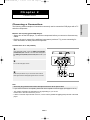
The following shows examples of connections commonly used to connect the DVD player with a TV
and other components.
Before Connecting the DVD Player
- Always turn off the DVD player, TV, and other components before you connect or disconnect any
cables.
- Refer to the user’s manual of the additional components (such as a TV) you are connecting for
more information on those particular components.
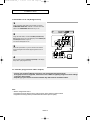
Connection to a TV (Video)
1
Using video/audio cables, connect the VIDEO (yellow)/AUDIO
(red and white) OUT terminals on the rear of the DVD player to
the VIDEO (yellow)/AUDIO (red and white) IN terminals of your
TV.
2
Turn on the DVD player and TV.
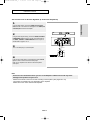
RED
WHITE
Audio Cable
RED
WHITE
YELLOW
Video Cable
YELLOW
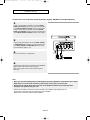
3
Press the input selector on your TV remote control until the
Video signal from the DVD player appears on the TV screen.
Note
- Noise may be generated if the audio cable placed too close to the power cable.
- If you want to connect to an Amplifier, please refer to the Amplifier connection page. (See pages 15 to 16)
- The number and position of terminals may vary depending on your TV set.
Please refer to the user's manual of your TV.
- If there is one audio input terminal on the TV, connect it to the [AUDIO OUT][left] (white) terminal of the DVD
player.
ENG-11
Connections
Choosing a Connection