1
User Guide
SI-EtherCAT
Part Number: 0478-0152-01
Issue Number: 1
www.controltechniques.com
General Information
The manufacturer accepts no liability for any consequences resulting from inappropriate, negligent or
incorrect installation or adjustment of the optional parameters of the equipment or from mismatching the
variable speed drive with the motor.
The contents of this guide are believed to be correct at the time of printing. In the interests of commitment
to a policy of continuous development and improvement, the manufacturer reserves the right to change the
specification of the product or its performance, or the content of the guide without notice.
All rights reserved. No parts of this guide may be reproduced or transmitted in any form or by any means,
electrical or mechanical including, photocopying, recording or by an information storage or retrieval system,
without permission in writing from the publisher.
Environmental Statement
Control Techniques is committed to minimising the environmental impacts of its manufacturing operations
and of its products throughout their life cycle. To this end, we operate an Environmental Management
System (EMS) which is certified to the International Standard ISO 14001. Further information on the EMS,
our Environment Policy and other relevant information is available on request, or can be found at
www.greendrives.com.
The electronic variable speed drives manufactured by Control Techniques have the potential to save
energy and (through increased machine/process efficiency) reduce raw material consumption and scrap
throughout their long working lifetime. In typical applications, these positive environmental effects far
outweigh the negative impacts of product manufacture and end-of-life disposal.
Nevertheless, when the products eventually reach the end of their useful life, they must not be discarded
but should instead be recycled by a specialist recycler of electronic equipment. Recyclers will find the
products easy to dismantle into their major component parts for efficient recycling. Many parts snap
together and can be separated without the use of tools, while other parts are secured with conventional
fasteners. Virtually all parts of the product are suitable for recycling.
Product packaging is of good quality and can be re-used. Large products are packed in wooden crates,
while smaller products come in strong cardboard cartons which themselves have a high-recycled fibre
content. If not re-used, these containers can be recycled. Polythene, used on the protective film and bags
from wrapping product, can be recycled in the same way. Control Techniques' packaging strategy prefers
easily recyclable materials of low environmental impact, and regular reviews identify opportunities for
improvement.
When preparing to recycle or dispose of any product or packaging, please observe local legislation and
best practice.
Firmware Statement
This product is supplied with the latest firmware version. When retro-fitting to an existing system, all
software versions should be verified to confirm the same functionality as products of the same type already
present. This also applies to products returned from a Control Techniques Service Centre or Repair Centre.
If there is any doubt please contact the supplier of the product.
The firmware version of the product can be identified by looking at Pr MM.002 where MM is the relevant
menu number for the module slot being used.
REACH legislation
EC Regulation 1907/2006 on the Registration, Evaluation, Authorisation and restriction of Chemicals
(REACH) requires the supplier of an article to inform the recipient if it contains more than a specified
proportion of any substance which is considered by the European Chemicals Agency (ECHA) to be a
Substance of Very High Concern (SVHC) and is therefore listed by them as a candidate for compulsory
authorisation.
For current information on how this requirement applies in relation to specific Control Techniques products,
please approach your usual contact in the first instance. Control Techniques position statement can be
viewed at:
http://www.controltechniques.com/REACH
Copyright
: © July 2014 Control Techniques Ltd.
Issue Number : 1
For patent and intellectual property related information please go to: www.ctpatents.info
Contents
1
Safety information .......................................................................................5
2
Introduction ..................................................................................................8
3
Mechanical installation .............................................................................10
4
Electrical installation .................................................................................13
5
Getting started ...........................................................................................16
6
Protocols ....................................................................................................21
7
Drive profile (CiA402) support ..................................................................33
8
Advanced features ....................................................................................63
1.1
1.2
1.3
1.4
1.5
1.6
1.7
1.8
2.1
2.2
2.3
2.4
2.5
2.6
3.1
4.1
4.2
4.3
4.4
4.5
5.1
5.2
6.1
6.2
6.3
6.4
7.1
7.2
7.3
7.4
7.5
7.6
7.7
7.8
7.9
7.10
8.1
8.2
8.3
Warnings, cautions and notes ................................................................................. 5
Electrical safety - general warning ........................................................................... 5
System design and safety of personnel ................................................................... 5
Environmental limits ................................................................................................ 6
Compliance with regulations .................................................................................... 6
Motor ....................................................................................................................... 6
Adjusting parameters ............................................................................................... 6
Electrical installation ................................................................................................ 7
What is EtherCAT? .................................................................................................. 8
About SI-EtherCAT .................................................................................................. 8
Features .................................................................................................................. 8
Option module identification .................................................................................... 8
Product Conformance Certificate ............................................................................. 9
Conventions used in this guide ................................................................................ 9
General installation ................................................................................................ 10
SI-EtherCAT module information ........................................................................... 13
SI-EtherCAT terminal descriptions ........................................................................ 14
Module grounding and EMC .................................................................................. 14
Network topology ................................................................................................... 15
Minimum node-to-node cable length ..................................................................... 15
Quick start guide .................................................................................................... 16
Quick start flowchart .............................................................................................. 20
Process Data Objects (PDOs) ............................................................................... 21
Service Data Object (SDO) parameter access ...................................................... 21
CANopen over EtherCAT (CoE) ............................................................................ 21
Cyclic data loss behaviour ..................................................................................... 32
0x6040 Controlword .............................................................................................. 33
0x6041 Statusword ................................................................................................ 34
Common profile features ....................................................................................... 34
Interpolated position mode .................................................................................... 44
vl velocity mode ..................................................................................................... 46
Homing mode ........................................................................................................ 51
Cyclic sync position mode ..................................................................................... 57
Cyclic Synchronous Velocity Mode ........................................................................ 59
Cyclic Synchronous Torque Mode ......................................................................... 59
Error Handling ....................................................................................................... 60
Distributed clocks .................................................................................................. 63
SI-EtherCAT protocol support ............................................................................... 64
Advanced Cyclic Data Task Configuration ............................................................ 64
Unidrive M SI-EtherCAT User Guide
Issue Number: 1
3
9
10
Menus .........................................................................................................67
Diagnostics ................................................................................................72
11
Glossary of terms ......................................................................................76
10.1
10.2
10.3
10.4
10.5
10.6
10.7
10.8
4
Module identification parameters ...........................................................................72
SI-EtherCAT module temperature ..........................................................................72
Error handling .........................................................................................................72
Drive trip display codes ..........................................................................................74
Updating SI-EtherCAT firmware .............................................................................74
Switching frequency ...............................................................................................74
Sync Task Orun trips ..............................................................................................74
SDO abort codes ....................................................................................................75
Unidrive M SI-EtherCAT User Guide
Issue Number: 1
1.1
Warnings, cautions and notes
Introduction
Safety information
Safety
information
1
A Warning contains information, which is essential for avoiding a safety hazard.
A Caution contains information, which is necessary for avoiding a risk of damage to the
product or other equipment.
Electrical
installation
CAUTION
NOTE
A Note contains information, which helps to ensure correct operation of the product.
Electrical safety - general warning
The voltages used in the drive can cause severe electrical shock and/or burns, and
could be lethal. Extreme care is necessary at all times when working with or adjacent to
the drive.
Protocols
Specific warnings are given at the relevant places in this User Guide.
1.3
System design and safety of personnel
The drive uses high voltages and currents, carries a high level of stored electrical
energy, and is used to control equipment which can cause injury.
5
Index
The SAFE TORQUE OFF function may be used in a safety-related application. The
system designer is responsible for ensuring that the complete system is safe and
Glossary of
terms
Careful consideration must be given to the functions of the drive which might result in a
hazard, either through their intended behavior or through incorrect operation due to a
fault. In any application where a malfunction of the drive or its control system could lead
to or allow damage, loss or injury, a risk analysis must be carried out, and where
necessary, further measures taken to reduce the risk - for example, an over-speed
protection device in case of failure of the speed control, or a fail-safe mechanical brake
in case of loss of motor braking.
Diagnostics
With the sole exception of the SAFE TORQUE OFF function, none of the drive
functions must be used to ensure safety of personnel, i.e. they must not be used
for safety-related functions.
Menus
The STOP and SAFE TORQUE OFF functions of the drive do not isolate dangerous
voltages from the output of the drive or from any external option unit. The supply must
be disconnected by an approved electrical isolation device before gaining access to the
electrical connections.
Advanced
features
Close attention is required to the electrical installation and the system design to avoid
hazards either in normal operation or in the event of equipment malfunction. System
design, installation, start up and maintenance must be carried out by personnel who
have the necessary training and experience. They must read this safety information and
this User Guide carefully.
Drive profile (CiA402)
support
The drive is intended as a component for professional incorporation into complete
equipment or a system. If installed incorrectly, the drive may present a safety hazard.
Unidrive M SI-EtherCAT User Guide
Issue Number: 1
Getting started
1.2
Mechanical
installation
WARNING
designed correctly according to the relevant safety standards.
1.4
Environmental limits
Instructions regarding transport, storage, installation and use of the drive must be
complied with, including the specified environmental limits. Drives must not be
subjected to excessive physical force.
1.5
Access
Drive access must be restricted to authorized personnel only. Safety regulations which
apply at the place of use must be complied with.
1.6
Fire protection
The drive enclosure is not classified as a fire enclosure. A separate fire enclosure must
be provided.
1.7
Compliance with regulations
The installer is responsible for complying with all relevant regulations, such as national
wiring regulations, accident prevention regulations and electromagnetic compatibility
(EMC) regulations. Particular attention must be given to the cross-sectional areas of
conductors, the selection of fuses or other protection, and protective ground (earth)
connections.
Instructions for achieving compliance with specific EMC standards may be found in the
relevant drive documentation.
Within the European Union, all machinery in which this product is used must comply
with the following directives:
•
•
1.8
2006/42/EC: Safety of machinery.
2004/108/EC: Electromagnetic Compatibility.
Motor
Ensure the motor is installed in accordance with the manufacturer’s recommendations.
Ensure the motor shaft is not exposed.
Standard squirrel cage induction motors are designed for single speed operation. If it is
intended to use the capability of the drive to run a motor at speeds above its designed
maximum, it is strongly recommended that the manufacturer is consulted first.
Low speeds may cause the motor to overheat because the cooling fan becomes less
effective. The motor should be installed with a protection thermistor. If necessary, an
electric forced vent fan should be used.
The values of the motor parameters set in the drive affect the protection of the motor.
The default values in the drive should not be relied upon.
It is essential that the correct value is entered in the motor rated current parameter
Pr 0.00.046, as this affects the thermal protection of the motor.
1.9
Adjusting parameters
Some parameters have a profound effect on the operation of the drive. They must not
be altered without careful consideration of the impact on the controlled system.
Measures must be taken to prevent unwanted changes due to error or tampering.
6
Unidrive M SI-EtherCAT User Guide
Issue Number: 1
Electrical installation
1.10.1 Electric shock risk
The voltages present in the following locations can cause severe electric shock and may
be lethal:
Introduction
•
•
•
Safety
information
1.10
AC supply cables and connections
Output cables and connections
Many internal parts of the drive, and external option units
1.10.2 Stored charge
Electrical
installation
The drive contains capacitors that remain charged to a potentially lethal voltage after the
AC supply has been disconnected. If the drive has been energized, the AC supply must
be isolated at least ten minutes before work may continue.
Mechanical
installation
Unless otherwise indicated, control terminals are single insulated and must not be
touched.
Getting started
Protocols
Drive profile (CiA402)
support
Advanced
features
Menus
Diagnostics
Glossary of
terms
Index
Unidrive M SI-EtherCAT User Guide
Issue Number: 1
7
2
Introduction
2.1
What is EtherCAT?
EtherCAT is an open high performance Ethernet-based fieldbus system that overcomes
the system limitations of other Ethernet solutions. The Ethernet packet is no longer
received, then interpreted and copied as process data at every connection; instead the
Ethernet frame is processed on the fly. The development goal of EtherCAT was to apply
Ethernet to automation applications that require short data update times (also called
cycle times) with low communication jitter (for synchronization purposes) and low
hardware costs. Typical application fields for EtherCAT are machine controls (e.g.
semiconductor tools, metal forming, packaging, injection moulding, assembly systems,
printing machines, robotics and many others).
2.2
About SI-EtherCAT
SI-EtherCAT is a option module that enables the Control Techniques Unidrive M range
of variable speed drives to be connected to an EtherCAT network as a slave device. It
can be used in a variety of applications, from those requiring accurate synchronization
and precise motion control, to those where ease of use and open loop control are
appropriate.
2.3
Features
•
Standard RJ45 with support for shielded twisted pair, half-duplex / full-duplex and
10 Mbs / 100 Mbs connectivity
•
Dual 100 Mbps EtherCAT interfaces for use in line topologies i.e. daisy chaining
•
Supports the Unidrive M drives range
•
Control loop synchronization
•
Control cycle times down to 250 µs
•
Configured Station Alias
•
CANopen over EtherCAT (CoE) which includes:
•
2.4
Support of CANopen CiA402
•
Cyclic sync position mode
•
Interpolated position mode
•
Velocity mode
•
Profile torque mode
•
Homing mode
•
One transmit and one receive PDOs
•
SDO access to all profile objects and drive parameters
•
Cyclic sync velocity mode
•
Cyclic sync torque mode
Option module identification
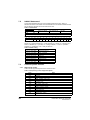
The SI-EtherCAT can be identified by:
•
•
8
The label located on the underside of the option module.
The color coding across the front of the SI-EtherCAT (brown-red).
Unidrive M SI-EtherCAT User Guide
Issue Number:1
1
SI-EtherCAT
Ser No : 3000005001
STDN39
A
Safety
information
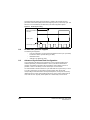
Figure 2-1 SI-EtherCAT labels
B
Introduction
2
Mechanical
installation
Ser No : 3000005001
1. Topside module label
2. Underside module label.
Date code format
Example: A date code of V35 would correspond to week 35 of year 2012.
Protocols
2.5
Product Conformance Certificate
Conventions used in this guide
The configuration of the host drive and option module is done using menus and
parameters. A menu is a logical collection of parameters that have similar functionality.
Menus
The setting of the Option Slot Identifiers (Pr 11.056) may change the slot numbering
from those described above. The internal menus of the option module or onboard
Ethernet interface will appear before menu 0 and after menu 41.
NOTE
•
Unidrive M SI-EtherCAT User Guide
Issue Number: 1
Index
•
Pr MM.ppp - Where MM signifies the menu allocated to the option module setup
menu and ppp signifies the parameter number within the set-up menu.
Pr mm.000 - Signifies parameter number 000 in any drive menu
Glossary of
terms
Pr S.mm.ppp - Where S signifies the option module slot number and mm.ppp
signifies the menu and parameter number of the option module's internal menus
and parameters.
If the option module slot number is not specified then the parameter reference will be a
drive parameter.
Diagnostics
For M200, M300 and M400 drives, the option module set-up parameters will appear in
menu 15. The method used to determine the menu or parameter is as follows:
•
Advanced
features
In the case of an option module, the option module set-up parameters in menu 0 will
appear in drive menu 15, 16 or 17 depending on which slot the module is installed in. In
the case of the onboard Ethernet interface, the set-up parameters in menu 0 will
appear in drive menu 24.
Drive profile (CiA402)
support
SI-EtherCAT has been awarded full EtherCAT Conformance Certification by the
EtherCAT Technology Group (ETG). A copy of the certificate is available on request
from your supplier or local Control Techniques Drive Centre.
2.6
Getting started
The date code is split into two sections: a letter followed by a number. The letter
indicates the year, and the number indicates the week number (within the year) in which
the option module was built. The letters go in alphabetical order, starting with A in 1990
(B in 1991, C in 1992 etc).
Electrical
installation
2.4.1
9
3
WARNING
3.1
Mechanical installation
Before installing or removing a option module in any drive, ensure the AC supply has
been disconnected for at least 10 minutes and refer to Chapter 1 Safety information on
page 5. If using a DC bus supply ensure this is fully discharged before working on any
drive or option module.
General installation
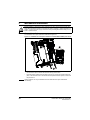
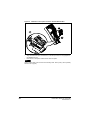
The installation of a option module is illustrated in Figure 3-1.
Figure 3-1 Installation of an SI option module on Unidrive M200 to M400 (sizes 2 to 4)
2
1
•
•
NOTE
10
With the option module tilted slightly backwards, align and locate the two holes in
the rear of the option module onto the two tabs (1) on the drive.
Place the option module onto the drive as shown in (2) until the module clicks into
place. The terminal cover on the drive holds the option module in place, so this must
be put back on.
Option modules can only be installed on drives that have the option module slot
functionality.
Unidrive M SI-EtherCAT User Guide
Issue Number: 1
Safety
information
Figure 3-1 Installation of an SI option module on Unidrive M200 to M400 (sizes 5 to 8)
Introduction
Mechanical
installation
2
Electrical
installation
Getting started
1
Protocols
Place the option module onto the drive as shown in (2) until the module clicks into
place. The terminal cover on the drive holds the option module in place, so this must
be put back on.
Drive profile (CiA402)
support
•
Advanced
features
Menus
Diagnostics
Glossary of
terms
Index
Unidrive M SI-EtherCAT User Guide
Issue Number: 1
11
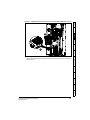
Figure 3-2 Installation of an SI option module on Unidrive M600 to M810
2
•
•
•
Move the option module in direction shown (1/2).
Align and insert the option module tab in to the slot provided, this is highlighted in
the detailed view (A).
Press down on the option module until it clicks into place.
NOTE
Option module slots must be used in the following order: Slot 3 (lower), Slot 2 (middle)
and then Slot 1(upper).
12
Unidrive M SI-EtherCAT User Guide
Issue Number: 1
Safety
information
4
Electrical installation
4.1.1
SI-EtherCAT module information
Introduction
4.1
Bus media
The SI-EtherCAT option module incorporates two 100 BASE-TX RJ45 interfaces.
Cabling considerations
To ensure long-term reliability it is recommended that any cables used to connect a
system together be tested using a suitable Ethernet cable tester, this is of particular
importance when cables are constructed on site.
Electrical
installation
4.1.3
Cable
Cables should be shielded and as a minimum, meet TIA Cat 5e requirements.
NOTE
Maximum network length
NOTE
Advanced
features
The EtherCAT system designer must consider the impact that the selected network
structure will have on performance.
Drive profile (CiA402)
support
The main restriction imposed on Ethernet cabling is the length of a single segment of
cable. The SI-EtherCAT module has two 100BASE-TX Ethernet ports, which support
segment lengths of up to 100 m. This means that the maximum cable length which can
be used between one SI-EtherCAT port and another 100BASE-TX port is 100 m
however it is not recommended that the full 100 m cable length is used. The total
network length is not restricted by the Ethernet standard but depends on the number of
devices on the network and the transmission media (copper, fiber optic, etc.).
Protocols
Cabling issues are the single biggest cause of network downtime. Ensure cabling is
correctly routed, wiring is correct, connectors are correctly installed and any switches or
routers used are rated for industrial use. Office grade Ethernet equipment does not
generally offer the same degree of noise immunity as equipment intended for industrial
use.
Getting
started
4.1.4
Mechanical
installation
4.1.2
Menus
Diagnostics
Glossary of
terms
Index
Unidrive M SI-EtherCAT User Guide
Issue Number: 1
13
4.2
SI-EtherCAT terminal descriptions
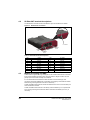
The SI-EtherCAT module has two RJ45 Ethernet ports for the EtherCAT network.
Figure 4-1 SI-EtherCAT connections
Link LEDs
Ethertnet
Port B
Ground
tab
Ethertnet
Port A
Table 4.1 EtherCAT terminal descriptions
4.3
Pin
A - IN
Pin
B - OUT
1
Transmit +
1
Transmit +
2
Transmit -
2
Transmit -
3
Receive +
3
Receive +
4
Not used
4
Not used
5
Not used
5
Not used
6
Receive -
6
Receive -
7
Not used
7
Not used
8
Not used
8
Not used
Module grounding and EMC
SI-EtherCAT is supplied with a grounding tab on the module that should be connected
to the closest possible grounding point using the minimum length of cable. This will
greatly improve the noise immunity of the module.
It is recommended that the Ethernet cable should be of the shielded type, and
connectors should be shielded with a metal body. Tie-wrapping of the Ethernet cable's
shield to the grounding bracket of the drive is necessary.
At least one EMC Ferrite inductor should be installed near to each communication port
of the SI-EtherCAT module.
At least one EMC Ferrite inductor is necessary near the Master's (PC / PLC) Ethernet
Port. Proper grounding of the Ethernet cable's shield near the Master (PC / PLC) is
necessary.
14
Unidrive M SI-EtherCAT User Guide
Issue Number: 1
Please note EMC Ferrite inductors of the required specification are available from the
following supplier:
WURTH ELEKTRONIK
Manufacturer Part No:
74271222
1635620
Description:
Ferrite core, Split type
Mechanical
installation
Order code:
Introduction
Network topology
Control Techniques recommend implementing daisy chaining on EtherCAT networks
(see Figure 4-2). Other Ethernet network topologies can be used but care must be taken
to ensure that the system still operates within the constraints specified by the designer.
Electrical
installation
4.4
Manufacturer:
Safety
information
Drive grounding brackets should be connected to each other by separate cables, and
the cable length should be as small as possible.
Figure 4-2 SI-EtherCAT daisy chain network topology
Unidrive
M700
Protocols
Master / PLC
Getting
started
Unidrive
M600
Unidrive
M200
Drive profile (CiA402)
support
Distributed I/O
4.5
SI-EtherCAT
Advanced
features
SI-EtherCAT
SI-EtherCAT
Minimum node-to-node cable length
Menus
There is no minimum length of cable recommended in the Ethernet standards. To avoid
possible problems it is recommended that you allow sufficient cable length to ensure
good bend radii on cables and avoid unnecessary strain on connectors.
Diagnostics
Glossary of
terms
Index
Unidrive M SI-EtherCAT User Guide
Issue Number: 1
15
5
Getting started
5.1
Quick start guide
This section is intended to provide a generic guide for setting up SI-EtherCAT with a
master/controller PLC. It will cover the basic steps required to get cyclic data
communicating using the CANopen over EtherCAT (CoE) protocol on the SI-EtherCAT
module.
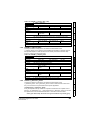
Table 5.1 PDO test mappings
RxPDO1
NOTE
TxPDO1
Mapping 1
0x6040 (controlword)
(16-bits)
0x6041 (statusword)
(16-bits)
Mapping 2
0x6042 (vl_target_velocity)
(16-bits)
0x6064 (position_actual_value)
(32-bits)
Mapping 3
Pr 20.021 (32-bits)
N/A
It is strongly recommended that the latest firmware be used where possible to ensure
that all features are supported.
Due to the large number of different masters that support CoE, details cannot be
provided for a specific master. Generic support is available through your supplier or
local Control Techniques Drive Centre. Before contacting your supplier or local Control
Techniques Drive Centre for support please ensure you have read section
10 Diagnostics on page 72 of this manual and have checked that the SDO/PDO
configurations are correct.
5.1.1
SI-EtherCAT XML file
Control Techniques provides EtherCAT device description files (in the form of .xml files).
These files provide the master with information about the SI-EtherCAT module and drive
configuration to aid with its configuration. These files can be downloaded from the
Control Techniques CTSupport.com website or from your local Control Techniques
Drive Centre or supplier. They should be placed in the directory specified by the master
e.g. when using TwinCAT this could be C:\TwinCAT\Io\EtherCAT.
NOTE
5.1.2
The master may have to be re-started for the file to be loaded.
Configuring the SI-EtherCAT module for cyclic communications
Unlike other Control Techniques fieldbus communication protocols, CoE does not
require that any module parameters be changed in order to achieve communications.
The baud rate of the network is fixed and the module is automatically allocated an
address.
To check that the ethernet cable connected to the SI-EtherCAT module on the drive is
connected correctly, look at the LED on the front of the SI-EtherCAT module relating to
the connector being used, if this light is a solid green color then a link is established with
the master, if this light if off then check the cabling and also check that the master has
started communications.
In the master, scan the network ensuring that the SI-EtherCAT module is connected
correctly to the master. If the network is configured correctly the SI-EtherCAT node(s)
should be visible in the PLC master.
Decide on the input / output data you wish to send cyclically (objects and/or
parameters).
16
Unidrive M SI-EtherCAT User Guide
Issue Number: 1
Mechanical
installation
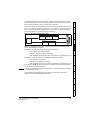
Figure 5-1 SI-EtherCAT PDO configuration
RxPDO1
0x6040
Control word
0x6042
vl_target_velocity
Pr 20.21
TxPDO1
0x6064 position
actual value
RxPDO1 and TxPDO1 will need to be enabled in the master. Once enabled you will
need to add mappings to the PDOs.
The format used when mapping objects to PDOs is as follows:
Protocols
Index: Object index number (0x0000)
•
Sub-index: Object sub-index number (0x00)
•
Size: Dependant on the size (in bytes) of the object to be mapped (range: 1-4)
•
Index: 0x2000 + menu number
•
Sub-index: 0x00 + parameter number
•
Size: Dependant on the size (in bytes) of the object to be mapped (range: 1-4)
The values are normally expressed in hexadecimal, so care must be taken to enter the
correct parameter number.
Menus
For this example the following objects will need to be set in order to achieve the
mappings of the parameters/objects in the PDOs.
Advanced
features
For example Pr 20.021 would be index 0x2014, sub-index 0x15 and the size would be 4
(the parameter is a 32-bit signed value).
Drive profile (CiA402)
support
•
The format used when mapping drive parameters to PDOs is as follows:
NOTE
Electrical
Getting started
installation
PLC
0x6041
Status word
Introduction
These PDOs contain the cyclic data (objects and/or parameters), the RxPDOs available
are 1, 2, 3, 5 and 6, the TxPDOs available are 1, 2, 3, 5 and 6 (for more information on
these PDOs including default mappings please see section 6.3.2 RxPDO mappings on
page 24 and section 6.3.3 TxPDO mappings on page 27).
Safety
information
Cyclic data is implemented on CoE networks by using "Process Data Objects" or PDOs.
Separate data objects are used for receiving (TxPDOs - from the slave to the master)
and transmitting (RxPDOs - from the master to the slave) data.
Diagnostics
Glossary of
terms
Index
Unidrive M SI-EtherCAT User Guide
Issue Number: 1
17
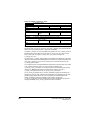
Table 5.2 Cyclic data mapping configuration
RxPDO1:
TxPDO1:
Object:
0x1600
Object:
0x1A00
Sub-index:
0x00
Sub-index:
0x00
Size:
1
Size:
1
Value:
3
Value:
2
Sub-index:
0x01
Sub-index:
0x01
Size:
4
Size:
4
Value:
0x60400010
Value:
0x60410010
Sub-index:
0x02
Sub-index:
0x02
Size:
4
Size:
4
Value:
0x60420010
Value:
0x60640020
Sub-index:
0x03
Not Used
Size:
4
Value:
0x20141520
NOTE
The format used to define the value of a mapped object is as follows:
Bit 0 to 7: Length of the mapped object in bits (if a gap, bit length of the gap).
Bit 8 to 15: Sub-index of the mapped object (if a gap, zero).
Bit 16 to 31: Index of the mapped object (if a gap, zero).
NOTE
The maximum number of mappings in one PDO is twelve. There are no restrictions on
the data length of these 2 parameters (i.e. It is possible to map five, 32-bit parameters in
one PDO). It is also possible to use a maximum of one RxPDOs and one TxPDOs.
5.1.3
Configuring the sync managers
The sync manager is used to control the transmission of CANopen PDOs over the
EtherCAT network.
The following objects 0x1C12 - sync manager 2 PDO assignment (RxPDO) and 0x1C13
- sync manager 3 PDO assignment (TxPDO) are required to assign PDOs to the
synchronization task. For the purpose of the example assign one RxPDO to sync
manager 2 and one TxPDOs to sync manager 3.
Figure 5-2 SI-EtherCAT sync manager configuration
0x1C12
RxPDO1
0x6040
Control word
PLC
0x6042
vl_target_velocity
Pr 20.021
0x1C13
TxPDO1
0x6041
Status word
0x6064
position
actual value
Assigning RxPDO to the sync manager
To assign RxPDO1 to sync manager 2 PDO assignment set the values below to the
following objects:
18
•
Index: 0x1C12
•
Sub index: 0x00
Unidrive M SI-EtherCAT User Guide
Issue Number: 1
Size: 1
•
Value: 1
Setting object 0x1C12, sub-index 0 to a value of 1 (as above) indicates that one RxPDO
will be assigned to the sync manager 2 assignment.
Sub index: 0x01
•
Size: 2
•
Value: 0x1600
Setting object 0x1C12, sub-index 1 to a value of 0x1600 (as above) maps RxPDO1 to
the process data output sync.
•
Index: 0x1C13
•
Sub index: 0x00
•
Size: 1
•
Value: 1
Index: 0x1C13
•
Sub index: 0x01
•
Size: 2
•
Value: 0x1A00
Setting object 0x1C13, sub-index 1 to a value of 0x1A00 (as above) maps TxPDO1 to
the process data input sync.
Drive profile (CiA402)
support
•
Protocols
Setting object 0x1C13, sub-index 0 to a value of 1 (as above) indicates that one
TxPDOs will be assigned to the sync manager 3 assignment.
Electrical
Getting started
installation
Assigning TxPDO to the sync manager
To assign TxPDO1 to sync manager 3 PDO assignment set the values below to the
following objects:
Mechanical
installation
Index: 0x1C12
•
Introduction
•
Safety
information
•
Download the configuration to the master.
Advanced
features
After downloading the configuration to the master the LED(s) on the front of the SIEtherCAT should flash, depending on the port(s) connected.
Menus
Values written to parameters over RxPDOs should now be viewable using the drive’s
keypad so long as the master has put the slave into the operational state; also,
parameter values changed using the drive keypad will be updated on the master.
Diagnostics
Glossary of
terms
Index
Unidrive M SI-EtherCAT User Guide
Issue Number: 1
19
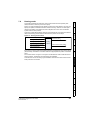
5.2
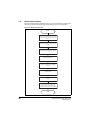
Quick start flowchart
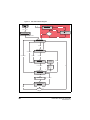
Figure 5-3 details the steps required to achieve cyclic communications on the EtherCAT
network. This flowchart should be used as the starting point for all configurations.
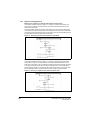
Figure 5-3 Quick start flowchart
START
Ensure the Control Techniques .xml file is in
the appropriate folder on the hard drive of the
master
Check the LED status of the SI-EtherCAT
module
In the master, scan the EtherCAT network
Select required PDOs
Configure the PDOs with the mappings
required
Configure the Sync managers using the
required PDOs
Download or activate the configuration to the
master
Check the front of the SI-EtherCAT module
to ensure that the LED relating to the
connection being used is flashing, this
confirms that communications are functioning
END
20
Unidrive M SI-EtherCAT User Guide
Issue Number: 1
Safety
information
Protocols
6.1
Process Data Objects (PDOs)
6.2
Service Data Object (SDO) parameter access
Index: 0x2000 + menu
For example Pr 20.021 would be index 0x2014 and the sub-index would be 0x15. The
values are usually expressed in base 16 (hexadecimal), so care must be taken to enter
the correct parameter number.
Sub-index 0 for any menu will return the highest sub-index available for the object (i.e.
the highest parameter number).
NOTE
The following SDO services are supported:
6.3
Initiate SDO Download (Write)
Initiate SDO Upload (Read)
Abort SDO Transfer (Error)
Advanced
features
•
•
•
CANopen over EtherCAT (CoE)
Menus
The CoE protocol over EtherCAT uses a modified form of the CANopen object
dictionary. This is specified in Table 6.1.
Table 6.1 CoE object dictionary
Index
Object dictionary area
Data type area
0x1000 to 0x1FFF
CoE communication area
0x2000 to 0x5FFF
Manufacturer specific area
Profile area
0xA000 to 0xFFFF
Reserved area
The object description format describes object related information such as size, range
and descriptions and is detailed in Table 6.2.
Glossary of
terms
0x6000 to 0x9FFF
Diagnostics
0x0000 to 0x0FFF
Drive profile (CiA402)
support
NOTE
Protocols
All other supported entries in the SI-EtherCAT object dictionary can also be accessed
using SDOs. Refer to the master controller documentation for full details about
implementing SDO transfers within the particular master controller.
Getting started
Sub-index: parameter
Electrical
installation
The service data object (SDO) provides access to all objects in the EtherCAT object
dictionary and the drive parameters are mapped into the object dictionary as 0x2XXX
objects in the following way:
Mechanical
installation
Cyclic data is implemented on EtherCAT networks by using "Process Data Objects" or
PDOs. Separate data objects are used for transmitting (TxPDOs) and receiving
(RxPDOs) data. PDO configuration objects are usually pre-configured in the EtherCAT
master controller and downloaded to the SI-EtherCAT at network Initialization using
SDOs.
Introduction
6
Index
Unidrive M SI-EtherCAT User Guide
Issue Number: 1
21
Table 6.2 Object description format
<index>
<object name>
Access: <access>
Range: <range>
Default:
<default>
Description:
<description>
Size: <size>
Unit: <unit>
For entries having sub-indices
Table 6.3 Object description format with sub-indices
<index>
<object name>
Sub-index 0
Access: <access>
Range: <range>
Default:
<default>
Description:
<description>
Size: <size>
Unit: <unit>
Size: <size>
Unit: <unit>
Size: <size>
Unit: <unit>
Size: <size>
Unit: <unit>
Size: <size>
Unit: <unit>
Sub-index 1
Access: <access>
Range: <range>
Default:
<default>
Description:
<description>
...
Access: <access>
Range: <range>
Default:
<default>
Description:
<description>
Sub-index n-1
Access: <access>
Range: <range>
Default:
<default>
Description:
<description>
Sub-index n
Access: <access>
Range: <range>
Default:
<default>
Description:
<description>
Definitions:
22
•
<index> : A signed 16-bit number. This is the index of the object dictionary
entry specified in four hexadecimal characters.
•
<access> : A value describing how the object may be accessed (RW = read/
write, RO = read-only and WO = write-only).
•
<size> : The size of the object/sub-index in bytes.
•
<unit> : The physical unit (e.g. ms, counts per second etc.).
Unidrive M SI-EtherCAT User Guide
Issue Number: 1
CoE communication area
Safety
information
6.3.1
The first set of objects specify general communication settings.
Table 6.4 Device type object
Device type
Access: RO
Default:
Range: N/A
Size: 4 bytes
Unit: N/A
Dependent on drive type / mode (see description).
Table 6.5 Identity object
0x1018
Identity object
Access: RO
Range: N/A
Size: 1 byte
Default:
4
Description:
The number of the last sub-index in this object.
Protocols
Sub-index 0
Unit: N/A
Range: N/A
Size: 4 bytes
Unit: N/A
Default:
0x000000F9
Description:
This contains the EtherCAT Technology Group vendor ID for Control Techniques
(0x000000F9).
Sub-index 2
Range: N/A
Size: 4 bytes
Unit: N/A
Default:
0x01mmvvtt
Byte 0: Drive Type (tt), Byte 1: Drive Variant/Derivative (vv), Byte 2: Drive Mode
(mm), Byte 3: Generation (0x01)
Description:
This has the value of the option ID code.
Access: RO
Range: N/A
Size: 4 bytes
Menus
Sub-index 3
Unit: N/A
Calculated from Pr S.00.002
Description:
This will contain the option module software version number; major in byte 3,
minor in byte 2, sub version in byte 1, and the build number in byte 0.
Sub-index 4
Range: N/A
Size: 4 bytes
Unit: N/A
0
Description:
This will contain zero, rather than the module or drive serial number
Glossary of
terms
Default:
Diagnostics
Default:
Access: RO
Advanced
features
Access: RO
Drive profile (CiA402)
support
Sub-index 1
Access: RO
Getting started
This value will be dependent on the drive operating mode and / or type. On
Unidrive M600 and above in the open-loop, RFC-A or Regen modes or on
Unidrive M200 - M400, bit 16 will be set, while bit 17 will be clear. On Unidrive
M600 and above in RFC-S mode, bit 17 will be set, while bit 16 will be clear.
Electrical
installation
Description:
Bits 0 to 15 (Device Profile Number): 402
Bit 16 (Frequency Converter): x
Bit 17 (Servo Drive): y
Bit 18 (Stepper Motor): 0
Bit 24 (DC Drive - Control Techniques specific): 0
Bits 25-31 (Manufacturer specific): 0
Mechanical
installation
The primary CoE functional profile is CiA402, so the value of this object is defined
as follows:
Introduction
0x1000
Index
Unidrive M SI-EtherCAT User Guide
Issue Number: 1
23
6.3.2
RxPDO mappings
Objects with indices from 0x1600 to 0x17FF specify receive PDO mappings. The
mappings from CiA402 are included as standard (the PDO mappings will have the
following default values).
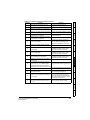
Table 6.6 RxPDO mappings
PDO No.
Mapped object indices
Mapped default object names
1
0x6040
controlword
2
0x6040
0x6060
controlword
modes_of_operation
3
0x6040
0x607A
controlword
target_position
5
0x6040
0x6071
controlword
target_torque
6
0x6040
0x6042
controlword
vl_target_velocity
The RxPDO mapping objects are defined in the following tables. Each mapping object
has the maximum number of sub-indices (each representing an object mapped to a
PDO) defined in the XML configuration file (specified as “CF” in the following
descriptions).
Table 6.7 RxPDO mapping 1
0x1600
Receive PDO mapping 1
Sub-index 0: Number of mapped objects
Access: RW
Range: 0 to 12
Size: 1 byte
Default:
1
Description:
The number of mapped objects in the PDO
Unit: N/A
Sub-index 1: 1st mapped object
Access: RW
Default:
Range: 0 to
0xFFFFFFFF
Size: 4 bytes
Unit: N/A
0x60400010 - the CiA402 control word (0x6040)
A mapping to an object with the following format:
Description:
24
Bits 0 to 7: Length of the mapped object in bits, e.g. a 32-bit parameter would
have a length of 32 or 0x20.
Bits 8 to 15: Sub-index of the mapped object.
Bits 16 to 31: Index of the mapped object.
Unidrive M SI-EtherCAT User Guide
Issue Number: 1
0x1601
Safety
information
Table 6.8 RxPDO mapping 2
Receive PDO mapping 2
Sub-index 0: Number of mapped objects
Access: RW
Range: 0 to 12
Size: 1 byte
2
Description:
The number of mapped objects in this PDO.
Unit: N/A
Introduction
Default:
Sub-index 1: 1st mapped object
Default:
Size: 4 bytes
Unit: N/A
Mechanical
installation
Range: 0 to
0xFFFFFFFF
Access: RW
0x60400010 - the CiA402 control word (0x6040)
A mapping to an object with the following format:
Bits 0 to 7: Length of the mapped object in bits, e.g. a 32-bit parameter would
have a length of 32 or 0x20.
Bits 8 to 15: Sub-index of the mapped object.
Bits 16 to 31: Index of the mapped object.
Sub-index 2: 2nd mapped object
Default:
Size: 4 bytes
Getting started
Range: 0 to
0xFFFFFFFF
Access: RW
Unit: N/A
0x60600008 - the CiA402 modes of operation object (0x6060)
A mapping to an object with the following format:
Bits 0 to 7: Length of the mapped object in bits, e.g. a 32-bit parameter would
have a length of 32 or 0x20.
Bits 8 to 15: Sub-index of the mapped object.
Bits 16 to 31: Index of the mapped object.
0x1602
Drive profile (CiA402)
support
Table 6.9 RxPDO mapping 3
Receive PDO mapping 3
Sub-index 0: Number of mapped objects
Access: RW
Range: 0 to 12
Size: 1 byte
Default:
2
Description:
The number of mapped objects in this PDO.
Unit: N/A
Range: 0 to
0xFFFFFFFF
Size: 4 bytes
Advanced
features
Sub-index 1: 1st mapped object
Access: RW
Unit: N/A
0x60400010 - the CiA402 control word (0x6040)
Description:
A mapping to an object. This will have the following format:
Bits 0 to 7: Length of the mapped object in bits (if a gap, bit length of the gap).
Bits 8 to 15: Sub-index of the mapped object (if a gap, zero).
Bits 16 to 31: Index of the mapped object (if a gap, zero).
Range: 0 to
0xFFFFFFFF
Default:
Size: 4 bytes
Diagnostics
Sub-index 2: 2nd mapped object
Unit: N/A
0x607A0020 - the CiA402 target position (0x607A).
A mapping to an object. This will have the following format:
Bits 0 to 7: Length of the mapped object in bits (if a gap, bit length of the gap).
Bits 8 to 15: Sub-index of the mapped object (if a gap, zero).
Bits 16 to 31: Index of the mapped object (if a gap, zero).
Glossary of
terms
A mapping to an object with the following format:
Description:
Menus
Default:
Access: RW
Protocols
Description:
Electrical
installation
Description:
Index
Unidrive M SI-EtherCAT User Guide
Issue Number: 1
25
Table 6.10 RxPDO mapping 5
0x1604
Receive PDO mapping 5
Sub-index 0: Number of mapped objects
Access: RW
Range: 0 to 12
Size: 1 byte
Default:
2
Description:
The number of mapped objects in this PDO.
Unit: N/A
Sub-index 1: 1st mapped object
Range: 0 to
0xFFFFFFFF
Access: RW
Size: 4 bytes
Unit: N/A
Default:
0x60400010 - the CiA402 control word (0x6040)
Description:
A mapping to an object. This will have the following format:
Bits 0 to 7: Length of the mapped object in bits (if a gap, bit length of the gap).
Bits 8 to 15: Sub-index of the mapped object (if a gap, zero).
Bits 16 to 31: Index of the mapped object (if a gap, zero).
Sub-index 2: 2nd mapped object
Range: 0 to
0xFFFFFFFF
Access: RW
Default:
Size: 4 bytes
Unit: N/A
0x60710010 - the CiA402 target torque (0x6071).
A mapping to an object with the following format:
Description:
A mapping to an object. This will have the following format:
Bits 0 to 7: Length of the mapped object in bits (if a gap, bit length of the gap).
Bits 8 to 15: Sub-index of the mapped object (if a gap, zero).
Bits 16 to 31: Index of the mapped object (if a gap, zero).
Table 6.11 RxPDO mapping 6
0x1605
Receive PDO mapping 6
Sub-index 0: Number of mapped objects
Access: RW
Range: 0 to 12
Size: 1 byte
Default:
2
Description:
The number of mapped objects in this PDO.
Unit: N/A
Sub-index 1: 1st mapped object
Access: RW
Range: 0 to
0xFFFFFFFF
Size: 4 bytes
Unit: N/A
Default:
0x60400010 - the CiA402 control word (0x6040)
Description:
A mapping to an object. This will have the following format:
Bits 0 to 7: Length of the mapped object in bits (if a gap, bit length of the gap).
Bits 8 to 15: Sub-index of the mapped object (if a gap, zero).
Bits 16 to 31: Index of the mapped object (if a gap, zero).
Sub-index 2: 2nd mapped object
Access: RW
Default:
Range: 0 to
0xFFFFFFFF
Size: 4 bytes
Unit: N/A
0x60420010 - the CiA402 vl target velocity (0x6042)
A mapping to an object with the following format:
Description:
26
A mapping to an object. This will have the following format:
Bits 0 to 7: Length of the mapped object in bits (if a gap, bit length of the gap).
Bits 8 to 15: Sub-index of the mapped object (if a gap, zero).
Bits 16 to 31: Index of the mapped object (if a gap, zero).
Unidrive M SI-EtherCAT User Guide
Issue Number: 1
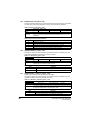
TxPDO mappings
Objects with the indices from 0x1A00 to 0x1BFF specify transmit PDO mappings. The
following mappings from CiA402 are included as standard.
Mapping object name
0x6041
statusword
2
0x6041
0x6061
statusword
modes_of_operation_display
3
0x6041
0x6064
statusword
position_actual_value
5
0x6041
0x6077
statusword
torque_actual_value
6
0x6041
0x6044
statusword
vl_velocity_actual_value
Table 6.13 TxPDO mapping 1
0x1A00
Transmit PDO mapping 1
Sub-index 0: Number of mapped objects
Range: 0 to 12
Size: 1 byte
Default:
1
Description:
The number of mapped objects in the PDO
Unit: N/A
Protocols
Access: RW
Range: 0 to
0xFFFFFFFF
Default:
Size: 4 bytes
Unit: N/A
0x60410010 - the CiA402 status word (0x6041)
A mapping to an object with the following format:
Description:
Advanced
features
Bits 0 to 7: Length of the mapped object in bits, e.g. a 32-bit parameter would
have a length of 32 or 0x20.
Bits 8 to 15: Sub-index of the mapped object.
Bits 16 to 31: Index of the mapped object.
Drive profile (CiA402)
support
Sub-index 1: 1st mapped object
Access: RW
Getting started
The PDO mapping objects are defined below. Each mapping object has the maximum
number of sub-indices (each representing an object mapped to a PDO) defined in the
XML configuration file.
Electrical
installation
Mapping object index
1
Mechanical
installation
PDO number
Introduction
Table 6.12 TxPDO mappings
Safety
information
6.3.3
Menus
Diagnostics
Glossary of
terms
Index
Unidrive M SI-EtherCAT User Guide
Issue Number: 1
27
Table 6.14 TxPDO mapping 2
0x1A01
Transmit PDO mapping 2
Sub-index 0: Number of mapped objects
Access: RW
Range: 0 to 12
Size: 1 byte
Default:
2
Description:
The number of mapped objects in this PDO.
Unit: N/A
Sub-index 1: 1st mapped object
Range: 0 to
0xFFFFFFFF
Access: RW
Default:
Size: 4 bytes
Unit: N/A
0x60410010 - the CiA402 status word (0x6041)
A mapping to an object with the following format:
Description:
Bits 0 to 7: Length of the mapped object in bits, e.g. a 32-bit parameter would
have a length of 32 or 0x20.
Bits 8 to 15: Sub-index of the mapped object.
Bits 16 to 31: Index of the mapped object.
Sub-index 2: 2nd mapped object
Range: 0 to
0xFFFFFFFF
Access: RW
Default:
Size: 4 bytes
Unit: N/A
0x60610008 - the CiA402 modes of operation display object (0x6061)
A mapping to an object with the following format:
Description:
Bits 0 to 7: Length of the mapped object in bits, e.g. a 32-bit parameter would
have a length of 32 or 0x20.
Bits 8 to 15: Sub-index of the mapped object.
Bits 16 to 31: Index of the mapped object.
Table 6.15 Tx PDO mapping 3
0x1A02
Transmit PDO mapping 3
Sub-index 0: Number of mapped objects
Access: RW
Range: 0 to 12
Size: 1 byte
Default:
2
Description:
The number of mapped objects in this PDO.
Unit: N/A
Sub-index 1: 1st mapped object
Access: RW
Default:
Range: 0 to
0xFFFFFFFF
Size: 4 bytes
Unit: N/A
0x60410010 - the CiA402 status word (0x6041)
A mapping to an object with the following format:
Description:
Bits 0 to 7: Length of the mapped object in bits, e.g. a 32-bit parameter would
have a length of 32 or 0x20.
Bits 8 to 15: Sub-index of the mapped object.
Bits 16 to 31: Index of the mapped object.
Sub-index 2: 2nd mapped object
Access: RW
Default:
Range: 0 to
0xFFFFFFFF
Size: 4 bytes
Unit: N/A
0x60640020 - the CiA402 actual position (0x6064)
A mapping to an object with the following format:
Description:
28
Bits 0 to 7: Length of the mapped object in bits, e.g. a 32-bit parameter would
have a length of 32 or 0x20.
Bits 8 to 15: Sub-index of the mapped object.
Bits 16 to 31: Index of the mapped object.
Unidrive M SI-EtherCAT User Guide
Issue Number: 1
0x1A04
Safety
information
Table 6.16 TxPDO mapping 5
Transmit PDO mapping 5
Sub-index 0: Number of mapped objects
Access: RW
Range: 0 to 12
Size: 1 byte
2
Description:
The number of mapped objects in this PDO.
Unit: N/A
Introduction
Default:
Sub-index 1: 1st mapped object
Size: 4 bytes
Unit: N/A
0x60410010 - the CiA402 status word (0x6041).
Description:
A mapping to an object. This will have the following format:
Bits 0 to 7: Length of the mapped object in bits (if a gap, bit length of the gap).
Bits 8 to 15: Sub-index of the mapped object (if a gap, zero).
Bits 16 to 31: Index of the mapped object (if a gap, zero).
Sub-index 2: 2nd mapped object
Range: 0 to
0xFFFFFFFF
Access: RW
Size: 4 bytes
Unit: N/A
0x60770010 - the CiA402 actual torque (0x6077)
Description:
A mapping to an object. This will have the following format:
Bits 0 to 7: Length of the mapped object in bits (if a gap, bit length of the gap).
Bits 8 to 15: Sub-index of the mapped object (if a gap, zero).
Bits 16 to 31: Index of the mapped object (if a gap, zero).
Protocols
Table 6.17 TxPDO mapping 6
0x1A05
Transmit PDO mapping 6
Range: 0 to 12
Size: 1 byte
Default:
2
Description:
The number of mapped objects in this PDO.
Drive profile (CiA402)
support
Sub-index 0: Number of mapped objects
Access: RW
Unit: N/A
Sub-index 1: 1st mapped object
Range: 0 to
0xFFFFFFFF
Access: RW
Size: 4 bytes
Unit: N/A
Advanced
features
Default:
0x60410010 - the CiA402 status word (0x6041)
A mapping to an object with the following format:
Description:
Getting started
Default:
Electrical
installation
Default:
Mechanical
installation
Range: 0 to
0xFFFFFFFF
Access: RW
Menus
Bits 0 to 7: Length of the mapped object in bits, e.g. a 32-bit parameter would
have a length of 32 or 0x20.
Bits 8 to 15: Sub-index of the mapped object.
Bits 16 to 31: Index of the mapped object.
Sub-index 2: 2nd mapped object
Default:
Size: 4 bytes
Unit: N/A
Diagnostics
Range: 0 to
0xFFFFFFFF
Access: RW
0x60440010 - the CiA402 actual motor speed (0x6044).
A mapping to an object with the following format:
Bits 0 to 7: Length of the mapped object in bits, e.g. a 32-bit parameter would
have a length of 32 or 0x20.
Bits 8 to 15: Sub-index of the mapped object.
Bits 16 to 31: Index of the mapped object.
Glossary of
terms
Description:
Index
Unidrive M SI-EtherCAT User Guide
Issue Number: 1
29
6.3.4
Sync manager configuration
The sync managers are the EtherCAT means for setting access attributes for different
areas of memory and triggering or notifying the application when the memory is
accessed. The following objects specify how the sync managers (and thus
corresponding memory areas) are utilized by the CoE protocol.
Table 6.18 Sync manager communication type object
0x1C00
Sync manager communication type
Sub-index 0 - number of sync manager channels used
Access: RO
Range: N/A
Size: 1 byte
Unit: N/A
Default:
5
Description:
The number of sync manager protocols used by the CoE protocol.
Sub-index 1 - Usage of sync manager 0
Access: RO
Range: N/A
Size: 1 byte
Unit: N/A
Default:
1
Description:
Sync manager 0 is used by CoE as the mailbox receive channel (master to
slave).
Sub-index 2 - Usage of sync manager 1
Access: RO
Range: N/A
Size: 1 byte
Unit: N/A
Default:
2
Description:
Sync manager 1 is used by CoE as the mailbox send channel (slave to master).
Sub-index 3 - Usage of sync manager 2
Access: RO
Range: N/A
Size: 1 byte
Unit: N/A
Default:
3
Description:
Sync manager 2 is used by CoE as the process data output (RxPDOx - master to
slave).
Sub-index 4 - Usage of sync manager 3
Access: RO
Range: N/A
Size: 1 byte
Unit: N/A
Default:
4
Description:
Sync manager 3 is used by CoE as the process data input (TxPDOs - slave to
master).
Table 6.19 Sync manager 0 PDO assignment object
0x1C10
Sync manager 0 PDO assignment
Sub-index 0
Access: RO
Range: N/A
Size: 1 byte
Unit: N/A
Default:
0
Description:
Number of assigned PDOs. The mailbox received sync manager can never have
PDOs assigned to it.
Table 6.20 Sync manager 1 PDO assignment object
0x1C11
Sync manager 1 PDO assignment
Sub-index 0
Access: RO
30
Range: N/A
Size: 1 byte
Unit: N/A
Default:
0
Description:
Number of assigned PDOs. The mailbox send sync manager can never have
PDOs assigned to it.
Unidrive M SI-EtherCAT User Guide
Issue Number: 1
0x1C12
Safety
information
Table 6.21 Sync manager 2 PDO assignment object
Sync manager 2 PDO assignment
Sub-index 0
Access: RW
Range: 0 to 255
Size: 1 byte
Unit: N/A
1
Description:
The number of RxPDOs assigned to this sync manager (used for process data
output).
Sub-indices 1 to (sub-index 0)
Size: 2 bytes
Unit: N/A
Default:
0x1605
Description:
The object index of a RxPDO to assign to this sync manager. By default this is
assigned to RxPDO mapping 6 (vl_target_velocity and controlword).
Electrical
installation
Table 6.22 Sync manager 3 PDO assignment object
0x1C13
Mechanical
installation
Range: 0x1600 to
0x17FF
Access: RW
Introduction
Default:
Sync manager 3 PDO assignment
Sub-index 0
Range: 0 to 255
Size: 1 byte
Unit: N/A
Default:
1
Description:
The number of TxPDOs assigned to this sync manager (used for process data
input).
Range: 0x1A00 to
0x1BFF
Access: RW
Unit: N/A
Default:
0x1A05
Description:
The object index of a TxPDO to assign to this sync manager. By default this is
assigned to TxPDO mapping 6 (vl_velocity_actual_value and statusword).
Feedback encoder source
Table 6.23 Feedback encoder source
0x3000
Position Feedback Encoder Configuration
Default:
Range: 0 to 11
Size: 1 byte
Unit: N/A
Advanced
features
Access: RW
0
This specifies the source for position controller feedback, and the source for
CiA402 position feedback objects, even when position control is not being
performed. This will have a value as follows:
Index
31
Glossary of
terms
Unidrive M SI-EtherCAT User Guide
Issue Number: 1
Diagnostics
0 - The feedback source for the position controller will match the drive motor
control feedback source (as specified in menu 3).
1 - Drive feedback source, P1 interface.
2 - Drive feedback source, P2 interface.
3 - Slot 1 position feedback module, P1 interface.
4 - Slot 1 position feedback module, P2 interface.
5 - Slot 2 position feedback module, P1 interface.
6 - Slot 2 position feedback module, P2 interface.
7 - Slot 3 position feedback module, P1 interface.
8 - Slot 3 position feedback module, P2 interface.
9 - Slot 4 position feedback module, P1 interface.
10 - Slot 4 position feedback module, P2 interface.
11 - Sensorless (the sensorless algorithm estimates position feedback).
This value will be ignored on drives where no encoder input is present.
This object will be read upon a transition from the EtherCAT Pre-operational state
to the Safe-operational state.
Menus
Description:
Drive profile (CiA402)
support
6.3.5
Size: 2 bytes
Protocols
Sub-indices 1 to (sub-index 0)
Getting started
Access: RW
6.4
Cyclic data loss behaviour
Table 6.24 Cyclic data loss behaviour
0x3005
Cyclic data loss behaviour
Sub-index 0
Access: RO
Range: N/A
Size: 1 byte
Default:
2
Description:
The number of the last sub-index in this object.
Unit: N/A
Sub-index 1
Access: RW
Range: 0 to 65535
Size: 2 byte
Unit: ms
Default:
0
Description:
The maximum time, in ms, allowed between accesses to PDOs (read or write). If
no PDO access occurs for this period, the option will start cyclic data loss
handling. If a value of zero is set, no cyclic data loss handling will occur.
An additional means of detection will be used in modes that provide interpolation,
thus having a mode-specific cycle time (e.g. Interpolated Position Mode or Cyclic
Sync Position, Velocity or Torque Mode); in these modes, the mode-specific
cycle time (e.g. the interpolation cycle time) will be used instead, and the
behaviour listed in sub-index 2 will be initiated if no data has arrived at the start of
a new time period.
Sub-index 2
Access: RW
Default:
Range: 0 to 2
Size: 1 byte
Unit: N/A
0
Cyclic Data Loss Action; the value will select an action as follows:
0: a trip will never occur; however, a cyclic data loss will still be handled by
initiating a motor stop according to the Fault reaction option code and indicating a
alarm as previously described.
Description:
1: the cyclic data loss trip will occur only after the motor has been stopped
according to the Fault reaction option code; in so far as the motor stop can
actually be detected, depending on the feedback actually in use, if any.
2: a trip will occur immediately on cyclic data loss (this implies that the motor will
coast; no other motor stop will be initiated).
32
Unidrive M SI-EtherCAT User Guide
Issue Number: 1
Safety
information
7
Drive profile (CiA402) support
SI-EtherCAT supports the following modes of the CiA402 profile:
Cyclic Synchronous Position Mode
•
Interpolated Position Mode
•
Velocity Mode
•
Cyclic Synchronous Velocity Mode
•
Cyclic Synchronous Torque Mode
Mechanical
installation
Homing Mode
•
Introduction
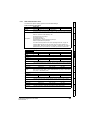
0x6040 Controlword
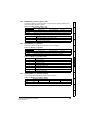
Table 7.1 Controlword
0x6040
Controlword
Access: RW
Range: 0 to 65535
Description:
15
14
Size: Unsigned 16
Unit: N/A
N/A
Provides the primary method of controlling the behavior of the drive.
13
12
11
10
9
8
7
ila
r
oms
h
fr
6
5
oms
4
3
2
1
0
hos
eo
qs
ev
so
LEGEND: ms = manufacturer-specific; r = reserved; oms = operation mode specific; h = halt;
fr = fault reset; hos = homing operation start; eo = enable operation; qs = quick stop; ev =
enable voltage; so = switch on
Table 7.2 Command coding
Bits of the controlword
Command
Bit 7
Bit 3
Bit 2
Bit 1
Shutdown
0
X
1
1
0
Switch on
0
0
1
1
1
0
1
1
1
1
Disable voltage
0
X
X
0
X
0
X
0
1
X
0
0
1
1
1
Enable operation
0
1
1
1
1
X
X
X
X
Fault reset
Diagnostics
Quick stop
Disable operation
Menus
Switch on + enable
operation
Advanced
features
Bit 0
Drive profile (CiA402)
support
Reserved
Protocols
Default:
Getting started
This provides the primary method of controlling the behavior of the drive e.g. enabling,
disabling, resetting, etc. Table 7.1 describes the format of the control word. The
individual bits are used in combinations (see Table 7.2) to sequence the drive through
the state machine described in Figure .
Electrical
installation
7.1
•
Glossary of
terms
NOTE: Automatic transition to Enable operation state after executing SWITCHED ON state
functionality.
Index
Unidrive M SI-EtherCAT User Guide
Issue Number: 1
33
7.2
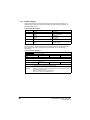
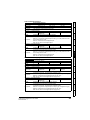
0x6041 Statusword
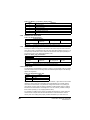
This provides feedback about the current operating state of the drive. Table 7.4
describes the format of the status word and illustrates how the individual statusword bits
are combined to represent the current state of the drive.
Table 7.3 Statusword
0x6041
Statusword
Access: RW
Range: 0 to 65535
Size: Unsigned 16
Unit: N/A
Default:
N/A
Description:
This provides feedback about the current operating state of the drive.
Table 7.4 Statusword bit functions
15
14
13
ms
12
11
10
9
8
7
6
5
4
3
2
1
0
ha
ila
tr
rm
ms
w
sod
qs
ve
f
oe
so
rtso
LEGEND: ms = manufacturer-specific; ha = homing attained; oms = operation mode
specific; ila = internal limit active; tr = target reached; rm = remote; w = warning; sod =
switch on disabled; qs = quick stop; ve = voltage enabled; f = fault; oe = operation
enabled; so = switched on; rtso = ready to switch on
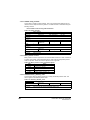
Table 7.5 State coding
Statusword
7.3
7.3.1
State
xxxx xxxx x0xx 0000b
Not ready to switch on
xxxx xxxx x1xx 0000b
Switch on disabled
xxxx xxxx x01x 0001b
Ready to switch on
xxxx xxxx x01x 0011b
Switched on
xxxx xxxx x01x 0111b
Operation enabled
xxxx xxxx x00x 0111b
Quick stop active
xxxx xxxx x0xx 1111b
Fault reaction active
xxxx xxxx x0xx 1000b
Fault
Common profile features
Sequencing control
These are the supported objects used to control the drive:
Table 7.6 Sequencing control supported objects
Index
34
Name
6040
Controlword
6041
Statusword
605B
shutdown_option_code
605C
disable_operation_option_code
605A
quick_stop_option_code
605D
halt_option_code
605E
fault_reaction_option_code
6060
modes_of_operation
6061
modes_of_operation_display
6080
max_motor_speed
6084
profile_deceleration
6085
quick_stop_deceleration
6502
supported_drive_modes
Unidrive M SI-EtherCAT User Guide
Issue Number: 1
Electrical
installation
Getting started
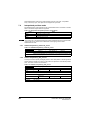
The SI-EtherCAT master device must be in the operational state before the state
machine can move from the ‘SWITCH ON DISABLED’ state to the ‘READY TO
SWITCH ON’ state. If the master leaves the operational state while the state machine is
in the ‘SWITCH ON’, ‘OPERATION ENABLE’ , ‘QUICK STOP ACTIVE’ or ‘READY TO
SWITCH ON’ state then the option will transition to the ‘SWITCH ON DISABLED’ state.
This implies that the drive will be inhibited and the motor will coast.
Mechanical
installation
When in the ‘OPERATION ENABLED’ or ‘QUICK STOP ACTIVE’ states it is not
possible to change the mode_of_operation object. This is to ensure that the motor is
stopped before changing the operation mode.
Introduction
When in the ‘QUICK STOP ACTIVE’ state, the currently selected mode of operation
indicates how a quick stop function should be handled. When the drive is stopped, and
the Quick stop option code doesn’t indicate that the state should remain at ‘QUICK
STOP ACTIVE’, the state will move to ‘SWITCH ON DISABLED’.
Safety
information
The behavior of the sequencing control is shown in Figure . This state machine
indicates how the drive will be controlled. For clarity the Statusword is abbreviated to
‘SW’ in the diagram.
Protocols
Drive profile (CiA402)
support
Advanced
features
Menus
Diagnostics
Glossary of
terms
Index
Unidrive M SI-EtherCAT User Guide
Issue Number: 1
35
Figure 7-1 CoE state machine diagram
(Any Drive Trip)
Start
14
Fault Reaction Active
Profile SW& 0xFFB0 | 0x000F
13
0
Drive not tripped
Fault Reaction
Complete
Fault Reset
Fault
Profile SW& 0xFFB0 | 0x000F
Inhibit drive
15
Not Ready To Switch On
Profile SW & 0xFFB0
Drive Tripped?
No
1
Pr 10.002=0
Yes
Switch On Disabled
Profile SW & 0xFFB0 | 0x0040
Inhibit drive
2
Shutdown
7
Ready To Switch On
Profile SW& 0xFF90 | 0x0021
Inhibit drive
Disable voltage
3
Disable voltage
Shutdown
Switch On
6
10
Switched On
Profile SW& 0xFF90 | 0x0023
Set drive Rdy state
Disabling
operation
Shutdown
4
Start disable
operation
(mode
specific)
Enable Operation
No
5
9
Disable operation
Operation Enabled
Profile SW& 0xFF90 | 0x0027
Set drive run state
8
16 Quick Stop
Start quick stop
(mode specific)
Enable operation
Quick Stop Active
Profile SW& 0xFF90 | 0x0007
11
Drive stopped?
Yes
Stay in Quick
Stop state?
36
12
Unidrive M SI-EtherCAT User Guide
Issue Number: 1
Transition
Event(s)
Safety
information
Table 7.7 CoE state machine transition and events
Action(s)
Automatic transition
Communication shall be activated
2
Shutdown command from control device
or local signal
None
3
Switch on command received from control Power section shall be switched on if not
device or local signal
already switched on
4
Enable operation command received from Drive function shall be enabled and clear
control device or local signal
all internal set-points
5
Disable operation command received from
Drive function shall be disabled
control device or local signal
6
The high-power shall be switched off
Shutdown command received from control immediately, and the motor shall be free to
device or local signal
rotate if not braked; additional action
depends on the shutdown option code
7
Quick stop or disable voltage command
from control device or local signal
None
8
Shutdown command from control device
or local signal
The high-power shall be switched off
immediately if possible, and the motor
shall be free to rotate if not braked
9
Disable voltage command from control
device or local signal
The high-power shall be switched off
immediately if possible, and the motor
shall be free to rotate if not braked
10
Disable voltage or quick stop command
from control device or local signal
The high-power shall be switched off
immediately if possible, and the motor
shall be free to rotate if not braked
11
Quick stop command from control device
or local signal
The quick stop function shall be started
12
Automatic transition when the quick stop
function is completed and quick stop
option code 1, 2, 3 or 4 disable voltage
The power section shall be switched off
command received from control device
(dependant on the quick stop option code)
13
Fault signal
The configure fault reaction function shall
be executed
14
Automatic transition
The drive function shall be disabled; the
high-power may be switched off
15
Fault reset command from control device
or local signal
A reset of the fault condition is carried out,
if no fault exists currently on the drive
device; after leaving the Fault state, the
Fault reset bit in the controlword shall be
cleared by the control device
16
Enable operation command from control
device, if the quick stop option code is 5,
6, 7 or 8
The drive function shall be enabled
Getting started
1
Electrical
installation
Drive device self-test and/or self
Initialization shall be performed
Mechanical
installation
Automatic transition after power-on or
reset application
Introduction
0
Protocols
Drive profile (CiA402)
support
Advanced
features
Menus
Diagnostics
Glossary of
terms
Index
Unidrive M SI-EtherCAT User Guide
Issue Number: 1
37
7.3.2
0x605A Quick stop option code
This object indicates what action is performed when the quick stop function is executed.
The slow down ramp is the deceleration value of the used mode of operations.
Table 7.8 Quick_stop_option_code
0x605A
Quick_stop_option_code
Access: RW
Range: 0 to 6
Size: Unsigned 16
Unit: N/A
Default:
2
Description:
Specifies what action is performed in the event of a quick stop function. See
Table 7.7 CoE state machine transition and events on page 37 for more
information.
Table 7.9 Quick stop value definitions
Value
7.3.3
Definition
0
Disable drive function
1
Slow down on slow down ramp and transit into Switch on disabled
2
Slow down on quick stop ramp and transit into Switch on disabled
5
Slow down on slow down ramp and stay in Quick stop active
6
Slow down on quick stop ramp and stay in Quick stop active
0x605B Shutdown_option_code
This object is used to control what action is performed if there is a transition from the
Operation Enabled state to the Ready To Switch On state.
Table 7.10 Shutdown_option_code
0x605B
Shutdown_option_code
Access: RW
Range: 0 to 1
Size: Unsigned 16
Unit: N/A
Default:
N/A
Description:
Used to control what action is performed if there is a transition from the Operation
Enabled state to the Ready To Switch On state.
Table 7.11 Shutdown_option_code values
Value
7.3.4
Definition
0
Disable drive function (switch off the drive power stage)
1
Slow down with slow down ramp; disable the drive function
0x605C Disable_operation_option_code
Disable drive function (switch off the drive power stage).
This object is used to control what action is performed if there is a transition from the
‘Operation Enabled’ state to the ‘Switched On’ state.
Table 7.12 Disabled_operation_option_code
0x605C
Disable_operation_option_code
Access: RW
Range: 0 to 1
Size: Unsigned 16
Unit: N/A
Default:
N/A
Description:
This object is used to control what action is performed if there is a transition from
the Operation Enabled state to the Switched On state.
Table 7.13 Disable_operation_option_code values
Value
38
Definition
0
Disable drive function (switch off the drive power stage)
1
Slow down with slow down ramp; disable the drive function
Unidrive M SI-EtherCAT User Guide
Issue Number: 1
0x605E Fault_reaction_option_code
This object is used to control what action is performed when a fault is detected. This
object is ignored if the drive is tripped.
Table 7.14 Fault_reaction_option_code
Introduction
0x605E
Fault_reaction_option_code
Access: RW
Range: 0 to 2
Size: Unsigned 16
Unit: N/A
N/A
Description:
This object is used to control what action is performed when a fault is detected.
Table 7.15 Fault_reaction_option_code values
Disable drive function, motor is free to rotate
1
Slow down on slow down ramp
2
Slow down on quick stop ramp
Electrical
installation
0x6060 Modes_of_operation
Getting started
7.3.6
Definition
0
This object is used to request a change in the mode of operation.
Table 7.16 Modes_of_operation
0x6060
Modes_of_operation
Access: RW
Range: 0 to 8
Size: Unsigned 8
Unit: N/A
2
Description:
This object is used to request a change in the mode of operation.
Protocols
Default:
Definition
0
No mode change
2
vl velocity mode
4
Profile torque mode
6
Homing mode
7
Interpolated position mode
8
Cyclic sync position mode
9
Cyclic sync velocity mode
10
Cyclic sync torque mode
Advanced
features
0x6061 Modes_of_operation_display
Menus
7.3.7
Drive profile (CiA402)
support
Table 7.17 Modes_of_operation values
Value
Mechanical
installation
Default:
Value
Safety
information
7.3.5
This read only object indicates the active mode of operation.
Table 7.18 Modes_of_operation_display
Modes_of_operation_display
Access: RO
Range: 0 to 8
Size: Unsigned 8
Default:
N/A
Description:
Used to provide the active mode of operation.
Diagnostics
0x6061
Unit: N/A
Glossary of
terms
Index
Unidrive M SI-EtherCAT User Guide
Issue Number: 1
39
Table 7.19 Modes_of_operation_display values
Value
7.3.8
Definition
0
No mode change
2
vl velocity mode
4
Profile torque mode
6
Homing mode
7
Interpolated position mode
8
Cyclic sync position mode
0x6084 Profile decleration
Table 7.20 Profile decleration
0x6084
Profile deceleration
Range:0 to
0xFFFFFFFF
Access: RW
7.3.9
Size: Unsigned 32
Default:
65536
Description:
Provides the deceleration ramp for the positioning modes
Unit: N/A
0x6085 Quick_stop_deceleration
This object is used to configure the deceleration rate used to stop the motor when the
quick stop function is activated and the quick stop code object (0x605A) is set to 2 or 6.
The quick stop deceleration is also used if the fault reaction code object (0x605E) is 2.
The value is given in user-defined acceleration units.
Table 7.21 Quick_stop_deceleration
0x6085
Quick_stop_deceleration
Sub-index 0
Range:0 to
0xFFFFFFFF
Access: RW
Size: Unsigned 32
Default:
2
Description:
Quick stop function for the positioning related modes.
Unit: N/A
7.3.10 Profile units
The SI-EtherCAT implementation provides a means to convert profile units into position
controller and drive units. All scaling values are standard profile objects. The following
objects are supported:
Table 7.22 Supported profile units
Index
Name
0x608F
position_encoder_resolution
0x6091
gear_ratio
0x6092
feed_constant
For positions, the scaling control includes a feed constant, a gear ratio and an encoder
revolution. These values are combined by the implementation into a simple scaling
numerator and denominator. It is possible to change these values non-cyclically (i.e.
using SDOs), in which case the scaling numerator and denominator and any position
limit values are recalculated in the background. It is not, however, possible to change
these values cyclically (i.e. by mapping PDOs to them).
For velocities, in addition to the position constants described above, these values are
combined into a simple numerator and denominator to scale velocities to internal
velocity units. This scaling also properly handles remainders (i.e. when used on a
40
Unidrive M SI-EtherCAT User Guide
Issue Number: 1
Table 7.23 Position_encoder_resolution
0x608F
Position_encoder_resolution
Access: RO
Default:
Range: N/A
Size: Unsigned 8
Unit: N/A
Range: 0 to
0xFFFFFFFF
Size: Unsigned 32
Unit: N/A
Size: Unsigned 32
Unit: N/A
Electrical
installation
Sub-index 0
2
Description:
Default:
1
Description:
Encoder increments
Getting started
Sub-index 1
Access: RO
Protocols
Sub-index 2
Range: 0 to
0xFFFFFFFF
Access: RO
1
Description:
Motor revolutions
7.3.12 0x6091 Gear_ratio
This object is used to apply scaling. When configured, appropriate user units can be
used to control the position of the shaft beyond a gearbox. The gear ratio is calculated
using the following formula:
Advanced
features
gear ratio = motor shaft revolutions / driving shaft revolutions
Table 7.24 Gear_ratio
0x6091
Gear_ratio
Access: RO
Range: N/A
Size: Unsigned 8
Unit: N/A
Range: 0 to
0xFFFFFFFF
Size: Unsigned 32
Unit: N/A
Size: Unsigned 32
Unit: N/A
Menus
Sub-index 0
Default:
Drive profile (CiA402)
support
Default:
Mechanical
installation
This read only object indicates the configured encoder increments per number of motor
revolutions. The information is read from the drive's encoder configuration.
Introduction
7.3.11 0x608F Position_encoder_resolution
Safety
information
reference or feedback, accumulate the remainder and add it to subsequent velocity
values, and when used with a limit, round up or down). It is possible to change these
values non-cyclically (i.e. using SDOs), in which case the scaling numerator and
denominator is recalculated in the background. It is also necessary to re-scale velocity
limit values with the new factor. It is not possible to change these values cyclically (i.e.
by mapping PDOs to them).
2
Description:
Diagnostics
Sub-index 1
Access: RW
1
Description:
Motor revolutions
Glossary of
terms
Default:
Sub-index 2
Range: 0 to
0xFFFFFFFF
Access: RW
1
Description:
Shaft revolutions
Unidrive M SI-EtherCAT User Guide
Issue Number: 1
Index
Default:
41
7.3.13 0x6092 Feed_constant
This is used to configure a feed constant. This is the measurement distance per one
revolution of the output shaft of the gearbox. The feed constant is calculated using the
following formula:
feed constant = feed / driving shaft revolutions
Table 7.25 Feed_constant
0x6092
Feed_constant
Sub-index 0
Access: RO
Default:
Range: N/A
Size: Unsigned 8
Unit: N/A
Range: 0 to
0xFFFFFFFF
Size: Unsigned 32
Unit: N/A
Range: 0 to
0xFFFFFFFF
Size: Unsigned 32
Unit: N/A
2
Description:
Sub-index 1
Access: RW
Default:
1
Description:
Feed
Sub-index 2
Access: RW
Default:
1
Description:
Shaft revolutions
7.3.14 Basic position control
Basic position control is supported on the Unidrive M600 and above in RFC-A and RFCS modes. The position control described here is used under the interpolated position
mode of operation. Table 7.26 lists the objects that are supported:
Table 7.26 Basic position control supported objects
Index
Name
0x6062
position_demand_value
0x6065
following_error_window
0x6067
position_window
0x60F4
following_error_actual_value
0x60FB
position_control_parameter_set
7.3.15 0x6062 Position_demand_value
This read only object is used to provide the currently demanded position value. The
value is given in user defined position units.
Table 7.27 Position_demand_value
0x6062
Position_demand_value
Range: 0 to
0xFFFFFFFF
Access: RO
42
Size: signed 32
Default:
N/A
Description:
Used to provide the currently demanded position value.
Unit: N/A
Unidrive M SI-EtherCAT User Guide
Issue Number: 1
This read only object provides the actual value of the position feedback device. The
value is given in internal units.
Table 7.28 Position_actual_value
Introduction
0x6064
Position_actual_value
Range: 0 to
0xFFFFFFFF
Access: RO
Size: signed 32
Safety
information
7.3.16 0x6064 Position_actual_value
Unit: N/A
N/A
Description:
This read only object provides the actual value of the position feedback device.
The value is given in internal units.
Mechanical
installation
Default:
7.3.17 0x6080 Max motor speed
Description:
Max motor speed
Range: 0 to 0xFFFFFFFF Size: Unsigned 32
Unit: rpm
3000
This object indicates the configured maximum allowed speed for the motor in either
direction. It is used to protect the motor and changing the value of this object will
also change Pr 1.06. The value is given in rotations per minute (rpm).
This read only object provides the actual value of the following error. The value is given
in user-defined position units.
0x60F4
Drive profile (CiA402)
support
Table 7.30 Following_error actual_value
Following_error actual_value
Range: 0 to
0xFFFFFFFF
Access: RO
Size: signed 32
Unit: N/A
Default:
N/A
Description:
This read only object provides the actual value of the following error.
Advanced
features
7.3.19 0x60FB Position_control_parameter_set object
Table 7.31 Position_control_parameter_set object
0x60FB
Protocols
7.3.18 0x60F4 Following_error_actual_value
Getting started
0x6080
Sub-index 0
Access: RW
Default:
Electrical
installation
Table 7.29 Max motor speed
Position_control_parameter_set
Sub-index 0
Range: N/A
Size: Unsigned 8
Default:
2
Description:
The number of control loop parameters.
Menus
Access: RO
Unit: N/A
Access: RW
Range: 0 to 65535
Size: Unsigned 16
Default:
2500
Description:
The position controller proportional gain.
Unit: 0.01 rad/s/rad
Glossary of
terms
Sub-index 2
Access: RW
Range: 0 to 65535
Size: Unsigned 16
Default:
1000 (i.e. a gain of 1)
Description:
The position controller speed feed forward gain.
Unit: 1 / 1000
Index
The APC position controller kernel is used by the basic internal position control.
The position_demand_value object contains the value supplied by either the
Unidrive M SI-EtherCAT User Guide
Issue Number: 1
Diagnostics
Sub-index 1
43
interpolated position mode or the profile position mode (in user units). It is updated
every control loop cycle. This object can be mapped as cyclic data.
7.4
Interpolated position mode
Interpolated position mode operates on the Unidrive M600 in RFC-A and RFC-s modes.
Table 7.32 lists the objects that are supported:
Table 7.32 Supported Interpolated position mode objects
Index
NOTE
7.4.1
Name
0x60C0
interpolation_submode_select
0x60C1
interpolation_data_record
0x60C2
interpolation_time_period
When using one of the CiA402 positioning modes, Distributed Clocks must be enabled.
Failure to do so may result in the SI-EtherCAT module going into the SAFEOPERATIONAL state.
0x60C0 Interpolation_sub-mode_select
Table 7.33 0x60C0 Interpolation_sub-mode_select
0x60C0
Interpolation_sub-mode_select
Access: RW
7.4.2
Range: 0
Size: Signed 16
Unit: N/A
Default:
0 (Linear interpolation)
Description:
Specifies the interpolation type. At present the only supported Interpolation SubMode is ‘Linear Interpolation’.
0x60C1 Interpolation_data_record
This object is used to specify the target position. Linear interpolation is used to generate
position demand values every 250 µs. The position is specified in user-defined position
units. The value is written into sub-index 1.
Table 7.34 0x60C1 Interpolation_data_record
0x60C1
Interpolation_data_record
Sub-index 0
Access: RO
Range: N/A
Size: Unsigned 8
Default:
1
Description:
This object is used to specify the target position.
Unit: N/A
Sub-index 1
Range: 0 to
0xFFFFFFFF
Access: RW
44
Default:
N/A
Description:
The set-point.
Size: Unsigned 32
Unit: N/A
Unidrive M SI-EtherCAT User Guide
Issue Number: 1
0x60C2 Interpolation_time_period
Safety
information
7.4.3
Table 7.35 Interpolation_time_period
0x60C2
Interpolation_time_period
Sub-index 0
Range: N/A
Size: Unsigned 8
Default:
2
Description:
The number of the last sub-index in this object.
Introduction
Access: RO
Unit: N/A
Access: RW
Range: 0 to 255
Size: Unsigned 8
Unit: (sub-index 2)
250 (units are dependant on the value in sub-index 2)
Description:
The number of time units between interpolator re-starts. A time unit is defined by
sub-index 2. The interpolator time period value is checked to ensure that it is
valid. Valid values are 250 µs, 500 µs or any multiple of 1ms. An attempt to write
other values results in an SDO Abort code.
Sub-index 2
Access: RW
Range: -6 to 0
Size: Signed 8
Unit: N/A
-6 (a time unit of 1 µs)
Description:
This specifies the time unit for the interpolation time period. Sub-index 2
specifies the unit exponent. The time unit, therefore, is 10 (sub-index 2). The
range of values allows for the shortest time unit to be 1 µs, and the longest to be
1 s.
Description
1 second
-1
0.1 of a second
-2
0.01 of a second
-3
0.001 of a second
0.0001 of a second
-5
0.00001 of a second
-6
0.000001 of a second
Glossary of
terms
The input buffer has a maximum size of 1 data record, and a data record contains one
position in profile-defined units. The buffer is a FIFO buffer. On each interpolator time
period, a value is read from this buffer. The correct number of data points for a specific
interpolation mode are stored internally. When a new position command is loaded in, the
oldest position command in the data set is discarded.
Diagnostics
The time period is checked to ensure that it is an integer multiple of the control loop
cycle time. Only linear interpolation is currently supported, this type inserts a delay of
one interpolation time period.
Menus
-4
Advanced
features
0
Drive profile (CiA402)
support
Table 7.36 Interpolation time period units
Protocols
The implementation of interpolated position mode allows synchronous operation only,
where a fixed, common interpolation interval is defined. The time specified must always
be an integer multiple of the control loop cycle time. The time period index has a
minimum value of -6 (i.e. the smallest time unit will be microseconds), see Table 7.36 for
more information.
Getting started
Default:
Value in 0x60C2, sub-index 2
Electrical
installation
Default:
Mechanical
installation
Sub-index 1
Index
Unidrive M SI-EtherCAT User Guide
Issue Number: 1
45
7.5
vl velocity mode
Velocity mode is supported on Unidrive M200 and above. It is not, however, supported
in regen modes.
When the drive is in either of the RFC-A or RFC-S operating modes the scaled velocity
is written to the drive internal speed shortcut. When the drive is in an open-loop
operating mode the scaled velocity is written to the user preset reference parameter
(Pr 1.21). Table 7.37 lists the objects that are supported:
Table 7.37 vl velocity mode supported objects
Index
7.5.1
Name
0x6042
vl_target_velocity
0x6043
vl_velocity_demand
0x6044
vl_velocity_actual_value
0x6046
vl_velocity_min_max_amount
0x6048
vl_velocity_accleration
0x6049
vl_velocity_deceleration
0x604A
vl_velocity_quick_stop
0x604B
vl_setpoint_factor
0x604C
vl_dimension_factor
0x6042 vl_target_velocity
This object is used to set the required velocity of the system. It is multiplied by the
vl_dimension_factor and the vl_setpoint_factor. The value is given in rpm, If the
vl_dimension_factor has the value of 1, otherwise the value is in user units. Positive
values indicate forward direction and negative values indicate reverse direction.
Table 7.38 vl_target_velocity
0x6042
vl_target_velocity
Range: -32768 to
+32767
Access: RW
7.5.2
Size: Signed 16
Default:
0
Description:
Used to set the required velocity of the system.
Unit: rpm
0x6043 vl_velocity_demand
This read only object provides the instantaneous velocity demand generated by the
drive ramp function. The value is given in rpm if the vl_dimension_factor and the
vl_setpoint_factor have the value 1, otherwise the value is in user units. Positive values
indicate forward direction and negative values indicate reverse direction.
Table 7.39 vl_velocity_demand
0x6043
vl_velocity_demand
Range: -32768 to
+32767
Access: RO
46
Size: Signed 16
Unit: rpm
Default:
0
Description:
Provides the instantaneous velocity demand generated by the drive ramp
function.
Unidrive M SI-EtherCAT User Guide
Issue Number: 1
0x6044 vl_velocity_actual_value
This read only object provides the velocity at the motor spindle or load. In a closed loop
system this is determined from the motor feedback device and in an open loop system it
is a copy of vl_velocity_demand.
0x6044
vl_velocity_actual_value
Range: -32768 to
+32767
Access: RO
Size: Signed 16
Default:
0
Description:
Provides the velocity at the motor spindle or load.
Unit: N/A
Electrical
installation
7.5.4
Mechanical
installation
Table 7.40 velocity_actual_value
0x6046 vl_velocity_min_max_amount
The value is given in rpm if the vl_dimension_factor has the value of 1, otherwise the
value is in user units.
Table 7.41 vl_velocity_min_max_amount
Protocols
vl_velocity_min_max_amount
Sub-index 0
Access: RO
Range: N/A
Size: Unsigned 8
2
Description:
The number of sub-indices in this object.
Unit: N/A
Sub-index 1
Range: 0 to
0xFFFFFFFF
Access: RW
Size: Unsigned 32
Unit: rpm
0
Description:
Used to configure the minimum velocity (both in the forward and reverse
direction) that the system can operate at. Writing to this sub index will overwrite
vl_velocity_min positive and vl_velocity_min negative.
Sub-index 2
Range: 0 to
0xFFFFFFFF
Access: RW
Unit: rpm
Default:
2147483647
Description:
Used to configure the maximum velocity (both in the forward and reverse
direction) that the system can operate at. Writing to this sub index will overwrite
vl_velocity_max positive and vl_velocity_max negative.
Diagnostics
0x6048 vl_velocity_acceleration
Menus
7.5.5
Size: Unsigned 32
Advanced
features
Default:
Drive profile (CiA402)
support
Default:
Getting started
This object is used to configure the minimum and maximum velocity.
0x6046
Introduction
The value is given in rpm if the vl_dimension_factor has the value of 1, otherwise the
value is in user units. Positive values indicate forward direction and negative values
indicate reverse direction.
Safety
information
7.5.3
This object is used to configure the delta speed and delta time of the slope of the
acceleration ramp.
vl_velocity_acceleration = delta speed / delta time
Glossary of
terms
Example: To ramp to 1000 rpm in 5 s, possible values for delta speed and delta time
are 10000 and 50 respectively.
Index
Unidrive M SI-EtherCAT User Guide
Issue Number: 1
47
Table 7.42 0x6048 vl_velocity_acceleration
0x6048
vl_velocity_acceleration
Sub-index 0
Access: RO
Range: N/A
Size: Unsigned 8
Default:
2
Description:
The number of sub-indices in this object.
Unit: N/A
Sub-index 1
Range: 0 to
0xFFFFFFFF
Access: RW
Size: Unsigned 32
Unit: rpm
Default:
1000
Description:
The value of delta speed is given in rpm if the vl_dimension_factor and the
vl_setpoint_factor have the value 1, otherwise the value is in user units.
Sub-index 2
Access: RW
7.5.6
Range: 0 to 65535
Size: Unsigned 16
Default:
2
Description:
The value of delta time is given in seconds.
Unit: s
0x6049 vl_velocity_deceleration
This object is used to configure the delta speed and delta time of the slope of the
deceleration ramp.
Example: To decelerate by 800 rpm in 10 s, possible values for delta speed and delta
time are 8000 and 100 respectively.
vl_velocity_deceleration = delta speed / delta time
Table 7.43 0x6049 vl_velocity_deceleration
0x6049
vl_velocity_deceleration
Sub-index 0
Access: RO
Range: N/A
Size: Unsigned 8
Default:
2
Description:
The number of sub-indices in this object.
Unit: N/A
Sub-index 1
Range: 0 to
0xFFFFFFFF
Access: RW
Size: Unsigned 32
Unit: rpm
Default:
1000
Description:
The value of delta speed is given in rpm if the vl_dimension_factor and the
vl_setpoint_factor have the value 1, otherwise the value is in user units.
Sub-index 2
Access: RW
7.5.7
Range: 0 to 65535
Size: Unsigned 16
Default:
2
Description:
The value of delta time is given in seconds.
Unit: s
0x604A vl_velocity_quick_stop
This object is used to configure the delta speed and delta time of the slope of the
deceleration ramp for quick stop.
Example: To decelerate by 800 rpm in 10 s, possible values for delta speed and delta
time are 8000 and 100 respectively.
vl velocity deceleration = delta speed / delta time
48
Unidrive M SI-EtherCAT User Guide
Issue Number: 1
0x604A
Safety
information
Table 7.44 0x604A vl_velocity_quick_stop
vl_velocity_quick_stop
Sub-index 0
Access: RO
Range: N/A
Size: Unsigned 8
2
Description:
The number of sub-indices in this object.
Unit: N/A
Introduction
Default:
Sub-index 1
Size: Unsigned 32
Unit: rpm
Default:
1000
Description:
The value of delta speed is given in rpm if the vl_dimension_factor and the
vl_setpoint_factor have the value 1, otherwise the value is in user units.
Mechanical
installation
Range: 0 to
0xFFFFFFFF
Access: RW
Access: RW
Size: Unsigned 16
2
Description:
The value of delta time is given in seconds.
Unit: s
0x604B vl_setpoint_factor
Table 7.45 0x604B vl_setpoint_factor
vl_setpoint_factor
Drive profile (CiA402)
support
0x604B
Sub-index 0
Access: RO
Range: N/A
Size: Unsigned 8
Default:
2
Description:
The number of sub-indices in this object.
Unit: N/A
Sub-index 1
Size: Signed 16
Default:
1
Description:
vl_setpoint_factor numerator (a value of 0 is not valid).
Unit: N/A
Advanced
features
Range: -32768 to
+32767
Access: RW
Protocols
This object is used to configure the numerator and denominator of the
vl_setpoint_factor. The vl_setpoint_factor modifies the resolution or directing range of
the specified setpoint. It does not influence the velocity limit function and the ramp
function. A value of 0 must not be used.
Getting started
7.5.8
Range: 0 to 65535
Default:
Electrical
installation
Sub-index 2
Sub-index 2
Default:
1
Description:
vl_setpoint_factor denominator (a value of 0 is not valid).
Unit: N/A
0x604C vl_dimension_factor
Velocity [user-defined unit] / Dimension factor [rpm/user-defined unit] = Velocity [rpm]
Unidrive M SI-EtherCAT User Guide
Issue Number: 1
49
Index
Calculating the vl_dimension_factor:
Every user-specific velocity consists of a specific unit referred to as a specific unit of
time (e.g. 1/s, bottles/min, m/s,...). The purpose of the vl_dimension_factor is to convert
this specific unit to the revolutions/minute unit. A value of 0 must not be used.
Glossary of
terms
This object is used to configure the numerator and denominator of the
vl_dimension_factor. The vl_dimension_factor is used to scale the user units so that
they can be used in a way that relates to the specific application.
Diagnostics
7.5.9
Size: Signed 16
Menus
Range: -32768 to
+32767
Access: RW
Table 7.46 0x604C vl_dimension_factor
0x604C
vl_dimension_factor
Sub-index 0
Access: RO
Range: N/A
Size: Unsigned 8
Default:
2
Description:
The number of sub-indices in this object.
Unit: N/A
Sub-index 1
Range: -32768 to
+32767
Access: RW
Size: Signed 16
Default:
1
Description:
vl_dimension_factor numerator (a value of 0 is not valid).
Unit: N/A
Sub-index 2
Range: -32768 to
+32767
Access: RW
Size: Signed 16
Unit: N/A
Default:
1
Description:
vl_dimension_factor denominator (a value of 0 is not valid).
The vl_target_velocity object is re-read every new profile cycle. It is scaled to
appropriate units using the vl_dimension_factor and vl_setpoint_factor objects and then
written to the drive preset reference 1 parameter (Pr 01.021).
The object vl_velocity_min_max is handled every profile cycle. The vl_target_velocity is
limited according to the values set in the object vl_velocity_min_max, which is read
every profile cycle. The object vl_velocity_min_max_amount is mapped to
vl_velocity_min_max.
The value of the vl_velocity_demand object is calculated in the background. The option
reads the value of parameter Pr 02.001 (post ramp reference), scaled from RPM to user
units using vl_dimension_factor and vl_setpoint_factor, and writes the value to the
vl_velocity_demand object.
On a closed-loop drive, the speed feedback is read from the drive internally every profile
cycle, scaled to the same units as vl_target_velocity and written to the
vl_velocity_actual_value object. On an open-loop drive, the estimated motor speed is
read from Pr 05.004 (motor RPM) in the background, scaled to the units of
vl_target_velocity and written to the vl_velocity_actual_value object.
The vl_velocity_acceleration and vl_velocity_deceleration objects are handled in the
background. They are read, scaled to drive acceleration units (depending on the drive
operating mode), and written to the drive acceleration rate and deceleration rate
presets. In addition, if the drive acceleration rate preset is changed, the
vl_velocity_acceleration object is updated, and if the drive deceleration rate preset is
changed (Pr 02.021), the vl_velocity_deceleration object is updated.
50
Unidrive M SI-EtherCAT User Guide
Issue Number: 1
Homing mode
This section describes the method by which a drive seeks the home position (also
called, the datum, reference point or zero point).
Figure 7-2 Homing mode function
Controlword (6040h)
Homing Speeds (6099h)
Homing
method
Position demand value (6062h)
Home offset (607C h)
There are two sources of homing signal available: These are the home switch and the
index pulse from an encoder.
Drive profile (CiA402)
support
An encircled number in Figure 7-3 to Figure 7-8 indicates the code for selection of this
homing position. The direction of movement is also indicated.
Protocols
By choosing a homing method the following behavior is determined: The homing signal
(home switch), the direction of actuation and where appropriate the position of the index
pulse.
Getting started
Homing acceleration (609A h)
Electrical
installation
Statusword (6041h)
Homing method (6098h)
Mechanical
installation
There is no output data except for those bits in the statusword, which return the status or
result of the homing process and the demand to the position control loops.
Introduction
Figure 7-2 shows the defined input objects as well as the output objects. The user may
specify the speeds, acceleration and the method of homing. There is a further object
named home offset, which allows the user to displace zero in the user's coordinate
system from the home position.
Safety
information
7.6
Advanced
features
Menus
Diagnostics
Glossary of
terms
Index
Unidrive M SI-EtherCAT User Guide
Issue Number: 1
51
7.6.1
General homing definitions
Method 3 and 4: Homing on positive home switch and index pulse
Using these methods as shown in Figure 7-3 Homing on positive home switch and
index pulse on page 52, the initial direction of movement shall be dependent on the
state of the home switch.
The home position shall be at the index pulse either to the left or the right of the point
where the home switch changes state. If the initial position is sited so that the direction
of movement shall reverse during homing, the point at which the reversal takes place is
anywhere after a change of state of the home switch.
Figure 7-3 Homing on positive home switch and index pulse
Method 5 and 6: Homing on negative home switch and index pulse
Using these methods as shown in Figure 7-4 Homing on negative home switch and
index pulse on page 52, the initial direction of movement shall be dependent on the
state of the home switch. The home position shall be at the index pulse either to the left
or the right of the point where the home switch changes state. If the initial position is
sited so that the direction of movement shall reverse during homing, the point at which
the reversal takes place is anywhere after a change of state of the home switch.
Figure 7-4 Homing on negative home switch and index pulse
52
Unidrive M SI-EtherCAT User Guide
Issue Number: 1
Introduction
Mechanical
installation
Electrical
installation
Figure 7-5 Homing on home switch and index pulse - positive initial motion
Safety
information
Method 7 to 14: Homing on home switch and index pulse
These methods use a home switch, which is active over only a portion of the travel; in
effect the switch has a 'momentary' action as the axis's position sweeps past the switch.
Using the methods 7 to 10, the initial direction of movement shall be to the right, and
using methods 11 to 14 the initial direction of movement shall be to the left except if the
home switch is active at the start of the motion. In this case the initial direction of motion
shall be dependent on the edge being sought. The home position shall be at the index
pulse on either side of the rising or falling edges of the home switch, as shown in Figure
7-5 Homing on home switch and index pulse - positive initial motion on page 53 and
Figure 7-6 Homing on home switch and index pulse - negative initial motion on page
53. If the initial direction of movement leads away from the home switch, the drive shall
reverse on encountering the relevant limit switch.
Getting started
Protocols
Drive profile (CiA402)
support
Advanced
features
Figure 7-6 Homing on home switch and index pulse - negative initial motion
Menus
Diagnostics
Glossary of
terms
Index
Unidrive M SI-EtherCAT User Guide
Issue Number: 1
53
Method 15 and 16: Reserved
These methods are reserved.
Method 17 to 30: Homing without index pulse
These methods are similar to methods 3 to 14 except that the home position is not
dependent on the index pulse but only dependent on the relevant home transitions. For
example methods 19 and 20 are similar to methods 3 and 4 as shown in Figure 77 Homing on positive home switch on page 54.
Figure 7-7 Homing on positive home switch
Method 31 and 32: Reserved
These methods are reserved.
Method 33 and 34: Homing on index pulse
Using these methods, the direction of homing is negative or positive respectively. The
home position shall be at the index pulse found in the selected direction as shown in
Figure 7-8 Homing on index pulse on page 54.
Figure 7-8 Homing on index pulse
Method 35: Homing on index pulse
In this method, the current position shall be taken to be the home position. This method
does not require the drive device to be in operational enabled state.
Use of controlword and statusword
The homing mode uses some bits of the controlword and the statusword for modespecific purposes. Table 7.47 Definition of bits 4 and 8 of the controlword on page 55
defines the values for bits 4 and 8 of the controlword.
54
Unidrive M SI-EtherCAT User Guide
Issue Number: 1
Bit
4
0
Definition
Do not start homing procedure.
1
Start or continue homing procedure.
0
Enable bit 4.
1
Stop axis according to halt option code (0x605D).
Introduction
8
Value
Safety
information
Table 7.47 Definition of bits 4 and 8 of the controlword
0
Homing procedure is in progress.
Definition
0
1
Homing procedure is interrupted or not started.
1
0
Homing is attained, but target is not reached.
1
1
Homing procedure was completed successfully.
0
0
Homing error occurred, velocity is not 0.
0
1
Homing error occurred, velocity is 0.
1
X
Reserved.
Getting started
Bit 10
0
Electrical
installation
7.6.2
Bit 12
Mechanical
installation
Table 7.48 Definition of bits 10 and 12 of the statusword
Homing mode object definitions
0x3003 Homing source
Protocols
This object indicates the configured source of the homing switch used during the
homing procedure. Table 7.49 Homing source on page 55 specifies the object
description.
Drive profile (CiA402)
support
Table 7.49 Homing source
0x3003
Homing source object
Sub-index 0
Access: RO
Range: N/A
Size: 1 byte
Unit: N/A
Default: 2
Description: The number of the last sub-index in this object.
Access: RW
Range: 1 to 6
Size: 1 byte
Advanced
features
Sub-index 1
Unit: N/A
Default: 5
Menus
Description: The source of homing switch. This will specify the number of a drive digital input/
output; the selected DIO also needs to be configured as an input.
This value will be read when CiA402 homing operation mode is selected.
Sub-index 2
Access: RW
Range: 0 to 1
Size: 1 byte
Unit: N/A
Diagnostics
Default: 0
Glossary of
terms
Description: Freeze or marker source for homing; this value will be read when CiA402 homing
operation mode is selected. This will have a value as follows:
0 - Use the marker of the feedback source selected for position feedback (see object 0x3000)
1 - Use the F1 freeze of the selected feedback source (drive or numbered option module).
2 - Use the F2 freeze of the selected feedback source (drive or numbered option module).
The value of object 0x3001 will be ignored on drives which do not support position
feedback.
Index
Unidrive M SI-EtherCAT User Guide
Issue Number: 1
55
0x607C Home offset
This object indicates the configured difference between the zero position for the
application and the machine home position (found during homing). During homing the
machine home position is found and once the homing is completed, the zero position is
offset from the home position by adding the home offset to the home position. All
subsequent absolute moves shall be taken relative to this new zero position. This is
illustrated in Figure 7-9 Home offset definition on page 56. The value of this object shall
be given in user-defined position units. Negative values indicate the opposite direction.
Figure 7-9 Home offset definition
Zero
position
Home
position
Home offset
Table 7.50 Home offset
0x607C
Home offset
Access: RW
Range: 0 to 0xFFFFFFFF
Default:
0
Description:
Homing offset value.
Unit: User-defined
position units
Size: Signed 32
0x6098 Homing method
This object indicates the configured homing method that shall be used. Table
7.51 Homing method on page 56 specifies the object description, and Table
7.52 Homing method values on page 56 specifies the value ranges for this object.
Table 7.51 Homing method
0x6098
Homing method
Access: RW
Range: 0 - 35
Size: Unsigned 8
Default:
0
Description:
The homing method that shall be used.
Unit: N/A
Table 7.52 Homing method values
Value
Definition
0
No homing method assigned
3
Method 3 shall be used
to
56
34
Method 34 shall be used
35
Method 35 shall be used
Unidrive M SI-EtherCAT User Guide
Issue Number: 1
0x6099
Introduction
Table 7.53 Homing speeds
Homing speeds
Sub-index 0
Access: RO
Range: 2
Size: Signed 8
Unit: N/A
Mechanical
installation
Default: 2
Description: The number of the last sub-index in this object.
Sub-index 1
Access: RW
Range: 0 to 0xFFFFFFFF Size: Unsigned 32
Unit: N/A
Electrical
installation
Default: 0
Description: Speed during search for a switch.
Sub-index 2
Range: 0 to 0xFFFFFFFF Size: Unsigned 32
Unit: N/A
Default: 0
Description: Speed during search for a zero.
0x609A
Homing acceleration
Access: RW
Unit: User-defined
acceleration units
Default:
0
Description:
Indicates the configured acceleration and deceleration to be used during homing
operation.
Cyclic sync position mode
Cyclic sync position mode is supported on the Unidrive M600 and above in RFC-A and
RFC-S modes. It is not supported in open-loop or regen mode.
Index
Name
0x607A
target_position
0x60B1
velocity_offset
0x60C2
interpolation_time_period
Unidrive M SI-EtherCAT User Guide
Issue Number: 1
57
Index
Cyclic sync position mode provides linear interpolation which will always insert a delay
of one position command. The time specified must always be an integer multiple of the
control loop cycle time. The time period index has a minimum value of -6 (i.e. the
smallest time unit will be microseconds). The time period is checked to ensure that it an
integer multiple of the control loop cycle time.
Glossary of
terms
When using one of the CiA402 positioning modes, Distributed Clocks must be enabled.
Failure to do so may result in the SI-EtherCAT module going into the SAFEOPERATIONAL state.
Diagnostics
NOTE
Menus
Table 7.55 Cyclic sync position mode
Advanced
features
7.7
Range: 0 to 0xFFFFFFFF Size: Unsigned 32
Drive profile (CiA402)
support
Table 7.54 Homing acceleration
Protocols
0x609A Homing acceleration
This object indicates the configured acceleration and deceleration to be used during the
homing operation. The value shall be given in user-defined acceleration units. Table
7.54 Homing acceleration on page 57 specifies the object description.
Getting started
Access: RW
Safety
information
0x6099 Homing speeds
This object indicates the configured speeds used during the homing procedure. The
values shall be given in user-defined velocity units. Table 7.53 Homing speeds on page
57 specifies the object description.
A velocity feed forward will be calculated for the position controller. On each interpolator
time period, a value is read from the target_position object. The correct number of data
points for linear interpolation is stored internally. When a new target position is loaded
in, the oldest position command in the data set will be discarded.
7.7.1
0x607A Target_position
This object indicates the commanded position that the drive should move to in cyclic
sync position mode using the current settings of motion control parameters such as
velocity, acceleration, deceleration, motion profile type etc. The value of this object is
given in user-defined position units.
Table 7.56 Target position
0x607A
Target position
Range: 0 to
0xFFFFFFFF
Access: RW
Size: Signed
32
Unit: User-defined
position units
Default:
N/A
Description:
Indicates the command positions that the drive should move to in cyclic sync
position mode.
Table 7.57 Interpolation sub-mode select
0x60C0
Interpolation sub-mode select
Access: RW
Range: 0 to 0
Size: 2 bytes
Unit: N/A
Default:
0 (Linear Interpolation)
Description:
This will specify the interpolation type. The values have the following meanings:
0 = Linear Interpolation.
Table 7.58 Interpolation time period
0x60C2
Interpolation time period
Sub-index 0
Access: RO
Range: N/A
Size: 1 byte
Default:
2
Description:
The number of the last sub-index in this object.
Unit: N/A
Sub-index 1
Access: RW
Range: 0 to 255
Size: 1 byte
Unit: (sub-index 2)
Default:
250
Description:
The number of time units between interpolator restarts. A time unit is defined by
sub-index 2. The interpolator time period value will be checked to ensure that it is
valid. Valid values are 250 µs, 500 µs or any multiple of 1 ms. Selecting other
values will result in an error indication.
Sub-index 2
Access: RW
58
Range: -6 to 0
Size: 1 byte
Unit: N/A
Default:
-6 (A time unit of 1 µs)
Description:
This specifies the time unit for the interpolation time period. Sub-index 2
specifies the unit exponent. The time unit, therefore, is 10(sub-index 2). The range
of values allows for the shortest time unit to be 1 µs, and the longest to be 1s.
Unidrive M SI-EtherCAT User Guide
Issue Number: 1
Cyclic Synchronous Velocity Mode
Cyclic Synchronous Velocity mode will be supported on Unidrive M600 and above in
RFC-A and RFC-S operating modes.
The following objects will be supported:
Name
60C2
interpolation_time_period
60FF
target_velocity
Mechanical
installation
Index
The following objects will be supported:
Index
Name
target_torque
6073
max_current
6075
motor_rated_current
6077
torque_actual_value
60C2
Interpolation_time_period
Advanced
features
Menus
The target_torque object will be re-read every new control loop cycle; this torque value
will be limited by the max_current object (which is read in the background). This torque
demand will be scaled appropriately and written to the drive Torque Reference
(Pr 04.008); interpolation will be used to generate additional intermediate values if the
interpolation_time_period is greater than the interval at which the drive will read the
torque reference parameter. The drive Motor Rated Current (Pr 05.007 or the second
motor map equivalent) will be read in the background and written to the object
motor_rated_current, which will be read-only.
Drive profile (CiA402)
support
6071
Protocols
On Unidrive M600 and above, this profile will operate on the control loop cycle time,
using the drive's torque reference (which is read by the drive every 250 µs).
Getting started
Cyclic Synchronous Torque Mode
Cyclic Synchronous Torque Mode will be supported on Unidrive M600 and above.
Electrical
installation
The target_velocity object will be re-read every new profile cycle (as specified by the
interpolation_time_period. This velocity demand will be scaled appropriately and written
to the drive; interpolation will be used to generate additional intermediate values if the
interpolation_time_period is greater than the interval at which the drive will read the
hard speed reference parameter.
7.9
Introduction
On Unidrive M600 and above, this profile will operate on the control loop cycle time,
using the drive's AMC speed reference (which is read by the drive every 250 µs, and the
AMC will be configured to run in velocity mode).
Safety
information
7.8
Diagnostics
Glossary of
terms
Index
Unidrive M SI-EtherCAT User Guide
Issue Number: 1
59
7.10
Error Handling
The following objects will be provided to indicate an error condition:
Index
Name
1001
error_register
603F
error_code
0x1001
Error register
Access: RO
Range: 0 to 255
Unit: N/A
0
Description:
A non-zero value in this object indicates that an error has occurred. The bit(s) set
indicate the type of error present. The following bits will be supported:
0: Generic error
1: Current
2: Voltage
3: Temperature
When an error is indicated in this object, the particular error code will be
contained in object 0x603F (Error code).
0x603F
Error code
Access: RO
60
Size: 1 byte
Default:
Range: 0 toFFF
Size: 2 bytes
Unit: N/A
Default:
0
Description:
A non-zero value in this object indicates that an error has occurred. The value
will be one of the codes described in the Error code table below.
Unidrive M SI-EtherCAT User Guide
Issue Number: 1
Meaning
Corresponding drive trip code (if available)
Generic error
(Any trip code not elsewhere in table)
0x2300
Current, device output side
3 – OI ac
0x3130
Phase failure
32 – Phase Loss
98 - Out Phase Loss
0x2230
Short circuit/ground leakage
(device internal)
5 – PSU
9 – PSU 24V
92 - Snubber OI
0x3210
DC link over-voltage
2 – Over Volts
0x3230
Load error
38 - Low Load
0x4310
Excess temperature drive
21 – OHt Inverter
22 – OHt Power
23 – OHt Control
27 – OHt dc bus
101 - OHt Brake
0x5112
"Supply low voltage" and "U2 =
91 - User 24V
supply +24 V"
Power section
111 - Config P
220 - Power Data
223 - Rating Mismatch
0x5510
RAM
227 - Sub Array RAM Allocation
0x5530
31 – EEPROM Fail
Data storage (Non-volatile data
36 – User Save
memory)
37 – Power Down Save
226 - Soft Start
0x6010
Software reset (watchdog)
30 – Watchdog
0x6320
Parameter Error
199 - Destination
216 - Slot App Menu Crash
217 - App menu changed
0x7112
Brake chopper (over current
brake chopper)
4 – OI Brake
19 – Brake R Too Hot
0x7113
Protective circuit break
chopper
10 - Th Brake Res
0x7120
Motor
11 - Autotune 1
12 - Autotune 2
13 - Autotune 3
20 - Motor Too Hot
Glossary of
terms
94 - Rectifier set up
Contacts
Diagnostics
Input stages
0x5440
Menus
0x5430
Advanced
features
0x5400
Drive profile (CiA402)
support
Control device hardware
Protocols
0x5200
200 - Slot 1 Hardware Fault
203 - Slot 1 Not Fitted
204 - Slot 1 Different
205 - Slot 2 Hardware Fault
208 - Slot 2 Not Fitted
209 - Slot 2 Different
210 - Slot 3 Hardware Fault
213 - Slot 3 Not Fitted
214 - Slot 3 Different
250 - Slot 4 Hardware Fault
253 - Slot 4 Not Fitted
254 - Slot 4 Different
221 - Stored HF
Getting started
0xFFO1
Electrical
installation
0 – None
Mechanical
installation
Error reset / No error
Introduction
0x0000
Safety
information
Error code
Index
Unidrive M SI-EtherCAT User Guide
Issue Number: 1
61
Error code
Corresponding drive trip code (if available)
Motor error or commutation
malfunction
14 – Autotune 4
15 – Autotune 5
16 – Autotune 6
24 - Thermistor
25 - Th Short Circuit
33 - Resistance
0x7300
Sensor
17 - Autotune 7
162 to 163 – Encoder 12 to Encoder 13
176 – Name Plate
189 to 198 – Encoder 1 to Encoder 10
218 - Temp Feedback
0x7310
Speed
7 - Over speed
0x7500
Communication
90 - Power Comms
103 - Interconnect
Data storage (external)
174 - Card Slot
175 – Card Product
177 – Card Boot
178 – Card Busy
179 – Card Data Exists
180 – Card Option
181 – Card Read Only
182 – Card Error
183 – Card No Data
184 – Card Full
185 – Card Access
186 – Card Rating
187 – Card Drive Mode
188 – Card Compare
0x7122
0x7600
62
Meaning
Unidrive M SI-EtherCAT User Guide
Issue Number: 1
8.1
Distributed clocks
SI-EtherCAT supports Distributed clocks. This is the scheme used by EtherCAT to
accurately time synchronize slave devices. Position, speed and current control loops
can all be synchronized.
Time synchronization support
Index
63
Glossary of
terms
Unidrive M SI-EtherCAT User Guide
Issue Number: 1
Diagnostics
Command and feedback values which are handled cyclically will be read at defined
times in the cycle. Command values handled/used every cycle (operating mode or
control loop) will be cached from the object dictionary in the task immediately before the
drive critical update period. Any feedback values read during a cycle will be scaled as
appropriate in that cycle, cached, and then written to the object dictionary in the task
occurring immediately after the drive critical update period. Feedback values that
change internally between control loop cycles (but whose objects are only updated
every profile cycle) will be read from the last control loop cycle in the operating mode
cycle. PDO data will be copied to and from the object dictionary (from and to the sync
manager memory areas) in the drive critical update period at the beginning of every
operating mode cycle. PDO data mapped to drive parameters (but not parameters
Menus
Any operating mode cycle will be restarted every operating mode cycle time, in phase
with the synchronisation events; if synchronization is enabled, the operating mode will
not start execution until the first synchronization event occurs. If synchronization is lost,
an error will be indicated, and the standard EtherCAT action for this event will occur.
Advanced
features
The drive motion and speed loops are executed every 250 µs on Unidrive M600 and
above, which coincides with OPT_SYNC edges. This will be referred to as the control
loop cycle. Synchronization must be enabled if the Cyclic Sync or Interpolated Position
modes are used; an error will be indicated if this is not the case. These modes have an
operating mode cycle time of the interpolation cycle time; other modes will have a
operating mode cycle time matching the synchronous task (250 µs or 5 ms, depending
on drive type)
Drive profile (CiA402)
support
If possible, the option will provide a synchronization signal suitable for the longest
interval drive cyclic task (this will also, of course, synchronize the higher rate tasks, if
they are phase locked to the lowest rate task).
Protocols
When the option module is connected to a drive which can accept a time
synchronisation signal (e.g. on Unidrive M600 and above), the EtherCAT distributed
clocks facility can be used to provide this signal so that the drive tasks (including the
motion, speed and current tasks) are synchronised to the network. On Unidrive M600
and above, the option synchronous task will also be synchronized to the drive
OPT_SYNC signal; on Unidrive M200 to M400 it will be executed every 5 ms,
asynchronous with the drive control loops (i.e. there is no synchronization).
Getting
started
8.1.1
In CoE interpolated position mode the position command provided by the master every
interpolation cycle time is used to generate a position command for the drive every 250
µs.
Electrical
installation
NOTE
Mechanical
installation
When the option module is connected to a drive which can take a time synchronization
signal (e.g. a Unidrive M600 or above), the EtherCAT Distributed Clocks facility can be
used to provide this signal so the drive speed and current tasks are synchronized to the
network. The position controller, and appropriate motion features will also be
synchronized to the drive speed task.
Introduction
Advanced features
Safety
information
8
accessed using Inter-Option Communications, or eCMP), will be written to those
parameters in the critical update period at the beginning of every control loop cycle. This
behaviour can be modified by the advanced cyclic data configuration objects.
Figure 8-1 Profile Cycle Timing
Interrupt 1 cycle time
Drive synchronization
waveform
Profile cycles
500μs
Control loop cycles
8.2
SI-EtherCAT protocol support
The following are supported:
8.3
•
Four Sync Managers. Two are used for the Mailbox Protocol (non-cyclic data)
and two are used for process data (cyclic data)
•
Distributed Clocks
•
CANopen over EtherCAT (CoE)
Advanced Cyclic Data Task Configuration
This configuration will allow the timing behaviour of the cyclic data handling to be
modified; specifically, it will allow the tasks in which cyclic data is handled to be
changed. The default configuration will be specified to reduce delays as much as
possible, in case it is necessary to close control loops over the network.
On Unidrive M200 to Unidrive M400, the cyclic data tasks are asynchronous (i.e. there
is no OPT_SYNC signal, or equivalent) to the drive tasks; there will be tasks
corresponding to those described in the object descriptions, but they will not bear any
relationship to the a drive critical update period which, from an option module point of
view, does not exist. Arguably, these objects are of limited utility on these drives.
64
Unidrive M SI-EtherCAT User Guide
Issue Number: 1
Out cyclic data configuration
Safety
information
0x3006
Sub-index 0
Access: RO
Range: N/A
Size: 1 byte
2
Description:
The number of the last sub-index in this object.
Unit: N/A
Introduction
Default:
Sub-index 1
Access: RW
Range: 0 to 2
Size: 1 byte
Unit: ms
0
High priority cyclic data task; selects the task in which high priority out (master to
slave) cyclic data is copied from the intermediate buffer to the mapped objects,
parameters, etc.
1 - Drive Critical update period. Occurs for the first 70 µs following an edge of the
OPT_SYNC signal.
Getting
started
2 - Post-Drive Critical update period. The task that occurs immediately after the
critical update period, up until the Pre Drive Critical Update Period.
Electrical
installation
Description:
0 - Pre-Drive Critical update period. The default; this is the task that, on Unidrive
M600 and above, starts execution 75 µs before the drive critical update period.
This time may need to be modified after measuring actual task periods (hopefully
it will be possible to start at a time closer to the critical update period).
Mechanical
installation
Default:
3 - Sync Manager task. This is the AL event task which occurs upon a sync
manager access.
Protocols
Sub-index 2
Access: RW
Range: 0 to 2
Size: 1 byte
Unit: N/A
Default: 3
Description:
0 - Pre-Drive Critical update period. The task that, on Unidrive M600 and above,
starts execution 75 µs before the drive critical update period. This time may need
to be modified after measuring actual task periods (hopefully it will be possible to
start at a time closer to the critical update period).
2 - Post-Drive Critical update period. The task that occurs immediately after the
critical update period, up until the Pre Drive Critical Update Period.
Menus
3 - Sync Manager task. The default; it is the AL event task which occurs upon a
sync manager access.
Advanced
features
1 - Drive Critical update period. Occurs during the first 70 µs following an edge of
the OPT_SYNC signal.
Drive profile (CiA402)
support
Intermediate buffer copy task. Selects the task in which the high priority out
(master to slave) cyclic data is copied into the intermediate buffer from the
EtherCAT sync manager space.
Diagnostics
Glossary of
terms
Index
Unidrive M SI-EtherCAT User Guide
Issue Number: 1
65
0x3007
In cyclic data configuration
Sub-index 0
Access: RO
Range: N/A
Size: 1 byte
Default:
2
Description:
The number of the last sub-index in this object.
Unit: N/A
Sub-index 1
Access: RW
Default:
Description:
Range: 0 to 2
Size: 1 byte
Unit: ms
2
High priority cyclic data task; selects the task in which high priority in (slave to
master) cyclic data is copied to the intermediate buffer from the mapped objects,
parameters, etc.
0 - Pre-Drive Critical update period. The default; this is the task that, on M600
and above, starts execution 75 µs before the drive critical update period. This
time may need to be modified after measuring actual task periods (hopefully it will
be possible to start at a time closer to the critical update period).
1 - Drive Critical update period. Occurs during the first 70 µs following an edge of
the OPT_SYNC signal.
2 - Post Drive Critical update period. The task that occurs immediately after the
critical update period, up until the Pre Drive Critical Update Period.
3 - Sync Manager task. The AL event task which occurs upon a sync manager
access.
Sub-index 2
Access: RW
Range: 0 to 2
Size: 1 byte
Unit: N/A
Default: 2
Intermediate buffer copy task. Selects the task in which the high priority in (slave
to master) cyclic data is copied from the intermediate buffer into the sync
manager space.
0 - Pre Drive Critical update period. The task that, on M600 and above, starts
execution 75 µs before the drive critical update period. This time may need to be
modified after measuring actual task periods (hopefully it will be possible to start
at a time closer to the critical update period).
Description:
1 - Drive Critical update period. Occurs during the first 70 µs following an edge of
the OPT_SYNC signal.
2 - Post Drive Critical update period. The default; it is the task that occurs
immediately after the critical update period, up until the Pre Drive Critical Update
Period.
3 - Sync Manager task. The AL event task which occurs upon a sync manager
access.
66
Unidrive M SI-EtherCAT User Guide
Issue Number: 1
Menus
Electrical
installation
S.00.ppp (Corresponds to menu 15, 16, 17 or 24) - Customized drive
setup / status menu
This menu will provide some common fieldbus option parameters used for basic
housekeeping and information.
Getting
started
S.00.001
Module ID
0
Maximum
Default
431
Units
65535
Type
16 Bit Volatile
Update Rate
Power-up write
Display Format
None
Decimal Places
0
Coding
RO, ND, NC, PT, BU
Protocols
Minimum
Firmware version
Minimum
0
Default
Maximum
Drive profile (CiA402)
support
The option module ID. SI-EtherCAT is 431.
S.00.002
999999 (Display
00.99.99.99
Units
32 bit volatile
Update Rate
Power-up write
Display Format
Version number
Decimal Places
0
Coding
RO, ND, NC, PT, BU
S.00.003
Hardware version
655.35
Maximum
0
Units
Type
16 bit volatile
Update Rate
Power-up write
Display Format
None
Decimal Places
2
Coding
RO, ND, NC, PT, BU
Diagnostics
0
Default
Menus
Minimum
Advanced features
Type
Contains the module's hardware version information in the format xx.yy.
S.00.004
Serial Number LS
0
Maximum
Default
0
Units
99999999
Type
32 bit volatile
Update Rate
Power-up write
Display Format
None
Decimal Places
0
Coding
RO, ND, NC, PT, BU
Glossary of
terms
Minimum
Mechanical
installation
In the following descriptions, S means the option module slot number.
9.0.1
Introduction
It is intended that it is not necessary to use option module parameters for EtherCAT
setup or control of a drive; parameters are mostly provided for status and information.
This means that a user will configure the motor and feedback in the usual way, using
parameters, install an EtherCAT option, and use CoE objects to control the drive from
that point onwards. Although, with objects which correspond to drive parameters, it
should be possible to perform all drive/motor/feedback configuration using the
EtherCAT interface.
Safety
information
9
Index
Unidrive M SI-EtherCAT User Guide
Issue Number: 1
67
The module serial number is available as a pair of 32-bit values where Serial Number
LS (S.00.004) provides the least significant 8 decimal digits and Serial Number MS
(S.00.005) provides the most significant 8 decimal digits. The reconstructed serial
number is ((S.00.005* 100000000) + S.00.004). For example serial number
"0001234567898765" would be stored as S.00.005 = 12345, S.00.004 = 67898765.
S.00.005
Serial Number MS
Minimum
0
Maximum
Default
0
Units
99999999
Type
32 bit volatile
Update Rate
Power-up write
Display Format
None
Decimal Places
0
Coding
RO, ND, NC, PT, BU
Maximum
3
See Serial Number LS (S.00.004).
S.00.006
Status
Minimum
-2
Default
Units
Type
8 bit volatile
Update Rate
Background
Display Format
None
Decimal Places
0
Coding
RO, Txt, ND, NC, PT, BU
Value
Text
-2
Bootldr - Update
-1
Bootldr - Idle
0
Initializing
1
OK
2
Config
3
Error
Description
The bootloader is performing a flash update
The bootloader is idle
The firmware is currently Initializing.
The firmware is initialised and no errors have been detected.
A configuration error has been detected.
An error has occurred preventing the firmware from running
correctly.
S.00.007
Reset
Minimum
0
Maximum
Default
0
Units
Type
1 bit volatile
Update Rate
Read every 200 ms
Written to 0 on module
initialization
Display Format
None
Decimal Places
0
Coding
RW, NC
1
When set the module performs a warm reset. If a CiA402 profile is currently in control of
the drive and motor, the motor will be brought to a stop, if possible (following configured
deceleration ramps, etc), and the drive disabled before the reset is performed. When the
reset has been performed and the module is performing its initialization routines the
parameter will be cleared to zero. Note: The drive, and any other modules installed to
the drive will not be affected by the reset.
68
Unidrive M SI-EtherCAT User Guide
Issue Number: 1
0
Maximum
Default
0
Units
Type
1 bit volatile
Update Rate
Read every 200 ms
Written to 0 when save is
complete
Display Format
None
Decimal Places
0
Coding
RW, NC
1
Introduction
NOTE
Take care using this parameter as any configuration information will be irretrievably lost
Slot Indicator
Minimum
0
Maximum
8
Units
Type
8 bit volatile
Update Rate
Written on power-up
Display Format
None
Decimal Places
0
Coding
RO, ND, BU
Protocols
Default
Getting
started
S.00.031
Slot Menu Number
Minimum
0
Default
Maximum
255
Units
8 bit volatile
Update Rate
Written on power-up
Display Format
None
Decimal Places
0
Coding
RO, ND, BU
Advanced features
Type
Drive profile (CiA402)
support
The parameter displays the number of the virtual option slot on the drive that the module
is connected to. The values for the slots are 1 to 8, where the onboard slot is 4.
S.00.032
Electrical
installation
If set to "ON" when the module is reset, this parameter will cause the option module to
return to its "Out of Box configuration"; any settings stored on the module will be
returned to their default values. This will include the CoE object dictionary, if it is saved.
Following the default the module will set the parameter to "OFF" and the module will
reset.
Mechanical
installation
Default
Minimum
Safety
information
S.00.008
The parameter displays the menu number of the option slot on the drive.
E.g. for Unidrive M the following mapping applies:
Menus
Slot 1 - Menu 15
Slot 2 - Menu 16
Diagnostics
Slot 3 - Menu 17
Slot 4 - Menu 24
Glossary of
terms
Index
Unidrive M SI-EtherCAT User Guide
Issue Number: 1
69
S.00.033
Disable drive control
Minimum
0
Maximum
Default
0
Units
Type
8 bit volatile
Update Rate
Read in background
Display Format
None
Decimal Places
0
Coding
RW, BU
1
In normal operation, at various points in EtherCAT and CiA402 operation, a number of
drive parameter values will be modified by the option module (to enable it to control the
drive, other parameters implicitly written by the CiA402 profile, etc).
Setting this parameter to 1 will prevent the option module from writing to these
parameters; user-mapped parameter writes will still occur, however.
S.00.034
Allow EEPROM Upgrade
Minimum
0
Maximum
Default
0
Units
Type
1 bit volatile
Update Rate
Read in background
Display Format
None
Decimal Places
0
Coding
RW, BU
1
This allows the data in the EtherCAT configuration EEPROM to be upgraded, and it
does this by preventing the EtherCAT ASIC from accessing the EEPROM, so that the
processor can access it; this means that EtherCAT communications are disabled. This
is used by setting this parameter and performing a option reset; the parameter cannot
be saved.
S.00.035
Configured Station Alias
Minimum
0
Maximum
Default
0
Units
65535
Type
16 bit volatile
Update Rate
Read on power up
Display Format
None
Decimal Places
0
Coding
RW, NC, PT, BU
It is unnecessary for a user to set a station address manually in order to initiate
EtherCAT communications; however, this parameter can be used to configure an
EtherCAT Station Alias, which can be used to uniquely identify a particular slave. If this
value is changed, it is necessary to reset the option for the new value to take effect (e.g.
by saving parameters and performing a power cycle). If this value is left at the default
value of zero, any value stored in the EtherCAT EEPROM will be used, and if a nonzero value is stored here, it will be used in place of the EEPROM value.
9.0.2
S.01.ppp - Status and configuration menu
S.01.001
EtherCAT RUN Indicator
Minimum
0
Maximum
Default
0
Units
Type
8 bit volatile
Update Rate
Background
Display Format
None
Decimal Places
0
Coding
RO, Txt, ND, NC, PT, BU
8
This parameter displays the EtherCAT Run state, as required by the EtherCAT Indicator
and Marking Specification. It will contain one of the following values:
70
Unidrive M SI-EtherCAT User Guide
Issue Number: 1
Display String
1
"Init"
Corresponding ESM State
INIT
"PreOp"
PRE-OPERATIONAL
4
"SafeOp"
SAFE-OPERATIONAL
8
"Op"
Introduction
2
OPERATIONAL
PDO Accesses per second
0
Maximum
Default
0
Units
65535
Type
16 bit volatile
Update Rate
Written every second
Display Format
None
Decimal Places
0
Coding
RO, ND, NC, PT, BU
Protocols
S.01.004
Mapped Parameter xx.000
0
Maximum
Default
0
Units
Type
16 bit volatile
Update Rate
Display Format
None
Decimal Places
Coding
RW, NC, PT, BU
65535
0
Advanced features
This parameter is purely a mapping to parameter xx.000, to allow this parameter to be
accessed using a CoE object (in the Control Techniques scheme, mapped CoE object
indices correspond to menu numbers, and sub-object indices correspond to parameter
numbers; since sub-object index zero is already used for another CoE purpose, this
cannot be used to access parameter zero of a menu).
Drive profile (CiA402)
support
Minimum
Getting
started
This will count the number of PDO accesses per second. For example, if there are two
PDOs configured in Sync Manager 2, and two PDOs configured in Sync Manager 3, and
both Sync Manager memory areas are written every 250 µs, this parameter will contain
a value of approximately 16000 (the value may fluctuate slightly because it is not
updated synchronously with the accesses).
Electrical
installation
Minimum
Mechanical
installation
S.01.002
Safety
information
Value
Menus
Diagnostics
Glossary of
terms
Index
Unidrive M SI-EtherCAT User Guide
Issue Number: 1
71
10
Diagnostics
10.1
Module identification parameters
10.1.1 SI-EtherCAT module ID code
Table 10.1 SI-EtherCAT module ID code
SI-EtherCAT module ID code
Default
S.00.001
431 (SI-EtherCAT)
Range
0 to 65535
Access
RO
The module ID code indicates the type of module installed in the slot. This is useful for
checking the module is of the correct type.
10.1.2 SI-EtherCAT firmware version
Table 10.2 SI-EtherCAT firmware version - (major and minor)
SI-EtherCAT firmware version - (major and minor) (xx.yy)
Default
S.00.002
10.2
N/A
Range
0 to 65535
Access
RO
SI-EtherCAT module temperature
Table 10.3 SI-EtherCAT module temperature
SI-EtherCAT module temperature
Default
S.09.030
N/A
Range
0 - 255
Access
RO
This parameter shows the option module temperature reading in degrees Celsius.
10.3
Error handling
The following objects are provided to indicate an error condition
Table 10.4 Error handling objects
Index
Name
0x1001
Error_register
0x603F
Error_code
10.3.1 Error register
Table 10.5 Error register
0x1001
Error register
Access: RO
72
Range: 0 to 255
Size: Unsigned 8
Unit: N/A
Default:
0
Description:
A non-zero value in this object indicates that an error has occurred. The bit(s)
set indicate the type of error present. The following bits are supported:
0: Generic error
1: Current
2: Voltage
3: Temperature
When an error is indicated in this object, the particular error code will be
contained in object 0x603F (Error code).
Unidrive M SI-EtherCAT User Guide
Issue Number: 1
Safety
information
10.3.2 Error code
Table 10.6 Error code
0x603F
Error code
Access: RO
Range: 0 to 0xFFFF
Size: 2 bytes
Unit: N/A
0
Description:
A non-zero value in this object indicates that an error has occurred. The value
will be one of the codes described in Table 10.7 below.
Error code
0x0000
Meaning
Corresponding drive trip Code (if available)
0 – None
0xFFO1
Generic error
(Any trip code not elsewhere in table)
0x2300
Current, device output side
3 – OI ac
0x3130
Phase failure
32 – Phase Loss
98 - Out Phase Loss
0x2230
Short circuit/ground leakage
(device internal)
5 – PSU
9 – PSU 24V
92 - Snubber OI
0x3210
DC link over-voltage
2 – Over Volts
0x3230
Load error
38 - Low Load
0x4310
Excess temperature drive
21 – OHt Inverter, 22 – OHt Power
23 – OHt Control, 27 – OHt dc bus
101 - OHt Brake
0x5112
"Supply low voltage" and "U2 =
supply +24 V"
91 - User 24V
0x5200
Control device hardware
200 - Slot 1 Hardware Fault
203 - Slot 1 Not Fitted, 204 - Slot 1 Different
205 - Slot 2 Hardware Fault
208 - Slot 2 Not Fitted, 209 - Slot 2 Different
210 - Slot 3 Hardware Fault
213 - Slot 3 Not Fitted, 214 - Slot 3 Different
250 - Slot 4 Hardware Fault
253 - Slot 4 Not Fitted, 254 - Slot 4 Different
221 - Stored HF
0x5400
Power section
111 - Config P
220 - Power Data
223 - Rating Mismatch
Software reset (watchdog)
30 – Watchdog
0x6320
Parameter Error
199 - Destination
216 - Slot App Menu Crash
217 - App menu changed
0x7112
Brake Chopper (Over current brake 4 – OI Brake
chopper)
19 – Brake R Too Hot
0x7113
Protective circuit break chopper
10 - Th Brake Res
0x7120
Motor
11 - Autotune 1, 12 - Autotune 2
13 - Autotune 3, 20 - Motor Too Hot
Unidrive M SI-EtherCAT User Guide
Issue Number:1
Index
226 - Soft Start
0x6010
Glossary of
terms
94 - Rectifier set up
Contacts
Diagnostics
Input stages
0x5440
Menus
0x5430
Advanced
features
0x5530
Drive profile (CiA402)
support
227 - Sub Array RAM Allocation
31 – EEPROM Fail
36 – User Save
37 – Power Down Save
Protocols
RAM
Data Storage (Non-volatile data
memory)
Getting
started
0x5510
Electrical
installation
Error reset / No error
Mechanical
installation
Table 10.7 Error codes
Introduction
Default:
73
Error code
Corresponding drive trip Code (if available)
Motor error or commutation
malfunc.
14 – Autotune 4, 15 – Autotune 5
16 – Autotune 6, 24 - Thermistor
25 - Th Short Circuit, 33 - Resistance
0x7300
Sensor
17 - Autotune 7
162 to 163 – Encoder 12 to Encoder 13
176 – Name Plate
189 to 198 – Encoder 1 to Encoder 10
218 - Temp Feedback
0x7310
Speed
7 - Over speed
0x7500
Communication
90 - Power Comms
103 - Interconnect
Data storage (external)
174 - Card Slot, 175 – Card Product
177 – Card Boot, 178 – Card Busy
179 – Card Data Exists, 180 – Card Option
181 – Card Read Only, 182 – Card Error
183 – Card No Data, 184 – Card Full
185 – Card Access, 186 – Card Rating
187 – Card Drive Mode,
188 – Card Compare
0x7122
0x7600
10.4
Meaning
Drive trip display codes
Table 10.8 shows the possible trip codes that will be displayed on the drive when a
problem is detected with SI-EtherCAT or when SI-EtherCAT initiates a trip.
Table 10.8 Trip display codes
Trip
10.5
Description
Inalid Fdbk Scr
An unknown or invalid feedback source has been configured
ECAT Int Error
An error while initializing the EtherCAT communications
TO ECAT PDO
A PDO has not been written for longer than the specified time-out
Sync Task Orun
The synchronous task has overrun its allowed interval
Updating SI-EtherCAT firmware
The latest SI-EtherCAT firmware is available from your local Control Techniques Drive
Centre or supplier, and can also be downloaded from www.ctsupport.com. To upload
firmware to SI-EtherCAT a copy of Unidrive M Connect and a suitable communications
lead for the option module's host drive is required.
10.6
Switching frequency
In applications where greater synchronization is required, it is suggested that the drive's
automatic switching frequency option is switched off. If automatic frequency switching is
required, then the network will continue to operate, however the synchronization jitter
may increase for a short time when the switching frequency changes. To disable the
drive's automatic switching frequency control, set the drive Pr 05.035 to Disabled (1).
10.7
Sync Task Orun trips
If SI-EtherCAT can not complete the assigned tasks within its 250 µs Synchronous Task,
a Sync Task Orun trip will be initiated; a Sync Task Orun trip indicates that the user is
trying to accomplish too much within the Synchronous task. The user can influence the
Synchronous Task by reducing the amount of cyclic data, or disabling drive control
CiA402. To disable drive control set the Pr S.00.033 to On (1), and perform an option
reset via S.00.007.
74
Unidrive M SI-EtherCAT User Guide
Issue Number: 1
SDO abort codes
Table 10.9 SDO abort codes
Abort code
(in hex.)
Description
Toggle bit not alternated
0x05040000
SDO protocol timed out
Client/server command specifier not valid or unknown
0x05040002
Invalid block size (block mode only)
0x05040003
Invalid sequence number (block mode only)
0x05040004
CRC error (block mode only)
Out of memory
0x06010000
Unsupported access to an object
0x06010001
Attempt to read a write only object
Attempt to write a read only object
0x06020000
Object does not exist in the object dictionary
0x06040041
Object cannot be mapped to the PDO
The number and length of the objects to be mapped would exceed PDO length
0x06040043
General parameter incompatibility
0x06040047
General internal incompatibility in the device
0x06060000
Access failed due to a hardware error
0x06070010
Data type does not match, length of service parameter does not match
0x06070012
Data type does not match, length of service parameter too high
0x06070013
Data type does not match, length of service parameter too low
Sub-index does not exist
Value range of parameter exceeded (only for write access)
0x06090031
Value of parameter written too high
0x06090032
Value of parameter written too low
0x06090036
Maximum value is less than minimum value
Advanced
features
0x06090011
0x06090030
Drive profile (CiA402)
support
0x06040042
Protocols
0x06010002
Getting
started
0x05040005
Electrical
installation
0x05040001
Mechanical
installation
0x05030000
Introduction
SDO messages use a request-response mechanism and the EtherCAT master will
always expect a response from the slave device. If an error occurs with an SDO transfer
SI-EtherCAT will return an SDO abort code to indicate the reason for the failure, the
SDO abort codes are listed in Table 10.9.
Safety
information
10.8
Data cannot be transferred or stored to the application
0x08000021
Data cannot be transferred or stored to the application because of local control
0x08000022
Data cannot be transferred or stored to the application because of the present
device state
0x08000023
Object dictionary dynamic generation fails or no object dictionary is present
Diagnostics
General error
0x08000020
Menus
0x08000000
Glossary of
terms
Index
Unidrive M SI-EtherCAT User Guide
Issue Number:1
75
11
Glossary of terms
Address: This is the unique network identification given to a networked device to allow
communication on a network. When a device sends or receives data the address is
used to determine the source and the destination of the message.
Bit: A binary digit, this may have the value of 1 or 0.
Byte: A collection of eight binary digits that collectively store a value. This may be
signed or unsigned.
Control word: A collection of binary digits that are used to control the drive. Features
typically include directional controls, run controls and other similar functions.
Cyclic: Data that is transmitted at regular intervals over the network.
Data rate: Determines the communication speed of the network, the higher the value
the more data can be sent across the network in the same time period.
Device: A piece of equipment connected to a network, this may be any type of
equipment including repeaters, hubs, masters or slaves.
Double word: A 32-bit word, this may be signed or unsigned.
Grounding / Earthing: Describes the electrical safety or shielding connections for the
module.
LED: Light emitting diode.
Long word: A 32-bit data word that may be signed or unsigned.
LSB: Least significant bit/byte.
MSB: Most significant bit/byte.
Node: A device on the network. This may be either a device such as a drive or part of
the network such as a repeater.
Non cyclic data: Data that is requested or sent as required and not on a regular basis.
Octet: A collection of eight binary digits which form a byte.
PC: Personal computer.
PLC: Programmable logic controller.
Poll rate: The rate at which cyclic data is sent and received on the network.
Polled data: See Cyclic data.
76
Unidrive M SI-EtherCAT User Guide
Issue Number: 1
Shielding: A connection to provide additional immunity to noise used on a network
cable.
Mechanical
installation
Word: A collection of sixteen binary digits.
Introduction
Status word: A value that denotes the status of the drive. Each bit within the word will
have a specific meaning.
Safety
information
Scan rate: See Poll rate.
Electrical
installation
Getting
started
Protocols
Drive profile (CiA402)
support
Advanced
features
Menus
Diagnostics
Glossary of
terms
Index
Unidrive M SI-EtherCAT User Guide
Issue Number: 1
77
Index
A
Address ......................................................................................................76
B
Bit ...............................................................................................................76
Byte ............................................................................................................76
C
Compliance ..................................................................................................6
Control word ...............................................................................................76
Cyclic data ..................................................................................................76
Cyclic sync position mode ..........................................................................57
Cyclic Synchronous Torque Mode .............................................................59
Cyclic Synchronous Velocity Mode ............................................................59
D
Data rate .....................................................................................................76
Device ........................................................................................................76
Diagnostics .................................................................................................72
Distributed clocks .......................................................................................63
Domain .......................................................................................................76
E
Earthing / grounding ...................................................................................76
Electrical installation ...................................................................................13
Electrical safety ............................................................................................5
Environmental limits .....................................................................................6
Error handling .............................................................................................72
G
Getting started ............................................................................................16
Glossary of terms .......................................................................................76
H
Homing mode .............................................................................................51
I
Installation ..................................................................................................10
Introduction ...................................................................................................8
L
Long word ...................................................................................................76
LSB .............................................................................................................76
M
Mechanical installation ...............................................................................10
Menus .........................................................................................................67
MSB ............................................................................................................76
N
Node ...........................................................................................................76
Non cyclic data ...........................................................................................76
78
Unidrive M SI-EtherCAT User Guide
Issue Number: 1
Safety
information
O
Octet ...........................................................................................................76
Option module ..............................................................................................8
Introduction
P
Parameters - adjusting .................................................................................6
PC ..............................................................................................................76
PLC ............................................................................................................76
Poll rate ......................................................................................................76
Mechanical
installation
Q
Quick start guide ........................................................................................16
S
Electrical
installation
SAFE TORQUE OFF ...................................................................................5
Safety information ........................................................................................5
Safety of personnel ......................................................................................5
Status word ................................................................................................77
Getting started
V
vl velocity mode ..........................................................................................46
W
Protocols
Word ...........................................................................................................77
Drive profile (CiA402)
support
Diagnostics
Advanced
features
Menus
Glossary of
terms
Index
Unidrive M SI-EtherCAT User Guide
Issue Number: 1
79
0471-0152-01