1
Chapter 1
2.
3.
MicroLog
Once the left key is released, MicroLog will
display the Min and Max values of the
sensors for the selected time period.
(Optional) Once the left key is released,
the MicroLog will send an IR signal of the
Min and Max values for the selected time
period. To receive a printout of this data,
simply point MicroLog to the IR printer (HP
portable printer – model No. 82240B).
Status messages
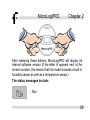
When both the left and right keys are pressed
simultaneously, the MicroLog LCD will display MicroLog’s
status. This will also “wake up” the device, a step necessary
10