1
Supermicro BIOS Utility User’s Guide
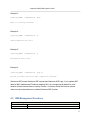
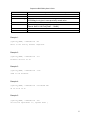
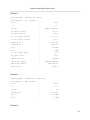
Example 3:
[ipmicfg_HOME] > IPMICFG.exe –dhcp
DHCP is currently disabled.
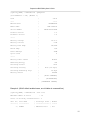
Example 4:
[ipmicfg_HOME] > IPMICFG.exe –k
Subnet Mask=255.255.255.0
Example 5:
[ipmicfg_HOME] > IPMICFG.exe –g
Gateway=192.168.12.254
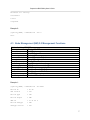
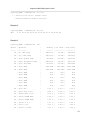
Example 6:
[ipmicfg_HOME] > IPMICFG.exe –garp on
Failed to enable Gratuitous ARP, Completion Code=80h
Gratuitous ARP means Gratuitous ARP request and Gratuitous ARP reply. It is to update ARP
table for MAC Address and IP Address mapping. But it is not supported by default for most
network devices because there is security concern. If customer needs this function, please
make sure the network devices to enable Gratuitous ARP function.
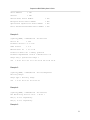
4.2 IPMI Management Functions
Options for Using IPMICFG
-clrint
Clear Chassis Intrusion.
-fd
Reset IPMI to the factory default.
5