1
File Name:
Project:
Sub Project:
Revision:
MEITRACK Parameter Editor
MVT340/MVT380/MVT100/
MVT600/T1/MT90/MT88/MT80i
Parameter Editor User Guide
V1.06
Creator:
Creation Date:
Update:
Page:
Confidential:
Cavana Cheung
2010-03-25
2011-08-01
13 of 13
External Documentation
Tap 7: Photo Authorization (only for MVT600)
Select one or more events to enable the camera to take picture and store the image in memory
once the selected event is activated.
In default mode, once the SOS button is pressed (Input 1 is activated), the tracker will
automatically take picture and store it in memory.
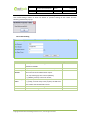
Tool Bar
Item
Description
Read Settings
Read all preset values of the tracker.
Write Settings
Write all settings (including all inputs in the 6 tabs below) to the
tracker.
Save Settings
Save current settings for next or future configuration.
Load Settings
Load the saved settings to implement them to a new tracker
After the tracker is configured, remove it from the USB data cable.
Copyright © 2010 Shenzhen Meiligao Electronics Co., Ltd. All rights reserved.