1
TL-SG2109WEB/TL-SL2210WEB/TL-SL2218WEB/TL-SL2428WEB/TL-SL2452WEB Gigabit Web Smart Switch User's Guide
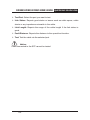
5.3.4.4 Tag VLAN Setting
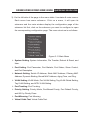
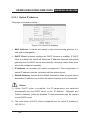
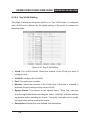
This page is displayed when the switch is in Tag VLAN mode, it configures
each VLAN and is affected by the global setting of the ports, it contains the
following fields:
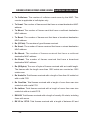
Figure 5-39 Tag VLAN Setting
¾¾ VLAN: The VLAN number. Select the number of the VLAN you want to
configure here.
¾¾ VLAN ID: configure the VLAN ID.
¾¾ Port: The switch port number.
¾¾ Member: Select the member of the VLAN here. If this field is checked, it
indicates the port belongs to the current VLAN.
¾¾ Egress Frame: The solution to the egress frame. "Drop Tag" indicates
drop the tag header before sending the frame. "Add Tag" indicates add the
tag header before sending the frame. "Unmodify” indicates not to modify
the tag header before sending the frame.
¾¾ Description: Display the user-defined port description.
54