1
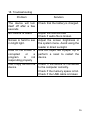
18. Troubleshooting
Problem
Solution
The device will turn
itself off after a few
seconds
No volume is heard
Check that the battery is charged.
Screen is hard to see
in bright light.
Data on the screen is
corrupted
or
a
program
is
not
responding properly
Can't copy file into the
device
Adjust the volume level
Check if audio file is broken
Adjust the screen brightness in
the system menu. Avoid using the
reader in direct sunlight.
Use thin object like a paper clip to
perform a reset to restart the
device
Check if the device is connected
to the computer correctly.
Check if the memory space is full.
Check if the USB cable is broken
16