1
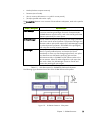
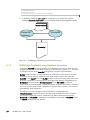
'StateSaveLocation’
slurmctld
slurmctldbackup
slurmdbd
mysql
Figure 5-2. SLURM High Availability using Database Accounting
4.2
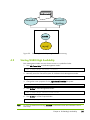
Starting SLURM High Availability
Each Management Node must start cluster services in a predefined order.
1.
Start HA Cluster Suite on both Management Nodes:
pdsh -w mngt0,mngt1 "storioha -c start"
2.
Manually mount the shared file system for SLURM on both Management Nodes:
pdsh -w mngt0,mngt1 "mount LABEL=HA_MGMT:SLURM /gfs2shared/slurmdata"
3.
Change the owner properties for the /gfs2shared/slurmdata file system:
chown –R slurm:root /gfs2shared/slurmdata
4.
Start SLURM on both Management Nodes:
pdsh -w mngt0,mngt1 "service slurm start"
5.
Start SLURM on all the Compute Nodes
pdsh -w Compute_Nodes[1-x] "service slurm start"
Note
For users of Database accounting slurmdbd will be started when the node boots with no
extra steps.
Chapter 4. SLURM High Availability
35