1
Troubleshooting
6. Troubleshooting
6-1 Checkpoints by Error Mode
■ Power LED: Check that the LED works when turning the Tact Switch ON/OFF
■ LED Indicators: See table 6-2-1 Basic Troubleshooting: LED Diagnosis on the Front Panel.
■ In case of a power failure or abnormal screen, check the following items.
1) Check that the power cord is correctly connected to electrical source equipment.
2) Check that the Tact Switch has been pressed.
3) Check that the signal cable is properly connected.
4) Check that channel setting has been set.
■ When the picture is abnormally displayed on the screen, display the Test pattern and check the adjustment status.
Samsung Electronics
6-1
Troubleshooting
■ Troubleshooting Mechanism :
- The System Blcok has the last output terminal, VCTI, which shows the internal Test pattern.
- The Power Block supplies power to the Deflection Block
- The System Block receives all signal inputs, the signal-processed signal is sent to CRT Ass'y.
Deflection and focus are controlled by the Deflection Block
Troubleshooting by Modules
1) Enter Service Mode
(In SET STANDBY status, if you press "Mute", "1", "8", "2" and "Power" in sequence on the remote control, the screen is
turned on and the Service Mode screen appears.)
2) Check if the System Block is out of order.
Press OPTION → TEST PATTERN → Right direction key:
The TOSHIBA pattern,COLOR BAR, BLACK pattern and WHITE pattern etc are displayed on the screen.
If the pattern is not displayed or is displayed abnormally, the VCTI or the System Block is out of order.
3) Check if the Power BLOCK, which supplies power to the System block and the Deflection blcok, is out of order.
If you cannot turn the screen on by pressing the POWER ON/OFF button or the screen repeatedly turns on and off when
pressing the POWER ON/Off button, check if the Power BLOCK is out of order.
4) Check if the Deflection Block is out of order.
When the screen is not properly displayed and the left or right side of the picture is shrunk, or the top or bottom of the screen
is expanded or shrunk, check if the Deflection Blcok is out of order.
6-2
Samsung Electronics
Troubleshooting
6-2 Troubleshooting Procedures by Error Modes
6-2-1 Basic Troubleshooting: Diagnosis of LED on the Front Panel
◑ : Light is Blinking
○ : Light is Off
Power
○
○→◑
Samsung Electronics
Description
This happens when the Tact Switch is not pressed or the power cord is disconnected.
If you press the power switch of the or the channel key on the remote control when in St-BY status, the screen will be turned on.
If the LED blinks and the screen is not displayed, check the connection between the Power and
the Main Board.
6-3
Troubleshooting
6-3 Troubleshooting Procedures by ASS'Y
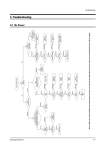
1. NO Power
Main B+ Check
29” : 123V
(STD-BY : 95V)
NO
SMPS BLOCK Check
: IC801S & Diodes
OK : Main B+connect
OK
STD-BY Mode ?
(Main B+ : 95V)
Supply Voltage Check
A/5.0V, A/3.3V
NO
OK
ICV201 Problem
→ Change
NO
Q812A(A/3.3V), Q801(A/5.0V) Input/Out Voltage Check
NO
Main B+ 123V OK?
Q401 Check
OK
OK
ICV201 Check
OK
T444S Check
OK
IC501 Check
B/5.0V, B/3.3V Check
NO
Q812A(A/3.3V), Q810(A/5.0V) Check
OK
OK
ICV201 Problem
OK
ICV201 Pin Voltage Check
(25, 43, 72Pin : 3.3V, 70Pin : 5.0V)
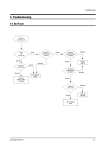
2. NO Video
Heater Voltage Check
V999S Heater 6.0~6.3 Vcc
NO
R418, R516 Check
OK
Video B+ Check
(IC501 6PIN)
: 180V~210V
OK
NO
IC501 Check
OK
ICV201 Check
IC301 Check
OK
IC301 Supply Voltage Check
: +16.5V, -16.5V
6-4
Samsung Electronics
Troubleshooting
3. NO Sound
Sound B+ Check
(IC601 3PIN)
: 8V~14V
NO
Sound Supply Voltage
Line Check
OK
ICV201 Sound Output Check OK
: Pin 84(R), 85(L)
IC602 Output Check
: CN601
NO
OK
Speaker &
Speaker Wire Check
NO
IC602 Problem → Change
ICV201 Problem → Change
4. Fly Back Lion Badness
Video B+ Check
(IC501 6PIN)
: 180V~210V
NO
IC501 Check
OK
ICV201 Problem → Change
IC801S
FD801S IC804
IC601
FP801S
Power cord
IC901
ICT501
IC201S
T401
TU01S
Q401
Samsung Electronics
IC301S QE01
6-5
Troubleshooting
6-4 Troubleshooting by Blocks
6-4-1 Troubleshooting Main Board
1. Tuner Diagnosis
The RF / CTV signal is transmitted to the Tuner of the Main Board. If the signal is not received, check the following items.
- Power supply: 5V, 33V
- Check for RF defects: Check the IF output
- Check for AUDIO defect: Check the SIF Signal output
6-6
Samsung Electronics
Troubleshooting
2. Micom Diagnosis
VSP/MSP/DRX Block ETC
- Power supply: 3.3V, 5V, 8V
- Check for input defects: Y/C(CVBS, S-VHS), 480i Y/Pb/Pr signal
Samsung Electronics
6-7
Troubleshooting
3. External Input Diagnosis
This consists of AV1/2, S-VHS and Component signal inputs as well as monitor output (Video, Audio).
The signals are sent to VCTI and the selected signals are output.
If the signal input or output does not work, check the following items.
- Check for input defects: Check the Micom input pin.
- Check for output defects: Check JAR701 (for RF/AV) or JA701(for comp/S_VHS)
6-8
Samsung Electronics
Troubleshooting
4. TDA7266SA / TDA7297SA (Audio Processor) Diagnosis
This receives the signal from the Audio Processor (VCTI) and outputs the signal in7W+7W / 10W + 10W sound.
- Power supply : 14V
- Check for input defects : AMP-R,AMP-L
- Check for output defects : L+, L-, R+,R-
Samsung Electronics
6-9
Troubleshooting
6-4-2 Troubleshooting Deflection Block
■ Countermeasures by Deflection Types
1. The screen is blank and only the relay repeats close and open when turning the power on.
▶ This happens when the vertical voltage or vertical signal is not supplied, and because the Micom operates for 5 to 10
seconds and then turns the power off by force as it cannot detect the vertical signal.
2. CHECK POINT
- Check that the vertical output voltage is measured in the FBT terminal.
→ VCC (+) : +16.5V
VCC (-) : -16.5V
▶ If you cannot measure the output voltage, check that the collector voltage of the horizontal TR is 1360V.
If the voltage is measured, the problem is a defect in the FBT unit.
(When you don't have an oscilloscope, and you can hear the high-voltage sound, you can determine that the horizontal TR
is normal.)
- Is the vertical input waveform output from the VCTI VDP Pin.
6-10
Samsung Electronics