1
Troubleshooting
5. Troubleshooting
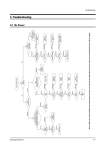
5-1 No Power
Counect
the Power code
Check
the
Power LED
Check the
3.3V-A,8V-A Line
of IC201S
LED On
LED Off
Normal
Check the
X-tal,SDA,SCL port
of IC201S
Normal
Abnormal
Check the
12.5V-A Line
Abnormal
Replace
IC201 S
Normal
Check the
(33)Pin (H-Drive)
of IC201S
Abnormal
Abnormal
Check/Replace
IC802
Check the
FD802S, IC801S
or AC-Fuse
Normal
Check the
130V- A Line
Normal
Abnormal
Check the
FBT,D808
Check / Replace
Q401
Samsung Electronics
5-1
Troubleshooting
5-2 No Video (Sound OK)
Check RK,GK,BK
Signal
Abnormal
Check R,G,B
Signal into CRT
PCB
Nornal
Check IC501
B+(180V-B)
Nornal
Nornal
Abnormal
Check the
Voltage of heater
Re-Adjust
Screen Voltage
Abnormal
Abnormal
Check the
resistance of R512
Nornal
Abnormal
Check/Replace
R418,R513,D503
Nornal
Replace
R512
Check
CRT and FBT
Abnormal
Check/Replace
IC201S
Abnormal
Check IC201S
Pin 51,52,53
(R.G.B)
Check/Replace
D407,FBT
Nornal
Check IC201S
Pin 49(V-GUARD)
Pin50(IK)
Nornal
Check
CRT and FBT
5-2
Samsung Electronics
Troubleshooting
5-3 No Sound (Video OK)
Checkthe signal
Output from CN602
CN603
Normal
Abnormal
Check
Speaker and Wire
Normal
Check IC602
Pin8,9
Abnormal
* STEREO
Abnormal
Check
IC101,TUNER
Abnormal
* MONO
Check IC601
Pin47(SIF)
Normal
Check IC601
B+
Normal
Check
B+ Line
5V-B, 8V-B
Normal
Check IC602
B+
Check/Replace
IC601
Check IC201S
Pin32(SIF)
Normal
Check/Replace
IC201S
Abnormal
Check
IC101,TUNER
Abnormal
Check
R610,R611
Normal
Check FD801S
D805
Normal
Replace
IC602
Abnormal
Replace
IC610,R611
Abnormal
Replace
FD801S,D805
See
No Power
Samsung Electronics
5-3
Troubleshooting
5-4 Horizontal Lines Appear or Screen
Check IC301 B+
16V-C,-13.5V-C
Abnormal
Normal
Check IC201S
Pin 21,22
(VDN,VDP)
Check
R413,R414
D405,D406
Abnormal
Normal
Check
IC201S
Check / Replace
IC301
5-4
Samsung Electronics