1
3.11.1 LAN Connection
3.11 LAN Connection
3.11.1 LAN Connection
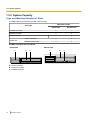
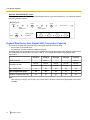
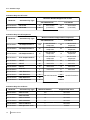
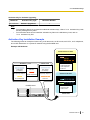
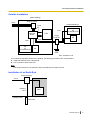
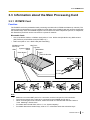
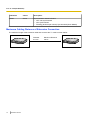
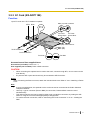
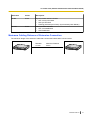
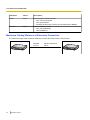
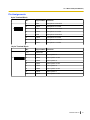
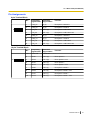
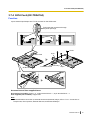
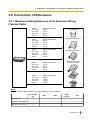
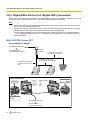
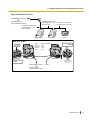
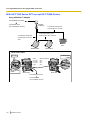
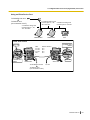
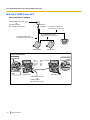
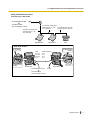
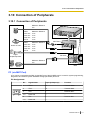
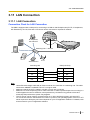
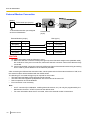
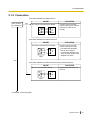
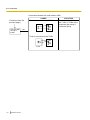
Connection Chart for LAN Connection
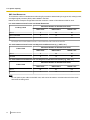
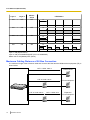
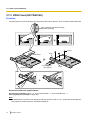
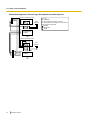
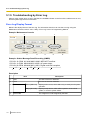
The PBX is equipped with a LAN port for connecting to a LAN so that IP telephones (IP-PTs, IP softphones,
SIP Extensions), IP-CSs, PCs and a CTI Server can be connected on a private IP network.
IP Softphone,
CA Client PC
PC
Switching Hub LAN Port
CTI Server
IP-PT
IP-CS
SIP Extension
Switching Hub
PBX (LAN Port)
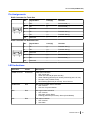
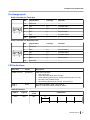
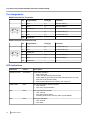
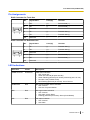
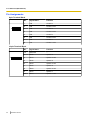
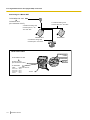
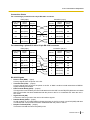
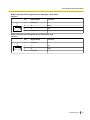
Signal Name Pin No.
Pin No. Signal Name
TX+
1
1
RX+
TX-
2
2
RX-
RX+
3
3
TX+
RX-
6
6
TX-
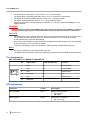
Note
•
•
•
•
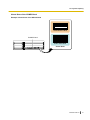
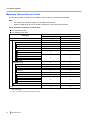
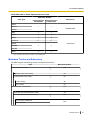
Use an Ethernet straight cable with an RJ45 connector for connection to a switching hub. The cable
should be a 10BASE-T/100BASE-TX CAT 5 or higher cable.
Make sure that all the CAT 5 cables in use are not over 100 m in length.
Make sure to create a spanning tree for LAN connection in order to prevent loops from occurring in a
multi-bridged environment. Otherwise, some packets may circulate for long periods of time and
eventually PBX performance system may degrade.
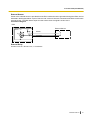
The CTI server can be used for connecting PCs on a LAN to provide third party call control CTI.
CTI connection uses the CSTA Phase 3 or TAPI 2.1 protocol. The operating system of the PC or CTI
server required for third party call control depends on your CTI application software. For details, refer
to the manual for your CTI application software.
Installation Manual
121