1
User Manual
SmartAX MT800 ADSL CPE
Chapter 3 Before Configuring MT800
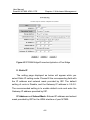
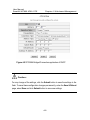
Figure 3-2 Enter user name and password
Use the default user name: admin and password: admin for
first time setup. You can change the password once you have
opened the Web-based configuration manager. The user name and
password allows any computer on the same subnet as the MT800 to
access the Web-based configuration manger. And this password can
also be used to Telnet to the device through the Ethernet or Internet
interfaces. To change this password, see the next chapter.
Note:
Do not confuse the user name and password used to access the Web-based
manager with the ADSL account and password needed for PPP connections to
access your ISP’s network.
3-4