1
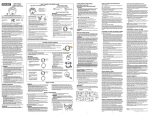
Mutual Interference Prevention
CONTENTS
Setting channel: CH1
Mutual interference prevention:
This refers to the function for preventing the influence of Sensor Heads when
mounted close to each other. (This function can be used for up to five Amplifier Units
connected by using Calculating Units (ZX2-CAL).)
INTRODUCTION
PREPARATION
FOR
MEASUREMENT
Procedure for setting up mutual interference prevention
1
Set to the MENU mode
2
Mutual interference
prevention setting
3
Return to RUN mode
Amplifier Unit
Calculating Unit
Set on CH1 Amplifier Unit
FLOW OF
OPERATION
BASIC
SETUP
MAIN
APPLICATIONS
& SETTING
METHODS
CH1
CH2
Setting completed
CH3
CH4
CH5
Height
1
Steps
and
Warpage
Button
Operation
Double
Sheet
Detection
Set to the MENU mode
Display
Lit
Hold down for
3 seconds
Thickness
Description of Operation
Hold down the
button of the
CH1 Amplifier Unit for three
seconds to switch to the MENU
mode.
Press the
Eccentricity
and Surface
Deflection
DETAILED
SETTINGS
TROUBLESHOOTING
Press to display.
Positioning
Explanation of
Selection Menu
button to display
.
* This step is not required if
detail menu display is
already set to ON in the
MENU mode.
Press the
button to set the
display to
to set display of
the detail menu.
Press to display.
Press the
the setting.
button to apply
SPECIFICATIONS
INDEX
SETTING
TRANSITION
CHARTS
84
Mutual Interference Prevention
ZX2 User’s Manual