1
Troubleshooting Linux Systems
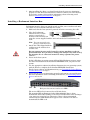
The loopback test test the modem control (hardware handshaking) signals. It
only has meaning in RS-232 mode on serial connector interfaces with full RS232 signals. If performed under the following conditions, the test will always
fail because full modem control signals are not present:
•
RS-422
•
RS-485
•
RJ11 connectors
7. Close Test Terminal
If both of these tests successfully complete, then the port is operational as
expected.
Note: Do forget to restart the application.
Troubleshooting Linux Systems
You can use the following subsections to test the serial ports.
lcom(1)
Comtrol has available lcom(1), which is a multiport serial I/O test program. You
can use lcom in test mode to send test data to any serial port.
lcom is available on the Software and Documentation CD or you can download the
latest version.
Note: For assistance using lcom, use the manual page, lcom(1) that accompanies
the program.
File Transfer
You can transfer a file using the following information. The default settings are
9600, 8, n, 1, and no parity. To send a file you can redirect output to a device; for
example:
cat /etc/inittab > /dev/ttyRP0
Sends the contents of the /etc/inittab file to the ttyRP0 device at 9600 baud, 8, n, 1,
and no parity.
Changing Serial
Port Settings (stty)
Use the following information if you need assistance changing or viewing the baud
rate settings.
To change the baud rate, use the following example, which changes the baud rate
to 19200:
stty 19200 </dev/ttyRP0
To view the current serial port settings for ttyRP0, enter:
stty -a </dev/ttyRP0
Note: Settings changes via stty are only valid during current log in session. For
permanent setting changes, use the /etc/inittab file.
Setting Up
Terminals and
Modems (mgetty,
getty)
Add the appropriate line or lines to the /etc/inittab file then restart.
Terminal Example:
T0:23:respawn:/sbin/agetty -L ttyRP0 57600 vt100
Modem Example:
T1:23:respawn:+/sbin/mgetty -m ‘”” AT&F OK’ -D -x9 -s 115200 ttyRP0
Note: If necessary, see the manual pages for more information on mgetty.
30 - Troubleshooting
RocketPort EXPRESS User Guide: 2000481 Rev. D