1
Using The System
Using Favourites Lists
6. Press the Select button to add the
highlighted channel to the Favourites Lists.
Note: Repeat steps 5 and 6 until all
desired channels are added.
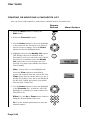
7. To delete a channel from the Favourites List,
use the Arrow buttons to move the highlight
to the channel in the list and press the Select
button to delete the channel from the list.
8. Highlight and select the Save option to save
all changes to the Favourites List.
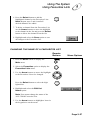
CHANGING THE NAME OF A FAVOURITES LIST
Remote
Buttons
Menu Options
1. Press the Menu button to display the
Main menu.
2. Select the Favourites option to display the
Favourites Lists menu.
3. Use the Arrow buttons to move the highlight
to the Favourites List to be changed.
Press the Select button to select the high
lighted list.
4. Highlight and select the Edit List
Name option.
Note: You cannot change the name of the
ALL CHAN Favourites List.
5. Use the Arrow buttons to highlight a letter in
the keypad area on the menu.
Page 3-37