1
8 Wire the Receiver(s)
Follow the steps below to wire your receiver(s).
Figure 14: Augat IT1000 Connector Installation Tool
IMPORTANT!
If you cut the RF cable(s) or used additional
RF cabling, be sure to terminate all RF cables
with Snap-N-Seal® F-connectors using an
Augat IT1000 connector installation tool
(KVH part #19-0242). Screw-on, push-on,
twist-on, and other low-quality connectors
will degrade system performance.
a. Connect the RF1 cable from the antenna to
the grounding block, as shown in Figure 15.
Label this grounding block connector “RF1.”
b. If you connected an RF2 cable in “Wire the
Antenna” on page 8, connect the RF2 cable
from the antenna to the grounding block.
Label this connector “RF2.”
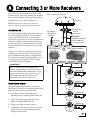
NOTE: If you need to connect three or more receivers,
refer to Appendix A on page 19.
c. If you are connecting two receivers to the
TracVision system, decide which receiver
will be the primary receiver. The primary
receiver controls satellite selection.
NOTE: Unless a KVH Master Receiver Selector is
installed, the secondary receiver will only be able to
select channels carried on the satellite that is currently
selected by the primary receiver.
Figure 15: Grounding Block and Receiver Wiring
Antenna
RF2
(Optional)
RF1
RF2 Label
RF1 Label
Grounding
Block
RF2
(Optional)
RF1
(Five-foot Cable)
Primary
Receiver
TV ANT/CABLE IN
R
SATELLITE
IN
L
OUT TO TV
SATELLITE IN
d. Connect the supplied 5-foot RF cable from the
“RF1” connector on the grounding block to
the “Satellite In” connector on the primary
receiver (see Figure 15).
AUDIO
VIDEO
S-VIDEO
PHONE JACK
Secondary
Receiver
(Optional)
TV ANT/CABLE IN
e. If you are connecting a second receiver,
connect an RF cable from the “RF2”
connector on the grounding block to the
“Satellite In” connector on the secondary
receiver.
f. Connect the receiver(s) to the customer’s
television(s). Follow the instructions in the
receiver’s manual.
10
R
SATELLITE
IN
L
OUT TO TV
SATELLITE IN
AUDIO
VIDEO
S-VIDEO
PHONE JACK