1
SMH5
10.9 Function Priority
10.11 Reset to Factory Default Settings
The SMH5 operates in the following order of priority:
1. To restore the SMH5 to factory default settings, press and hold the
Phone Button for 12 seconds until the LED shows solid red and you
hear high tone double beeps. You will also hear a voice prompt
saying “Factory reset”.
2. Within 5 seconds, press the Jog Dial to confirm reset. The headset
will be restored to factory setting and switched off automatically.
You will hear a voice prompt saying “Headset reset, good-bye”.
3. If you don’t press the Jog Dial within 5 seconds, the reset attempt is
canceled and the headset returns to stand-by mode. You will hear
a voice prompt saying, “Canceled”.
(Highest) Mobile Phone,
Intercom,
(Lowest) Bluetooth Stereo Music
A lower priority function is always interrupted by a higher priority
function. For example, stereo music is interrupted by intercom call, and
intercom conversation is interrupted by incoming mobile phone call .
10.10 Enabling/Disabling Voice Prompts (Factory Default:
Enabled)
The voice prompt feature is enabled from the factory, and is enabled
or disabled by the following procedures.
1. Press and hold the Jog Dial for 8 seconds until the blue LED is
rapidly flashing and you hear a mid-tone double beep. You will also
hear a voice prompt saying “Voice prompt”.
2. To disable, tap the Jog Dial within 10 seconds, then you will hear a
single beep and the red LED flashes for 2 seconds. To enable the
voice prompts, tap the Phone Button within 10 seconds, then you
will hear a double beep and the blue LED flashes for 2 seconds. If
any button is not pressed within 10 seconds, it remains unchanged
and goes back to standby.
22
10.12 Fault Reset
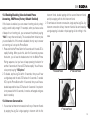
When the SMH5 is not working properly or is in faulty status for any
reason, you may reset by pushing the pin-hole reset button at the
back of the headset main unit. Insert a paper clip into the reset pinhole and press the reset button for a second with light pressure.
The SMH5 will be switched off after which time, you have to turn
the system back on and try again. However, this will not restore the
headset to factory default settings.