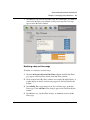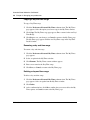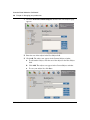
1
Standard - Nortel Networks Confidential
MCP 3.0 Standard (04.02)
Part No. NN10039-113
July 2004
Personal Agent User Guide
Standard-Nortel Networks Confidential
ii
Copyright © 2004 Nortel Networks
All rights reserved. July 2004.
The information in this document is subject to change without notice. The statements, configurations, technical data, and
recommendations in this document are believed to be accurate and reliable, but are presented without express or implied
warranty. Users must take full responsibility for their applications of any products specified in this document. The
information in this document is proprietary to Nortel Networks.
Trademarks
*Nortel Networks, the Nortel Networks logo, and the Globemark are trademarks of Nortel Networks.
*Microsoft, Microsoft Windows, Windows, Windows XP, Windows NT, and Internet Explorer are trademarks of
Microsoft Corporation.
*Netscape and Netscape Communicator are trademarks of Netscape Communications Corporation.
NN10039-113
Standard-Nortel Networks Confidential
Contents
iii
Contents
Contents . . . . . . . . . . . . . . . . . . . . . . . . . . . . . . . . . . . . . . . . . . . . . . . . . . . . . .iii
Welcome . . . . . . . . . . . . . . . . . . . . . . . . . . . . . . . . . . . . . . . . . . . . . . . . . . . . . vii
Audience . . . . . . . . . . . . . . . . . . . . . . . . . . . . . . . . . . . . . . . . . . . . . . . . . . . . . . . . . . . vii
Text conventions . . . . . . . . . . . . . . . . . . . . . . . . . . . . . . . . . . . . . . . . . . . . . . . . . . . . . . viii
Acronyms . . . . . . . . . . . . . . . . . . . . . . . . . . . . . . . . . . . . . . . . . . . . . . . . . . . . . . . . . . . viii
Related publications . . . . . . . . . . . . . . . . . . . . . . . . . . . . . . . . . . . . . . . . . . . . . . . . . . . viii
How to get help . . . . . . . . . . . . . . . . . . . . . . . . . . . . . . . . . . . . . . . . . . . . . . . . . . . . . . .ix
Getting started with the Personal Agent . . . . . . . . . . . . . . . . . . . . . . . . . . . . 1
What is the Personal Agent? . . . . . . . . . . . . . . . . . . . . . . . . . . . . . . . . . . . . . . . . . . . . . 1
Personal Agent services and features . . . . . . . . . . . . . . . . . . . . . . . . . . . . . . . . . . . . . . 2
Before you begin . . . . . . . . . . . . . . . . . . . . . . . . . . . . . . . . . . . . . . . . . . . . . . . . . . . 2
Minimum hardware and software requirements . . . . . . . . . . . . . . . . . . . . . . . . . . . . 3
Recommended hardware and software requirements . . . . . . . . . . . . . . . . . . . . . . . 3
Useful terms to know . . . . . . . . . . . . . . . . . . . . . . . . . . . . . . . . . . . . . . . . . . . . . . . . . . . 4
Service package . . . . . . . . . . . . . . . . . . . . . . . . . . . . . . . . . . . . . . . . . . . . . . . . . . . 4
Address . . . . . . . . . . . . . . . . . . . . . . . . . . . . . . . . . . . . . . . . . . . . . . . . . . . . . . . . . . 4
Click to call . . . . . . . . . . . . . . . . . . . . . . . . . . . . . . . . . . . . . . . . . . . . . . . . . . . . . . . . 5
Global address book . . . . . . . . . . . . . . . . . . . . . . . . . . . . . . . . . . . . . . . . . . . . . . . . 5
Personal address book . . . . . . . . . . . . . . . . . . . . . . . . . . . . . . . . . . . . . . . . . . . . . . 5
Friends . . . . . . . . . . . . . . . . . . . . . . . . . . . . . . . . . . . . . . . . . . . . . . . . . . . . . . . . . . . 5
Presence . . . . . . . . . . . . . . . . . . . . . . . . . . . . . . . . . . . . . . . . . . . . . . . . . . . . . . . . . 6
Accessing the Personal Agent for the first time . . . . . . . . . . . . . . . . . . . . . . . . . . . . . . . 7
Logging in to the Personal Agent . . . . . . . . . . . . . . . . . . . . . . . . . . . . . . . . . . . . . . . . . . 8
Understanding the Personal Agent interface . . . . . . . . . . . . . . . . . . . . . . . . . . . . . . . . 10
Navigating the Personal Agent Quick Start landing page . . . . . . . . . . . . . . . . . . . 11
Exiting the Personal Agent . . . . . . . . . . . . . . . . . . . . . . . . . . . . . . . . . . . . . . . . . . . . . . 12
Using the online Help . . . . . . . . . . . . . . . . . . . . . . . . . . . . . . . . . . . . . . . . . . . . . . . . . . 12
Starting the Multimedia Web Client . . . . . . . . . . . . . . . . . . . . . . . . . . . . . . . . . . . . . . . 13
Managing your preferences . . . . . . . . . . . . . . . . . . . . . . . . . . . . . . . . . . . . . 15
Setting up your personal preferences . . . . . . . . . . . . . . . . . . . . . . . . . . . . . . . . . . . . . 15
Personal Agent User Guide
Standard-Nortel Networks Confidential
iv
Contents
Modifying your contact information . . . . . . . . . . . . . . . . . . . . . . . . . . . . . . . . . . . . 16
Changing your password . . . . . . . . . . . . . . . . . . . . . . . . . . . . . . . . . . . . . . . . . . . . 17
Selecting a picture ID . . . . . . . . . . . . . . . . . . . . . . . . . . . . . . . . . . . . . . . . . . . . . . 18
Setting up My Times date and time ranges . . . . . . . . . . . . . . . . . . . . . . . . . . . . . . 21
Adding a new day and time range . . . . . . . . . . . . . . . . . . . . . . . . . . . . . . . . . . 21
Modifying a day and time range . . . . . . . . . . . . . . . . . . . . . . . . . . . . . . . . . . . 25
Copying a day and time range . . . . . . . . . . . . . . . . . . . . . . . . . . . . . . . . . . . . 26
Renaming a day and time range . . . . . . . . . . . . . . . . . . . . . . . . . . . . . . . . . . . 26
Deleting a day and time range . . . . . . . . . . . . . . . . . . . . . . . . . . . . . . . . . . . . 26
Modifying your i2002 and i2004 Internet Telephone settings . . . . . . . . . . . . . . . . . . . . 27
Creating a subject list for your i2002 and i2004 Internet Telephone calls . . . . . . . 27
Changing the subject list order . . . . . . . . . . . . . . . . . . . . . . . . . . . . . . . . . . . . . . . 29
Specifying reject reasons . . . . . . . . . . . . . . . . . . . . . . . . . . . . . . . . . . . . . . . . . . . 29
Changing the order of the list of reasons . . . . . . . . . . . . . . . . . . . . . . . . . . . . . . . . 31
Personalizing your presence . . . . . . . . . . . . . . . . . . . . . . . . . . . . . . . . . . . . . . . . . 31
Checking i2002 and i2004 Internet Telephone settings . . . . . . . . . . . . . . . . . . . . . 33
Viewing and modifying your available services . . . . . . . . . . . . . . . . . . . . . . . . . . . . . . 34
Viewing your service package information . . . . . . . . . . . . . . . . . . . . . . . . . . . . . . 35
Viewing your Watchers List . . . . . . . . . . . . . . . . . . . . . . . . . . . . . . . . . . . . . . . . . . 38
Setting up a Banned watcher’s list . . . . . . . . . . . . . . . . . . . . . . . . . . . . . . . . . . . . . 39
Modifying your Automatic Presence service . . . . . . . . . . . . . . . . . . . . . . . . . . . . . 40
Viewing and modifying your Meet me conferencing details . . . . . . . . . . . . . . . . . . 42
Modifying your call park . . . . . . . . . . . . . . . . . . . . . . . . . . . . . . . . . . . . . . . . . . . . . . . . 43
Setting Calling Line Identification . . . . . . . . . . . . . . . . . . . . . . . . . . . . . . . . . . . . . . . . . 44
Creating and maintaining your directories . . . . . . . . . . . . . . . . . . . . . . . . . 45
Understanding Personal Agent address books . . . . . . . . . . . . . . . . . . . . . . . . . . . . . . 45
Using your personal address book . . . . . . . . . . . . . . . . . . . . . . . . . . . . . . . . . . . . . . . . 46
Viewing your contacts in List view . . . . . . . . . . . . . . . . . . . . . . . . . . . . . . . . . . . . . 47
Sorting your contacts . . . . . . . . . . . . . . . . . . . . . . . . . . . . . . . . . . . . . . . . . . . 48
Searching for a contact . . . . . . . . . . . . . . . . . . . . . . . . . . . . . . . . . . . . . . . . . . 48
Viewing details about a contact . . . . . . . . . . . . . . . . . . . . . . . . . . . . . . . . . . . . 51
Initiating a call to a personal address book contact . . . . . . . . . . . . . . . . . . . . 52
Viewing your contacts . . . . . . . . . . . . . . . . . . . . . . . . . . . . . . . . . . . . . . . . . . . 53
Viewing your contacts in Card view . . . . . . . . . . . . . . . . . . . . . . . . . . . . . . . . . . . . 53
Viewing details about a contact . . . . . . . . . . . . . . . . . . . . . . . . . . . . . . . . . . . . 54
NN10039-113
Standard-Nortel Networks Confidential
Contents
v
Managing your contacts in your personal address book . . . . . . . . . . . . . . . . . . . . . . . 56
Adding a contact to your personal address book . . . . . . . . . . . . . . . . . . . . . . . . . . 56
Editing a contact . . . . . . . . . . . . . . . . . . . . . . . . . . . . . . . . . . . . . . . . . . . . . . . . . . 57
Editing a contact - List view . . . . . . . . . . . . . . . . . . . . . . . . . . . . . . . . . . . . . . . 57
Editing a contact - Card view . . . . . . . . . . . . . . . . . . . . . . . . . . . . . . . . . . . . . 58
Deleting a contact . . . . . . . . . . . . . . . . . . . . . . . . . . . . . . . . . . . . . . . . . . . . . . . . . 60
Adding a new group . . . . . . . . . . . . . . . . . . . . . . . . . . . . . . . . . . . . . . . . . . . . . . . . 60
Designating a contact as a Friend . . . . . . . . . . . . . . . . . . . . . . . . . . . . . . . . . . . . . 62
Using the global address book . . . . . . . . . . . . . . . . . . . . . . . . . . . . . . . . . . . . . . . . . . . 64
Accessing the global address book . . . . . . . . . . . . . . . . . . . . . . . . . . . . . . . . . . . . 64
Working with the global address book - List view . . . . . . . . . . . . . . . . . . . . . . . . . 67
Sorting users . . . . . . . . . . . . . . . . . . . . . . . . . . . . . . . . . . . . . . . . . . . . . . . . . . 67
Searching for a user . . . . . . . . . . . . . . . . . . . . . . . . . . . . . . . . . . . . . . . . . . . . 67
Viewing details about a user . . . . . . . . . . . . . . . . . . . . . . . . . . . . . . . . . . . . . . 69
Initiating a call to a global address book user . . . . . . . . . . . . . . . . . . . . . . . . . 70
Working with the global address book - Card view . . . . . . . . . . . . . . . . . . . . . . . . 71
Adding global address users to your personal address book . . . . . . . . . . . . . . . . 73
Call logs . . . . . . . . . . . . . . . . . . . . . . . . . . . . . . . . . . . . . . . . . . . . . . . . . . . . . 77
Viewing call logs . . . . . . . . . . . . . . . . . . . . . . . . . . . . . . . . . . . . . . . . . . . . . . . . . . . . . . 77
Calling contacts in the call log . . . . . . . . . . . . . . . . . . . . . . . . . . . . . . . . . . . . . . . . . . . 78
Saving contacts from the call log information . . . . . . . . . . . . . . . . . . . . . . . . . . . . . . . . 79
Clearing call log information . . . . . . . . . . . . . . . . . . . . . . . . . . . . . . . . . . . . . . . . . . . . . 80
Using click to call to make calls . . . . . . . . . . . . . . . . . . . . . . . . . . . . . . . . . . 81
Using the click to call icon . . . . . . . . . . . . . . . . . . . . . . . . . . . . . . . . . . . . . . . . . . . . . . 81
Using click to call from your personal address book . . . . . . . . . . . . . . . . . . . . . . . . . . 83
Using click to call from the global address book . . . . . . . . . . . . . . . . . . . . . . . . . . . . . 85
Using the Personal Agent Route Wizard . . . . . . . . . . . . . . . . . . . . . . . . . . . 87
What is routing? . . . . . . . . . . . . . . . . . . . . . . . . . . . . . . . . . . . . . . . . . . . . . . . . . . . . . . 88
What is the Personal Agent Route wizard? . . . . . . . . . . . . . . . . . . . . . . . . . . . . . . . . . 88
Understanding the Route wizard steps . . . . . . . . . . . . . . . . . . . . . . . . . . . . . . . . . 89
Navigating the Route wizard . . . . . . . . . . . . . . . . . . . . . . . . . . . . . . . . . . . . . . . . . 89
Using the Personal Agent Route wizard . . . . . . . . . . . . . . . . . . . . . . . . . . . . . . . . . . . . 89
Step 1: Initiating action . . . . . . . . . . . . . . . . . . . . . . . . . . . . . . . . . . . . . . . . . . . . . 91
Personal Agent User Guide
Standard-Nortel Networks Confidential
vi
Contents
Step 2: Specifying conditions . . . . . . . . . . . . . . . . . . . . . . . . . . . . . . . . . . . . . . . . 91
Specifying contacts from your personal address book . . . . . . . . . . . . . . . . . . 92
Specifying users from the global address book . . . . . . . . . . . . . . . . . . . . . . . 93
Specifying groups . . . . . . . . . . . . . . . . . . . . . . . . . . . . . . . . . . . . . . . . . . . . . . 95
Specifying telephone numbers . . . . . . . . . . . . . . . . . . . . . . . . . . . . . . . . . . . . 96
Specifying a condition for an anonymous incoming call . . . . . . . . . . . . . . . . . 98
Specifying a condition for ‘Unavailable Busy’ . . . . . . . . . . . . . . . . . . . . . . . . . 99
Specifying Day/Time ranges . . . . . . . . . . . . . . . . . . . . . . . . . . . . . . . . . . . . . 100
Step 3: Actions . . . . . . . . . . . . . . . . . . . . . . . . . . . . . . . . . . . . . . . . . . . . . . . . . . 101
Specifying ordered lists . . . . . . . . . . . . . . . . . . . . . . . . . . . . . . . . . . . . . . . . . 102
Specifying an ordered list . . . . . . . . . . . . . . . . . . . . . . . . . . . . . . . . . . . . . . . 102
Specifying a rejection message . . . . . . . . . . . . . . . . . . . . . . . . . . . . . . . . . . 104
Specifying an email request . . . . . . . . . . . . . . . . . . . . . . . . . . . . . . . . . . . . . 107
Step 4: Exceptions . . . . . . . . . . . . . . . . . . . . . . . . . . . . . . . . . . . . . . . . . . . . . . . . 107
Step 5: Finish . . . . . . . . . . . . . . . . . . . . . . . . . . . . . . . . . . . . . . . . . . . . . . . . . . . . 109
Address Book Search Criteria . . . . . . . . . . . . . . . . . . . . . . . . . . . . . . . . . . 111
Personal Address Book search criteria . . . . . . . . . . . . . . . . . . . . . . . . . . . . . . . . . . . 112
Global Address Book search criteria . . . . . . . . . . . . . . . . . . . . . . . . . . . . . . . . . . . . . 114
Index . . . . . . . . . . . . . . . . . . . . . . . . . . . . . . . . . . . . . . . . . . . . . . . . . . . . . . . 117
NN10039-113
Standard-Nortel Networks Confidential
vii
Welcome
The "Personal Agent User Guide" is is intended only to provide you with the
instructions you need to get up and running with this product. This guide
describes the Personal Agent, a feature-rich online user interface IP telephony
solution. Using the Personal Agent, you can view, manage, and configure services
to your personal preferences from any location with no software download.
Sections include:
•
•
•
•
•
•
•
“Getting started with the Personal Agent” on page 1
“Managing your preferences” on page 15
“Creating and maintaining your directories” on page 45
“Call logs” on page 77
“Using click to call to make calls” on page 81
“Using the Personal Agent Route Wizard” on page 87
“Address Book Search Criteria” on page 111
Audience
This guide is intended for subscribers of the Personal Agent services and features.
We recommend that you keep your Personal Agent open when you follow the
steps described in the "Personal Agent User Guide".
Screen captures in the "Personal Agent User Guide" documentation show Internet
Explorer as the default browser. However, if you are using another browser (for
example Netscape), your screen may look slightly different.
Personal Agent User Guide
Standard-Nortel Networks Confidential
viii
Welcome
Text conventions
This guide uses the following text conventions:
bold text
indicates the command key or link you need to press or
click.
Examples: Press Ok, Click Help
italic text
Indicates new terms, document titles.
Acronyms
This guide uses the following acronyms:
IP
Internet Protocol
PA
Personal Agent
PNG
portable network graphic
URL
universal resource locator (internet address)
Related publications
Other related publications related to the Personal Agent:
•
•
•
•
•
NN10039-113
Multimedia Web Client User Guide (Part No. NN10040-112)
Multimedia PC Client User Guide (Part No. NN10041-112)
i2004 Internet Telephone User Guide (Part No. NN10042-113)
i2002 Internet Telephone User Guide (Part No. NN10319-111)
Assistant Console and Assisted Support Getting Started Guide (Part No.
NN10393-112)
Standard-Nortel Networks Confidential
Welcome
ix
How to get help
For service issues, please contact your local support or Information Services team.
Personal Agent User Guide
Standard-Nortel Networks Confidential
x
Welcome
NN10039-113
Standard-Nortel Networks Confidential
1
Chapter 1
Getting started with the Personal Agent
This section describes how to get started with The Personal Agent.
Topics include:
•
•
•
•
•
•
•
•
•
“What is the Personal Agent?” on page 1
“Personal Agent services and features” on page 2
“Useful terms to know” on page 4
“Accessing the Personal Agent for the first time” on page 7
“Logging in to the Personal Agent” on page 8
“Understanding the Personal Agent interface” on page 10
“Exiting the Personal Agent” on page 12
“Using the online Help” on page 12
“Starting the Multimedia Web Client” on page 13
What is the Personal Agent?
The Personal Agent is a powerful tool that allows you to more effectively manage
your services and communication preferences on your system. The Personal
Agent is your own communications concierge, ensuring that your calls are
delivered wherever, and whenever, you would like.
Personal Agent User Guide
Standard-Nortel Networks Confidential
2
Chapter 1 Getting started with the Personal Agent
Personal Agent services and features
The Personal Agent solves the problem of having a different contact number for
your office phone, home phone, mobile phone, and other communications
devices. Using the Personal Agent, you can direct incoming calls to ring all of
these devices at the same time, or in a sequence.
Personal Agent features allow you to:
•
•
•
•
•
define how your incoming calls will be treated
view and customize your personal information and services (including
viewing the presence of another user in your network)
manage, track, and maintain key contact information
establish a call between you and another contact
start the Multimedia Web Client from the Personal Agent
Before you begin
You need the following items to start using the Personal Agent:
•
•
NN10039-113
URL to access the Personal Agent
User name and password for login (provided by your system administrator)
Standard-Nortel Networks Confidential
Chapter 1 Getting started with the Personal Agent
•
•
3
PC configured with the required minimum software and hardware (See
“Minimum hardware and software requirements” on page 3.)
Internet access and a connection that meets the minimum transmission speed
requirements
Minimum hardware and software requirements
•
•
•
•
•
•
•
•
•
200 MHz Pentium class or equivalent processor
No additional free RAM is required. (The minimum memory requirements of
your browser must be met. See your browser documentation for more
information.)
No additional hard drive space is required. (Local caching of web pages is
performed by your web browser. See your browser documentation for
information on the minimum disk space requirements.)
Mouse (optional)
640x480 @8bpp (256 colors) VGA graphics card
Microsoft Windows* 98 Second Edition (SE), Windows* Millennium Edition
(Me), Windows 2000, Windows XP*, or Windows NT* 4.x with Service Pack
5 (SP5)
28.8Kbps modem
Netscape Communicator* 7.0 or Internet Explorer* 6.0
Cookies and javascript enabled
Recommended hardware and software requirements
•
•
•
•
•
•
300MHz (or higher) Pentium class or equivalent processor
No additional free RAM is required. (The minimum memory requirements of
your browser must be met. See your browser documentation for more
information.)
No additional hard drive space is required. (Local caching of web pages is
performed by your web browser. See your browser documentation for more
information on the minimum disk space requirements.)
Mouse (required)
800x600 or higher @16bpp (65,536 colors) VGA or better video graphics
card
Microsoft Windows 98 Second Edition (SE), Windows 2000, Windows XP, or
Windows NT 4.x with Service Pack 5 (SP5)
Personal Agent User Guide
Standard-Nortel Networks Confidential
4
Chapter 1 Getting started with the Personal Agent
•
•
•
56Kbps modem or other high speed connection (For example, cable modem,
DSL modem, 10baseT ethernet, and so forth)
Netscape Communicator 7.1 and above, or Internet Explorer 6.0 and above
Cookies and javascript enabled
Useful terms to know
The Personal Agent uses some terms that may be new to you. Take a moment to
read through the explanations to familiarize yourself with the following terms.
Service package
Your service provider or system administrator assigns a service package with
pre-defined features and options for you. Some features are only available to you
if they are listed in your service package. For example, your service package
defines how many entries in the list of Friends you can have, how many callers
you can have join in on an audio conference, and whether you have voice mail
enabled.
Address
When a procedure instructs you to enter an address it means entering either a
telephone number or a SIP address. A SIP address is a unique identifier of users
on the IP network. It has the same format as an email address, for example,
[email protected], but it is not an email address. The network can identify where you
are and route your calls by tracking your SIP address when you sign in to any
Multimedia PC Client, Multimedia Web Client, or i2002 or i2004 Internet
Telephone.
In order to make it easier to place calls, you can store addresses (SIP addresses or
telephone numbers) in your personal address book.
NN10039-113
Standard-Nortel Networks Confidential
Chapter 1 Getting started with the Personal Agent
5
Click to call
The Click to Call feature allows you to initiate call from any device for example, a
PSTN Phone or registered Multimedia Communication Portfolio (MCP) SIP
client, to a specified number.
Global address book
Your global address book is a list of all registered users on your network. (This list
is maintained by your service provider or system administrator.) Using the
Personal Agent, you can search for a Username/UserID, Name, First name, Last
name, or Phone number. You can initiate a call by clicking on an entry in your
global address book.
Personal address book
Your personal address book is a key tool for managing addresses. You can save
your addresses for quick call (Click to Call) access as well as organize addresses
into groups. Your personal address book is synchronized across all your network
access devices. If you make a change in your personal address book on the
Personal Agent, the change automatically appears on your other network access
devices (for example, your Multimedia PC Client, Multimedia Web Client, and/or
your i2002 or i2004 Internet Telephone).
Friends
Within your personal address book, you can designate entries as Friends. People
that you contact frequently are good candidates as Friends. If you have marked an
address book entry as a Friend, then you can see the online presence status for that
entry in the Multimedia PC Client, or Multimedia Web Client or i2004 or i2004
Internet Telephone.
Note: The ability to designate entries as Friends is a feature of the
Presence service and is dependent upon your service package. If your
service package does not support the Presence service, then you cannot
designate entries as Friends.
Personal Agent User Guide
Standard-Nortel Networks Confidential
6
Chapter 1 Getting started with the Personal Agent
Presence
•
•
Presence: a service on the Multimedia PC Client, Multimedia Web Client, or
i2002 or i2004 Internet Telephone that allows you to see the online status of
other users on your network and also a way to alert others to your status.
Automatic presence: a service on the Multimedia PC Client, Multimedia
Web Client, or i2002 or i2004 Internet Telephone that allows you to set the
system to automatically alert others when you are away from your PC or on
the telephone.
Note: The ability to configure automatic presence notifications on the
Personal Agent is dependent upon your service package. If your service
package does not support automatic presence, then you will not be able to
use the automatic presence feature.
•
Presence Indicators: You can determine the status of anyone registered in the
system by querying the Personal Agent’s global address list. This feature is
extremely helpful when sending instant messages or after unanswered calls.
The Presence states include:
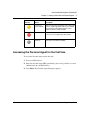
Presence
Indicator
NN10039-113
Status
Description
Active available
The user is active on their computer. This is an
auto presence enabled state and is shown on the
user’s behalf.
Active on the
phone
The user is active on a call on one of their clients.
This is an auto presence enabled state and is
shown on the user’s behalf.
Connected
The user is registered on the network.
Connected
inactive
The user has not used their computer for a period
of time. The idle timer is able to be configured by
the user under the Preferences > Services >
Auto Presence option.
Standard-Nortel Networks Confidential
Chapter 1 Getting started with the Personal Agent
Presence
Indicator
Status
Description
Connected
<user defined>
These are the connected default states (Away, Out
to lunch, and Be right back) and any user defined
connected states that identify that the user is
registered, but not readily available.
Unavailable
The user is registered in the network but is busy,
or, the user is not registered on the network.
Unknown
No Presence information available.
7
Accessing the Personal Agent for the first time
To access the Personal Agent for the first time
1
Start your Web browser.
2
Enter the Personal Agent URL (provided by your service provider or system
administrator) in your Web browser.
3
Press Enter. The Personal Agent Login page appears.
Personal Agent User Guide
Standard-Nortel Networks Confidential
8
Chapter 1 Getting started with the Personal Agent
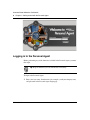
Logging in to the Personal Agent
Before performing any of the functions available in the Personal Agent, you must
first login.
Tip: Keep in mind that you can timeout due to inactivity.
To login to the Personal Agent
1
NN10039-113
Enter your user name, domain name (for example: [email protected]),
and password in the Personal Agent Login page.
Standard-Nortel Networks Confidential
Chapter 1 Getting started with the Personal Agent
2
9
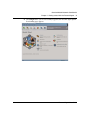
Click Login. Once you are successfully logged in, the Personal Agent Quick
Start landing page appears.
Personal Agent User Guide
Standard-Nortel Networks Confidential
10
Chapter 1 Getting started with the Personal Agent
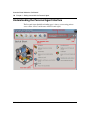
Understanding the Personal Agent interface
The Personal Agent Quick Start landing page is always your starting point to
access all the services and features of the Personal Agent.
NN10039-113
Standard-Nortel Networks Confidential
Chapter 1 Getting started with the Personal Agent
11
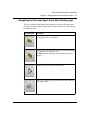
Navigating the Personal Agent Quick Start landing page
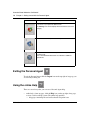
The icons and links on the Quick Start landing page and top navigation menu
provide the interface to the Personal Agent services and features as described in
the following table:
Service/Feature
Description
Access to the Quick Start landing page, a road map to the
Personal Agent services and features.
Define how you want to manage your incoming calls by specifying
the routing and screening of your calls.
(The Routes icon will not display without the Advanced service
package.)
Manage your account and personal information.
Create, view, and manage your personal address book. View your
global address book.
Personal Agent User Guide
Standard-Nortel Networks Confidential
12
Chapter 1 Getting started with the Personal Agent
Service/Feature
Description
View your inbox and outbox list of calls. Click to call a contact in the
list of save it to your personal address book.
(The Call logs icon will not display without the Advanced service
package.)
Establish a call between you and another person.
The Multimedia Web Client is an optional client that you can use
for making calls.
Refer to the Multimedia Web Client User Guide for additional
requirements.
Exiting the Personal Agent
To exit the Personal Agent click the Logout icon on the top right of any page you
are currently working on.
Using the online Help
There are several ways that you can access Personal Agent help:
•
NN10039-113
online help - from any page, click the Help icon, on the top right of any page,
to view a task-based help system. The online help provides:
— help pages containing forward and backward navigation icons
Standard-Nortel Networks Confidential
Chapter 1 Getting started with the Personal Agent
•
13
— procedures that help you use the Personal Agent
— hypertext links to all topics
— a Table of Contents with hypertext links
— an Index with hypertext links
rollover help - help text with a description and possible values that appears
when your mouse pointer moves over a form field or an icon.
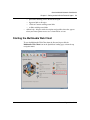
Starting the Multimedia Web Client
To start the Multimedia Web Client from the Personal Agent click the
Multimedia Web Client icon on the Quick Start landing page or from the top
navigation menu.
Personal Agent User Guide
Standard-Nortel Networks Confidential
14
Chapter 1 Getting started with the Personal Agent
NN10039-113
Standard-Nortel Networks Confidential
15
Chapter 2
Managing your preferences
Topics in this section:
•
•
•
“Setting up your personal preferences” on page 15
“Modifying your i2002 and i2004 Internet Telephone settings” on page 27
“Viewing and modifying your available services” on page 34
Tip: Click the + and - symbols to expand or collapse a menu item on the
Preferences page.
Setting up your personal preferences
To set up or modify your personal preferences, click the Preferences icon on the
Quick Start page or from the top navigation menu. Click the Personal submenu
item. The following submenu items appear:
•
•
•
•
Contact info
Password
Picture
My Times
Tip: The information you enter in the Contact info and My Times
submenu items is used when setting up routes for your incoming calls.
See Chapter 6, “Using the Personal Agent Route Wizard for complete
information on setting up routes.
Personal Agent User Guide
Standard-Nortel Networks Confidential
16
Chapter 2 Managing your preferences
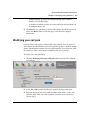
Modifying your contact information
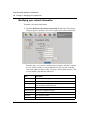
To modify your contact information
1
Click the Preferences>Personal>Contact info submenu item. The Contact
info page appears, allowing you to view or update your contact information.
From this page, you can view your first name, last name, and alias as entered
by your service provider or system administrator. You can enter or modify
your email address, business, home, cell, pager, and fax phone numbers. You
can also modify your timezone and locale.
NN10039-113
Field
Description
First Name
Your first name as it appears to other users (viewable field only).
Last Name
Your last name as it appears to other users (viewable field only).
Alias
An alias (if provisioned) that associates a PSTN phone number to
your username (viewable field only).
Email
Email address (for example [email protected])
Business phone
Your business telephone number.
Home phone
Your home phone number.
Cell phone
Your cell phone number.
Pager
Your pager number.
Standard-Nortel Networks Confidential
Chapter 2 Managing your preferences
Field
Description
Fax
Your FAX number.
Timezone
Your time zone in which your predefined My Times Call Screening
times are enforced.
Locale
Your language and region, for display in different languages, if
supported. (You will need to logout and login again for changes to
take effect.)
2
Complete the fields on the page.
3
Click Save. The message “Personal information updated successfully”
appears at the top of the Contact Info page indicating that your changes are
applied.
17
Changing your password
When you change your password, your password changes across all client devices
(Multimedia PC Client, Multimedia Web Client, Personal Agent, and the i2002
and i2004 Internet Telephones).
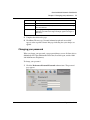
To change your password
1
Click the Preferences>Personal>Password submenu item. The password
page appears.
Personal Agent User Guide
Standard-Nortel Networks Confidential
18
Chapter 2 Managing your preferences
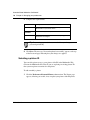
2
Complete the required fields.
Field
Description
New Password
Your new password. Note: Consult your system
administrator for password criteria.
Confirm
Password
Confirmation of your new password.
Old Password
Your old password that you entered when you registered
with the Personal Agent,
Tip: For security purposes, it is recommended that you change your
password periodically.
3
Click Save. The message “Password updated successfully” appears at the top
of the Password page indicating that your changes are applied.
Selecting a picture ID
You can add a picture to use as your picture caller ID in the Multimedia Web
Client or the Multimedia PC Client. If you are replacing an existing picture ID
then your new picture overwrites the old picture.
To add or modify a picture
1
NN10039-113
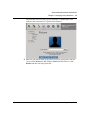
Click the Preferences>Personal>Picture submenu item. The Picture page
appears, allowing you to add, view, or update your picture caller ID picture.
Standard-Nortel Networks Confidential
Chapter 2 Managing your preferences
19
The first time you access this page you will notice a shadow figure. This
indicates that you do not have a picture in the database.
2
Enter the path and file name of the picture to use for your Picture Caller ID
service on the Multimedia Web Client or Multimedia PC Client, or, click
Browse and then select the picture file.
Personal Agent User Guide
Standard-Nortel Networks Confidential
20
Chapter 2 Managing your preferences
3
Preview your picture. You will notice the word “Preview” appears on your
picture. The word “Preview” is removed once you save the picture.
Tip: Pictures greater than 160 x 120 pixels will be resized. The picture
cannot be larger than 24KB. Use only PNG or JPG files.
4
To reset your picture from the preview picture to your current picture, click
Reset.
5
Click Save to save the picture as your picture caller ID. The picture file you
specify is sent to your service provider’s user database and displays on the
Multimedia Web Client, Multimedia PC Client, and on the Picture page each
time you use the Personal Agent. The picture will also display in the address
book in "card view" mode. Click Delete to delete a picture.
Note: A picture caller ID displays when the contact has been added to the
address book of the person being called.
NN10039-113
Standard-Nortel Networks Confidential
Chapter 2 Managing your preferences
21
Setting up My Times date and time ranges
If the Advanced screening parameter is enabled in your service package, you can
use the My Times page to create, modify, copy, rename, or delete day and time
ranges to use when setting up conditions to screen and route your incoming calls.
Adding a new day and time range
To add a new day and time range
1
Click the Preferences>Personal>My Times submenu item. The My Times
page appears.The first time you use the Personal Agent, you will see the
following default day and time options to choose from in the My Times
window:
•
•
2
My Office Hours
Nights and Weekends
Select a default option (for example, My Office Hours). A graphic display for
the default time range of 8:00 AM to 5:00 PM, Monday - Friday, appears in
the Day/Time Details window.
Personal Agent User Guide
Standard-Nortel Networks Confidential
22
Chapter 2 Managing your preferences
3
Click Add. A new My times page appears (without any Day/Time
combinations selected) that allows you to add your desired days and times and
create a new Day/Time range.
4
Select your Day/Time combinations.
For example, if you work part time, you may want to add a Day/Time
combination that will only apply on Monday’s, Wednesday’s and Friday’s
between the hours of 7:30 AM and 5:30 PM. To set up these hours
NN10039-113
a
Select Monday, Wednesday, Friday in the Select Days column.
b
Select 7:30 AM in the From Time drop down lists.
c
Select 5:30 PM in the To Time drop down lists.
Standard-Nortel Networks Confidential
Chapter 2 Managing your preferences
d
5
23
Click Add Time. The graphic display in the Day/Time Details window is
updated with your selected days and times.
To add more than one Day/Time combination to apply to the Day/Time range.
For example, in addition to working part time on Monday’s Wednesday’s and
Fridays, you may work half days on Tuesday’s and Thursday’s. To set up
these hours
a
Select Tuesday and Thursday in the Select Days column.
b
Select 7:30 AM in the From Time drop down lists.
c
Select 12:00 PM in the To Time drop down lists.
Personal Agent User Guide
Standard-Nortel Networks Confidential
24
Chapter 2 Managing your preferences
d
Click Add Time. The graphic display in the Day/Time Details window is
updated with your selected days and times.
Tip: To remove all Day/Time ranges for a selected day, check the day in
the Select Days column and click Clear Day. To remove all Day/Time
ranges for all days, click Clear All.
6
NN10039-113
Enter a name for the Day/Time range in the text box provided.
Standard-Nortel Networks Confidential
Chapter 2 Managing your preferences
7
25
Click Save to save your new Day/Time range and combinations, or Cancel, to
return to the My Times page without creating a new range.The new range
appears in the My Times window.
Modifying a day and time range
To modify an existing day and time range
1
Click the Preferences>Personal>My Times submenu item.The My Times
page appears with Day/Times options in the My Times window.
2
Click an option in the My Times window (for example, My Office Hours). A
graphic display for the day and time range appears in the Day/Time Details
window.
3
Click Modify. Enter your changes to the days and time ranges on the My
Times page. Click Add Time. Your changes appear in the Day/Time Details
window.
4
Click Save to save your Day/Time changes, or Cancel to return to the My
Times page.
Personal Agent User Guide
Standard-Nortel Networks Confidential
26
Chapter 2 Managing your preferences
Copying a day and time range
To copy a Day/Time range
1
Click the Preferences>Personal>My Times submenu item. The My Times
page appears. Select the option you want to copy in the My Times window.
2
Click Copy. The My Times copy page appears. Enter a name for the new Day/
Time Range.
3
Click Save to save your changes, or Cancel, to return to the My Times page.
The My Times page appears with the new Day/Time range in the Day/Time
Details window.
Renaming a day and time range
To rename a day and time range
1
Click the Preferences>Personal>My Times submenu item. The My Times
page appears.
2
Select an option in the My Times window.
3
Click Rename. The My Times rename window appears.
4
Enter a new name for the Day/Time range.
5
Click Save, or Cancel, to return to the My Times page.
Deleting a day and time range
To delete a day and time range
NN10039-113
1
Click the Preferences>Personal>My Times submenu item. The My Times
page appears. Select an option from the My Times window.
2
Click Delete.
3
At the confirmation box, click Ok to confirm that you want to delete the My
Times option, or Cancel to return to the My Times page.
Standard-Nortel Networks Confidential
Chapter 2 Managing your preferences
27
Modifying your i2002 and i2004 Internet Telephone
settings
To set up or modify your i2002 and i2004 Internet Telephone preferences, click
the Preferences icon on the Quick Start page or from the top navigation menu.
Click the i200x menu item. The following submenu items appear:
•
•
•
•
Subjects
Reasons
Personalized presence
Logout
Creating a subject list for your i2002 and i2004 Internet
Telephone calls
On the i2002 and i2004 Internet Telephone, you can select from a list of subjects
when you place an outgoing call. The subject displays on the i2002 and i2004
Internet Telephone (as well as other registered SIP clients) of the person you are
calling to alert them as to why you are calling.
To create a new subject in the list
Personal Agent User Guide
Standard-Nortel Networks Confidential
28
Chapter 2 Managing your preferences
NN10039-113
1
Click the Preferences>i200x>Subjects submenu item. The Subjects page
appears.
2
Enter the text of the subject in the New Subject field.
3
Click Add. The subject text appears in the Current Subjects window
a
To add another subject, enter the text of the subject in the New Subject
field.
b
Click Add. The subject text appears in the Current Subjects window.
c
To save your subject list, click Save.
Standard-Nortel Networks Confidential
Chapter 2 Managing your preferences
4
To remove a subject, select the entry, and click Remove. To remove all
subjects in the list you created, select all the entries, and click Remove All.
5
To save your subject list, click Save, or Reset, to clear your input on the
Subjects form.
29
Changing the subject list order
To specify the order in which the subjects display on an i2002 and i2004 Internet
Telephone
1
Click on a subject in the Current Subjects window.
2
Click Up or Down to change the order of the subject list.
3
To save your changes, click Save.
Specifying reject reasons
You can specify a reason or list of reasons to display on your i2002 and i2004
Internet Telephone.
To specify a new reject reason or a list of reasons for rejecting an incoming call
1
Click the Preferences>i200x>Reasons submenu item. The Reasons page
appears.
Personal Agent User Guide
Standard-Nortel Networks Confidential
30
Chapter 2 Managing your preferences
2
Enter the text of the reason (for example, Busy right now or Try again later) in
the New Reason field.
Tip: The reasons are displayed in the order that you enter them.
3
4
Click Add. The reason text appears in the Current Reasons window.
a
To add another reject reason, enter the text of the reason in the New
Reason field.
b
Click Add. The reason text appears in the Current Reasons window.
To save the reason, Click Save.
Or, click Reset, to clear your input and reset your reason list to the last saved
settings. (To remove a reason, select the reason and click Remove, or Remove
All, to remove all reasons.)
Tip: The reasons display on your i2002 and i2004 Internet Telephone in
the same order they appear in the Current Reasons window.
NN10039-113
Standard-Nortel Networks Confidential
Chapter 2 Managing your preferences
31
Changing the order of the list of reasons
To reorder the list of reasons displayed on an i2002 and i2004 Internet Telephone
1
Click on a reason in the Current Reasons window.
2
Click Up or Down to reorder the reason for display on the i2002 and i2004
Internet Telephone.
Tip: The reasons display on your i2002 and i2004 Internet Telephone in
the same order they appear in the Current Reasons window.
3
a
To remove a reject reason from the list, highlight the entry in the Current
Reasons list.
b
Click Remove to remove the selected reason, or, click Remove All, to
remove all reasons.
To save your changes, click Save.
Personalizing your presence
To customize a presence status note for display on the i2002 and i2004 Internet
Telephone
Personal Agent User Guide
Standard-Nortel Networks Confidential
32
Chapter 2 Managing your preferences
NN10039-113
1
Click the Preferences>i200x>Presence>Personalized presence submenu.
The Personalized presence page appears.
2
Enter a note in the New Note text field to appear on your i2002 and i2004
Internet Telephone.
Standard-Nortel Networks Confidential
Chapter 2 Managing your preferences
3
4
33
Click Add. The note text appears in the Current notes window.
a
To add another note, enter the text of the note in the New Note field.
b
Click Add. The note text appears in the Current Notes window.
c
Click Up or Down to reorder the presence note for display on the i2002
and i2004 Internet Telephone.
To save the note, Click Save.
Or, click Reset, to clear your input and reset your note list to the last saved
settings. (To remove a note, click Remove, or Remove All, to remove all
notes.)
Checking i2002 and i2004 Internet Telephone settings
If you work in a number of locations and often log into several i2002 and i2004
Internet Telephones, you can use the i200x option to check your login status and
log yourself out from an active phone.
To check the login status of an i2002 and i2004 Internet Telephone
1
Click the Preferences>i200x>Logout submenu item. The Logout page
appears.
Personal Agent User Guide
Standard-Nortel Networks Confidential
34
Chapter 2 Managing your preferences
2
Look for the i2002 or i2004 Internet Telephone that you are logged into based
on the Device Label, MAC address, or Users.
Tip: The i200x option lists a separate entry for each phone you are
logged into.
3
Click the Log Me Out link, for the i2002 and i2004 Internet Telephone you
want to log out of. Click Ok at the confirmation message.
Viewing and modifying your available services
To view or modify the list of services that you are currently subscribed to, click
the Preferences icon on the Quick Start page or from the top navigation menu.
Click the Services menu item. The following submenu items appear:
•
•
•
NN10039-113
Service package - the list of services assigned to you by your service provider
or system administrator
Presence- allows you to see the online status of other users on the network and
also a way to let others know your status.
• Watchers - list of users that are currently watching your presence
information.
• Banned watchers - list of users that you have blocked from subscribing to
your presence information by selecting the "Ban" option button
• Auto presence - settings to automatically alert others when you are away
from your PC or on the telephone.
Meet Me - provides you with your conferencing bridge information.
Standard-Nortel Networks Confidential
Chapter 2 Managing your preferences
•
•
35
Call Park - select whether or not parked calls are returned to you if they are
not retrieved (auto-retrieve) and change the time setting that determine how
long a parked call waits before it is returned.
Calling Line ID Restriction - block your calling line ID information from
transmitting when you make a call.
Tip: You may see other menu items depending on your Service
Package. Please refer to the documentation for those services.
Viewing your service package information
Note: You do not have the ability to change any of the service package
parameters that you view on the Service Package page. Contact your
system administrator to request any changes to your service packages.
To view the services enabled in your service package
1
Click the Preferences>Services>Service package submenu item. The
Service Package page appears, displaying the name of the service package
Personal Agent User Guide
Standard-Nortel Networks Confidential
36
Chapter 2 Managing your preferences
and the services packages assigned to you. The lists of features available will
vary with each user based on the "Service Package" available to them.
2
View the list of services assigned to you.
Note: The following table lists all the services available, however, your
subscriber or system administrator may not have all Service Package
Options therefore you may not be assigned some of the services or
parameters listed.
NN10039-113
Standard-Nortel Networks Confidential
Chapter 2 Managing your preferences
If this Service Package
Option is enabled...
Then you have the ability to...
Voice mail
receive and retrieve your voicemail and also receive
notification of waiting messages.
For information on retrieving voice mail refer to the
Multimedia PC Client User Guide, i2002 Internet
Telephone User Guide, i2004 Internet Telephone User
Guide and the Multimedia Web Client User Guide.
Ad hoc conferencing
join, or conference, multiple users together in a call.
Presence
•
•
•
37
view the online status of other users and allow others
to monitor your status by indicating when your PC is
inactive or when you are on the phone.
designate an address book contact as a Friend in
order to see that person’s presence. The amount of
friends is determined by the service provider.
prohibit a contact in your network from viewing your
online presence status.
Video
receive and transmit video calls.
Advanced screening
defines routes that affect how your calls and instant
messages are received. A Route allows you to specify
locations that will ring simultaneously or sequentially
when you receive a call. A Route can be defined to only
affect specific calls and/or Instant Messages based on a
set of conditions selected by the user, for example: the
time of day you receive the call and/or who is calling.
QoS
set the following quality of service parameters:
• QoS DiffServ code for signalling
• QoS DiffServ code for audio
• QoS DiffServ code for video
• QoS 802.1p service priority
Converged Desktop
use your Multimedia PC Client to access multimedia
services, while using your existing telephony system for
voice, for detailed information refer to the MCS 5100 or
MCS 5200 Feature Description Guide
SimRing
simotainously rings mutiple end points as designated by
the user, for more detailed information refer to the "MCS
5100 or 5200 Feature Description Guide"
Personal Agent Intelligent
Networking (PA IN)
A user of the Personal Agent-driven Converged desktop
service can access certain features and perform the
certain tasks through the Multimedia PC Client. For more
detailed information on this features refer to MCS 5100 or
5200 Feature Description Guide
Personal Agent User Guide
Standard-Nortel Networks Confidential
38
Chapter 2 Managing your preferences
If this Service Package
Option is enabled...
Then you have the ability to...
Device Access Restrictions
have full or restricted access to i2002 and i2004 Internet
Telephone functionality.
Hot Line
call a pre-determined destination by going off hook on the
relevant line key. Used in conjunction with the Device
Access Restriction service package option.
Meet me conferencing
chair an audio conference by sending out a dial-in number
and Personal Identification Number (PIN) for a conference
bridge.
Advanced Addressbook
has greater than 10 contacts (default), the maximum
number of contacts is determined by the service provider
Assistant Support
Assistant Console
to act as an assistant for another person in order to
answer and route their calls. Refer to the "Assistant
Console and Assisted Support Getting Started
Guide".
Music On Hold
provide music to callers that you put on hold.
Call Park
park a call so that another user can pick it up
Calling Line ID Restriction
block your calling line ID information from appearing on
the display of other telephones.
Call Waiting Disable
disables the Call Waiting feature
Net6 Support
The Net 6 support activity allows i2004 Internet
Telephones to display Web text. It allows them to connect
to the Net 6 server to display information from the Web. It
also allows a user to perform searches of a corporate
directory. Refer to the "Feature Description Guide" and
the "i2004 Internet Telephone User Guide" for more
detailed information on this feature.
Network Call Logs
to view the number of inbox and outbox call logs allowed
IM Chatroom
send IMs to multiple users (for Multimedia PC Client and
Multimedia Web Client)
Unified Communications
set up mailbox greetings, change your PIN, set up email
preference, etc. Note: This feature must be enabled in
your service package. Refer to the Unified
Communications Quick Reference for procedures.
Viewing your Watchers List
To see a list of people who have subscribed to your presence information
NN10039-113
Standard-Nortel Networks Confidential
Chapter 2 Managing your preferences
1
39
Click the Preferences>Services>Presence>Watchers submenu item. The
Watchers List page appears.
The list shows only the active usernames watching your presence not all users
registered to your presence. The date when an active watcher subscribed to
your presence information is also displayed. To ban an active watcher from
seeing your presence information
a
Click the checkbox beside the watcher’s username.
b
Click the Ban watcher’s icon. The Banned watchers list appears with the
new banned watcher’s username.
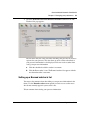
Setting up a Banned watcher’s list
You want to ban someone from subscribing to your presence information in the
future. Use the Banned watchers menu option to restrict access to other users
who do not currently appear in your watcher’s list.
To ban someone from viewing your presence information
Personal Agent User Guide
Standard-Nortel Networks Confidential
40
Chapter 2 Managing your preferences
1
Click the Preferences>Services>Presence>Watch List submenu item. The
Watch List page appears.
2
Enter the SIP address of the person you want to ban.
3
Click Save. The person you added to the Watch List can still call you, but they
can no longer see your online status. The name now appears in a list of banned
users.
4
To delete a user from your Watch List, click the link, Delete, next to Banned
User. Click Ok at the confirmation message. The party is removed from the
ban list.
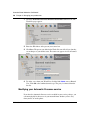
Modifying your Automatic Presence service
If you have the Automatic Presence service enabled in your service package, you
can automatically let other users in your network know whether you are away
from your PC or on the phone.
NN10039-113
Standard-Nortel Networks Confidential
Chapter 2 Managing your preferences
41
To modify your Auto presence options
1
Click the Preferences>Services>Presence>Auto presence submenu item.
The Auto presence page appears.
2
Select the Report when inactive option, and enter a time value in the range of
10 to 600 minutes into the Inactivity Timer (in minutes) field. This value is
the number of minutes that must elapse before your status is reported as
inactive. People who have subscribed to your presence will be alerted to your
presence status after the elapsed time.
Note: The Inactivity Timer (in minutes) option only applies to the
Multimedia PC Client and the Multimedia Web Client. This option does
not apply to the i2002 and i2004 Internet Telephone.
3
Select the Report when on the phone option to allow people subscribed to
your presence to receive an “On the Phone” message that displays when you
are connected on a call. This option applies to all the clients: Multimedia PC
Client, the Multimedia Web Client, and the i2002 and i2004 Internet
Telephone.
4
Click Save. Any changes to your service package are reflected the next time
you log in.
Personal Agent User Guide
Standard-Nortel Networks Confidential
42
Chapter 2 Managing your preferences
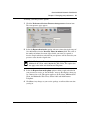
Viewing and modifying your Meet me conferencing details
The Meet me audio conferencing service allows you to have a personal conference
bridge, available 24 hours a day. Usage of the bridge is strictly enforced through a
PIN access. Participants dialing into the bridge are greeted and prompted to enter
in an Access Code that uniquely identifies a personal bridge. Only you, as the
chairperson (the person who owns the bridge) can open the bridge and allow all
participants to join.
To view the details of your bridge
1
Click the Preferences>Services>Meet Me submenu option. The Meet Me
page appears.
2
View the specific details of your conference information
— Dial-In Number
— Access Code
Note: Contact your service provider or system administrator to request
any changes to the conference phone number(s) or conference access
code.
NN10039-113
Standard-Nortel Networks Confidential
Chapter 2 Managing your preferences
43
— Chairperson PIN. To change the Chairperson PIN, enter a number
between 4 and 10 digits long.
— A checkbox to indicate whether or not the conference will end when you
disconnect from the call.
3
Click Save to save your changes. If you make changes and decide not to save
them, click Reset. When you do, the page is refreshed to the original
information.
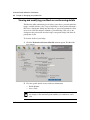
Modifying your call park
Call park allows you to place a call on hold so that someone else can retrieve it.
You can have the call returned to you if it is not picked up after a specified amount
of time. For information on how to use the call park feature, refer to the user guide
for your device. This service must be enabled in your service package.
To change your call park settings
1
Click the Preferences>Services>Call park submenu option. The Call Park
page appears.
2
Select Yes or No from the Auto-Retrieve parked calls drop down menu.
3
Enter the amount of time (in seconds) that must elapse before a call is auto
retrieved. (Note: This step is not required if you chose not to auto retrieve
calls in step 2.)
Personal Agent User Guide
Standard-Nortel Networks Confidential
44
Chapter 2 Managing your preferences
4
Click Save.
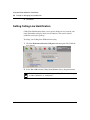
Setting Calling Line Identification
Calling Line Identification allows you to specify whether or not you want your
name and number to display when you call someone. This service must be
enabled in your service package.
To change your Calling Line ID Restriction setting
1
Click the Preferences>Services>Call park submenu option. The Call Park
page appears.
2
Select Yes or No from the Calling Name/Number Privacy drop down menu.
Note: If you enable this service then your calling ID information displays
as either "unknown" or "anonymous".
NN10039-113
Standard-Nortel Networks Confidential
45
Chapter 3
Creating and maintaining your directories
The Directory icon (available from the Personal Agent Quick Start landing or top
navigation menu) allows you to:
•
•
•
•
create and maintain a personal address book of your personal contacts and
groups of contacts.
access a global address book of all users in your domain.
call a contact from your personal or global address book.
access details about a contact including their presence status on the system.
Topics in this section:
•
•
•
•
“Understanding Personal Agent address books” on page 45
“Using your personal address book” on page 46
“Managing your contacts in your personal address book” on page 56
“Using the global address book” on page 64
Understanding Personal Agent address books
The following address books are available in the Personal Agent:
•
personal address book - contains contact information set up by you.
Personal Agent User Guide
Standard-Nortel Networks Confidential
46
Chapter 3 Creating and maintaining your directories
•
global address book - contains contact information (maintained by your
system administrator and for reference only) of all users in your domain.
Tip: Information in your personal and global address book can be used
as a condition when defining a route to handle your incoming calls. For
more information see Chapter 6, “Using the Personal Agent Route
Wizard,” on page 87.
Using your personal address book
Your personal address book is a dynamic list of contacts and information that lists
the nickname, first name, and last name of a contact in your personal address
book. You can also view and define a group for the contact to belong to and
whether or not to include the contact in your list of Friends.
Tip: Anytime you add a contact or make a change to a contact using the
Personal Agent, your personal address book automatically updates and
synchronizes with the Multimedia PC Client, Multimedia Web Client,
i2002 and i2004 Internet Telephones which enables you to view your
Friends on line from any of these devices.
Your personal address book has two viewing options for your contacts:
•
•
NN10039-113
List view -- a traditional “table-like” view
Card view -- information as you would normally see on a business card
(including a picture of the contact, if available)
Standard-Nortel Networks Confidential
Chapter 3 Creating and maintaining your directories
47
Both the List view and Card view have the following icons available for working
with your personal address book.
Click this icon...
To...
Add a new contact to your
personal address book
Remove selected contacts
from your personal address
book.
Create, rename, and delete
contact groups in your
personal address book.
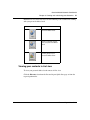
Viewing your contacts in List view
To view your personal address book contacts in List view
Click the Directory icon from the Personal Agent Quick Start page or from the
top navigation menu.
Personal Agent User Guide
Standard-Nortel Networks Confidential
48
Chapter 3 Creating and maintaining your directories
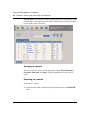
The List View tab is always the active view when you access your directory. Your
personal address book appears in a list format, allowing you to scroll up and down
to view all the contacts in the list.
Sorting your contacts
To sort your contacts, click a column name (for example, Friend, Nickname,
Last name, First name, or Group). Click the column name again to sort in
reverse.
Searching for a contact
To search for a contact
1
NN10039-113
Select Personal address book from the drop down list next to the SEARCH
field.
Standard-Nortel Networks Confidential
Chapter 3 Creating and maintaining your directories
2
49
Select a field to search on as described in the following table
Field
Search criteria
Nickname
An alternate name assigned to a subscriber. For
example, you may assign the nickname “manager” for
the person you work for.
Name
•
•
•
First name and last name of the contact. For
example, searching for the contact with the Name
of Smith displays contacts with the first name
Smith and contacts with the last name Smith.
Both first and last name of the contact. For
example, the string John Smith returns contacts
with the first name John and the last name
Smith.The search string Smith, John, also returns
the same contacts.
Name matching continuation. For example,
entering a y returns all contacts starting with the
letter Y.
Last name
Last name of the contact.
First name
First name of the contact.
Phone number
Telephone number of the contact.
SIP address
The SIP address of the contact on the IP network. It
has the same format as an email address, for
example, [email protected], but it is not an email
address.
Friends
Nickname, first name or last name of the contact.
Group
Group name that the contact is a member of. For
example, searching for Work returns all contacts that
are members of that group.
Personal Agent User Guide
Standard-Nortel Networks Confidential
50
Chapter 3 Creating and maintaining your directories
3
Enter a search string in the field provided and click Search.
Tip: You can enter a wildcard symbol (*) at the beginning or middle of a
search string. For example, searching for J*n will return all contacts
named John, Jon, Jen etc. Use quotation marks "," before and after a
search string to specify an exact match. For a complete list of the search
criteria refer to Appendix A, “Address Book Search Criteria,” on page
111.
NN10039-113
Standard-Nortel Networks Confidential
Chapter 3 Creating and maintaining your directories
51
Viewing details about a contact
To view details about a contact, click a link in the Nickname column. A page
appears listing details about the contact, including an icon that indicates their
presence status on the network. You can click the "Back" button to return to the
contact list.
Presence status
indicator
Personal Agent User Guide
Standard-Nortel Networks Confidential
52
Chapter 3 Creating and maintaining your directories
Initiating a call to a personal address book contact
To call a contact, click the Call link in the Call column to initiate a call to the
contact in your personal address book.
The Click to Call page appears. See Chapter 5, “Using click to call to make calls,”
on page 81, for complete information on using click to call.
NN10039-113
Standard-Nortel Networks Confidential
Chapter 3 Creating and maintaining your directories
53
Viewing your contacts
To expand the list of contacts to display all the contacts in your personal address
book, click View All.
Viewing your contacts in Card view
To view your personal address book contacts in Card view
1
Click the Directory icon from the Personal Agent Quick Start page or from
the top navigation menu.
Personal Agent User Guide
Standard-Nortel Networks Confidential
54
Chapter 3 Creating and maintaining your directories
2
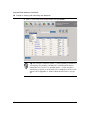
Select the Card View tab. Your personal address book appears in a Card view.
Scroll up and down to view all the contacts in the Card view.
Tip: A shadow figure in the Picture column means that there is no
picture ID available for the contact.
Viewing details about a contact
To view details, or initiate a call to a contact, click the following links in the
Details column:
NN10039-113
Standard-Nortel Networks Confidential
Chapter 3 Creating and maintaining your directories
55
•
Name - click to edit contact details. The contact details page appears and
includes details such as the presence status of the contact on the network.
Click Edit to edit contact details, or Back, to return to the list of contacts in
Card view.
•
SIP address, Business phone, Home phone, Mobile - click to initiate a call
through the Click to Call page.
Personal Agent User Guide
Standard-Nortel Networks Confidential
56
Chapter 3 Creating and maintaining your directories
See Chapter 5, “Using click to call to make calls,” on page 81, for complete
information on using click to call.
Managing your contacts in your personal address book
Your personal address book helps you manage, track, and access information
about all of your key contacts.
Adding a contact to your personal address book
Note: The maximum number of contacts that you can add to your
personal address book is dependent on your Service Package.
To add a contact to your personal address book
NN10039-113
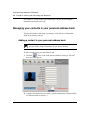
1
Click the
"New" icon on the Personal Address book page. The add
new entry page appears.
2
Complete the fields with your contact’s personal information. Required fields
are indicated with an asterisk (*).
Standard-Nortel Networks Confidential
Chapter 3 Creating and maintaining your directories
57
3
Click in the checkbox next to the Friend icon to designate a personal address
book contact as one of your Friends.
4
Select a group for the contact using the Group drop down list.
5
Click Save to save this contact to your personal address book and close the
window, or Cancel to return to your personal address book.
Editing a contact
There may be times when you wish to modify information about a contact in your
address book.
Editing a contact - List view
To edit details about a contact (List view) in your personal address book
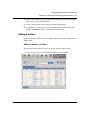
1
From List view, select and click the contact that you want to edit.
Personal Agent User Guide
Standard-Nortel Networks Confidential
58
Chapter 3 Creating and maintaining your directories
2
On the contact details page that appears, click "Edit".
3
Enter or revise the contact information, including Friend or Group selections.
4
Click Save to save the changes, Delete to delete the contact, Copy to copy the
information, or Cancel to return to the previous screen.
5
Click Back to return to your personal address book.
Editing a contact - Card view
To edit details about a contact (Card view) in your personal address book
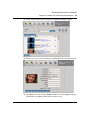
1
NN10039-113
From Card view, select the contact that you want to edit.
Standard-Nortel Networks Confidential
Chapter 3 Creating and maintaining your directories
59
2
On the contact details page that appears, click Edit in the Edit column.
3
Enter or revise the contact information, including Friend or Group selections.
4
Click Save to save the changes, Delete to delete the contact, Copy to copy the
information, or Cancel to return to the previous screen.
Personal Agent User Guide
Standard-Nortel Networks Confidential
60
Chapter 3 Creating and maintaining your directories
5
Click Back to return to your personal address book.
Deleting a contact
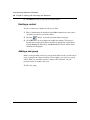
To select a contact (or a number of contacts) to delete
1
Enter a checkmark in the checkbox in the Select column next to the contact
(or number of contacts) you wish to delete.
2
Click the
3
Click OK when you are prompted to confirm the deletion. The contact is
deleted from your personal address book that is dynamically synchronized
with the Multimedia Web Client, the Multimedia PC Client, and the i2002/
i2004 Internet Telephone.
"Delete" icon on the personal address book page.
Adding a new group
Before you begin adding contacts to your personal address book, you will want to
create a group for the contact to belong to. For example, you can create a group
called “Work” for your office contacts, another called “Personal” for your
personal contacts in another, and so on.
To add a new group
NN10039-113
Standard-Nortel Networks Confidential
Chapter 3 Creating and maintaining your directories
61
1
From the personal address book, click the
page appears.
2
Enter the name of the Group. For example, you can group all the members of
your family into a group called “Family”.
3
Click Add. The message “Address book group added successfully” appears at
the top of the Groups screen. The new group now appears in the Groups
window.
4
Click Add to add more groups. To rename a group, select the group in the
Groups window and click Rename. To delete a group, select the group and
click Delete.
"Groups" icon. The Groups
Personal Agent User Guide
Standard-Nortel Networks Confidential
62
Chapter 3 Creating and maintaining your directories
5
Click Back to return to your personal address book.
Designating a contact as a Friend
Note: Presence must be enabled in your service package in order to be
able to select the Friend check box for designating a contact as a Friend in
your personal address book. Your service package determines the
maximum number of contacts that you can designate as Friends. By
designating a contact as a Friend you are able to view their activity by
clicking the icon Friends Online in the Multimedia web client. For more
information refer to the "Multimedia Web Client User Guide".
The Personal Agent allows you to create, view, and update a contacts as a Friend.
Friends may be people that you work with or correspond with regularly.
To designate a contact as a Friend
1
NN10039-113
Click on the checkbox next to the "Friends"
icon when entering or
completing contact information in your personal address book (Card view or
List view).
Standard-Nortel Networks Confidential
Chapter 3 Creating and maintaining your directories
2
63
Click Save. The contact you designated as a Friend now appears in your
personal address book (List view) with the Friends icon appearing in the
Friends column for the selected contact.
In Card view, the contact you designated as a Friend appears with the Friend
icon next to the contact name.
Personal Agent User Guide
Standard-Nortel Networks Confidential
64
Chapter 3 Creating and maintaining your directories
3
To delete a contact as a Friend, uncheck the checkmark next to the Friend icon
in the contact details page (List view or Card view) and click Save.
Tip: You can also use the Multimedia PC Client, Multimedia Web
Client, i2002 or i2004 Internet Telephone to see whether or not a Friend
is online.
Using the global address book
Your global address is a directory of all users in your domain. This list is created
and maintained by your service provider or system administrator.
Your global address book has two viewing options for your contacts:
•
•
List view -- a traditional “table-like” view
Card view -- information as you would normally see on a business card
(including a picture of the contact, if available)
Accessing the global address book
To the global address book
1
Click the Directory icon from the Personal Agent Quick Start page or from
the top navigation menu.
Note: By default, the active book is always your personal address book in
List view format.
NN10039-113
Standard-Nortel Networks Confidential
Chapter 3 Creating and maintaining your directories
2
65
To display users from the global address book
a
Select Global address book from the drop down list next to the SEARCH
field.
b
Select a field to search FOR from the drop down list.
Personal Agent User Guide
Standard-Nortel Networks Confidential
66
Chapter 3 Creating and maintaining your directories
c
Enter a search string in the text box as described in the following table.
For a complete list of the search criteria you can specify to search for a
contact see “Global Address Book search criteria” on page 114.
Field
Search criteria
Username
Username of the user (assigned by your service provider
or system administrator).For example, eburns.
Name
•
•
•
First name and last name of the user. For example,
searching for a user with the Name of Smith will
display users with the first name Smith and contacts
with the last name Smith.
Both first and last name. For example, the string John
Smith will return users with the first name John and
the last name Smith.The search string Smith, John,
will also return the same users.
Name matching continuation. For example entering a
y returns all users starting with the letter Y.
Last name
Last name.
First name
First name.
Phone number
Telephone number.
Tip: You can enter a wildcard symbol (*) at the beginning or middle of a
search string. For example, searching for J*n will return all contacts
named John, Jon, Jen etc.
Use quotation marks "," before and after a search string to specify an
exact match. For a complete list of the search criteria refer to
Appendix A, “Address Book Search Criteria,” on page 111.
NN10039-113
Standard-Nortel Networks Confidential
Chapter 3 Creating and maintaining your directories
d
3
67
Click Search. The global address book appears, in List view, with the
results of the user search specified.
To return to your personal address book, click Return to my address book.
Working with the global address book - List view
The global address book allows you to access a single, common network-wide
address book, in a list format.
Sorting users
To sort users in the global address book
1
Click a column name (for example, Last name, First name, Office, or
Home).
2
Click the column name again to sort in reverse.
Searching for a user
To search for a user in the global address book in List view
Personal Agent User Guide
Standard-Nortel Networks Confidential
68
Chapter 3 Creating and maintaining your directories
1
Select Global address book from the drop down list next to the SEARCH
field.
2
Select a field to search on as described in the following table.
Field
Search criteria
Username
Username of the user (provisioned by your service provider
or system administrator). For example, eburns.
Name
•
•
•
First name and last name of the user. For example,
searching for a user with the Name of Smith will display
users with the first name Smith and users with the last
name Smith.
Both first and last name of the user. For example, the
string John Smith will return users with the first name
John and the last name Smith.The search string Smith,
John, will also return the same users.
Name matching continuation. For example, entering a y
returns all users starting with the letter Y.
Last name
Last name of the user.
First name
First name of the user.
Phone number
Telephone number of the user.
3
Enter your search criteria.
Tip: You can enter a wildcard symbol (*) at the beginning or middle of a
search string. For example, searching for J*n will return all contacts
named John, Jon, Jen etc.
Use quotation marks "," before and after a search string to specify an
exact match. For a complete list of the search criteria refer to
Appendix A, “Address Book Search Criteria,” on page 111.
NN10039-113
Standard-Nortel Networks Confidential
Chapter 3 Creating and maintaining your directories
4
Click Search. The results of your search appears.
5
Click Return to my address book to access your personal address book.
69
Viewing details about a user
To view details about a user in the global address book
Personal Agent User Guide
Standard-Nortel Networks Confidential
70
Chapter 3 Creating and maintaining your directories
1
Click on a highlighted user in the Last name, First name, Office, or Home
column. A page appears listing details about the user, including an icon that
indicates their presence status on the network.
2
Click Close to return to the global address book page, or click Add to add this
user to your personal address book.
Initiating a call to a global address book user
To initiate a call to user in the global address book
NN10039-113
Standard-Nortel Networks Confidential
Chapter 3 Creating and maintaining your directories
71
1
Click the Call link in the Call column to initiate a call to the user in your
global address book. The Click to Call window pops up, simply click the
"Call" button to connect.
2
For information on how to use click to call, see Chapter 5, “Using click to call
to make calls,” on page 81.
Working with the global address book - Card view
To access the global address book in Card view
1
Select Global address book from the drop down list next to the SEARCH
field.
2
Select a field to search on as described in the following table
Field
Search criteria
Username
Username of the user (provisioned by your service provider or
system administrator). For example, eburns.
Personal Agent User Guide
Standard-Nortel Networks Confidential
72
Chapter 3 Creating and maintaining your directories
Name
•
•
•
First name and last name of the user. For example,
searching for the user with the Name of Smith will display
users with the first name Smith and users with the last
name Smith.
Both first and last name of the user. For example, the
string John Smith will return users with the first name John
and the last name Smith.The search string Smith, John,
will also return the same users.
Name matching continuation. For example, entering a y
returns all users starting with the letter Y.
Last name
Last name of the user.
First name
First name of the user.
Phone number
Telephone number of the user.
3
Enter your search criteria.
Tip: You can enter a wildcard symbol (*) at the beginning or middle of a
search string. For example, searching for J*n will return all contacts
named John, Jon, Jen etc.
Use quotation marks "," before and after a search string to specify an
exact match. For a complete list of the search criteria refer to
Appendix A, “Address Book Search Criteria,” on page 111.
NN10039-113
4
Click Search. The results of your search appears in List view.
5
To see the results of your search in Card view, click the Card View tab. The
global address book displays the user, or users, in your global address book
Standard-Nortel Networks Confidential
Chapter 3 Creating and maintaining your directories
73
that match the specified search criteria and includes a thumbnail picture of the
user (if available).
Adding global address users to your personal address
book
To select a user to add to your personal address book from the global address book
(Card view or List view) you must first perform a search in the Global address
book See “Searching for a user” on page 67:
Personal Agent User Guide
Standard-Nortel Networks Confidential
74
Chapter 3 Creating and maintaining your directories
NN10039-113
1
Following the search enter a checkmark in the checkbox in the Select column
next to the user (or number of users) you wish to add.
2
Click the "Add"
Address Book".
icon to "Add selected entry/entries to Personal
Standard-Nortel Networks Confidential
Chapter 3 Creating and maintaining your directories
3
75
The message window "Adding address book entries" is show, be sure to check
the "Add users as friends:" checkbox, designate a group if desired and click
the "OK" button.
Note: You will receive an error message if you attempt to add users from
your global address book that have the same Last name or First name as
the Nickname field defined in your personal address book.
Your personal address book appears.
Personal Agent User Guide
Standard-Nortel Networks Confidential
76
Chapter 3 Creating and maintaining your directories
NN10039-113
Standard-Nortel Networks Confidential
77
Chapter 4
Call logs
The Personal Agent allows you to view a list of the incoming and outgoing calls
made by any device that you are logged in to.
Topics in this section
•
•
•
•
“Viewing call logs” on page 77
“Calling contacts in the call log” on page 78
“Saving contacts from the call log information” on page 79
“Clearing call log information” on page 80
Viewing call logs
Click on the Call logs icon
in the top navigation bar.
The Call Logs page appears with the inbox call log information (by default). To
view the outbox call log, click on the Outbox tab at the top of the window.
The inbox call log shows all of the incoming calls to you with information about
the caller’s name, time of the call, duration and caller address. The icons in the
Type column are as follows:
indicates that the call was answered
indicates that the call was not answered
Personal Agent User Guide
Standard-Nortel Networks Confidential
78
Chapter 4 Call logs
The outbox call log shows the name of the person you called, the time of the call,
duration and SIP address.
Note: Network-based call logs will be able to capture the log for calls
missed whether the caller leaves a message or not. The icons above
indicate whether the call was answered or not.
Calling contacts in the call log
1
Click the Call logs icon in the top navigation bar.
2
Select your call log tab (if required).
3
Click the Call link beside the contact name. The Click to Call window
appears.
4
Complete the following actions for Ring me at:
a
NN10039-113
Device - select a device from the drop down list that you wish to initiate
the call from.
Standard-Nortel Networks Confidential
Chapter 4 Call logs
b
5
6
79
Phone # or Address - enter a new number or registered SIP address if you
do not want to use a pre-configured telephone number or registered SIP
address for calling the personal address book contact.
Complete the following actions for Make Call To:
a
Device - select a device from the drop down list that you wish to initiate
the call to.
a
Phone # or Address - enter a new number or registered SIP address if you
do not want to use a pre-configured telephone number or registered SIP
address for the receiving call from the contact in your personal address
book.
Click Call. At this point, both sides of the call are rung. The system waits for
you to answer then initiates a second call to the contact your personal address
book.
Saving contacts from the call log information
To save a contact from a call log to your personal address book
Personal Agent User Guide
Standard-Nortel Networks Confidential
80
Chapter 4 Call logs
1
From either the "Inbox" or the "Outbox" view click the checkbox beside the
name of the contact you want to save.
2
Click the Add to directory icon. The Directory page appears with a message
confirming that the contact was successfully added. The new contact appears
in the Directory list.
Clearing call log information
To remove one or more entry in a call log
1
Click the checkbox beside the name of the contact you want to delete.
2
Click the Delete entry icon. You are prompted to confirm the deletion. Click
Ok to confirm the deletion. The Call logs page refreshes and the entry is gone.
Tip: The Select all button under the call log adds a checkmark to every
entry in the call log. The Clear all button removes the checkmark beside
entries in the call log.
NN10039-113
Standard-Nortel Networks Confidential
81
Chapter 5
Using click to call to make calls
The Personal Agent allows you to initiate calls to contacts in your personal
address book as well as the global address book by using the click to call
functionality.
Using click to call, you enter a phone number or SIP address of the device where
you want to take the call, then enter the called party number. The phone then rings
at your preferred device. After answering, you are connected with the called party.
Topics in this section
•
•
•
“Using the click to call icon” on page 81
“Using click to call from your personal address book” on page 83
“Using click to call from the global address book” on page 85
Using the click to call icon
To initiate a call using the click to call icon
Personal Agent User Guide
Standard-Nortel Networks Confidential
82
Chapter 5 Using click to call to make calls
1
Access the Personal Agent Quick Start page.
Click to Call
icons
2
NN10039-113
Click the Call icon from the top navigation menu or the Click to Call link on
the Quick Start page. The Click to Call page appears.
Standard-Nortel Networks Confidential
Chapter 5 Using click to call to make calls
83
3
Modify the calling and called numbers of the contact (in your personal
address book or the global address book of your system) that you are calling.
If you do not want to use a pre-configured phone number or registered SIP
address for the calling or called party, then enter a new number or registered
SIP address.
4
Click Call. At this point, your device is rung. The system waits for you to
answer then initiates a second call to the contact in your personal or global
address book.
Using click to call from your personal address book
To initiate a call from your personal address book
1
Locate the contact in your personal address book.
Personal Agent User Guide
Standard-Nortel Networks Confidential
84
Chapter 5 Using click to call to make calls
2
Click the Call link in the Call column (List view) or the phone number or SIP
address link (Card view) for the contact in your personal. The Click to Call
window appears.
3
Complete the following actions for Ring me at:
4
5
NN10039-113
a
Device - select a device from the drop down list that you wish to initiate
the call from.
b
Phone # or Address - enter a new number or registered SIP address if you
do not want to use a pre-configured telephone number or registered SIP
address for calling the personal address book contact.
Complete the following actions for Make Call To:
a
Device - select a device from the drop down list that you wish to initiate
the call to.
a
Phone # or Address - enter a new number or registered SIP address if you
do not want to use a pre-configured telephone number or registered SIP
address for the receiving call from the contact in your personal address
book.
Click Call. At this point, your device is rung. The system waits for you to
answer then initiates a second call to the contact your personal address book.
Standard-Nortel Networks Confidential
Chapter 5 Using click to call to make calls
85
Using click to call from the global address book
To initiate a call from your global address book
1
Locate the user in the global address book.
2
Click the Call link in the Call column (List view) or the phone number or SIP
address link (Card view) for the contact in the global address book. The Click
to Call window appears.
Personal Agent User Guide
Standard-Nortel Networks Confidential
86
Chapter 5 Using click to call to make calls
3
4
5
NN10039-113
Complete the following actions for Ring me at:
a
Device - select a device from the drop down list that you wish to initiate
the call from.
b
Phone # or Address - enter a new number or registered SIP address if you
do not want to use a pre-configured telephone number or registered SIP
address for calling the user in your global address book.
Complete the following actions for Make Call To:
a
Device - select a device from the drop down list that you wish to initiate
the call to.
a
Phone # or Address - enter a new number or registered SIP address if you
do not want to use a pre-configured telephone number or registered SIP
address for the receiving call from the user in your global address book.
Click Call. At this point, both sides of the call are rung. The system waits for
you to answer, then initiates a second call to the user in the global address
book.
Standard-Nortel Networks Confidential
87
Chapter 6
Using the Personal Agent Route Wizard
The Personal Agent Route Wizard solves the problem of having different contact
numbers for different communication devices (office phone, home phone,
mobile). Call screening allows the user to build a route or routes, using the Route
Wizard, for all or specified incoming calls and the option to block any anonymous
callers.
Note: The ability to use the Personal Agent Route Wizard to set up
routes for your incoming calls is dependent upon your service package.
If Advanced screening is not enabled in your service package, then you
will not be able to use the Personal Agent routing capabilities. If you do
not have routing capability, a default route is defined for you that will
ring your phone, and, if you are subscribed to the voicemail service, the
call is sent to voicemail.
Note: The Assisted User utilizes the Route wizard in the Personal Agent
to route incoming calls to the designated assistant groups. Refer to the
“Assistant Console and Assisted Support Getting Started Guide” for
specifics.
Topics in this section
•
•
“What is routing?” on page 88
“What is the Personal Agent Route wizard?” on page 88
Personal Agent User Guide
Standard-Nortel Networks Confidential
88
Chapter 6 Using the Personal Agent Route Wizard
•
“Using the Personal Agent Route wizard” on page 89
Tip: Some features, such as Call forward, can be set at the i2002 and
i2004 Internet Telephones and may override the routes that you set on
the Personal Agent.
What is routing?
A route allows you to perform different actions on a your incoming calls and/or
Instant Messages based on a set of conditions or exceptions. For example, you can
create a route named "Lunch" that specifies a condition that calls received
between 12:00PM and 1:00PM Monday through Friday are to be affected by the
route. The route "Lunch" would also have an action that specifies that calls that
are affected by the route will ring the your mobile phone first, and then send the
call to voicemail.
Tip: Routes are applied to incoming calls in the order in which they are
listed in the List of Routes window. Click Move up or Move down to
change the order of how your incoming calls are treated.
What is the Personal Agent Route wizard?
You can create routes with the Personal Agent Route wizard. The wizard is a
step-by-step procedure that makes the task of creating rules and conditions for
your incoming calls easier.
Use the Route wizard to:
•
•
•
•
NN10039-113
define routes for how your incoming calls and Instant Messages are handled
specify conditions as to how specific calls should be presented to you and on
what devices in a simultaneous or sequential fashion.
define personalized time blocks to further define your routes so that you are
always in reach
send an Instant Message (IM) when processing a ring list
Standard-Nortel Networks Confidential
Chapter 6 Using the Personal Agent Route Wizard
89
Understanding the Route wizard steps
The following table describes the steps you will follow when you create a route
using the Personal Agent Route wizard.
Step...
Specifies...
1: Initiate action
main action or actions that initiates the processing of the
route. There are two options listed here to select from:
"When a call is received or“When an Instant Message is
received”. Select the desired option by clicking on the
appropriate checkbox.
2: Conditions
filtering of conditions respective to the call originator and
the time of day that must apply before the Actions in Step 3
can take place.
3: Actions
what action, or actions, are performed when a call is
received. Actions are defined with respect to the services
enabled in your service package.
4: Exceptions
exceptions to the filtering conditions defined in Step 2.
5: Finish
name of the route, and whether the route should be active
(or not), and saved (or not).
Navigating the Route wizard
When you have entered the required data for each step, click:
•
•
•
•
•
Next to go to the next step.
Back to change your decision.
Cancel to cancel the creation or modification of the route.
Finish to complete a step.
Save to save the route.
Using the Personal Agent Route wizard
To get started with the Personal Agent Route wizard
Personal Agent User Guide
Standard-Nortel Networks Confidential
90
Chapter 6 Using the Personal Agent Route Wizard
NN10039-113
1
Click the Route icon from the Personal Agent Quick Start page or from the
top navigation menu. The first time you use the Route Wizard, the List of
Routes page appears with a default (permanent) route checked and greyed out.
2
Click New to go to Step 1, Initiate action.The Initiate action page appears.
Standard-Nortel Networks Confidential
Chapter 6 Using the Personal Agent Route Wizard
91
Step 1: Initiating action
In Step 1, you specify the main action or actions that initiate the processing of the
route. Currently, the only action you can take at Step 1 is "When a call is
received". From the initiate action page click Next to go to Step 2, Conditions.
Step 2: Specifying conditions
Step 2 of the Route Wizard allows you to specify the following conditions to filter
how your incoming calls will be handled by the route you are setting up.
Click this link...
to specify...
From THESE PEOPLE in
my Personal Address Book
a contact (or contacts) from your personal address
book that you want to include in the condition.
From THESE PEOPLE in
my Global Address List
a user (or users) from the global address book that
you want to include in the condition.
From THESE GROUPS
the lists of contacts that you have organized into
meaningful groups in your personal address book (for
example, Friends, Family, Work, Projects) that you
want to include in the condition.
Personal Agent User Guide
Standard-Nortel Networks Confidential
92
Chapter 6 Using the Personal Agent Route Wizard
Click this link...
to specify...
From THESE TELEPHONE
NUMBER(S)
the SIP Address or phone number of the person (or
persons) calling you.
SPECIFIC DAY/TIME
RANGE(S)
the days and hours of the day and week when you
want the condition to apply. For information on using
the My Times feature to set up Day/Time ranges, see
“Setting up My Times date and time ranges” on
page 21.
Specifying contacts from your personal address book
To specify a contact (or contacts) from your personal address book as a condition
NN10039-113
1
Click the link, From THESE PEOPLE. Your personal address book window
appears.
2
Enter a search criteria in the Search for: field to select a contact (or contacts)
from your personal address book.
3
Select a contact (or contacts) from the Select column, or, click Select all to
select all contacts to include in the condition.
Standard-Nortel Networks Confidential
Chapter 6 Using the Personal Agent Route Wizard
93
4
Click OK to accept the selected contacts, or Cancel to quit this window. The
Step 2. Conditions window appears with the conditions you specified from
your personal address book listed in the Route details window.
5
To edit the condition, click the link in the Route details window.
6
Continue to specify conditions, or click Next to go to the next step.
Specifying users from the global address book
To specify a user (or more than one user) from the global address book as a
condition
1
Click the link, THESE PEOPLE. The global address book window appears.
Personal Agent User Guide
Standard-Nortel Networks Confidential
94
Chapter 6 Using the Personal Agent Route Wizard
NN10039-113
2
Enter a search criteria in the Search for: field to select a user (or group of
users) from the global address book. The result of your search appears in the
window below.
3
Select a user (or group of users) from the Select column, or, click Select all to
select all users from the global address book.
4
Click OK to accept the selected users, or Cancel to quit this window. The
Step 2. Conditions window appears with the global address conditions you
specified listed in the Route details window.
Standard-Nortel Networks Confidential
Chapter 6 Using the Personal Agent Route Wizard
5
To edit the condition, click the link in the Route details window.
6
Continue to specify conditions, or click Next, to go to the next step.
95
Specifying groups
To specify a group as a condition
1
Click the THESE GROUPS link. The group window appears.
2
Select the group (or groups) of people that you have organized into groups
(such as Family, or Friends) as defined in your personal address book.
3
Click Select all to select all groups.
Personal Agent User Guide
Standard-Nortel Networks Confidential
96
Chapter 6 Using the Personal Agent Route Wizard
4
Click OK to accept the selected groups, or Cancel, to quit this window. The
Step 2. Conditions window appears with the group conditions you specified
listed in the Route details window.
5
To edit the condition, click the link in the Route details window.
6
Continue to specify conditions, or click Next, to go to the next step.
Specifying telephone numbers
To specify a phone number, a list of phone numbers, or a SIP Address, of an
incoming call as a condition
NN10039-113
Standard-Nortel Networks Confidential
Chapter 6 Using the Personal Agent Route Wizard
97
1
Click the THESE TELEPHONE NUMBER(S) link. The telephone number
window appears.
2
Enter a phone number (or a list of phone numbers), or a SIP address. (Add one
number or SIP address per line that the filter will apply to.)
3
Click OK to accept the selected phone numbers or SIP addresses, or Cancel,
to quit this window. The Step 2 Conditions window appears with the phone
conditions you specified listed in the Route details window.
4
To edit the condition, click the link in the Route details window.
5
Continue to specify conditions, or click Next to go to the next step.
Personal Agent User Guide
Standard-Nortel Networks Confidential
98
Chapter 6 Using the Personal Agent Route Wizard
Specifying a condition for an anonymous incoming call
You can set up the following conditions about how to handle incoming calls from
an anonymous caller:
•
•
•
•
reject the incoming call without specifying a reason
reject the call and specify a reason for the rejection
send the call to voice mail (if enabled in your service package)
specify the call to be sent to a particular phone number
For information on setting up the actions for an incoming anonymous call, see,
“Specifying an ordered list” on page 102, and “Specifying a rejection message”
on page 104.
To specify an anonymous caller condition
NN10039-113
1
Select the Received in “Unavailable Busy” option in the Step 2: Conditions
window.
2
Continue to specify conditions, or click Next, to go to the next step.
Standard-Nortel Networks Confidential
Chapter 6 Using the Personal Agent Route Wizard
99
Specifying a condition for ‘Unavailable Busy’
You can set up the following conditions about how to handle incoming calls when
your presence state is set to ‘Unavailable Busy’:
•
•
•
•
reject the incoming call without specifying a reason
reject the call and specify a reason for the rejection
send the call to voice mail (if enabled in your service package)
specify the call to be sent to a particular phone number
Tip: This parameter is only available if Presence Based Routing is
enabled in your service package.
For information on setting up the actions for an incoming calls while you are
‘Unavailable Busy’, see “Specifying an ordered list” on page 102, and
“Specifying a rejection message” on page 104.
To specify an incoming call condition while ‘Unavailable Busy’
1
Select the From anonymous option in the Step 2: Conditions window.
2
Continue to specify conditions, or click Next, to go to the next step.
Personal Agent User Guide
Standard-Nortel Networks Confidential
100
Chapter 6 Using the Personal Agent Route Wizard
Specifying Day/Time ranges
1
To specify the days and times ranges for the condition to apply.
2
Click the SPECIFIC DAY/TIME RANGE(S link. The My Times page appears.
Tip: For complete information on setting up My Times Day/Times
ranges, see “Setting up My Times date and time ranges” on page 21.
3
Select a previously defined day and time range (for example, My Office
Hours).
View the graphic display of highlighted My Times.
4
NN10039-113
Use the buttons to create new My Times Day/Time ranges or manage existing
My Time Day/Time ranges.
Standard-Nortel Networks Confidential
Chapter 6 Using the Personal Agent Route Wizard
101
5
Click Save to accept selected My Times, or Cancel to quit this window. The
Step 2 Conditions window appears with the My Times conditions you
specified listed in the Route details window.
6
To edit the condition, click the link in the Route details window.
7
Continue to specify conditions, or click Next, to go to the next step.
Step 3: Actions
Step 3 of the Route Wizard allows you to specify what action, or actions to
perform on your incoming calls. For example, you can set up the following
mutually exclusive actions:
•
•
•
•
specify numbers to ring simultaneously or sequentially in ordered lists
send a rejection message (PSTN callers will receive a busy tone)
send the request to email (PSTN callers will receive a busy tone)
pop up a call window
Personal Agent User Guide
Standard-Nortel Networks Confidential
102
Chapter 6 Using the Personal Agent Route Wizard
•
send the call to voice mail
Note: Actions are defined with respect to the services, such as Converged
Desktop or Advanced screening, that are enabled in your service package.
The option to pop up a call window or send the call to voice mail actions
are only available when you are subscribed to the Converged Desktop or
Voice Mail services, respectively.
Specifying ordered lists
The Personal Agent allows you to set up how and where you want your incoming
calls to ring by using ordered lists. An ordered list is a group of SIP addresses or
phone numbers associated with your user name (the name you register under) in
your organization's or service provider's user database. The basic purpose of an
ordered list is to enable your incoming calls to follow you if you are not at your
desk or primary device location.
Using ordered lists, you can specify the sequence of phone numbers to ring first,
second, and so on. You can then specify how many times the phone in each list
should ring. Finally, you can specify whether or not the incoming call should go to
voice mail (if you are subscribed to and provisioned for voice mail).
Tip: The maximum number of ordered lists and phone numbers in each
list is restricted by your service package.
Your calls are routed differently based on who is calling you. Based on your
ordered lists, incoming calls can be forwarded, or routed, to any number of
devices or clients. You can “push” a web page in response to an incoming call, as
well as send a response in the form of an instant message.
Specifying an ordered list
To specify an ordered list for your incoming calls
NN10039-113
Standard-Nortel Networks Confidential
Chapter 6 Using the Personal Agent Route Wizard
1
103
Select the option to ring your devices in an ordered list.
Note: The options that will be available to the user in this window will
vary based on the service provider package selected by your service
provider.
Note: The number of “ordered lists” grows depending on the Advanced
Screening service parameters in your service package. If you have
Voicemail enabled in your service package, there will be an additional
option for "If no answer then send to voicemail" when creating an ordered
list.
Note: If you do not have Voicemail enabled, then the Personal Agent
Route Wizard does not provide the ability to create a route that terminates
a call to voice mail. However, if Voicemail is enabled, and the Advanced
Screening service is not assigned to your service package, then only the
default route is available to you.
2
Enter a check mark in the first option box in the list. Click the THESE
NUMBERS link to specify a list of numbers that will be rung when the
Personal Agent User Guide
Standard-Nortel Networks Confidential
104
Chapter 6 Using the Personal Agent Route Wizard
incoming call reaches a ringlist. A window appears that allows you to select
any, or all, of the following actions for the incoming call.
Checkbox to select the
desired actions for the
ordered list.
Drop down menu
Type, auto populates
the Phone # or
address fields. Use
Other to enter
another address.This information
comes from your contact info
defined in Preferences.
Instant message sent when
processing the ordered list. Client
must support Instant Message.
Used to specify
numbers that will ring
at the same time
(simultaneously)
when routing a call
to this ordered list.
Web page pushed to
the browser of call
originator.
3
Select the actions for the incoming call, and click OK, to return to the Actions
page.
4
Continue specifying ordered lists. To edit the ordered list, click the links in the
Route details window.
5
If you are finished specifying conditions, click Finish to name your route and
save your route details. If you wish to specify exceptions, click Next.
Specifying a rejection message
To specify a reject message
NN10039-113
Drop down menu to
specify how many
times to ring the
specified numbers.
The specified
numbers will ring at
the same time.
Standard-Nortel Networks Confidential
Chapter 6 Using the Personal Agent Route Wizard
105
1
Select the Rejection option in the window that specifies how you would like to
filter calls received.
2
Click the MESSAGE link to compose a message to display when the route is
activated for an incoming call from an anonymous caller. The Select rejection
message window appears.
3
To compose a rejection message, click New a dialog box will open. Enter the
text for your message in the dialog box and Click OK on the dialog box. The
Personal Agent User Guide
Standard-Nortel Networks Confidential
106
Chapter 6 Using the Personal Agent Route Wizard
rejection message now appears in the Select rejection message window. Click
on the circle beside the rejection message to make it active.
NN10039-113
4
Click OK to return to the Route wizard. Your reject reason appears in the
Route details window.
5
To edit the message, click the rejection link in the Route details window.
6
Continue to specify conditions, or click Next, to go to the next step.
Standard-Nortel Networks Confidential
Chapter 6 Using the Personal Agent Route Wizard
107
Specifying an email request
To specify an email request when you receive an incoming call, select the option
to request an email (PSTN callers will receive a busy tone).
With this option, the caller is asked to send an email to the email address of the
user that they called. An email window opens up, with the email address autofilled
with the address of the person requesting an email. The phone is never rung.
Step 4: Exceptions
Step 4 of the route wizard allows you to specify exceptions to the conditions that
you specified in Step 2: Conditions. The method for specifying exceptions is
consistent with the method for specifying conditions. See “Step 2: Specifying
conditions” on page 91 for information on specifying conditions.
Personal Agent User Guide
Standard-Nortel Networks Confidential
108
Chapter 6 Using the Personal Agent Route Wizard
The following links are available as exceptions
•
•
•
•
THESE PEOPLE (in your personal address book)
•
From anonymous
•
Received in “Unavailable Busy”
THESE PEOPLE (in the global address book)
THESE GROUPS (in your directory)
THESE TELEPHONE NUMBER(S)
Tip: The SPECIFIC DAY/TIME RANGE(S) link is not available as an
exception.
The Received from “Unavailable Busy” parameter is only available if
you have Presence Based Routing enabled in your service package.
To edit the condition, click the link in the Route details window. To go to the next
step, click Next.
NN10039-113
Standard-Nortel Networks Confidential
Chapter 6 Using the Personal Agent Route Wizard
109
Step 5: Finish
Before you complete the final step in setting up your route, it is recommended that
you view all the route details to ensure that you are satisfied with the conditions,
actions, and exceptions.
If the route is complete, you can now name the route and set the route to active.
1
Specify a unique name for the route in the text box provided.
2
Select the checkbox, Make this route active.
3
Click Save, to save the route information and activate the route. Incoming
calls will now be processed according to your active route(s).
Personal Agent User Guide
Standard-Nortel Networks Confidential
110
Chapter 6 Using the Personal Agent Route Wizard
NN10039-113
Standard-Nortel Networks Confidential
111
Appendix A
Address Book Search Criteria
Topics in this section:
•
•
“Personal Address Book search criteria” on page 112
“Global Address Book search criteria” on page 114
Note: The only field that is case sensitive is the phone number field. This
field is case sensitive for the entire string. All other fields are case
insensitive for the entire string.
Note: Name searches automatically search for "sounds like" and "fuzzy
(similar spelling)" an example of this feature would be the spelling of the
word elephant or elefant. However please note if a user updates their first
or last name they will not be found by the "fuzzy" search until the next
day.
Tip: To remove the" sounds like" and "fuzzy" search options include the
* symbol in the name search.
Personal Agent User Guide
Standard-Nortel Networks Confidential
112
Address Book Search Criteria
Personal Address Book search criteria
The following table provides a detailed description of the Personal Address Book
search criteria.
Field
Example Each criteria
Results
Nickname
*nick
Returns entries ending with nick, and
starting with anything (appends *).
*nick*
Same as *nick.
nick
Finds anything that starts with nick
(appends *).
nick*
Same as nick.
name
Returns anything starting with first name
and starting with last name (appends * to
both).
name*
Same as "name".
*name
Returns anything that has first name or
last name that contains name (appends *
at end).
*name*
Same as *name.
firstname lastname
Returns anything starting with last name
and starting with first name (appends * to
both).
firstname* lastname*
Same as "firstname lastname".
firstname* lastname
Same as "firstname lastname".
firstname lastname*
Same as "firstname lastname".
lastname, firstname
Returns anything starting with last name
and starting with first name (appends * to
both).
lastname*,firstname
Same as "lastname firstname".
lastname, firstname*
Same as "lastname firstname".
lastname*, firstname*
Same as "lastname firstname".
lastname*,*firstname
Returns entries starting with last name
and containing firstname in the firstname
(appends * to the firstname).
lastname*,*firstname*
Same as "lastname*,*firstname".
Name
NN10039-113
Standard-Nortel Networks Confidential
Address Book Search Criteria
Field
Last name (
First Name
Phone Number
SIP Address
113
Example Each criteria
Results
*lastname, firstname
Returns entries containing last name and
starting with firstname (appends * to the
firstname).
*lastname, firstname*
Same as *lastname, firstname.
*lastname
Returns entries containing lastname
(appends *).
*lastname*
Same as *lastname.
lastname*
Returns entries starting with lastname.
lastname
Same as lastname*.
*firstname
Returns entries containing firstname
(appends *).
*firstname*
Same as *firstname.
firstname*
Returns entries starting with firstname.
firstname
same as firstname*.
phoneNumber
Returns entries starting with
phoneNumber (appends *).
phoneNumber*
Same as phoneNumber.
*sipAddress
Returns entries containing sipAddress.
sipAddress*
Same as *sipAddress.
sipAddress*
Returns entries starting with sipAddress.
sipAddress
Same as sipAddress*.
Friends
Rules similar to the last name and first name search apply to this
search criteria, but the search is carried out for the string with the
condition that the entry being searched for is a Friend.
Group
*groupName
Returns entries belonging to group
containing groupName in the name of the
group (appends *).
*groupName*
Same as *groupName
groupName
Finds entries belonging to the group
starting with groupName (appends *).
groupName*
Same as groupName.
no criteria
Returns all the entries in the address
book.
Personal Agent User Guide
Standard-Nortel Networks Confidential
114
Address Book Search Criteria
Global Address Book search criteria
The following table provides a detailed description of the Global Address Book
search criteria
Note: The only field that is case sensitive is the phone number field. This
field is case sensitive for the entire string. All other fields are case
insensitive for the entire string.
Note: Name searches automatically search for "sounds like" and "fuzzy
(similar spelling)" an example of this feature would be the spelling of the
word elephant or elefant. However please note if a user updates their first
or last name they will not be found by the "fuzzy" search until the next
day.
Tip: To remove the" sounds like" and "fuzzy" search options include the
* symbol in the name search.
Field
Example search criteria
Results
Username
user@domain*
Returns entries which have username
starting with user@domain.
user@domain
Same as user@domain*.
user*
Returns entries which have username
starting with user.
*user*
Returns entries containing user in the
username.
name
Returns anything with first name or last
name starting with name (appends * at
end).
name*
Same as "name".
*name
Returns anything that has first name or
last name that contains name (appends *
at end).
*name*
Same as *name.
Name
NN10039-113
Standard-Nortel Networks Confidential
Address Book Search Criteria
Field
Name
Last name
First Name
Phone Number
115
Example search criteria
Results
"name"
Returns all users that have the last name
or first name that match the search
criteria within the quotation marks.
firstname lastname
Returns anything starting with first name
and starting with last name (appends * to
both).
firstname* lastname*
Same as "firstname lastname".
firstname* lastname
Same as "firstname lastname".
firstname lastname*
Same as "firstname lastname".
lastname, firstname
Returns anything starting with last name
and starting with first name (appends * to
both).
lastname*,firstname
Same as "lastname firstname".
lastname, firstname*
Same as "lastname firstname".
lastname*, firstname*
Same as "lastname firstname".
lastname*,*firstname
Returns entries starting with last name
and containing firstname in the firstname
(appends * to the
firstname).
*lastname, firstname*
Same as *lastname, firstname.
*lastname
Returns entries containing lastname
(appends *).
*lastname*
Same as *lastname.
lastname*
Returns entries starting with lastname.
lastname
Same as lastname*.
*firstname
Returns entries containing firstname
(appends *).
*firstname*
Same as *firstname.
firstname*
Returns entries starting with firstname.
firstname
Same as firstname*.
phoneNumber
Returns entries starting with
phoneNumber (appends *).
phoneNumber*
Same as phoneNumber.
Personal Agent User Guide
Standard-Nortel Networks Confidential
116
Address Book Search Criteria
NN10039-113
Standard-Nortel Networks Confidential
117
Index
A
first name field 16
home phone field 16
last name field 16
locale field 17
modifying 16
pager field 16
time zone field 17
acronyms viii
address
definition 4
SIP address 4
advanced screening parameter 21
audience vii
automatic presence
definition 6
inactivity timer option 41
modifying options 40
report when inactive option 41
report when on the phone option 41
B
contacts
initiating a call (personal address book) 52
search criteria (personal address book) 49
searching (personal address book) 48
converged desktop service package option 37
D
device access service package option 38
Directory icon 11
banned watcher’s list 39
C
E
Editing a contact 57
card view
personal address book 47
viewing contacts 53
F
Click to Call 5
description 81
from global address book 85
from personal address book 83
initiating a call 81
Friends
adding a contact 62
definition 5
deleting a contact 64
icon 62
Click to Call icon 12
contact information
business phone field 16
cell phone field 16
email field 16
fax field 17
G
global address book
accessing 64
add icon 74
adding a user 73
Personal Agent User Guide
Standard-Nortel Networks Confidential
118
Index
card view 71
definition 5
displaying users 65
initiating a call to user 70
search criteria 66
searching 67
sorting 67
table of search criteria 114
viewing user details 69
Group icon 61
H
hardware requirements
minimum 3
recommended 3
help
Help icon 12
rollover help 13
using 12
hot line service package option 38
I
i2002 and i2004 Internet Telephone
preferences 27
changing subject list order 29
creating a subject list 27
i200x option 33
personalized presence status 31
reordering reasons 31
specifying reasons 29
i200x option 27
L
list view
personal address book 47
List View tab (personal address book) 48
M
Meet me audio conferencing 42
NN10039-113
Access Code 42
changing chairperson PIN 43
Dial-In Number 42
service package option 38
viewing bridge details 42
My Times
adding new day and time range 21
copying a day and time range 26
day/time combinations 22
day/time details window 24
deleting a day and time range 26
modifying 25
removing day/time ranges 24
renaming a day and time range 26
P
password
changing 17
personal address book 46
adding a contact 56
adding a Friend 62
adding a group 60
definition 5
delete icon 47
deleting a contact 60
editing a contact (Card view) 58
editing a contact (List view) 57
group icon 47
initiating a call 52
list view 47
new contact icon 47
searching for a contact 48
sorting contacts 48
storing addresses 4
table of search criteria 112
viewing contact details 51
Personal Agent
accessing 7
before you begin 2
description 1
exiting 12
getting started 1
Standard-Nortel Networks Confidential
Index
interface, understanding 10
logging in 8
route wizard 87
services and features 2
actions 101
email request 107
ordered lists 102
rejection message 104
activating the route 109
definition 89
exceptions 107
from groups in the global address book 108
from people in the global address book 108
from people in the personal address
book 108
initiating action 91
navigating 89
specifying conditions 91
contacts from personal address book 91
day/time ranges 100
from anonymous call 98
groups 95
telephone numbers 96
users from the global address book 93
table of steps and actions 89
picture caller ID
adding 18
deleting 20
previewing 20
resetting 20
shadow figure 19
size limits 20
updating 18
viewing 18
preferences
Meet Me option 34
presence option 34
service package 34
service package option 34
Preferences icon 11
preferences, setting up 15
presence
definition 6
presence indicator
active available 6
active on the phone 6
connected 6
connected inactive 6
unavailable 7
unknown 7
presence service package option 37
publications, hard copy viii
Q
QoS service package option 37
Quick Start icon 11
Quick Start landing page, navigating 11
R
related publications viii
route wizard
119
Routes icon 11
routing
definition 88
S
service package
Ad hoc conferencing option 37
advanced addressbook option 38
advanced screening 37
converged desktop option 37
definition 4
device access restriction option 38
hot line 38
Meet me conferencing option 38
presence option 37
QoS option 37
video option 37
viewing services 35
voice mail option 37
services, viewing and modifying 34
software requirements
Personal Agent User Guide
Standard-Nortel Networks Confidential
120
Index
minimum 3
recommended 3
T
technical publications viii
technical support ix
text conventions viii
U
unavailable busy 99
V
video service package option 37
voice mail service package option 37
W
Watch List
definition 39
watcher’s list 38
Web Client icon 12
NN10039-113