1
Chapter 5 ______________________________________________________________ Maintenance
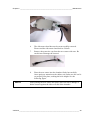
Figure 11
6.
The old sensor chord has now been successfully removed.
Please send the old sensor chord back to Vaisala.
7.
Remove the protective cap from the new sensor with care. Be
careful not to damage the sensors!
Figure 12
8.
NOTE
Remove Sensor from Chamber
New Sensor Chord with Protective Cap
Place the new sensor into the chamber firmly but carefully.
Once again pay attention to the rubber seal, make sure the seal is
set properly into place, making the hole airtight. See the
following figure.
When placing the new sensor into place, take care not to damage or
hit the sensors against the sides or walls of the chamber.
VAISALA _______________________________________________________________________ 29