1
User Guide
TELEPHONE CONNECTION DIAGNOSTIC TEST
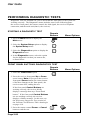
This test checks that the receiver telephone connection is correct. Select the Phone
Connection option to begin the test. The receiver displays a message asking you to
wait until the test is completed. If the telephone connection is correct, the receiver
displays a message that says “Phone Connection OK.” If the telephone is not connected
properly, the receiver displays a failure message. In this case, see the Performing
Diagnostic Tests section of the Problems and Solutions Tables that begin on page 4-10.
MAIN UNIT (RECEIVER) DIAGNOSTIC TEST
This test checks that the receiver is working correctly. Select the Main Unit Test option
to begin the test. The receiver displays a message asking you to wait until the test is
completed. If the receiver is working correctly, it displays a message that says “Main
Unit OK.” If the receiver is not working correctly, it displays a failure message. In this
case, call Bell ExpressVu Customer Service Call Centre for assistance.
Note: This test may temporarily distort the TV picture.
Page 3-52