1
4. Configuration
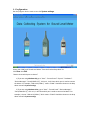
Run the program. On the main screen click System settings.
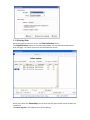
Select your COM* and “Sound Level Meter” from the Product drop‐down list. Click Save then Exit. Digital Measurement Metrology, Inc *How to know which port to choose? 1) If you are using Windows XP, go to “Start”‐ “Control Panel”‐“System”‐“Hardware”‐
“Device Manager”‐“Ports(COM & LPT)”, click on it, it will show which port is used to connect the Meter. For example, “USB serial (COM 1)” means “COM1” should be chosen on the drop down manual in System settings. 2) If you are using Windows Vista, go to “Start”‐ “Control Panel”‐“Device Manager”‐
“Ports(COM & LPT)”, click on it, it will show which port is used to connect the Meter. For example, it shows “USB serial (COM 1)” which means “COM1” should be chosen on the drop down manual in System settings.