1
 5. Collecting Data
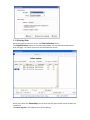
When you go back on the main screen, click Data Collection button. Click Begin/Continue button to start collecting the data. You can now take measurements with your gage – the values will show on the Data Collection screen. When you’re done click Pause/Stop. You can then save the report and/or export the data into an Excel file. Click Chart diagram, it will show the chart of the readings.